
All Activity
- Past hour
-

internal wifi "x96 max plus" tv box wifi chip "CDTech 47W3155"
SteeMan replied to Jain Ziad's topic in Amlogic CPU Boxes
Moved to amlogic TV ox forum -
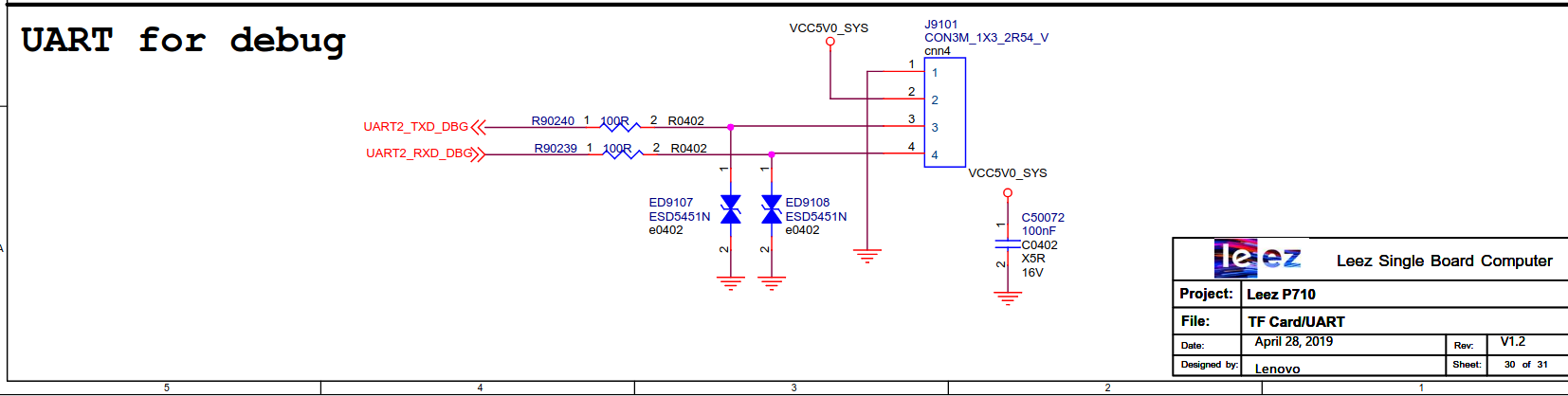
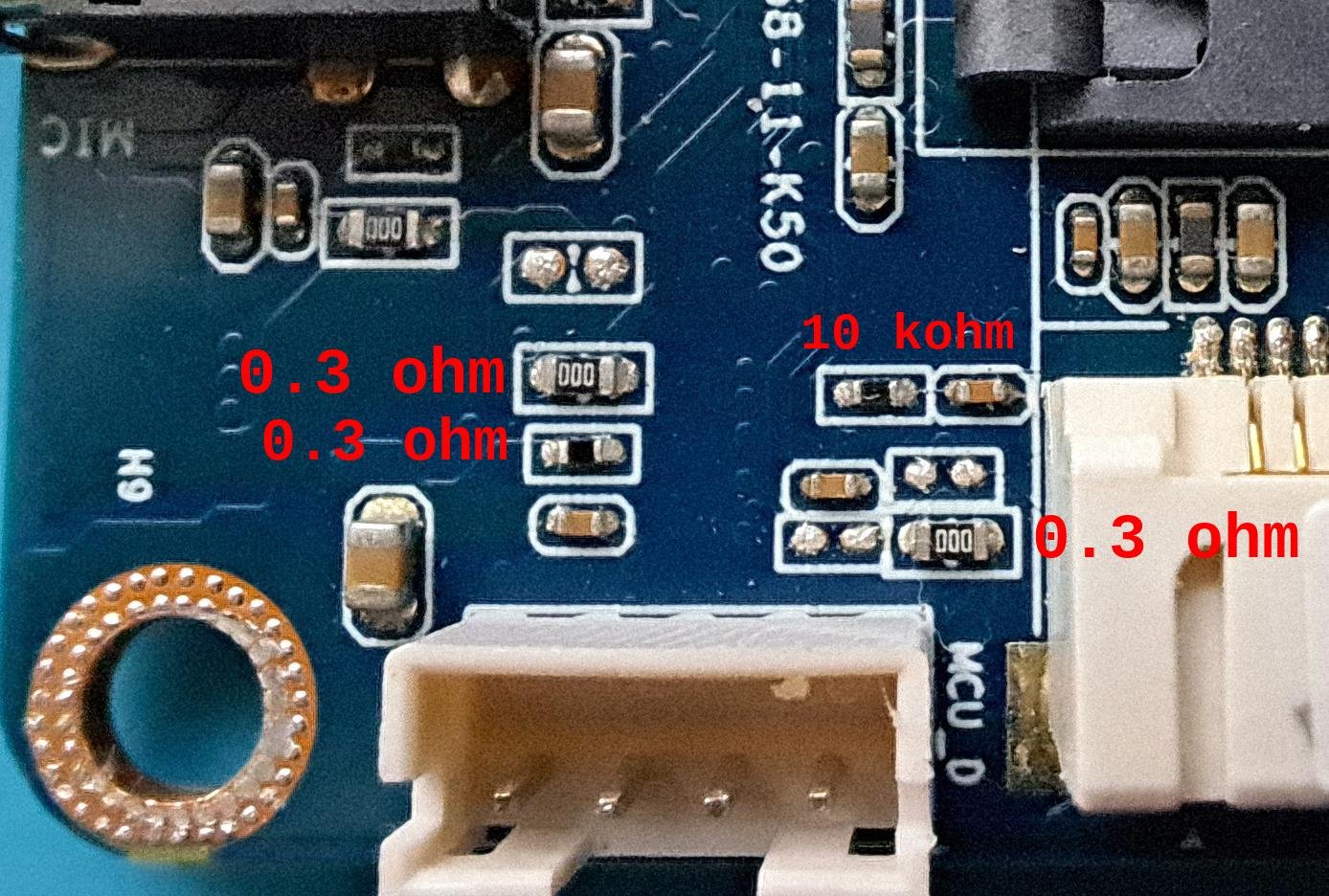
@kisgezenguz you're welcome. You can check the UART RX/TX paths with the multimeter in diode/continuity mode and checking the continuity against RX (or TX) and the various SMD components. But anyway, if you read 3.3v on all the UART pins, I can guess there are three other hypothesis: * the UART RX/TX pins are correctly connected, but not to the usual debug UART. rk3399 has several uarts, so perhaps that exposed UART is not the same configured in software to be used to log the debug. * MCU_D makes me think that UART is used for the little MCU embedded into rk3399. rk3399 has two small Cortex-M0 cores for very low power tasks. So again that UART is not what you are looking for. * the RX/TX pins are just shorted to high voltage level/pulled ups on purpose (improbable) edit: I just paid attention to the schematic you posted, but it looks it does not match what you've discovered: the schematic says you should read 5.0v on the VCC pin, instead you read 3.3v. Perhaps that MCU_D connector it's definitely not the one you are looking for.
-
Armbian default login and password is always root and 1234. If this does not work, the image is not genuine.
- Today
-

Orange Pi Zero 3 to Banana Pi M4 Zero Hardware Update
SUPA replied to SUPA's topic in Banana Pi M4 Zero
I am asking if someone can refer me somewhere so I can update my current orangepi zero 3 hardware to bananpi m4 zero hardware. -

Orange Pi Zero 3 to Banana Pi M4 Zero Hardware Update
c0rnelius replied to SUPA's topic in Banana Pi M4 Zero
U-Boot SPL 2025.07-armbian-2025.07-Se37d-P526e-H8869-V8e92-Bb703-R448a (Aug 19 2025 - 04:10:01 +0000) DRAM: 4096 MiB Trying to boot from MMC2 NOTICE: BL31: v2.12.5(debug):armbian NOTICE: BL31: Built : 04:09:39, Aug 19 2025 NOTICE: BL31: Detected Allwinner H616 SoC (1823) NOTICE: BL31: Found U-Boot DTB at 0x4a0b5100, model: BananaPi BPI-M4-Zero INFO: ARM GICv2 driver initialized INFO: Configuring SPC Controller INFO: Probing for PMIC on I2C: INFO: PMIC: found AXP313 INFO: BL31: Platform setup done INFO: BL31: Initializing runtime services INFO: BL31: cortex_a53: CPU workaround for erratum 855873 was applied INFO: BL31: cortex_a53: CPU workaround for erratum 1530924 was applied INFO: PSCI: Suspend is unavailable INFO: BL31: Preparing for EL3 exit to normal world INFO: Entry point address = 0x4a000000 INFO: SPSR = 0x3c9 INFO: Changed devicetree. ns16550_serial serial@5000000: pinctrl_select_state_full: uclass_get_device_by_phandle_id: err=-19 U-Boot 2025.07-armbian-2025.07-Se37d-P526e-H8869-V8e92-Bb703-R448a (Aug 19 2025 - 04:10:01 +0000) Allwinner Technology CPU: Allwinner H616 (SUN50I) Model: BananaPi BPI-M4-Zero DRAM: 4 GiB Core: 65 devices, 22 uclasses, devicetree: separate WDT: Not starting watchdog@30090a0 MMC: mmc@4020000: 0, mmc@4022000: 1 Loading Environment from FAT... Unable to use mmc 1:1... In: serial@5000000 Out: serial@5000000 Err: serial@5000000 Allwinner mUSB OTG (Peripheral) Net: using musb-hdrc, OUT ep1out IN ep1in STATUS ep2in MAC de:ad:be:ef:00:01 HOST MAC de:ad:be:ef:00:00 RNDIS ready eth0: usb_ether starting USB... USB EHCI 1.00 USB OHCI 1.0 Bus usb@5311000: 1 USB Device(s) found Bus usb@5311400: 1 USB Device(s) found scanning usb for storage devices... 0 Storage Device(s) found Hit any key to stop autoboot: 0 switch to partitions #0, OK mmc1(part 0) is current device Scanning mmc 1:1... Found U-Boot script /boot/boot.scr 4641 bytes read in 1 ms (4.4 MiB/s) ## Executing script at 4fc00000 U-boot loaded from SD Boot script loaded from mmc 280 bytes read in 0 ms Load fdt: /boot/dtb/allwinner/sun50i-h618-bananapi-m4-zero.dtb MMC: no card present ** Bad device specification mmc 0 ** 43728 bytes read in 4 ms (10.4 MiB/s) Working FDT set to 4fa00000 1358 bytes read in 3 ms (441.4 KiB/s) Applying kernel provided DT overlay sun50i-h616-bananapi-m4-sdio-wifi-bt.dtbo 4203 bytes read in 2 ms (2 MiB/s) Applying kernel provided DT fixup script (sun50i-h616-fixup.scr) ## Executing script at 45000000 17177939 bytes read in 543 ms (30.2 MiB/s) 38219784 bytes read in 1207 ms (30.2 MiB/s) Moving Image from 0x40080000 to 0x40200000, end=0x42760000 ## Loading init Ramdisk from Legacy Image at 4ff00000 ... Image Name: uInitrd Image Type: AArch64 Linux RAMDisk Image (gzip compressed) Data Size: 17177875 Bytes = 16.4 MiB Load Address: 00000000 Entry Point: 00000000 Verifying Checksum ... OK ## Flattened Device Tree blob at 4fa00000 Booting using the fdt blob at 0x4fa00000 Working FDT set to 4fa00000 Loading Ramdisk to 48f9e000, end 49fffd13 ... OK Loading Device Tree to 0000000048f2a000, end 0000000048f9dfff ... OK Working FDT set to 48f2a000 Starting kernel ... Armbian 25.8.1 Trixie ttyS0 bananapim4zero login: root Password: _ _ _ /_\ _ _ _ __ | |__(_)__ _ _ _ / _ \| '_| ' \| '_ \ / _` | ' \ /_/ \_\_| |_|_|_|_.__/_\__,_|_||_| v25.8.1 for BananaPi BPI-M4-Zero running Armbian Linux 6.12.35-current-sunxi64 Packages: Debian stable (trixie) Updates: Kernel upgrade enabled and 6 packages available for upgrade IPv4: (LAN) xx.xx.xx.xx (WAN) xx.xx.xx.xx Performance: Load: 16% Uptime: 0 min Memory usage: 4% of 3.83G CPU temp: 46°C Usage of /: 5% of 29G Commands: Configuration : armbian-config Upgrade : armbian-upgrade Monitoring : htop root@bananapim4zero:~# lsblk NAME MAJ:MIN RM SIZE RO TYPE MOUNTPOINTS mmcblk2 179:0 0 29.1G 0 disk └─mmcblk2p1 179:1 0 28.8G 0 part /var/log.hdd / mmcblk2boot0 179:32 0 4M 1 disk mmcblk2boot1 179:64 0 4M 1 disk zram0 252:0 0 1.9G 0 disk [SWAP] zram1 252:1 0 50M 0 disk zram2 252:2 0 0B 0 disk root@bananapim4zero:~# https://www.armbian.com/bananapi-m4-zero/ Seems fine to me? -

Gaming experience with Orange Pi 5 (RK3588) on Armbian
KhanhDTP replied to KhanhDTP's topic in Orange Pi 5
Armbian 25.11.2 Noble XFCE (BSP Kernel: 6.1.115) + PanVk - mesa 26.0 (https://launchpad.net/~ernstp/+archive/ubuntu/mesaaco) + Box64 arm64 v0.4.1 ed9827920 (https://ryanfortner.github.io/box64-debs/) + ge-proton10-29 (https://github.com/GloriousEggroll/proton-ge-custom/releases/tag/GE-Proton10-29) (GE-proton is more likely to be segment fault-proof than other wine-proton versions) + dgVoodoo2 (https://github.com/dege-diosg/dgVoodoo2/releases) + DXVK-stripped v2.7.1 ~30fps@720p (high settings - the lowest settings in game) box64 environment variables: Crysis 2 Maximum Edition
.thumb.jpg.4ff3574e4a4f11c2939f7307ef540020.jpg)
-
 Just tried stock DietPI & Armbian builds using both current-rockchip64 and edge-rockchip64 utilizing U-Boot - thus completely eliminating the EDK2 UEFI factor. None handle multichannel audio correctly so I guess there is something still not mature enough in mainline/upstream for this. kernel-rk35xx-vendor:6.1.115 works perfectly even with EDK2 UEFI. Perhaps the Armbian devs need to take a look at what LibreELEC is doing as they managed to get it working in their mainline/upstream kernels.
 -
 not getting internal wifi from "amlogic s905x3" "x96 max plus" tv box wifi chip "CDTech 47W3155" board version "Q5X3-141 V4.1"
 -
Good day. We have a medical device project. We always wanted to have bananapi m4 zero hardware on our main board, with armbian as an OS seeing as it is up to date and fit for purpose. However, our Hardware supplier has not been able to solve the full hardware stack. We currently are able to boot the orangepi zero 3 image... and as far as I understand the hardware chips are very close to each other. We also have emmc on the board. But not working. We desperately need hardware development help so we can get banana pi m4 zero armbian supported OS working. Any advise please. We have 2GB RAM , allwinner h618, axp313. All the same as orangepi zero 3. Please help. Desperate help needed.
-
@jock Than you for the hints. If I measure on all (except GND) UART Pin 3.3V is not indicate that all resistor in place? Regarding the rk3399 schematic design, there should be some 100 ohm resistors there. To be honest for me was also very difficult to find the MaskRom pins, search something what is not there is a bit challenging. I measure all black SMD item (far as I know they are resistors), but non of them 100 ohm. (The board other side I do not see any missing resistor) Could you please advise me what I need to look? There is 3 point where possible to solder resistor, how to identify which one I need?
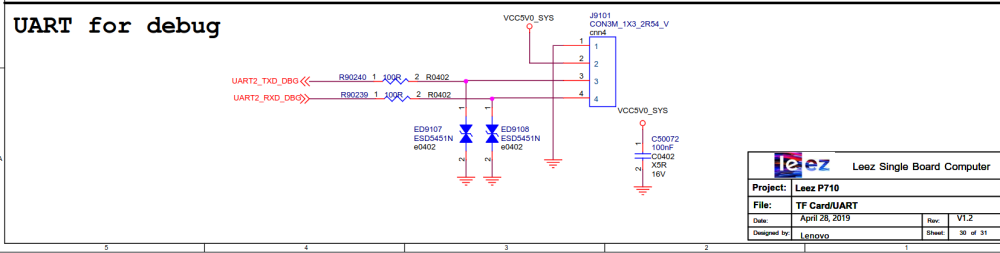
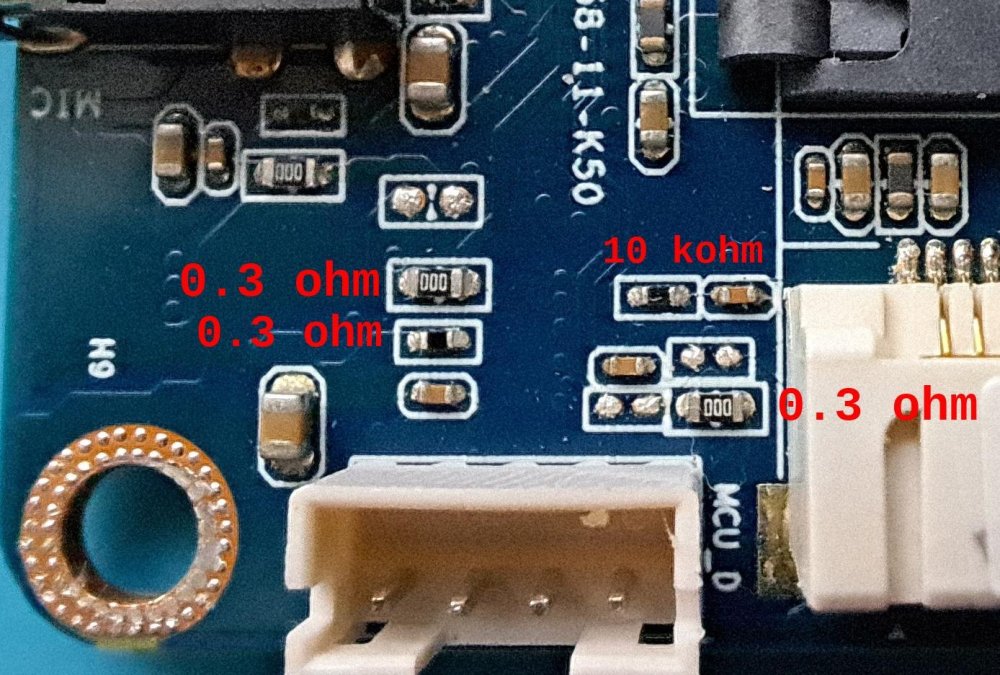
-
Concerns before trying to boot Armbian from SD card on GS King-X
SteeMan replied to marfalk's topic in Amlogic CPU Boxes
You would just burn your downloaded image file to any USB storage, just like you would to an SD card (i.e. plug the USB storage into another device and burn the image to the storage) -
I've setup an Armbian build environment that was able to build a Rock-S0, trixie, minimal image. Using the patch for the Rock-S0 also rk3308b based, as a basis, I would like to create a sv06-Ace patch using the rk-kernel.dts that I managed to pull from the OEM SV06 Ace firmware. If I get a working Armbian image for the SV06, Mainline klipper should be doable. Can someone point me to the documentation on howto do this. rk-kernel.dts
-

Concerns before trying to boot Armbian from SD card on GS King-X
marfalk replied to marfalk's topic in Amlogic CPU Boxes
Thank you. I have managed to successfully boot Armbian from SD card. Android is preserved. Now I am trying to install (move) Armbian (the "/root" partition) to an external USB drive. I run "armbian-config", then I pick "System" --> "Storage", but no "Install" (Copy the running Armbian system to another device) option is listied (according to the documentation here). I get only the following items: Download a fresh, official Armbian OS image and write it to a device Enable read only filesystem Enable Network filesystem (NFS) support etc... I have tried also in Terminal: "armbian-config --cmd STO001" but I get an error. In the instructions for TV boxes here it says: "running the shell script in the /root directory: install-aml.sh" But it refers to installing (moving) Armbian to the internal eMMC, if I am not mistaken. Is it possible to install it either to an external USB HDD or internal SATA HDD? -
@BigDi I was able flash the Image Armbian_26.2.1_Nanopim4v2_trixie_current_6.18.8_minimal.img.xz to the emmc and start Armbian on the device. Interesting that Wifi (Realtek RTL8821CU) is work well but Ethernet not.
-
Hello! I wanted to install the Armbian 26.2.1 Minimal / IOT to an Ordoid HC2 (using the XU4 distro). Download ok - sha hash is ok - balena etcher ok - startup - ok. Problem: When I log in the first time with "root", the "1234" as first password is not accepted. Also, PUTTY warns that ths ssh of the armbian uses only "Diffie-hellmann-group1-sha1" which (for PUTTY) is a bit unsecure. Any idea about the password issue?
-
 With a lot of trial and error I figured out the issue but not the cause. This seems to only effect HEVC (x265) videos when drm is successfully enabled with MPV from this repository. If I try a different player, they play fine but no hardware acceleration. If I encode the videos to x264 they play but hardware acceleration fails with the following error [ffmpeg/video] h264: v4l2_request_probe_video_device: set controls failed. Invalid argument (22) The issue is the width of the video. Outside of certain ranges it will display a black video (audio works). It doesn't seem to matter what the height is set to. Eg) 704x480, 704x960 image is displayed. 706x480, 706x960 black screen The ranges go for 14 pixels and each range is separated by 50 pixels. eg) widths in the range of 690 to 704 display an image. Widths between 706 and 752 display a black screen. 754 to 768 display an image. It's a strange one.... Here is a list of ranges that work. Any widths outside of these ranges produces a black screen. It only goes up to 1984 but I'm sure the same rules would apply above this value.
 -

to get 32768 clk from GPIO1 D4 on RK3328
tparys replied to emresensoy's topic in Advanced users - Development
PREEMPT_RT is fully merged in mainline Linux as of 2024 (https://en.wikipedia.org/wiki/PREEMPT_RT). - Yesterday
-
Here is the updated image with Wifi and EMMC boot https://github.com/sicXnull/armbian-build/releases/download/mxqpro/Armbian-unofficial_26.02.0-trunk_Mxqpro-h313_trixie_current_6.12.74_cinnamon_desktop.img.xz
-
I just tried booting this LibreELEC test build on my nanopi R6S and to my amazement everything worked great in that build/kernel/bootloader. This means it is technically possible and the ingredients are out there, to bad it isn't on Armbian yet...
-
Gaming experience with Orange Pi 5 (RK3588) on Armbian
KhanhDTP replied to KhanhDTP's topic in Orange Pi 5
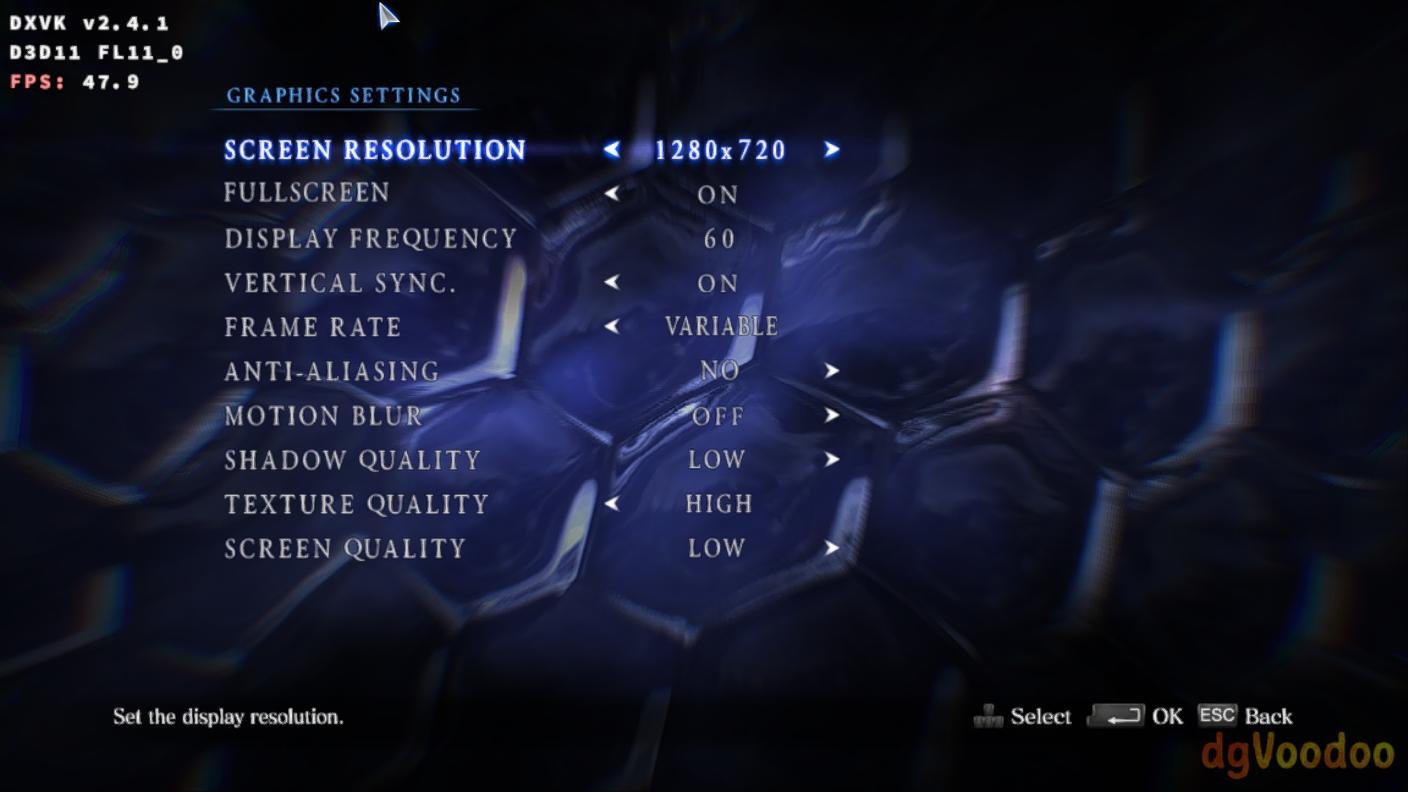
Armbian 25.11.2 Noble XFCE (BSP Kernel: 6.1.115) + PanVk - mesa 26.0 (https://launchpad.net/~ernstp/+archive/ubuntu/mesaaco) + Box64 arm64 v0.4.1 ed9827920 (https://ryanfortner.github.io/box64-debs/) + ge-proton10-29 (https://github.com/GloriousEggroll/proton-ge-custom/releases/tag/GE-Proton10-29) (GE-proton is more likely to be segment fault-proof than other wine-proton versions) + dgVoodoo2 (https://github.com/dege-diosg/dgVoodoo2/releases) + DXVK-stripped v2.5.3 30~40fps@720p (low settings, texture high) box64 environment variables: RESIDENT EVIL 6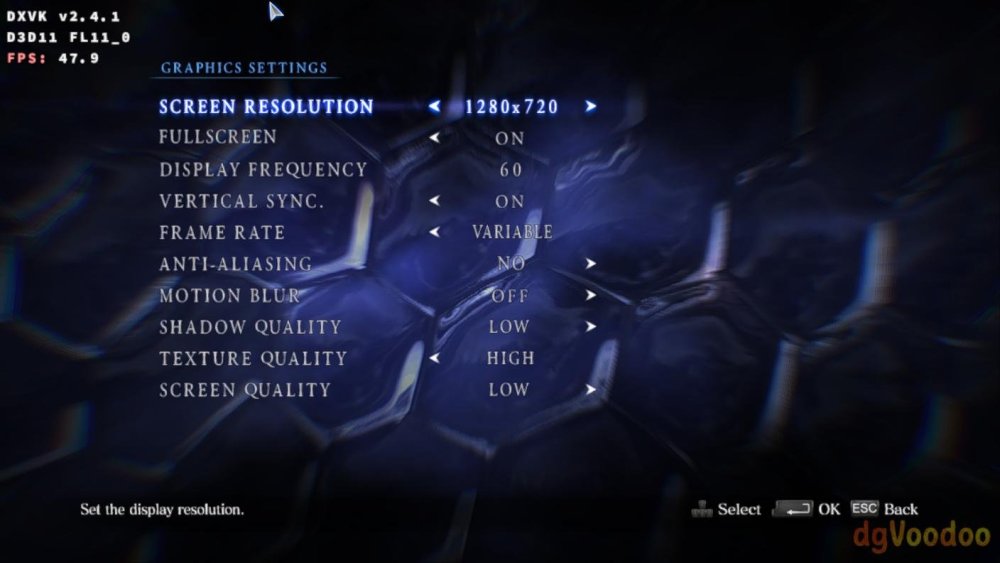
.thumb.jpg.73712c13fe36683e8184ceeb35f549f2.jpg)
-

Is the NanoPC-T6 Plus compatible with the NanoPC T6 LTS image ?
Werner replied to magic_sam's topic in NanoPC T6 LTS
I don't know, perhaps the author knows. Try. If it doesn't work, then fe's wiki is misleading. -

Is the NanoPC-T6 Plus compatible with the NanoPC T6 LTS image ?
magic_sam replied to magic_sam's topic in NanoPC T6 LTS
Dear @Werner , Thank you very much for your quick reply, and sorry for the delay on my end (I started a new job last week). If this board is not yet compatible with Armbian, then why this article ? EDIT: FriendlyElec's Wiki seems to imply that the board is compatible with Armbian's M6 / T6 and R6 images... https://wiki.friendlyelec.com/wiki/index.php/NanoPC-T6_Plus#Install_OS Best regards, Samuel -
Thanks for your insights @eselarm. I was led to believe that the bootloader could not have any impact on this - guess AI is wrong again 😅 Anyhow I am running EDK2-UEFI v1.1 so might try one of the later artifacts
-
Please read the FAQ and installation instructions linked on the download page. https://www.armbian.com/amlogic-s9xx-tv-box/
-
 thank you for your reply! I reverted to the stock ubuntu for opi5 for now. I will have a new device in my hands in the next days, I will then try this


.jpg.2f38930931c373091b9afc530d7d19d7.jpg)




.jpg.900712b95bfc30d78b8feffbba389b24.jpg)