All Activity
- Past hour
-
 ping @amazingfate and @prahal
 -
maybe @schmiedelm has an idea?
- Today
-

Efforts to develop firmware for H96 MAX M9 RK3576 TV Box 8G/128G
cmuki replied to Hqnicolas's topic in Rockchip CPU Boxes
@xiaobao80I did manage to get 3.5mm working with the help of ChatGPT. The box is using HT5010. ChatGPT told me to disable the es8388 nodes, but it still works with them enabled. My sai@2a61000 looks like this: My ht5010-sound node looks like this: I got bluetooth working with a hack from the Radxa forums here (creating a shell script and adding it to the root's crontab): I tried to send audio from a TV to the rk3576 box - it did work, but the latency is too much for me. The brown box has beefier cooling than the purple one. I haven't recompiled, used my "stable" image from before to fix the 3.5mm issue, might need to recompile to try the GPU driver. Tried the rkr7.1 dts, but couldn't get it to work (might need additional time to look at it); armbian / linux-rockchip is still at rkr5.1. -

Driving the ili9488 LCD (4.0 inch cheap chinese clone)
forumtrekker replied to robertoj's topic in Allwinner sunxi
I got the display to work! I left out a phandle = <0x01> line in my ili9486@0 section, adding it made it work. DTS was fine otherwise. It's a little glitchy and laggy so I need to tinker with it more, but I see plymouth displaying properly! I can't seem to get into tty or XFCE, but I believe I'm not running wayland and it sounds like thats a requirement for tinydrm? I'll figure it out, but the hard part is over. Once I get everything polished I'll write a summary of my steps so its easy for others to follow. Working DTS for the red ili9488 display using tinydrm driver: -
There are none. https://docs.armbian.com/User-Guide_Networking/#networking
-
Driving the ili9488 LCD (4.0 inch cheap chinese clone)
forumtrekker replied to robertoj's topic in Allwinner sunxi
My latest post on page two shows the waveshare clone LCD DTS, working under FBTFT not DRM. The gpio formatting is strange, but it is what I lifted from Radxa provided DTS for a different waveshare LCD that I'm adapting for the displays here. This DTS I have is functional, and I'm certain the pins are correct as the Red ili9488 display shows purple / blue lines using FBTFT (probably incorrect init sequence, since it shows purple and red using your FBTFT init sequence under ili9341 driver instead of ili9486. fb_ili9486 does not work as you also experienced), and the Blue waveshare clone display works perfectly. Current working red DTS: Current working waveshare fbtft, laggy (waveshare LCD is a parallel display with shift register hacks and kind of bad, so lag is expected.) Haven't tried DMA or fbcp since fbtft is outdated anyway. I've commented what each line / hexadecimal represents, to make it easy to follow. I spent several weeks trying variations of the DTS you provided, and I was never able to get it to work properly. I only got positive results when I started using the formatting I am now. The formatting is semi-understandable, every gpio and spi is just referenced at the end of the file by line name and position in increases of 4 (0 refers to the first item in a line, 4 to the second, 8 to the third etc), instead of being directly called in their location. For example, the target of fragment0 is 0xfffffff, which at the bottom of the DTS in the fixups section, is referred to as spi1. The cs-gpios are referred to in fixups in both gpio4 and gpio1. I am using latest armbian compiled per your instructions / forum posts, running edge compiled armbian with kernel 6.18.0-rc6, with panel-mipi selected at kernel build time according to the KungfuPancake github, firmware placed in lib/firmware, and drm verified to be loaded and semi functioning. I've essentially followed all your forum posts but have not had the success you have had. I'm now wondering if I have to tell armbian how to use the display with DRM, because I read somewhere that fbtft will draw constantly to your screen, but DRM will only draw when called and by default stays a white screen until called by the system. I tried adding a line in /boot/armbian.conf which should use the /dev/fb0 device as a display when /sys/class/drm/card1-spi is present (which it is), but it doesn't change anything. Edit: it seems adding this is not necessary if plymouth is installed. extras="fbcon=map:1" I appreciate your help! EDIT: I went through the first page of this thread again to check I haven't missed anything. since I've done multiple reinstall's etc... and realized after installing xfce this time, I didn't go through the updating of initramfs to ensure panel-mipi loads properly with plymouth installed. Panel-mipi seemed to still load fine and be present, but I went through the steps in your thread here and it fixed the following error I was having since installing XFCE, AND the screen is showing blue and black bars. The evidence seems to be pointing to the drm driver being initialized and used properly, so i'm going to make sure my gpio pin polarity is correct in my DTS since DRM expects flipped values in some cases compared to FBTFT, then I will check my wiring and shorten them in case it is physics / interference problem, and finally I'll try other init sequences from lcdwiki. [ 4.601941] panel-mipi-dbi-spi spi1.0: No config file found for compatible 'panel-mipi-dbi-spi' (error=-2) -
I know of a way to install a specific kernel version: sudo apt install linux-image-edge-sunxi64=25.5.1 --> installs linux 6.14.8 But how do you install specifically linux 6.15.4? Also, have you checked if the newest linux version requires a dtbo to be activated in armbian-config? If you still can: compare the output of lsmod under 6.15.4 and under 6.16.8
-
 Hello Armbian team, I am working with the TQ mba8mpxl-ras314 (i.MX8MP) board and trying to use an LVDS display: AUO G150XAN02.0 (1024×768). I have built Armbian from source using: ./compile.sh build \ BOARD=mba8mpxl-ras314 \ BRANCH=current \ RELEASE=jammy \ BUILD_DESKTOP=yes \ BUILD_MINIMAL=no \ DESKTOP_ENVIRONMENT=xfce \ DESKTOP_ENVIRONMENT_CONFIG_NAME=config_base \ KERNEL_CONFIGURE=no I created a custom LVDS DTS overlay with the correct timing from the display datasheet (65 MHz pixel clock, 1024×768, proper porch and sync settings), and added it to However, after booting the image, the LVDS output still stays at 1280×800, which is the default panel configuration for the Tianma panel used in TQ’s reference device tree. The expected resolution 1024×768 does not apply, even though: The overlay compiles correctly The .dtbo file is present The build finishes successfully I am unsure whether: My overlay is not being applied The correct panel node name is different from &display Another overlay overrides mine The i.MX8MP LVDS binding needs a different structure Armbian’s mba8mpxl-ras314 base DTS is overriding the timing
 -

Driving the ili9488 LCD (4.0 inch cheap chinese clone)
robertoj replied to robertoj's topic in Allwinner sunxi
Can you share the DTS you used, to have success with the waveshare LCD? The only thing we need to extract from it are the gpio pins. And I am curious how you made a waveshare LCD work. The gpio formatting in your DTS looks very weird. Can you start with the DTS I shared? Share also which armbian and Linux version you are using. (I can only help with a Linux 6.11 or newer). If you only get a white LCD screen, it means that the LCD is not getting the right control signals in the correct pins. You don't need to try XFCE at this point. It won't work. -
Orange Pi Zero 3 Sound Problem(Lineout-Analog Codec)
robertoj replied to Taha YILDIRIM's topic in Allwinner sunxi
Can you try: * activate "analog-codec" within armbian-config * run: sudo apt install alsa-utils * run: alsamixer (text user interface to increase volume by individual output) * basic mp3 player: "sudo apt install mpg123" (instructions for orange pi zero LTS, but it may still work for opiz3) What do you mean by "image became distorted", and "kernel artifacts"? Can you build your own armbian OS with armbian build? (with Linux edge version) -
Orima, Ubuntu 22.04 is recommended, but I have no problem installing armbian build in Linux Mint 22.0. I think Debian Trixie in your laptop is too new to have the right requirements and versions for armbian build. You can build Debian Trixie for your orange pi, with no problems. Don't try to fill all the parameters in a single command line. Just download the armbian zip, "git clone" it in a new directory. Then run "./compile.sh". You will be presented with all the text user interfaces to make your board selections, linux and debian versions, etc.
-
@robertoj Hi I'm completely stuck. I'm trying to build an Armbian Trixie image, but I'm having trouble installing packages. I've tried changing the repository links to the ones closest to my location, but to no avail. I am completely unable to continue my research for assembling Armbian. This is how I collected Armbian ./compile.sh BOARD=orangepizero3 BRANCH=edge kernel-config CONFIG_DRM_PANEL_MIPI_DBI=m CONFIG_TOUCHSCREEN_EDT_FT5X06=m CONFIG_BACKLIGHT_GPIO=m CONFIG_BACKLIGHT_PWM=m ./compile.sh BOARD=orangepizero3 BRANCH=edge BUILD_DESKTOP=yes BUILD_MINIMAL=yes KERNEL_CONFIGURE=no RELEASE=trixie Also, with the configurator window open, I selected to enable panel_mipi_dbi Perhaps you still have an image of the assembled Armbian? I first built it on Ubuntu 22.04. Later, I built it on Debian Trixie. I change repo to: http://ftp.debian.org/debian And debian security http://ftp.debian.org trixie-security For armbian https://armbian.systemonachip.net/apt Its not work
-
Hello, Could you please tell me which image does not have netplan? I want to compare how much resources it uses. Thanks
-
Anyone knows how enable usb 3.0 with Radxa cubie a5e? I found cubie-a5e-enable-usb3.dts from radxa's git but could apply it. Currently I am running 26.2.0-trunk.22.
-

Getting vlc to play nice with pulseaudio
Popolon replied to Reluctant Linux User's topic in Radxa Rock 5 ITX
I'm not sure vulkan is the best solution, RK3588, as most ARM SoCs has a dedicated video engine, vulkan is mainly needed on hardware without dedicated engine, using graphic card to decode, as it's often the case in x86_64 worlld. You can then including it's decoding in vulkan if you want. Don't know wich version of kernel/mesa/video decoder you use. The best, is to remove all dedicated package, and use system one, today, everything work fine with standard linux kernel, as armbian one, standard video tools, rockchip specific libs/video tools was used with rockchip made tools, until everything was mainlined. I don' use VLC, that needs specific libs, but mpv, or several other video players (including firefox one), and everything plays fine. -
I dont know how to do that, sorry!
-
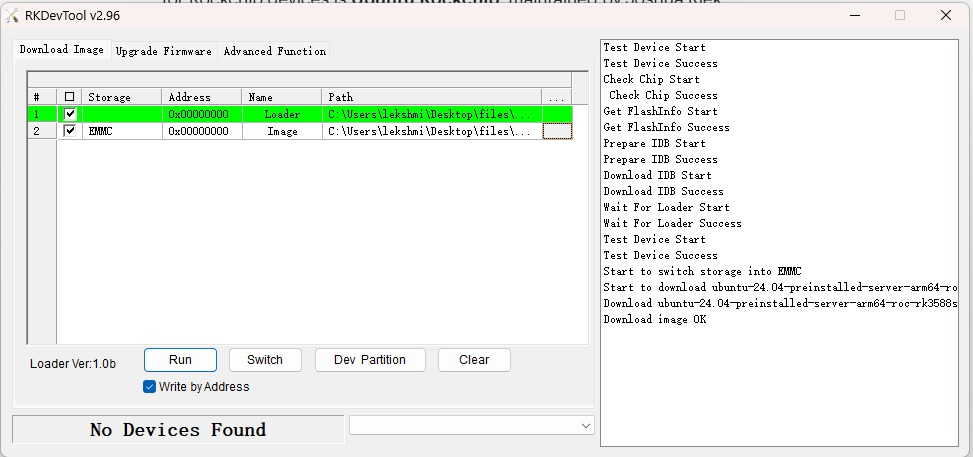
Subject: [R58X] Hard Brick After Failed Armbian Upgrade (Jammy to Noble) Hello, My Mekotronics R58X running Armbian Ubuntu 22.04 (Jammy) hard-bricked after a failed attempt to upgrade to Ubuntu 24.04 (Noble). Initial Failure: The upgrade crashed, and the device would not boot/log in properly . Recovery Attempt: I successfully flashed a new Ubuntu 24.04 image using the official Mekotronics documentation/tool. Current Status: After the flash completed successfully and the device went offline, it is now completely dead. It will not power on. No LED activity. I cannot enter recovery mode (Loader or MaskROM) using standard methods. It appears the device is hard-bricked, possibly due to bootloader corruption. Has anyone recovered an R58X from a similar state? Thank you for your help.
-
 Thanks Robertoj All the documentation for the board is here https://github.com/zharijs/zmxxxp-re But the LCD is not an himax-hx8394. The screen is a "MTF0397SWI-06" using the chip OTM8019A. It just that I am starting from this driver to port the sunxi driver: sl698ph_720p. I will now look at your links.
 -
 Tried this with a Ubuntu PC today, and have the same result. lsblk shows one partition.
 -

Yoka TV kb2 pro installation instructions
Atorres replied to Jamie Swoish's topic in Amlogic CPU Boxes
I followed your tutorial, and it works! I did it with a server image instead. But I was not able to make Wifi work. Did you manage to connect to the Wifi? -
 Thanks! This fixed the issue!
 -
 Try installing qemu-user-static package via apt
 -
Hi again, So sorry to have left this hanging, due to lack of time. I have been trying successive updates since posting this, without the issue being resolved, but have now confirmed that this is kernel or device-tree related. Using armbian-config to load kernels, I can say that the problem originated some time between kernel 6.1.104 (02/02/2025) and 6.6.750 (03/02/25). dmesg output looks similar with and without the problem, as does /proc/device-tree, but I can post any specific output here if anyone can suggest what to look for. 6.6.750 keeps the backlight and a noisy/gray screen, while the screen is black (with backlight showing in the corners) with later kernels, suggesting a further change around 6.12 (tbc) Unfortunately I can't see where to find any armbian intermediate kernels / device-trees, so would be very happy if someone could point me at a repo. where they might be available. Failing that I can try to locate kernels from alternative sources, or compile my own, but it would be good if I could keep as much the same as possible (including any Armbian patches and the armbian dt packages.)
-
Hi, I'm trying to build the Armbian for Rock64. Host machine is Ubuntu 24.04 AMD64 (but it is running in VirtualBox under Windows). Build fails with the following error: [🐳|🌱] Deploying qemu-user-static binary to chroot [ qemu-aarch64-static during image-early ] [🐳|🔨] '/usr/bin/qemu-aarch64-static' -> '/armbian/.tmp/rootfs-232e77ba-e6ab-4067-8029-afd44bd1d0b9//usr/bin/qemu-aarch64-static' chroot: failed to run command ‘/bin/bash’: No such file or directory [🐳|💥] Error 127 occurred in main shell [ at /armbian/lib/functions/rootfs/distro-specific.sh:276 create_sources_list_and_deploy_repo_key() --> lib/functions/rootfs/distro-specific.sh:276 extract_rootfs_artifact() --> lib/functions/rootfs/create-cache.sh:130 do_with_logging() --> lib/functions/logging/section-logging.sh:81 get_or_create_rootfs_cache_chroot_sdcard() --> lib/functions/rootfs/create-cache.sh:90 build_rootfs_and_image() --> lib/functions/main/rootfs-image.sh:14 full_build_packages_rootfs_and_image() --> lib/functions/main/default-build.sh:36 do_with_default_build() --> lib/functions/main/default-build.sh:42 cli_standard_build_run() --> lib/functions/cli/cli-build.sh:25 armbian_cli_run_command() --> lib/functions/cli/utils-cli.sh:136 cli_entrypoint() --> lib/functions/cli/entrypoint.sh:208 main() --> compile.sh:50 The /bin/bash (/armbian/.tmp/rootfs-232e77ba-e6ab-4067-8029-afd44bd1d0b9/bin/bash) seems an ARM64 and this might be the reason for "failed to run". Is this a known issue? Can I fix it? I've tried to avoid using chroot in this line, the build goes forward but fails with similar error later.