All Activity
- Today
-
 Update: The reason i haven't released the cursor patch is because im working on the GUI. I managed to now use EGLFS with FFMPEG, so it feels right that we modernized the crankshaft-ng GUI to feel more modern and usable.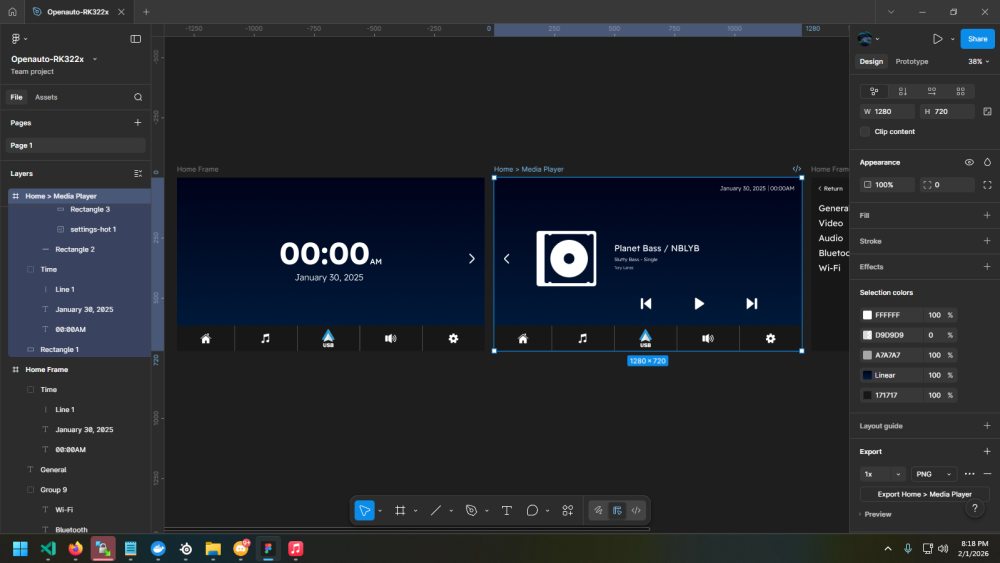
-
Hi guys, I have a Espressobin V7_2-1 Model: Marvell Armada 3720 Community Board ESPRESSOBin (eMMC) CPU 1000 [MHz] L2 800 [MHz] TClock 200 [MHz] DDR 800 [MHz] DRAM: 1 GiB Would you be so kind as to make the flash-image-DDR4-1g_1cs_5-1000_800.bin?
-
Bluetooth now working, no compiling required via hciattach. I don't know how much of this is necessary because I generally don't know what I'm doing. But here goes. Apparently hciattach is a legacy app that requires the firmware to be in /etc/firmware so I made a folder and setup a symlink before running the hciattach. <NOT REQUIRED> sudo mkdir -p /etc/firmware <NOT REQUIRED> sudo ln -sf /lib/firmware/aic8800_sdio/*.* /etc/firmware sudo hciattach -s 1500000 /dev/ttyS1 any 1500000 flow nosleep <NOT REQUIRED> sudo hciconfig hci0 up Bluetooth should be available now. You can test it with sudo hcitool -i hci0 scan This will display any devices in the area the bluetooth adapter has detected. I had installed armbian-firmware package so that might also be required but I doubt it. I will flash a new image and start from scratch just to make sure everything I've stated works on a fresh install and then update the thread. Edit: I tested it on a fresh image and the only command required for bluetooth to activate was the hciattach line. I couldn't figure out how to do strikethrough in the code block so I just listed added the "NOT REQUIRED" info. I didn't want to remove them in case it helps someone else. The firmware files I mentioned in a previous post need to copied over and the device powered down before running the hciattach command. The hciattach commands do not persist through a reboot so I need to figure out how to get this to run on startup, hopefully the easy part. Thanks for all the help. Hard to beat that feeling when you spend hours troubleshooting something and it fires up for the first time!
-
Some context: https://docs.armbian.com/User-Guide_FAQ/#why-things-stop-working The hardest part and expensive for time is keeping functions working while kernel changes, goes up. Image you are referring too is probably a demo image with some ancient kernel that will never be changed. This is usual way to sell hardware. It is made to work, but you will stay at this very old SW stack without any real option to change or fix anything. All functions on 300+ boards, which on top of extreme diversity, have also different revisions, quality issue ... is already not possible to keep up by entire open source community. Armbian is small part focused into SBCs and we do what we can. Work we are doing is never complete, we (nobody) can't solve bugs and especially not near to (expected) real-time. We (or community open source in total) can address a problem within weeks or months fastest as resources are tiny compared to problems that are constantly found in open source code that somebody else made. We have no option to expand the team / project as users don't care about well being of SW developers. We can only try to keep SW stack operational on a best effort principle. Once this job becomes too expensive (<1% of costs share is on users side), we have to step back and declare support as "community". We will continue to build and ship images as they might still work for some use cases and as downstream projects will provide those Armbian images anyway.
-
A month ago when doing test boots and power measurements, see I discovered that when using the RPL 27W 'Pi5' PSU, the NanoPi-R6C with the indicated bootloader(s) and kernel(s) sticks to 5V. But when using a 45W USB-C PD PSU from a HP laptop or 60W USB-C PD PSU white-label, switch is made I saw on a USB-C PD power measurement device that was also in the chain. More detailed USB-C PD protocol analysis seems to be needed in order to figure out what happens. One could guess 3A is requested at highest possible voltage as with the 45W PSU, I saw 15V. 9V or 12V would also be OK, but the PD handler cannot be 100% sure I think, depends also what is inserted in USB type-A ports on device etc.
-
does emmc working yet?
-
 armbianmonitor - u result: https://paste.armbian.com/nocetohemu Best regards Rolf
 -
 Providing logs with armbianmonitor -u helps with troubleshooting and significantly raises chances that issue gets addressed.
 -
**1. Summary:** The text console (`tty1`) is permanently stuck at 30 rows by 90 columns after boot, despite the DRM/KMS framebuffer being correctly set to 1920x1080 resolution. All attempts to change the console size via boot parameters, sysfs, or runtime tools fail. This breaks the basic CLI experience on displays larger than VGA. **2. Environment:** * **Hardware:** Orange Pi PC (Allwinner H3) * **Image/Distribution:** "Forky" (appears to be an Armbian-based rolling Debian fork) * **Kernel:** `6.12.68-current-sunxi` (build@armbian) #1 SMP Fri Jan 30 09:28:49 UTC 2026 * **Graphics Stack:** Modern DRM/KMS (`sun4i-drm`). The legacy `fb` driver is not active. * **Monitor:** Connected via HDMI. EDID is correctly read (tested with `modetest`). **3. Steps to Reproduce:** 1. Boot the system with the affected image on an Orange Pi PC. 2. Log in to the text console (`tty1`). 3. Run `stty size`. It will always return `30 90`. 4. Observe that the terminal only uses the top-left quarter of a 1920x1080 display. **4. Diagnostic Evidence:** ```bash # Console size is fixed and wrong: $ stty size < /dev/tty1 30 90 # Framebuffer is provided by DRM and reports correct resolution: $ cat /sys/class/graphics/fb0/name sun4i-drmdrmfb $ cat /sys/class/drm/card0/card0-HDMI-A-1/modes | head -1 1920x1080 # Kernel boot parameters (from /proc/cmdline) include video settings, but are ignored: root=UUID=... video=HDMI-A-1:1920x1080@60 console=tty1 ... # All attempted fixes that FAILED: # - Boot parameters: `fbcon=font:VGA8x16`, `vt.global_cursor_default=0`, `drm_kms_helper.edid_firmware=...` # - Runtime commands: `resizecons`, `setupcon`, `stty rows cols`, writing to `/sys/class/graphics/fbcon/` # - Service restarts: `getty@tty1`, `gpm` ``` **5. Expected Behavior:** The text console should automatically scale to use the full resolution of the framebuffer. For a 1920x1080 framebuffer with an 8x16 font, the expected `stty size` should be approximately `67 240` (or `67 120` for a 16x16 font). The console should fill the entire display. **6. Additional Notes:** * The same hardware works correctly with a **Debian Bookworm** image and an older kernel, where console auto-scaling functions perfectly. * This indicates a **regression** in the `6.12.68-current-sunxi` kernel build or its DRM/KMS configuration for the Allwinner H3. * The bug makes the distribution unsuitable for any headless or console-focused use case on this hardware. **7. Questions for Maintainers:** * Is there a specific kernel configuration option (`CONFIG_*`) for Allwinner H3 DRM that controls TTY auto-scaling? * Has the `vt` or `drm` subsystem changed in a way that requires new boot parameters for this hardware? * Can this be worked around without a kernel recompile?
-
@Nick A Oh yeah, I did change a few things as well for type c. Maybe the drm heap changes are not needed after all. Looking at my changes. husb311 is now under drivers/power/typec, so just enable it. et7304 is not included in the original bsp, radxa team added them later so simply apply this same patch. https://github.com/radxa/allwinner-bsp/commit/156b6578cc173855b41ea311a229403ccbadb17c
-
We have progress, sorry I feel like I'm spamming this thread a bit but at least I have a result. Wifi is now working. Still no bluetooth. For anyone playing at home with this box, to get to this point I installed x98h image from Nick's github. I then downloaded the following files from walnutpi's github fw_patch_table_u03.bin fw_adid_u03.bin fw_patch_u03.bin fmacfw.bin aic_userconfig.txt I copied these files to the device and placed them in /lib/firmware/aic8800_sdio/ Then shutdown the unit and powered it back up. Doing a restart isn't enough, you need to shut it down. So just bluetooth to go. The only related message seems to be sdio_err: <aicwf_sdio_bus_pwrctl,1380>: bus down Which I expect will probably require me to update the dtb settings as previously discussed. Happy to settle with just the wifi working but I'll take a shot at getting bluetooth going because I may as well finish what I started. Thanks for the help thus far. edit: I've tried decompiling the /boot/dtb/allwinner/sun50i-h618-x98h.dtb file but I can't find any of the relevant info to change in the dts file. It's like the sections listed in the patch file linked earlier are not there at all. I understand it's in a different format but as an example. The following section line 278 to 297 +&uart1 { + pinctrl-names = "default"; + pinctrl-0 = <&uart1_pins>, <&uart1_rts_cts_pins>; + uart-has-rtscts; + status = "okay"; + + bluetooth { + compatible = "allwinner,sunxi-btlpm"; + // max-speed = <1500000>; + + clocks = <&rtc 1>; + clock-names = "lpo"; + vbat-supply = <®_dldo1>; + vddio-supply = <®_dldo1>; + enable-gpios = <&pio 6 19 GPIO_ACTIVE_HIGH>; /* PH19 bt_power */ + reset-gpios = <&pio 6 13 GPIO_ACTIVE_LOW>; /* PH13 bt_rst_n */ + device-wakeup-gpios = <&pio 6 17 GPIO_ACTIVE_HIGH>; /* PH17 bt_wake */ + host-wakeup-gpios = <&pio 6 16 GPIO_ACTIVE_HIGH>; /* PH16 bt_hostwake */ + }; +}; I've tried searching the dts file for "uart1", "bluetooth", "bt", "btlpm", "lpo", the hex equivalent of the values above, all the different value names etc... of the small amount of results that do show up, most of them are not even remotely close to matching anything above. "usart1" does have a section detailing the pins and rtscts but it seems that bluetooth section just isn't there. This is just one example, lines 87 to 102 don't appear to be there either. There is some values for vcc-3v3 but that's it. I'll probably have to look at updating the values in the patch file and building an image.
-
@jock Thank you for the information, I just updated the thread removing the requirement to use CMA=256. as per openauto it doesn't require cma to be set at 256. Will release the cursor patch with some adjustments to ffmpeg and some GUI changes (mostly settings adjustment)
-
@Bones558 @alexc I noticed that a few USB-C drivers are missing in the 6.6 kernel. While the Makefile and Kconfig files are present, they have changed. In the 5.15 BSP, the bsp/drivers/usb/typec/tcpm directory contains tcpci_et7304.c and tcpci_husb311.c, but in 6.6, this directory is empty. 6.6: bsp/drivers/usb/typec/tcpm$ ls Kconfig Makefile 5.15: bsp/drivers/usb/typec/tcpm$ ls Kconfig Makefile tcpci_et7304.c tcpci_husb311.c
-
@Nick A @Bones558 Hi there, I am not sure if that's definitely due to DRM heap. But I fixed that driver and it could be built now. I didn't know if USB C DP works or not before but it is working now (on a USB C monitor, maybe needs a few re-plug). I opened a PR on Radxa allwinner-bsp github (https://github.com/radxa/allwinner-bsp/pull/11), you can also test it out.
-
Excellent, thanks. One more thing. I just reloaded the x98h image. When I previously loaded this image, I didn't check dmesg like I did with the other images. They had no mention of Wifi at all but this one does. It seems to start enabling wifi but then fails here rwnx_load_firmware :firmware path = /lib/firmware/aic8800_sdio/fw_patch_table_u03.bin rwnx_load_firmware: fw_patch_table_u03.bin file failed to open wrong size of firmware file aicbt_patch_table_alloc fail edit: So lib/firmware/aic8800_sdio/fw_patch_table_u03.bin does not exist which probably explains that error. I'll see if I can get my hands on that file and see if that fixes things before I worry about compiling/decompiling stuff.
-
@BoringName Looks right. You can decompile the dtb into a dts.. edit the dts and compile it again. You will find it in the /boot directory. dtc -I dtb -O dts -o mainline_edit.dts your_mainline_file.dtb dtc -I dts -O dtb -o modified_mainline.dtb mainline_edit.dts
- Yesterday
-
Ok, just so I'm following you correctly. This line in my DTS dump bt_rst_n = <0x23 0x06 0x13 0x01>; In decimal is <35 6 19 1> In the patch you linked the line above should be matched to these values at line 293? reset-gpios = <&pio 6 13 GPIO_ACTIVE_LOW>; /* PH13 bt_rst_n */ So I should change this to reset-gpios = <&pio 6 19 GPIO_ACTIVE_HIGH>; /* PH13 bt_rst_n */ Repeat for all the other values to match the DTS dump then build the image? Is there a way to set these values at the command line without having to build an image? edit: Actually my high low flag is 0x13 which is 0001 0011. This is read from right to left isn't it? So Bit 0 is actually a 1 which means in the example above I should set it to the following? reset-gpios = <&pio 6 19 GPIO_ACTIVE_LOW>; /* PH13 bt_rst_n */ Sorry I'm probably getting in a little over my head....
-
Thanks. I'm at a loss too, because it works with this: 2022-04-17-ubuntu-16.04-mate-desktop-mpv-1080p-bpi-m1-m1p-r1-sd-emmc.img I was just hoping someone else might have encountered this problem. Thanks for your help though.
-
That is the correct one. Then I do not know anymore why yours does not work with recent Armbian images/installation.
-
 Technically CMA is not needed at all for the VOP. Rockchip VOP has its own MMU, it is not like raspberry pi or amlogic devices. It should not require to reserve and map memory by the kernel for the VOP as long as the MMU is enabled in the device tree and it is working correctly.
 -
Good evening. The BPI M1+ is powered via the side micro USB port. (next to the 5V SATA connector)
-
Which microUSB connector of the bananapi do you use for powering the bananapi itsef?
-
Hi, I wanted to report an issue with the currently available Armbian images for the PocketBeagle 2 (all of them from what I can tell), that stops them from booting up. I attempted to go through the bug reporting form, but it seems to only point you to the forum, so here I am. I couldn't find a location to post about the PocketBeagle 2 board specifically, so I am putting this under the Beagle Y board (they have the same maintainer listed). Please move this to the right place (or maybe create it if it doesn't exist?) or tell me how I should do this myself. The issue is in the file "/boot/extlinux/extlinux.conf", where a ".dts" file is being referenced from the directory "/boot/dtb/ti/", which contains only ".dtb" files. U-Boot fails to find the device tree file and fails to boot. Changing the file extension of the device tree in "extlinux.conf" to ".dtb" fixes the boot up issue and everything else seems to be working fine. If this is not the right place to be reporting this issue, please direct me to the correct place, so this can be brought to the attention of the appropriate maintainer. It should be a quick fix, but the images currently available to download are likely unusable for inexperienced users. Many Thanks, Paul
-
Hello, the SSD connected to the SATA port on the BPT M1+ works under Ubuntu 16.04 with an adapter and no external power supply. However, to rule out that as the cause, I powered the SSD externally, and it's still not recognized. So far, I've only found the Ubuntu 16.04 image that supports the SATA interface on the BPT M1+.
-

[Latest] Armbian Build HDMI Audio support Fix
Poka26ev2 replied to just_facking_about's topic in Radxa Dragon Q6A
Thank you a lot, my Dragon Q6A now has audio