


Hqnicolas
-
Posts
692 -
Joined
-
Last visited
Content Type
Forums
Store
Crowdfunding
Applications
Events
Raffles
Community Map
Everything posted by Hqnicolas
-

Efforts to develop firmware for H96 MAX V56 RK3566 4G/32G
Hqnicolas replied to Hqnicolas's topic in Rockchip CPU Boxes
@Kenneth Hidalgo and @ufsm can you test this image? new topic, new device, same method.... -
Efforts to develop firmware for H96 MAX V56 RK3566 8G/64G
Hqnicolas replied to Hqnicolas's topic in Rockchip CPU Boxes
How i will did this image? I simply applied everything that was already said in the other topic, I will repeat .... The only difference is the loader.bin: Uboot Legacy, Parameter.txt to create the Rockchip image ./mkupdate.sh Uboot Legacy, Parameter.txt to create the Rockchip image Probably you can create a solid single file.img How? Just changing the parameter.txt file seting it UP to stop Grow! Stop grow: by setting it to a FIXED VALUE instead of -@0x00038000(root:grow) I think Rockchip grow function is messing with armbian ext4 by the whrong way open new topics when performing this procedure on a device other than the H96MAX I will be happy to help This topic is Closed until Kernel 7 i dont wanna talk about RK3566 for the rest of my short life -
🏆 Become a sponsor, help to add other boards in armbian standart, you don't need to be a programmer to help the community, just need a copy of the ARM BOARD and a x86 computer to compile new versions. If you like what you see here and want to help: Donate Armbian the like button only costs a few dollars. Armbian Needs you help! This Armbian adventure was summarized in my Public Github Repository. H96 MAX V56 RK3566 8gb Ram SD-Card unofficial images: Tutorial SD-Card Version v0.5 ARMBIAN BETA unofficial H96 MAX V56 RK3566 8gb EMMC Chainloader to mainline HotnikQ unofficial images: Tutorial EMMC Version V0.7 ARMBIAN BETA unofficial H96 MAX V56 RK3566 8gb EMMC Mainline Boot Hzdm unofficial images: Tutorial EMMC Version v0.8 ARMBIAN unofficial H96 MAX V56 RK3566 8gb EMMC Mainline Boot Hzdm unofficial images: Tutorial EMMC Version v0.9 ARMBIAN BETA unofficial H96 MAX V56 RK3566 8gb EMMC Chainloader to mainline HotnikQ unofficial images: Tutorial EMMC Version v1.0 ARMBIAN unofficial H96 MAX V56 RK3566 8gb EMMC Hzdm Mainline Boot Custom unofficial images: Tutorial Build Your own Armbian EMMC unofficial image H96 MAX V56 RK3566 EMMC Raspiblitz HotnikQ unofficial images: Tutorial Build Raspiblitz on EMMC Armbian Bullseye unofficial H96 MAX V56 RK3566 8gb EMMC Hzdm Mainline Boot unofficial images: Tutorial Build Your own V1.1 Armbian EMMC unofficial image H96 MAX V56 RK3566 8gb Vendor Kernel 5.1.16 Tutorial Build Your own Armbian Rockchip Kernel vendor Kernel 5.1.16 Armbian Joshua Riek Ubuntu Rockchip Images kernel 5.1 H96 MAX V56 RK3566 8gb Vendor Kernel 6.1.43 Tutorial Build Your own Armbian Rockchip Kernel vendor Kernel 6.1.43 Armbian Joshua Riek Ubuntu Rockchip Images Kernel 6.1 Tutorial Flash H96 Max on Linux Desktop Tutorial Build Your own Armbian with Maxios Lan Device Using Linux Power Shell H96 MAX V56 RK3566 8gb EMMC Ning Mainline Kernel: Armbian EMMC official image Armbian Desktop Gnome kernel The Latest official Debian BookWorm Server Kernel Minimal The Latest official Desktop Test Images: Pre-Build Desktop 22.04 Armbian Test Image (PT-BR) Community Official Images: Armbian_community_25.2.0-trunk.410_H96-tvbox-3566_bookworm_current_6.12.11_minimal.img.xz Armbian_community_25.2.0-trunk.410_H96-tvbox-3566_noble_current_6.12.11_gnome_desktop.img.xz Bleding Edge images: Armbian-unofficial_25.11.0-trunk_H96-tvbox-3566_bookworm_edge_6.16.10_gnome_desktop.tar.xz Software description: V0.5 = @armbian The Armbian SD card image "Compiled From Armbian Project" V0.8 = @hzdm Project with Mainline Bootloader "Boot the 64gb Emmc Armbian with Mainline Rockchip" V0.9 = @hzdm Release Mainline Bootloader "Boot the 32gb and 64gb Emmc Armbian with Mainline Rockchip" V1.0 = @hotnikq The Armbian SD card inside the Android Legacy Rockchip Image "Two Original Glued Images: Android boot for Linux" V1.2 = @ning Release Device Tree and Bootloader to longterm 6.6.27 Kernel "Boot with Mainline Rockchip" V1.3 = @Hqnicolas Github PR Enable h96 Rk3566 TV-Box device for Kernel 6.8 V1.4 = @pocosparc Github PR Enable OpenVFD and IR controller V1.5 = @dfahren Github PR Update U-boot 2025.01 for Kernel 6.12+ @fevangelou Linux Flash Tutorial @WINEDS Build Armbian for Maxios Lan Chip Board Video drivers: https://developer.arm.com/downloads/-/mali-drivers/bifrost-kernel https://docs.mesa3d.org/download.html https://docs.mesa3d.org/drivers/panfrost.html Wifi Driver: https://drive.google.com/file/d/1B1LmAylalETcnBEWiPiJHL0MjK5xlIV4/view?usp=sharing For Boards Newer than 2025: Follow @WINEDS method to compile Armbian with the ethernet and wifi drivers Front Panel Display: Tutorial Repo: https://github.com/jefflessard/tm16xx-display UEFI: https://github.com/hqnicolas/h96v56_uefi/releases/tag/v1.2.1 Or Just Live install Wifi Driver: cd /lib/firmware/brcm/ sudo wget https://github.com/CoreELEC/brcmfmac_sdio-firmware-aml/raw/master/firmware/brcm/fw_bcm4335b0_ag.bin sudo ln -s fw_bcm4335b0_ag.bin brcmfmac4335-sdio.h96-TVbox,rk3566.bin sudo reboot now nmcli dev wifi sudo rmmod brcmfmac_wcc brcmfmac brcmutil modprobe brcmfmac Topic description: This topic aims to demonstrate the path taken to the Armibian EMMC solution. In our path we create a lot of ready-to-use ROM files, some users burn an use this images without learning with the Linux compilation process. the name of the topic is efforts but that's no effort at all, you should try compile your own images. Device Capability Test: Using Rockchip SoCs NPU. Drivers: https://github.com/rockchip-linux/rknpu2 User Guide: https://github.com/rockchip-linux/rknpu2/blob/master/doc/Rockchip_RKNPU_User_Guide_RKNN_API_V1.4.0_EN.pdf OpenCV: https://opencv.org/blog/2022/11/29/working-with-neural-processing-units-npus-using-opencv/ A discussion on Reddit: https://www.reddit.com/r/OrangePI/comments/12b3jmj/accessing_the_npu_on_the_orange_pi/ Transformers models: https://github.com/usefulsensors/useful-transformers Usage: https://www.crowdsupply.com/useful-sensors/ai-in-a-box/ Usage: https://youtu.be/pN8mKZ5wpdQ
-
Efforts to develop firmware for H96 MAX V56 RK3566 4G/32G
Hqnicolas replied to Hqnicolas's topic in Rockchip CPU Boxes
The image that you post here Works Fine in my device.... i will share the miniLoaderAll.bin from your own firmware.... and a tutorial to you.... @Kenneth Hidalgo i found an 8gb ROM on 4pda it's time to create an 8gb ROM? and topic? @Kenneth Hidalgo -
Efforts to develop firmware for HK1 RBOX R2 4G/64G
Hqnicolas replied to Hqnicolas's topic in Rockchip CPU Boxes
USB enable and disable? do it by trial and error, seems like a good way... DTC it and test. I find it.............. 6.1 kernel is rk3566-box-demo.dts compatible...... maybe your problem could be just the usb port -
Efforts to develop firmware for H96 MAX V56 RK3566 4G/32G
Hqnicolas replied to Hqnicolas's topic in Rockchip CPU Boxes
You will need to create a update.img to your device, since the factory change the BOM list to build your device you can search for @SteeMan topics about that You can read more about this here ................. Everything you need is described on this topic. start from page 1 ................... Try flash uboot and loader from your Android image ......................... If you can, please send a readable board photo upside and downside -
Efforts to develop firmware for HK1 RBOX R2 4G/64G
Hqnicolas replied to Hqnicolas's topic in Rockchip CPU Boxes
Keep dumping here, just mark down with references and purposes for every change Sent from my 22021211RC using Tapatalk @ewww You're using Linux version 6.1.34-media please compile an armbian kernel 6.2++++ rk3566-box-demo.dts came with edge kernel 6.2 -
Efforts to develop firmware for HK1 RBOX R2 4G/64G
Hqnicolas replied to Hqnicolas's topic in Rockchip CPU Boxes
@maka @ewww good job [emoji106] Now you just need to enable the right USB setup. Don't forgot to share Sent from my 22021211RC using Tapatalk -
Efforts to develop firmware for HK1 RBOX R2 4G/64G
Hqnicolas replied to Hqnicolas's topic in Rockchip CPU Boxes
@ewww You are closer than I expected... you just need to compare the power pins and other things. as @maka said this device is fully compatible with rk3566-box-demo.dtb adaptation is minimal. you can wait for another user of this device, but without much effort you should get. try disabling all usb ports on rk3566-box-demo.dts to see the boot happen if the boot happens, enable only the ones you believe work -
Efforts to develop firmware for HK1 RBOX R2 4G/64G
Hqnicolas replied to Hqnicolas's topic in Rockchip CPU Boxes
be carefull, My device is based on FAN53555, tcs4525, RK809-5 your device is based on rk3566-box-demo.dts misconfiguration for power devices can make things go hot. make things based on your DTS from android11 and rk3566-box-demo this is the true, no way to scape, the work is slow like an ant. use the translation mode i suggest, anything you do outside of that will make things stop working. Author: Piotr Oniszczuk piotr.oniszczuk@gmail.com Based on Quartz64 DT by: Peter Geis pgwipeout@gmail.com with sort of code from @thc013 split your dts to work in pages. if you start today, 30 days, 30 pages.... do it on track and slowly, it will work -
Efforts to develop firmware for HK1 RBOX R2 4G/64G
Hqnicolas replied to Hqnicolas's topic in Rockchip CPU Boxes
the solution is in the posts above yours, just run the translation from android11.dts to rk3566-box-demo.dts and it will works 100% -
Efforts to develop firmware for HK1 RBOX R2 4G/64G
Hqnicolas replied to Hqnicolas's topic in Rockchip CPU Boxes
a tip how i worked on my device when compile armbian. set "change kernel config" when the compile stops to setup kernel config you will need to change the rk3566-box-demo.dts file inside this folder: Ubuntu-22.04\home\build\cache\sources\linux-kernel-worktree\6.2__media__arm64\arch\arm64\boot\dts\rockchip now it will compile armbian image with your dtb inside. in your case, the device have SD card reader, dont need to recompile entire kernel, it's faster: just DTC it on terminal and put the new file on SD card to test. dtc -I dts -O dtb -o rk3566-box-demo.dtb rk3566-box-demo.dts if you take 30 days to understand and translate the pins and memory addresses you were lucky, but the whole community will thank you -
Efforts to develop firmware for HK1 RBOX R2 4G/64G
Hqnicolas replied to Hqnicolas's topic in Rockchip CPU Boxes
Your ethernet android11 config is rockchip,rk3568-gmac\0snps,dwmac-4.20a Your HDMI android11 is rockchip,rk3568-dw-hdmi Power Management rockchip,rk3568-pmu\0syscon\0simple-mfd it will take some time but, as I said when I opened this topic, you have to be very patient You will need to include this devices on RK3566-box-demo Enable devices that you have disable devices that you dont changing ports to devices that uses different address.... Use this calculator to compare ports from original android HEX and set it up decimal number for linux... rk3566-box-demo.dts -
Efforts to develop firmware for HK1 RBOX R2 4G/64G
Hqnicolas replied to Hqnicolas's topic in Rockchip CPU Boxes
Lets Start with an example: Leds: On Android 11 DTS we have: and on Linux Rockchip: So we can do an Linux compatible with HK1 RBOX R2: and let's pray that the linux gods give you strength to run this translation on all devices........... it will take some time but, as I said when I opened this topic, you have to be very patient You will need to include this devices on RK3566-box-demo Enable devices that you have disable devices that you dont changing ports to devices that uses different address.... Use this calculator to compare ports from original android HEX and set it up decimal number for linux... rk3566-box-demo.dts -
Efforts to develop firmware for HK1 RBOX R2 4G/64G
Hqnicolas replied to Hqnicolas's topic in Rockchip CPU Boxes
@ewww This is everything you need to create a bootable v0.7Armbian mmc image: DUMP Please cofirm that this image works on your device.... On RK3566_DC_R2_HK5235F_11_20210705.1409.img How i did it? imgRePackerRK.exe /cid /2nd /debug /log update.img and after that dtc -I dtb -O dts -o android11.dts dtb android11.dts -
Efforts to develop firmware for HK1 RBOX R2 4G/64G
Hqnicolas replied to Hqnicolas's topic in Rockchip CPU Boxes
@ewww we need a link to the Android image provided by the factory, better if it's an android 12. to extract DTB file and work around it. if you aleady have DTB and DTS original from android, please post it here. dtc -I dtb -O dts -o android12.dts android12.dtb i find your firmware here: ANDROID 11 ORIGINAL FIRMWARE -
Another Chinese Toy to brick @ewww Let's find out also looking for a way to build uboot and recreate sdcard for booting.
-
Efforts to develop firmware for H96 MAX V56 RK3566 4G/32G
Hqnicolas replied to Hqnicolas's topic in Rockchip CPU Boxes
it's worse than when I started my thread back in 2022 if you have the patience to test and compile the adaptations we will create a topic efforts to develop firmware for HK1 RBOX R2 4gb 64gb ap6398s -
Efforts to develop firmware for H96 MAX V56 RK3566 4G/32G
Hqnicolas replied to Hqnicolas's topic in Rockchip CPU Boxes
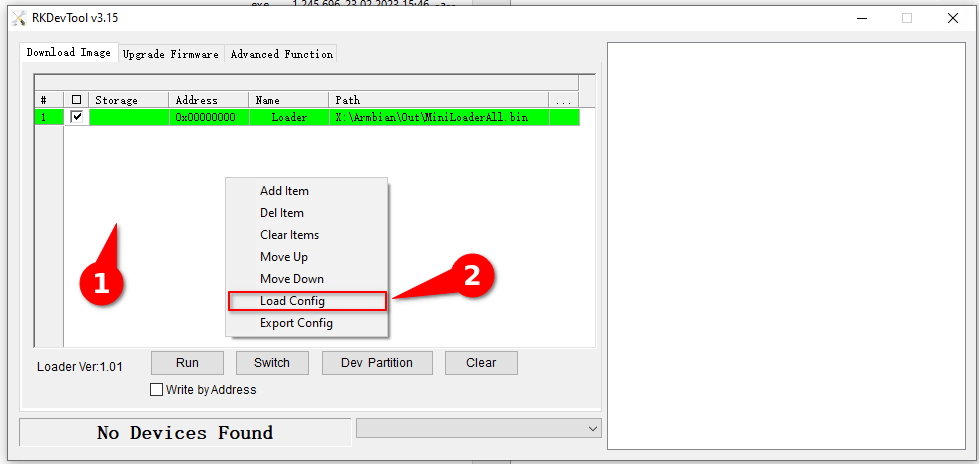
🏆 help to add other boards in armbian standart, you don't need to be a programmer to help the community, just need a copy of the ARM BOARD and a x86 computer to compile new versions. If you like what you see here and want to help: Donate Armbian, the like button only costs a few dollars. Armbian Needs you help! ####################### Just a Few clicks to help ################## This is an internal mmc trick 2-step image! You no longer need to solder an SD-card Reader like the creepy Release Version v0.5 BETA that i made. check before if your device has the regulator: fan53555 check before if your device has: tcs4525 check before if your device has: RK809-5 works with 4gb and 8gb devices How to use it: - install RKDevTool Drivers Rockchip - Use RkDevTool v2.86 - Drop Config.cfg the RkDevTool config file on folder Righ click on white background from RKDevTool click on Load Config Select the Config.cfg Step 1 Extract this file.xz with 7zip Extract this file.tar with 7zip Connect Your device: How? press the back button with a toothpick and connect male to male USB to you computer. Flash the Update Image on entire device as an Upgrade Firmware After Complete ! ! Disconect your device ! ! Step 2: Reconnect Your device: How? press the back button with a toothpick and connect male to male USB to you computer. Flash the GPT image inside the MMC GPT partition how: on RkDevTool v2.86 double click the number on table set Address on 0x00000000 set Name on gpt select the root file to flash on the "..." the dot right side of the table........ mark, Write by address after flash, it's done, use HDMI and USB to create user and password, regular armbian install... The Gpt file The Server 4gb Update image The Server 8gb Update image Yes, you can Skip Root flash. But you can drop the v0.7 Root.img file. Please Reflash GPT.img after new Root.img Debian 12 BookWorm Server Minimal ROOT ##################################### END ############################################## ############################### HOT TO CREATE IMAGES ##################################### if you wanna do all that creepy again with other devices and images, (please do it on other devices) and topic this is all you need to create this image, first step: Compile armbian on linux desktop dont forgot to do it with modified DTS file: in this case DTB + DTS Files for you to edit because you want to help the community any resemblance to this topic is mere adaptation Mount that image virtual device like /media/armbian_boot fdisk -l your-armbian-image-for-sd-card.img mount -o loop your-armbian-image-for-sd-card.img /media/armbian_boot if you can't "like WSL2" sudo apt-get install kpartx sudo kpartx -av your-armbian-image-for-sd-card.img sudo mount -o loop /dev/mapper/loop0p1 /media/armbian_boot Second Step: prepare an sd card or usb flash dummy , can be anithing with 6gb fdisk /dev/mmcblk1 N default default (lower this value to match the size of your root image) T 1 W third step: format that flash drive for ext4 mkfs.ext4 /dev/mmcblk1p1 fourth step: mount that clear partition and copy the entire virtual drive to the flash device mount /dev/mmcblk1p1 /mnt/ rsync -avx /media/armbian_boot/ /mnt/ fifth Step: Edit your uuid From Armbian Boot config "uuid for /dev/mmcblk1p1" blkid nano -w /mnt/boot/extlinux/extlinux.conf sync umount /mnt sixth step: make an hardware RAW.img from hardware flash drive with these parameters sudo dd if=/dev/mmcblk1p1 of=~/root.img bs=4096 status=progress PS: can be /dev/SDA" I do it on my h96max" so it's mmcblk1 If you want a GPT.img backup dd if=/dev/mmcblk1 of=gpt.img bs=16896 count=1 dd if=/dev/mmcblk1p1 of=gpt1.img bs=16896 count=1 dd if=/dev/mmcblk1p2 of=gpt2.img bs=16896 count=1 now you have an ROOT IMAGE MADE BY YOURSELF! Update.img CREATE the Update Image on linux with the rockchip software. Linux Pack Rockchip Firmware ./mkupdate.sh Uboot Legacy, Parameter.txt to create the Rockchip image this process generate two files: File1: Linux_Pack_Firmware/rockdev/Image/update.img File2: Linux_Pack_Firmware/rockdev/update.img I generally use the File2 to flash my device on upgrade Firmware RKDevTool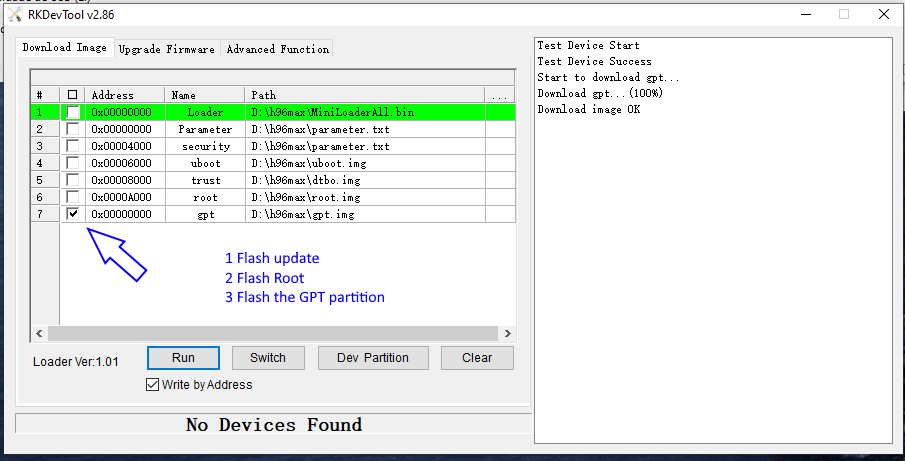
-
Efforts to develop firmware for H96 MAX V56 RK3566 4G/32G
Hqnicolas replied to Hqnicolas's topic in Rockchip CPU Boxes
same procedure for 2, 4, 8gb devices.... @Kenneth Hidalgo posted a Linaro6.2 distro kernel 4, and it works on my device. Since you both have this problem with my tutorial, i will test the tutorial on my device, downloading files from the links that i post, the .tar.xz file can be corrupt. how you extract the .tar.xz files? @ufsm UPDATE: TESTED AND WORKING 4gb/32gb device Please extract file.xz with 7zip Please extract file.tar with 7zip -
Efforts to develop firmware for H96 MAX V56 RK3566 4G/32G
Hqnicolas replied to Hqnicolas's topic in Rockchip CPU Boxes
If you like what you see here and want to help: Donate Armbian the like button only costs a few dollars. Armbian Needs you help! ######################### WHAT IS THIS? ######################### This is an SD-card image! to use it in an SD-Card You will need do solder an SD-card Reader. check before if your device has the regulator: fan53555 check before if your device has: tcs4525 check before if your device has: RK809-5 works with 4gb and 8gb devices ######################### HOW TO USE IT ######################### using the T95 Method flash the Wipe_part on Boot partition flash the Wipe_part on Recovery partition Connect the power cord... wait 1 second and in a fraction of second, connect the sd-Card on device..... if it doesn't boot, try again in a different timming 2 seconds after power. #################### SOLDERED READER EXAMPLE #################### ########################### END ########################### ######################### FIRST BOOT ######################### user: root password: 1234 This is default armbian for original debian 12 image ######################### WHAT IS THIS? ######################### Base image: Armbian-unofficial_25.02.0-trunk_H96-tvbox-3566_noble_current_6.12.11_cinnamon_desktop.img ✔️ H96 Max RK3566 4gb and 8gb ✔️ boot from SD-CARD Soldered ✔️ runs kernel 6.2 DESKTOP ✔️ Boot on Linux XFCE Ambian✔️ display video HDMi ✔️ detect internal MMC ✔️ Detect SD-CARD ✔️ Detect USB 2.0 port ✔️ Detect USB 3.0 port ✔️ ######################### HOW TO BUILD IT ######################### Runtime [ 6:05 min ] [✨] Repeat Build Options ./compile.sh build BOARD=h96-tvbox-3566 BRANCH=current BUILD_DESKTOP=yes BUILD_MINIMAL=no DESKTOP_APPGROUPS_SELECTED='browsers desktop_tools editors internet multimedia office programming remote_desktop' DESKTOP_ENVIRONMENT=cinnamon DESKTOP_ENVIRONMENT_CONFIG_NAME=config_base KERNEL_CONFIGURE=no RELEASE=noble ######################### HOW PUT IT ON MMC ######################### you can use it to make a v0.7 ROOT image. how? -
Efforts to develop firmware for H96 MAX V56 RK3566 4G/32G
Hqnicolas replied to Hqnicolas's topic in Rockchip CPU Boxes
with your example, I made a new edition in the v0.7 text, go back there and execute the new text edition. if it keep maskroom, i think you will need a TTL debug to find out whats wrong -
Efforts to develop firmware for H96 MAX V56 RK3566 4G/32G
Hqnicolas replied to Hqnicolas's topic in Rockchip CPU Boxes
Since v0.7ARMBIAN23 works for me. i will no long test new images, my device is on production stage. I will deliver some alternative root versions within the armbian spheres for you to use in v0.7 step 2. i discovered windows WSL2 + windows terminal + usbipd i'm compiling Linux: Debian 12 "Bookworm" will release it soon as a v0.5DEBIAN12 first "sd-card" and after test.... v0.7DEBIAN12 ROOT PARTITION with 2 trick steps. since kernel v4 to this device is deprecate i will start to free space on my google drive. Removed/deleted files: Ubuntu_20.04.5_K4.19.219_RK3566_H96_MAX_8GB_No_Video_OUT_WIFI_OK_PARTITIONING.tar Ubuntu_20.04.5_K4.19.219_RK3566_H96_MAX_4GB_No_Video_OUT_WIFI_OK_PARTITIONING.tar -
Efforts to develop firmware for H96 MAX V56 RK3566 4G/32G
Hqnicolas replied to Hqnicolas's topic in Rockchip CPU Boxes
Please confirm that you flash the first step with the "update.img" file... and disconect the device after flash.... when press the back button with a toothpick and reconnect the device H96 MAX V56 RK3566 need to be reconized. if it return maskrom even when press the back button with a toothpick and reconnect you will need to do the first step again.... -
Efforts to develop firmware for H96 MAX V56 RK3566 4G/32G
Hqnicolas replied to Hqnicolas's topic in Rockchip CPU Boxes
now you will need to unplug the device. press the back button with a toothpick and reconnect male to male USB to you computer, ...........Go to step 2