


Hqnicolas
-
Posts
692 -
Joined
-
Last visited
Content Type
Forums
Store
Crowdfunding
Applications
Events
Raffles
Community Map
Everything posted by Hqnicolas
-

Efforts to develop firmware for H96 MAX V56 RK3566 4G/32G
Hqnicolas replied to Hqnicolas's topic in Rockchip CPU Boxes
power the device on, and after just a second put the SD card on it...... -
Efforts to develop firmware for H96 MAX V56 RK3566 4G/32G
Hqnicolas replied to Hqnicolas's topic in Rockchip CPU Boxes
haaa... you droped my config.cfg file finally! on line root.... 0x0000A000 the last Row is "..." where you can select the img file just select the armbian root.img file that you downloaded on tutorial. select write by address and Run... -
Efforts to develop firmware for H96 MAX V56 RK3566 4G/32G
Hqnicolas replied to Hqnicolas's topic in Rockchip CPU Boxes
watch backup and restore videos for rockchip devices -
Efforts to develop firmware for H96 MAX V56 RK3566 4G/32G
Hqnicolas replied to Hqnicolas's topic in Rockchip CPU Boxes
After complete the first step.... disconect the device... push the bottom on the board.... and conect again... release the bottom. do the second step...... -
Efforts to develop firmware for H96 MAX V56 RK3566 4G/32G
Hqnicolas replied to Hqnicolas's topic in Rockchip CPU Boxes
rkdev automatically? where you read it? it will never happend... the table need to be edited by hand... Brow.... Just copy the Config.cfg that i posted here...... and drop it on the rkdev folder. it's an table that need to be edited by you.... You will need to edit manually Remove the checkbox from that lines that you have... Your 2 lines that you have is for RADXA DEVICE! Like i said before. did you ever use any office suite for editing tables? Just copy the Line number 8... -
Efforts to develop firmware for H96 MAX V56 RK3566 4G/32G
Hqnicolas replied to Hqnicolas's topic in Rockchip CPU Boxes
i will build an Storage on Cifis Samba connection over gigabit. CasaOS on other device will share the Cifis over web https on Nextcloud. 1x H96 Max v56 1x USB 3.0 HUB 4x USB3 to Sata3 4x HDD 1x Power Supply On Remote server Kernel6 to mount disks at Logon automatically: /etc/fstab //192.168.0.11/fotos /DATA/fotos cifs username=UsErNaMe,password=PASSWORD,iocharset=utf8,file_mode=0777,dir_mode=0777,x-systemd.automount,x-systemd.idle-timeout=60 //192.168.0.11/arquivos /DATA/arquivos cifs username=UsErNaMe,password=PASSWORD,iocharset=utf8,file_mode=0777,dir_mode=0777,x-systemd.automount,x-systemd.idle-timeout=60 On Remote server Kernel5 to mount disks at Logon automatically: /etc/fstab x-systemd.automount,x-systemd.idle-timeout=1min //192.168.0.11/fotos /DATA/fotos cifs username=UsErNaMe,password=DONTWEAKPASSWORD,iocharset=utf8,file_mode=0777,dir_mode=0777 //192.168.0.11/arquivos /DATA/arquivos cifs username=UsErNaMe,password=DONTWEAKPASSWORD,iocharset=utf8,file_mode=0777,dir_mode=0777 -
Efforts to develop firmware for H96 MAX V56 RK3566 4G/32G
Hqnicolas replied to Hqnicolas's topic in Rockchip CPU Boxes
uncheck both checkboxes.... by left click them.... righ click on table... create new line. set address by double click it and typing... set name by double click it and typing... it´s an tabble. like office.... or you can simply drop this file on RKdev folder and start the program... config.cfg -
Efforts to develop firmware for H96 MAX V56 RK3566 4G/32G
Hqnicolas replied to Hqnicolas's topic in Rockchip CPU Boxes
@Kenneth Hidalgo after setup your device user and password, please upload armbian debug. sudo armbianmonitor -u send link to this forum thread -
Efforts to develop firmware for H96 MAX V56 RK3566 4G/32G
Hqnicolas replied to Hqnicolas's topic in Rockchip CPU Boxes
you probably downloaded this RKdev from a RADXA forum.... i see this SPL flash before. Just edit it like an Table, righ click left click and let it like the attach file you will need to get the partitions config from device... "Dev Partition" button config.cfg -
Efforts to develop firmware for H96 MAX V56 RK3566 4G/32G
Hqnicolas replied to Hqnicolas's topic in Rockchip CPU Boxes
Drop it on folder config.ini -
Efforts to develop firmware for H96 MAX V56 RK3566 4G/32G
Hqnicolas replied to Hqnicolas's topic in Rockchip CPU Boxes
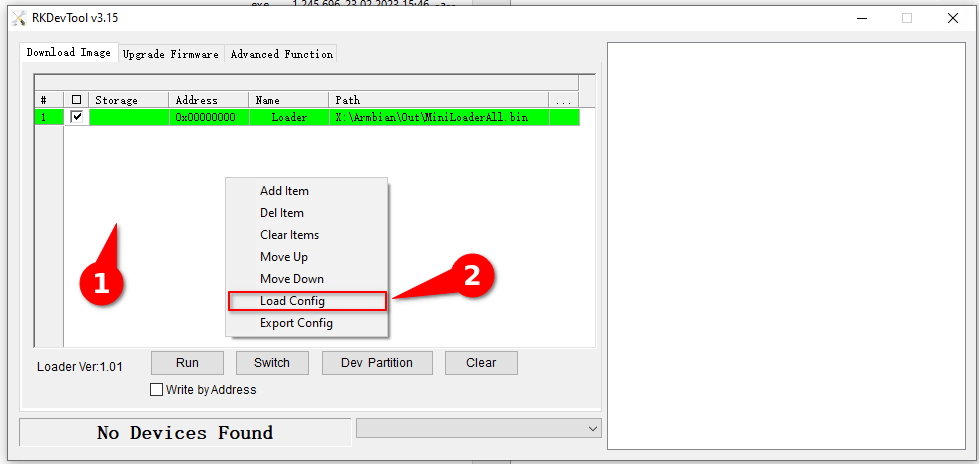
dear friends that buy cheap 42U$ tv boxes on chinese scam sites! rk3566 h96MAX ARMBIAN23 kernel6 MMC image it's done. 🏆 help to add other boards in armbian standart, you don't need to be a programmer to help the community, just need a copy of the ARM BOARD and a x86 computer to compile new versions. This is an internal mmc trick 2-step image! You no longer need to solder an SD-card Reader like the creepy Release Version v0.5 BETA that i made. check before if your device has the regulator: fan53555 check before if your device has: tcs4525 check before if your device has: RK809-5 works with 4gb and 8gb devices How to use it: - install RKDevTool Drivers Rockchip - Use RkDevTool v2.86 - Drop Config.cfg the RkDevTool config file on folder Righ click on white background from RKDevTool click on Load Config Select the Config.cfg Step 1: Extract this file.xz with 7zip Extract this file.tar with 7zip Connect Your device: How? press the back button with a toothpick and connect male to male USB to you computer. Flash the Update Image on entire device as an Upgrade Firmware After Complete ! ! Disconect your device ! ! and because I'm lazy and I don't want to work on that damn FIT image anymore. You will need to do a second step: Step 2: Reconnect Your device: How? press the back button with a toothpick and connect male to male USB to you computer. Flash the armbian extracted GPT image inside the MMC gpt partition how: on RkDevTool v2.86 double click the number on table set Address on 0x00000000 set Name on gpt select the root file to flash on the "..." the dot right side of the table........ mark, Write by address after flash, it's done, use HDMI and USB to create user and password, regular armbian install... The Gpt file The Server 4gb Update image The Server 8gb Update image Yes, you can Skip Root flash. But you can drop the v0.7 Root.img file. Please Reflash GPT.img after new Root.img Two Root v0.7 Files: Debian 12 BookWorm Server Minimal ROOT Debian 12 BookWorm Desktop Gnome ROOT Armbian_23.11.0-trunk_Station-m2_jammy_edge_6.2.16_Server_Minimal.img ✔️ Boot from internal MMC ✔️ Runs kernel 6.2 Server ✔️ display video HDMi ✔️ detect internal MMC ✔️ Detect SD-CARD ✔️ Detect USB 2.0 port ✖️ (no USB2.0 on Server Images) Detect USB 3.0 port ✔️ (use a cheap usb hub 3.0) ##################################### END ############################################## ############################### HOT TO CREATE IMAGES ###################################### if you wanna do all that creepy again with other devices and images, (please do it on other devices) and topic this is all you need to create this image, first step: Compile armbian on linux desktop dont forgot to do it with modified DTS file: in this case DTB + DTS Files for you to edit because you want to help the community any resemblance to this topic is mere adaptation Mount that image virtual device like /media/armbian_boot fdisk -l your-armbian-image-for-sd-card.img mount -o loop your-armbian-image-for-sd-card.img /media/armbian_boot if you can't "like WSL2" sudo apt-get install kpartx sudo kpartx -av your-armbian-image-for-sd-card.img sudo mount -o loop /dev/mapper/loop0p1 /media/armbian_boot Second Step: prepare an sd card or usb flash dummy , can be anithing with 6gb fdisk /dev/mmcblk1 N default default (lower this value to match the size of your root image) T 1 W third step: format that flash drive for ext4 mkfs.ext4 /dev/mmcblk1p1 fourth step: mount that clear partition and copy the entire virtual drive to the flash device mount /dev/mmcblk1p1 /mnt rsync -avx --timeout=10 /media/armbian_boot/ /mnt/ fifth Step: Edit your uuid From Armbian Boot config "uuid for /dev/mmcblk1p1" blkid nano -w /mnt/boot/extlinux/extlinux.conf sync umount /mnt sixth step: make an hardware RAW.img from hardware flash drive with these parameters sudo dd if=/dev/mmcblk1p1 of=~/root.img bs=4096 status=progress PS: can be /dev/SDA" I do it on my h96max" so it's mmcblk1 now you have an ROOT IMAGE MADE BY YOURSELF! Update.img CREATE the Update Image on linux with the rockchip software. Linux Pack Rockchip Firmware ./mkupdate.sh Uboot Legacy, Parameter.txt to create the Rockchip image this process generate two files: File1: Linux_Pack_Firmware/rockdev/Image/update.img File2: Linux_Pack_Firmware/rockdev/update.img I generally use the File2 to flash my device on upgrade Firmware RKDevTool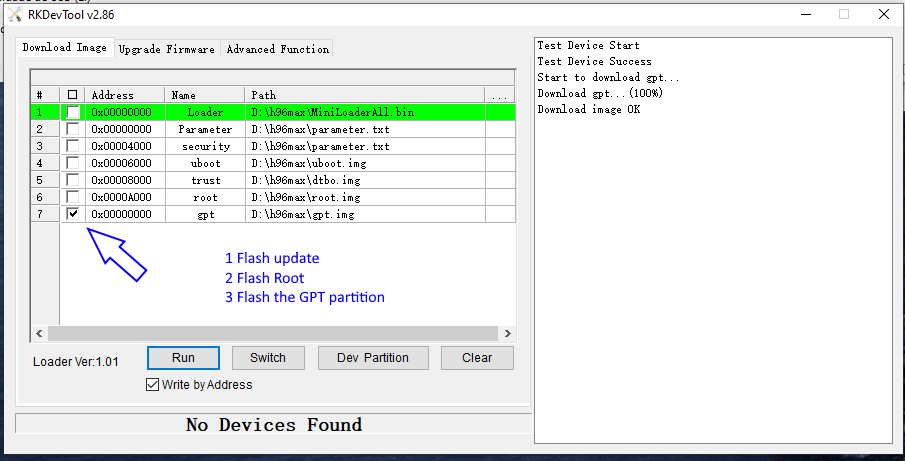
-
Efforts to develop firmware for H96 MAX V56 RK3566 4G/32G
Hqnicolas replied to Hqnicolas's topic in Rockchip CPU Boxes
this image probably from Rockchip it's encrypted with sha256 and use an old kernel can be good to work nativelly baremetal with RKnpu and GPU but i'm looking for something more docker side of things kernel 6.2 is runing amazing, i'm searching for a way to make an image for flash mmc i can create an image with Linux_Pack_Firmware My image looks like this: /dev/mmcblk1p3: PARTLABEL="trust" PARTUUID="xxx" /dev/mmcblk1p1: PARTLABEL="security" PARTUUID="xxx" /dev/mmcblk1p4: PARTLABEL="baseparameter" PARTUUID="xxx" /dev/mmcblk1p2: PARTLABEL="uboot" PARTUUID="xxx" /dev/mmcblk1p5: PTUUID="xxxx" PTTYPE="gpt" PARTLABEL="root" PARTUUID="xxx" and its reporting on ttl: Scanning mmc 0:4... Failed to iterate over directory extlinux Failed to iterate over directory boot.scr.uimg Failed to iterate over directory boot.scr Failed to iterate over directory boot Failed to iterate over directory boot Failed to iterate over directory boot ## Error: "mtd_boot" not defined ## Error: "mtd_boot" not defined ## Error: "mtd_boot" not defined But i need to change it to something like this to boot from MMC: /dev/mmcblk1p4: UUID="xxx" BLOCK_SIZE="4096" TYPE="ext4" PARTUUID="xxx" /dev/mmcblk1p3: PARTLABEL="trust" PARTUUID="xxx" /dev/mmcblk1p1: PARTLABEL="security" PARTUUID="xxx" /dev/mmcblk1p2: PARTLABEL="uboot" PARTUUID="xxx" and it need to do something like this: Scanning mmc 1:1... Found /boot/extlinux/extlinux.conf Retrieving file: /boot/extlinux/extlinux.conf 320 bytes read in 21 ms (14.6 KiB/s) 1: Armbian Retrieving file: /boot/uInitrd 33353896 bytes read in 2805 ms (11.3 MiB/s) Retrieving file: /boot/Image 27853312 bytes read in 2340 ms (11.4 MiB/s) if i boot from SD card and change it i'ts working, booting from MMC but i'm trying to make a image to share here and use as backup/repair -
Efforts to develop firmware for H96 MAX V56 RK3566 4G/32G
Hqnicolas replied to Hqnicolas's topic in Rockchip CPU Boxes
Linux version 4.19.193 (qmx_srv@qmxsrv-MS-7C09) (gcc version 6.3.1 20170404 (Linaro GCC 6.3-2017.05), GNU ld (Linaro_Binutils-2017.05) 2.27.0.20161019) #24 SMP Thu Mar 2 10:16:53 CST 2023 Machine model: Rockchip RK3566 EVB3 DDR3 V10 Board can't unpack the image on windows.... can't unpack the image on linux... sha256...... let's try DD it to an SD card on device MMC struct BLKid: Let's try dtbview.exe "from Renate Teamblast" C:\>dtbview dtbo.img > big.txt Result DTB: Boot TTL LOG big.txt -
Efforts to develop firmware for H96 MAX V56 RK3566 4G/32G
Hqnicolas replied to Hqnicolas's topic in Rockchip CPU Boxes
Please change permissions for "everyone with link" -
Efforts to develop firmware for H96 MAX V56 RK3566 4G/32G
Hqnicolas replied to Hqnicolas's topic in Rockchip CPU Boxes
Please .tar.xz it first -
Efforts to develop firmware for H96 MAX V56 RK3566 4G/32G
Hqnicolas replied to Hqnicolas's topic in Rockchip CPU Boxes
Please edit action expired.... -
Efforts to develop firmware for H96 MAX V56 RK3566 4G/32G
Hqnicolas replied to Hqnicolas's topic in Rockchip CPU Boxes
### Partition " / " resized to FULL DISK ### $ df -h sudo resize2fs /dev/mmcblk1p4 $ df -h -
Efforts to develop firmware for H96 MAX V56 RK3566 4G/32G
Hqnicolas replied to Hqnicolas's topic in Rockchip CPU Boxes
how to DUMP from mmcblk1 Device Start End Sectors Size Type /dev/mmcblk1p1 8192 16383 8192 4M unknown /dev/mmcblk1p2 16384 24575 8192 4M unknown /dev/mmcblk1p3 24576 32767 8192 4M unknown /dev/mmcblk1p4 32768 61071326 61038559 29.1G EFI System install the android original image on MMC flash the Wipe_part on Boot partition flash the Wipe_part on Recovery partition and connect the ssd on soldered reader With armbian h96max v0.5 sudo dd if=/dev/mmcblk1 of=~/sd-card-copy.img bs=1M status=progress Your SD-card need to be 64gb to dump 32gb mmc -
Efforts to develop firmware for H96 MAX V56 RK3566 4G/32G
Hqnicolas replied to Hqnicolas's topic in Rockchip CPU Boxes
what needs to be done? need to put an sd card image inside the internal mmc because originally this board does not have SD card reader the only way i know of to do this is the old and fashion @thc013 method for FIT images.... instead of building the entire kernel on it, we just do a comand ./build.sh updateimg This comand will create a rockchip image with the android files that you extrated previously or the linux 4.19 that we compile in 2022.... all files need to be inside " /rockdev " folder Add file: ./package-file Add file: ./package-file done,offset=0x800,size=0x28b,userspace=0x1 Add file: ./Image/MiniLoaderAll.bin Add file: ./Image/MiniLoaderAll.bin done,offset=0x1000,size=0x701c0,userspace=0xe1 Add file: ./Image/parameter.txt Add file: ./Image/parameter.txt done,offset=0x71800,size=0x1f4,userspace=0x1 Add file: ./Image/uboot.img Add file: ./Image/uboot.img done,offset=0x72000,size=0x400000,userspace=0x800 Add file: ./Image/misc.img Add file: ./Image/misc.img done,offset=0x472000,size=0xc000,userspace=0x18 Add file: ./Image/boot.img BUILD CUSTOM SDK - shaggy013 - 02-14-2022 -
Efforts to develop firmware for H96 MAX V56 RK3566 4G/32G
Hqnicolas replied to Hqnicolas's topic in Rockchip CPU Boxes
If you like what you see here and want to help: Donate Armbian the like button only costs a few dollars. Armbian Needs you help! ####################### WHAT IS THIS? ####################### This is an SD-card image! to use it in an SD-Card You will need do solder an SD-card Reader. check before if your device has the regulator: fan53555 check before if your device has: tcs4525 check before if your device has: RK809-5 works with 4gb and 8gb devices ####################### HOW TO BUILD IT! ####################### https://docs.armbian.com/Developer-Guide_Build-Preparation/ Runtime [ 6:05 min ] [✨] Repeat Build Options ./compile.sh build BOARD=h96-tvbox-3566 BRANCH=current BUILD_DESKTOP=yes BUILD_MINIMAL=no DESKTOP_APPGROUPS_SELECTED='browsers desktop_tools editors internet multimedia office programming remote_desktop' DESKTOP_ENVIRONMENT=cinnamon DESKTOP_ENVIRONMENT_CONFIG_NAME=config_base KERNEL_CONFIGURE=no RELEASE=noble ####################### HOW TO USE IT ####################### using the T95 Method flash the Wipe_part on Boot partition flash the Wipe_part on Recovery partition Connect the power cord... wait 1 second and in a fraction of second, connect the sd-Card on device..... if it doesn't boot, try again in a different timming 2 seconds after power. ####################### SOLDERED READER EXAMPLE ####################### #######################WHAT IS THIS? ####################### Base image: Armbian-unofficial_25.02.0-trunk_H96-tvbox-3566_noble_current_6.12.11_cinnamon_desktop.img ✔️ H96 Max RK3566 4gb and 8gb ✔️ boot from SD-CARD Soldered ✔️ runs kernel 6.2 DESKTOP ✔️ Boot on Linux XFCE Ambian✔️ display video HDMi ✔️ detect internal MMC ✔️ Detect SD-CARD ✔️ Detect USB 2.0 port ✔️ Detect USB 3.0 port ✔️ ####################### HOW PUT IT ON MMC ####################### you can use it to make a v0.7 ROOT image. how? -
Efforts to develop firmware for H96 MAX V56 RK3566 4G/32G
Hqnicolas replied to Hqnicolas's topic in Rockchip CPU Boxes
I'm understanding why this image is falling in Initramfs On my last build kernel4.19 i use to boot into the internal MMC Now the Armbian_23.08.0-trunk_Station-m2_jammy_edge_6.2.16_xfce_desktop.img trying to tank with and the kernel 6 read an internal value for console from file -
Efforts to develop firmware for H96 MAX V56 RK3566 4G/32G
Hqnicolas replied to Hqnicolas's topic in Rockchip CPU Boxes
Fixed USB3.0 port Boot on Linux ✖️ Detect USB 2.0 port ✖️ Full dump: rk3566-firefly-roc-pc.dtb rk3566-firefly-roc-pc.dts -
Efforts to develop firmware for H96 MAX V56 RK3566 4G/32G
Hqnicolas replied to Hqnicolas's topic in Rockchip CPU Boxes
need to patch USB.... no USB ports... Base image: Armbian_23.08.0-trunk_Station-m2_jammy_edge_6.2.16_xfce_desktop.img ✔️ Detect SD-CARD ✖️ Detect USB ✖️ Need to fix: rk3566-firefly-roc-pc.dtb rk3566-firefly-roc-pc.dts -
Efforts to develop firmware for H96 MAX V56 RK3566 4G/32G
Hqnicolas replied to Hqnicolas's topic in Rockchip CPU Boxes
I'm using the firefly-roc-pc board as a base as indicated by @maka Base image: Armbian_23.08.0-trunk_Station-m2_jammy_edge_6.2.16_xfce_desktop.img H96 Max RK3566 4gb 32gb boot from SD-CARD Soldered ✔️ linux regular boot ✖️ it shows initframfs "can be USB bad assign for sd-card" serial ttl summary: rk3566-firefly-roc-pc.dts rk3566-firefly-roc-pc.dtb -
Efforts to develop firmware for H96 MAX V56 RK3566 4G/32G
Hqnicolas replied to Hqnicolas's topic in Rockchip CPU Boxes
Lets Start with an example: Leds: On H96 MAX Android 12 DTS we have: and on Linux Rockchip: So we can do an Linux H96 MAX compatible: and let's pray that the linux gods give us strength to run this translation on all devices...........