robertoj
Members
-
Joined
-
Last visited
Everything posted by robertoj
-
-
I keep trying to make my ili9488 SPI LCD with Linux 6.12, from the image in NickA's github... with no success so far Now I have a strong feeling that it is the gpiochip configuration, since I make this test in Linux 6.11 which works with my LCD With Linux 6.11, the device is gpiochip0 With Linux 6.12, the device is gpiochip1 With Linux 6.11, the GPIO lines for reset and command, and the SPI pins, are shown as connected to a function: But with Linux 6.12 (from NickA's github): I had a pending task to check that all the patches for SPI are included in my build... so I check the source code: armbian-nickA-20250306/build/patch/kernel/archive/sunxi-6.12/series.conf And I see that very few patches that are excluded... none of them relate to SPI... I don't know how to make the SPI work in Linux 6.12 as well as it does in Linux 6.12 Am i doing this right? UPDATE: I tried the same DTS, as shown in https://forum.armbian.com/topic/47971-driving-the-ili9488-lcd-40-inch-cheap-chinese-clone/#findComment-208446 with TheGoing build system in his github https://github.com/The-going/armbian-build/tree/main-sunxi-6.12 ... and I still see the SPI pins PH6,7,8 as unclaimed Is anyone able to use the H618 SPI pins in Linux 6.12.x? UPDATE: in this thread, people discuss the gpiochip0 vs gpiochip1 as a sign that the driver is not "occupying" the GPIO, and a DTS change may be needed https://forum.armbian.com/topic/49331-nanopi-neo2-v11-how-to-control-otg-port-power-with-gpio-354/#findComment-210992
-
-
-
-
Going, I see that you worked on some SPI patches previously ... have you tested SPI in opiz3, under Linux 6.12? I found that the raspberry pi people are using panel-mipi-dbi-spi successfully under 6.12 https://forums.raspberrypi.com/viewtopic.php?p=2290196&hilit=panel+mipi+dbi+spi+6.12#p2290196
-
Process of using a kernel config from a file Copy the config file from /boot folder to build/userpatches Then rename: $ mv config-6.11.9-edge-sunxi64 linux-sunxi64-edge.config cd .. ./compile.sh I get this compilation error: It seems that a wifi driver is in 2 folders... I will see which kernel driver I should remove ...first trying removing mfd/ac200 I don't know if has improved anythig... but I see these new build errors:
-
-
-
Can somebody with an orangepi zero 3 try my dts? It seems that either the patches in NickA's codebase make it incompatible, or linux 6.12 changed the DTS. https://forum.armbian.com/topic/47971-driving-the-ili9488-lcd-40-inch-cheap-chinese-clone/#findComment-208446 ili9488-ads7846.dts: I am able to do #armbian-add-overlay ili9488-ads7846.dts normally with armbian official and linux 6.11 But with this github's armbian build, I get in uboot: Applying user provided DT overlay ili9488-ads7846.dtbo failed on fdt_overlay_apply(): FDT_ERR_NOTFOUND base fdt does not have a /__symbols__ node make sure you've compiled with -@ Error applying DT overlays, restoring original DT Hmm, I found that my armbian build didn't create a /boot/dtb/allwinner/overlay/ folder I copied the "overlay" folder, from my working armbian microsd, with linux 6.11, to this linux 6.12 microsd... I still get the same error: can't use my dtbo (I needed to make my own build, because I need to activate panel-drm-dbi.ko)
-
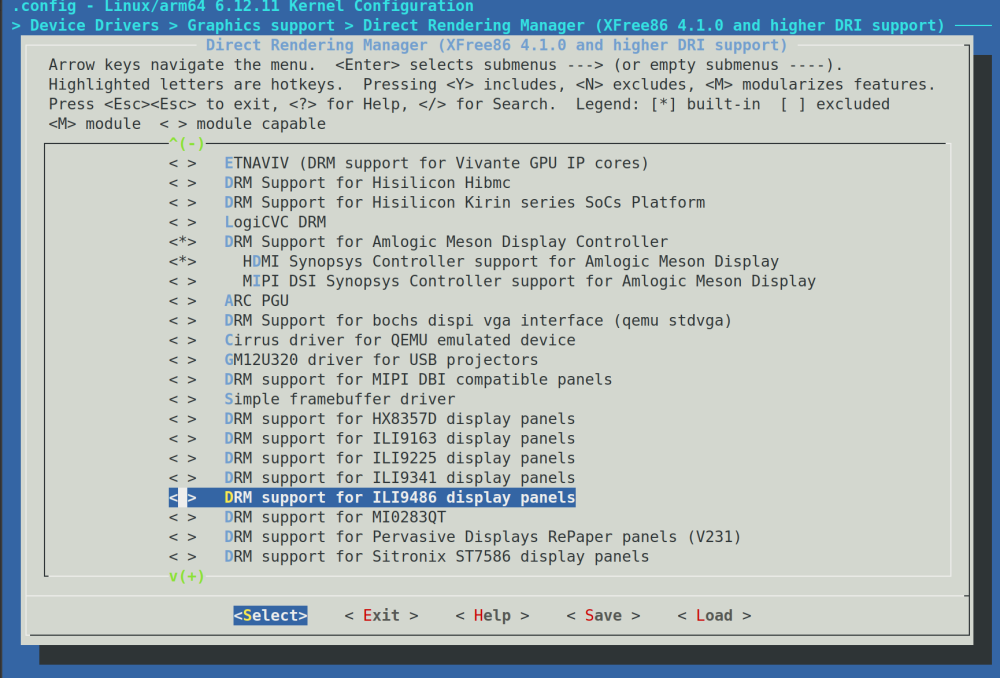
i dont know if this is new, but i see a ili9486 driver in the kernel config, which is unselected by default. Warning.... I just looked at some of the code in the linux mailing list discussion, and it looks like it is made specifically for 2 raspberry LCD hats * PISCREEN 3.5" 320x480 TFT (Ozzmaker 3.5") * RPILCD 3.5" 320x480 TFT (Waveshare 3.5") Which have a SPI->parallel chip on the circuitboard https://patchwork.kernel.org/project/dri-devel/patch/eb5672abbdb89d7018793c76d7193bfb78a2ea88.1580059987.git.kamlesh.gurudasani@gmail.com/ WDR_s: are you still having good experience with the ili9341 driver for the ili9486 LCD?
-
-
-
-
-
When the driver is configured correctly for the orange pi zero 3, everything will look correct from inside the operating system and the SPI port will be clocking out bits. But the LCD is a one-way communication device. The orange pi zero 3 will never know something has failed The ILI9486 LCD's default byte ordering, color format, etc, may be different from the ILI9488. You should find one example of ILI9486 running in raspberry pi, arduino, etc and find the initial byte command sequence. See how it differs from the KungFuPancake's txt file. Make changes to the txt file one by one line, toward being closer to the ili9486 byte sequence you find elsewhere. If you are starting with a DTS that uses the "ilitek,ilixxxx" driver, and change it to "mipi-dbi-spi", remember to change the RESET pin definition (see my other ILI9431 thread for explanation)
-
Those LCD parameters where you found differences are: PGAMCTRL (Positive Gamma Control) (E0h) NGAMCTRL (Negative Gamma Control) (E1h) (See the ILI9488 PDF I posted) I don't know what they do exactly, but I guess they control pixel voltage, given a R, G or B digital value. I think that you can worry about it, after everything else works.
-
-
-
I just looked at your neofetch screenshot again... linux 6.6.72. Armbian community 25.5.0-trunk.87... I am surprised that H264 hardware acceleration is working But I noticed you are running Wayland and Gnome... is that how it works from the desktop-armbian image? Or did you install it later? (I hope I can start with a minimal image, and install all that's needed for wayland+labwc in my SPI LCD <- aiming for minimal ram use and lowest load time)
-
Yes, you must use that panel-mipi-dbi-spi.txt, process it with the python script, copy it to the right folder, and use the DTS I shared last. I havent seen another command byte sequence for ili9488. Can you post the link to the download (to make sure I will see the same thing). Can you make a hypothetical byte sequence from the LCDWIKI_SPI.cpp?
-
Try it with the ili9486 and ili9488 DTS we have made here: https://forum.armbian.com/topic/46824-orange-pi-zero-3-ili9486-tft-lcd/ https://forum.armbian.com/topic/47971-driving-the-ili9488-lcd-40-inch-cheap-chinese-clone/ For the gpio inside the DTS, it is only enough to know the port letter and pin number (you don't need the GPIO number and WPI)
-
I had time to test xrandr with my ili9488 and mipi-dbi-spi while the LCD is showing X11+lightdm+openbox, I logged in via SSH and typed: roberto@orangepizero3:~$ DISPLAY=:0.0 xrandr -q xrandr: Failed to get size of gamma for output default Screen 0: minimum 480 x 320, current 480 x 320, maximum 480 x 320 default connected 480x320+0+0 0mm x 0mm 480x320 0.00* roberto@orangepizero3:~$ DISPLAY=:0.0 xrandr --output default --rotate left xrandr: output default cannot use rotation "left" reflection "none" So, I can't rotate the LCD display with xrandr, and the only option is the 2 actions I shared on March 4 Note: the 4 rotate options are normal, right, left and inverted. None of them worked
-
I have the ili9488 working in orange pi zero 3 with my DTS in https://forum.armbian.com/topic/47971-driving-the-ili9488-lcd-40-inch-cheap-chinese-clone/#findComment-208446 and the panel-mipi-dbi-spi.txt from https://github.com/KungfuPancake/v0_ips_touch_display?tab=readme-ov-file My DTS file uses the new panel-mipi-dbi-spi driver, which is not fbtft, it is tinydrm. Kernel 6.12, built from https://github.com/NickAlilovic/build I can use X11 completely fine, but I havent tried wayland and h264 acceleration yet. Can you try it? The only problems I see: Cursor has some "jumpiness" when pressing the touch panel (ads7846). Graphic pixel noise appears when I am dragging an X11 window with finger. But it returns to normal after the dragging event. (doesn't happen when I drag with USB mouse). I think the noise won't happen if I can make a separate soft-SPI for the touch function. Has anybody tried xrandr? I learned to use it in my laptop, but I don't have my orange pi zero 3 available. Can anyone try: $ xrandr --output SPI-1 --rotate left Then replace left with: inverted, right and normal This should take care of the touch at the same time, but someone needs to try it.
-
I found that you can rotate the ili9488 display 180 degrees, by changing the LCD initialization command in panel-mipi-dbi-spi.txt: Change: command 0x36 0xE0 To: command 0x36 0x20 (changes memory access control row and column order from: starting from the corner near the VCC pin, to starting from the corner opposite from the VCC pin) Then, open /usr/share/X11/xorg.conf.d/99-calibration, and add: Option "InvertX" "1" Option "InvertY" "1" Reference: https://focuslcds.com/wp-content/uploads/Drivers/ILI9488.pdf https://forums.raspberrypi.com/viewtopic.php?t=173993 I hope it helps someone, or to myself in the future