
robertoj
-
Posts
612 -
Joined
-
Last visited
Content Type
Forums
Store
Crowdfunding
Applications
Events
Raffles
Community Map
Everything posted by robertoj
-
THANK YOU. I will try this tonight
-
Thank you... I already got the help that I personally needed to get my work project rolling again I want to learn how to make a DTS, compile it into a DTBO and make a Pull Request I agree that GPIOD is less capable than MRAA. I may have the time to learn how to make it work.
-
roberto@orangepizero3:~$ sudo cat /sys/kernel/debug/gpio gpiochip0: GPIOs 0-287, parent: platform/300b000.pinctrl, 300b000.pinctrl: gpio-76 ( |red:status ) out hi gpio-77 ( |green:power ) out hi gpio-80 ( |regulator-usb1-vbus ) out hi gpio-166 ( |cd ) in lo ACTIVE LOW gpio-210 ( |reset ) out hi ACTIVE LOW gpiochip1: GPIOs 352-383, parent: platform/7022000.pinctrl, 7022000.pinctrl: Attaching DTB from /boot/dtb/allwinner/sun50i-h618-orangepi-zero3.dtb in rolling armbian release. I dont know whether there are any armbian patches toward the GPIO, but this is the folder with armbian patches for orangepi zero 3 https://github.com/armbian/build/tree/main/patch/kernel/archive/sunxi-6.7/patches.armbian sun50i-h618-orangepi-zero3.dtb
-
-
What should I do in my orangepi zero 3, so that the result of "gpioinfo " is "line 229: "PH5...", and just show the usable lines (as shown in https://git.kernel.org/pub/scm/libs/libgpiod/libgpiod.git/about/ ) What I get now is: "line 0: unnamed... (288 lines)" (as shown in https://forum.armbian.com/topic/29202-orange-pi-zero-3/?do=findComment&comment=181015) Is this the way to do it? https://stackoverflow.com/questions/60100907/gpiod-use-labels-in-devicetree
-
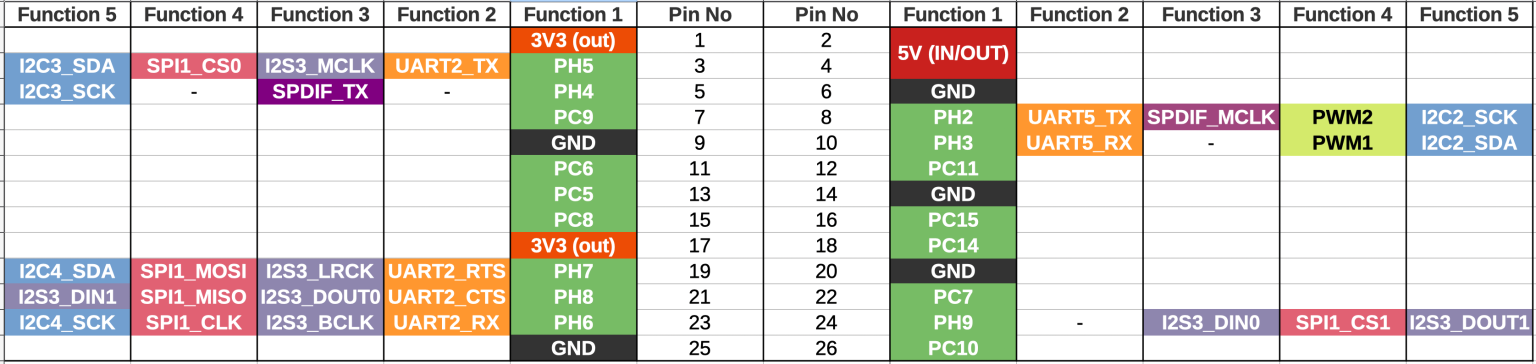
gpio-sysfs is deprecated and gpiod is one of the replacements https://git.kernel.org/pub/scm/libs/libgpiod/libgpiod.git/about/ What would be needed to have my orangepi zero 3 show this? VVV This is NOT what I get. This is what I want to get VVV $ gpioinfo gpiochip0 - 27 lines: line 229: "PH5/I2C3_SDA" input line 228: "PH4/I2C3_SCK" input line 73 "PC9" input line 226 "PH2/UART5_TX" output line 227 "PH3/UART5_RX" input line 70 "PC6" input line 75 "PC11" input line 69 "PC5" input line 72 "PC8" input line 79 "PC15" input line 78 "PC14" input line 231 "PH7,SPI1_MOSI" input line 232 "PH8,SPI1_MISO" input line 71 "PC7" input line 230 "PH6,SPI1_CLK" input line 233 "PH9,SPI1_CS" input line 74 "PC10" input line 234 "PH10/UART6_TX" input line 235 "PH11/UART6_RX" input line 236 "PH12/I2C4_SDA" input line 237 "PH13/I2C4_SCK" input line 238 "PH14/SPI2_MOSI" input line 239 "PH15/SPI2_MISO" input line 240 "PH16/SPI2_CLK" input line 241 "PH17/SPI2_CS" input line 242 "PH18/UART7_TX" input line 243 "PH19/UART7_RX" input
-
Can you check WiFi, Bluetooth and HDMI?
-
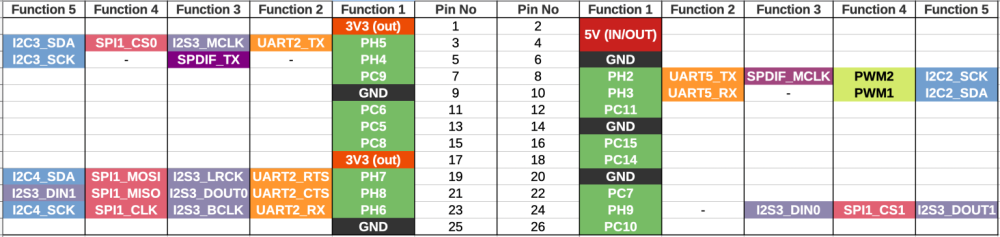
Ok. I got one output pin to work. 😀 This is how to do it in OrangePi Zero 3, pin 8 PH2: In Bash as root: # addgroup --system gpio # chown root:gpio /dev/gpiochip0 # chmod 660 /dev/gpiochip0 # nano /etc/udev/rules.d/61-gpio-tools.rules {add line SUBSYSTEM=="gpio",KERNEL=="gpiochip*", GROUP="gpio", MODE="0660"} # usermod -a -G gpio myusername # apt install python3-dev # reboot In a new folder for your Python script, as normal user: $ python3 -m venv .venv $ source .venv/bin/activate $ pip install gpiod Create script (example in https://pypi.org/project/gpiod/ with one fix): $ nano blink_pin.py import time import gpiod #needed in example from gpiod.line import Direction, Value #Calculating PH2 "line" number #H=8 #2=2 #line=(8-1)x32+2=226 #also shown in https://github.com/rm-hull/OPi.GPIO/issues/79 LINE = 226 with gpiod.request_lines( "/dev/gpiochip0", consumer="blink-example", config={ LINE: gpiod.LineSettings( direction=Direction.OUTPUT, output_value=Value.ACTIVE ) }, ) as request: while True: request.set_value(LINE, Value.ACTIVE) time.sleep(1) request.set_value(LINE, Value.INACTIVE) time.sleep(1) Run script: $ python3 blink_pin.py When done working with your project: $ deactivate Pin 8 PH2 turns ON and OFF 😄 I haven't tested the other pins yet
-
That gpiod sounds very promising, and easy to use with https://pypi.org/project/gpiod/ I need to wait until I get back home to work on my opiz3
-
References for trying tomorrow: https://wiki.radxa.com/Mraa https://wiki.radxa.com/RockpiE/dev/libmraa https://www.okdo.com/project/how-to-install-mraa-library-on-the-rock-4c/ https://www.ics.com/blog/getting-started-mraa-raspberry-pi Has anyone used mraa in rockpi+armbian? Old discussion about alternatives to mraa https://forum.armbian.com/topic/12285-providing-mraa-as-common-gpio-library-as-a-replacement-for-wiringpi/
-
Thank you Gunjan... I hope i have the skill (or time to develop the skill) to add support for opiz3 In the older thread, I was told that /sys/class/gpio won't work anymore... well, it is very true: https://forum.armbian.com/topic/29202-orange-pi-zero-3/?do=findComment&comment=180975 https://www.thegoodpenguin.co.uk/blog/stop-using-sys-class-gpio-its-deprecated/ So, any methods and libraries that depend on sys/class/gpio, like opi.gpio, JUST WONT WORK
-
Thank you... I was just making a new thread about this topic... hopefully someone will give me a solution soon
-
Yesterday, I tried to use the digital IO in my opi zero3, with the Python GPIO package from https://opi-gpio.readthedocs.io/en/latest/ by Richard Hull It depends on having sysfs files in /sys/class/gpio/ My original opi zero has these files and it works, but my opi zero3 doesn’t have these files I learned that /sys/class/gpio is created if the linux kernel is configured with a specific option ON, as suggested in the documentation: https://github.com/rm-hull/OPi.GPIO https://linux-sunxi.org/GPIO Also, a developer has made a change on the opi.GPIO project to support opi zero3 https://github.com/rm-hull/OPi.GPIO/issues/79 I will have time to try this tomorrow... but I want to ask: is anyone using GPIO in its most basic way? As reference: I saw this older thread about zero3's GPIO... https://forum.armbian.com/topic/31493-how-to-enable-i2c3-on-orange-pi-zero-3/ It is using leebobby's "armbian" image, with raspi-config, and wiringpi Using my original opi-zero, I never needed to use armbian-config to enable basic gpio and the python opi.gpio just worked as documented Note: the opi.gpio only claims to support basic gpio, not i2c. Update: these are interesting potential solutions and discussions (but they are all from before there was armbian for opiz3) https://www.reddit.com/r/OrangePI/comments/16vfa4g/orange_pi_zero_3_gpio_python_library/ https://github.com/eutim/OPI.GPIO https://www.reddit.com/r/OrangePI/comments/16ioyri/gpio_python_library_for_orange_pi_zero_3/ https://www.reddit.com/r/OrangePI/comments/18iveo3/how_to_control_gpio_pins_in_android_orange_pi/
-
I tried the latest rolling release from Feb 4, and I have good wifi performance and 0.0 cpu load when idle I tried to use GPIO Python from https://opi-gpio.readthedocs.io/en/latest/ however, it depends on having files in /sys/class/gpio/… which my original opi zero has, but my opi zero3 doesn’t have. Does GPIO depend on a dtbo or a ko? Or is it an option in kernel config, or within armbian-config?
-
Thank you!!
-
Hello. Thank you for making this image. I recently refocused in my orange pi boards and want to try this 👍🏽 i hope I don’t get much trouble with basic GPIO usage