Ravi Terala
-
Posts
12 -
Joined
-
Last visited
-

NPU not working in OrangePi5Plus Vendor Kernel
Ravi Terala replied to Ravi Terala's topic in Orange Pi 5 Plus
@Werner here is the URL: https://paste.armbian.com/yoyimafolu -
Hello All.. I am trying to get rknpu working properly. I have resolute minimal install with 6.1 vendor kernel installed. Default install does not have `/dev/rknpu` and shows error with loading the rknpu driver. Can any one help resolve this? This is with fresh install of the OS on the NVME drive: There is no NPU option in the dtb list for orangepi5plus. PRETTY_NAME="Armbian 26.5.1 resolute" NAME="Ubuntu" VERSION_ID="26.04" VERSION="26.04 (Resolute Raccoon)" VERSION_CODENAME=resolute ID=ubuntu ID_LIKE=debian HOME_URL="https://www.armbian.com" SUPPORT_URL="https://forum.armbian.com" BUG_REPORT_URL="https://www.armbian.com/bugs" PRIVACY_POLICY_URL="https://www.armbian.com" UBUNTU_CODENAME=resolute LOGO="armbian-logo" ARMBIAN_PRETTY_NAME="Armbian 26.5.1 resolute" This is the error in dmesg [ 15.981999] RKNPU fdab0000.npu: Adding to iommu group 0 [ 15.982175] RKNPU fdab0000.npu: RKNPU: rknpu iommu is enabled, using iommu mode [ 15.982308] RKNPU fdab0000.npu: Looking up rknpu-supply from device tree [ 15.985241] RKNPU fdab0000.npu: Looking up mem-supply from device tree [ 15.988551] RKNPU fdab0000.npu: can't request region for resource [mem 0xfdab0000-0xfdabffff] [ 15.988583] RKNPU fdab0000.npu: can't request region for resource [mem 0xfdac0000-0xfdacffff] [ 15.988603] RKNPU fdab0000.npu: can't request region for resource [mem 0xfdad0000-0xfdadffff] [ 15.989174] [drm] Initialized rknpu 0.9.8 20240828 for fdab0000.npu on minor 1 [ 15.993547] RKNPU fdab0000.npu: Looking up rknpu-supply from device tree [ 15.996066] RKNPU fdab0000.npu: RKNPU: bin=0 [ 15.996288] RKNPU fdab0000.npu: leakage=8 [ 15.996320] RKNPU fdab0000.npu: Looking up rknpu-supply from device tree [ 15.996356] debugfs: Directory 'fdab0000.npu-rknpu' with parent 'vdd_npu_s0' already present! [ 16.005738] RKNPU fdab0000.npu: pvtm=868 [ 16.011925] RKNPU fdab0000.npu: pvtm-volt-sel=3 [ 16.012005] RKNPU fdab0000.npu: Looking up rknpu-supply from device tree [ 16.012037] debugfs: Directory 'fdab0000.npu-rknpu' with parent 'vdd_npu_s0' already present! [ 16.012656] RKNPU fdab0000.npu: Looking up mem-supply from device tree [ 16.014725] RKNPU fdab0000.npu: avs=0 [ 16.014836] RKNPU fdab0000.npu: rockchip_pvtpll_set_volt_sel: error cfg clk_id=6 voltsel (-1) [ 16.015007] RKNPU fdab0000.npu: l=15000 h=85000 hyst=5000 l_limit=0 h_limit=800000000 h_table=0
-
Thanks. Posted in the TV boxes forum.
-
What is the best way to report this bug so maintainers can take a look?
-
I installed an old build and held these packages back. apt update is not breaking the OS. linux-dtb-current-rockchip64/bookworm 24.8.0-trunk.332 arm64 [actualizable desde: 24.8.0-trunk.139] linux-image-current-rockchip64/bookworm 24.8.0-trunk.332 arm64 [actualizable desde: 24.8.0-trunk.139] linux-u-boot-rk3318-box-current/bookworm 24.8.0-trunk.332 arm64 [actualizable desde: 24.8.0-trunk.139] One of these packages must be breaking initramfs.
-
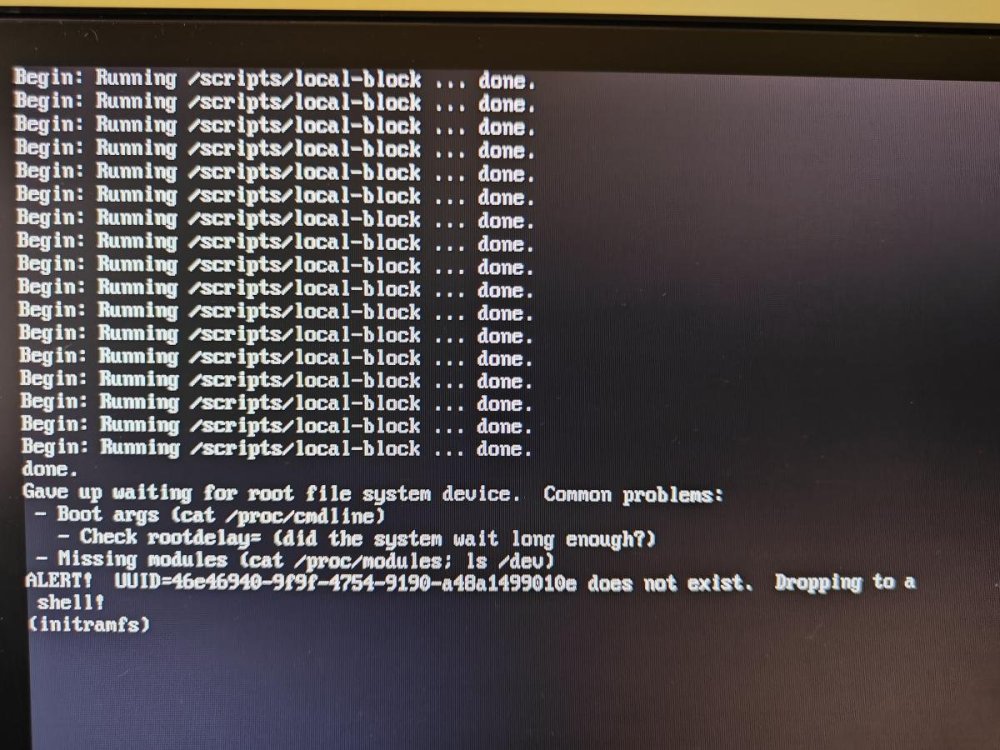
Hello there, I upgraded the newest kernel (`linux-image-current-rockchip64 arm64 24.8.0-trunk.332`) today. Something went wrong and it is failing to find the rootfs and drops in to initramfs shell. Attached are the update logs and login images. How do I fix this? Thanks apt-update.txt
-
 RK3588 is a very power CPU and is very capable of running desktop loads. Rock5 ITX form factor is excellent for hosting couple of cheap HDD/SSDs in a awesome looking case like RAIJINTEK PAEAN MINI, that's functional and looks awesome. It makes an excellent pair with Joshua Riek's Ubuntu distro for a fully functional desktop + NAS combo. I want to build one!
 -
I guess the board might have been fried. No power shows up on any where.
-
@Jaybyrd, @Werner I tried the maskrom process and nothing is detected. I tested all the pins using a multimeter and no voltage is detected on any of the pins. Is this board now completely dead? Any way to revive this?
-
I wasn't using PD, was using the plain old 5V 4A power supply I was using earlier. The board was already powered up with the 5V-4A power supply when I connected the USB-C multi-port dongle. Is there a way to diagnose what went wrong? Is the board totally dead?
-
My Orange Pi 5 appears to be completely dead. No lights turn on when the power is connected and the SD card is freshly imaged as well. This started happening when I connected a USB-C multi-port dongle with a connected PD power supply to it. Is it possible to revive this?