All Activity
- Today
-
 Same error on my SBCs
 -
 I'm experiencing the same issue on my Orange Pi 5 running Armbian 25.11.2 noble (Ubuntu 24.04). Error: E: The repository 'http://apt.armbian.com noble Release' is not signed. N: Updating from such a repository can't be done securely, and is therefore disabled by default. What I've tried: Downloaded and installed the armbian.key multiple times: wget https://apt.armbian.com/armbian.key gpg --dearmor < armbian.key sudo tee /usr/share/keyrings/armbian.gpg > /dev/null sudo chmod go+r /usr/share/keyrings/armbian.gpg Copied the key to both locations: sudo cp /usr/share/keyrings/armbian.gpg /etc/apt/trusted.gpg.d/armbian.gpg Configured the repository using both .list and .sources formats The problem: The repository keeps redirecting to different mirrors (armbian.atomonetworks.com, armbian.lv.auroradev.org, etc.) and none of them have valid InRelease or Release.gpg files: $ curl -I https://armbian.atomonetworks.com/apt/dists/noble/InRelease HTTP/2 404 Workaround: The github.armbian.com/configng repository works fine, but the main apt.armbian.com repository appears to have infrastructure issues with signature files missing on all mirrors. Is this a known issue? System info: Distribution: Armbian 25.11.2 noble Ubuntu version: 24.04 LTS Architecture: arm64 Device: Orange Pi 5
 -

Efforts to develop firmware for H96 MAX M9 RK3576 TV Box 8G/128G
Hqnicolas replied to Hqnicolas's topic in Rockchip CPU Boxes
It works with this old drivers in windows. CP2102 doesn't reach high baud rates in linux. Baud rate: 1500000 Data bit: 8 Stop bit: 1 Parity check: none Flow control: none ☑️ CP2104 TTL Tested the original one! ☑️ CP2102 TTL Tested the chinese fake one! with this Driver -
 Just got this error on a sudo apt update.
 -
I can confirm that booting Odroid M1 from SD card does not work with U-Boot versions newer than 2024.04. Many thanks to IAV for providing a workaround. Perhaps most people are booting from NVMe now, so this issue has flown under the radar? # Install U-Boot 24.5.1 (maps to upstream v2024.04) apt-get install -y linux-u-boot-odroidm1-edge=24.5.1 # Freeze the package at that version "printf 'linux-u-boot-odroidm1-edge hold\n' | sudo dpkg --set-selections" # Flash SPI directly from the package artifacts (or via armbian-install) flashcp -v /usr/lib/linux-u-boot-edge-odroidm1/idbloader.img /dev/mtd0 flashcp -v /usr/lib/linux-u-boot-edge-odroidm1/u-boot.itb /dev/mtd2 # Confirm strings /dev/mtd0 | grep -m1 "U-Boot" # U-Boot SPL 2024.04 (Jan 10 2026 - 10:54:44 +0100) strings /dev/mtd2 | grep -m1 "U-Boot" # FIT image for U-Boot with bl31 (TF-A) Now I can boot from sdcard again w/o RCY button. To use only ZFS on my system I compiled zfs into U-Boot. That worked but the problem was still with U-Boot's handling of the mmc1 somehow. Even though zfsls/zfsload were present in the SPI-flashed U-Boot, that build immediately reinitialized mmc1 in HS200 (1.8 V) mode and hit the “Card did not respond to voltage select! : -110” failure before the boot script could run. So the inability to boot the ZFS v28 pool was due to the SPI U-Boot’s bad MMC tuning, not the ZFS commands themselves. For future reference I’ll leave here on how to built U-Boot with ZFS support from the upstream sources: # Workspace & Dependencies apt install git gcc-aarch64-linux-gnu bison flex device-tree-compiler libssl-dev make python3 ninja-build build-essential mkdir -p ~/work/u-boot && cd ~/work/u-boot # Upstream U-Boot git clone --depth=1 --branch v2024.04 https://source.denx.de/u-boot/u-boot.git # Firmare blobs git clone --depth=1 https://github.com/rockchip-linux/rkbin.git # Prepare .config cd u-boot cp configs/odroid-m1-rk3568_defconfig .config scripts/config --file .config --enable CONFIG_CMD_ZFS yes "" | olddefconfig # Compile make -j$(nproc) \ BL31=../rkbin/bin/rk35/rk3568_bl31_v1.45.elf \ ROCKCHIP_TPL=../rkbin/bin/rk35/rk3568_ddr_1560MHz_v1.23.bin # Flash SPI directly from the package artifacts (or via armbian-install) cp spl/u-boot-spl.bin /usr/lib/linux-u-boot-edge-odroidm1/idbloader.img cp u-boot.itb /usr/lib/linux-u-boot-edge-odroidm1/u-boot.itb flashcp -v /usr/lib/linux-u-boot-edge-odroidm1/idbloader.img /dev/mtd0 flashcp -v /usr/lib/linux-u-boot-edge-odroidm1/u-boot.itb /dev/mtd2
-
Realy cool, but is gpio supposed? I can't get it to work do I need to download some drivers?
-

OZPI v1 new image with Armbian v26.2 Debian stable (trixie)
Werner replied to TRay's topic in Allwinner sunxi
If that worked for you, then you're lucky. For me it did not (other board tested). I guess the files on there have an older state which is still good. Again, as mentioned, repo is being worked on and we're aware of the issues and trying our best to resolve this asap. -

OZPI v1 new image with Armbian v26.2 Debian stable (trixie)
jmrsnt replied to TRay's topic in Allwinner sunxi
I'm experiencing the same issue when trying to build image for Raspberry Pi 4B with: BOARD=rpi4b BRANCH=current RELEASE=noble Workaround (worked for me): Forcing the use of Werner's mirror: LOCAL_MIRROR="fi.mirror.armbian.de/apt" Posting this in case it helps others facing the same problem. -
System Information Distribution: Debian (armbian) Kernel Version: 6.1.115-vendor-rk35xx OpenZFS Version: 2.3.5 The kernel module does load. # zfs -V zfs-2.3.5-2~bpo13+1 zfs-kmod-2.3.5-2~bpo13+1 # zfs version Failed to initialize the libzfs library. Note: To keep this post short, I only pasted the errors from the trace below. # strace zfs version prctl(PR_CAPBSET_READ, 0x30 /* CAP_??? */) = -1 EINVAL (Invalid argument) prctl(PR_CAPBSET_READ, CAP_CHECKPOINT_RESTORE) = 1 prctl(PR_CAPBSET_READ, 0x2c /* CAP_??? */) = -1 EINVAL (Invalid argument) prctl(PR_CAPBSET_READ, 0x2a /* CAP_??? */) = -1 EINVAL (Invalid argument) prctl(PR_CAPBSET_READ, 0x29 /* CAP_??? */) = -1 EINVAL (Invalid argument) openat(AT_FDCWD, "/dev/zfs", O_RDWR|O_EXCL|O_CLOEXEC) = -1 ENODEV (No such device) openat(AT_FDCWD, "/usr/share/locale/en_US.UTF-8/LC_MESSAGES/zfs-linux-user.mo", O_RDONLY) = -1 ENOENT (No such file or directory) openat(AT_FDCWD, "/usr/share/locale/en_US.utf8/LC_MESSAGES/zfs-linux-user.mo", O_RDONLY) = -1 ENOENT (No such file or directory) openat(AT_FDCWD, "/usr/share/locale/en_US/LC_MESSAGES/zfs-linux-user.mo", O_RDONLY) = -1 ENOENT (No such file or directory) openat(AT_FDCWD, "/usr/share/locale/en.UTF-8/LC_MESSAGES/zfs-linux-user.mo", O_RDONLY) = -1 ENOENT (No such file or directory) openat(AT_FDCWD, "/usr/share/locale/en.utf8/LC_MESSAGES/zfs-linux-user.mo", O_RDONLY) = -1 ENOENT (No such file or directory) openat(AT_FDCWD, "/usr/share/locale/en/LC_MESSAGES/zfs-linux-user.mo", O_RDONLY) = -1 ENOENT (No such file or directory) write(2, "Failed to initialize the libzfs "..., 41Failed to initialize the libzfs library. ) = 41 exit_group(1) = ? +++ exited with 1 +++ The /dev/zfs file does exist # ll /dev/zfs crw-rw-rw- 1 root root 10, 249 Jan 9 16:48 /dev/zfs In addition the trace also contains the following, confirming the existence of the file faccessat(AT_FDCWD, "/dev/zfs", F_OK) = 0 zpool also has the same issue.
-
Why is there no image for RK3288?
-
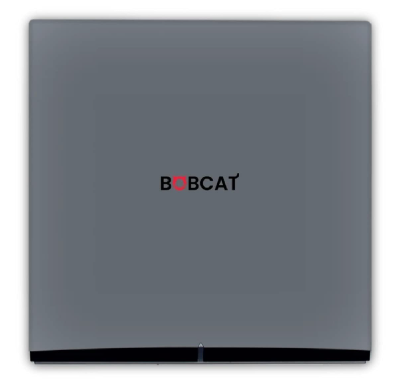
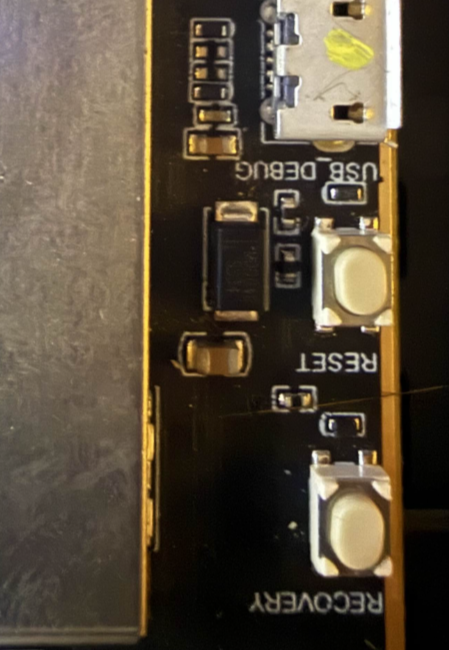
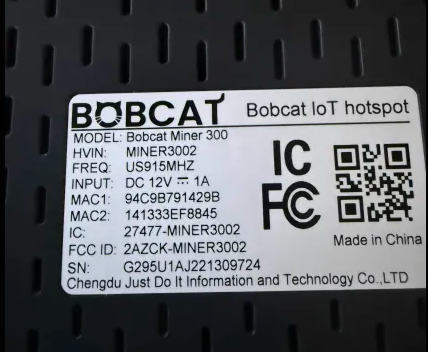
After a ton of time porting the dts for modern kernels, i have a working release for the Bobcat 300 29X Variant To compile https://github.com/sicXnull/armbian-build/tree/Bobcat-29x . ./compile.sh build BOARD=bobcat-29x BRANCH=current BUILD_DESKTOP=no BUILD_MINIMAL=yes EXPERT=yes KERNEL_BTF=no KERNEL_CONFIGURE=NO KERNEL_GIT=shallow RELEASE=bookworm Link to Prebuilt Armbian-unofficial_26.02.0-trunk_Bobcat-29x_bookworm_current_6.18.4.img.xz First check to see if you have a compatible version. Flip the unit over and check the serial number. It will start with G290 or 295. This does not work on 28 or 285. How to Flash 1) Install Rockchip Flash Tools 2) Download bootloader (rk356x_spl_loader_ddr1056_v1.10.111.bin) attached here. 3) Boot device into LOADER mode. Plug USB Cable in to back of the unit, powered off. Open the device. With it powered on hold the reset button for 1 second, then immediately let off and hold the recovery button down until the PC recognizes you in LOADER mode 4) Follow the flash procedure found here. WARNING While I2C/Spidev is functional, i did not install Helium or the Lora packet forwarder for testing. Flash this image at your own risk if you still wish to use helium mining. rk356x_spl_loader_ddr1056_v1.10.111.bin
- Yesterday
-
For Australian users, there is an unofficial mirror at https://mirror.aarnet.edu.au/armbian/apt
-
 Yep Already tried that:- "chatgpt+gemini have given lots of ideas like patches, hooks, extensions but none of them work. (grrrrrr!)." Didn't work probably because the source is not an ASCII text file but a large CPIO binary. But....I am just running a make right now which looks like it might work..... don't want to jinx it....
 -

OZPI v1 new image with Armbian v26.2 Debian stable (trixie)
tutralex replied to TRay's topic in Allwinner sunxi
I have no complaints about the developers, it’s enough for me to just know that this is not a client-side problem and that someone is working on a solution. -
I suggest to try kernel-patch build command. Your changes then are compiled into a patch which is then applied to the kernel source before building.
-
yes i have CONFIG_INITRAMFS_SOURCE working on my server no drama. i was hoping to be able to roll my own initrd on armbian as well. LONG ANSWER: the problem is that the armbian build system does housecleaning before the kernel make starts. part of this is to delete any folder thats not part of the source tree. so the questions are: 1) where do i put it so its visible to the make? 2) how do i stop the build from deleting it? chatgpt+gemini have given lots of ideas like patches, hooks, extensions but none of them work. (grrrrrr!).
-

Armbian for H313 X96-Q LPDDR3 TV-Box
Maurizio Finesso replied to sicxnull's topic in Allwinner CPU Boxes
Hi @sicxnull @Nick A, as mentioned by @ventara X96Q vs 5.1 image of sicxnull has direct ethernet port and wireless working fine instead the Nick A 'Armbian-unofficial_25.05.0-trunk_X96q-ddr3-v5-1_bookworm_edge_6.12.11_xfce_desktop.img' has no ethernet or wifi working. I'm totally a newbie on these things, but thanks to the comunity I was able to use an mxq mini (S905X) working with Armbian and home assistant (of course i just used an image with armbian and after I load HA and tailscale. Now I would like to use the X96Q vs 5.1 for the other house. I know that the image of sicxnull works but I prefer to use Nick A. because armbian config as well most of the things are like the one on the other working tv box instead on the sicxnull image there is mate and a lot of commands or gui function are so different. I tried to understand what is different between the two images and github repository to be able to fix almost the ethernet port problem but I do not have enough acknowledge. My unix experience was with the AT&T unix system 5 and Solaris so very old OS and many years ago. Only now I'm coming back to unix world and I don't know anything about git, patch and so on. I read in a post that someone was able applying a patch but it is not clear to me how and where to apply patch, I have already installed Ubuntu in a Virtualbox and prepare everything to compile Armbian and tested that initial script start, ask me for board and other staff but after I stopped because I realized that I didn't understand what I'm doing. Probably with a standard sbc was easier. I promise that I will go ahead studying but it is hard and confused at the moment. If I can do something to help of course when I'm at home I will do it. Please, when you have free time give me some info on how to fix at least the direct ethernet port. armbianEnv.txt and boot.cmd looks same file. In both dtb folder there are same namefile.dtb include the 5.1 where armbianEnv point out but I don't know if they are same file in both distribution or are different? Wifi chip is the XR819 like I saw in other image with the v 5,1 Thanks for the great job you and the comunity are doing! -

OZPI v1 new image with Armbian v26.2 Debian stable (trixie)
Igor replied to TRay's topic in Allwinner sunxi
Sure, no worries. You will notice once its fixed. as this is not something you should adjust on the APT client side. You didn't and won't loose anything except current updating mechanism is broken. -
Thanks Nick. In the meanwhile, would dtbo overlay, setting up CSI taken from radxa's github a733, work with kernel/u-boot of your image? Is there a way I can manually alter boot files to get this dtbo loaded? This is of course for the experiment - radxa's a733 image seems to still have a problem with ISP processor (or dtbo file affecting data formatting), as the resulting picture from the camera seems to be in a wrong color space (by the look, but I'm not an expert). I've reported the issue at https://forum.radxa.com/t/radxa-cubie-a7a-radxa-13m-214-camera/29717/7 for anyone interested.
-
duplicate
-

OZPI v1 new image with Armbian v26.2 Debian stable (trixie)
TRay replied to TRay's topic in Allwinner sunxi
Igor, I understand the issue is complex, as you say, but for now I can only report that this didn't work. However, if I manage to resolve it, please let me know what we should do next, as I don't want to lose the work I've done on the image I downloaded. I also understand that these are BETA test images. -
OZPI v1 new image with Armbian v26.2 Debian stable (trixie)
TRay replied to TRay's topic in Allwinner sunxi
Today when I run: apt clean and rm -rf /var/lib/apt/lists/* apt update Ign:10 http://beta.armbian.com trixie/trixie-utils all Packages Err:8 http://beta.armbian.com trixie/trixie-utils armhf Packages File has unexpected size (10351 != 8303). Mirror sync in progress? [IP: 23.186.113.5 80] Ign:11 http://beta.armbian.com trixie/trixie-desktop armhf Packages 0% [7 InRelease 30.1 kB/47.3 kB 64%]Error: Transaction http://beta.armbian.com/dists/trixie/InRelease was already aborted and is aborted again Err:10 http://beta.armbian.com trixie/trixie-utils all Packages File has unexpected size (3562 != 3343). Mirror sync in progress? [IP: 23.186.113.5 80] Get:12 http://deb.debian.org/debian trixie-backports InRelease [54.0 kB] Get:13 http://deb.debian.org/debian trixie/main armhf Packages [12.7 MB] Get:14 http://deb.debian.org/debian trixie/non-free armhf Packages [69.9 kB] Get:15 http://deb.debian.org/debian trixie/non-free-firmware armhf Packages [6,685 B] Get:16 http://deb.debian.org/debian trixie/contrib armhf Packages [50.6 kB] Get:17 http://deb.debian.org/debian trixie-updates/main armhf Packages [5,144 B] Get:18 http://deb.debian.org/debian trixie-backports/non-free-firmware armhf Packages [3,856 B] Get:19 http://deb.debian.org/debian trixie-backports/non-free armhf Packages [1,520 B] Get:20 http://deb.debian.org/debian trixie-backports/main armhf Packages [132 kB] Get:21 http://deb.debian.org/debian trixie-backports/contrib armhf Packages [4,364 B] Error: Transaction http://beta.armbian.com/dists/trixie/InRelease was already aborted and is aborted again -
OZPI v1 new image with Armbian v26.2 Debian stable (trixie)
Igor replied to TRay's topic in Allwinner sunxi
I spent practically whole holidays to rework repository management and there are still some problems, even it was tested on and on before going into production. But beta repository, which you are having troubles with, was never tested. Only stable. Motive: https://github.com/armbian/build/pull/9150 Affected: https://github.com/armbian/armbian.github.io/blob/main/.github/workflows/infrastructure-repository-update.yml https://github.com/armbian/armbian.github.io/blob/main/.github/workflows/infrastructure-download-external.yml https://github.com/armbian/armbian.github.io/blob/main/scripts/sync-repository.sh https://github.com/armbian/armbian.github.io/blob/main/scripts/copy-kernel-packages.sh https://github.com/armbian/build/blob/main/tools/repository/extract-repo.sh https://github.com/armbian/build/blob/main/tools/repository/repo.sh ... so you might get an idea on the problem complexity -
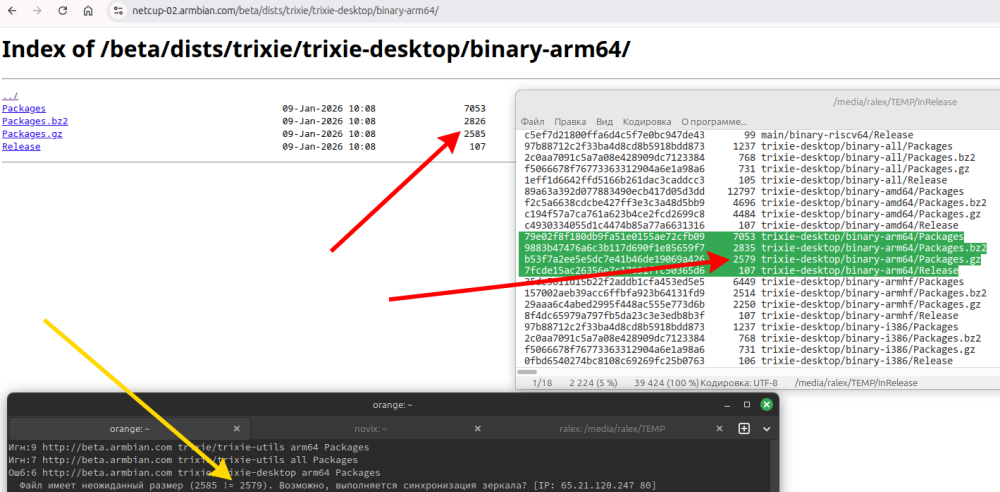
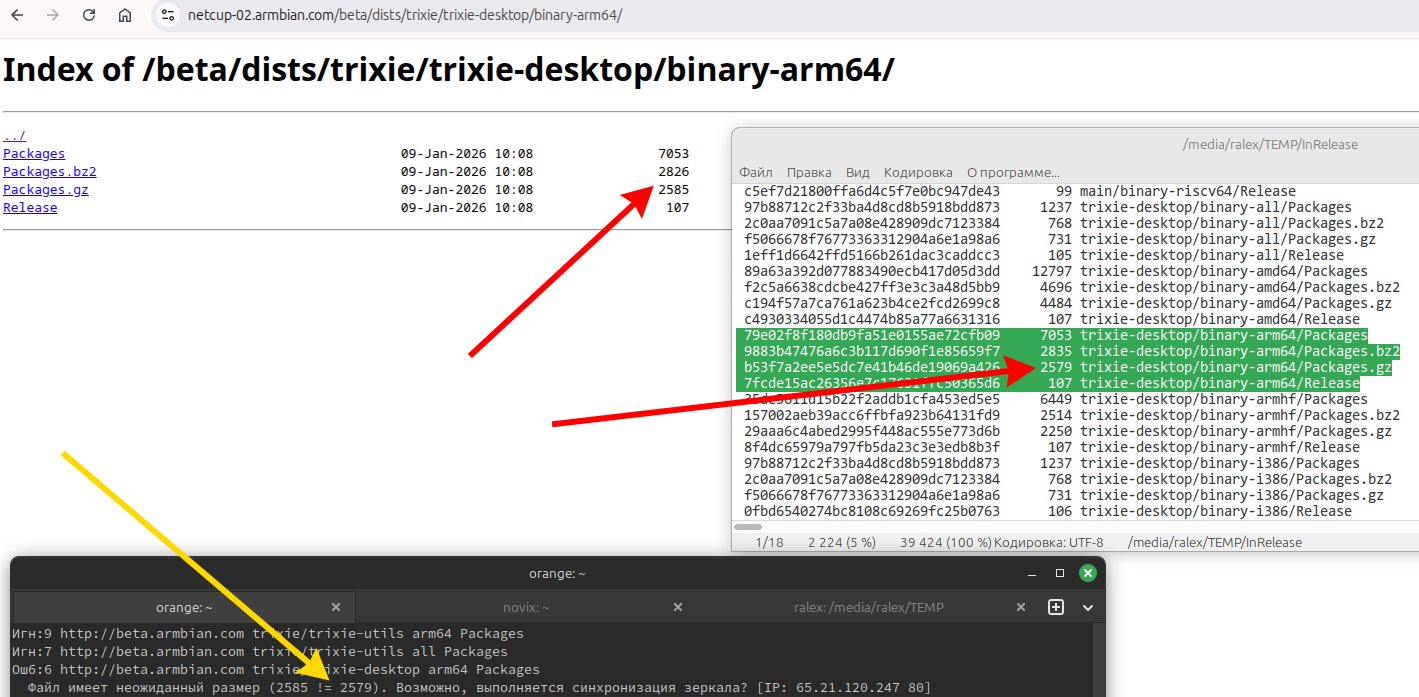
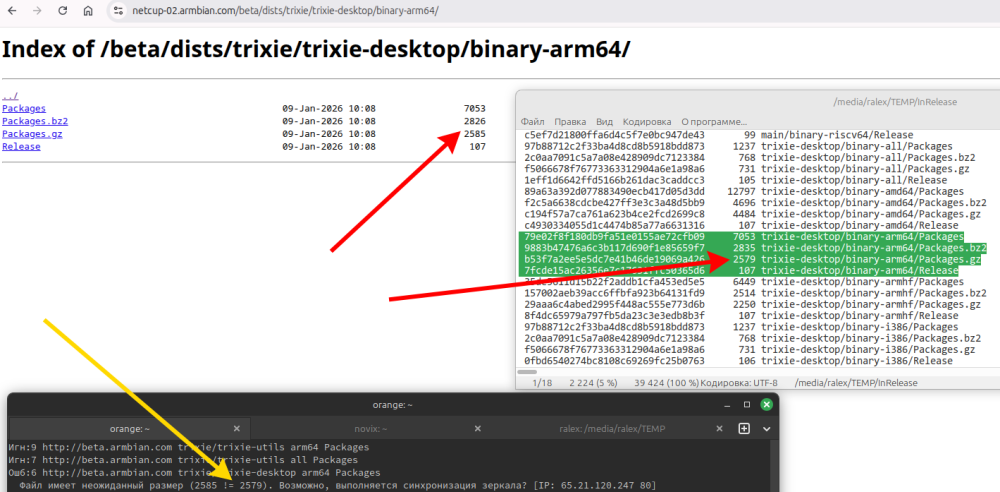
The update from the "armbian.com/beta" repository has not been working for quite some time now. Repositories are broken, sizes in InRelease do not match sizes in subbranches. Mirror synchronization has been going on for about a week now?!
-
OZPI v1 new image with Armbian v26.2 Debian stable (trixie)
tutralex replied to TRay's topic in Allwinner sunxi
I confirm that the update has not been working for several days. Your repositories are broken, sizes in InRelease do not match sizes in subbranches. The file has an unexpected size (10351 != 8303). Perhaps the mirror is synchronizing? [IP: 65.21.120.247 80] Mirror synchronization has been going on for about a week now!?