All Activity
- Past hour
-
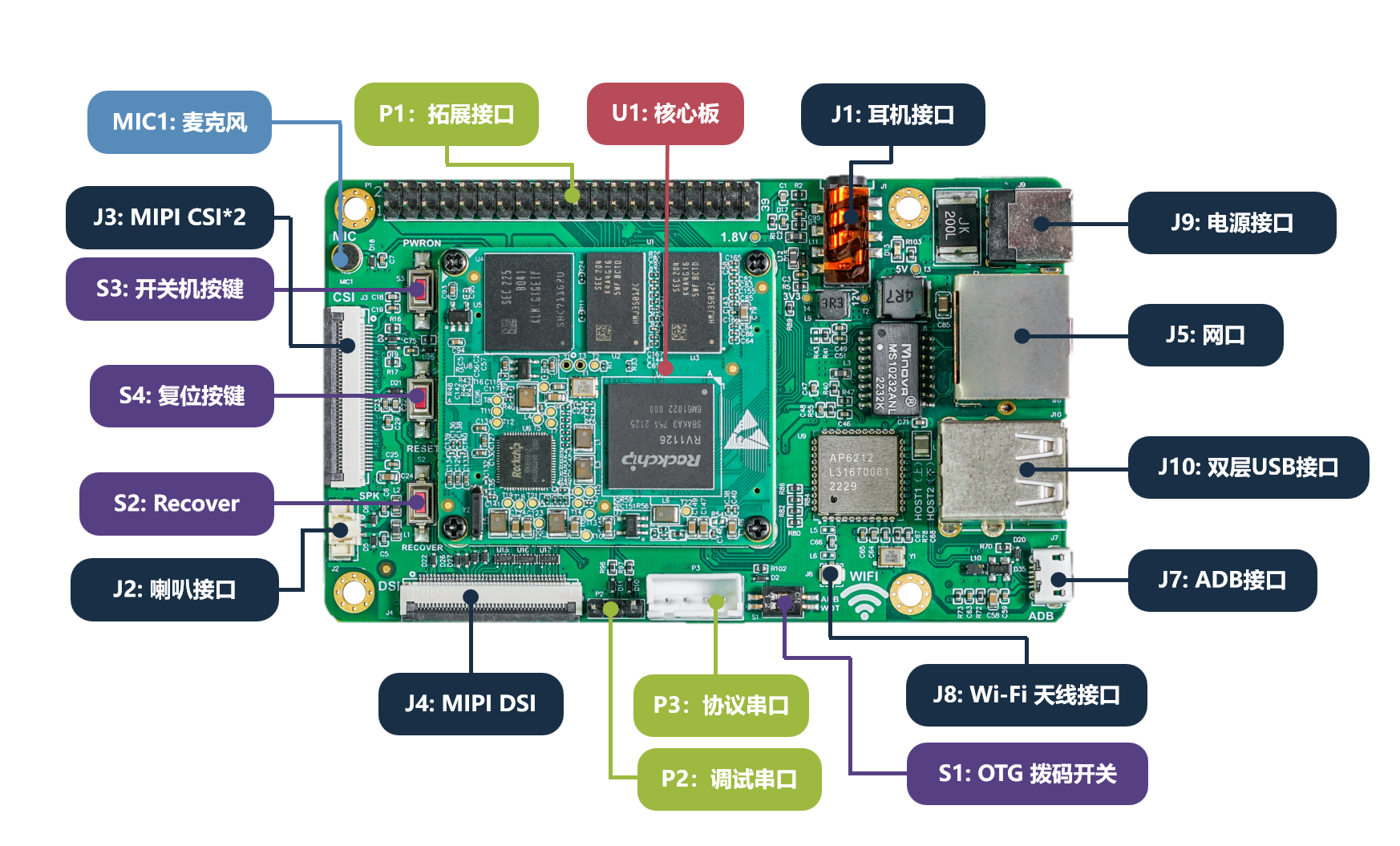
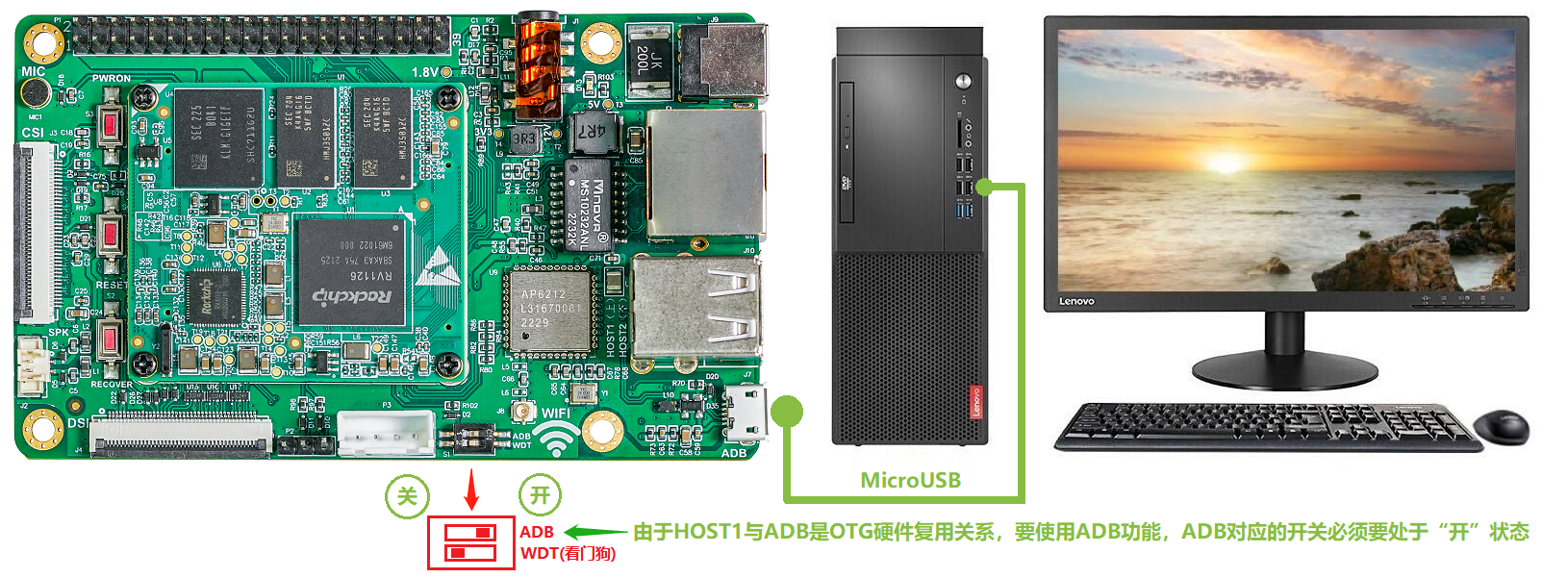
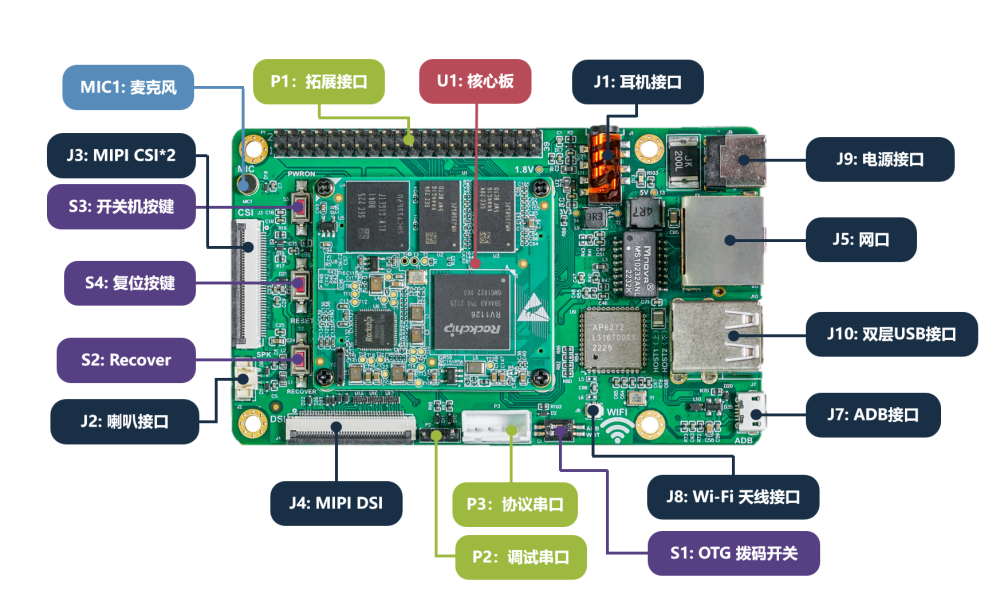
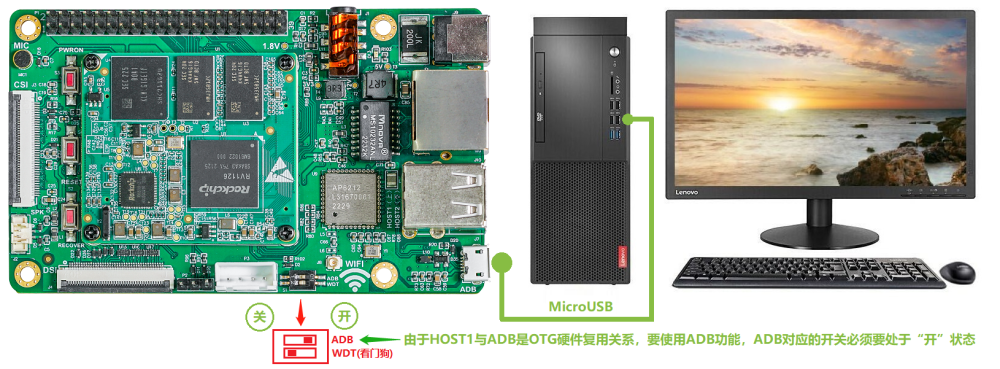
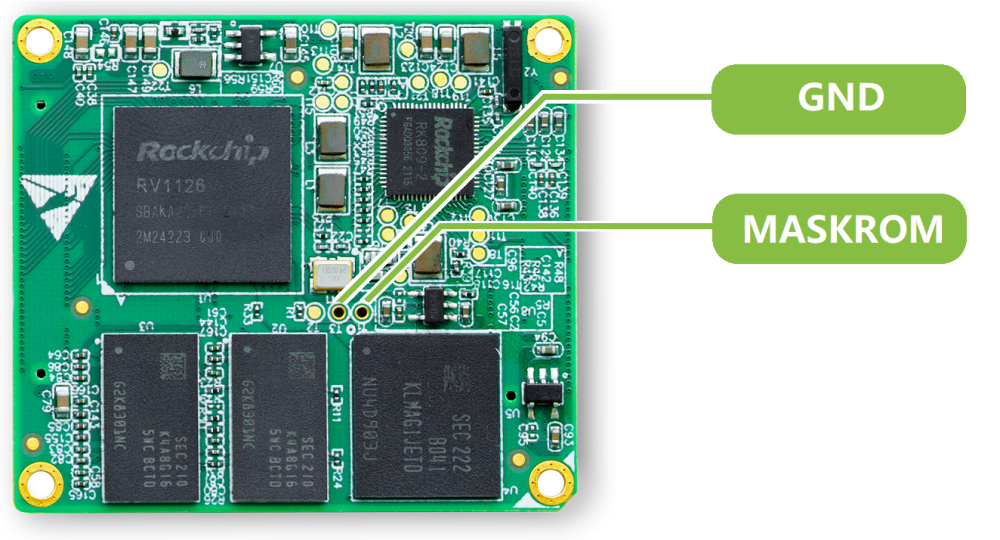
Here, I will document the efforts to get the Easy EAI RV1126 board into Armbian.
- Today
-
Hello, Same issue with debian trixie and my UPS connected by usb, not working but work on old kernel.
-
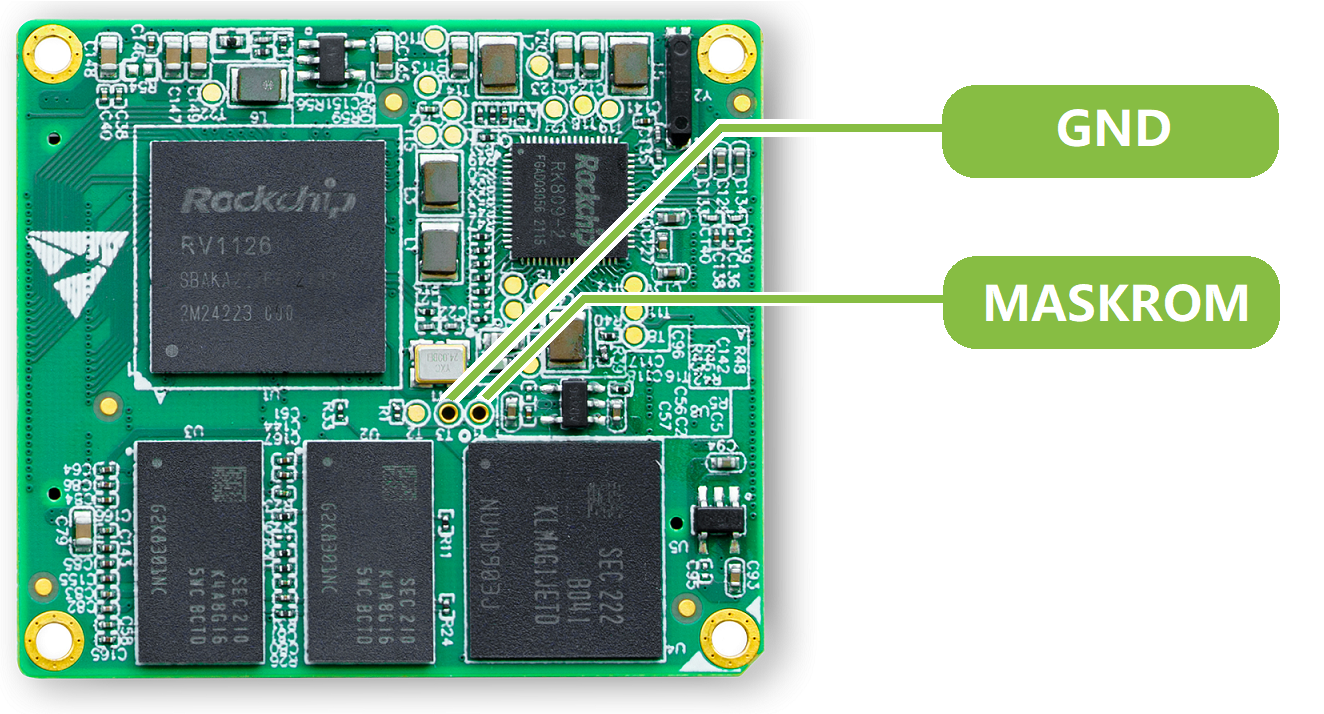
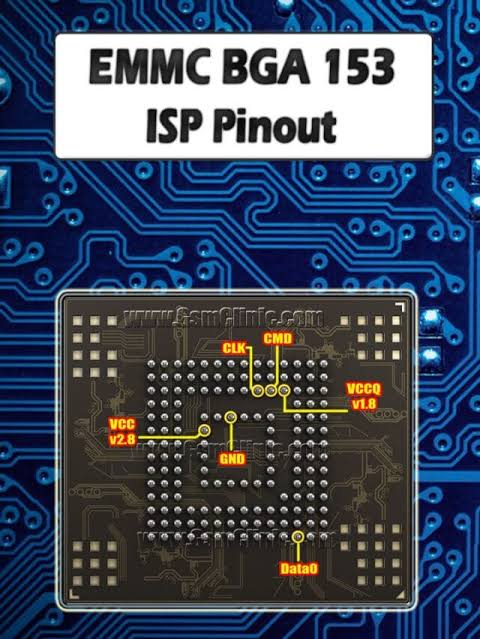
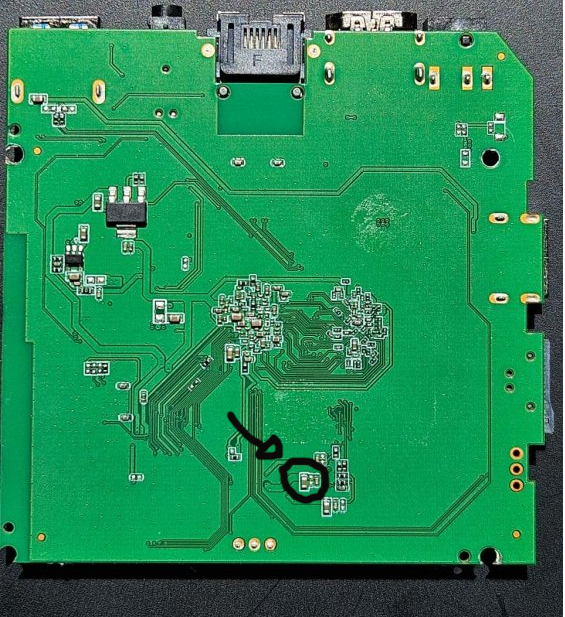
 You can try to short the EMMC that wasn't connected, to short the CLK and GND of the soldered EMMC also check this points to:
-
Is it possible to enable jumbo frame on any ethernet interface of Orange Pi RV2. My attempts to set mtu > 1500 are going to fail. The kernel is not support this. I use Ambian based Debian 13 ( current 6.18.35 ). By the way, network controller support Jumbo up to 18K.
-
Are there anyone who have tried flashing Armbian riscv uefi image to the nvme drive with armbianized u-boot in the SPI flash?
-
Hi I need assistance with my TV98 box. It is stuck on the android screen. I need firware
-

Freeze / kernel panic after upgrading to kernel 7.0.12
eselarm replied to Johannes's topic in Allwinner sunxi
Good that your bpi appears to be stable. My did hang again, no reaction on serial console, no reaction on IP networking. So I enabled the watchdog, uncommented the 'ping 192.168.1.1 line' and made it ping 192.168.1.100 and temporarily added that address to another computer: ip addr add dev br0 192.168.1.100/24 Then removing it: ip addr del dev br0 192.168.1.100/24 and after a minute or so: [ 263.929336] systemd-journald[236]: Received SIGTERM from PID 1071 (watchdog). [ 265.185973] systemd[1]: systemd 257.13-1~deb13u1 running in system mode (+PAM +AUDIT +SELINUX +APPARMOR +IMA +IPE +SMACK +SECCOMP +GCRYPT -GNUTLS +OPENSSL +ACL +BLKID +CURL +ELFUTILS +FIDO2 +IDN2 -IDN +IPTC +KMOD +LIBCRYPTSETUP +LIBCRYPTSETUP_PLUGINS +LIBFDISK +PCRE2 +PWQUALITY +P11KIT +QRENCODE +TPM2 +BZIP2 +LZ4 +XZ +ZLIB +ZSTD -BPF_FRAMEWORK -BTF -XKBCOMMON -UTMP +SYSVINIT +LIBARCHIVE) [ 265.221538] systemd[1]: Detected architecture arm. [ 269.100327] systemd[1]: Failed to fork off sandboxing environment for executing generators: Protocol error [!!!!!!] Failed to start up manager. [ 269.146571] systemd[1]: Freezing execution. This looks like HW watchdog does not work. Same trick on NanoPi-NEO, so also sunxi kernel although 7.0.12-edge-sunxi, it resets. So appears to work although no proof that it is HW reset. I have not checked live dmesg or so, just noticed it went offline and came back later when I also added that .100 IP address again. -
RK3576 - Support for full video hardware acceleration on Armbian
eselarm replied to Marus Gradinaru's topic in Nanopi M5
If you use and Armbian image with kernel '6.1.115-vendor-rk35xx' (note there are many builds over time, all same name, but you need to look in config-6.1.115-vendor-rk35xx and maybe also consider the gcc compiler version to have RKMPP based method working. I mean the API is there, you need a special ffmpeg (from jellyfin for example to use it) in order to use RKMPP based decoding and encoding in HW. That is just CLI, server use-case, works on RK3568 and RK3588. RK3576 should have the same speed/ASIC blocks as RK3588 AFAIK, but check yourself. It can do 5x realtime speed 1080p50 HEVC to H264. mpv 'uses open and agreed standards' and RKMPP is not. Also Android is completely different. Same is Windows or Apple iOS. Those are implemented by commercial/paid developers. In fact it is worse, ffmpeg open-source developers have concluded already long time ago the Rockchip downstream kernel code was copied and violates licenses. (Rockchip copied code and put their names in it.). So since a few months, ffmpeg developers requested github to remove access and that happened. So following GPL licensing, that 6.1.115 kernel is essentially illegal. How you want to deal with that is up to you. It is like it is. Anyway, 6.1.x downstream is getting old and might contain several unpatched security holes. So over time the 'problem' will solve itself as people won't trust it anymore despite being able to use every HW block in RK35xx. As already said, decoding generally is implemented as part on mainline kernel, you just need matching latest userspace. Encoding is much more complex. If you want that, only Intel/AMD is more or less viable option. Like N100, so in cheap miniPCs, certainly considering high RAM prices, is just a way better option. Plays all HW accelerated in FireFox (and mpv as well). Does also VP9 encoding for example, is a royalty free codec, so you won't see this 2 decades old patents issues for H264 and HEVC. Also note AV1 HW decoding was the first to be available in mainline kernel for RK3588. There is just not much content I think. And HW AV1 encoding is another level of new silicon, is not really an option to do in software. -

RK3576 - Support for full video hardware acceleration on Armbian
JFL replied to Marus Gradinaru's topic in Nanopi M5
Hi @Marus Gradinaru, May be this might interest you. -
# cat /etc/NetworkManager/system-connections/br0.nmconnection [connection] id=br0 uuid=75d54cd2-cdfe-4621-ab45-0bddf3ab4e6c type=bridge interface-name=br0 zone=trusted [ethernet] cloned-mac-address=my eth0 mac address [ipv4] method=auto [ipv6] addr-gen-mode=default method=ignore # cat /etc/NetworkManager/system-connections/eth0-br0_slave.nmconnection [connection] id=eth0-br0_slave uuid=31645756-5c39-4184-a0c2-337ae09422ec type=ethernet interface-name=eth0 master=75d54cd2-cdfe-4621-ab45-0bddf3ab4e6c slave-type=bridge # cat /etc/NetworkManager/system-connections/wlan0-br0_slave.nmconnection [connection] id=wlan0-br0_slave uuid=4ff7f9f2-056e-4836-9bc7-0e77d98a989c type=wifi interface-name=wlan0 master=75d54cd2-cdfe-4621-ab45-0bddf3ab4e6c slave-type=bridge [wifi] band=bg channel=1 mode=ap ssid=mywifissid [wifi-security] key-mgmt=wpa-psk proto=rsn; psk=mypassword template, stripped, optimized, cleaned, untested
-
I would not give up on the BPiPro just because this networking stack/tool issues. As I indicated, a bridged WiFi AP works fine with NetworkManager. Armbian images are there to get you started very easily, even without Linux know-how. But it still is Linux, open-source, all DIY and no company you can manage to blame (try to find the engineer(s) who designed the SBC ... ). I know the majority of SBC users throws away working older installations and then get stuck with some new pre-installed image. You can instead just dist-upgrade in-place Netplan is from Canonical and there to uniform Ubuntu so NM and systemd-networkd can be used. Debian does not need netplan, there is no dependency on NM nor systemd-networkd. Now look at this: A script from Armbian does netplan yaml that does .netdev/.network files or .nmconnection files. As long as it works, fine. But 3 layers, from math permutation you can know that means many more potential error cases. So you want to discard HW because networking config tooling has become too complex? I forgot to power off the RPi3b+ before night and now in the morning the internet on the smartphone still works (via that AP). A simple reboot via serial console and short flip to 4G but then back to connected to the AP. BUT, the wlan0 again shows as 'failed'. So it seems a timing issue or so or just the status reporting is the issue. Also Android normally simply disconnects on PHY/MAC layer if no public routing ('internet'). That might happen easily after reboots or so or just without various timeouts. Note I have disabled systemd-networkd-wait-online.service else always 3 minutes waiting at reboot. You can also specify how and what to wait for, but needs reading docs. Also note that OS is not vanilla Debian aarch64, but from RPL, there is many changed packages, especially also in the network domain. And RPi3 has USB connected networking, not on the SoC like most other SBC's, this is also an issue I discovered. I see for another RPi3: @/raspi4/latest/etc/NetworkManager/system-connections -rw------- 1 root root 259 Jan 21 16:16 br0.nmconnection -rw------- 1 root root 217 Jan 21 16:16 eth0-br0_slave.nmconnection -rw------- 1 root root 312 Jan 22 10:44 wlan0-br0_slave.nmconnection Is still RPiOS arm64 bookworm, but with some hacks to prevent netplan and cloud-init disturbing things and wasting time, it also works with RPiOS Trixie. Certainly without tricks on standard Debian Trixie as I simply copy those 3 files to and from old AMD fanless computer etc that also has WiFi onboard. You need to make sure you stop and start NM at the proper moments and also make sure no UUID doubles or orphans. Should be fine when new, not yet booted image.
-
The nand-sata-install script is indeed quite old and not very actively maintained anymore. A common modern replacement on Odroid XU4 (and similar boards) is to use the Armbian installer built into armbian-config. You can run: Bash sudo armbian-config Then go to System → Install (or Install to SATA/USB/NVMe depending on your setup). Many people find it more reliable than the old nand-sata-install. Alternatively, you can do it manually with dd for U-Boot + rsync for the rootfs, but armbian-config is usually the easiest route these days. If you run into any issues with it, feel free to share the output and I can help walk you through it.
-
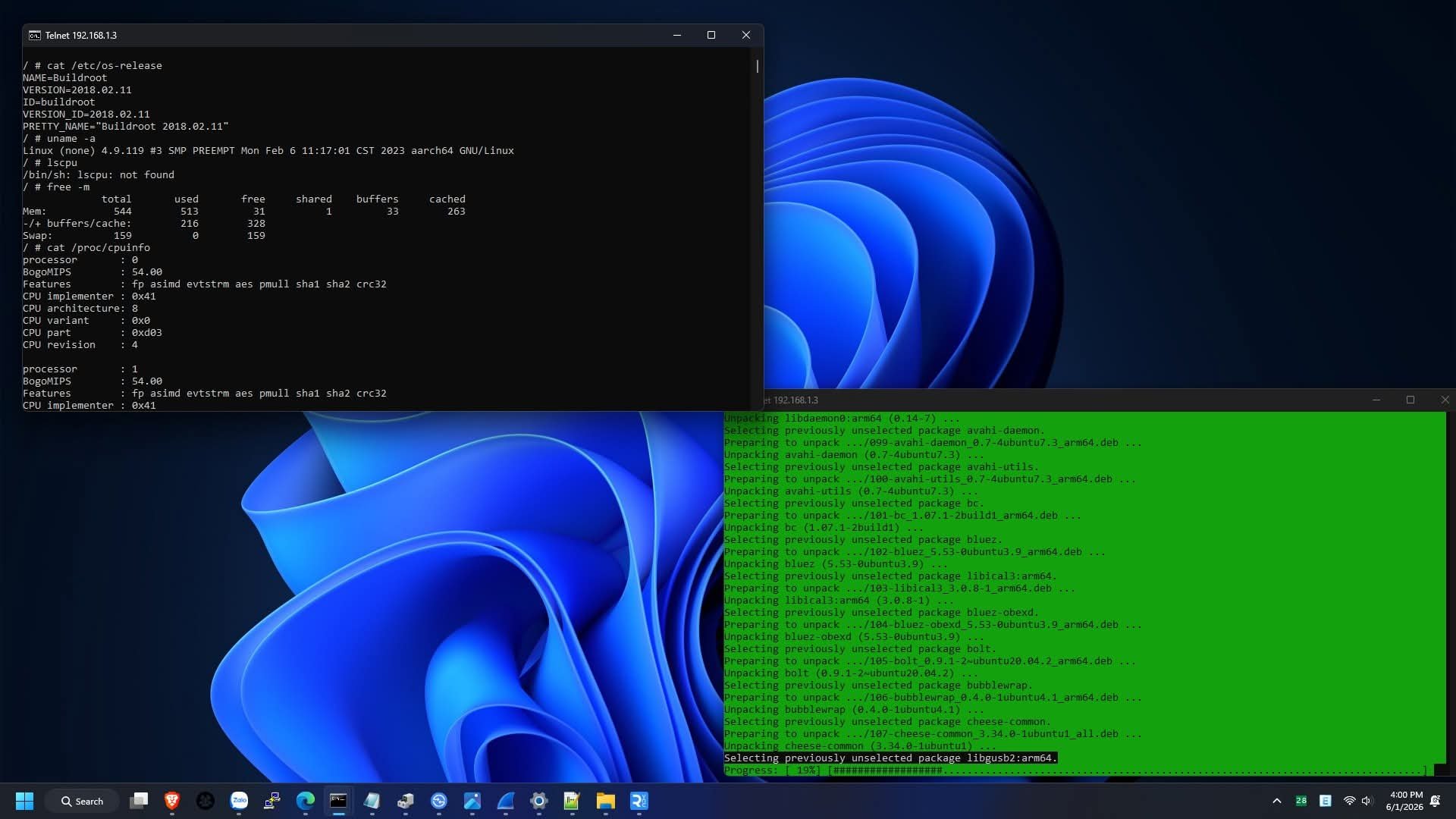
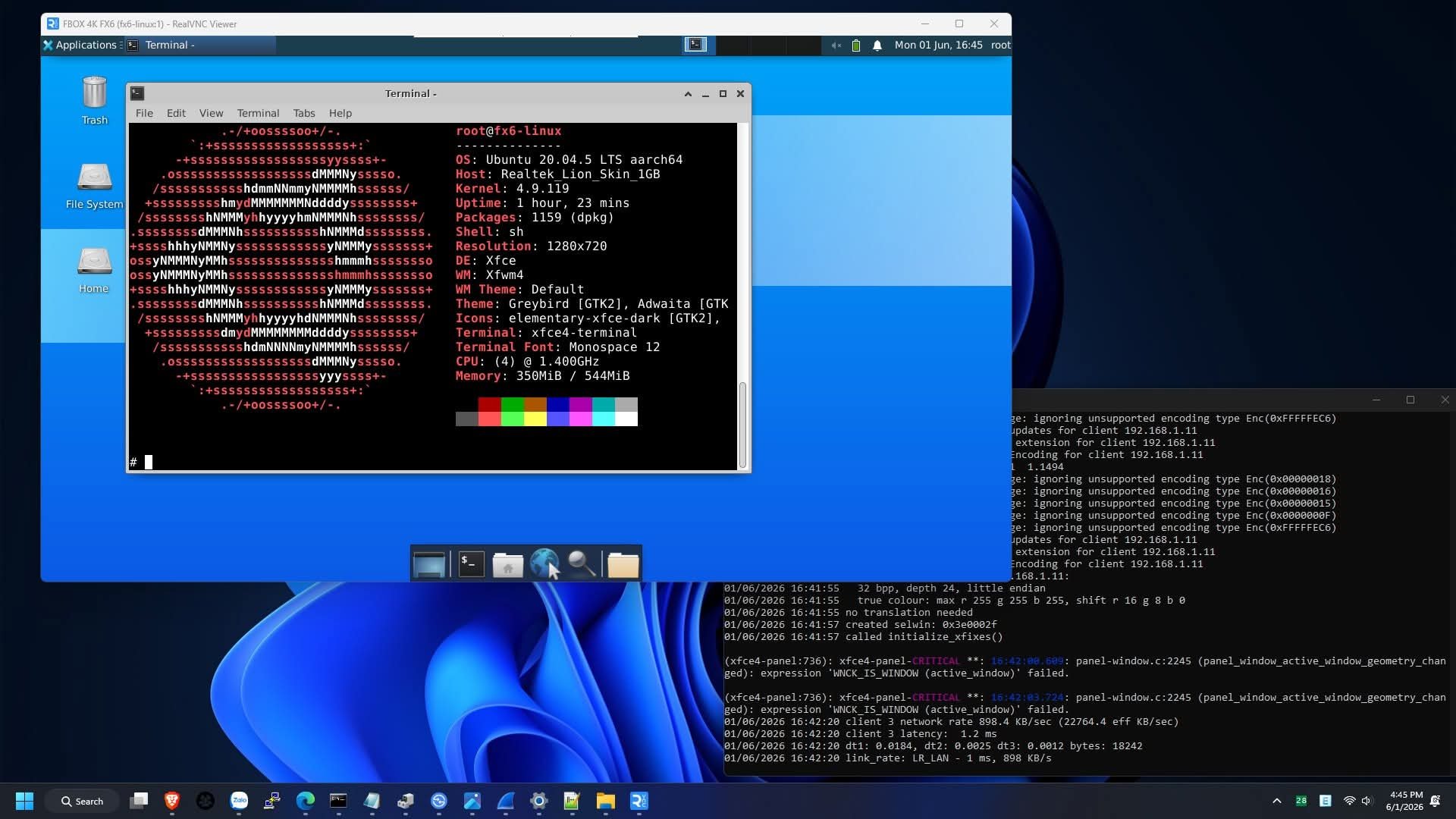
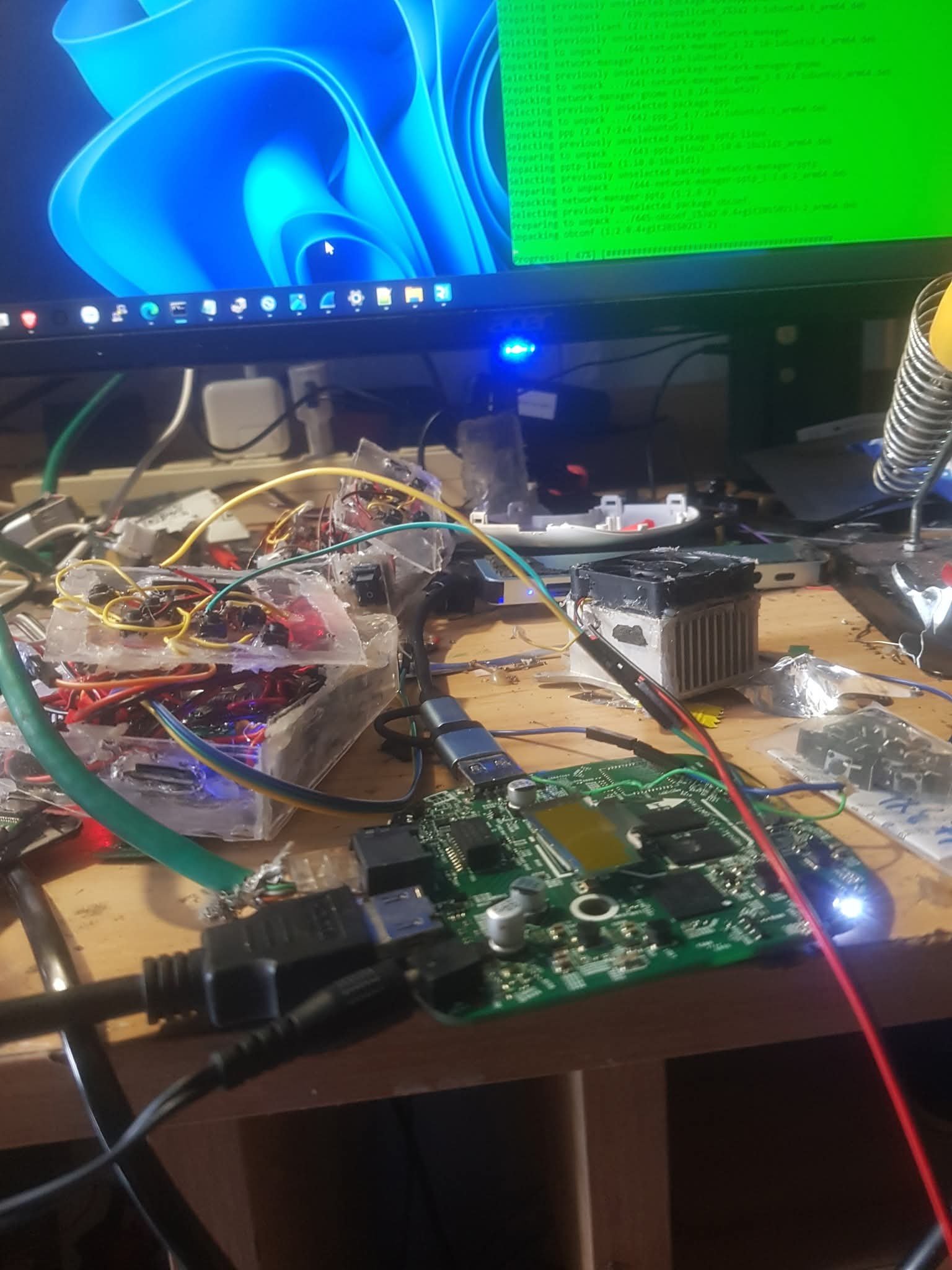
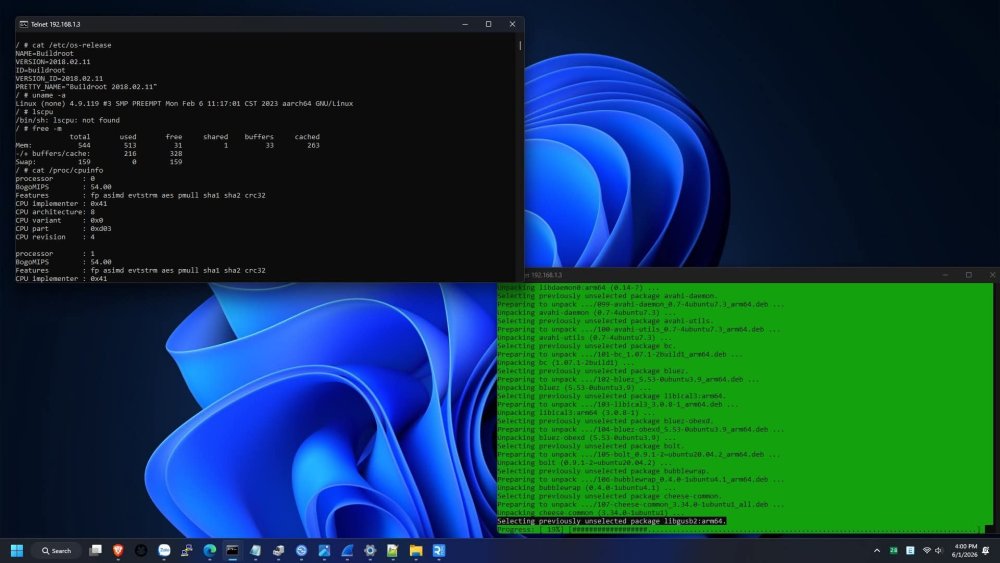
So i had figured out how to get the root shell access on this specific type of box(fx6), and unfortunately, nope. You cant run any other os than the official firmware linux(buildroot) because of secure boot and locked bootloader(nope, you can't unlock it with fastboot). But, you can use chroot to run ubuntu or another os. Heres some images for proof. So, you cant run armbian, have to stick with buildroot, you can modify it the way you like with root permission, just dont modify the root parttion, if you do, it wont boot and it will be bricked
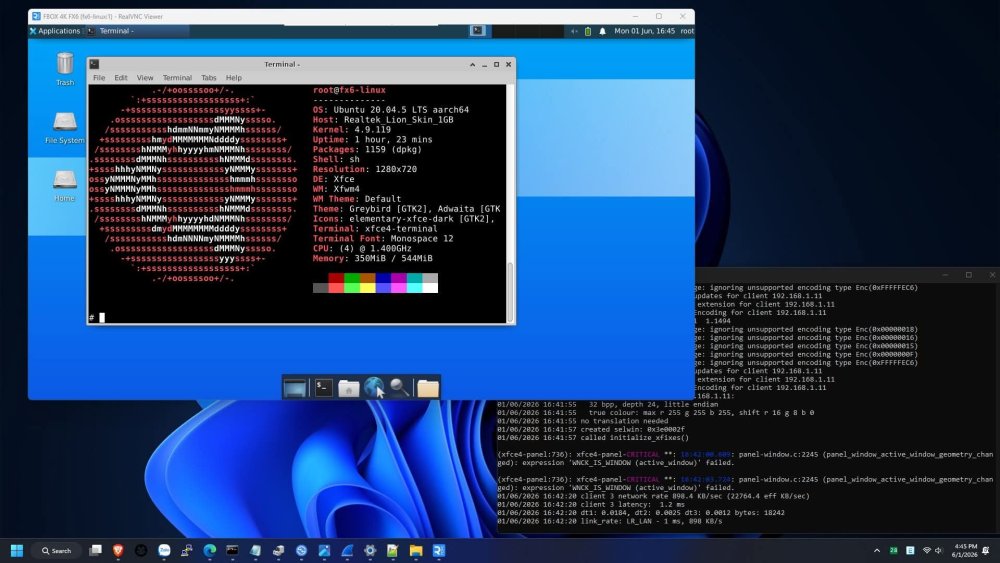
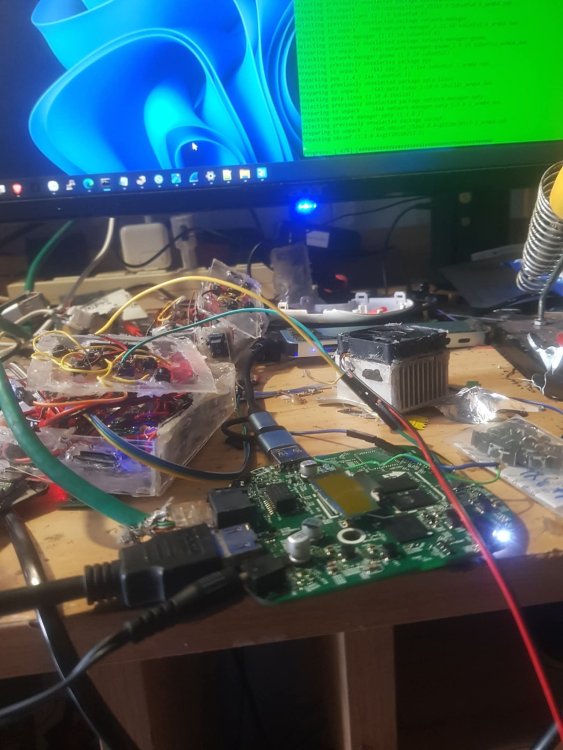
-
 Ok, then. But at least remove that "It works out of the box" statement (which is not true), so that other people don't waste their time, like I did. This Armbian OS, at this time, does not support the NanoPi M5 board.
 -
Theoretically no, because the game won't occupy all the ram, so when you start to fill it up, the kernel should start compressing and move other stuff to zram, but theory is not always how it works in practicality. As for how to disable zram, add zswap.enabled=0 to your kernel parameters and it won't be available after a reboot. To stop zram during operation, IIRC, stop (not disable) systemd-zram-setup@zram0.service. If it's not you should be able to figure out what to stop by listing relevant unit files with systemctl --type swap
- Yesterday
-

RK3576 - Support for full video hardware acceleration on Armbian
tparys replied to Marus Gradinaru's topic in Nanopi M5
There's nearly 400 boards in the Armbian build system. There are not nearly that many people actively supporting those configurations, so not all are seeing the level of care and attention to detail that we'd all like to see. There are other threads of folks discussing Rockchip hardware acceleration, which seems relatively new. You may need a more recent kernel (7.x mainline), and/or other bleeding edge software which is not part of the Ubuntu 26 baseline. -
 Last photo just to the right of the rk3528 at 3 o'clock are the most likely (the two round gold pins). With power off check with a multi meter if one of them is connected to ground. Then with power applied use an oscilloscope to check if the other one has a clock signal on it. If it has these are probably the maskrom pins. Credit to @Hqnicolas
 -
 Many thanks for your investigations! SD card issues are solved, I obviously stopped the system during a write operation - after a shutdown (and card check with an PCs adapter) the errors are gone. But this had no impact. What I did for comparison: I applied the same semi-manual netplan / networkd / hostapd setup sequence to an OrangePiZero, also trixie ( v26.8 rolling for Orange Pi Zero running Armbian Linux 6.18.37-current-sunxi). And guess what: this works without a hiccup! So I looked into the syslog output when connecting. This is the output for the OPi (success!): 2026-07-07T20:47:35.333876+02:00 orangepizero hostapd: wlan0: STA ee:79:bc:4f:11:45 IEEE 802.11: authenticated 2026-07-07T20:47:35.336530+02:00 orangepizero hostapd: wlan0: STA ee:79:bc:4f:11:45 IEEE 802.11: associated (aid 1) 2026-07-07T20:47:35.406476+02:00 orangepizero hostapd: wlan0: STA ee:79:bc:4f:11:45 RADIUS: starting accounting session 01344FB459DCA3B1 2026-07-07T20:47:35.407484+02:00 orangepizero hostapd: wlan0: STA ee:79:bc:4f:11:45 WPA: pairwise key handshake completed (RSN) 2026-07-07T20:47:35.409156+02:00 orangepizero kernel: ieee80211 phy0: CCMP_PAIRWISE keylen=16! And this is the output for the failing BPi: 2026-07-06T17:54:46.957014+02:00 bananapipro hostapd: wlan0: STA 22:50:7b:ac:e3:2e IEEE 802.11: associated 2026-07-06T17:54:46.983182+02:00 bananapipro hostapd: wlan0: STA 22:50:7b:ac:e3:2e RADIUS: starting accounting session 9B014BB4D748D33B 2026-07-06T17:54:46.984065+02:00 bananapipro hostapd: wlan0: STA 22:50:7b:ac:e3:2e WPA: pairwise key handshake completed (RSN) 2026-07-06T17:55:28.848201+02:00 bananapipro hostapd: wlan0: STA 22:50:7b:ac:e3:2e IEEE 802.11: disassociated or: (worst case) 2026-07-07T16:52:15.236724+02:00 bananapipro hostapd: wlan0: STA 22:50:7b:ac:e3:2e IEEE 802.11: associated 2026-07-07T16:52:15.270595+02:00 bananapipro hostapd: wlan0: STA 22:50:7b:ac:e3:2e RADIUS: starting accounting session E501E4B1A6220EF1 2026-07-07T16:52:15.271648+02:00 bananapipro hostapd: wlan0: STA 22:50:7b:ac:e3:2e WPA: pairwise key handshake completed (RSN) 2026-07-07T16:52:30.104160+02:00 bananapipro kernel: ieee80211 phy0: brcmf_psm_watchdog_notify: PSM's watchdog has fired! 2026-07-07T16:55:07.185663+02:00 bananapipro kernel: brcmfmac: brcmf_sdio_bus_rxctl: resumed on timeout 2026-07-07T16:55:07.185794+02:00 bananapipro kernel: ieee80211 phy0: brcmf_cfg80211_get_channel: chanspec failed (-110) 2026-07-07T16:55:09.745805+02:00 bananapipro kernel: brcmfmac: brcmf_sdio_bus_rxctl: resumed on timeout 2026-07-07T16:55:09.749180+02:00 bananapipro kernel: ieee80211 phy0: brcmf_cfg80211_get_tx_power: error (-110) 2026-07-07T16:57:18.001649+02:00 bananapipro kernel: brcmfmac: brcmf_sdio_bus_rxctl: resumed on timeout 2026-07-07T16:57:20.561670+02:00 bananapipro kernel: ieee80211 phy0: brcmf_proto_bcdc_query_dcmd: brcmf_proto_bcdc_msg failed w/status -110 2026-07-07T16:57:20.562221+02:00 bananapipro kernel: ieee80211 phy0: brcmf_cfg80211_get_station: GET STA INFO failed, -110 2026-07-07T16:58:23.281661+02:00 bananapipro kernel: ieee80211 phy0: brcmf_proto_bcdc_query_dcmd: brcmf_proto_bcdc_msg failed w/status -110 2026-07-07T16:58:23.282246+02:00 bananapipro kernel: ieee80211 phy0: brcmf_cfg80211_get_channel: chanspec failed (-110) .... (more errors) The ip link/ ip route is identical, for the OPi also the networkctl output is clean: root@orangepizero:/home/thomas/work# networkctl IDX LINK TYPE OPERATIONAL SETUP 1 lo loopback carrier unmanaged 2 end0 ether enslaved configured 3 wlan0 wlan enslaved configured 5 br0 bridge routable configured 4 links listed. I also started to compare the log outputs for the start of hostapd, many things look equal / "similar" (maybe due to different underlaying hardware). I could provide the 2 (streamlined) logs, here only the most obvious deltas: nl80211: flush -> DEL_STATION wlan0 (all) --> nl80211: Station flush failed: ret=-14 (Bad address) (BPi) <none> (OPi) <TX queue cmds OPi> nl80211: TX queue param set: queue=0 aifs=1 cw_min=3 cw_max=7 burst_time=15 --> res=0 nl80211: TX queue param set: queue=1 aifs=1 cw_min=7 cw_max=15 burst_time=30 --> res=0 nl80211: TX queue param set: queue=2 aifs=3 cw_min=15 cw_max=63 burst_time=0 --> res=0 nl80211: TX queue param set: queue=3 aifs=7 cw_min=15 cw_max=1023 burst_time=0 --> res=0 <TX queue cmds BPi> nl80211: TX queue param set: queue=0 aifs=1 cw_min=3 cw_max=7 burst_time=15 --> res=-95 Failed to set TX queue parameters for queue 0. nl80211: TX queue param set: queue=1 aifs=1 cw_min=7 cw_max=15 burst_time=30 --> res=-95 Failed to set TX queue parameters for queue 1. nl80211: TX queue param set: queue=2 aifs=3 cw_min=15 cw_max=63 burst_time=0 --> res=-95 Failed to set TX queue parameters for queue 2. nl80211: TX queue param set: queue=3 aifs=7 cw_min=15 cw_max=1023 burst_time=0 --> res=-95 Failed to set TX queue parameters for queue 3. Question is, if I have to give up on the hardware or try a SW workaround (as my old solution running on BPiPro Bookworm / NM: wifi set to umanaged and using a hand-made hostapd / dnsmasq / iptables solution - will this work for Trixie? Do not know.)
 -
You disable the zram swap, I forgot how, I think look in /etc/default/ambian* files. Else disable or mask the specific .service file.
-
This is no success, it id wrong implementation, it is AI, from concept/principel it seems OK, but implementation is NOK So I think I stop experimenting and will use NM if bridged WiPi AP is needed, I have several optional working in Debian Trixie and other distro. For wired lines, systemd-networkd with brideges and VLANs work OK. As said already, Debian has netplan optional, so in Armbain Trixie I simply do apt purge --autoremove netplan.io (and install NM via apt install network-manager). Then via nmtui it is easy to setup a bridged WiFi AP, no hostapd needed. By the way, you have several errors w.r.t. your SD-card, might be a sunxi kernel issue, but also you brad SD-card or so.
-
Problem seems to be that the wlan0 somehow must have a carrier, else it cannot be added to the bridge. A quick hack in a running system, done via serial terminal is: root@raspi7:/etc/systemd/network# systemctl stop systemd-networkd ; systemctl restart hostapd ; systemctl start systemd-networkd Then: root@raspi7:/etc/systemd/network# networkctl IDX LINK TYPE OPERATIONAL SETUP 1 lo loopback carrier unmanaged 2 eth0 ether enslaved configured 3 br0 bridge routable configured 4 wlan0 wlan enslaved configured I did some more testing and also with wlan0 stated as fail, I could browse the internet on my smarthone via the AP. Note that in the meantime, I also simplified the 10-* files a bit, added a MACAddress same as eth0 for br0, so my routers issues same IP address when DHCP, but that is not fundamental to this issue I think, i more how I do it also via NM and how it was automatically in old Linuxes. Google/Gemini suggests to add Before=systemd-networkd.service to hostapd.service, maybe I try, but I find that a dirty hack, it should be already in the OS, although Trixie is not the latest Linux.
-
I made a comparable setup on a raspberrypi3b+ and I see in the journal: Jul 07 17:37:01 raspi7 systemd-networkd[292]: wlan0: Configuring with /etc/systemd/network/10-wlan0.network. Jul 07 17:37:01 raspi7 systemd-networkd[292]: wlan0: Failed to set master interface: Device does not allow enslaving to a bridge. Operation not supported Jul 07 17:37:01 raspi7 systemd-networkd[292]: wlan0: Failed It worked many years ago when it was buster or bullseye and using ifupdown interfaces network setup. Also ported that to NetworkManager before Bookworm and that works, also in Trixie. This is my first manual setup, as it is Debian Trixie based, I can avoid the use of netplan.io. I remember I have seen this issue somewhere, It might be a newer release systemd issue. But have not searched internet now, will see later why this is.
-
Well, netplan is the advertised / provided solution for Armbian. So when you look into /etc/systemd/network you find a readme from armbian pointing you to /etc/netplan. I think what netplan does is generating the following files for systemd-networkd under /run/systemd/network: 10-netplan-end0.network: [Match] Name=end0 [Link] MACAddress=02:cd:08:83:3c:f3 [Network] LinkLocalAddressing=no Bridge=br0 10-netplan-wlan0.network [Match] Name=wlan0 [Network] LinkLocalAddressing=no Bridge=br0 10-netplan-br0.network [Match] Name=br0 [Network] LinkLocalAddressing=ipv6 Address=192.168.178.29/24 DNS=9.9.9.9 DNS=1.1.1.1 ConfigureWithoutCarrier=yes [Route] Destination=0.0.0.0/0 Gateway=192.168.178.1 Metric=200 10-netplan-br0.netdev [NetDev] Name=br0 Kind=bridge And this is the ip output: ip route: default via 192.168.178.1 dev br0 proto static metric 200 192.168.178.0/24 dev br0 proto kernel scope link src 192.168.178.29 ip link: 1: lo: <LOOPBACK,UP,LOWER_UP> mtu 65536 qdisc noqueue state UNKNOWN mode DEFAULT group default qlen 1000 link/loopback 00:00:00:00:00:00 brd 00:00:00:00:00:00 2: end0: <BROADCAST,MULTICAST,UP,LOWER_UP> mtu 1500 qdisc mq master br0 state UP mode DEFAULT group default qlen 1000 link/ether 02:cd:08:83:3c:f3 brd ff:ff:ff:ff:ff:ff altname enx02cd08833cf3 3: br0: <BROADCAST,MULTICAST,UP,LOWER_UP> mtu 1500 qdisc noqueue state UP mode DEFAULT group default qlen 1000 link/ether a2:67:ed:53:cb:f1 brd ff:ff:ff:ff:ff:ff 4: wlan0: <BROADCAST,MULTICAST,UP,LOWER_UP> mtu 1500 qdisc pfifo_fast master br0 state UP mode DEFAULT group default qlen 1000 link/ether e0:76:d0:03:53:bc brd ff:ff:ff:ff:ff:ff altname wlxe076d00353bc
-
Thanks for the reply @eselarm. I was wondering if the install script was doing more than just flashing the SPI and cloning the partition, but if that's all it does I'm good. Regarding Zram and ramlog, I'm not concerned about how much the Nvme SSD gets written, I mainly use the Rock 5B as a low power NAS for temporary files, it downloads a ton of stuff that get shared on the other devices on my LAN, and after a while the files get deleted, so the work load is already more intense than what a bit of swapping and logging is going to do. But I sometimes use it to host simple game servers for my friends, so from time to time I need all the possible RAM, would disabling ZRAM and ramlog be beneficial, considering the SSD is fast enough to act as an efficient swap?
-
AI development is shifting from implementing models from scratch to composing powerful capabilities via APIs, enabling developers to integrate speech recognition, language models, and tool execution into useful applications with far less effort. View the full article