All Activity
- Past hour
-

How to add private package to image?
Werner replied to Tim Zhang's topic in Advanced users - Development
Easiest approach is the customize-image.sh script in userpatches/. https://docs.armbian.com/Developer-Guide_User-Configurations/#user-provided-image-customization-script -
I want to add a private package with C source code in custom image. Extensions maybe are one approach— are there any other more standard practices?
-
 Finally, build successful on Ubuntu Noble.😃
 - Today
-
Oh and i missed one thing, the Helios64's board is nano itx (120x120), the on from radxa you want to use as replacement is mini itx (170x170)
-
Dec 25th image for Cubie a5e is not a bootable image
Werner replied to Meestor_X's topic in Allwinner sunxi
Provide logs -
moved to feedback
-

BPI M4 Zero 2G EMMC 8G H618 MCP2515
Netcrusher replied to Александр Архангельский's topic in Banana Pi M4 Zero
This spi-mcp251x.dts made me use can0 with SEENGREAT Dual-CH Can Hat on latest Armbian v25.11.2 for BananaPi BPI-M4-Zero running Armbian Linux 6.12.58-current-sunxi64: /* * Device tree overlay for mcp2517/18 @ can0 on SPI1.0 (BananaPi Zero M4) / Works with SEENGREAT Dual-CH Can Hat (can0 only) */ /dts-v1/; /plugin/; / { compatible = "allwinner,sun50i-h616"; fragment@0 { target-path = "/"; __overlay__ { can0_osc_fixed: can0_osc_fixed { compatible = "fixed-clock"; #clock-cells = <0>; clock-frequency = <16000000>; }; }; }; fragment@1 { target = <&pio>; __overlay__ { can0_pin_irq: can0_pin_irq { pins = "PC2"; /* Pin 22 on BananaPi BPI-M4-Zero */ function = "irq"; bias-pull-up; }; }; }; fragment@2 { target = <&spi1>; /* Use SPI1 */ __overlay__ { #address-cells = <1>; #size-cells = <0>; mcp2518fd@1 { compatible = "microchip,mcp2515"; reg = <0>; /* Use SPIx.0 */ pinctrl-names = "default"; pinctrl-0 = <&can0_pin_irq>; spi-max-frequency = <10000000>; interrupt-parent = <&pio>; interrupts = <2 2 0x08>; /* PC2 IRQ_TYPE_LEVEL_LOW */ clocks = <&can0_osc_fixed>; status = "okay"; }; }; }; }; Create file: sudo nano /boot/dtb/spi-mcp251x.dts Add overlay: sudo armbian-add-overlay /boot/dtb/spi-mcp251x.dts Edit armbianEnv.txt: overlays=bananapi-m4-pi-5-6-i2c0 bananapi-m4-sdio-wifi-bt bananapi-m4-spi1-cs0-spidev spi-mcp251x param_spidev_spi_bus=1 dtparam=spi=on param_i2c_arm_baudrate=10000 I did not try to get can1 to work since I don't need it at the moment. I hope it helps. Have fun! -
 I’ve been testing Armbian on an Amlogic-based TV box, and wanted to share a short user experience. The device originally runs Android, but thanks to the Amlogic S9xx platform, it can boot Armbian from an SD card without touching the internal firmware. In my case, the system booted reliably and was usable for basic tasks like SSH access, light services, and general Linux testing. Ethernet and USB worked out of the box, while Wi-Fi and power management still required some manual tweaks, which seems common for community-supported TV boxes. For reference, the hardware I used belongs to the category of Amlogic TV boxes that are widely available on the market. These devices are not officially supported by Armbian, but they can still be interesting low-cost platforms for learning, testing, or small home projects. I’m curious if others here have experience with Armbian on similar Amlogic TV boxes, and which SoCs or configurations worked best for you.
 -

Booting Armbian without EMMC
Kevin Putra Satrianto replied to Kevin Putra Satrianto's topic in Amlogic CPU Boxes
I see. Is this a hardware enforced security feature of sort? Because according to: https://docs.u-boot.org/en/latest/board/amlogic/boot-flow.html, the s905x2 can read the bootloader from sd card no matter the configuration. Only the order differs. I'm now trying to compile u-boot down from BL2 up to BL33 using this closest match of a board. It has a ddr4 memory while mine is ddr3l, but as shown in the doc it also includes ddr3 firmwares so I *hope* this will work. https://docs.u-boot.org/en/latest/board/amlogic/sei510.html However, if I'm talkin nonsense please let me know. This is my first dive into u-boot or bootloaders in general. -

Need help with video decode acceleration on NanoPi R6S
Blind55 replied to Blind55's topic in NanoPi R6S/R6C
@eselarm, thank you for your thoughts. So, just for clarification: for the Jellyfin server, do you use the FriendlyElec (the vendor distro)? Or one of the 6.1 Armbian images? With the Ubuntu rolling release I can stream in a browser with software decoding ok (although I am not getting sound rn). I will work some more on it and report back. -
Wow, thank you for this comprehensive answer. It will probably take me about as much time as until 6.19 is released to try and understand it 😂 Why does this say archlinux? And also, where to get these "idbloader.img" and "u-boot.itb" files from? The console is ttyS0, it works.
- Yesterday
-

Have Armbian for Tanix TX1 QHZIW_H313_TX1_EMCP_V2.0?
Nick A replied to Lesano's topic in Allwinner CPU Boxes
@Lesano https://linux-sunxi.org/Tanix_TX1 shouldn’t be hard to make a armbian config for this board since it's mainlined. You probably want this patch to add wifi and hdmi. https://gitlab.manjaro.org/iuncuim/linux/-/blob/eccecabc2ca2d6efb463edc94aa0ef383d8ae200/0650-arm64-dts-allwinner-h313-Tanix-TX1-TVbox.patch You would need to boot over USB cable. I never booted over USB so I can't help with that. https://linux-sunxi.org/FEL/USBBoot -
From what I know it isn't possible to boot without emmc on the amlogic TV boxes
-
 During first boot if the wifi router is not online, the whole setup skips wifi configuration. It would have good if it keeps scanning for new wifi names everytime it fails to connect to chosen option.
 -
PSA - trunk 130 is not a bootable image. trunk 100 works fine.
-
I couldn't find this documented specifically, but I confirmed this was the case via testing. Google also provided an AI summary which also stated that this was the case. I enabled `iptables-legacy` in the Armbian kernel builder which then resolved the errors I was getting. I also eventually realized through further research that `nftables` were also supported and available as a module out of the box. I wound up changing my Microk8s config to use `nftables`, which also worked out and is where I left my config today. Hopefully this is helpful for someone else in the future. Somewhat relevant articles: https://github.com/canonical/microk8s/issues/2180 https://github.com/canonical/microk8s/issues/4387 https://hub.libre.computer/t/missing-iptables-kernel-configs-for-microk8s-calico/3717
-
Thx, i'll do that
-
i also tried installing network manager separately, however it is not able to override the wifi configurations. It was allowing in image files few months ago. But now it does not allow.
-
Hello, I am facing situation where new armbian images e.g. Armbian_community_26.2.0-trunk.100_Orangepizero2w_trixie_current_6.12.63_minimal is coming without nmui. nmtui support one wifi configuration with dhcp while assigning static ip to other wifi. systemd-networkd does not support separate behaviour for two different wifi configruation. Requesting to provide nmtui which is more flexible. To elaborate the case, the dhcp is must for connecting to mobile hotspot which keeps on changing ip series. And for IoT project, I need static configuration. That's why i need armbian to allow dhcp when i am trying to ssh on mobile hotspot for initial configuration to and later switch to static ip of IoT project router.
-
Hi all, I have this Amlogic S905x2 (ddr3l) android tv box which I'm trying to boot Armbian on. Firstly, I was having issue with the default bootloader always booting into android, no matter if I used the sd card or usb. So then I lifted the emmc chip, in hope that it will then choose to boot from the sd card. However, I failed to notice that BL2 is stored in the emmc, and as you guessed, I need BL2 to boot into linux. Now I've read that you can use USB burning tool to send and start BL2 from RAM. However, I've no idea what to do next and what file am I even supposed to send via the USB Burning tool. I would be very thankful for any assistance.
-
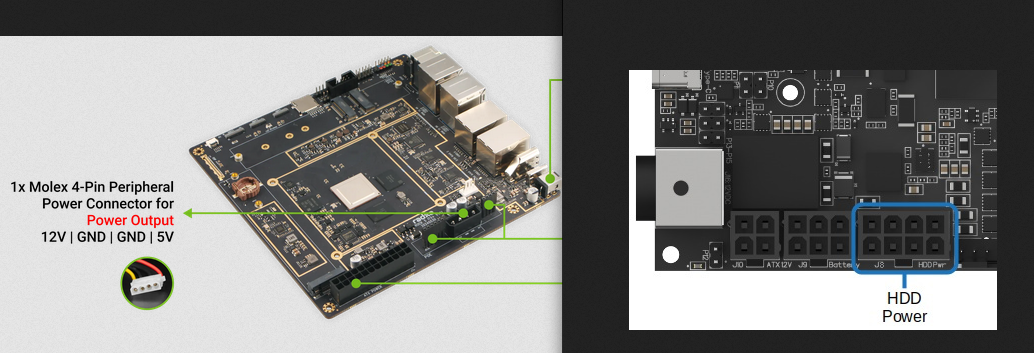
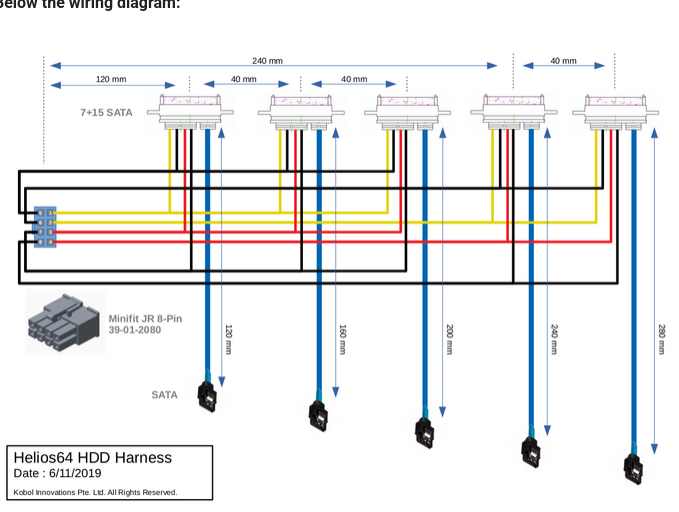
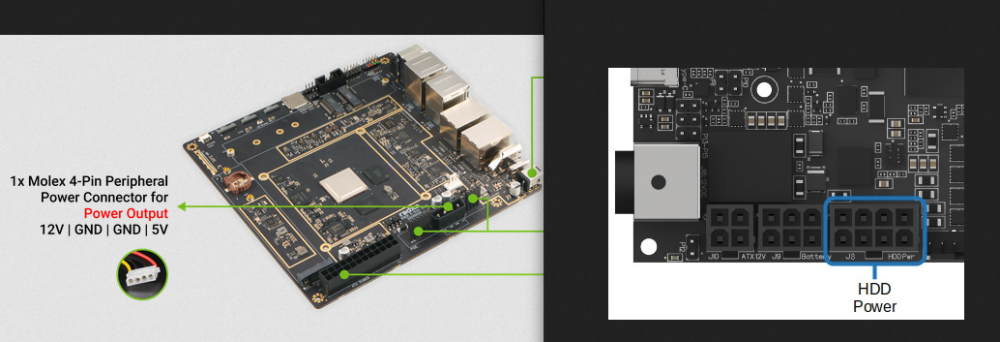
I like it, unfortunately I couldn't find anything about the specs of the 12V/5V molex output. Only the recommended power supply using the 12V barrel (90W/ 12V/8A). You should probably reach to Radxa on their discord/forum to find out if the board can supports the intensity peak of 5 3.5" HDD spinning up a the same time....
-
Hello, After 5 years of loyal service, my Helios64 SBC just died on me last night. Would a Radxa Rock5 ITX+ and a M.2 to Hexa SATA Adapter could be a good drop in replacement to reuse the case? Both are Mini-ITX so it would fit. I know I would lose the front panel lights and power/reset button, and I would need to cut the back panel to fit the I/O shield but these are minor problems. What I am more concerned with, is if it is at all possible to power the 5 HDD from the radxa board (as the Helios 64 board didi). Helios engineers had made it possible to do it with minimum power, mainly by starting up the drives sequentially. Can the molex 4-Pin connector on the Radxa can do it? Provided I could buy/make an adapter to connect it to the J8 harness of the case? That would definitely be a great thing if I could reuse that very fine enclosure. Thanks for your input on that matter.
-
 In the past (2019) there was no chance to use the A64-CPU Jide Remix Mini with armbian, because of a blocked -u-boot But today I found a site (from February 2025 on github) https://github.com/r4nd3l/revived_remix_mini_pc?tab=readme-ov-file which can make the Closed Jide Remix Mini to boot from SDCard with a modified u-boot There at the github page is a modified u-boot and a modified A64 armbian for the Jide Remix Mini. Jide did leave us with a closed/blocked device AT this time the 16GB emmc isnt useable, but using SDCard is a start for upcycling the Jide Remix Mini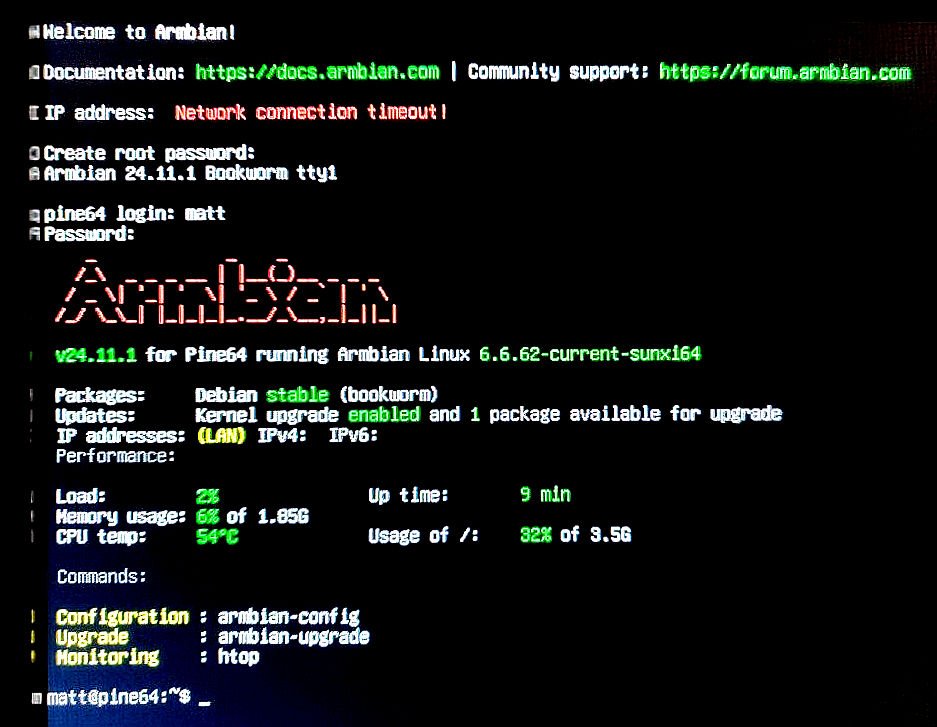
-
 If this fails on multiple build host environments, maybe check your network/internet connectivity. Else I don't really know what could be the cause. I use Armbian Aarch64 (RK3588s) with various tweaks ans kernels and it works fine for builds.
 -
This suggests it is 5V only and also no USB-C PD. You should power a ROCK5 with higher voltage, then no issues, at least that is my experience and is also what you can see if you look at schematics. You can also read the end-user docs/wiki. ROCK3A, ROCK5B, NanoPi-R6C all have own step-down DC/DC converter on the board itself. The latter one for example has an 8A component for it. So it can make enough power from 20 or 15 Volt input at a perfect 5V internally for USB devices on its type-A ports, and also easily maintain its 3.3V and lower voltages for CPU etc. OrangePi is cheap, same as RaspberryPi. Those shift the powering (issues) to the end-user, meaning you need a stable enough 5V on the USB power input connector. A slight voltagedrop can lead to problems. But board itself is cheap. RPi5 requires a quite rare 5A capable 5V USB-C PD (RPI5), where the ROCK3A/5B can just be fed from any voltage between 9 and 20 Volt (see docs/wiki). If you use 5V, the on-board DC/DC step-down cannot do its work of course, so essentially bypassed. Why did you buy a ROCK5 then. Same as buying a car with combustion engine with empty fuel tank, instead put a horse in front to pull you forward from A to B. (Or get a bicycle). The (extra) horse is the 27W Pi5 PSU here, costed me 18 Euros, half the price of the ROCK3A. I put a fixed 12V on a USB-C connector, from an old card battery, that by itself is kept at about 12V by a 12V/10A generic powerbrick. Is also UPS then is no 230VAC mains. The Nanpi-R6C with latest U-Boot and latest mainline kernel does also do USB-C PD, so with a generic 45W USB-C PD PSU, is flips automatically to 15V on its USB-C input. With another 60W USB-C PD PSU it was 20V. ROCK5B should be able to do the same, but haven't tried as run 24/7 for months as home/house server.