All Activity
- Past hour
-
Thanks for the feedback. This is welcome 👾 I'm currently fiddling with Wifi for the 6.18 kernel. No good karma: the adapted bcmdhd sdio wifi from the Spacemit kernel 6.6 was removed from 6.18. So I'm using the bcmdhd extension instead, as it's done with OrangePi 5, based on the github/armbian/bcmdhd-dkms repo. That one has ALLWINNER changes under the #ifdef CUSTOMER_HW_RK (probably Rockchip origin). I need to re-add SPACEMIT changes. Also, I need to revert a Wake-on-WLAN change submitted by Spacemit to RFKILL in order to get the necessary Interrupt init called. Bonus: OPi5-edge also uses that extension driver but does not compile b/c a PR for 6.17 on bcmdhd-dkms from October was ignored. Will need time 🤪 LG // Sven-Ola
-
 Pardon me, something's always missing 😅 cat /etc/os-release PRETTY_NAME="Armbian 25.11.2 noble" NAME="Ubuntu" VERSION_ID="24.04" VERSION="24.04 LTS (Noble Numbat)" VERSION_CODENAME=noble ID=ubuntu ID_LIKE=debian HOME_URL="https://www.armbian.com" SUPPORT_URL="https://forum.armbian.com" BUG_REPORT_URL="https://www.armbian.com/bugs" PRIVACY_POLICY_URL="https://www.armbian.com" UBUNTU_CODENAME=noble LOGO="armbian-logo" ARMBIAN_PRETTY_NAME="Armbian 25.11.2 noble"
 -
 If it is so critical, you should have a backup, not only of the files on the RAID array, but also of the root filesystem. Then you can again make a copy of that backed-up rootfs and do a test upgrade with that. You should also mention what OS/distro it is based (Debian or Ubuntu) , see /etc/os-release I guess it is Bookworm. This usr-merge should work OK if you did normal upgrades and even dist-upgrades. I have seen many warnings when doing Bookworm-> Trixie, but all still works well (not on Odroid-HC4, but various other Armbian installations). I do not use DKMS but that can cause some issues as it is not a standard distro kernel but Armbian's instead. So for me it is easy, I purge it. You should know where you need it for, I guess you don't need it as you do at least not run ZFS on the array AFAIK.
 - Today
-
Great I thought RiscV was still much slower than ARMs of similar prices.
-
 I am thinking about getting a Nanopi R3S, which could be a better option, for it has a dedicated designed case for it. The CPU on it is the same one, so computation wise should be feasible.
 -
System Overview Hardware: ODROID HC4 OS: Armbian (current version) Kernel: 6.12.44-current-meson64 Use case: Production NAS with critical data Problem Description During apt upgrade, the following critical warnings appear: dpkg: warning: This system uses merged-usr-via-aliased-dirs, going behind dpkg's dpkg: warning: back, breaking its core assumptions. This can cause silent file dpkg: warning: overwrites and disappearances System state analysis reveals: /bin, /sbin, /lib are correct symlinks to /usr/* BUT: Files exist in duplicate (/bin/bash and /usr/bin/bash identical) DKMS cannot build kernel modules (missing headers) systemd cannot set journal flags (symlink to SD card) NAS Configuration (Critical Infrastructure) Storage Setup: RAID1 with mdadm (two HDDs) + LUKS encryption /var/log relocated to SD card Filesystem: /dev/mmcblk0p1: LABEL="armbi_root" TYPE="ext4" /dev/sda: TYPE="crypto_LUKS" /dev/sdb: TYPE="crypto_LUKS" /dev/mapper/sda_luks: TYPE="linux_raid_member" /dev/mapper/sdb_luks: TYPE="linux_raid_member" /dev/md0: TYPE="ext4" Reproduction $ ls -la /bin /sbin /lib lrwxrwxrwx 1 root root 7 Apr 22 2024 /bin -> usr/bin lrwxrwxrwx 1 root root 7 Apr 22 2024 /lib -> usr/lib lrwxrwxrwx 1 root root 8 Apr 22 2024 /sbin -> usr/sbin $ ls -la /usr/bin/bash /bin/bash -rwxr-xr-x 1 root root 1543048 Mar 31 2024 /bin/bash -rwxr-xr-x 1 root root 1543048 Mar 31 2024 /usr/bin/bash # DUPLICATE! Urgent Questions 1. Root Cause Analysis Has anyone experienced this specific issue with Armbian on ODROID HC4? Is this a known upgrade problem with a particular Armbian version? 2. Solution Paths Which approach do you recommend for a production NAS? A) System repair tool (is there an Armbian-specific one?) Manual cleanup - any experiences with this? C) Migration to new image - best method with LUKS+RAID? D) Install kernel headers first despite warnings? 3. Migration Strategy with LUKS How to safely migrate: LUKS configuration (keys, passphrases) mdadm RAID1 setup Samba/NFS shares and ACLs WireGuard configuration Risk Assessment Current risk: Silent data corruption possible Kernel updates may break filesystem modules System might not boot after next reboot Time pressure: NAS must remain available, but security is top priority. System Details # dpkg --version Debian 'dpkg' package management program version 1.22.6 (arm64). # uname -a Linux odroidhc4 6.12.44-current-meson64 #3 SMP PREEMPT Thu Aug 28 14:31:16 UTC 2025 aarch64 aarch64 aarch64 GNU/Linux # cat /etc/armbian-image-release BOARD=odroidhc4 BOARD_NAME="Odroid HC4" VERSION=25.2.1 REVISION=25.2.1 IMAGE_UUID=54c1127b-9e70-4d3f-bedd-3faf1f5e58fa BUILD_REPOSITORY_COMMIT=1f6972065 Request for assistance with: Immediate actions to stabilize the system Proven migration method for Armbian+ODROID+LUKS Experiences with this specific bug
-
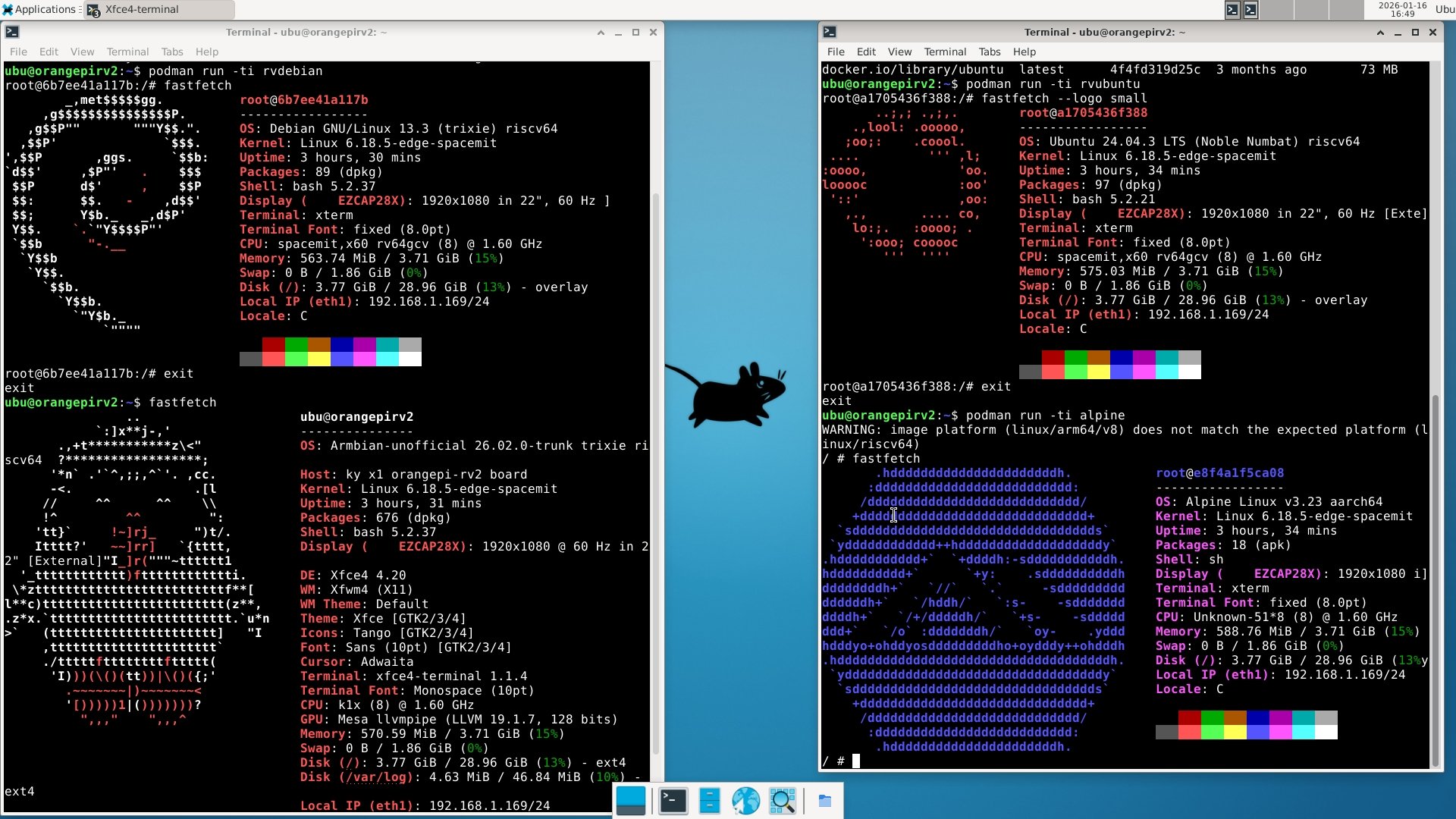
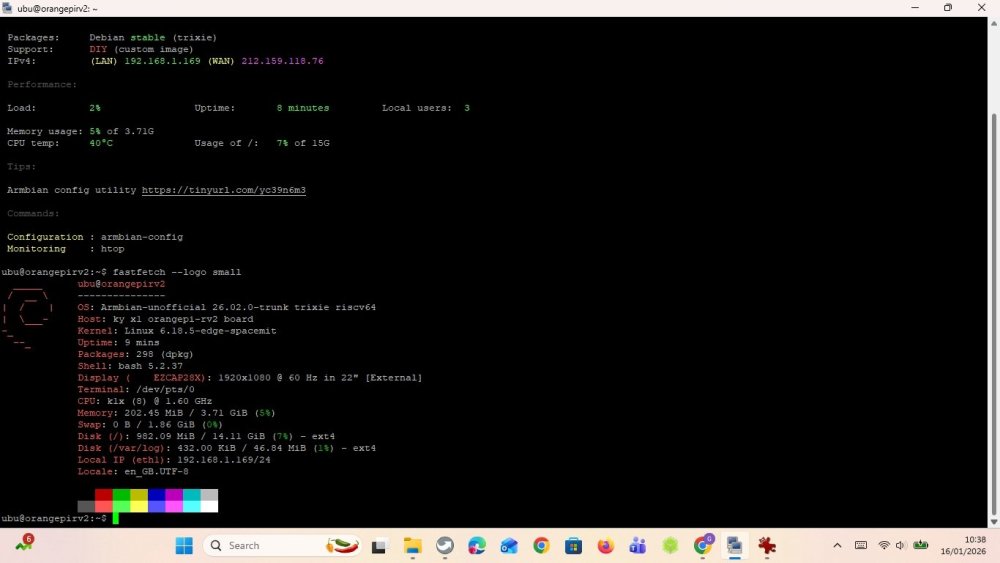
I got surprised by "GPU: Mesa llvmpipe" ... but then I searched, and it means CPU rendering. But still very nice!
-
What @Werner means by this comment is that you need to update your code to current github code base. You can't use old code to build. The dependencies that get pulled in during the build process change over time. So you always need to be on current (or near current) github source for armbian build to reliably build images.
-
 While it didn't give an solution, 👆 this is a good answer. It matches my concept of what armbian-build does, as I learned it 3 years ago (from reading the documentation and experimentation)
 -
I just thought that a inserting a cpio file would be accepted, just like inserting a c file into the linux source code. I have never done a source file insertion myself, with neither C or cpio file... but I assumed it would work, since it is a common need for linux patches. In this page, they talk about the "--new-file" feature of the diff command https://unix.stackexchange.com/questions/37287/how-to-include-a-new-file-into-a-patch
-
-
Yes, absolutely works with the front USB. I do not know the regular price, that depends on the spec you choose (how much RAM, is eMMC included). I got the similar price for that board including shipping, but do note that it was shipped from China to Taiwan. Hmm, that's true for Hiby R3II, checking from the manual, it actually says:
-
 HI I arrived here after buying a Hiby R3II and trying to use it on my PS5. Stupid Gemini sayed that it has a software toggle to UAC 1 but it doesn´t. So I´m seeing what to do and this option popped up. Do you think it may work with the PS5 front USB? I looked for the board and is around 35 USD in Aliexpress shipped to Europe. Is that regular price? thanks a lot.
 -
I'm using the command ./compile.sh build BOARD=rpi4b BRANCH=current KERNELBRANCH=current SKIP_ARMBIAN_REPO=yes SKIP_ARMBIAN_CONFIG=yes SKIP_EXTERNAL_TOOLCHAINS=yes BUILD_DESKTOP=no BUILD_MINIMAL=yes CLEAN_LEVEL=make-kernel,alldebs,images,cache EXPERT=yes KERNEL_CONFIGURE=no NEWPKG=true OFFLINE_WORK=no KERNEL_BTF=no RELEASE=noble
-
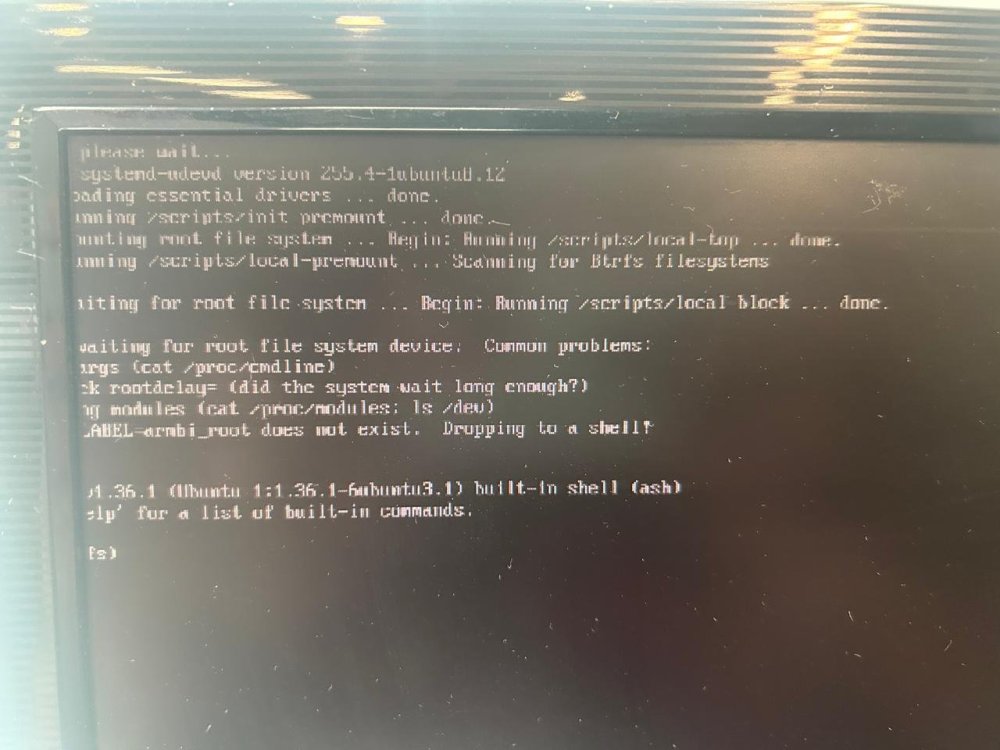
The image is generated, but when I put it in the Raspberry Pi, it displays the screen.
-
moved Cannot reproduce. Download image works just fine https://dl.armbian.com/rpi4b/Noble_current_minimal outdated tag, unsupported
-

Edit ArmbianEnv.txt when machine is unable to boot?
Myriade replied to Myriade's topic in Rockchip CPU Boxes
Found the other partition! Quite surprised that it didn't show up in KDE, but that's on me for blindly trusting a GUI. Thank you -
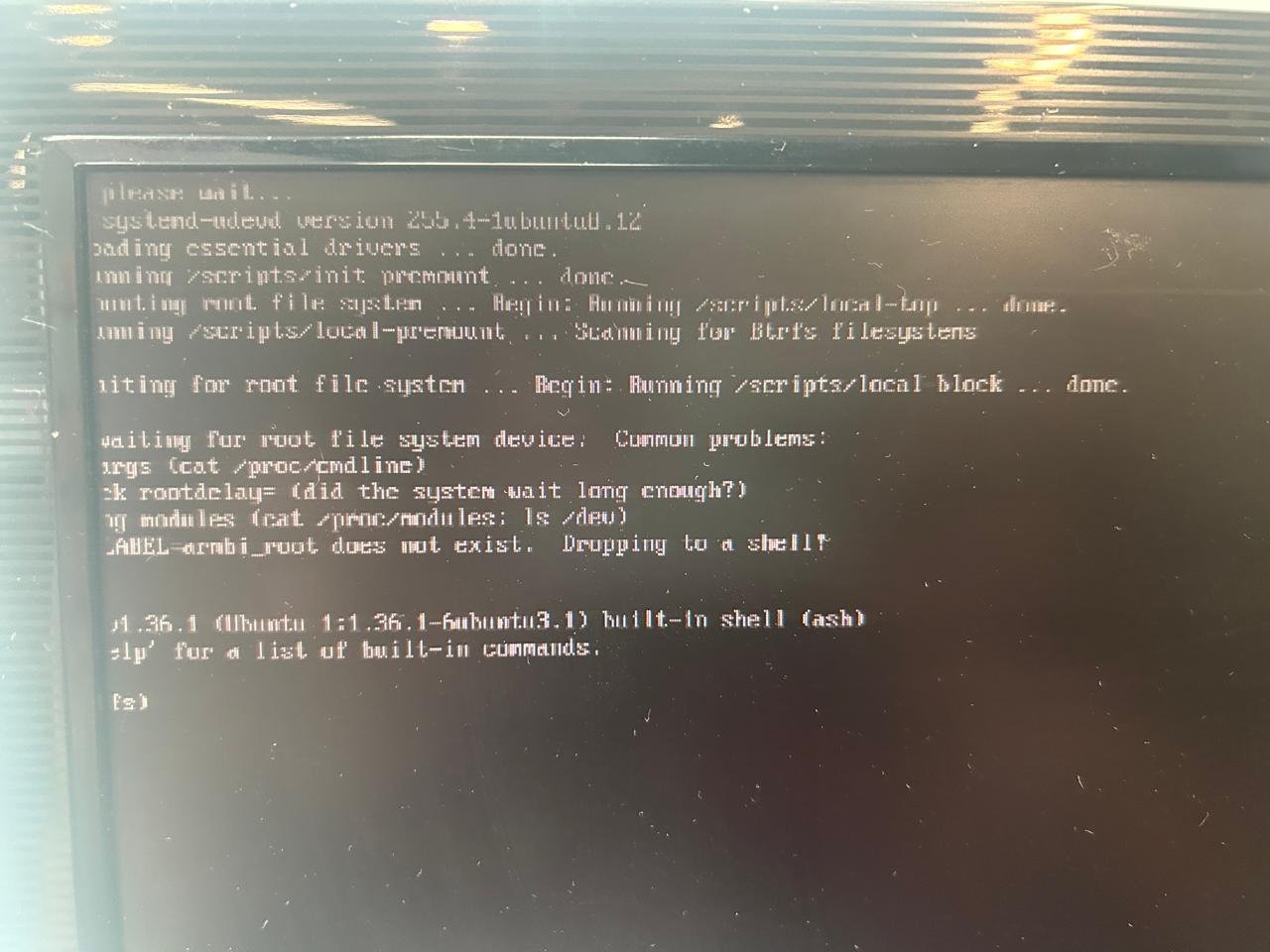
I need help. Every version I generate for Raspberry Pi 5 Armbian-unofficial_25.08.0-trunk_Rpi4b_noble_current_6.12.32_minimal shows the error shown in the photo.
-
Hello Dear, After flashing *Armsom-cm5-rpi-cm4-io_*, there is one critical problem. onboard USB hub always connects and disconnects 2 times when booting. dmesg outputs: [ 6.190239] hub 1-1:1.0: USB hub found … [ 7.868081] rk-pcie 2a200000.pcie: PCIe Link Fail, LTSSM is 0x3, hw_retries=0 [ 7.868642] usb 1-1: USB disconnect, device number 2 … [ 9.326443] hub 1-1:1.0: USB hub found … [ 11.213062] rk-pcie 2a200000.pcie: PCIe Link Fail, LTSSM is 0x3, hw_retries=1 [ 11.213297] usb 1-1: USB disconnect, device number 4 I have tried with many variations, but the onboard hub is always disconnected. server/desktop community release/ self build several tags from 25.5 to 26.2 CONFIG_USB_ONBOARD_HUB O/X rpi cm4 io board/ Ochin board However, Armsom's official image has no problem with the onboard usb hub. CM4-nano-B has no onboard hub, and has no problem with external hub. So, it seems to be a SW problem. In addition (for information), I tried custom-build without pcie because hub disconnection happens near pcie. Kernel menuconfig disables Rockchip PCIe host cont/ Rockchip DesignWare PCIe cont/ Broadcom Wireless Device Drv. Device Drivers ---> [*] PCI support ---> PCI controller drivers ---> < > Rockchip PCIe host controller DesignWare PCI Core Support ---> < > Rockchip DesignWare PCIe controller ... [*] Network device support ---> [*] Wireless LAN ---> <*> Rockchip Wireless LAN support ---> [ ] Broadcom Wireless Device Driver Support ---> Then, both pcie and onboard-usb-hub disappear in dmesg even though any usb option is not changed. Please review this problem. Thanks.
-
Thank you
-
Still waiting in January 2026. LOL What happened @ROOD I was just given an H96 PRO+ (like your photos, but with v2.1 of motherboard). I want to put it to work doing something... so I am ready to install armbian, with whatever your final instructions are. -Thanks!
-
 Dear SteeMan, thank you for your answer. I checked Android info, and it shows 8 GB / 128 GB, Android 15, so the advertisement was not real. I investigate it forther.
 -
 @quaSimba: Thanks for your remarks and the link to the guide on Github. Hopefully I'll one day have a RPi to work with so I can support it in my script and tutorial. @fxkl47BF: The completion packages were removed because they can be horribly laggy on low-powered SoCs and I find them annoying in general. They can be easily reinstalled if desired.
 -
I have a question about booting from sd card. While with empty emmc (erase with rkdeveloptool), the board falls back to maskrom mode even the sd card (with working os) is inserted. It can boot armbian into sd card if I flash miniloader and u-boot in to emmc. I wonder how can we get it to boot fully from sd card.
-
 Thanks @robertoj I had a quick look at your link. It talks about introducing patches into the Ambien build (which I already do in terms of c code, module source code and the linux .config file). HOWEVER, when I attempt to create a patch from my cpio binary file and use that as the initial ramdisc during the build, it fails (I did it a couple of weeks ago & I can't remember exactly what the problem was). Nevertheless, if you think I can create a patch from the cpio file, please give me detailed instructions and I'll try it again--- maybe I did something wrong?