All Activity
- Past hour
-
Support for 7.1 has been merged yesterday https://github.com/armbian/build/pull/9784
-
I verified the overlay above working with diy kernel 7.1.0-rc1 and kernel 6.18.10 from apt repo.
-
@sven-ola Hi sven-ola! Thanks a ton for making RV2 work on Armbian! I'll go about trying to make an RV2 start for the first time shortly. Interfacing it via the serial port is fine, and equally fine is connecting it via HDMI and USB to screen and keyboard, right? As for boot media, will booting the Armbian Debian image from a USB storage device work out of the box or must I install some image on an onboard flash chip first, if so what's the URL to that? And then: Do you think it makes any sense for me to use the Armbian Edge which has kernel 6.19 right now, does it seem stable? If so can you provide an URL to it (upload it on armbian.org or mega.nz etc.) On SpaceMIT's mainlining page https://github.com/spacemit-com/linux/wiki#user-content-K1_SoC I see that the PCI support got an update in 6.19, would this be a reason to use Armbian Edge. This URL is linked: https://lore.kernel.org/all/20251013153526.2276556-1-elder@riscstar.com/ . I have no idea if this update has been backported to the 6.18 kernel used. The 6.19 and 6.18 kernels used, where are they taken from actually? At least for 6.18 I think the repo is https://github.com/jmontleon/linux-spacemit/ or https://github.com/spacemit-com/linux-k1x , do you use it? And for clarity, there is no Armbian with Linux 7.1 yet right? Otherwise just downloading the Armbian with 6.18 from https://armbian.com/boards/orangepirv2 . For CLI and packages and no desktop, the Debian flavour is preferable I guess. At this point do you think PCI and USB interfaces are stable in Armbian or Armbian Edge? Thanks!
- Today
-
OK, I checked and the USB port is already set to host: The USB-A port is still not functional, but - as said in my previous reply - the USB-C port is working fine.
- Yesterday
-
Not really. The USB-C port does work, I actually connected an USB hub to be able to add a keyboard/mouse to the SBC and it worked without issue. I'll try this , thank you for the instructions. The USB-C port does work though if I connect a hub to it, I'm able to use the devices connected to the HUB without issue.
-
I prefer to stay on stable release. I updated an old version because of copy fail CVE . It's very strange that i'm the only one with this bug. Can I update only the uboot part?
-
 After upgrading armbian to 26.2.1 with kernel 6.18.10 performances on WAN interface dropped to 20Mbps for a single TCP connection. The interface is end0, renamed from eth1, driver from ethtool -i is "st_gmac". I used armbian-config to rollback to kernel 6.12.58 and performances are ok now. Will it be fixed in the future kernels ?
 -
 Today I realized a higher version of zfs-dkms(2.4.1) was actually offered in the Armbian repository. So I entered the command below to upgrade zfs-dkms to 2.4.1 and it was successful:
 -
Maybe because it's a "zombie" system with systemd removed and the monitor tools fails to address Here's the dmesg of current system https://paste.armbian.com/zuyaxiwugo.yaml
-
Hm does not contain 7.1.0 dmesg boot log
-
 Seems like the same "issue" like here. tl;dr: upstream uses "otg" to allow user to change the usb port behaviour as they like. https://forum.armbian.com/topic/59094-usb-2-port-not-available/#comment-237191
 -
blank
-
The upstream default seems to be "otg" to allow users in userspace to change the usb port behavior. Try this and use armbian-add-overlay /dts-v1/; /plugin/; / { fragment@0 { target = <&usb_host0_xhci>; __overlay__ { dr_mode = "host"; }; }; };
-
 Thanks for your update. I checked rk3588-orangepi-5-plus.dtb after decompiling, it says: It seems line dr_mode = "otg" does On The Go, they seem to switched it from the 6.1.115-vendor-rk35xx dtb. What could be the use case? As I understand you can set it to dr_mode = "peripheral" ?
 -
In mainline kernel 6.18 or above, the USB 2.0 port (and USB-C port) is configured as device mode. You can use following cmd to change to host mode to connect other USB devices, but you need to do it again after reboot. sudo bash -c "echo host > /sys/kernel/debug/usb/fc000000.usb/mode" It could be done by dtb overlay but there is no one available now.
-
Providing logs with armbianmonitor -u helps with troubleshooting and significantly raises chances that issue gets addressed.
-
No problem, just to let you guys know Everything else is working Cheers !
-
must be specific to this board. rock-3a which also uses RK3568 is not affected. btw. bleedingedge is intended to be used by developers only since breakage just like you noticed, is very much expected.
-
Connecting a usb keyboard doesn't seem to work with 7.1 .. [ 2.836541] usb 7-1: new full-speed USB device number 2 using ohci-platform [ 3.024538] usb 7-1: device descriptor read/64, error -62 [ 3.304535] usb 7-1: device descriptor read/64, error -62 [ 3.596542] usb 7-1: new full-speed USB device number 3 using ohci-platform [ 3.780527] usb 7-1: device descriptor read/64, error -62 [ 4.076543] usb 7-1: device descriptor read/64, error -62 [ 4.180566] usb usb7-port1: attempt power cycle [ 4.372529] usb 7-1: new full-speed USB device number 4 using ohci-platform [ 4.780541] usb 7-1: device not accepting address 4, error -62 [ 4.964529] usb 7-1: new full-speed USB device number 5 using ohci-platform [ 5.372526] usb 7-1: device not accepting address 5, error -62 [ 5.372569] usb usb7-port1: unable to enumerate USB device
-
 Search root for this motherboard. The device is tvbox Fobem Duo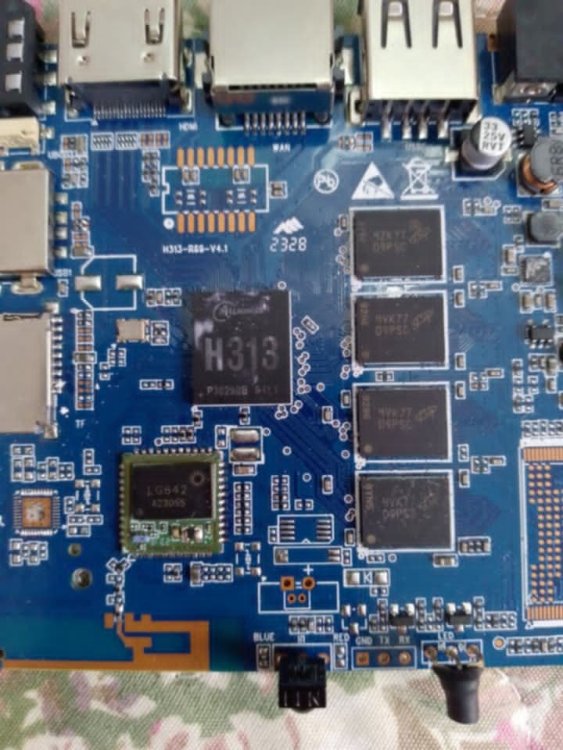
-
Bleedingedge Kernel 7.1 rc2 fixed it [ 12.686942] panfrost fde60000.gpu: clock rate = 594000000 [ 12.686994] panfrost fde60000.gpu: bus_clock rate = 500000000 [ 12.710029] panfrost fde60000.gpu: mali-g52 id 0x7402 major 0x1 minor 0x0 status 0x0 [ 12.710053] panfrost fde60000.gpu: features: 00000000,00000df7, issues: 00000000,00000400 [ 12.710062] panfrost fde60000.gpu: Features: L2:0x07110206 Shader:0x00000002 Tiler:0x00000209 Mem:0x1 MMU:0x00002823 AS:0xff JS:0x7 [ 12.710070] panfrost fde60000.gpu: shader_present=0x1 l2_present=0x1
-
 Hello! I noticed that x96q lpddr v1.3 is now an official (or something close to that) release, as it appears on the main page when searching. I used to use @sicxnull fork but now I have the impression that his changes were incorporated and he is the official maintainer of this device. I installed the Armbian 26.02 in an SD card and tested it in my X96Q lpddr v1.3 device and it works great! The problem is when I installed it to the internal eMMC, it will not boot anymore. I have the serial cable attached and I can see that very very early in the boot process u-boot cannot read from flash and the boot hangs. I know this has been discussed to some extent in another thread but I wanted to start fresh on this one since now we're talking about the Armbian official release and not the fork anymore. My intent with this thread is focus exclusively on fixing eMMC on the official release. My tests: Test 1 Download latest release, from here, more specifically this one. Direct link to the image here (name: Armbian_community_26.2.0-trunk.858_X96q_resolute_current_6.18.27_xfce_desktop.img.xz). Write to SD card using balena etcher, boot in my x96q device. It works well, boots through the initialization process, create user account, etc. The, run armbian-install and install it to internal eMMC. Remove SD card. Reboot. It will not boot, with the following error: Trying to boot from MMC2 MMC Device 1 not found spl: could not find mmc device 1. error: -19 SPL: failed to boot from all boot devices ### ERROR ### Please RESET the board ### Booting from SD card again, re-running the installer and forcing to update the eMMC bootloader does not help. Test 2 I swapped only u-boot for the one from miniarch/minimyth2 project, compiled for the same hardware. Miniarch project can be found here. An image that works on this hardware (in my specific device) can be found here, more specifically this one. This image works well, and it also works well when installed to eMMC. The reason I don't use it is that I prefer Ubuntu over Arch, which I can get with Armbian instead. Download that image, and extract the file u-boot-sunxi-with-spl.bin from the first partition of that image. I used unxz + losetup + loopback mount the image's first partition in linux, but it may be easier for you to just write that image to an SD card, then copy the file from it. It is in the first partition in the path /bootloader/u-boot-sunxi-with-spl.bin. Copy it to a usb stick and plug it into the x96q device or scp it directly. Now, boot the x96q with the SD card, go through all initial setup. Run armbian-install, and install it to eMMC. Finish the installer (quit). Copy the file you extracted from miniarch to the booted system in x96q (using the usb stick or scp'ing it directly). Overwrite the file with the same name at /usr/lib/linux-u-boot-current-x96q/u-boot-sunxi-with-spl.bin with the new one. Run the armbian-install command again, this time chose to update the bootloader in the eMMC. Mount the eMMC temporarily at /mnt and edit the /mnt/boot/armbianEnv.txt file, add this line: fdtfile=allwinner/sun50i-h313-x96q-lpddr3.dtb This is because the hardcoded path for the DTD file in miniarch is different from the one from armbian, so you need to override it. It can also be done in realtime on the u-boot boot prompt if you have serial cable attached. Reboot, remove the SD card and let it boot from the eMMC. It should work, now you have a working Armbian on the eMMC. This will get undone if the bootloader is updated again with the original one (and is not meant as a permanent fix). Thoughts Miniarch uses 2025.04 u-boot while Armbian x96q board is using 2024.01 but I'm not sure this is really relevant. My guess is that the difference is in some of the patches they apply and not in the improvements of this new version of u-boot itself. But I could be wrong. You can find the list of patches that miniarch applies over to stock u-boot here. Many of those patches do not exist in Armbian. I wonder if it is any of those that is making the difference. Question to @sicxnull: do you have a good idea of what is going on and have any direction for further testing? I wanted to ask before I start applying the extra patches one by one, that would take quite some time. Thanks!
 -
Is it possible on a Banana Pi M4 Zero to reboot Armbian running from SD card, so that the next time it boots from the internal storage, without removing the SD card? (and without modifying sdcard boot sector) I want to create an automatic backup internal storage - so that the system (booted from emmc) reboots, starts from the SD card, backs up content emmc to sdcard, and then reboots again, booting from emmc. Is it possible some how?
-

H96 Max RK3528 - Cannot boot Armbian from TF/SD card
jock replied to 0KTAV1US's topic in Rockchip CPU Boxes
@epost.deb Hmmm, I am a bit skeptical about that; mainly because the SoC (on my board <-- this is important!) does not peek for sdcard at all during boot, thus u-boot is not involved; moreover if I read the SARADC2 from userland, I get it in the range of the eMMC-only boot configuration. I emphasize this is on my board, because the manufacturer can chose the boot configuration placing a pair of resistors on the board. The manufacturer of my board choose the eMMC-only boot configuration. If I find the two resistors, and remove the "pull-down" one, my board would try booting from all the options. -

Efforts to develop firmware for H96 MAX V56 RK3566 8G/64G
Hqnicolas replied to Hqnicolas's topic in Rockchip CPU Boxes
somehow I'm in troble to run the armbian build into 24.04 localhost. cd build ./compile.sh BOARD=h96-tvbox-3566 BRANCH=edge BUILD_DESKTOP=no BUILD_MINIMAL=yes KERNEL_CONFIGURE=no RELEASE=resolute [💥] Problem detected [ Docker installed but not usable ] [💥] Exiting in 10 seconds [ Press <Ctrl-C> to abort, <Enter> to ignore and continue ] [🔨] E: Unable to correct problems, you have held broken packages. [💥] error! [ Failed to install host packages; make sure you have a sane sources.list. ] [💥] Exiting with error 43 [ at /home/nicolas/Downloads/build/lib/functions/logging/traps.sh:1 so let's try docker, cd build ./compile.sh docker BOARD=h96-tvbox-3566 BRANCH=edge BUILD_DESKTOP=no BUILD_MINIMAL=yes KERNEL_CONFIGURE=no RELEASE=resolute then also docker: Failed to update binfmts [ update-binfmts --enable qemu-aarch64 ] ... arm64: not supported on this machine/kernel how to fix: sudo apt update sudo apt install -y qemu-user-static binfmt-support sudo systemctl restart systemd-binfmt update-binfmts --display qemu-aarch64 docker run --privileged --rm tonistiigi/binfmt --install all docker run --rm --platform linux/arm64 arm64v8/ubuntu uname -m now, run the build inside the docker shell: cd build newgrp docker ./compile.sh docker-shell ./compile.sh BOARD=h96-tvbox-3566 BRANCH=edge BUILD_DESKTOP=no BUILD_MINIMAL=yes KERNEL_CONFIGURE=no RELEASE=resolute Now let's prepare this board for kernel 7