All Activity
- Past hour
-
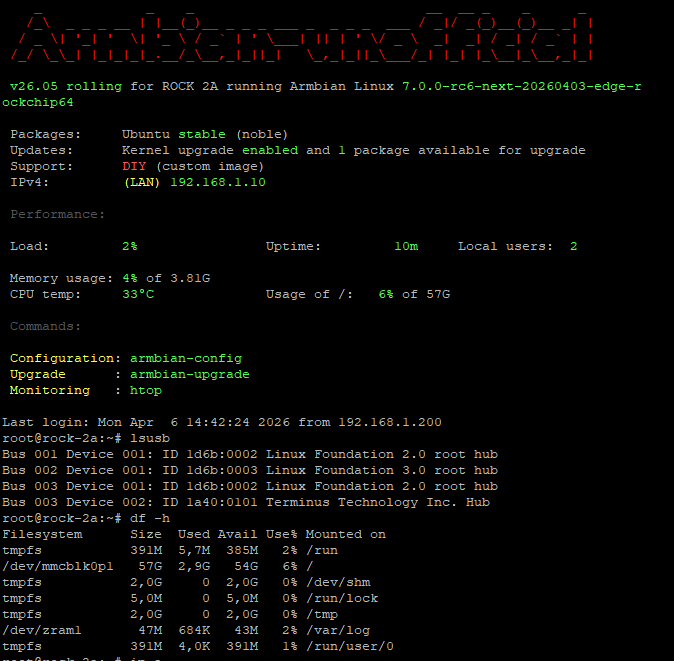
Armbian image placed on internal soldered eMMC 64GB - only one issue now aic8800 not supported yet for kernel 7.0-rc6 so no wifi 😕
- Today
-
This week’s Armbian development saw significant enhancements across hardware support and system functionality. The Arduino UNO Q was officially added, along with new firmware and flash binaries for the QRB2210 and QCM2290 variants. HDMI CEC support was introduced for Rockchip RK3588/RK3576 SoCs, while panel compatibility expanded with updates for Raspberry Pi and Hardkernel ODROID-Vu8S. Key kernel improvements included a bump to version 7.0-rc6 and rewritten patches for Rockchip64-6.18. The release also featured workflow hardening, exclusion of unsupported boards, and fixes for USB-C OTG mode on Odroid-M2. These updates collectively strengthen Armbian’s platform stability and broaden its device coverage. ChangesAdd Arduino UNO Q. by @igorpecovnik in armbian/armbian.github.io#268Add firmware for Arduino UNO Q (QRB2210/QCM2290). by @SuperKali in armbian/firmware#123Add HDMI CEC support to Rockchip RK3588/RK3576 SoCs. by @chaitan3 in armbian/build#9622Agatti: add flash binaries for Arduino UNO Q (QRB2210). by @SuperKali in armbian/qcombin#1Arduino logo. by @igorpecovnik in armbian/armbian.github.io#269ch13726a: Added missing MIPI_DSI_MODE_VIDEO. by @kay-lambdadelta in armbian/build#9621config: rockchip64: build Motorcomm YT6801 drivers built-in for OOB Ethernet. by @c127dev in armbian/build#9625drm: add support for rpi panel v2. by @ackPeng in armbian/linux-rockchip#465Exclude end-of-support boards from armbian-images.json. by @igorpecovnik in armbian/armbian.github.io#271Harden data-update-partners workflow. by @igorpecovnik in armbian/armbian.github.io#270mainline: bump edge to 7.0-rc6. by @EvilOlaf in armbian/build#9618Odroid-M2: Add support for Hardkernel ODROID-Vu8S panel. by @mlegenovic in armbian/build#9627Odroid-M2: Fix USB-C port in OTG mode. by @mlegenovic in armbian/build#9633Remove radxa-dragon-q6a from targets-release-nightly blacklist. by @igorpecovnik in armbian/armbian.github.io#267rockchip-vendor: CONFIG_BT_HCIBTUSB=m. by @vidplace7 in armbian/build#9628rockchip64-6.18: rewrite kernel patches against 6.18.21. by @EvilOlaf in armbian/build#9629SpacemiT: Disable k1-usb: add disconnect function support. by @pyavitz in armbian/build#9620View the full article
-

networking in bpi-m5 with new 26.03.1 release.
eselarm replied to gene1934's topic in Software, Applications, Userspace
I assumed your router is 192.168.71.1 and is only doing DNS for internet, so not for your in-house computer. For in-house computers, I assumed want to use a fixed IP address assigned on the local computer and also put a hosts file per local computer so all other computers in your house are known via that. So then, on a new image in a running computer, use: sudo nmtui to assign a fixed IP address. You need to tab through the options. -
I recently did some trying to boot Armbian on this box and eventually got it not to recognize "Loader" mode using the reset button. It was working before I eventually flashed an not so compatible u-boot. I knew the risks, sh1t happens I was trying to boot Armbian from USB by the way, that is why I tried to do this. I discovered that the original firmware is the same as a H96 Max M1 PLUS as we can see from the official firmware file naming: rk3528_l001_H96_Max_M1PLUS_6621_64BIT_TAR-20251112.2200.img My question, as anyone had experience with this board? The idea is to ditch the original firmware and run HA on Armbian (I previously did this with another box using docker). I know the only option now is to "short" the eMMC in order to achieve "Maskrom" mode but there are no obvious pin points on the board.
-
Dear Armbian-Enthusiasts! I would like to install Armbian with Virtualbox, so that I can run Home Assistant (HA) in a VM environment (Intel chip .vdi) - yes, no container. Would chose this image "Armbian 25.11.1 Minimal / IOT 6.1 kernel" (rolling release) Installing Virtualbox with: sudo apt install virtualbox Is this possible? Best wishes, Greg Links: https://www.home-assistant.io/installation/linux/ https://wiki.debian.org/VirtualBox https://www.armbian.com/orange-pi-5-plus/
-

networking in bpi-m5 with new 26.03.1 release.
gene1934 replied to gene1934's topic in Software, Applications, Userspace
You mix up 2 things: - 'msdos filesystem' which usually means 'FAT' - 'msdos table' which usually means 'MBR partition table' agreed Both can be up to 2 TeraBytes when sector or cluster size is 512 bytes. So no reason to change to GPT. Changing to GPT (with standard 128 entries), will use the same space as where the U-Boot bootloader is located on SD-card for older Arm chips, like Allwinner A20 (original bananapi). So risk is un-bootable. which seems to be the case. but it sure as hell blocks mounting and working on the card b4 network is enabled. Why? the error reported is can't find ext4 filesystem. I'll rewrite it just to be sure its pristine. Because it did mount but only lost+found is there. next? -
Thanks for the info to try other options 🙂 Thanks for the tip, I'll try other options 🙂 It worked for: odroid-c4 ... basically, the settings are the same as for the OrangePI3LTS, I'm talking about connecting cables to a 40x2 / 20x2 LCD. The diagram for the BananapiM2pro is as follows: My Winstar 40x2 OLED LCD compatible with drivers: hd44780 / driver: WS0010 is detected in the system as: 3f .................................. sudo i2cdetect -y 0 [sudo] kris: 0 1 2 3 4 5 6 7 8 9 a b c d e f 00: -- -- -- -- -- -- -- -- 10: -- -- -- -- -- -- -- -- -- -- -- -- -- -- -- -- 20: -- -- -- -- -- -- -- -- -- -- -- -- -- -- -- -- 30: -- -- -- -- -- -- -- -- -- -- -- -- -- -- -- 3f 40: -- -- -- -- -- -- -- -- -- -- -- -- -- -- -- -- 50: -- -- -- -- -- -- -- -- -- -- -- -- -- -- -- -- 60: -- -- -- -- -- -- -- -- -- -- -- -- -- -- -- -- 70: -- -- -- -- -- -- -- -- .................................. You can also enter the appropriate values yourself in the file: sudo nano /boot/armbianEnv.txt verbosity=1 console=both overlay_prefix=meson fdtfile=amlogic/meson-sm1-bananapi-m2-pro.dtb rootdev=UUID=a4fb8074-c453-45da-ab31-4d61dca46cfa rootfstype=ext4 overlays=sm1-odroid-c4-i2c0 sm1-odroid-c4-i2c1 usbstoragequirks=0x2537:0x1066:u,0x2537:0x1068:u regards
-
@tparys Thanks for your precious advices I merged them in one dts. This suppress the dummy rtc0 rplace it by the real ds3231 rtc , and as it's rtc0 linux uses it at boot with out any service or script. the dts : /dts-v1/; /plugin/; / { compatible = "amlogic,meson-sm1"; fragment@0 { target-path = "/soc/bus@ffd00000/i2c@1d000"; __overlay__ { status = "okay"; clock-frequency = <100000>; pinctrl-names = "default"; pinctrl-0 = <&i2c2_pins>; #address-cells = <1>; #size-cells = <0>; rtc@68 { compatible = "maxim,ds3231"; reg = <0x68>; }; }; }; fragment@1 { target-path = "/soc/bus@ff600000/bus@34400/pinctrl@40"; __overlay__ { i2c2_pins: i2c2_pins { mux { groups = "i2c2_sda_x", "i2c2_sck_x"; function = "i2c2"; bias-disable; drive-strength-microamp = <3000>; }; }; }; }; fragment@2 { target-path = "/soc/bus@ff800000/rtc@a8"; __overlay__ { status = "disabled"; }; }; }; then I set up a basic service to keep ds3231 up to date either by internal system clock or NTP if chrony synchronize with internet extract of syslog : 2026-04-06T10:19:22.245210+02:00 bananapim5 systemd[1]: Started sync-rtc.timer - Run RTC sync every 6 hour. 2026-04-06T10:19:22.248077+02:00 bananapim5 kernel: rtc-ds1307 0-0068: SET TIME! 2026-04-06T10:19:22.248112+02:00 bananapim5 kernel: rtc-ds1307 0-0068: registered as rtc0 2026-04-06T10:19:22.248120+02:00 bananapim5 kernel: rtc-ds1307 0-0068: setting system clock to 2026-04-06T08:19:16 UTC (1775463556) 2026-04-06T10:24:18.665668+02:00 bananapim5 systemd[1]: Starting sync-rtc.service - Synchronize RTC0 avec l'horloge systeme si NTP actif... 2026-04-06T10:24:18.743806+02:00 bananapim5 sync-rtc: NTP actif : mise à jour RTC0 depuis l'heure système 2026-04-06T10:24:18.751001+02:00 bananapim5 sync-rtc: Mise à jour RTC0 depuis l'heure système NTP actif/inactif 2026-04-06T10:24:19.005750+02:00 bananapim5 systemd[1]: sync-rtc.service: Deactivated successfully. 2026-04-06T10:24:19.006443+02:00 bananapim5 systemd[1]: Finished sync-rtc.service - Synchronize RTC0 avec l'horloge systeme si NTP actif. root@bananapim5:/home/gerard# service : root@bananapim5:/home/gerard# cat /etc/systemd/system/sync-rtc.service [Unit] Description=Synchronize RTC0 avec l'horloge systeme si NTP actif After=chronyd.service [Service] Type=oneshot ExecStart=/usr/rtc/sync-rtc.sh root@bananapim5:/home/gerard# cat /etc/systemd/system/sync-rtc.timer [Unit] Description=Run RTC sync every 6 hour [Timer] OnBootSec=5min OnUnitActiveSec=6h Unit=sync-rtc.service Persistent=true [Install] WantedBy=timers.target root@bananapim5:/home/gerard# cat /usr/rtc/sync-rtc.sh #!/bin/bash # sync-rtc.sh # Synchronisation RTC <-> système avec logging # Vérifie si Chrony a des sources NTP actives NTP_OK=$(chronyc tracking | grep 'Reference ID' | grep -v '0.0.0.0') if [ -n "$NTP_OK" ]; then # Chrony OK, mettre RTC à jour depuis l’heure système logger -t sync-rtc "NTP actif : mise à jour RTC0 depuis l'heure système" else # NTP indisponible logger -t sync-rtc "NTP inactif" fi logger -t sync-rtc "Mise à jour RTC0 depuis l'heure système NTP actif/inactif" hwclock -w -f /dev/rtc0 root@bananapim5:/home/gerard# thanks again
-
Worth trying all of them.
-
networking in bpi-m5 with new 26.03.1 release.
eselarm replied to gene1934's topic in Software, Applications, Userspace
You mix up 2 things: - 'msdos filesystem' which usually means 'FAT' - 'msdos table' which usually means 'MBR partition table' Both can be up to 2 TeraBytes when sector or cluster size is 512 bytes. So no reason to change to GPT. Changing to GPT (with standard 128 entries), will use the same space as where the U-Boot bootloader is located on SD-card for older Arm chips, like Allwinner A20 (original bananapi). So risk is un-bootable. Back to your networking issues: I have not read all, but this BPI-M5 image is Ubuntu based and I see NetworkManager. So that means you also get netplan. I don't want that, so I only use Debian based images as a start. But it seems that if you use 'nmtui' text based tool that you still can quite easily set fixed IP addresses locally. At least that is the case for 'Raspberry Pi OS Trixie' where they also made a dependency between netplan and NetworkManager. Then since this year also Debian by default uses systemd-resolved for their pre-installed (cloud) images for DNS. This means it all won't work out of the box for you. Same was the case for me, I use also my own router and DNS server and that did not work with Armbian (half a year ago). I think now some extra is done, as tests with 26.2 images what Igor asked for, worked OK, but only did boot them via serial console. Look up the forum topic about it if you want to know, I already forgot. So to work with local hosts file on every computer, the whole Linux must prioritize hosts file over DNS resolver. That is determined in /etc/nsswitch.conf I have at least 2 ARM64 computers that need fixed IP (they must work without router) so I have a few entries in hosts file, very limited and dedicated, as rest is all in router. So what I do with new images when some tests or so, is (as root): systemctl disable --now systemd-resolved # this stops the DNS resolver and also makes sure it won't start after reboot rm /etc/resolv.conf # when systemd-resolved is used, this file is a symbolic link to tmpfs in RAM, so if not removed, your next settings are lost after reboot echo nameserver 192.168.71.1 > /etc/resolv.conf Then same as on older (bookworm) Raspberry Pi OS, install openresolv (it handles access to /etc/resolv.conf 😞 apt install openresolv I can not guarantee that it all works the same in Ubuntu when netplan is active, but up to you to figure that out yourself in your network environment. -

[Latest] Armbian Build HDMI Audio support Fix
MarkAntony replied to just_facking_about's topic in Radxa Dragon Q6A
@rsbuffalo's Feb 18th post worked a treat for me on my Dragon Q6a (Armbian 26.2.1 trixie, xfce 4.20). Thanks so much for sharing your solution. -
networking in bpi-m5 with new 26.03.1 release.
gene1934 replied to gene1934's topic in Software, Applications, Userspace
what is installed to be similar to tcpdump since tcpdump is not installed? the date is off about 11 months in the past which disables net resolution in dd-wrt. Apparently ARP is in play here, as I am seeing lots of this in a tcpdump =ieno1|grep amanda here on this machine but I see no answers: 16:42:20.926695 ARP, Request who-has amanda.coyote.den tell 0.0.0.0, length 46 16:42:20.926695 ARP, Request who-has amanda.coyote.den tell 0.0.0.0, length 46 16:42:20.926695 ARP, Request who-has amanda.coyote.den tell 0.0.0.0, length 46 16:42:20.926695 ARP, Request who-has amanda.coyote.den tell amanda.coyote.den, length 46 16:42:21.470873 ARP, Request who-has amanda.coyote.den tell amanda.coyote.den, length 46 16:42:23.288701 ARP, Request who-has router.coyote.den tell amanda.coyote.den, length 46 16:42:24.320147 ARP, Request who-has router.coyote.den tell amanda.coyote.den, length 46 16:42:25.344176 ARP, Request who-has router.coyote.den tell amanda.coyote.den, length 46 16:42:26.370963 ARP, Request who-has router.coyote.den tell amanda.coyote.den, length 46 16:42:27.392224 ARP, Request who-has router.coyote.den tell amanda.coyote.den, length 46 16:42:28.416249 ARP, Request who-has router.coyote.den tell amanda.coyote.den, length 46 16:42:29.445598 ARP, Request who-has router.coyote.den tell amanda.coyote.den, length 46 16:42:30.468289 ARP, Request who-has router.coyote.den tell amanda.coyote.den, length 46 16:42:31.488315 ARP, Request who-has router.coyote.den tell amanda.coyote.den, length 46 16:42:32.513828 ARP, Request who-has router.coyote.den tell amanda.coyote.den, length 46 16:42:33.536356 ARP, Request who-has router.coyote.den tell amanda.coyote.den, length 46 So the protocol is at least transmitting from amanda. This is evidence of dd-wrt ignoring the wrong timestamp because amanda's date is about 11 months out of sync. there is no settime installed so there's no way for be to manually fix that. I got this bit of info by commenting out the "pool" lines forcing chrony to use the "server 192.168.71.3 iburst" in the chrony subdir servers.d/ file. So I wrote another copy of the latest Armbian_26.2.1_Bananapim5_noble_current_6.18.15_xfce_desktop.img to another new 128G card, and fdisk then id's it as having an msdos partition table, skipping 8k and having a 6.4G ext4 as /dev/sdc1 and undefined for the remainder of the card. So I quit fdisk and ran gparted on /dev/sdc/ and selected data recovery. Which warned that it would take a long time, 6.5 hours later its still scanning. blue bar slowly marching back and forth in the progress line at the bottom of the gparted screen. Hopefully recovering enough data to write a valid ext4 partition table & see if /dev/sdc1 is mountable AND bootable. I have since found a cli reboot won't, but a powerdown will if the card was written with a bs=4096. That is where I am with backups of the whole houses still sitting in a /raid6 I can't rebuild w/o net access to install both gfs2 and mdadm from the repo's. So this is a trail report, not a success story. if this fails. I get a 6 pack of 32Giggers which I know WILL work with an msdos table. But that doesn't give the cards adequate room to do housekeeping meaning they will fail in less then a year. Once working I have not had a failure of a 64G card or a 128G card. - Yesterday
-
 @HenricoLegal can you find the wifi chip on your board?
 -
What should the correctly enabled I2C service (for a 40x2 LCD) look like on Bananapim2pro? Should I edit the armbianEnv.txt file and add, for example, the following entry: overlays=i2c0 i2c1? The armbian-config service is a bit confusing, and after editing it, I get this: ........................ verbosity=1 console=both overlay_prefix=meson fdtfile=amlogic/meson-sm1-bananapi-m2-pro.dtb rootdev=UUID=a4fb8074-c453-45da-ab31-4d61dca46cfa rootfstype=ext4 overlays=i2cA i2cB usbstoragequirks=0x2537:0x1066:u,0x2537:0x1068:u .................. There are other options, but they probably don't apply to bananapim2pro. : sm1-odroid-c4-i2c0 g12b-bananapi-cm4-i2c2 g12a-radxa-zero-i2c-ao....
-
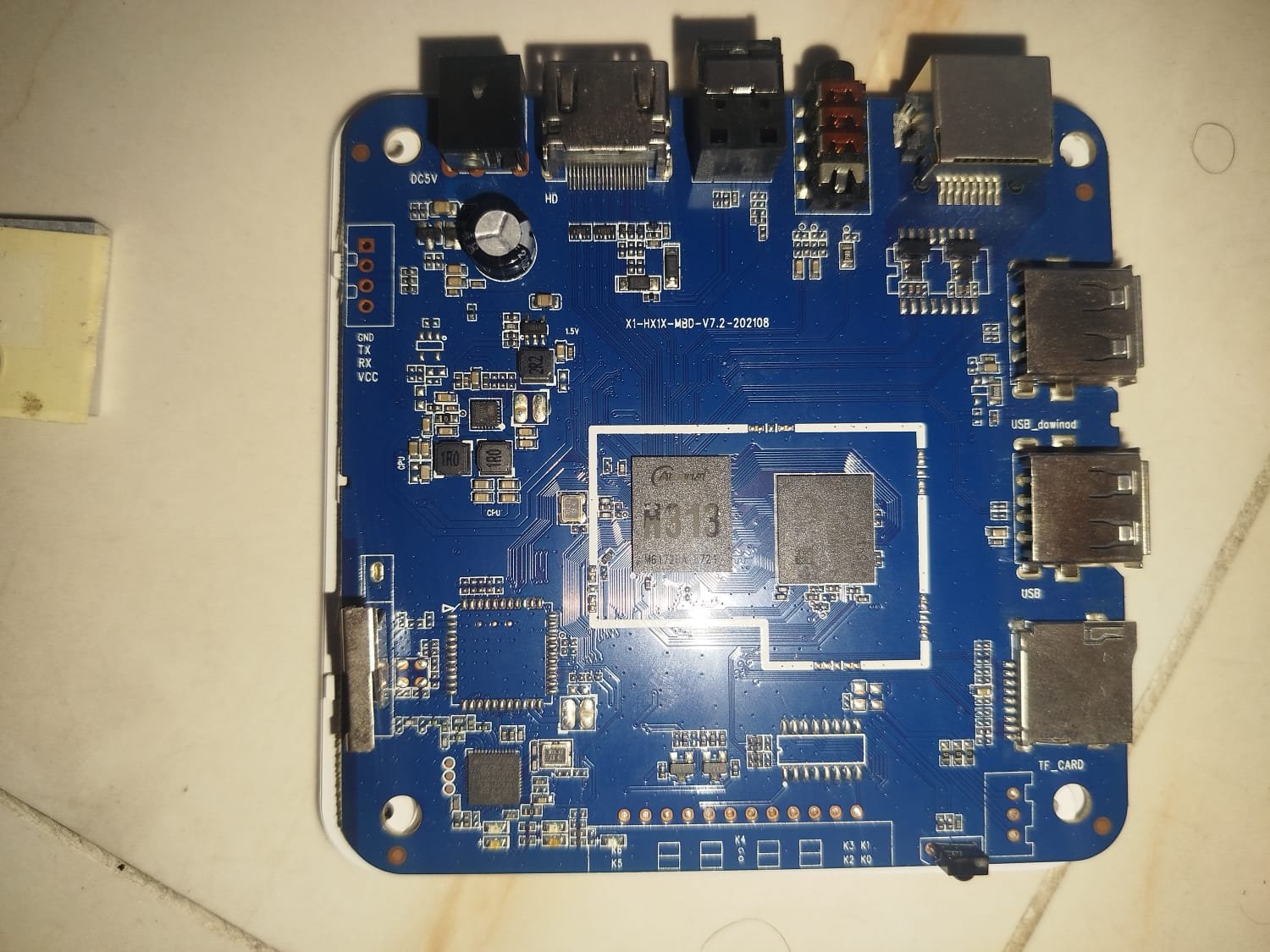
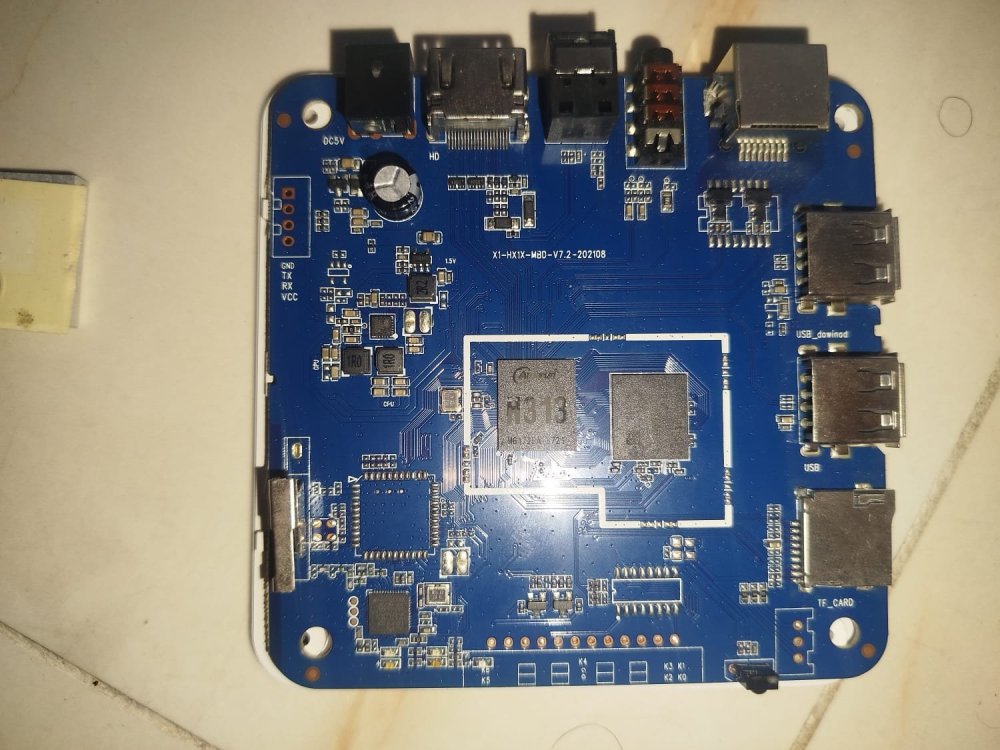
 Hey everyone! I have a TV Box labeled “In Xplus”, running on an Allwinner H313 (most likely a generic/rebranded device). I was able to install Linux on it using Armbian 26.2.0-trunk (Trixie). The system boots normally, but I’m facing network issues: - Wi-Fi is not working (no interface detected) - Ethernet is also not working (only interface is lo) So basically, the system runs fine, but I have no network connectivity at all. My questions: - Is this a current limitation of Armbian support for the H313? - Is there any specific DTB or patch that could fix Wi-Fi/Ethernet? - Is there a more stable Armbian version or another distro with better support? - Has anyone managed to get networking working on this chip? Any help or shared experience would be greatly appreciated. Thanks!
.thumb.jpeg.8ab46a34e0d1e0508cc07b93cfdbaa25.jpeg)
-
Holy Shit this is great! Finally can get use out of this doorstopper if you continue. Imagine getting MeshCore or Meshtastic installed.
-
Nicely done. As some additional thoughts: 1. Fragment 0 and 2 of your .dts point to the same spot. They could be combined if you'd like. 2. The util-linux-extra package should be part of the core Ubuntu distribution. An apt install should have been enough, though you may need to enable the universe repository. 3. If you have a /dev/rtc1 device, that suggests that you have an rtc0 as well, and if you disable it, the kernel will natively load and store time to the one you provided. A quick glance at the .dts suggests one at /soc/bus@ff800000/rtc@a8. Adding one final fragment to your overlay like the below might allow you to skip need of hwclock, and both SystemD services for your RTC. See my note about CONFIG_RTC_HCTOSYS_DEVICE and CONFIG_RTC_SYSTOHC_DEVICE above. fragment@3 { target-path = "/soc/bus@ff800000/rtc@a8"; __overlay__ { status = "disabled"; }; }; 4. If you're up for it, submit a PR to create a dtbo for the I2C buses on the M5? Contributions to the project are always welcome.
-
networking in bpi-m5 with new 26.03.1 release.
gene1934 replied to gene1934's topic in Software, Applications, Userspace
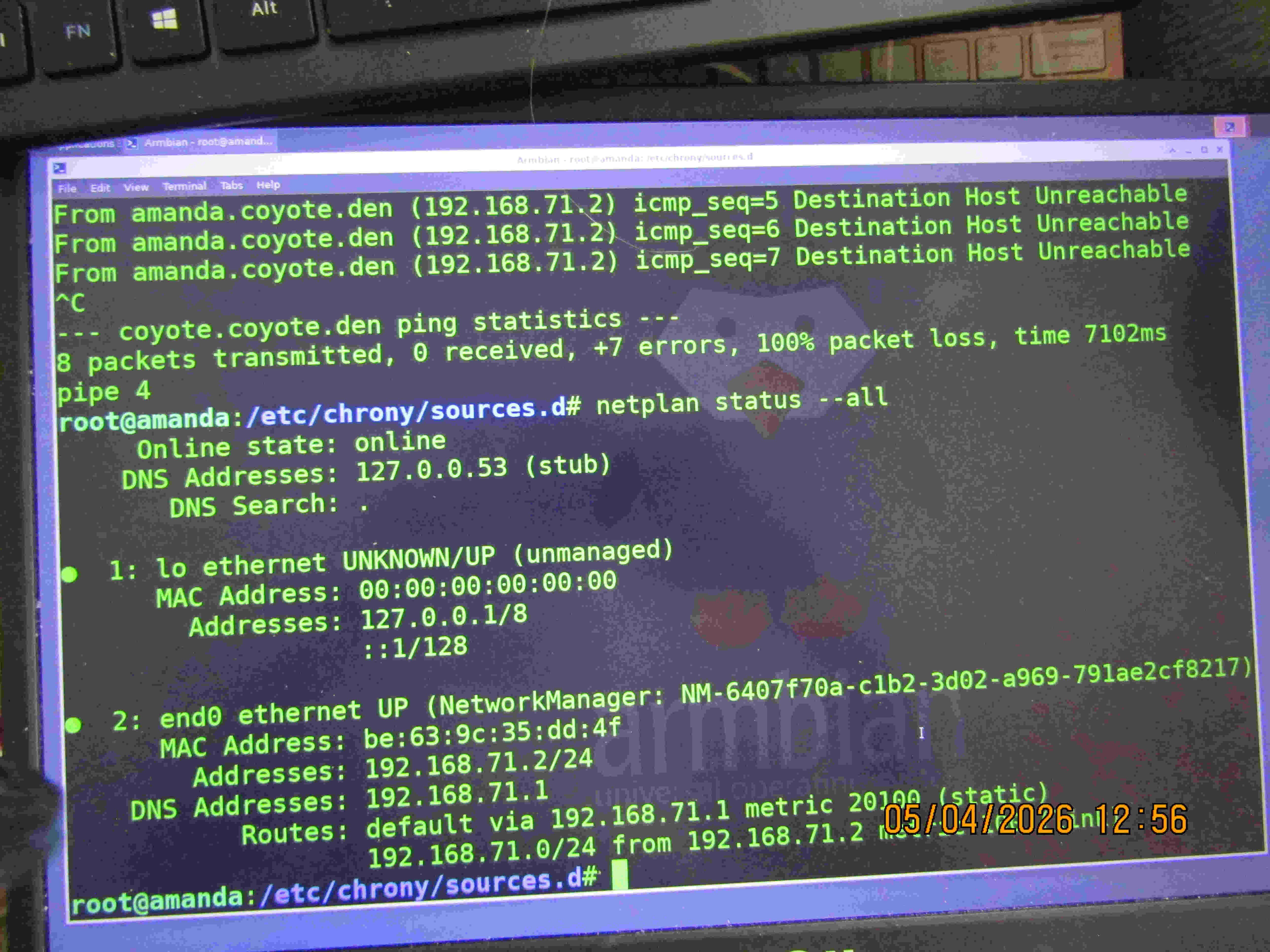
I'm sorry but, lmao, this is entertaining to read. The sd card is OBVIOUSLY corrupt, it even TELLS YOU THAT in what you posted. But you think what I am seeing should tell me it fubar. That fact that this configuration works perfectly for 6 or 7 other machines in this house long string of cat5 or cat6 cable seems to be blowing right on by. This can't be true for all 4 u-sd cards I''ve tried. The last 2 were brand new, even faster rated cards, but all are 128gig sandisk's 1: the image itself has a dos table, which doesn't work above 32gigs acc what I have read and this prevents mounting the written images for installation in a card reader, but the used partition is ext4, so it boots ok but takes a long time because the net failure blocks the boot for many minutes 2: so I back up to a 25_05 image, and at one time had it booting the 6_18 kernal, but still no net which is the original problem. ATM I am wasting my time on a 25_05 build image which is running just fine on another bpi-m5 driving a 3d printer about 10x faster than OOTB. So I'd suggest you pass this one off to someone who knows how to make a 50 line /etc/hosts file work without a dhcp because I'm doing it on 2 other wintel boxes, an rpi4b running bookworm and 3 bpi-m5's running noble on 3d printers. The best I can do is post a pix of the 'netplan status --all" screen and somebody tell me whats wrong instead of berating me for not running a dhcp server properly.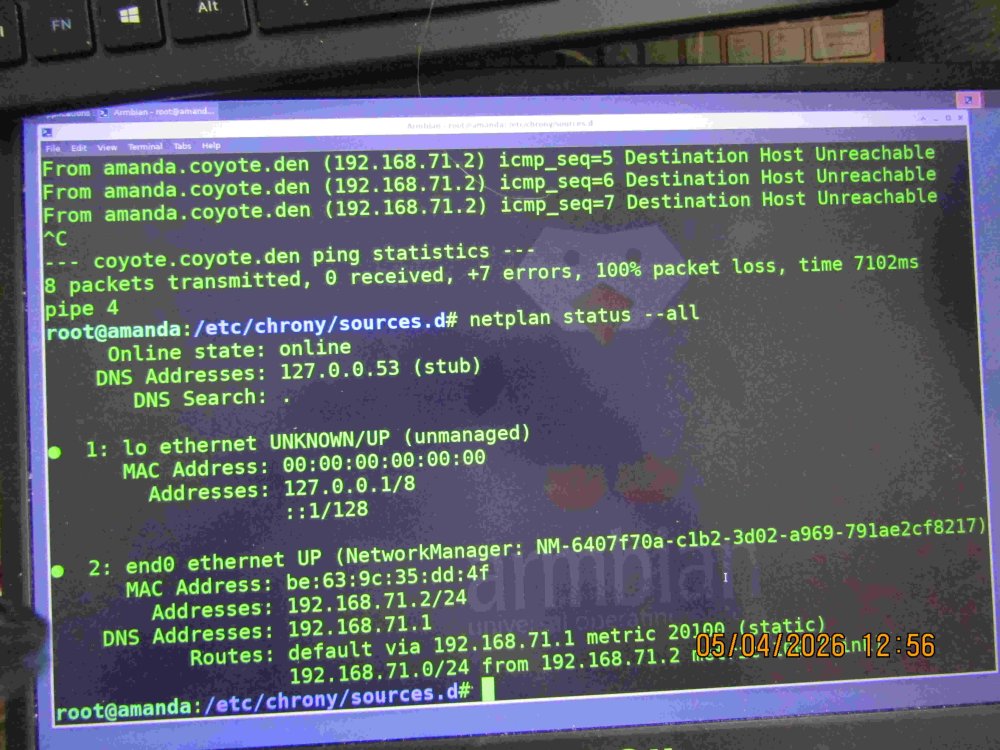
-

networking in bpi-m5 with new 26.03.1 release.
bedna replied to gene1934's topic in Software, Applications, Userspace
I'm sorry but, lmao, this is entertaining to read. The sd card is OBVIOUSLY corrupt, it even TELLS YOU THAT in what you posted. It's probably a good idea to go back to the basics and learn linux properly if you don't know what a msdos (MBR) partition table is. https://unix.stackexchange.com/questions/289389/what-are-the-differences-between-the-various-partition-tables As for how to NORMALLY SETUP A NETWORK, you can read my earlier responses, no host files on the devices, no hardcoded ip, just a correctly configured dhcp server that delivers the CORRECT IP:s to all devices. Then the dns server on the network (dnsmaq in this case) resolves desired domains to local ip:s. That way, there is NO NEED to do ANY CONFIG on the devices, it is all done on the entire network. -
 @Nick A Thank you, can you publish a server image for the Radxa A7Z with kernel 6.18?
 -
If an pre-made image is not there, just DIY. https://docs.armbian.com/Developer-Guide_Build-Preparation/
-
I see. Well I can confirm my bootloader is very stable. I have been running it on two devices for a couple years now without any issues. It cannot hurt to flash it again (to rule out random bitflips), but if you are getting sporadic crashing no matter the kernel/OS it does start to indicate a hardware issue. I have a laptop that crashes sporadically but it isn't so bad that I cannot use it. I've run memtest on it countless times without issue, tried replacing RAM, etc. some devices really are just cursed for whatever reason unfortunately. In case it is helpful, you can find the config for the kernel I run on my devices here: https://github.com/bschnei/linux-a3700
-
Moreso the timing of the boot sequence and device enablement. The fact that i got the Debian-on-SATA to load ONE TIME strikes me as very odd. The fact that i get kernel panics on the stock eMMC now and then, also strikes me as very odd. I've tried using the different uboot clock-timing builds for DDR offered by armbian ( ), but they all show the same thing... so i don't think it's the cpu/ddr timings.. i think its the bootup timings, or power configs or something introduced around pcie/sata since 4.x. But clearly i'm shooting into the wind at this point.
-
> Timing issue might occur in DDR mode I get every boot so that should indeed be ignored. What do you mean by timing issue? I could build you a bootloader clocked at 800Mhz instead of 1.2Ghz if that is what you are referring to?
-
Correct -- GTI ships it with Ubuntu. Installing either of the Armbian supported models (Debian Trixie or Ubuntu Noble) on the SATA causes bootup issues. The stock Ubuntu/eMMC boots up fine -- MOST of the time. i do get kernel panics sometimes even then. -- On the stock install via eMMC: root@ccpe10c1a5:~# w 04:41:40 up 8:24, 1 user, load average: 0.00, 0.00, 0.00 root@ccpe10c1a5:~# lsb_release -d Description: Ubuntu 18.04 LTS root@ccpe10c1a5:~# uname -a Linux ccpe10c1a5 4.19.62-00036-gbc6a6e31fe72 #1 SMP PREEMPT Tue Jun 16 15:39:07 CST 2020 aarch64 aarch64 aarch64 GNU/Linux root@ccpe10c1a5:~# cat /proc/cmdline console=ttyMV0,115200 earlycon=ar3700_uart,0xd0012000 root=/dev/mmcblk0p1 rw rootwait net.ifnames=0 biosdevname=0 On the stock install, I was able to run a memtester test, 10 cycles, no errors. The only thing i got was these xenon-sdhi errors every now and then during the test (below); not sure if it was relevant or not. Although i have seen this when booting, before locking up: [ 3.650635] xenon-sdhci d00d8000.mmc: Timing issue might occur in DDR mode So i'm thinking the hardware is actually OK. It's got to be more a timing issue, or an overlap issue. I restructured the booti components, so there should be no overlaps, though... leaving me with a boot timing issue. Since the stock Ubuntu install fails via kernel panic at times, that's what I'm leaning towards. I guess it could still be configuration in the device tree... i'm not familiar with how to tune those, so looks like I'm going to have to keep digging. I'll have to look closer at what you're doing in ebu-bootloader... maybe it'll work around my issues somehow. Thanks again for all the engagement! -- E.g., Loop 10/10: Stuck Address : ok Random Value : ok Compare XOR : ok Compare SUB : ok Compare MUL : ok Compare DIV : ok Compare OR : ok Compare AND : ok Sequential Increment: ok Solid Bits : ok Block Sequential : setting 5[20847.635300] xenon-sdhci d00d8000.sdhci: eMMC PHY init cannot complete after 1 us setting 91[20966.319305] xenon-sdhci d00d8000.sdhci: eMMC PHY init cannot complete after 1 us setting 108[20989.955374] xenon-sdhci d00d8000.sdhci: eMMC PHY init cannot complete after 1 us setting 160[21061.452841] xenon-sdhci d00d8000.sdhci: eMMC PHY init cannot complete after 1 us ok Checkerboard : ok Bit Spread : ok Bit Flip : setting 199[21753.608246] xenon-sdhci d00d8000.sdhci: eMMC PHY init cannot complete after 1 us setting 256[21832.440524] xenon-sdhci d00d8000.sdhci: eMMC PHY init cannot complete after 1 us ok Walking Ones : ok Walking Zeroes : ok 8-bit Writes : ok 16-bit Writes : ok Done. -- espressobin-ultra> grep sdhci Errors.txt Block Sequential : setting 44[ 1160.445415] xenon-sdhci d00d8000.sdhci: eMMC PHY init cannot complete after 1 us setting 104[ 1243.071074] xenon-sdhci d00d8000.sdhci: eMMC PHY init cannot complete after 1 us Bit Flip : setting 207[ 2022.270265] xenon-sdhci d00d8000.sdhci: eMMC PHY init cannot complete after 1 us setting 493[ 2419.709372] xenon-sdhci d00d8000.sdhci: eMMC PHY init cannot complete after 1 us Block Sequential : setting 51[ 5613.205850] xenon-sdhci d00d8000.sdhci: eMMC PHY init cannot complete after 1 us Block Sequential : setting 86[ 7831.212692] xenon-sdhci d00d8000.sdhci: eMMC PHY init cannot complete after 1 us setting 114[ 7869.815417] xenon-sdhci d00d8000.sdhci: eMMC PHY init cannot complete after 1 us setting 139[ 7904.632847] xenon-sdhci d00d8000.sdhci: eMMC PHY init cannot complete after 1 us Bit Flip : setting 252[ 8698.620476] xenon-sdhci d00d8000.sdhci: eMMC PHY init cannot complete after 1 us Bit Flip : setting 345[11019.588593] xenon-sdhci d00d8000.sdhci: eMMC PHY init cannot complete after 1 us Block Sequential : setting 128[12258.573632] xenon-sdhci d00d8000.sdhci: eMMC PHY init cannot complete after 1 us Bit Flip : tesetting 328[13172.479247] xenon-sdhci d00d8000.sdhci: eMMC PHY init cannot complete after 1 us Walking Zeroes : setting 121[13773.551198] xenon-sdhci d00d8000.sdhci: eMMC PHY init cannot complete after 1 us Block Sequential : setting 94[14421.542088] xenon-sdhci d00d8000.sdhci: eMMC PHY init cannot complete after 1 us setting 241[14624.491234] xenon-sdhci d00d8000.sdhci: eMMC PHY init cannot complete after 1 us Solid Bits : setting 33[16456.854416] xenon-sdhci d00d8000.sdhci: eMMC PHY init cannot complete after 1 us Block Sequential : setting 7[16509.517668] xenon-sdhci d00d8000.sdhci: eMMC PHY init cannot complete after 1 us setting 216[16797.761210] xenon-sdhci d00d8000.sdhci: eMMC PHY init cannot complete after 1 us Walking Ones : setting 44[17908.735026] xenon-sdhci d00d8000.sdhci: eMMC PHY init cannot complete after 1 us Walking Zeroes : setting 14[18044.789017] xenon-sdhci d00d8000.sdhci: eMMC PHY init cannot complete after 1 us Block Sequential : setting 154[18905.444761] xenon-sdhci d00d8000.sdhci: eMMC PHY init cannot complete after 1 us [18905.451549] xenon-sdhci d00d8000.sdhci: eMMC PHY init cannot complete after 1 us setting 228[19007.479627] xenon-sdhci d00d8000.sdhci: eMMC PHY init cannot complete after 1 us [19007.486828] xenon-sdhci d00d8000.sdhci: eMMC PHY init cannot complete after 1 us Bit Flip : setting 14[19347.751784] xenon-sdhci d00d8000.sdhci: eMMC PHY init cannot complete after 1 us setting 164[19556.154518] xenon-sdhci d00d8000.sdhci: eMMC PHY init cannot complete after 1 us Block Sequential : setting 5[20847.635300] xenon-sdhci d00d8000.sdhci: eMMC PHY init cannot complete after 1 us setting 91[20966.319305] xenon-sdhci d00d8000.sdhci: eMMC PHY init cannot complete after 1 us setting 108[20989.955374] xenon-sdhci d00d8000.sdhci: eMMC PHY init cannot complete after 1 us setting 160[21061.452841] xenon-sdhci d00d8000.sdhci: eMMC PHY init cannot complete after 1 us Bit Flip : setting 199[21753.608246] xenon-sdhci d00d8000.sdhci: eMMC PHY init cannot complete after 1 us setting 256[21832.440524] xenon-sdhci d00d8000.sdhci: eMMC PHY init cannot complete after 1 us







.jpeg.1defaabc10fd9ab2a1c7f4ebf6802058.jpeg)