All Activity
- Today
-
Ok then i will try with S905W images. Does these boot of an sd card like on the H313 ones ?
-
Thank you
-
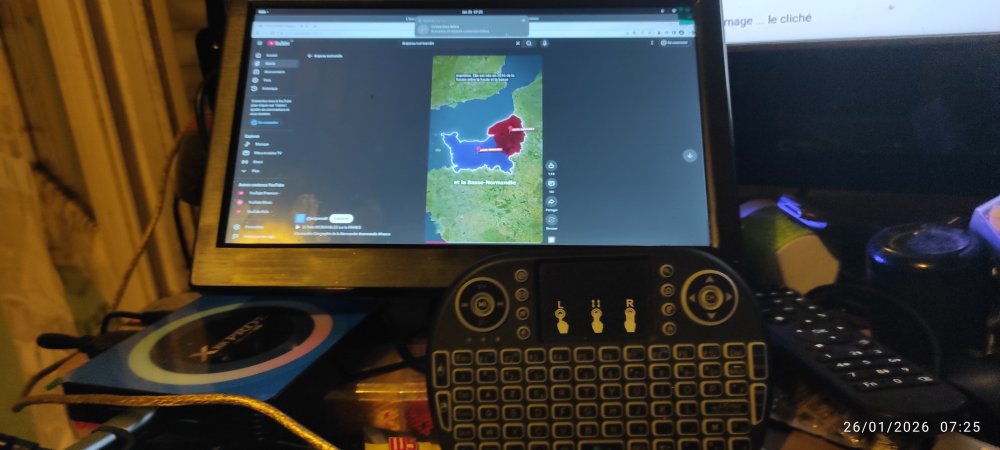
Hello, thk work fine on my X88 pro13 Here is : Armbian_community_26.2.0-trunk.332_Hinlink-ht2_noble_vendor_6.1.115_gnome_desktop.img Armbian_community_26.2.0-trunk.332_Hinlink-ht2_noble_vendor_6.1.115_gnome_desktop.img
-
 By any chance, could someone post a link to a working image for Cubox I? I'm trying to find any working Armbian build and there is nothing that works. Thanks!
 -
What model is your device? Got a photo?
-

Gaming experience with Orange Pi 5 (RK3588) on Armbian
heyrict replied to KhanhDTP's topic in Orange Pi 5
@robertojTheoretically it will, as H618 supports OpenGL and Vulkan. But do not expect the same performance as RK3588. This is off the topic here and you'd better ask someone who share the same chip with you. -
Gaming experience with Orange Pi 5 (RK3588) on Armbian
heyrict replied to KhanhDTP's topic in Orange Pi 5
Cool! I own this game as well, just didn't test it as I thought atlus put most their games under DRM. Definitely going to try it later. Also found that some games (probably CPU-intensive ones) work better on hangover compared with box64+proton/wine, if only the game was compatible. -
I'm looking for a ROM because this Android box only stops at the logo. However, there's a problem with the PCB board type 3328 but the chip is 3318. How do I find the firmware? Is there anyone here who has it? And I've tried flashing with RK3328 but it still bootloops.
-
Then stick with what you got going on.
-
But, now that I have a running linux on it, is there another way to flash the android image? I mean, I had to open the box, connect uart to see what's going on and short random resistors on the board to get it in usb burn mode and flash the android image - which didn't work as I mentioned before. I was receiving timeout errors, and after that the board became unresponsive (./update identify 7 - timeout). After a bit of research I found out it could be the usb 3.0 port on the device that I used (since I tried switching to usb 2.0, but I got it in mask rom mode only through usb 3.0 port the last time, and after that too, never on usb 2.0). Anyway, the point is - now that I'm booting from usb, I disconnected uart and closed the board back in it's case. It was a mess, and I'd rather not open it up just to install android to it. I mean, can I do it from a running linux? Or can I just run install-aml? At the end of the road, I could just use it as is - it will boot to usb, regardless of the garbage in the emmc. I know I mentioned I wanted to take advantage of the 32gb emmc, but now I'm just happy it's even alive.
- Yesterday
-
@kingbecher Why do you believe this isn't an Amlogic s905w? Those cpus are also cortex-a53. I see Amlogic references throughout the boot log you posted
-
sm1 and g12 share the same common dtsi file. Use that aml flash tool along with --soc=g12a and flash the android img. That should bring you back to where you were. That would be a full recovery.
-
I didn't know g12 and sm1 were compatible enough for flashing - since I realized how easy it is to mess up by using the wrong soc type I grew very meticulous about everything - I just didn't want to brick my box. (after I soft bricked it already:) About the next step: how to run recovery? Could you please explain in more detail, or just point me in the right direction where to look? I mean, I'm really quite new to all of this, SoC linux installs etc, so I don't really understand a big portion of it. P.S. wifi and eth are also working
-
@user03 For sm1 devices use --soc=g12a Another option which is something I recently had to do with my BPI-CM4 "if I recall correctly, I've also done so on a tvbox i b0rked" is use pyamlboot. sudo pip3 install pyamlboot Short the board and run; sudo boot-g12.py u-boot.bin # if you have a functional u-boot binary This won't actually flash anything, "atleast it didn't in my case?" it will just force the unit to load that boot binary. From there you should be able to hit the SPACEBAR and check ur options using `print` and `help`. Should see options like usbboot, usb_update, etc. Not saying you should use one of these, but... You may be able to find one online or inside the Android img for ur unit. https://github.com/pyavitz/debian-image-builder/tree/feature/files/boot/uboot/ac2xx Anyway. At least you got it booting from USB. Next step would be running a recovery on it.
-
Thank you @c0rnelius for guidelines regarding the tools. I was able to successfully get the device in mask rom mode after dozens of unsuccessful attempts, it's been like hell. Anyway, once I managed to get it in mask rom mode, I checked the tools you mentioned - the thing is https://github.com/natinusala/linux-amlogic-toolkit uses https://github.com/Stane1983/aml-linux-usb-burn under the hood, it's more specialized for unpacking, modifying and repacking android images. Then the other tools available such as https://github.com/mluis/aml-flash-tool and https://github.com/PowderLinux/Amlogic-Flash-Tools-Backup don't seem to support my box. I looked at the flash scripts and the --soc options and saw this --soc=<m8|axg|gxl|txlx|g12a> My board is s905x3, which is sm1. This repo https://github.com/PowderLinux/Amlogic-Flash-Tools-Backup even lists s905x3 as supported, but when I opened the flash tool, the script had this soc value check if [[ "$soc" != "m8" ]] && [[ "$soc" != "gxl" ]] && [[ "$soc" != "axg" ]] && [[ "$soc" != "txlx" ]] && [[ "$soc" != "g12a" ]]; then echo "Soc type is invalid, should be either m8,gxl,axg,txlx,g12a" exit 1 fi I mean, seriously - the README explicitly states s905x3 boards are supported, and if you put --soc=sm1 the flash script will probably fail (I didn't dare run that). @SteeManRegarding the install.sh script which I couldn't find - I mentioned I used dd instead of balena-etcher. I tried to install balena-etcher, just to see if the usb would be different, but then I remembered why I didn't do it with balena in the first place - package conflicts (node vs node-lts) on arch, I'd have to uninstall node, and switch to lts version... It was just too much of a hassle, so I didn't install it. With dd, the usb is partitioned in armb_boot and armbi_root, and instead of a /boot folder, I had a partition. The armbi_root partition contains the linux filesystem, /etc, /boot, /lib etc. But I did find a /root directory in the armbi_root partition. And of course, it contains the install-aml.sh script. I thought since /boot was a partition in my case, /root was the armbi_root partition, and the /root dir is hidden and inaccessible to normal users. So, my apologies, I should have been more thorough, and look better and ask instead of asking AI carelessly - should have known it wasn't safe to just follow AI's instructions for installing to emmc, it's too specific and delicate, and AIs are usually too general. I guess it's a very good lesson, one that cost me hours of work and nerves. Thank you again for your patience and all the help you provided. And then I searched with AI, to see if any at all linux tools are available for my board - no results. ChatGPT told me there was an option to flash parts of the android image - without touching the bootloader. So I ended up using https://github.com/Stane1983/aml-linux-usb-burn, to unpack the android image and to flash something. ChatGPT showed me which files and in what order to flash them (going from lowest risk possible supposedly). I managed to flash the dtb successfully but that was it - after that I couldn't flash boot, and the board probably lost contact # dtb flash - successful [user03@arch unpack]$ ./../update partition _aml_dtb _aml_dtb.PARTITION normal file size is 0x10306 AmlUsbTplCmd = download store _aml_dtb normal 0x10306 rettemp = 1 buffer = download store _aml_dtb normal 0x10306 AmlUsbReadStatus retusb = 1 Downloading.... [update]Cost time 0Sec [update]Transfer size 0x10306B(0MB) AmlUsbBulkCmd[download get_status] [update]mwrite success # 1. attempt boot flash - fail [user03@arch unpack]$ ./../update partition boot boot.PARTITION normal file size is 0x98d800 AmlUsbTplCmd = download store boot normal 0x98d800 rettemp = 1 buffer = download store boot normal 0x98d800 AmlUsbReadStatus retusb = 1 Downloading.... [AmlLibUsb]:IOCTL_WRITE_MEDIA_Handler,value=1,index=ffff,len=32,ret=-110 error_msg=Connection timed out Write media command 112 failed AmlWriteMedia failed [update]Cost time 5Sec [update]Transfer size 0x70000B(0MB) ERR:write data to media failed # 2. attempt boot flash - fail [user03@arch unpack]$ ./../update partition boot boot.PARTITION normal file size is 0x98d800 AmlUsbTplCmd = download store boot normal 0x98d800 IOCTL_TPL_CMD_Handler ret=-110,tpl_cmd=download store boot normal 0x98d800 error_msg=Connection timed out rettemp = 0 buffer = download store boot normal 0x98d800 # 3. attempt boot flash - fail [user03@arch unpack]$ ./../update partition boot boot.PARTITION normal file size is 0x98d800 AmlUsbTplCmd = download store boot normal 0x98d800 rettemp = 1 buffer = download store boot normal 0x98d800 AmlUsbReadStatus retusb = 1 [update]ERR(L298):cmdret=[] # test if board available - fail [user03@arch tools]$ ./update identify 7 AmlUsbIdentifyHost IOCTL_IDENTIFY_HOST_Handler ret=-110 error_msg=Connection timed out ERR: get info from device failed So I unplugged it, and tried to boot it, just to see what's the status... amazing, I was shocked when I saw the line ## Booting Android Image at 0x01080000 ... It worked! I mean, of course it didn't boot any android, since I didn't really manage to flash it, but it managed to get to that point. So, I reflashed my usb stick (fresh armbian trixie) and enabled multi-boot with toothpick, and well, it does boot now to amrbian from usb - hdmi working, usbs working, ethernet and wifi not tested, but probably working (ethernet). So, I guess, as long as I have the usb inserted, it should successfully boot:) I call it a day Also, should I even try to run the install-aml.sh script now? I really wanted to use the 32gb emmc, instead of the 8gb usb. If it's not a good idea, then I'll just add another one in the other usb port (which I don't use anyway) and setup fstab rule to load it automatically to be used as additional storage.
-
Sven, I stumbled across this thread last night and have created this account to thank you. After purchasing this board some time ago, it was quite disappointing to discover how lacking software support was. Again, thank you for your fantastic work so far.
-
Klipper Load Cell Documentation The kx711 is specifically referenced near the bottom of the documentation. It needs slow speeds and I believe has been incorporated into recent Klipper releases. I posted the file output on graphics, framebuffer and drm to @Torte github link. Also found an informative YouTube video on adding a Klipper Touch Screen, over serial, and configuring it. I'm adverse to tossing electronics into landfills - motivation to invest some time into a build for the Sovol boards and tolerate the mksclient propriatary blob. If the touch screen proves to be a show stopper, I think the makerbase MKS-SKIPR board, A supported USB wifi dongle and an HDMI touch screen could be used.
-
In the meantime, I fixed internal audio for "edge" (was: missing headphone GPIO). And also investigated around the esos.elf RTOS firmware. There's a license for that, which I added to my tree. The license basically says: use but do not infect with GPL: https://gitee.com/spacemit-buildroot/buildroot-ext/blob/k1-bl-v2.2.y/board/spacemit/k1/target_overlay/lib/firmware/LICENSE.spacemit_esos. Continuing on kthread issue. LG // Sven-Ola
-
What happens if your start armbian-resize-filesystem.service manually? IE "sudo systemctl start armbian-resize-filesystem.service" and then check the log for the service?
-
 You can create an extension including something like unset armbian_kernel_config__force_pa_va_48_bits_on_arm64
 -
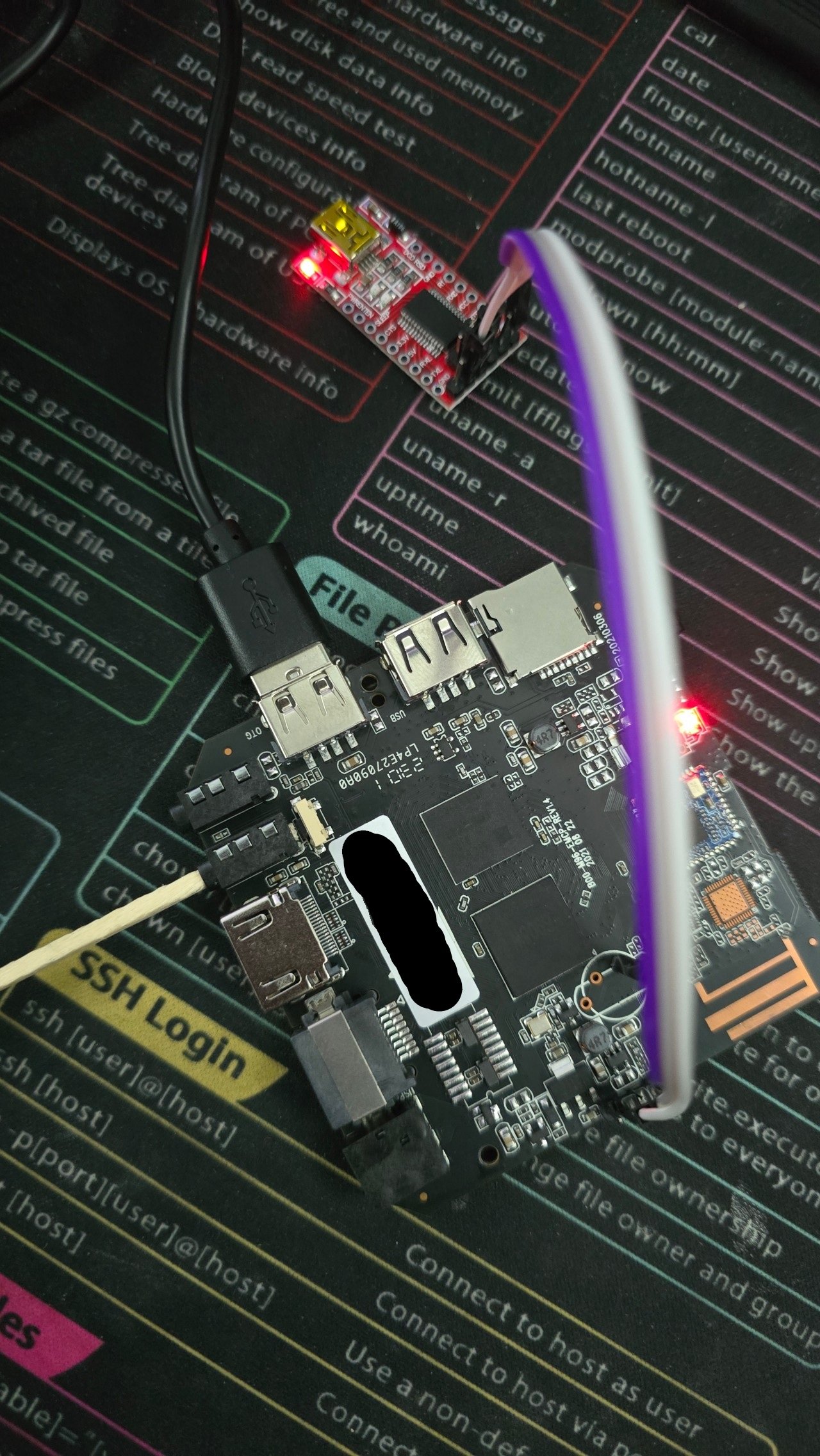
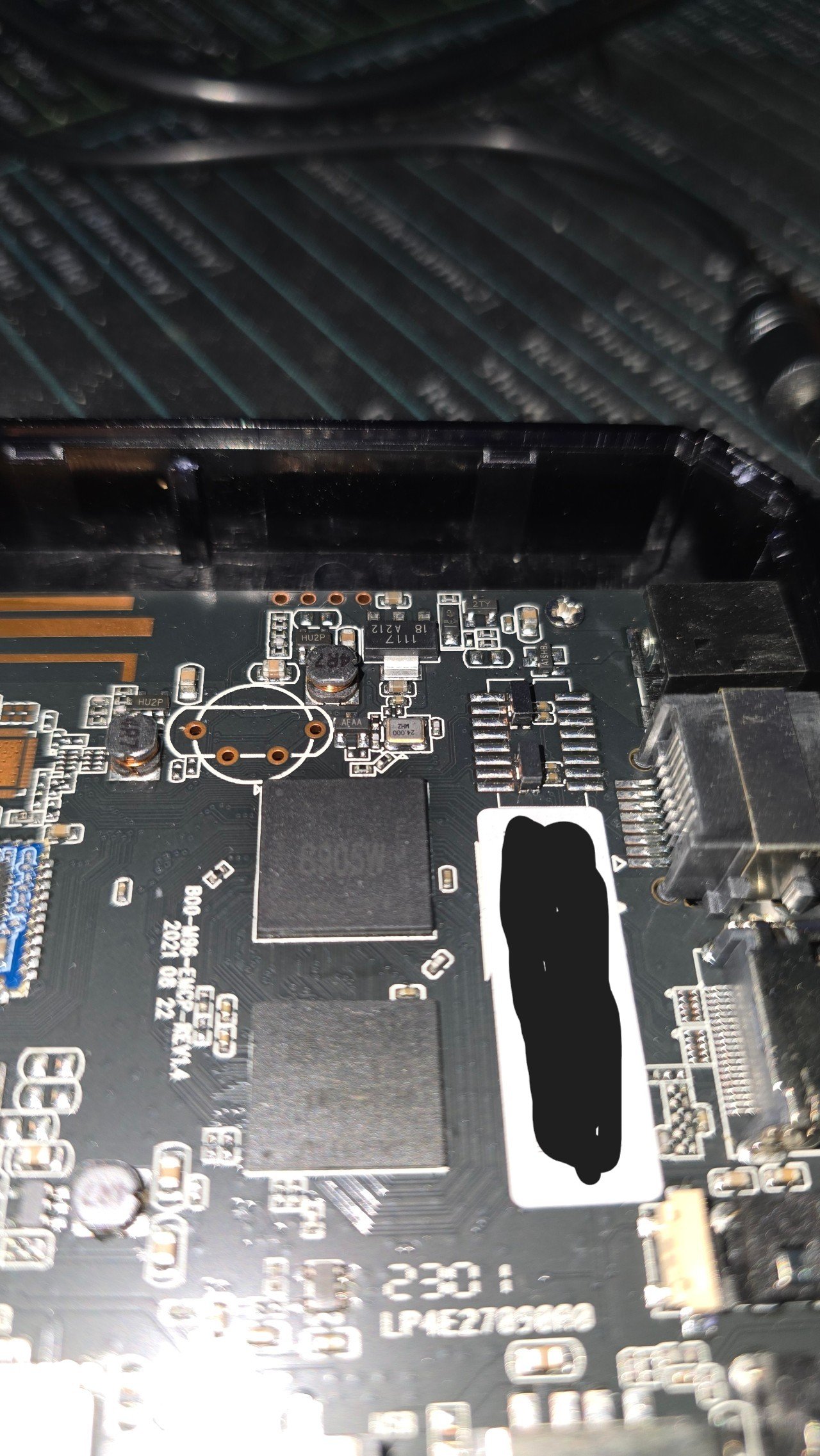
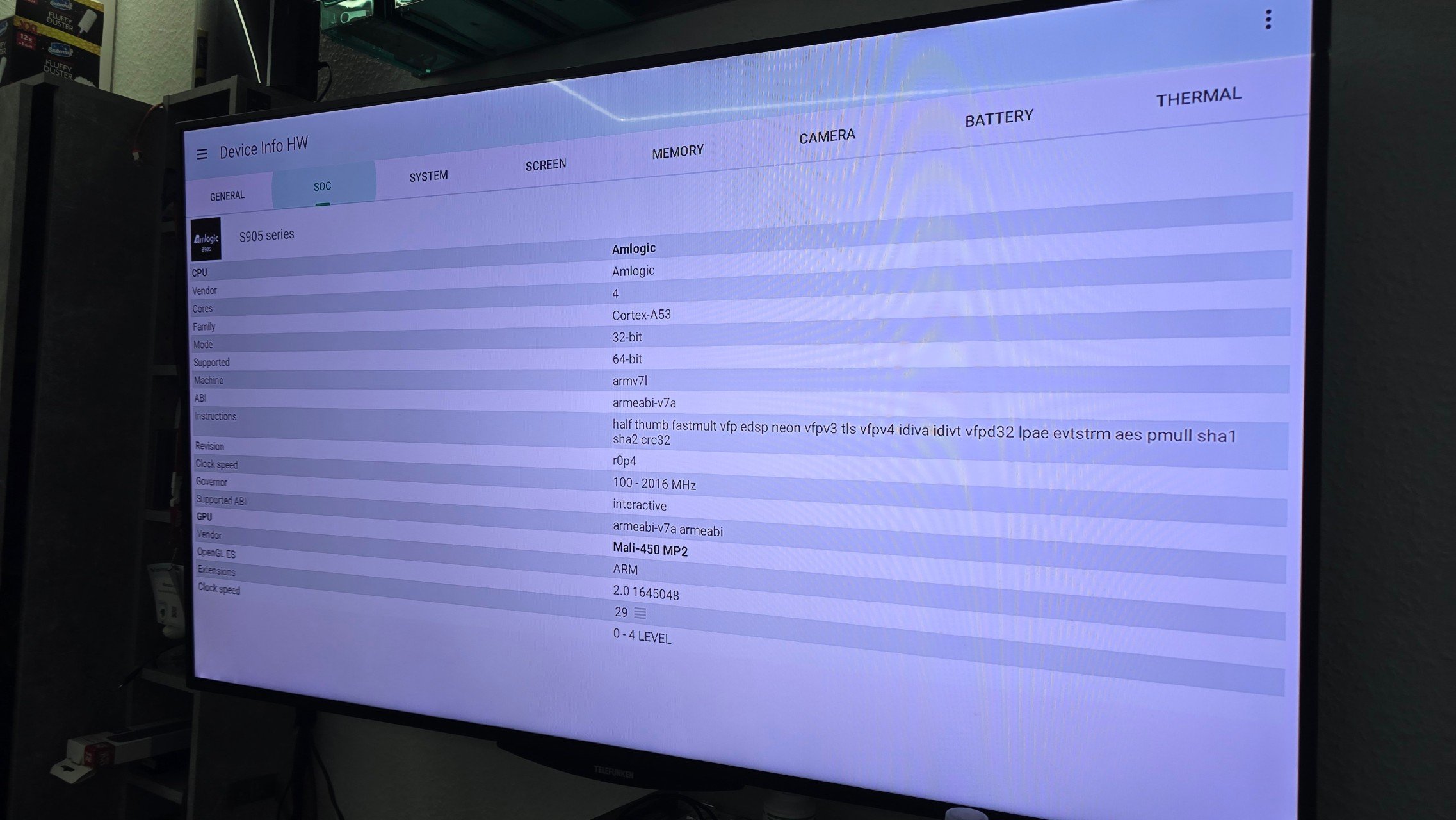
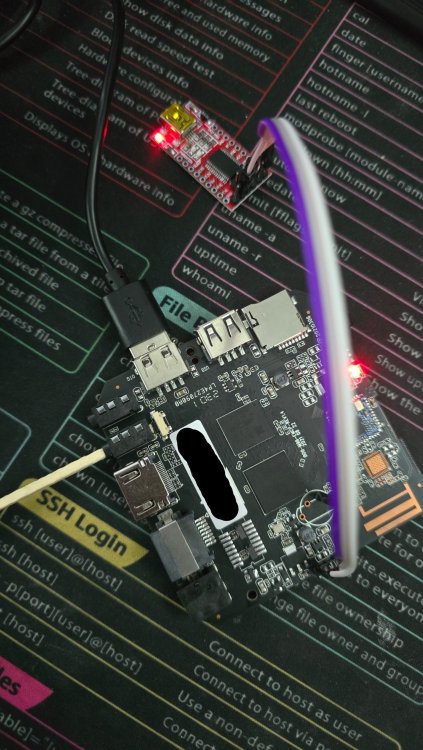
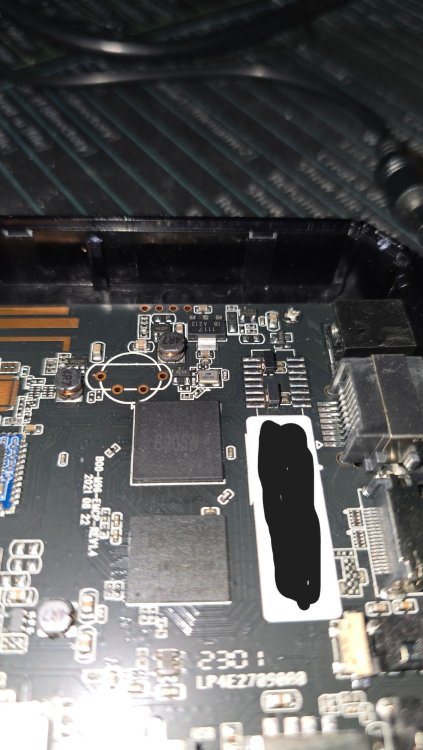
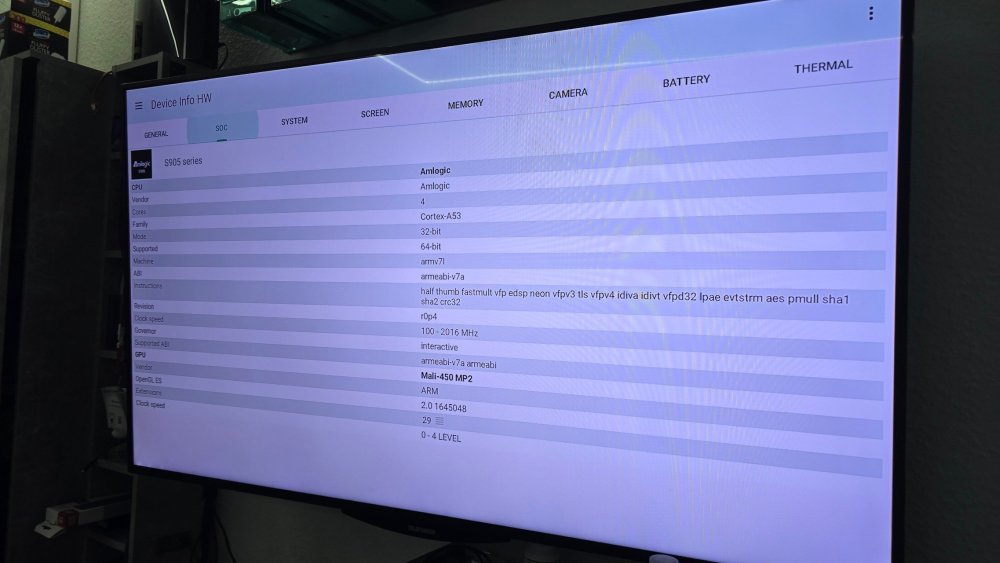
Hi everyone I Have an different Version of this Clones. The Cpu is has an weird printing. It has S905W engraved but DeviceInfoHW shows an CortexA53. Maybe an H313? Version 1.4 Not booting from SD Card from many Version of armbian tested with an genue Sandisk 16gb. Serial Output on normal Android boot: Have somebody an idea what iam missing ? The Rkdumper tool will not find this device. Thanks
-
 @Werner I re-checked all my patches and custom configurations and performed a clean rebuild. I found clear evidence in the logs that `CONFIG_ARM64_VA_BITS` is being explicitly overwritten during the build process: ### kernel_config_initialize.log --> (9) INFO: Configuring kernel [ linux-rk35xx-vendor ] --> (9) INFO: Using kernel config provided by user [ userpatches/linux-rk35xx-vendor.config ] --> (9) COMMAND: cp -pv /armbian/userpatches/linux-rk35xx-vendor.config /armbian/cache/sources/linux-kernel-worktree/6.1__rk35xx__arm64/.config '/armbian/userpatches/linux-rk35xx-vendor.config' -> '/armbian/cache/sources/linux-kernel-worktree/6.1__rk35xx__arm64/.config' --> (9) INFO: Considering available RAM for BTF build [ 13082 MiB ] --> (9) INFO: Enabling eBPF and BTF info [ for fully BTF & CO-RE enabled kernel ] --> (9) COMMAND: ./scripts/config --disable SECURITY_LOCKDOWN_LSM ... --> (10) COMMAND: ./scripts/config --enable ARM64_VA_BITS_48 ... --> (12) COMMAND: ./scripts/config --set-val ARM64_PA_BITS 48 --> (12) COMMAND: env -i CCACHE_BASEDIR="/armbian/cache/sources/linux-kernel-worktree/6.1__rk35xx__arm64" CCACHE_TEMPDIR="/armbian/.tmp/work-907ace63-1eb7-43dc-ac17-503d457007a8/ccache_tmp" PATH="/usr/bin:/armbian/cache/pip/base/bin:/armbian/.tmp/work-907ace63-1eb7-43dc-ac17-503d457007a8/bin:/usr/local/sbin:/usr/local/bin:/usr/sbin:/usr/bin:/sbin:/bin" PYTHONPATH="/armbian/cache/pip/base/lib/python3.12/site-packages:" DPKG_COLORS=always XZ_OPT='--threads=0' TERM='xterm-256color' COLUMNS='248' COLORFGBG='' CCACHE_DIR='/armbian/cache/ccache' make '-j6' 'ARCH=arm64' 'LOCALVERSION=-vendor-rk35xx' 'CROSS_COMPILE= aarch64-linux-gnu-' 'KCFLAGS=-fdiagnostics-color=always -Wno-error=misleading-indentation ' 'SOURCE_DATE_EPOCH=1768563629' 'KBUILD_BUILD_TIMESTAMP=Fri Jan 16 11:40:29 UTC 2026' 'KBUILD_BUILD_USER=build' 'KBUILD_BUILD_HOST=armbian' 'KGZIP=pigz' 'KBZIP2=pbzip2' olddefconfig HOSTCC scripts/basic/fixdep LEX scripts/kconfig/lexer.lex.c YACC scripts/kconfig/parser.tab.[ch] HOSTCC scripts/kconfig/lexer.lex.o HOSTCC scripts/kconfig/parser.tab.o HOSTLD scripts/kconfig/conf .config:2755:warning: override: reassigning to symbol ARM64_VA_BITS_39 .config:2789:warning: override: ARM64_VA_BITS_48 changes choice state # # configuration written to .config # --> (14) INFO: Kernel configuration [ linux-rk35xx-vendor ] I traced this behavior to the following function in `lib/functions/compilation/armbian-kernel.sh`: function armbian_kernel_config__force_pa_va_48_bits_on_arm64() { if [[ "${ARCH}" == "arm64" ]]; then opts_y+=("ARM64_VA_BITS_48") opts_val["ARM64_PA_BITS"]="48" fi } I manually modified this function (changing `48` to `39`), and the resulting kernel deb finally compiled with `CONFIG_ARM64_VA_BITS=39` successfully. Obviously, modifying the build framework source is not the proper solution. Is this enforcement intended for all arm64 builds? Is there a standard way to bypass this function?
 -
Nevermind, got the answer from here.
-
If you can get the unit in the proper state by shorting, you can flash an android img or custom one using this tool; https://github.com/natinusala/linux-amlogic-toolkit Other repos that you may find useful: https://github.com/mluis/aml-flash-tool https://github.com/Stane1983/aml-linux-usb-burn
-
Hi While I thiknk your approach should have worked, a quick search revealed that something similar is done for a different family. Perhaps try this way:https://github.com/armbian/build/blob/9aa6e1e29ec2d397bbe223bebaa93bd13ef79818/patch/kernel/archive/filogic-6.16/patches.armbian/0007-build.sh-add-additional-build-script-config-defconfi.patch#L1909