Hqnicolas
-
Posts
693 -
Joined
-
Last visited
Content Type
Forums
Store
Crowdfunding
Applications
Events
Raffles
Community Map
Everything posted by Hqnicolas
-

Efforts to develop firmware for H96 MAX V56 RK3566 8G/64G
Hqnicolas replied to Hqnicolas's topic in Rockchip CPU Boxes
this one -
Efforts to develop firmware for H96 MAX V56 RK3566 8G/64G
Hqnicolas replied to Hqnicolas's topic in Rockchip CPU Boxes
@mvpwar One more trick... Can you flash the 4gb device update image And put the 8gb mini loader all.bin It will make the device work again on maskrom and Reeboot to loader So you can flash root.img -
Efforts to develop firmware for H96 MAX V56 RK3566 8G/64G
Hqnicolas replied to Hqnicolas's topic in Rockchip CPU Boxes
USB stick with the v0.5 image from this topic? -
Efforts to develop firmware for H96 MAX V56 RK3566 8G/64G
Hqnicolas replied to Hqnicolas's topic in Rockchip CPU Boxes
The old 8gb image that I made? Can you share it here? The only difference between 4gb and 8gb ROM on my old Ubuntu is miniliaderall.bin -
Efforts to develop firmware for H96 MAX V56 RK3566 8G/64G
Hqnicolas replied to Hqnicolas's topic in Rockchip CPU Boxes
Ah ok, so, the uboot is fine, I don't know why it doesn't detect the root.img 🤔 Did you try to boot flashdrive? -
Efforts to develop firmware for H96 MAX V56 RK3566 8G/64G
Hqnicolas replied to Hqnicolas's topic in Rockchip CPU Boxes
I think by reading DTB from the kernel 4 that boot... You will find things like this -
Efforts to develop firmware for H96 MAX V56 RK3566 8G/64G
Hqnicolas replied to Hqnicolas's topic in Rockchip CPU Boxes
My god, that's good be a difference in voltage regulator 👀 It's a device with tcs4525 Or sti8070? This uboot from 8gb device don't like to boot from USB... I think we have somebody in this girl with SD card reader soldered on 8gb device -
Efforts to develop firmware for H96 MAX V56 RK3566 8G/64G
Hqnicolas replied to Hqnicolas's topic in Rockchip CPU Boxes
Thank you! Please use 0x0000c800 Flash the update again and do root on 0x0000c800 Please consider to rename this root partition to "recovery" on a second try rename it to "root" -
Efforts to develop firmware for H96 MAX V56 RK3566 4G/32G
Hqnicolas replied to Hqnicolas's topic in Rockchip CPU Boxes
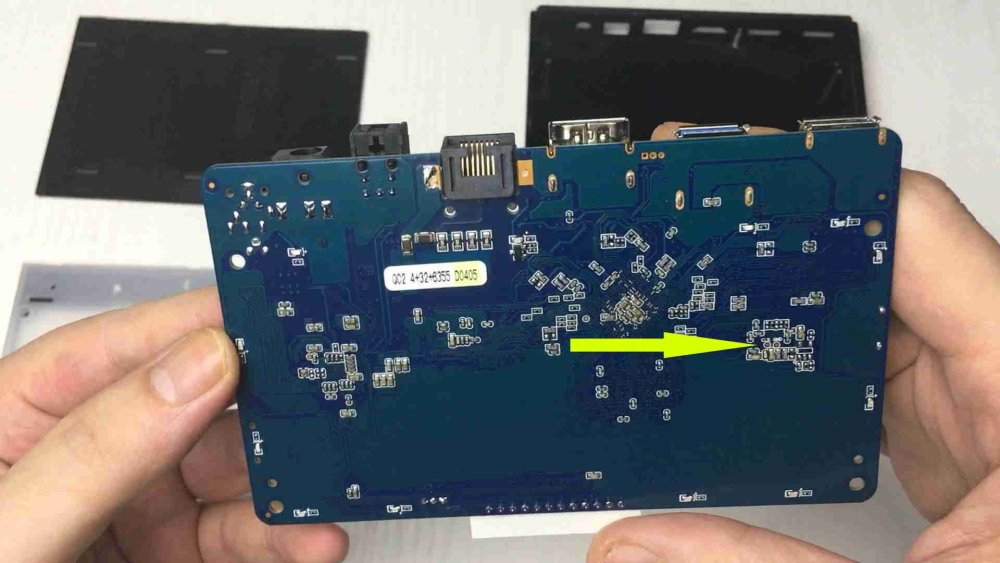
-
Efforts to develop firmware for Vontar KK Max 8gb/128gb"
Hqnicolas replied to gersones's topic in Rockchip CPU Boxes
some armbian builds https://disk.yandex.ru/d/Bt5wObnYekq8FQ not mine, i just found -
Efforts to develop firmware for H96 MAX V56 RK3566 8G/64G
Hqnicolas replied to Hqnicolas's topic in Rockchip CPU Boxes
it's Friday night! let's build another build H96MAX 8GB RK3566 UPDATE.img How to build V7 8G_Linux_Pack_Firmware.zip @mvpwar @Kenneth Hidalgo can you test it? Following the tutorial instead of set Address on 0x0000A000 You will set Address on 0x0000c800 -
Efforts to develop firmware for H96 MAX V56 RK3566 8G/64G
Hqnicolas replied to Hqnicolas's topic in Rockchip CPU Boxes
Flash This UpdateV4.img file on EMMC and v0.5 on USB stick on port 3.0 Please post the LOG from TTL -
Efforts to develop firmware for H96 MAX V56 RK3566 8G/64G
Hqnicolas replied to Hqnicolas's topic in Rockchip CPU Boxes
for editing and include armbian kernel 6.2 on EMMC you will need to boot from usb -
Efforts to develop firmware for H96 MAX V56 RK3566 8G/64G
Hqnicolas replied to Hqnicolas's topic in Rockchip CPU Boxes
Can you use the linaro build image to boot from USB? On 8gb device? If you can... You can mount MMC and put the armbian inside, like this tutorial -
Efforts to develop firmware for H96 MAX V56 RK3566 8G/64G
Hqnicolas replied to Hqnicolas's topic in Rockchip CPU Boxes
😮💨 I'm about to buy an 8gb box just to make this image, but I already have a lot of hardware sitting here, including a radxa rock 3A 8gb ram 64gb mmc 1tb nvme, that don't accelerate GPU 😂 (drivers), hardware waiting for some use, tomorrow I'm going to make a socks5 Proxy over isolated docker L3 lan on it just to prevent it from being at the bottom of the drawer -
Efforts to develop firmware for H96 MAX V56 RK3566 8G/64G
Hqnicolas replied to Hqnicolas's topic in Rockchip CPU Boxes
You need to enable console tty over dtb command line So it will wait for interaction Since we use an original Android dtb on uboot.img No console enabled 😅 -
Efforts to develop firmware for H96 MAX V56 RK3566 8G/64G
Hqnicolas replied to Hqnicolas's topic in Rockchip CPU Boxes
Sorry @mvpwar When I said v5 image It's about the v0.5 flash drive image that I have done... I'm not so good with instructions, For me It's hard to give instructions over a forum topic, be better when I have the device to debug. Flash the V5 update.IMG on device And v0.5 SD image on flash drive over USB 3.0 -
Efforts to develop firmware for H96 MAX V56 RK3566 8G/64G
Hqnicolas replied to Hqnicolas's topic in Rockchip CPU Boxes
You need to mark write by address flag!!!!! -
Efforts to develop firmware for H96 MAX V56 RK3566 8G/64G
Hqnicolas replied to Hqnicolas's topic in Rockchip CPU Boxes
Balena etcher -
Efforts to develop firmware for H96 MAX V56 RK3566 8G/64G
Hqnicolas replied to Hqnicolas's topic in Rockchip CPU Boxes
please try to flash V5 image to an flash drive and put it on usb 3.0 port Release Version v0.5DEBIAN12 BETA Release Version v0.5ARMBIAN23 BETA -
Efforts to develop firmware for H96 MAX V56 RK3566 8G/64G
Hqnicolas replied to Hqnicolas's topic in Rockchip CPU Boxes
OK the V5 image address is 0x00010800 you will need to flash the root.img in this address please change it on the table -
Efforts to develop firmware for H96 MAX V56 RK3566 8G/64G
Hqnicolas replied to Hqnicolas's topic in Rockchip CPU Boxes
LOL! did you fix it? I'm at work now, can you recompile and test? -
Efforts to develop firmware for H96 MAX V56 RK3566 8G/64G
Hqnicolas replied to Hqnicolas's topic in Rockchip CPU Boxes
please get the DEV Partition from image v5 from the flashed device!!!! i have changed it 😨 -
Efforts to develop firmware for H96 MAX V56 RK3566 8G/64G
Hqnicolas replied to Hqnicolas's topic in Rockchip CPU Boxes
what is the address that you flash the root.img partition on tutorial step 2? please try to flash V5 image to an flash drive and put it on usb 3.0 port Release Version v0.5DEBIAN12 BETA Release Version v0.5ARMBIAN23 BETA -
Efforts to develop firmware for H96 MAX V56 RK3566 8G/64G
Hqnicolas replied to Hqnicolas's topic in Rockchip CPU Boxes
te seller from china send it to @Kenneth Hidalgo unfortunately it was an kernel 4 linaro