Active threads
Showing topics posted in for the last 365 days.
- Past hour
-
That's the proprietary trust OS problem Let me understand: if you erase the emmc, and boot armbian from sdcard, doesn't it freeze anymore?
-
truck.xxx builds are daily/weekly rolling release builds and are not archived.
- Today
-
same thing with edge kernel: https://paste.armbian.com/orivozogil
-
 OK thanks @bedna With your help I've made some progress. I followed one of your links to the wiki regarding a standalone server and modified the smb.conf file as below # # Sample configuration file for the Samba suite for Debian GNU/Linux. # # # This is the main Samba configuration file. You should read the # smb.conf(5) manual page in order to understand the options listed # here. Samba has a huge number of configurable options most of which # are not shown in this example # # Some options that are often worth tuning have been included as # commented-out examples in this file. # - When such options are commented with ";", the proposed setting # differs from the default Samba behaviour # - When commented with "#", the proposed setting is the default # behaviour of Samba but the option is considered important # enough to be mentioned here # # NOTE: Whenever you modify this file you should run the command # "testparm" to check that you have not made any basic syntactic # errors. #======================= Global Settings ======================= [global] map to guest = Bad User log file = /var/log/samba/%m log level = 1 server role = standalone server [guest] # This share allows anonymous (guest) access # without authentication path = /srv/samba/guest/ read only = no guest ok = yes guest only = yes ## Browsing/Identification ### # Change this to the workgroup/NT-domain name your Samba server will part of workgroup = WORKGROUP # server string is the equivalent of the NT Description field server string = %h server (Samba, Ubuntu) #### Networking #### # The specific set of interfaces / networks to bind to # This can be either the interface name or an IP address/netmask; # interface names are normally preferred ; interfaces = 127.0.0.0/8 eth0 # Only bind to the named interfaces and/or networks; you must use the # 'interfaces' option above to use this. # It is recommended that you enable this feature if your Samba machine is # not protected by a firewall or is a firewall itself. However, this # option cannot handle dynamic or non-broadcast interfaces correctly. ; bind interfaces only = yes #### Debugging/Accounting #### # This tells Samba to use a separate log file for each machine # that connects log file = /var/log/samba/log.%m # Cap the size of the individual log files (in KiB). max log size = 1000 # We want Samba to only log to /var/log/samba/log.{smbd,nmbd}. # Append syslog@1 if you want important messages to be sent to syslog too. logging = file # Do something sensible when Samba crashes: mail the admin a backtrace panic action = /usr/share/samba/panic-action %d ####### Authentication ####### # Server role. Defines in which mode Samba will operate. Possible # values are "standalone server", "member server", "classic primary # domain controller", "classic backup domain controller", "active # directory domain controller". # # Most people will want "standalone server" or "member server". # Running as "active directory domain controller" will require first # running "samba-tool domain provision" to wipe databases and create a # new domain. server role = standalone server obey pam restrictions = yes # This boolean parameter controls whether Samba attempts to sync the Unix # password with the SMB password when the encrypted SMB password in the # passdb is changed. unix password sync = yes # For Unix password sync to work on a Debian GNU/Linux system, the following # parameters must be set (thanks to Ian Kahan <<kahan@informatik.tu-muenchen.de> for # sending the correct chat script for the passwd program in Debian Sarge). passwd program = /usr/bin/passwd %u passwd chat = *Enter\snew\s*\spassword:* %n\n *Retype\snew\s*\spassword:* %n\n *password\supdated\ssuccessfully* . # This boolean controls whether PAM will be used for password changes # when requested by an SMB client instead of the program listed in # 'passwd program'. The default is 'no'. pam password change = yes # This option controls how unsuccessful authentication attempts are mapped # to anonymous connections map to guest = bad user ########## Domains ########### # # The following settings only takes effect if 'server role = classic # primary domain controller', 'server role = classic backup domain controller' # or 'domain logons' is set # # It specifies the location of the user's # profile directory from the client point of view) The following # required a [profiles] share to be setup on the samba server (see # below) ; logon path = \\%N\profiles\%U # Another common choice is storing the profile in the user's home directory # (this is Samba's default) # logon path = \\%N\%U\profile # The following setting only takes effect if 'domain logons' is set # It specifies the location of a user's home directory (from the client # point of view) ; logon drive = H: # logon home = \\%N\%U # The following setting only takes effect if 'domain logons' is set # It specifies the script to run during logon. The script must be stored # in the [netlogon] share # NOTE: Must be store in 'DOS' file format convention ; logon script = logon.cmd # This allows Unix users to be created on the domain controller via the SAMR # RPC pipe. The example command creates a user account with a disabled Unix # password; please adapt to your needs ; add user script = /usr/sbin/useradd --create-home %u # This allows machine accounts to be created on the domain controller via the # SAMR RPC pipe. # The following assumes a "machines" group exists on the system ; add machine script = /usr/sbin/useradd -g machines -c "%u machine account" -d /var/lib/samba -s /bin/false %u # This allows Unix groups to be created on the domain controller via the SAMR # RPC pipe. ; add group script = /usr/sbin/addgroup --force-badname %g ############ Misc ############ # Using the following line enables you to customise your configuration # on a per machine basis. The %m gets replaced with the netbios name # of the machine that is connecting ; include = /home/samba/etc/smb.conf.%m # Some defaults for winbind (make sure you're not using the ranges # for something else.) ; idmap config * : backend = tdb ; idmap config * : range = 3000-7999 ; idmap config YOURDOMAINHERE : backend = tdb ; idmap config YOURDOMAINHERE : range = 100000-999999 ; template shell = /bin/bash # Setup usershare options to enable non-root users to share folders # with the net usershare command. # Maximum number of usershare. 0 means that usershare is disabled. # usershare max shares = 100 # Allow users who've been granted usershare privileges to create # public shares, not just authenticated ones usershare allow guests = yes #======================= Share Definitions ======================= # Un-comment the following (and tweak the other settings below to suit) # to enable the default home directory shares. This will share each # user's home directory as \\server\username ;[homes] ; comment = Home Directories ; browseable = no # By default, the home directories are exported read-only. Change the # next parameter to 'no' if you want to be able to write to them. ; read only = yes # File creation mask is set to 0700 for security reasons. If you want to # create files with group=rw permissions, set next parameter to 0775. ; create mask = 0700 # Directory creation mask is set to 0700 for security reasons. If you want to # create dirs. with group=rw permissions, set next parameter to 0775. ; directory mask = 0700 # By default, \\server\username shares can be connected to by anyone # with access to the samba server. # Un-comment the following parameter to make sure that only "username" # can connect to \\server\username # This might need tweaking when using external authentication schemes ; valid users = %S # Un-comment the following and create the netlogon directory for Domain Logons # (you need to configure Samba to act as a domain controller too.) ;[netlogon] ; comment = Network Logon Service ; path = /home/samba/netlogon ; guest ok = yes ; read only = yes # Un-comment the following and create the profiles directory to store # users profiles (see the "logon path" option above) # (you need to configure Samba to act as a domain controller too.) # The path below should be writable by all users so that their # profile directory may be created the first time they log on ;[profiles] ; comment = Users profiles ; path = /home/samba/profiles ; guest ok = no ; browseable = no ; create mask = 0600 ; directory mask = 0700 [printers] comment = All Printers browseable = no path = /var/tmp printable = yes guest ok = no read only = yes create mask = 0700 # Windows clients look for this share name as a source of downloadable # printer drivers [print$] comment = Printer Drivers path = /var/lib/samba/printers browseable = yes read only = yes guest ok = no # Uncomment to allow remote administration of Windows print drivers. # You may need to replace 'lpadmin' with the name of the group your # admin users are members of. # Please note that you also need to set appropriate Unix permissions # to the drivers directory for these users to have write rights in it ; write list = root, @lpadmin [data] path = /mnt/data read only = no browseable = yes writeable = yes create mask = 0777 directory mask = 0777 I've inserted the global settings as found in the wiki and an entry [data] for the share as above. I can now see the share from windows but could not connect due to a windows security policy for guest users. I therefore ran sudo smbpasswd -a your_username to add the local user to samba. This allowed me to connect to the share using the local user account. However i have two issues:- 1) Whilst i can browse the share I cannot write to it from windows. 2) There is a second share named guest which has appeared. See (attachment) I can only think this is something to do with the global entry at the beginning of the smb.conf? Which entry should i remove from smb.conf to remove this share (everything in [guest] ?? ) as clearly guest only access is not working from windows. As regards writing to the share I have tried running chmod -R 777 /mnt/data/ this appears to finish without errors but I still cannot write to the share from windows. Could this be because the file system is exFat? If I try and convert the partition to Ext4 then I need to run gnome-disks as Sudo and afterwards I still cannot access the share on the pi with the local user permissions. I am therefore stuck. Any suggestions as to change the permissions to allow write access to the share please?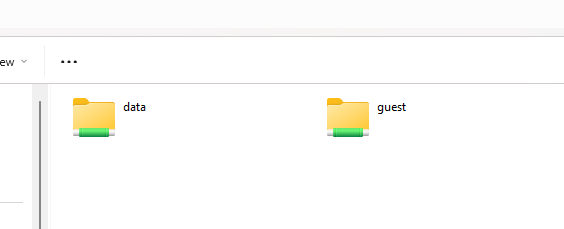
-
I tried to build a image from the current main branch (kernel: 6.18.20) and I found the problem is the same. I changed KERNELBRANCH to "tag:v6.18.18" from "branch:linux-6.18.y" and rebuild. It can boot to desktop as expected. It seems some change in the 6.18.19 kernel causes the problem
-
Thanks I got it.
-
Found an error in the "use proprietary GPU driver for Spacemit K1" script. Because I cannot edit here is the corrected install script. spacemit-gpu-addon.sh
-
I have 3 Aceline AG-216 consoles. Help me find the right image for her. QHZIW_H313_A3_2LP4. V2.0 20240603 EA6521QF 2+16G
-
Example for adding a new board with already existing board family: https://github.com/armbian/build/pull/9456/changes
-
Maybe. Trunk are untested auto-builds and support for this board is from the community. Its functionality is unknown to the Armbian team. Get serial console logs. This makes investigation way easier.
-

How to receive MIDI messages to a cli app
samlevy0515 replied to Vivichrist's topic in Software, Applications, Userspace
Try running a2jmidid with pw-jack a2jmidid first — that bridges ALSA MIDI to JACK MIDI, and then use pw-link or qpwgraph to connect your app's MIDI input to the resulting Midi-Bridge ports -
I was able to run Steam games with GPU accelerated ofc. But since my Opi5 only has 8Gb, I mainly run non-Steam games. I can see your SBC has 32Gb, so you are good. I assume your game is 64-bit DX11. Change the Steam Play compatible layer to "GE-proton". Download Dxvk-stripped here: https://github.com/khanh-it/dxvk/releases/tag/releases Copy x64/d3d11.dll, x64/dxgi.dll to the <<game>>.exe folder. Then run the game with a command like so:
- Yesterday
-
Hey there, Title: Need compatible firmware / loader for XR8223518K-V1.0 (RK3518) TV box Message: Hi, I’m trying to recover a TV box with this exact mainboard: Board code: XR8223518K-V1.0 SoC: Rockchip RK3518 Symptoms: device only shows blue LED no HDMI output device can still enter MASKROM / Rockusb mode What I already tested: RKDevTool detects “Found One MASKROM Device” using my current MiniLoaderAll.bin + ExportImage.img fails with: “Download boot fail. Please check DDR.” So I believe I need: the exact stock firmware for this board or a compatible RK3518 MiniLoaderAll.bin / loader for this exact board / DDR configuration If anyone has firmware, loader, dump, or files for XR8223518K-V1.0, I would really appreciate it. Thanks.
-
@boggy have you tried another SD card? You have a lot of mmc errors. which miniarch image booted for you? Maybe we can use the mmc settings from that image.
-
I opened PR #9590 with the really minimal change that's needed to get my desired behavior back.
-
Diagnosing System Issues and Getting Support with ArmbianmonitorArmbian is a lightweight operating system based on Debian/Ubuntu, highly optimized for single-board computers (SBCs) like the Raspberry Pi, Orange Pi, and many others. When facing system problems on an SBC running Armbian, the built-in utility armbianmonitor is an essential diagnostic tool. It quickly gathers crucial system data, making troubleshooting faster and more accurate for both the user and the community providing support. Key Diagnostic FunctionsThe primary use of armbianmonitor is to generate real-time performance and system configuration reports. By running the command without any arguments, you get a menu of options, but the most vital functions for diagnosis are: System Status (armbianmonitor -m): This provides a live monitoring dashboard. It displays key metrics like CPU frequency, load average, temperature, memory usage, and disk I/O. By watching this output while a problem (like a system freeze or slowdown) occurs, you can often pinpoint the bottleneck—for instance, a sudden spike in CPU temperature indicating a cooling problem, or sustained high memory usage pointing to a resource leak.System Information (armbianmonitor -u or -d): This is the most crucial function for seeking online support. It gathers a comprehensive, anonymized report including details about the kernel version, device model, installed packages, boot logs, and hardware configuration. This data is essential because the performance and stability of SBCs are often highly dependent on the specific kernel and hardware drivers used for that model.Getting Support OnlineWhen seeking help on platforms like the Armbian forum or GitHub, simply describing the symptoms is rarely enough. The person helping you needs to know the exact state of your system. By running armbianmonitor -u, the utility uploads the detailed diagnostic report to a public pastebin service (like https://www.google.com/search?q=paste.armbian.com) and provides a unique, short URL. You can then include this URL directly in your support request. This allows community members to instantly access the exact configuration, eliminating back-and-forth questions about device type, OS version, and log file locations. This standardized method is the fastest way to receive targeted, effective assistance and ensures your issue is diagnosed accurately. View the full article
-
Nice! I actually did something similar. In my case I ended up using an old PWM fan I had lying around, powering it through the 12V pin input. Then I used ground on pin 6 and the PWM signal from GPIO pin 11. I wrote a bash script and set it up as a service that controls the fan speed based on five temperature levels. Right now I’m running it on FriendlyElec CM3588 NAS with Armbian Linux 6.1.115-vendor-rk35xx (v26.2 rolling). The repo is in Spanish for now, but I’m planning to translate it to English soon: https://github.com/jgomezriesgobancario/cm3588-fan-controller **edited** Fix typos
-
https://forums.kali.org/ There is an arm64 section.
-
Thank Igor that explains it. I'll look at your suggestion or just go back to an SMB share
-
 The same issue has occurred again. I had to take this measure again today to fix the zfs module. I had to revert the kernel, headers and dtb back to 25.11.2 from 26.2.1 of linux(meson64:arm64)
 -
Hello. I installed Armbian 26.2.1 Minimal Debian 13 (Trixie), but the Wi-Fi still doesn't work. It doesn't connect to the AP during initial setup. After reconfiguring via armbian-config, it works until the first reboot.
- Last week
-

iptables module missing from 6.18.10-current-meson64 kernel
bedna replied to Jeedom Cassivet's topic in Beginners
Also: # apt install -y iptables # iptables -v iptables v1.8.11 (nftables): no command specified https://wiki.debian.org/nftables AFAIK using iptables syntax should still work, but nft is what you probably should learn to use instead. https://wiki.nftables.org/wiki-nftables/index.php/Moving_from_iptables_to_nftables -
Add to /etc/rc.local and reboot. echo "1" > /sys/devices/system/cpu/cpufreq/boost && echo "performance" | tee /sys/devices/system/cpu/cpu[0-9]/cpufreq/scaling_governor &&
-
I tried installing armbian on tx6 because I saw a .img file for the tanix tx6 to turn it as a Minecraft server but I quickly run into problems