
Active threads
Showing topics posted in for the last 365 days.
- Past hour
-
 @ag123 thank you for your response. I donated to the project in the past (search my messages, peytote was an awesome guy that helped with some specific SPI issue i had many years ago on a Orange PI i think), i am donating to few open source projects (Like FreeCAD) , will make recurring donations to Armbian for sure. Yeah i am not using any OrangePi with their original OS, no way. I need a more powerful board than OPi Zero 3, will look into the maintained and supported ones here on Armbian. Thanks for your reply.
 -
If I understand you correctly: root via ssh is not allowed by default I usually setup (new) SBC's in a different way, but last time testing 2 of my boards with 26.2 minimal/IoT fresh image was via serial console, have not used ssh and certainly not putty. If no (serial) console, you might also have sme networking firewall issues somewhere in Windows or so, although would be vary rare. Have you setup a normal user first via (serial) console first?
- Today
-
having the same issiue , would like to improve the situation since most of the monitor that i use come in 16:10 format, and those resolution seem not easily available. also read here on a site it should be capable of 4k output. https://www.electromaker.io/blog/article/pine64-rockpro64-review-a-beefy-single-board-computer
-
I tried it with a desktop PC, but couldn't select a resolution higher than 1024x768. I read that there's a bug in newer kernel versions that's already been fixed. However, I couldn't find out if the fix is included in the downloaded image. Then I tried an older imager with kernel 4.4, and with that one, I was able to select higher resolutions. @jock I only tested it with Wi-Fi. You could also try a version with an older kernel.
-
If you want to add new board with its own device tree, this is a good example: https://github.com/armbian/build/pull/9423 Remember to add pictures - this way https://github.com/armbian/armbian.github.io/pull/236
-
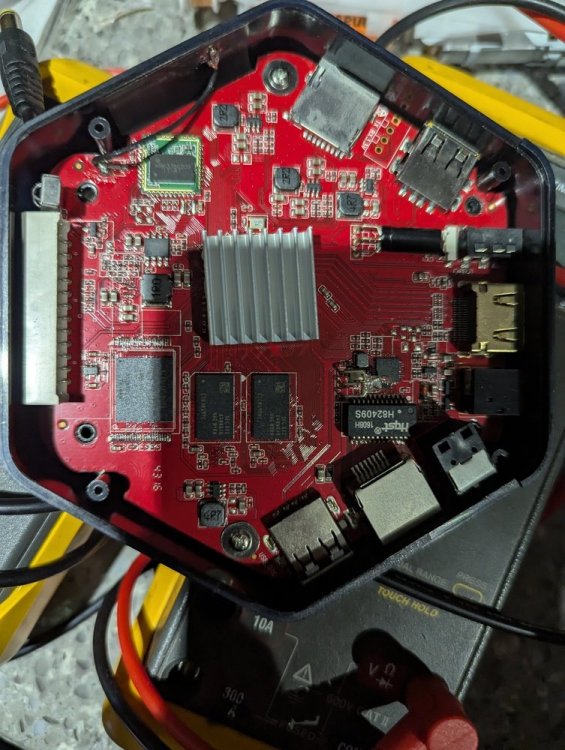
Tried your image on an SD card but tried several way to get it to boot from SD was unsuccessful. I tried the toothpick on the button inside the 3.5 mm port. I tired ADB reboot update and ADB reboot recovery. But all those times, I just receive the android recovery menu when failed to boot SD. Is there any thing special I need to do to get this box to boot from SD? I will solder some dupont pins soon so I can get a better reading what is happening with serial console. But for now, do you know why it is so difficult to boot from SD. I never had this much issue with an AMLogic S9xx before.
- Yesterday
-
Auto generated images: https://dl.armbian.com/nightly/orangepirv2/Forky_current_minimal https://dl.armbian.com/nightly/orangepirv2/Noble_current_xfce
-

internal wifi "x96 max plus" tv box wifi chip "CDTech 47W3155"
SteeMan replied to Jain Ziad's topic in Amlogic CPU Boxes
Why are you expecting this to work? -

Orange Pi Zero 3 to Banana Pi M4 Zero Hardware Update
SUPA replied to SUPA's topic in Banana Pi M4 Zero
I am asking if someone can refer me somewhere so I can update my current orangepi zero 3 hardware to bananpi m4 zero hardware. -

Gaming experience with Orange Pi 5 (RK3588) on Armbian
KhanhDTP replied to KhanhDTP's topic in Orange Pi 5
Armbian 25.11.2 Noble XFCE (BSP Kernel: 6.1.115) + PanVk - mesa 26.0 (https://launchpad.net/~ernstp/+archive/ubuntu/mesaaco) + Box64 arm64 v0.4.1 ed9827920 (https://ryanfortner.github.io/box64-debs/) + ge-proton10-29 (https://github.com/GloriousEggroll/proton-ge-custom/releases/tag/GE-Proton10-29) (GE-proton is more likely to be segment fault-proof than other wine-proton versions) + dgVoodoo2 (https://github.com/dege-diosg/dgVoodoo2/releases) + DXVK-stripped v2.7.1 ~30fps@720p (high settings - the lowest settings in game) box64 environment variables: Crysis 2 Maximum Edition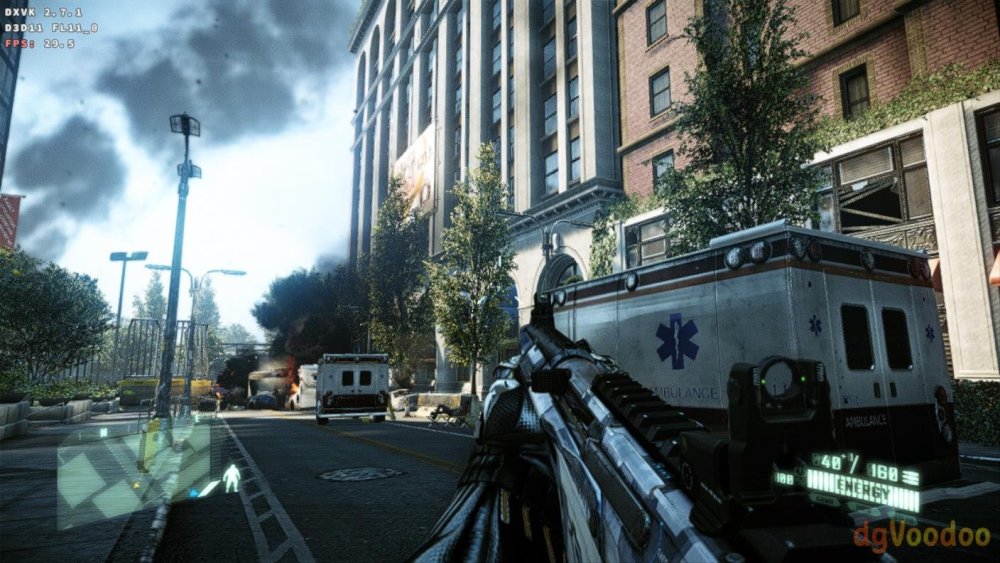
.thumb.jpg.4ff3574e4a4f11c2939f7307ef540020.jpg)
-
 Just tried stock DietPI & Armbian builds using both current-rockchip64 and edge-rockchip64 utilizing U-Boot - thus completely eliminating the EDK2 UEFI factor. None handle multichannel audio correctly so I guess there is something still not mature enough in mainline/upstream for this. kernel-rk35xx-vendor:6.1.115 works perfectly even with EDK2 UEFI. Perhaps the Armbian devs need to take a look at what LibreELEC is doing as they managed to get it working in their mainline/upstream kernels.
 -
Concerns before trying to boot Armbian from SD card on GS King-X
SteeMan replied to marfalk's topic in Amlogic CPU Boxes
You would just burn your downloaded image file to any USB storage, just like you would to an SD card (i.e. plug the USB storage into another device and burn the image to the storage) -
 With a lot of trial and error I figured out the issue but not the cause. This seems to only effect HEVC (x265) videos when drm is successfully enabled with MPV from this repository. If I try a different player, they play fine but no hardware acceleration. If I encode the videos to x264 they play but hardware acceleration fails with the following error [ffmpeg/video] h264: v4l2_request_probe_video_device: set controls failed. Invalid argument (22) The issue is the width of the video. Outside of certain ranges it will display a black video (audio works). It doesn't seem to matter what the height is set to. Eg) 704x480, 704x960 image is displayed. 706x480, 706x960 black screen The ranges go for 14 pixels and each range is separated by 50 pixels. eg) widths in the range of 690 to 704 display an image. Widths between 706 and 752 display a black screen. 754 to 768 display an image. It's a strange one.... Here is a list of ranges that work. Any widths outside of these ranges produces a black screen. It only goes up to 1984 but I'm sure the same rules would apply above this value.
 -

to get 32768 clk from GPIO1 D4 on RK3328
tparys replied to emresensoy's topic in Advanced users - Development
PREEMPT_RT is fully merged in mainline Linux as of 2024 (https://en.wikipedia.org/wiki/PREEMPT_RT). - Last week
-
Here is the updated image with Wifi and EMMC boot https://github.com/sicXnull/armbian-build/releases/download/mxqpro/Armbian-unofficial_26.02.0-trunk_Mxqpro-h313_trixie_current_6.12.74_cinnamon_desktop.img.xz
-

Is the NanoPC-T6 Plus compatible with the NanoPC T6 LTS image ?
Werner replied to magic_sam's topic in NanoPC T6 LTS
I don't know, perhaps the author knows. Try. If it doesn't work, then fe's wiki is misleading. -
Please read the FAQ and installation instructions linked on the download page. https://www.armbian.com/amlogic-s9xx-tv-box/
-
 thank you for your reply! I reverted to the stock ubuntu for opi5 for now. I will have a new device in my hands in the next days, I will then try this
 -
Hello NickA, fire-hound from discord here ... You do a tremendous service for us all, keep it up buddy! I loaded your recent build from here: https://github.com/NickAlilovic/build/releases and can confirm it works on my A7A. It correctly detected my Pimorony NVME Base lsblk NAME MAJ:MIN RM SIZE RO TYPE MOUNTPOINTS mtdblock0 31:0 0 8M 0 disk mmcblk0 179:0 0 29.2G 0 disk ├─mmcblk0p1 179:1 0 256M 0 part /boot └─mmcblk0p2 179:2 0 28.6G 0 part /var/lib/containers/storage/overlay /var/log.hdd / zram0 254:0 0 3.9G 0 disk [SWAP] zram1 254:1 0 50M 0 disk /var/log zram2 254:2 0 0B 0 disk nvme0n1 259:0 0 238.5G 0 disk └─nvme0n1p1 259:1 0 238.5G 0 part /srv/dev-disk-by-uuid-b28b2f5c-ee2e-4ded-959e-22bc63051b1d and: screenfetch _,met$$$$$gg. root@radxa-cubie-a7a ,g$$$$$$$$$$$$$$$P. OS: Debian 13 trixie ,g$$P"" """Y$$.". Kernel: aarch64 Linux 6.6.98-vendor-sun60iw2 ,$$P' `$$$. Uptime: 11h 14m ',$$P ,ggs. `$$b: Packages: 661 `d$$' ,$P"' . $$$ Shell: bash 5.2.37 $$P d$' , $$P Disk: 4.9G / 271G (2%) $$: $$. - ,d$$' CPU: ARM Cortex-A55 Cortex-A76 @ 8x 1.794GHz $$\; Y$b._ _,d$P' RAM: 534MiB / 7928MiB Y$$. `.`"Y$$$$P"' `$$b "-.__ `Y$$ `Y$$. `$$b. `Y$$b. `"Y$b._ `"""" So far so good The issues: 1. The typical Armbian image has a module in the armbian-config and radxa's rsetup where one can set up the two leds conveiently to other than full on and heartbeat for the green and blue gpio leds respectively. I find it to be a nuisance to dig for that manually 2. The Ovralys module in armbian-config is returning an error - when entering DTO001 module (Device Tree Overlays) saying: Invalid overlay_prefix that might require deeper digging into the issue i guess? What works: Open Media Vault registers the NVME nicely as additional storage. I suspect booting off that NVME would work for an updated SPI bootloader i could test that if you want me to? If you need any other info or output I stand at Your disposal 😁
-

Looking for help porting to an RK3328-based device
Soupborsh Proton replied to QwertyChouskie's topic in Rockchip CPU Boxes
Hello, I would like to use Armbian on control hub too but without disassembling it. I tried latest renegade image and usb and internet were not working. What is exactly everything I need to change in the image to make the usb at least work? I tried enabling the rk3318-box-led-conf3 in some file I forgot but it did not work, maybe else more needed or I did it wrong. I would be very grateful if you could write what I need to change! I do not want to disassemble since it's legality in FTC rules is ambigous for me. -
Neither of these is good advice. dd does not verify written data and balena etcher has known issues, hence it is not recommended either. Either use Armbian Imager (https://docs.armbian.com/User-Guide_Getting-Started/) or USBimager (https://gitlab.com/bztsrc/usbimager). Both are known to work.
-
 As it turned out, Orange Pi does not support Power Delivery Negotiations and requires a "dumb" power supply providing 5V 4A. My power supply delivered 2A and then went into protection mode; the board itself had nothing to do with it
 -
Make sure you have ili9486.ko in your ko module folder: modinfo ili9486 Can you use the DTS that I published in: https://forum.armbian.com/topic/47971-driving-the-ili9488-lcd-40-inch-cheap-chinese-clone/#findComment-208446 But change the "compatible" line with waveshare,rpi-lcd-35 , Delete the stuff under the "compatible" line, until the "}vsync-len = <0>;", and replace it with what you had in your DTS. Change these lines, if they are different: spi-max-frequency = <24000000>; rotate = <270>; bgr; fps = <30>; buswidth = <8>; regwidth = <16>; Reference: https://github.com/raspberrypi/linux/blob/rpi-6.12.y/arch/arm/boot/dts/overlays/piscreen-overlay.dts
-
Help in installing Armbian On an andoid tv box with amologic chip
SteeMan replied to KOUSA's topic in Amlogic CPU Boxes
You are not using Armbian. Ophub is a fork of Armbian. They do not contribute to Armbian development nor do they participate in these forums. You need to go to ophub to ask this question, as no one here can help you. -

Starting kernel... after power losses Nanopi Neo Air
eselarm replied to whiteblaine's topic in Allwinner sunxi
What is in armbianEnv.txt then? Anyway you need to load and edit it such that you make sure loglevel=7 Then there will be more text after Starting kernel ... You also seem to have a power and/or reliability problem w.r.t. cables as characters are missing in your debug log text.




.jpg.2f38930931c373091b9afc530d7d19d7.jpg)


