
Active threads
Showing topics posted in for the last 365 days.
- Past hour
-

Concerns before trying to boot Armbian from SD card on GS King-X
marfalk replied to marfalk's topic in Amlogic CPU Boxes
Thank you again for your reply. I am facing an issue though. When i try to shut down the device (either by issuing the poweroff comand or picking the "Exit" on screen menu item), the shut down process does not complete. I can see the dots spinning on the screen for about 5-10 seconds, but then they freeze and the device stays on... The only way to shut it down is to disconnect the device from the power supply, but, because of that, of course the hard drive can not reach the sleep mode as I can hear it is still spinning. Can I try something to solve this and have a clean power off? -

Super console cube X3 seems can't boot.
gnutux landia replied to gnutux landia's topic in Amlogic CPU Boxes
Any idea about this → sudo dmesg | grep tty [ 0.471034] console [tty0] enabled [ 633.797008] usb 1-1.4.1.3: cp210x converter now attached to ttyUSB0 [ 1159.103497] cp210x ttyUSB0: cp210x converter now disconnected from ttyUSB0 [ 2713.702725] usb 1-1.4.1.2: cp210x converter now attached to ttyUSB0 [ 3812.350749] cp210x ttyUSB0: usb_serial_generic_read_bulk_callback - urb stopped: -32 [ 3812.351220] cp210x ttyUSB0: usb_serial_generic_read_bulk_callback - urb stopped: -32 [ 3812.447580] cp210x ttyUSB0: failed set request 0x12 status: -19 [ 3812.447593] cp210x ttyUSB0: failed set request 0x0 status: -19 [ 3812.447923] cp210x ttyUSB0: cp210x converter now disconnected from ttyUSB0 [ 4077.235990] usb 1-1.4.1.2: cp210x converter now attached to ttyUSB0 [ 4098.361943] cp210x ttyUSB0: cp210x converter now disconnected from ttyUSB0 GNU/Linux sudo screen /dev/ttyUSB0 115200. [screen is terminating] -

Efforts to develop firmware for X96 X6 RK3566 (8G/64G)
Chris4arm replied to loi xin's topic in Rockchip CPU Boxes
Sorry for the late reply to your request. I still have the image; let me know where to upload it if you're still interested. - Today
-
Hi, eselarm. i did not have time to delete the topic. Somehow it started working. Thank you for your time.
-
https://github.com/armbian/linux-rockchip/pull/448 Was able to reproduce this issue and get it fixed.
-
@shexplorer I am in the same situation with my x88pro13 box not booting and I do not manage to go in Maskrom mode. Any progress on your side ?
-
Unless they have changed something very recently, you can login as root via ssh on first-run. I double checked /etc/ssh/sshd_config on an armbian install image I had downloaded, and: # Authentication: #LoginGraceTime 2m PermitRootLogin yes #StrictModes yes #MaxAuthTries 6 #MaxSessions 10 PubkeyAuthentication yes <snip> # To disable tunneled clear text passwords, change to no here! #PasswordAuthentication yes #PermitEmptyPasswords no And inside /etc/shadow (default 1234 passwd): root:$y$j9T$SAPCtO/l2ZIj6A2frqTza/$.Z8dP41gzqRHoIS8PvXFn9fghf9rgkGqAWgXVRW4dg6:20234:0:99999:7::: So that should not be an issue here. (and there are keys inside /etc/ssh that I assume can be used at first login, I have never tried) Sounds more like a faulty sd-card that gets mounted read-only, that can cause stuff like this happening. (as mentioned earlier by Igor) Try with a different sd-card (and use armbian-imager instead of balena) and see if the same happens on another card.
-
I managed to do it thanks
-
Hello averyone I'm trying to download the multitool.img.xz can someone please help me find it or share a valide link?
-
The paste armbian URL displays nothing (anymore?) so without any (new) info from you, no-one can help you. AFAIR, 4K via HDMI connector is only recently available (on RK3588, not sure about RK3399), so make sure you can manage various combinations of U-Boot, kernel, rootfs. So sort of act like a developer, als make sure you have a serial console (debug) cable, else you cannot get any step further. Use a 26.2 based U-Boot and 6.19 rockchip64 kernel I would say, then see what happens.
-
 @ag123 thank you for your response. I donated to the project in the past (search my messages, peytote was an awesome guy that helped with some specific SPI issue i had many years ago on a Orange PI i think), i am donating to few open source projects (Like FreeCAD) , will make recurring donations to Armbian for sure. Yeah i am not using any OrangePi with their original OS, no way. I need a more powerful board than OPi Zero 3, will look into the maintained and supported ones here on Armbian. Thanks for your reply.
 -
I'll add my 2 cents with my more recent findings. Mind that I am using an Orange PI 5 Plus, your mileage might vary with other models. I started booting the official Orange PI (Arch) distro to clear the SPI bootloader, as suggested by @Igor sudo pacman -Syy sudo pacman -S mtd-utils sudo flash_erase /dev/mtd0 I've tried multiple flavours of the available downloads for Armbian, but I've found that all versions with kernel 6.12.58 would fail to load (the LED stays red, instead of flashing red & blue). This includes both Debian trixie and Ubuntu noble, with their desktop and minimal editions. Back in December 20204 @Igor V described similar boot issues that got resolved with kernel 6.1.75, the one that was highlighted in green at the time. So that led me to try with kernel 6.1.115 instead, and that has worked just fine. Not sure if this is an issue introduced with the newer kernel, or whether it's to be expected as it has not been officially stabilised yet. Anyway, I thought I'd share in case this can help others in the future.
-
I tried it with a desktop PC, but couldn't select a resolution higher than 1024x768. I read that there's a bug in newer kernel versions that's already been fixed. However, I couldn't find out if the fix is included in the downloaded image. Then I tried an older imager with kernel 4.4, and with that one, I was able to select higher resolutions. @jock I only tested it with Wi-Fi. You could also try a version with an older kernel.
-
If you want to add new board with its own device tree, this is a good example: https://github.com/armbian/build/pull/9423 Remember to add pictures - this way https://github.com/armbian/armbian.github.io/pull/236
-
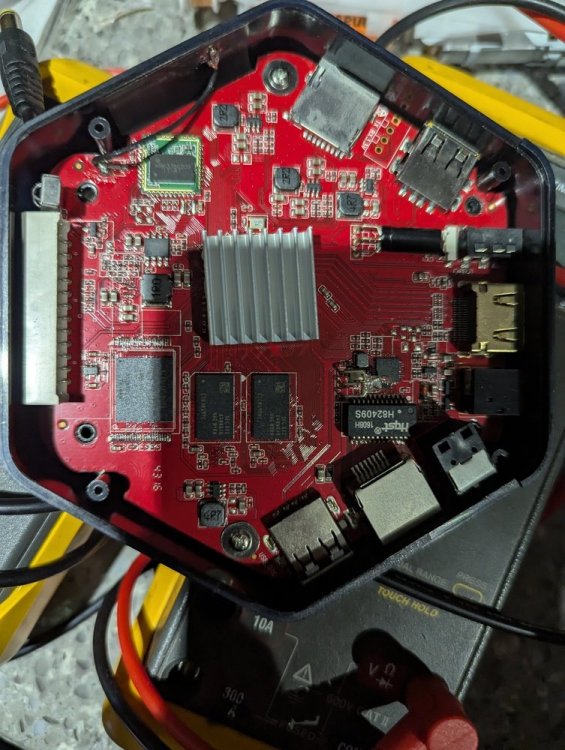
Tried your image on an SD card but tried several way to get it to boot from SD was unsuccessful. I tried the toothpick on the button inside the 3.5 mm port. I tired ADB reboot update and ADB reboot recovery. But all those times, I just receive the android recovery menu when failed to boot SD. Is there any thing special I need to do to get this box to boot from SD? I will solder some dupont pins soon so I can get a better reading what is happening with serial console. But for now, do you know why it is so difficult to boot from SD. I never had this much issue with an AMLogic S9xx before.
- Yesterday
-
Auto generated images: https://dl.armbian.com/nightly/orangepirv2/Forky_current_minimal https://dl.armbian.com/nightly/orangepirv2/Noble_current_xfce
-

internal wifi "x96 max plus" tv box wifi chip "CDTech 47W3155"
SteeMan replied to Jain Ziad's topic in Amlogic CPU Boxes
Why are you expecting this to work? -

Orange Pi Zero 3 to Banana Pi M4 Zero Hardware Update
SUPA replied to SUPA's topic in Banana Pi M4 Zero
I am asking if someone can refer me somewhere so I can update my current orangepi zero 3 hardware to bananpi m4 zero hardware. -

Gaming experience with Orange Pi 5 (RK3588) on Armbian
KhanhDTP replied to KhanhDTP's topic in Orange Pi 5
Armbian 25.11.2 Noble XFCE (BSP Kernel: 6.1.115) + PanVk - mesa 26.0 (https://launchpad.net/~ernstp/+archive/ubuntu/mesaaco) + Box64 arm64 v0.4.1 ed9827920 (https://ryanfortner.github.io/box64-debs/) + ge-proton10-29 (https://github.com/GloriousEggroll/proton-ge-custom/releases/tag/GE-Proton10-29) (GE-proton is more likely to be segment fault-proof than other wine-proton versions) + dgVoodoo2 (https://github.com/dege-diosg/dgVoodoo2/releases) + DXVK-stripped v2.7.1 ~30fps@720p (high settings - the lowest settings in game) box64 environment variables: Crysis 2 Maximum Edition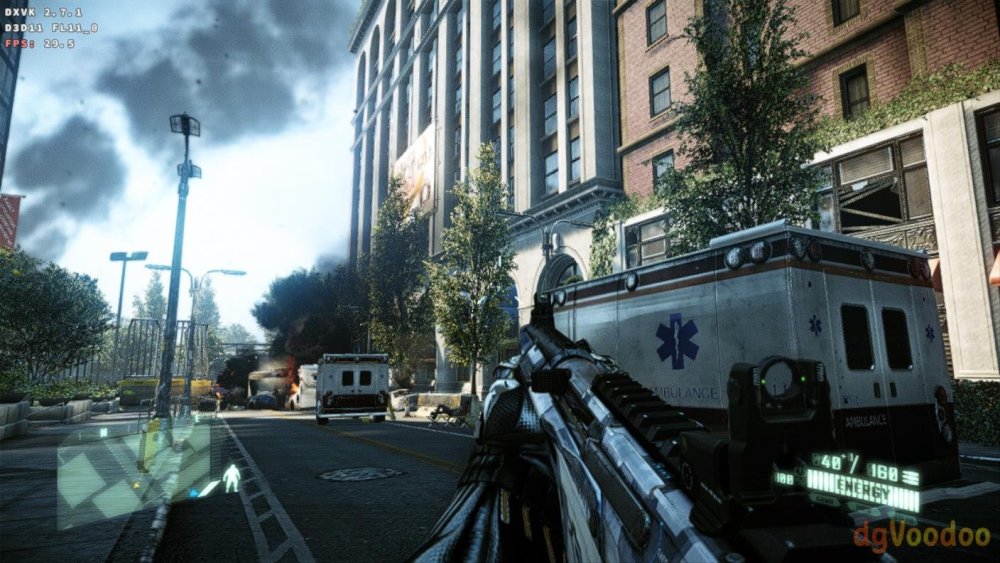
.thumb.jpg.4ff3574e4a4f11c2939f7307ef540020.jpg)
-
 Just tried stock DietPI & Armbian builds using both current-rockchip64 and edge-rockchip64 utilizing U-Boot - thus completely eliminating the EDK2 UEFI factor. None handle multichannel audio correctly so I guess there is something still not mature enough in mainline/upstream for this. kernel-rk35xx-vendor:6.1.115 works perfectly even with EDK2 UEFI. Perhaps the Armbian devs need to take a look at what LibreELEC is doing as they managed to get it working in their mainline/upstream kernels.
 -
 With a lot of trial and error I figured out the issue but not the cause. This seems to only effect HEVC (x265) videos when drm is successfully enabled with MPV from this repository. If I try a different player, they play fine but no hardware acceleration. If I encode the videos to x264 they play but hardware acceleration fails with the following error [ffmpeg/video] h264: v4l2_request_probe_video_device: set controls failed. Invalid argument (22) The issue is the width of the video. Outside of certain ranges it will display a black video (audio works). It doesn't seem to matter what the height is set to. Eg) 704x480, 704x960 image is displayed. 706x480, 706x960 black screen The ranges go for 14 pixels and each range is separated by 50 pixels. eg) widths in the range of 690 to 704 display an image. Widths between 706 and 752 display a black screen. 754 to 768 display an image. It's a strange one.... Here is a list of ranges that work. Any widths outside of these ranges produces a black screen. It only goes up to 1984 but I'm sure the same rules would apply above this value.
 -

to get 32768 clk from GPIO1 D4 on RK3328
tparys replied to emresensoy's topic in Advanced users - Development
PREEMPT_RT is fully merged in mainline Linux as of 2024 (https://en.wikipedia.org/wiki/PREEMPT_RT). - Last week
-
Here is the updated image with Wifi and EMMC boot https://github.com/sicXnull/armbian-build/releases/download/mxqpro/Armbian-unofficial_26.02.0-trunk_Mxqpro-h313_trixie_current_6.12.74_cinnamon_desktop.img.xz
-

Is the NanoPC-T6 Plus compatible with the NanoPC T6 LTS image ?
Werner replied to magic_sam's topic in NanoPC T6 LTS
I don't know, perhaps the author knows. Try. If it doesn't work, then fe's wiki is misleading. -
 thank you for your reply! I reverted to the stock ubuntu for opi5 for now. I will have a new device in my hands in the next days, I will then try this











.jpg.2f38930931c373091b9afc530d7d19d7.jpg)
