All Activity
- Past hour
-
It just stops after that. No Linux UART logs, nothing via HDMI. I'm flashing this image: Armbian_26.2.1_Rock-5b_noble_vendor_6.1.115_gnome_desktop.img
-
Does it simply stop after that line or is the output incomplete?
-
Hi. I did a wipe of the SPI flahs using the method found in this guide https://docs.radxa.com/en/rock5/rock5b/low-level-dev/install-os/rkdevtool_spi#erase-spi-flash While I can see that the TF-A version is newer I still hand int the same fashion: ``` DDR b8ce94f14b cym 25/09/26-15:48.05,fwver: v1.20 ch0 ttot10 ch1 ttot10 ch2 ttot10 ch3 ttot10 ch0 ttot18 LPDDR4X, 2112MHz channel[0] BW=16 Col=10 Bk=8 CS0 Row=17 CS=1 Die BW=16 Size=2048MB ch1 ttot18 channel[1] BW=16 Col=10 Bk=8 CS0 Row=17 CS=1 Die BW=16 Size=2048MB ch2 ttot16 channel[2] BW=16 Col=10 Bk=8 CS0 Row=17 CS=1 Die BW=16 Size=2048MB ch3 ttot18 channel[3] BW=16 Col=10 Bk=8 CS0 Row=17 CS=1 Die BW=16 Size=2048MB Manufacturer ID:0xff DQS rds:l0,h1 CH0 RX Vref:27.5%, TX Vref:21.8%,0.0% DQ rds:l0 h1 h1 h1 h4 h1 h3 h1, h1 h6 h4 h3 h4 h4 h7 h2 DQS rds:l0,h3 CH1 RX Vref:27.5%, TX Vref:20.8%,0.0% DQ rds:h1 h6 h1 h3 h3 h4 h3 h4, h5 h1 h4 h6 h5 h7 h1 h2 DQS rds:h1,h1 CH2 RX Vref:28.5%, TX Vref:20.8%,0.0% DQ rds:l0 h4 h2 l0 h6 h5 h4 h2, h3 h3 h2 h4 h5 h5 h7 h6 DQS rds:h1,h1 CH3 RX Vref:28.9%, TX Vref:21.8%,0.0% DQ rds:h2 h7 h7 h2 h6 h2 h7 h1, h5 l0 h5 l0 h1 h5 h1 h1 stride=0x2, ddr_config=0x0 hash ch_mask0-1 0x20 0x40, bank_mask0-3 0xa00 0x1400 0x2800 0x0, rank_mask0 0x0 change to F1: 528MHz ch0 ttot10 ch1 ttot10 ch2 ttot10 ch3 ttot10 change to F2: 1068MHz ch0 ttot14 ch1 ttot12 ch2 ttot12 ch3 ttot14 change to F3: 1560MHz ch0 ttot16 ch1 ttot16 ch2 ttot14 ch3 ttot16 change to F0: 2112MHz ch0 ttot18 ch1 ttot18 ch2 ttot18 ch3 ttot18 out INFO: Preloader serial: 2 NOTICE: BL31: v2.3():v2.3-942-g98eaeb2f3:derrick.huang, fwver: v1.53 NOTICE: BL31: Built : 12:10:56, Aug 25 2025 INFO: spec: 0x1 INFO: code: 0x88 INFO: customer demand: 0x0 INFO: ext 32k is not valid INFO: ddr: stride-en 4CH INFO: GICv3 without legacy support detected. INFO: ARM GICv3 driver initialized in EL3 INFO: valid_cpu_msk=0xff bcore0_rst = 0x0, bcore1_rst = 0x0 INFO: l3 cache partition cfg-0 INFO: system boots from cpu-hwid-0 INFO: disable memory repair INFO: idle_st=0x21fff, pd_st=0x11fff9, repair_st=0xfff70001 INFO: dfs DDR fsp_params[0].freq_mhz= 2112MHz INFO: dfs DDR fsp_params[1].freq_mhz= 528MHz INFO: dfs DDR fsp_params[2].freq_mhz= 1068MHz INFO: dfs DDR fsp_params[3].freq_mhz= 1560MHz INFO: BL31: Initialising Exception Handling Framework INFO: BL31: Initializing runtime services WARNING: No OPTEE provided by BL2 boot loader, Booting device without OPTEE initialization. SMC`s destined for OPTEE will return SMC_UNK ERROR: Error initializing runtime service opteed_fast INFO: BL31: Preparing for EL3 exit to normal world INFO: Entry point address = 0x200000 INFO: SPSR = 0x3c9 ```
-
@Marvin-03 It is past the bootloader. I only tested the build on XFCE, which boots fine. GNOME failing to boot properly might be due to the PowerVR or KMScon install script. If you need GNOME. Try removing the function post_family_tweaks__install_powervr_desktop(). https://github.com/NickAlilovic/build/blob/Radxa-mainline-WIP-test/config/sources/families/sun60iw2.conf#L467
- Today
-
@Marvin-03 Just to confirm: for both boards, with and without eMMC, are you using the same microSD card as the boot device? From the current boot log, it looks like there may be an issue with the microSD card. Both the previous boot log (using the BSP MMC driver) and the current boot log (using the mainline MMC driver) show problems detecting mmc0 (the microSD card). Could you try a different microSD card, preferably from another brand, and see if the issue persists?
-
 Great job I don't have time to replicate this, but I would like to see more photos, screenshots, and what you can do with so many SDRs It's perfect to use an older kernel, if you don't need anything from a newer Linux (for example more stable Wifi, and resistive LCDs with Wayland)... In your writeup, you could have included the dmesg or journalctl messages, just prior to the crash. Sometimes, there's a confict between a new or changed kernel module and the module you want to use, and it causes crashes, or not being able to start Linux. Then you deactivate the module that gives you the problem. Which services were disabled with sudo systemctl mask systemd-networkd-wait-online ? It sounds like you never want to start a network service automatically on boot. I hope that the SoapySDR developers can fix the root issue, so that you don't need to lock a library .SO like that I made a thread showing how to control GPIO with Python gpiod https://forum.armbian.com/topic/33800-orange-pi-zero-3-gpio/#findComment-181191 Instead of using Opi.GPIO, which relies of sysfs (deprecated, and you can't use it in newer Linux)
 -
How Orange Pi Zero 3W use Mainline Armbian Kernel with Vendor U-Boot?
robertoj replied to Yeely's topic in Allwinner sunxi
I had no idea that there's an OpiZ3W Just in case, it is nothing at all like the Orange Pi Zero 3, which has a lot in common with the OpiZ2W. Yeely: what are your first impressions about this board? Are there demos for the NPU? Are the video encoders and decoders working with the Orange Pi Linux OS? Bring up verifiable (open source) examples of AI generated code, making an improved program. -
@Nick A My bad, cleaned my build folder and it compiled fine. Still, it is still stuck in the bootloader Bootlog: https://pastebin.com/ckqP10Bb I tried with both of my board with and without emmc installed.
-
@Marvin-03 that's odd. The test branch I cloned has "0011-Add-BSP-support-files-54e9e5fb62" patch. Compiles fine on my build. Try to clone it again. git clone https://github.com/NickAlilovic/build.git --branch Radxa-mainline-WIP-test
-

Gaming experience with Orange Pi 5 (RK3588) on Armbian
Alex Ling replied to KhanhDTP's topic in Orange Pi 5
Tomb Raider (2013) Armbian 26.05-trunk (Linux kernel 7.0.10-edge-rockchip64) + Panvk: Mesa 26.2.0-devel (git-3df406633e) + DXVK 2.7.1-stripped (https://github.com/khanh-it/dxvk/releases) + Wine: wine-11.9-staging-tkg-amd64-wow64 (https://github.com/Kron4ek/Wine-Builds/releases) + box64: box64-rk3588_0.4.3+20260529.5b7308f-1 (https://github.com/ryanfortner/box64-debs/) ~30fps@720p (default settings)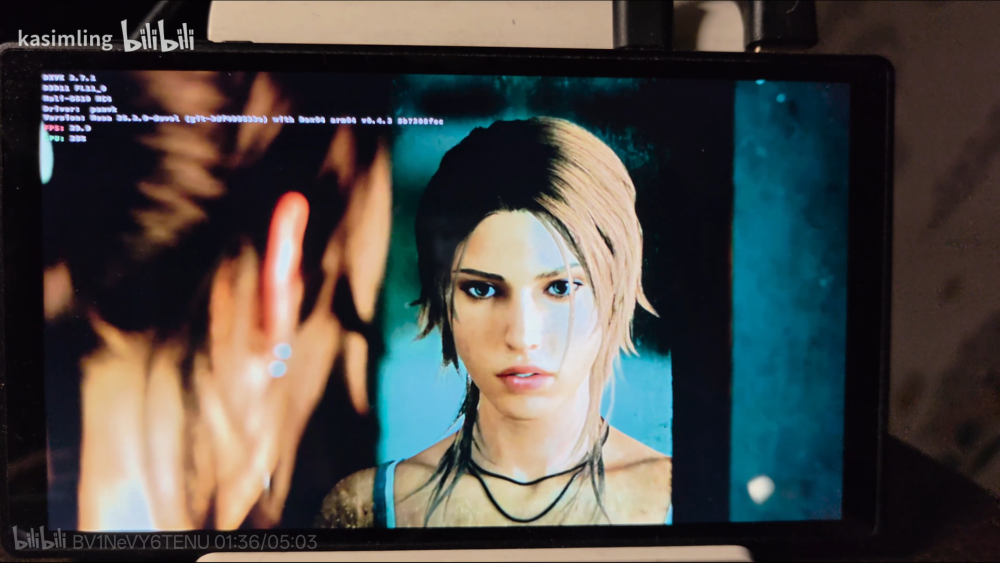
-
Okay I will try that when I get back from work, thanks for your time
-
correct. If the soc does not detect a valid boot loader on spi it will fall back to its hard coded boot order which is spi, emmc, microsd or something like this.
-
Ok thanks my apologies. Oh thanks, I missed that point. This box should've been ewaste long ago I gotbthe bright idea.of using it as a low power 'digital sign' driver for my wife's store . I started with ohub bookworm server for the board. I couldn't get the boot toothpick to read cards or usb. It wasn't until I flashed CoreELEC to a card and was trying to see if it was a distro issue that I realized the box was trying to go into android recovery with the toothpick not looking for boot drives. I put aml_autoscript from the CoreELEC root folder and zipped it then I used android recovery mode to clear the cache and update from card pointing at the zip file. Even though the final output was that it failed it actually loaded CoreELEC autoscript and when I rebooted it read the bootloader on sdcard. After discovering that little nuance I did the same for the flashed Arabian distro but it didn't seem to catch the bootloader on sdcard. I assumed I wasn't getting the right dtd.img copied so I tried the most likely for the chip and when I.asked ai it thought I needed a legacy version. When I throw the CoreELEC in now it still boots from the card. I made the assumption that the modifications to android boot would work accross distros so it didn't seem strange that CoreELEC might boot even if it was the bookworm autoscript being used by android. Thanks for taking the time to reply even though it's the wrong forum and my apologies I should've thought that through. Looking at the hub forum it didn't seem like there was much in the way of replies happening. Cheers
-
Hello, After more research it seems that despite the Wikipedia screenshot, M2 Ultra & M2 Berry do not really have the same CPU : M2U uses R40 and M2B uses V40 This is most probably why it does not work. After checking watchdog & sysrq, I almost rebooted with : echo 1 > /proc/sys/kernel/sysrq echo b > /proc/sysrq-trigger but still hung in the end. I was about to throw the Banana PI away, and I finally found this website which provides a (very) raw debian image for the M2 Berry, and it works correcty including reboot. Sharing the link in case it helps other people with M2B : https://sd-card-images.johang.se/boards/banana_pi_m2_berry.html Thanks for your help Regards
-
Hi, thanks for the reply. I've tried this already following this guide https://docs.radxa.com/en/e/e24c/getting-started/install-os/nvme-system/spi-flash#flash-spi-boot-firmware. I tried to flash both the release and debug images I found here https://dl.radxa.com/rock5/sw/images/loader/rock-5b/ When you say wipe it, do you mean wipe it and don't flash something else?
-
Second point, per the faq install instructions on this site. It you have ever run another distribution (like coreelec), you have changed the uboot environment in ways incompatible with Armbian. You need to flash a clean android firmware before using armbian. (Balbes had issues with coreelec and made his code incompatible)
-
Ophub is a fork of Armbian. They use the Armbian name without permission. They are not Armbian. They do not contribute to Armbian development nor do they participate in these forums. You need to ask questions regarding ophub in there support channels.
-

RADXA Cubie A5E 1GB RAM Armbian CLI stucks while uboot via sdcard
chapeaufer replied to chapeaufer's topic in Allwinner sunxi
Hello Aniket, as i mentioned the armbian is not working because of the different DRAM Voltage setting in uboot. The board was running with original debian version from RADXA https://github.com/radxa-build/radxa-cubie-a5e/releases. If you check the log you see the dram voltage settings and training. For me i'm waiting until a board with 2/4GB which hopefully runs with armbian. Rolf -
 I am facing similar issue with this board and now I am stuck with it.
 -
Hi I am trying to breathe some life into an older generic Amlogic TV box on my workbench and am hitting a brick wall with modern mainline images. I’m looking for a copy of a legacy, community-archived Armbian image (Kernel 5.4.y, 5.10.y, or 4.19.y) tailored for the S905X / S905W (meson-gxl) architecture. The newer automated GitHub builds (6.12+ kernels) completely purge the old asset files, and modern multi-stage boot configurations (boot.scr) are being entirely bypassed by my box's legacy onboard bootloader. Hardware Specs & Current Context: SoC: Amlogic S905X / S905W variant (Generic budget clone box, likely 1GB RAM) Target DTBs I'm testing: meson-gxl-s905x-p212.dtb or meson-gxl-s905w-tx3-mini.dtb The Baseline (Crucial Detail): CoreELEC-Amlogic.arm-9.2.8-Generic boots instantly and functions flawlessly from a Class 4 MicroSD card on this box. CoreELEC The Problem: Modern Armbian ophub images (6.x mainline kernels) fail to engage the bootloader at power-on and skip straight to the internal, native Android OS, even with aml_autoscript renames or script adjustments. Because CoreELEC 9.2.8 catches immediately, I know the physical hardware, SD slot bus, and basic external boot priority work perfectly. It confirms this specific box requires a primitive build structure that still utilizes the true legacy u-boot.ext chain-loader file on the root partition and simple text configuration (uEnv.ini or early uEnv.txt configurations) which these stubborn eMMC controllers require to handshake. CoreELEC If anyone has a preserved .img.xz or .img.gz file sitting on a local drive or a private cloud mirror (like an old balbes150 or flippy build from 2020–2022), I would greatly appreciate a download link! Thanks in advance for keeping the legacy hardware archive alive.
-
Providing logs with armbianmonitor -u helps with troubleshooting and significantly raises chances that issue gets addressed.
-
I guess dirty spi. wipe it and try again
-
Hello, I am attempting to run armbian off of UFS on an a7z and running into issues. I don't know if I'm missing something fairly basic. - Board is unmodified by me. I don't know how commonly sellers mod these boards themselves, but there is a bit of scuffing on the ram and UFS chip. It has 8gb ram, the official hsf, and the official power supply. Display over HDMI, USB hub for IO. - I can boot the official radxa image from the ufs, flashing it with sudo dd if=<path_to_image> of=/dev/sda bs=4M status=progress conv=fsync - I have successfully built and booted armbian trixie 6.6 kernel with kde on the sd card. I had to do some tty backflips to get kde to launch once it booted, but it did run. I have also booted the released armbian xfce build from sd, which I had no problems with at all. - Currently I have the official radxa image booted off the sd card, and I have been attempting to build and flash armbian for ufs. - I built with ./compile.sh, board selection: radxa-cubie-a7z-ufs, vendor 6.6, trixie, desktop, kde, no extras - Flashed to the ufs with the same command from above from my session on the radxa build sd card, and rebooted without the sd card. The green LED comes on solid, then the fan kicks in, then the LED turns off. My display comes up out of sleep, black screen for a second, then no signal. - After about 25 minutes, I disconnected power, and booted back into the sd card. Here is the boot.log from the ufs: https://pastebin.com/ASpndqVU
- Yesterday
-
 Nick's instructions: You need to add this line to the bottom. "+CONFIG_SPL_IMAGE_TYPE_SUNXI_TOC0=y" and change "@@ -0,0 +1,31 @@" to @@ -0,0 +1,32 @@. ./compile.sh choose "Do not change kernel configuration" choose "Show CSC/WIP/EOS/TVB" choose "I understand and agree" choose "X98H" choose "edge" rest is up to you. Your image should be in output/images directory.
 -
Hello, I tired to boot Armbian for my Rock5b but whatever image I choose to use, I'm never able to get past U-boot into linux when looking at the Uart output. Here are the log I get: ``` U-Boot SPL board init U-Boot SPL 2017.09-gd1cf49135ee-220414-dirty #stephen (May 23 2024 - 19:39:28) Trying to boot from MMC2 GUID Partition Table Entry Array CRC is wrong: 0x71678773 != 0xab54d286 part_get_info_efi: *** ERROR: Invalid GPT *** part_get_info_efi: *** Using Backup GPT *** spl: partition error Trying fit image at 0x4000 sector ## Verified-boot: 0 ## Checking atf-1 0x00040000 ... sha256(7612223b82...) + OK ## Checking uboot 0x00200000 ... sha256(b6f9939e11...) + OK ## Checking fdt 0x003200d8 ... sha256(e3b0c44298...) + OK fdt_record_loadable: FDT_ERR_BADMAGIC ## Checking atf-2 0xff100000 ... sha256(70505bb764...) + OK fdt_record_loadable: FDT_ERR_BADMAGIC ## Checking atf-3 0x000f0000 ... sha256(b2af21b504...) + OK fdt_record_loadable: FDT_ERR_BADMAGIC Jumping to U-Boot(0x00200000) via ARM Trusted Firmware(0x00040000) Total: 729.286/924.898 ms INFO: Preloader serial: 2 NOTICE: BL31: v2.3():v2.3-868-g040d2de11:derrick.huang, fwver: v1.48 NOTICE: BL31: Built : 15:02:44, Dec 19 2024 INFO: spec: 0x1 INFO: code: 0x88 INFO: ext 32k is not valid INFO: ddr: stride-en 4CH INFO: GICv3 without legacy support detected. INFO: ARM GICv3 driver initialized in EL3 INFO: valid_cpu_msk=0xff bcore0_rst = 0x0, bcore1_rst = 0x0 INFO: l3 cache partition cfg-0 INFO: system boots from cpu-hwid-0 INFO: disable memory repair INFO: idle_st=0x21fff, pd_st=0x11fff9, repair_st=0xfff70001 INFO: dfs DDR fsp_params[0].freq_mhz= 2112MHz INFO: dfs DDR fsp_params[1].freq_mhz= 528MHz INFO: dfs DDR fsp_params[2].freq_mhz= 1068MHz INFO: dfs DDR fsp_params[3].freq_mhz= 1560MHz INFO: BL31: Initialising Exception Handling Framework INFO: BL31: Initializing runtime services WARNING: No OPTEE provided by BL2 boot loader, Booting device without OPTEE initialization. SMC`s destined for OPTEE will return SMC_UNK ERROR: Error initializing runtime service opteed_fast INFO: BL31: Preparing for EL3 exit to normal world INFO: Entry point address = 0x200000 INFO: SPSR = 0x3c9 ``` I tried to use multiple SDcard and different power supply (67W 5v phone charger and USB-PD bricks) but I never got any logs after `INFO: SPSR = 0x3c9`. I tried multiple Armbian images with vendor and current kernel, minimal ones and ubuntu gnome ones. I'm starting to wonder if my board is broken but I can boot the Android image that I found here https://forum.radxa.com/t/rom-rock5a-b-androidtv-12-by-mo123/15527