All Activity
- Today
-
 It looks like the training of AI bots is getting to a stall. Anyway, a knowledgeable contributor does not feed the bots. Instead, they judge if the info from the bot can save their life. Will this bot come to my house with food for free and put it into my mouth. Asking the bot to give money first might look a good first thing to do, but it isn't. Even if real coins or paper and not bank transaction.
 -
 Ok. This might have been caused by a partial update. Running OMV there is a script to run to update to the latest in that version - in my case v6. Once that completes successfully then I need to run a release update script which will increment the major version to 7. But I never got that far. So maybe if I do the quick workaround to get me onto the latest and then the correct U-Boot and bootscript will then be included as you said in the latest? Hope that all made sense 😁
 -
 Hi @wolf7250, The correct U-Boot and bootscript is for sure in the newest release. I built recently and all is there and working without issue on my helios4. Let's unravel what is happening for you and get that sorted out. Gr,
 -

Installation Instructions for TV Boxes with Amlogic CPUs
John Taylor replied to SteeMan's topic in FAQ
Disk genius in my case reveals there is NO FAT32 boot partition, hidden or otherwise, only a root partition.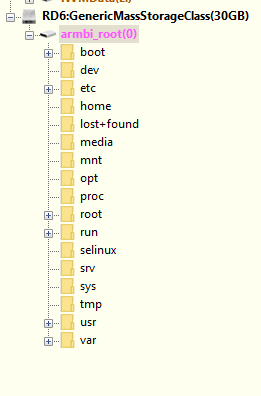
-
(I prepared this spiel before I found this thread, but it still holds) /// Spent the last 2 days on this issue with an ALLWINNER image, not an AMLOGIC image. Back in October I had NO issue configuring this same image (downloaded to my nVME drive) on W11, with the same image, same copy of Balena etcher. PC 1 I flashed an Armbian community image onto an SD card (in a USB SD Card adapter), but was unable to see the FAT32 partition in Windows. I mounted the same USB in a VMware VM, and could only see one partition(!) I reflashed the image using dd (in VMware) and again only one partition was written. The flashed SD card (unconfigured for DTB etc) ran fine on my TV box. The default DTB setup clearly works. I loaded Linux Reader for Windows (LRFW) but had the same result, could not see a FAT32 boot partition. PC 2 I flashed the same image using etcher on a different Windows 11 PC. Same result on that PC, unable to see a FAT32 partition. (Back to) PC1 I Inserted the SD card adapter back into the first computer, and was able to see the root partition, mounted as armbi_root(F:) and also as armbi_root(i), but still no BOOT partition (maybe the LRFW software took a few minutes to start working). It seems to me the only variable is Windows 11 having some driver issue, since that's the only remaining variable I can think of. //// Does any knowledgeable contributor know of any POSSIBLE reason why etcher would now only write ONE partition, whereas previously it would write 2 partitions from the same image? Is anyone having this issue using only Linux as the dev environment? best John
-
Yes, I did update… not sure why it’s not picking it up. If I go with the quick workaround, will the correct U-Boot get applied in future updates?
-
Hi @wolf7250, That does not look like the new bootscript. Did you update already? To get it working again, you can try the quick workaround as you pointed to earlier, which should allow more room for U-Boot loading kernel, initrd and the rest. Gr,
-
Thanks @djurny, Here it is: U-Boot SPL 2019.04_armbian-2019.04-S3c99-Pcd6a-H9530-V0854-Bbf55-R448a (Nov 07 2025 - 04:24:07 +0000) High speed PHY - Version: 2.0 Detected Device ID 6828 board SerDes lanes topology details: | Lane # | Speed | Type | -------------------------------- | 0 | 6 | SATA0 | | 1 | 5 | USB3 HOST0 | | 2 | 6 | SATA1 | | 3 | 6 | SATA3 | | 4 | 6 | SATA2 | | 5 | 5 | USB3 HOST1 | -------------------------------- High speed PHY - Ended Successfully mv_ddr: mv_ddr-armada-18.09.2 DDR3 Training Sequence - Switching XBAR Window to FastPath Window DDR Training Sequence - Start scrubbing DDR3 Training Sequence - End scrubbing mv_ddr: completed successfully Trying to boot from MMC1 U-Boot 2019.04_armbian-2019.04-S3c99-Pcd6a-H9530-V0854-Bbf55-R448a (Nov 07 2025 - 04:24:07 +0000) SoC: MV88F6828-B0 at 1600 MHz DRAM: 2 GiB (800 MHz, 32-bit, ECC enabled) MMC: mv_sdh: 0 Loading Environment from EXT4... ** File not found /boot/boot.env ** ** Unable to read "/boot/boot.env" from mmc0:1 ** Model: Helios4 Board: Helios4 SCSI: MVEBU SATA INIT Target spinup took 0 ms. Target spinup took 0 ms. AHCI 0001.0000 32 slots 2 ports 6 Gbps 0x3 impl SATA mode flags: 64bit ncq led only pmp fbss pio slum part sxs Net: Warning: ethernet@70000 (eth1) using random MAC address - 8e:a7:83:0a:8c:60 eth1: ethernet@70000 Hit any key to stop autoboot: 0 switch to partitions #0, OK mmc0 is current device Scanning mmc 0:1... Found U-Boot script /boot/boot.scr 2967 bytes read in 197 ms (14.6 KiB/s) ## Executing script at 03000000 Boot script loaded from mmc 207 bytes read in 156 ms (1000 Bytes/s) 28834 bytes read in 618 ms (44.9 KiB/s) 13378189 bytes read in 2450 ms (5.2 MiB/s) 8678912 bytes read in 1749 ms (4.7 MiB/s) Wrong Ramdisk Image Format Ramdisk image is corrupt or invalid SCRIPT FAILED: continuing... starting USB... USB0: MVEBU XHCI INIT controller @ 0xf10f4000 Register 2000120 NbrPorts 2 Starting the controller USB XHCI 1.00 USB1: MVEBU XHCI INIT controller @ 0xf10fc000 Register 2000120 NbrPorts 2 Starting the controller USB XHCI 1.00 scanning bus 0 for devices... 1 USB Device(s) found scanning bus 1 for devices... 1 USB Device(s) found scanning usb for storage devices... 0 Storage Device(s) found Device 0: device type unknown ... is now current device ethernet@70000 Waiting for PHY auto negotiation to complete...... done BOOTP broadcast 1 BOOTP broadcast 2 BOOTP broadcast 3 DHCP client bound to address 192.168.1.145 (1271 ms) *** ERROR: `serverip' not set Cannot autoload with TFTPGET missing environment variable: pxeuuid missing environment variable: bootfile Retrieving file: pxelinux.cfg/01-06-5c-c4-a0-d4-d3 *** ERROR: `serverip' not set missing environment variable: bootfile Retrieving file: pxelinux.cfg/C0A80191 *** ERROR: `serverip' not set missing environment variable: bootfile Retrieving file: pxelinux.cfg/C0A8019 *** ERROR: `serverip' not set missing environment variable: bootfile Retrieving file: pxelinux.cfg/C0A801 *** ERROR: `serverip' not set missing environment variable: bootfile Retrieving file: pxelinux.cfg/C0A80 *** ERROR: `serverip' not set missing environment variable: bootfile Retrieving file: pxelinux.cfg/C0A8 *** ERROR: `serverip' not set missing environment variable: bootfile Retrieving file: pxelinux.cfg/C0A *** ERROR: `serverip' not set missing environment variable: bootfile Retrieving file: pxelinux.cfg/C0 *** ERROR: `serverip' not set missing environment variable: bootfile Retrieving file: pxelinux.cfg/C *** ERROR: `serverip' not set missing environment variable: bootfile Retrieving file: pxelinux.cfg/default-arm-mvebu *** ERROR: `serverip' not set missing environment variable: bootfile Retrieving file: pxelinux.cfg/default-arm *** ERROR: `serverip' not set missing environment variable: bootfile Retrieving file: pxelinux.cfg/default *** ERROR: `serverip' not set Config file not found BOOTP broadcast 1 DHCP client bound to address 192.168.1.145 (3 ms) *** ERROR: `serverip' not set Cannot autoload with TFTPGET BOOTP broadcast 1 DHCP client bound to address 192.168.1.145 (5 ms) *** ERROR: `serverip' not set Cannot autoload with TFTPGET => ▒
-
Hi @wolf7250, Can you post the serial console output? Want to make sure the new U-Boot and bootscript are used. Gr,
-
Unfortunately I got the same error… Still says the error as below
-
Hi @wolf7250, Should be, yes. If not, do check back in here 🙂 Gr,
-
You can try, worse case it won't boot. What's the problem with that ? Only general. Switch to nightly repository and then switch to edge kernel: https://docs.armbian.com/User-Guide_Armbian-Config/System/#rolling https://docs.armbian.com/User-Guide_Armbian-Config/System/#alternative-kernels but if it won't work, you are on your own to find out why it doesn't work. Also some features won't work. We never supported EDGE kernels due to extreme costs associated with such operation.
-
Thanks @djurny! So the only thing I should need to do after/when upgrading is to run nand-sata-install? The rest of it should be handled by the packages in the update?
-
Hi @wolf7250, When you upgrade, one of the packages will update the bootscript (/boot/boot.scr), that will prevent a load address conflict - this should be armbian-bsp-cli iirc. The new bootscript will either calculate the load addresses or use new defaults to avoid the image overlap/"corruption" issue. The U-Boot for the helios4 has been updated as well to enable load address calculation, instead of using hardcoded values. To update U-Boot, run nand-sata-install and select to "install/update the bootloader on SD/MMC" (see here). Groetjes,
-
This is part of https://github.com/armbian/build/pull/8777/files And there are no changes at our end. So I assume the issue was introduced in mainline?
-
moved to staging
-
I am attempting to update my Helios4 running OpenMediaVault and am experiencing the same error that many have posted about above Boot script loaded from mmc 207 bytes read in 156 ms (1000 Bytes/s) 28834 bytes read in 620 ms (44.9 KiB/s) 13378509 bytes read in 2448 ms (5.2 MiB/s) 8678912 bytes read in 1753 ms (4.7 MiB/s) Wrong Ramdisk Image Format Ramdisk image is corrupt or invalid SCRIPT FAILED: continuing... I can see that some patches have been developed and @Igor has merged these in, is there something in particular that I need to do in order to do a successful update/upgrade? Is this what I should be following?
-
@djoness I also have V4.0 Box, have same X96Q-Armbian-H313 V4.0 boot screen, so, I burn "Armbian-unofficial_25.05.0-trunk_X96q-ddr3_bookworm_edge_6.12.11_server.img.xz" which you said to SD Card, My Box not work.Than i press and hold the Av button,The LED.Show Red,and. Screen Black. nothing. i don't press ,it will be inside to Android. what are you do, can make inside to Armbian.Tell me. Thanks a lot.
-
I've been using this setup for a few good weeks without issues, same powered hub and everything, however after accidentally unplugging the server and being unable to boot I decided to reimage the SD Card and now the box refuses to detect my external 1TB 2.5" HDD (powered hub). Currently running latest server Debian (Armbian_community_26.2.0-trunk.22_Aml-s9xx-box_trixie_current_6.12.59) on X96 Mini (Amlogic S905W). I've tried to recreate my setup as close as possible to what I had before, however, now I cannot seem to be able to detect the HDD. The OS is installed on the SD Card. lsblk looks like this: NAME MAJ:MIN RM SIZE RO TYPE MOUNTPOINTS mmcblk0 179:0 0 57.6G 0 disk ├─mmcblk0p1 179:1 0 512M 0 part /boot └─mmcblk0p2 179:2 0 56.6G 0 part /var/log.hdd / mmcblk1 179:32 0 14.7G 0 disk mmcblk1boot0 179:64 0 4M 1 disk mmcblk1boot1 179:96 0 4M 1 disk zram0 252:0 0 960.7M 0 disk [SWAP] zram1 252:1 0 50M 0 disk /var/log zram2 252:2 0 0B 0 disk I can hear a clicking sound coming from the hdd, however it does not want to spin up. The HDD has around 8-9% free space left, and is formatted as EXFAT. Connecting to a windows laptop the HDD spins up and gets detected instantly, even with no external power. I'm completely at a loss regarding this, especially since I did my best recreating my working setup from a few hours ago.
-

Driving the ili9488 LCD (4.0 inch cheap chinese clone)
forumtrekker replied to robertoj's topic in Allwinner sunxi
Good to know. I'm interested in getting the red LCD's to work as they are cheaper and more available, I purchased the waveshare only to test my SPI, SBC, and DTS formatting were functional. Now that I confirmed how to translate DTS to work with my SBC, I can work on the red ili9486/8 without worrying about it being a formatting issue. -

KickPi K2B not booting up: DRAM setup not supported
c0rnelius replied to chuanzz's topic in KickPi K2B
The v2 uses a diff wifi chip: SKW wifi module VS6621S I have a patch for it, which came from KICKPI in the deb builder, but... I don't have a V2 to work any magic on it. chuanzz at one point contacted KICKPI and they sent him an archive that had a bunch of Armbian adds in it, including the patches and board.confs. But the HDD I had the archive on got erased by mistake, so yeah... I don't have the info anymore. I don't see the K2B REV2 getting official support here or by me, as its using a wifi chip that is just to obscure. Here is a u-boot-v2025.07 binary for the K2B REV2 u-boot-sunxi-with-spl.bin - Yesterday
-
Hello, These boards (Radxa Rock 2F and Rock 2A) have standard support so there should probably be a forum section for them. In its absence, I created this topic in the section for the most "similar" board. Currently, we only have the `vendor` kernel available for both. It seems that both of them have been mainlined in 6.18, as seen here for example: https://www.cnx-software.com/2025/12/01/linux-6-18-release-main-changes-arm-risc-v-and-mips-architectures/ The config file for the board currently looks like this: # Rockchip RK3528 quad core 1-4GB SoC WIFI/BT 0-32GB eMMC BOARD_NAME="ROCK 2F" BOARDFAMILY="rk35xx" BOOTCONFIG="rock-2-rk3528_defconfig" BOARD_MAINTAINER="CodeChenL" KERNEL_TARGET="vendor" KERNEL_TEST_TARGET="vendor" FULL_DESKTOP="yes" BOOT_LOGO="desktop" BOOT_FDT_FILE="rockchip/rk3528-rock-2f.dtb" BOOT_SCENARIO="spl-blobs" IMAGE_PARTITION_TABLE="gpt" enable_extension "radxa-aic8800" AIC8800_TYPE="usb" I tried just adding "edge" in the KERNEL_TARGET line and building an image but this won't be enough to make it boot, will it? Any tutorials on how to get them to work on mainline?
-
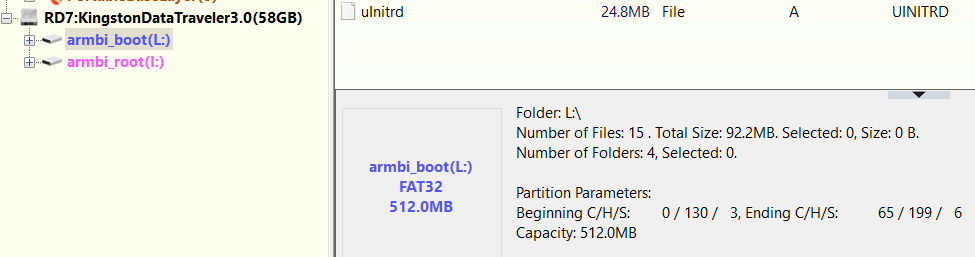
@Maurizio Finesso@John Taylor@SteeMan I've had success using USB stick instead of SD Card (see my post on 1st page), however now the BOOT Fat32 partition was hidden for some reason, I used DiskGenius to unhide it. I didn't test this on the tv box yet. This also goes against what is being said in this thread (that there are no more Fat32 paritions visible in Windows) from this thread: EDIT2: USB stick works, however I'm having trouble with "USB device not recognized" on Windows, and I can' seem to be able to fix it with gparted for example, as it keeps disconnecting, so YMMW.
-
I did a bisect. 3381d25b77fbf1ebaaa151a9f2be66fbf1ca3a1e is the first bad commit commit 3381d25b77fbf1ebaaa151a9f2be66fbf1ca3a1e Author: Ricardo Pardini <ricardo@pardini.net> Date: Sun Oct 12 19:57:32 2025 +0200 I try to build 6.18 kernel with config file linux-meson64-edge.config taken from "good" 6.17 kernel. but result was a "slow" kernel. Before I hope to find "bad" change in kernel config, now it's clear problem not there. I have no more ideas 😢
-
I downloaded 'Armbian_25.11.2_Odroidc2_trixie_current_6.12.58_minimal.img.xz', flashed it to sdcard, and it booted fine. As a sidenote unrelated to the issue at hand, my first try was with the sdcard on a device with emmc, and in this case the boot process stopped after block-local (?), and dropped to initramfs shell prompt.