All Activity
- Past hour
-
We don't deal with other OS than Armbian. If you need Android, I suggest to ask at xda developers or similar place.
-

Gaming experience with Orange Pi 5 (RK3588) on Armbian
KhanhDTP replied to KhanhDTP's topic in Orange Pi 5
@Alex Ling yeah, I have noticed it too. With Mesa (PanVk) recent updates, DX9 games can be played with Dxvk without dgVoodoo2 wrapper. -
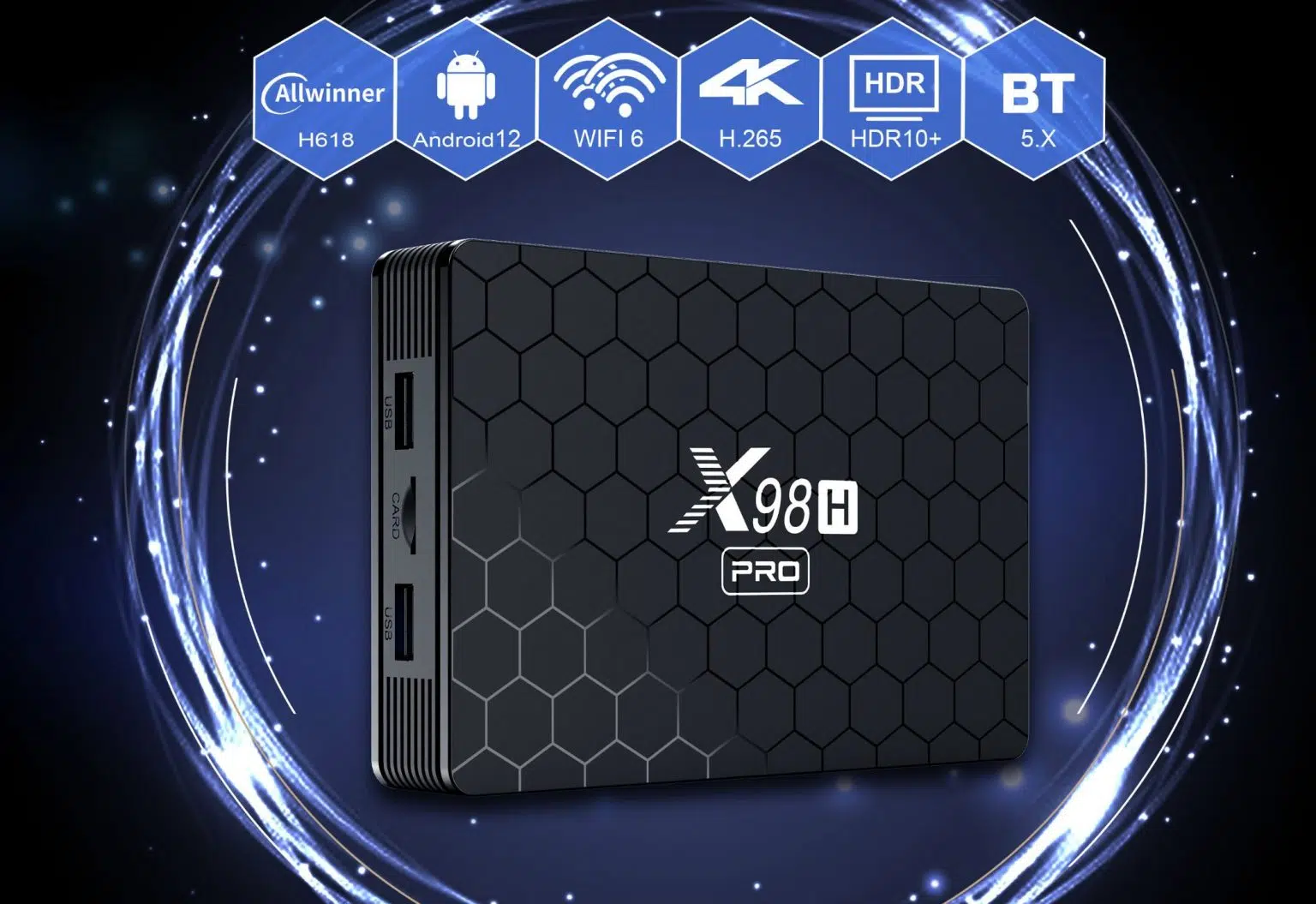
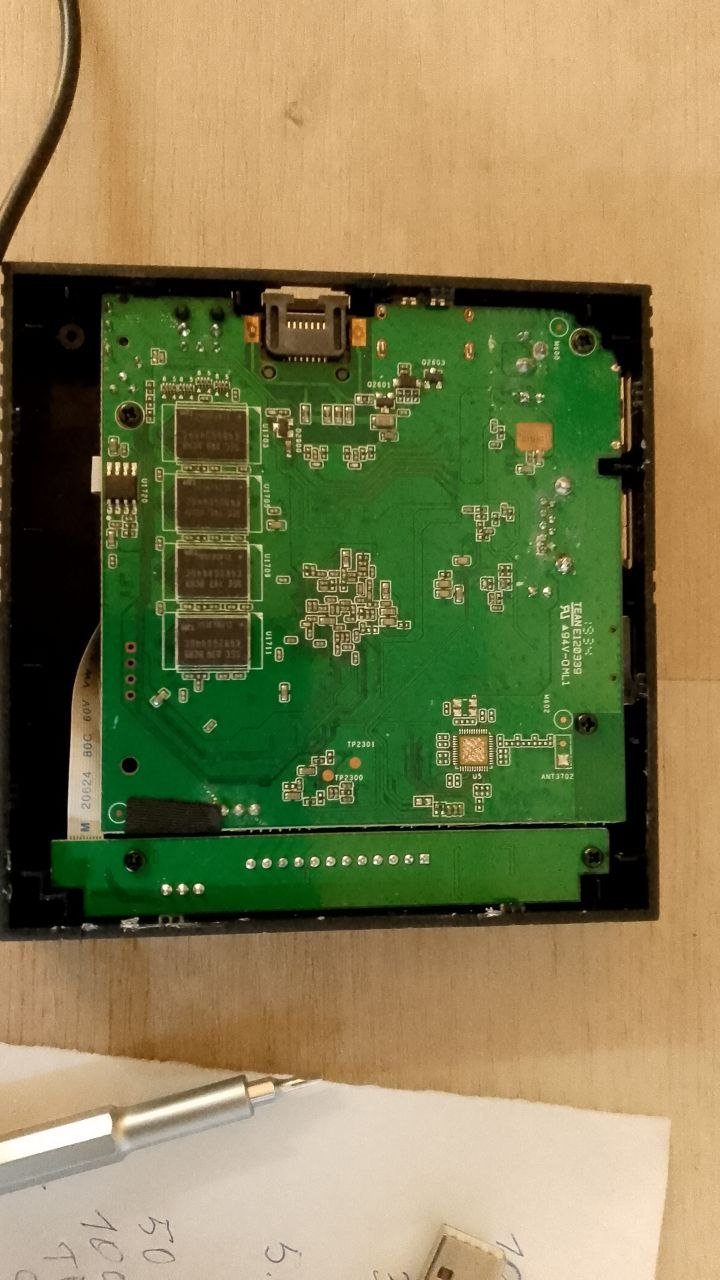
X98H Pro FIRMWARE OFICIAL secure image
- Today
-

Gaming experience with Orange Pi 5 (RK3588) on Armbian
Alex Ling replied to KhanhDTP's topic in Orange Pi 5
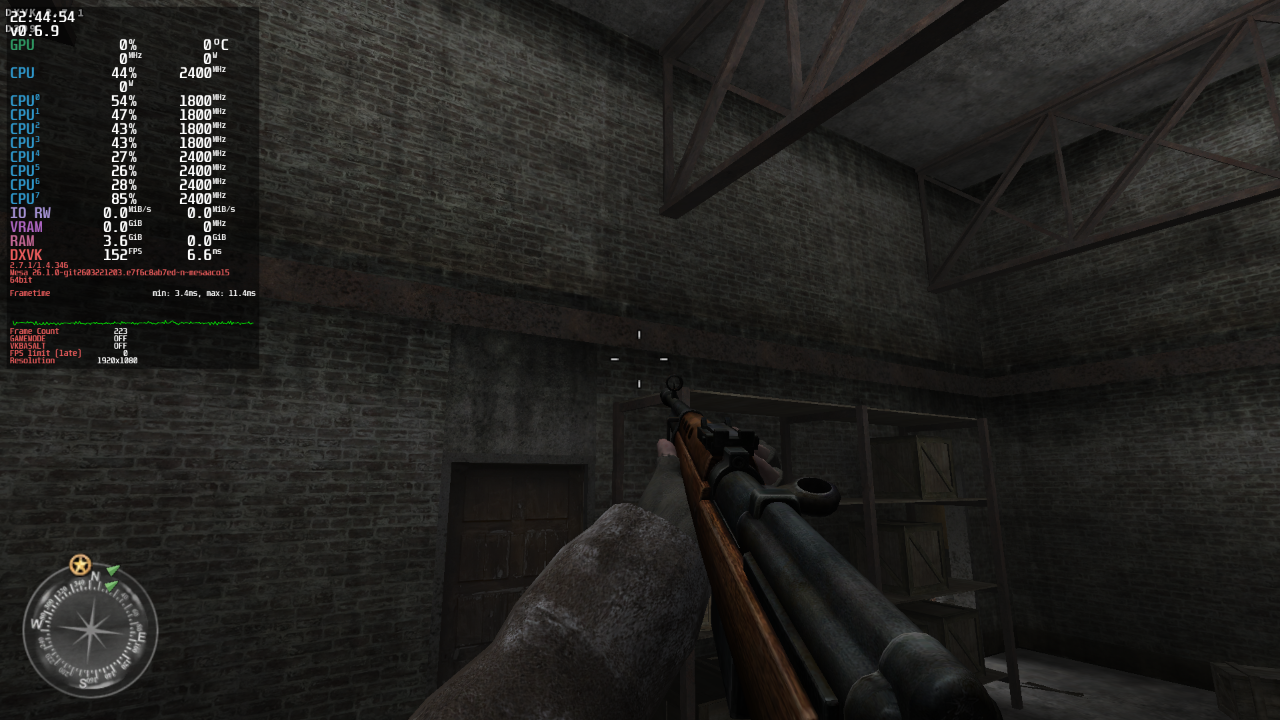
@KhanhDTP Now Call of Duty 2 can be launched with dxvk 2.7.1 + mesaaco ppa.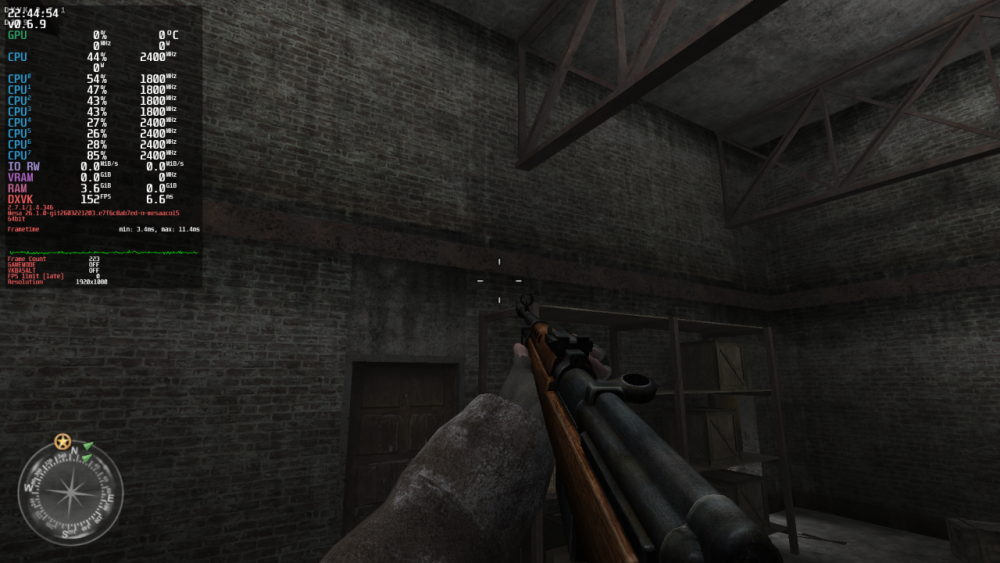
-
Hello, I am trying to connect a ds3231 module to get time during boot (dns does'nt like 1970) and without internet connexion. I load a recent build UBUNTU 26.2.1 on the M5 but unfortunatly after 2 days of research with chatgpt , I ask to knowledge experience people if they know if it's possible and which kind of dts can make this module up and running. I did'nt identify a dtbo on the distribution , a made a lot of investigation , pin 3 and 5 og the 40pins connector is connect to the cpu with pullup resistor , i try a lot dts conf and nothing gave result. If some one did this kind of connexion thanks in advance. Gérard
-
Hi @bschnei - i'm late to the party, tried using the standard instructions from GTI... Thanks for putting all this together! I'm running into an issue building the A3700, with an error about relocation. dangerous relocation: unsupported relocation Could be related to having LSB set to 1 for safely identifying the relocation target?... based on searches Any hints what I'm missing? -- Built /srv/development/espressobin-ultra/2026-03-bschnei/ebu-bootloader/trusted-firmware-a/build/a3700/release/boot-image.bin successfully make -C wtmi LOCAL_VERSION_STRING=-devel-18.12.1 cp -f ../../mox-boot-builder/wtmi_app.bin build/wtmi_app_pad.bin truncate -s %16 build/wtmi_app_pad.bin make -C sys_init LOAD_OFFSET=15360 COMMON_PATH=/srv/development/espressobin-ultra/2026-03-bschnei/ebu-bootloader/A3700-utils-marvell/wtmi/common CROSS_CM3=arm-linux-gnueabi- CHK autoconf.h UPD autoconf.h AS start.S CC apctl.c CC avs.c CC clock.c CC main.c CC printf.c CC uart.c CC ddr/ddr.c CC ddr/ddrcore.c CC ddr/ddr_support.c CC ddr/dll_tuning.c CC ddr/new_qs_gating.c CC ddr/vref_training.c CC /srv/development/espressobin-ultra/2026-03-bschnei/ebu-bootloader/A3700-utils-marvell/wtmi/common/delay.c CC -nostdlib -T sys_init.ld -Xlinker --build-id=none start.o apctl.o avs.o clock.o main.o printf.o uart.o ddr/ddr.o ddr/ddrcore.o ddr/ddr_support.o ddr/dll_tuning.o ddr/new_qs_gating.o ddr/vref_training.o /srv/development/espressobin-ultra/2026-03-bschnei/ebu-bootloader/A3700-utils-marvell/wtmi/common/delay.o -o build/sys_init.elf /usr/lib/gcc-cross/arm-linux-gnueabi/14/../../../../arm-linux-gnueabi/bin/ld: warning: build/sys_init.elf has a LOAD segment with RWX permissions /usr/lib/gcc-cross/arm-linux-gnueabi/14/../../../../arm-linux-gnueabi/bin/ld: (*ABS*0x1fff0000): Unknown destination type (ARM/Thumb) in main.o main.o: in function `main': /srv/development/espressobin-ultra/2026-03-bschnei/ebu-bootloader/A3700-utils-marvell/wtmi/sys_init/main.c:349:(.text.startup+0x38): dangerous relocation: unsupported relocation collect2: error: ld returned 1 exit status make[4]: *** [Makefile:149: build/sys_init.elf] Error 1 make[3]: *** [Makefile:42: sys_init/build/sys_init.bin] Error 2 make[2]: *** [Makefile:36: WTMI] Error 2 make[1]: *** [plat/marvell/armada/a3k/common/a3700_common.mk:158: /srv/development/espressobin-ultra/2026-03-bschnei/ebu-bootloader/./A3700-utils-marvell/wtmi/build/wtmi.bin] Error 2 make[1]: Leaving directory '/srv/development/espressobin-ultra/2026-03-bschnei/ebu-bootloader/trusted-firmware-a' make: *** [Makefile:28: /srv/development/espressobin-ultra/2026-03-bschnei/ebu-bootloader/./trusted-firmware-a/build/a3700/release/flash-image.bin] Error 2
-

HDMI audio and analog audio do not work on Opi5Plus
JFL replied to ずっと一人's topic in Orange Pi 5 Plus
Just an update. Upgraded to linux-image-current-rockchip64-26.2.0-trunk.655 (6.18.20) not sure whether it included this But unfortunately with the new linux-image-current-rockchip64-26.2.0-trunk.655 kernel still no audio/sound output from the Headphone Jack (Analog).. Edit: Downgraded to or Install linux-image-current-rockchip64-26.2.1 (6.18.10), Headphone Jack has audio/sound output. -
@Mohammad Adel Here are the steps to make a secure boot image. In your case you want to modify the X98H defconfig. git clone https://github.com/NickAlilovic/build.git --branch v20250306 cd build pico patch/u-boot/u-boot-h616/171-add-x98h-defconfig.patch You need to add this line to the bottom. "+CONFIG_SPL_IMAGE_TYPE_SUNXI_TOC0=y" and change "@@ -0,0 +1,31 @@" to @@ -0,0 +1,32 @@. From 25669b44bab8ffdc4d07e140226c6385a9d13950 Mon Sep 17 00:00:00 2001 From: Nick Alilovic <nickalilovic@gmail.com> Date: Tue, 11 Mar 2025 22:09:15 -0400 Subject: [PATCH] add x98h defconfig add x98h defconfig --- configs/x98h_defconfig | 31 +++ .../src/arm64/allwinner/sun50i-h618-x98h.dts | 223 ++++++++++++++++++ 2 files changed, 254 insertions(+) create mode 100644 configs/x98h_defconfig create mode 100644 dts/upstream/src/arm64/allwinner/sun50i-h618-x98h.dts diff --git a/configs/x98h_defconfig b/configs/x98h_defconfig new file mode 100644 index 0000000000..b87498cd10 --- /dev/null +++ b/configs/x98h_defconfig @@ -0,0 +1,32 @@ +CONFIG_ARM=y +CONFIG_ARCH_SUNXI=y +CONFIG_DEFAULT_DEVICE_TREE="allwinner/sun50i-h618-x98h" +CONFIG_SPL=y +CONFIG_DRAM_SUN50I_H616_DX_ODT=0x03030303 +CONFIG_DRAM_SUN50I_H616_DX_DRI=0x0e0e0e0e +CONFIG_DRAM_SUN50I_H616_CA_DRI=0x1f12 +CONFIG_DRAM_SUN50I_H616_TPR0=0xc0001002 +CONFIG_DRAM_SUN50I_H616_TPR10=0x2f1107 +CONFIG_DRAM_SUN50I_H616_TPR11=0xddddcccc +CONFIG_DRAM_SUN50I_H616_TPR12=0xeddc7665 +CONFIG_MACH_SUN50I_H616=y +CONFIG_SUNXI_DRAM_H616_DDR3_1333=y +CONFIG_DRAM_CLK=648 +CONFIG_MMC_SUNXI_SLOT_EXTRA=2 +CONFIG_R_I2C_ENABLE=y +# CONFIG_SYS_MALLOC_CLEAR_ON_INIT is not set +CONFIG_SPL_I2C=y +CONFIG_SPL_I2C_SUPPORT=y +CONFIG_SPL_SYS_I2C_LEGACY=y +CONFIG_SYS_I2C_MVTWSI=y +CONFIG_SYS_I2C_SLAVE=0x7f +CONFIG_SYS_I2C_SPEED=400000 +CONFIG_PHY_REALTEK=y +CONFIG_SUN8I_EMAC=y +CONFIG_I2C3_ENABLE=y +CONFIG_SUPPORT_EMMC_BOOT=y +CONFIG_AXP313_POWER=y +CONFIG_AXP_DCDC3_VOLT=1360 +CONFIG_USB_EHCI_HCD=y +CONFIG_USB_OHCI_HCD=y +CONFIG_SPL_IMAGE_TYPE_SUNXI_TOC0=y Then create the secure boot patch. pico patch/u-boot/u-boot-h616/secure-boot.patch diff --git a/root_key.pem b/root_key.pem new file mode 100644 index 0000000000..892a10ef90 --- /dev/null +++ b/root_key.pem @@ -0,0 +1,28 @@ +-----BEGIN PRIVATE KEY----- +MIIEvgIBADANBgkqhkiG9w0BAQEFAASCBKgwggSkAgEAAoIBAQCWZ7G39E+RCi+9 +B48yiD4GxnfqNzvlXOxAd+GHQuKbgynXZd5pIuNHt3ewhZTHZkdHxuO9liqX9MmU +8OhiG+Skww2LzHPPi/eLeN4vCt/waXkjFrkblkhNzB3c6MejKdiz9sfw8oeOFX1S +teP/MJBoRaj6Hexj5g/oCspU+KFfv0cOBcWuq4vZwPJ6+U44IBi7EGleShGHNhBI +xQEyvNaDLWoDCPGLrjRM0DrIbUpzEntk9KJ0z+3Th8O/FtvlW21atolIVr5F96Pw +EEv3CDUHrY+IvK0z+IwNhnYo99kMPi5djB6vviz4In530JQ+OdPxhi4cQY3Yw9wx +Sm8EFaRRAgMBAAECggEAEaEcZ+k7VU8aGuBStNPa31zui9XHD8KlT4YtuXbJzHwi +kKSYXf7woISdAyQZNQkkREHICn4aRn7zDOHy/yLxWS2ivhbsITDxBlhXxLBT4OBg +ClCcyGLEXVgWTQE8+z9Jrwh3VaL76BfVPXdj/tKwroQxwwV0Yp5CEYsIPc75zVjW +Y2tppJL9XlTfKXTSo7FAxJmjkTC8QGPSHgMglR5FOfZ/D3Nj4KV4LV1gHCkICKUy +c2jklHISy8S6/pvgpWb50TKArEhbN6uAKQBNb74ZsChKJ9h9aof/vjH/8Ab1rwUJ +g91lpkR3mEefTjJTW1JOuoT49Y3lfWmkRVh75GiCsQKBgQDUo3uMcy9VdbbmY9Gt +2JuhbSvwR/dOHZJoXvtlNYVJ+1JvavExBy2u31cYsK/2SH/Upc8AXS6H02dXbnC3 +wjlUFi21Xi7/PCQM8TUz05km3+9qOkDYw53EBBBnCdjawBpDgcUSkoZGU+ltBzcR +sj0nsmI29DjwfYHXhofnlfI52QKBgQC1E2Q0hGfk3YUtfzTjDJCfd3gs6QYGQGeT +49jvnsbYsnz9vsK4Ao2skN8nBhSefDJR8h2X+7tRXEefQB2Hy/+9qoiuoVzPJGWD +IiHjeVJDoEqA2Q483UhZ+OPjUGFDTI7O/j1A1HkEBKswdJpKlGVygdoXYaieUAfz +Sb+dCYf7OQKBgQCWkE/aSnE4vQpOJl4BEABbFFdpYzvcpxnVJ3Qw3O3NTdS4Keww +wBl72o7sX6eo5vsE0oc5hcF90ZY6FWxg4XkAblfdNZxng+ku9NisIuct3KDFAgyK +sDCU7B/FJfbUJfQy2r91gCTtxVripZo7wI6G/kuHB/UNbIE04AB5XfZPOQKBgAGw +K5f9wAY3Nn2lGPYg8Nw7vegVSBQY155eWnBpd4sfpuCqvZ//jhiUxS/U865ClCmF +a1c2ZpmslZJbg6r3cOvwwhN2t6nKuhON5uj7AZRV0zv+Sg6xNXJ5So6c+jspZI9z +eVi4YmRyMrJh8+pMFeIKaeEb7PmE334aKuoo45apAoGBAKNp7ssXgU4Ma7cUr7+L +TKGBNVsMZyM3T2qsXJjFY1f90+lwp7TlNQGVMPOSOHxyINWkuLNgAgetlhavnc0S +0l+SbSaO6SfnHfQWBFPEJfol8V/Xa4rcVP7fGxQn4phYnk14N09xKIQa24Mi2Xa5 +9G0C2VOB8Yz6OWcQZELs0uFp +-----END PRIVATE KEY----- -- 2.34.1 ./compile.sh choose "Do not change kernel configuration" choose "Show CSC/WIP/EOS/TVB" choose "I understand and agree" choose "X98H" choose "edge" rest is up to you. Your image should be in output/images directory.
-
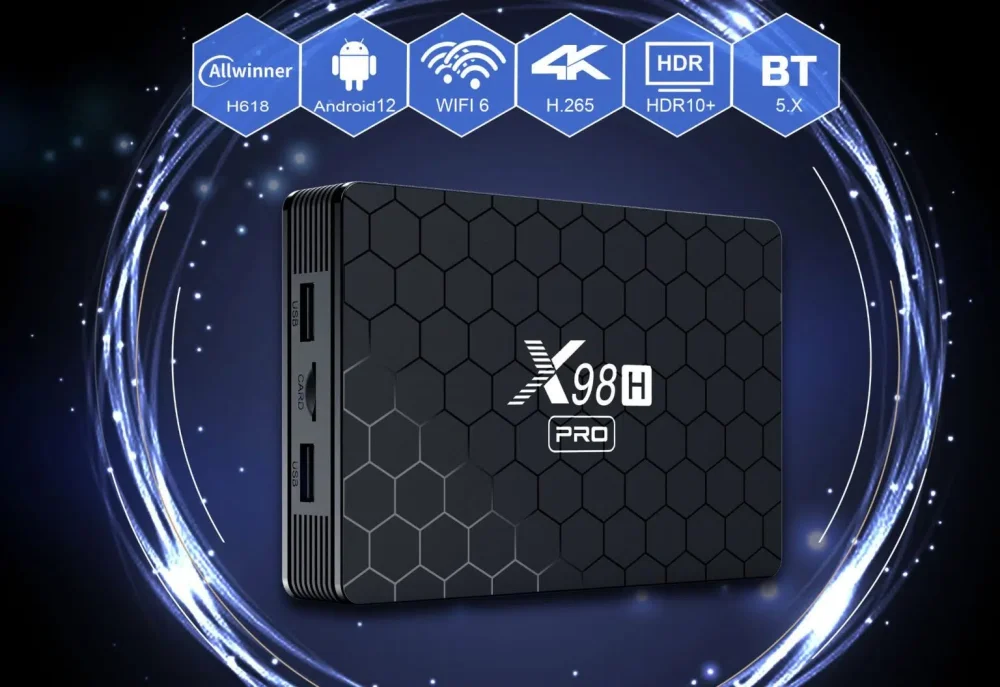
i need secure image x98h pro
-

CSC Armbian for RK3318/RK3328 TV box boards
andrey.lobov replied to jock's topic in Rockchip CPU Boxes
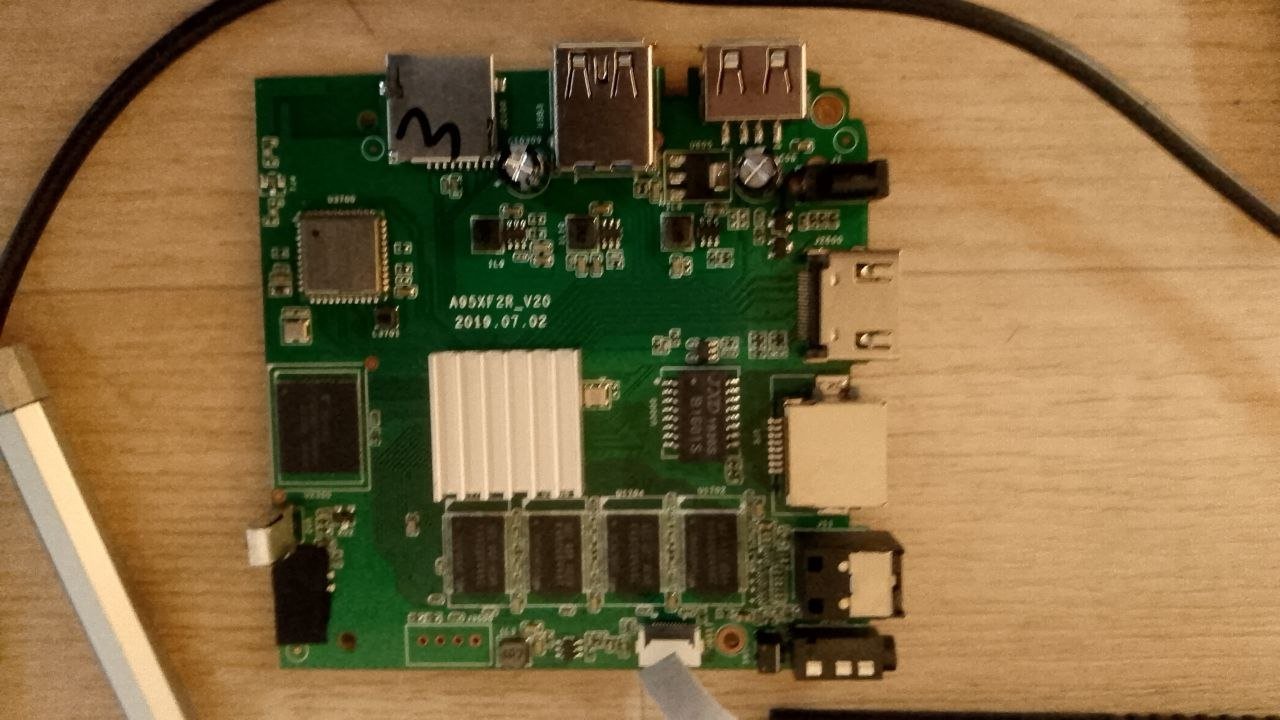
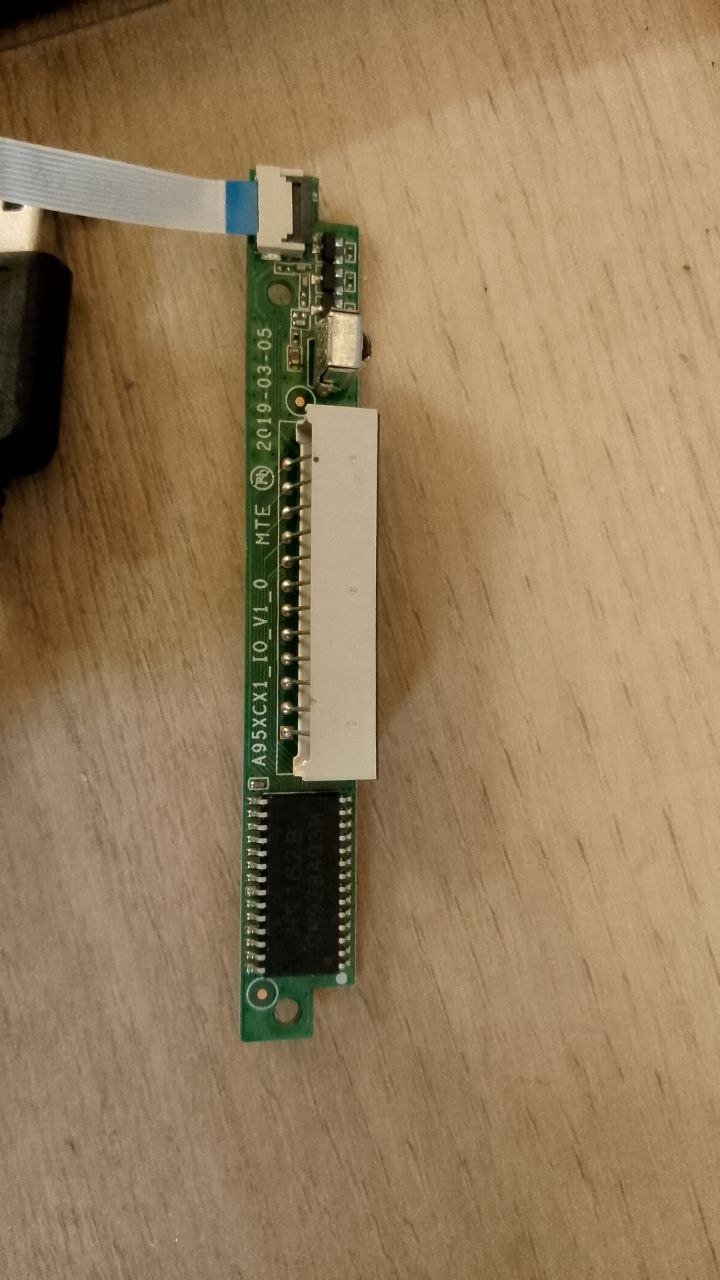
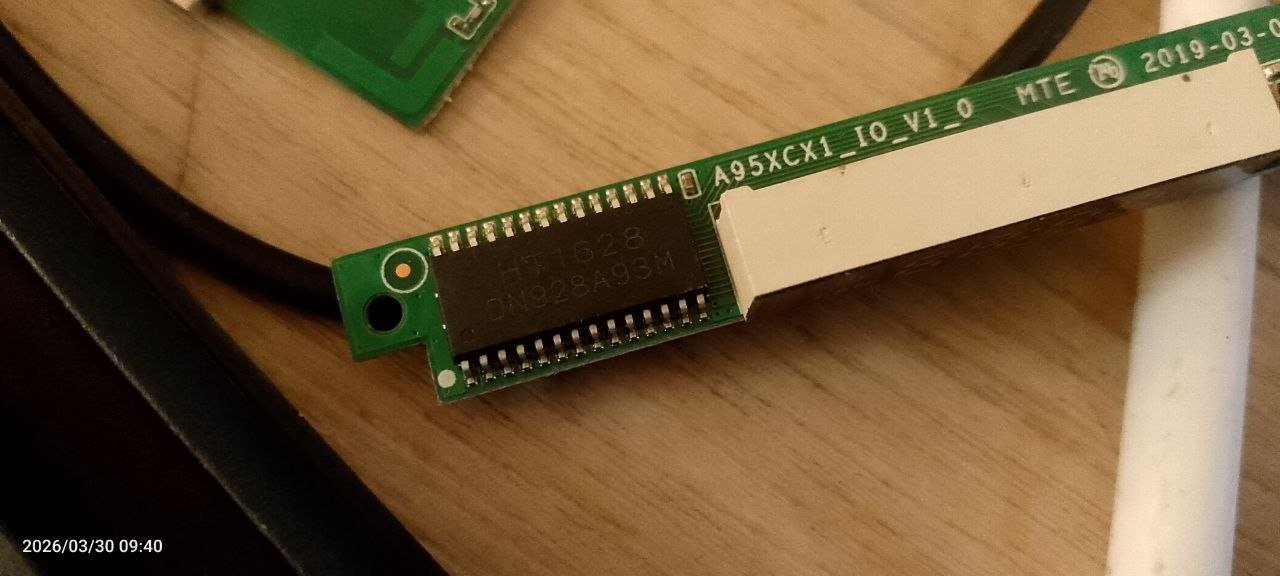
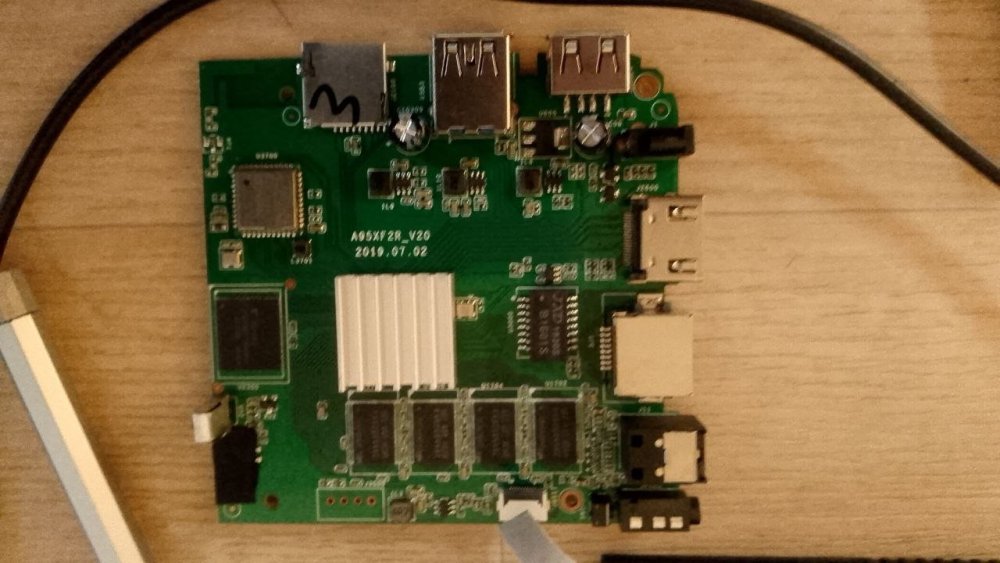
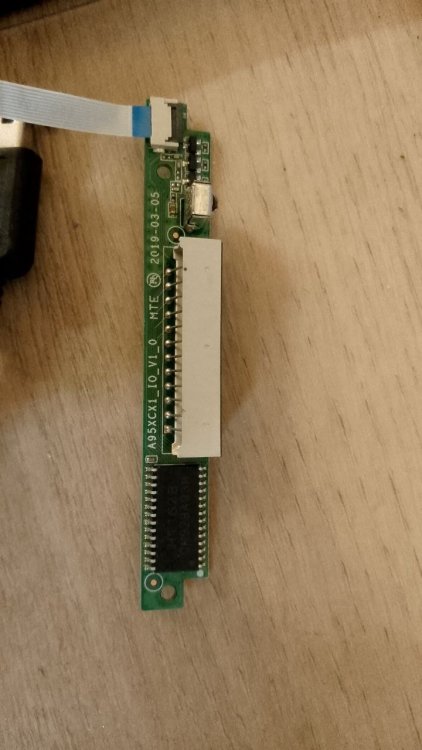
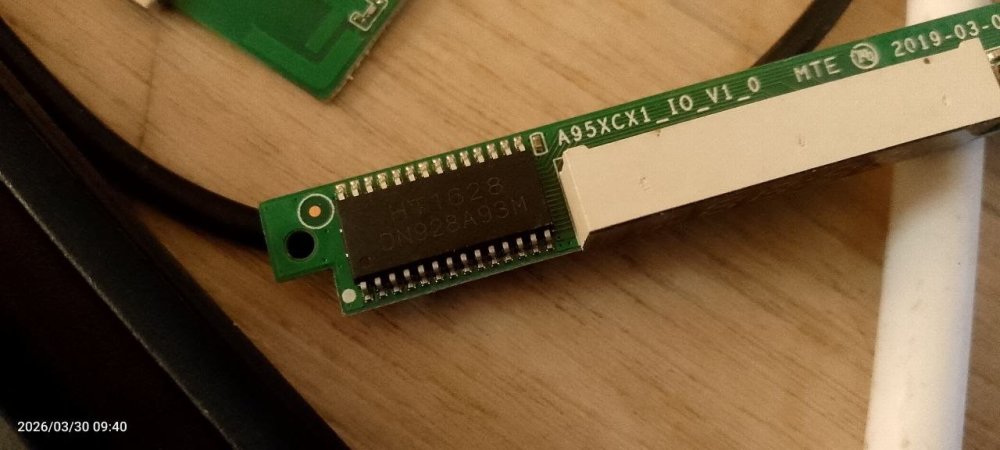
@jock Thanks. My box is A95X R2 (rk3318), mainboard A95X R2_V20 (2019‑07‑02). Front panel board A95XCX1_IO_V1.0 (2019‑03‑05). The LED controller on the front panel is TM1628 (photo available). So I should use the tm16xx kernel driver (tm1628), not openvfd. I’ll try rk3318x-config to enable the front panel. If the board isn’t in the list, I can provide front/back photos and dtb.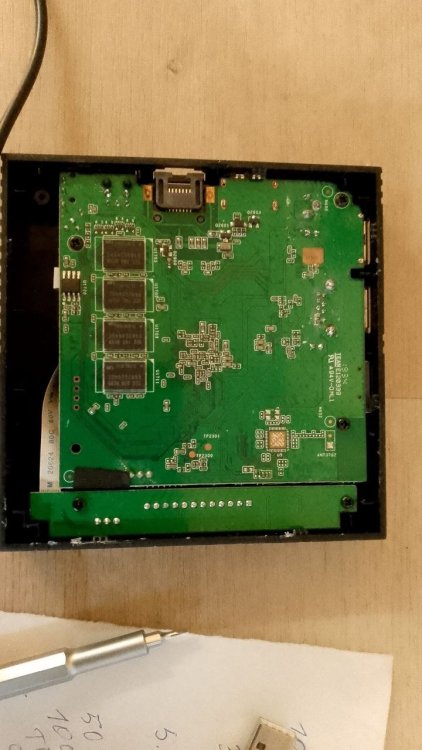
-
That's not an issue. These fixup scripts are only there to allow dt overlays being configurable via parameters rather than having hard-coded pins for example. About the actual issue, no clue. I suggest to try 7.0 kernel from "edge".
- Yesterday
-
Armbian_community 26.2.0-trunk.639 Trixie ttyS0 Ethernet is unstable, cannot connect with SSH, useDns, mtu change - did not help. WiFi is not initialized anymore. I can confirm there is no file. I tried to fix it with AI help and did a lot of stuff, nothing worked. Bu once decreasing speed to 100 ethtool -s end0 speed 100 duplex full autoneg on it started to work. Now I can connect via SSH and apt update work as well.
-
On other fora it is nowadays forbidden to post AI content. I would use same here. So you need to google yourself. Or just 'man dpkg'
-
There were changes merged fairly recently. Perhaps try this: https://github.com/armbian/build/pull/9600
-
 None I am aware of. neither do I have this board nor do I maintain it.
 -
 Hi @Werner, do you have any news on this bug? I had to copy the /boot on the second nvme to make this setup work and to be honest it shouldn't be like that
 -

Realvnc problem in Armbian. Black screen
SteeMan replied to Luis Delgado Garcia's topic in Amlogic CPU Boxes
You are not running Armbian. Ophub is a fork of Armbian. They do not contribute to Armbian development nor do they participate in these forums. You need to direct your questions to their support sites. -
 @Abdullah Al HaDi Talking about custom roms, I did try to install ATV Xperience rom in it but it unfortunately ended up in a bootloop. But I had great success with Armbian (s90xx builds or idk what it was called). Besides armbian I had success with Manjaro too but I decided to stick with Armbian till the end of its lifetime. Yes the sbc is dead now, RIP...
 -
sudo dpkg --print-architecture sudo dpkg --print-foreign-architectures maybe i have installed wine once, but atm it is not installed; if i go to sources.list can not find it, but now there is sources.list.d/ folder and several different list there, but there is no explicit entriy for "i386" that i could easily delete. EDIT: thanks, removing "wine" from sources brought the "upt-get update" process down to 19sec. now it would be nice to remove the remaining "i386" from the equation.
-
[Latest] Armbian Build HDMI Audio support Fix
Alex Ling replied to just_facking_about's topic in Radxa Dragon Q6A
After I added "snd-soc-wcd938x" to /etc/modules-load.d/modules.conf, the sound card can be detected as expected. -
HDMI audio and analog audio do not work on Opi5Plus
JFL replied to ずっと一人's topic in Orange Pi 5 Plus
I do not meant that the above causes the NO Analog Output issue. I don't think those patches were in the earlier kernekl 6.18.20-current=rockchip64-26.2.0-trunk.640 or the kernel-7.0.0-rc5-edge-rockchip64-26.2.0-trunk.626. These patches are added totay or yesterday. On the contrary, could the https://github.com/armbian/build/pull/9600 resolved the NO Analog Output issue on Opi5-Plus. -
I see wine, so you likely have let some tool mess up your Debian packaging setup. See what the following shows: sudo dpkg --print-architecture sudo dpkg --print-foreign-architectures For the rest , this is standard Debian methods, I forgot it a bit, but I see google AI shows all other commands w.r.t. this issue. But make sure you understand it. I at least don't know how to fix it, unless you just accept to remove all that wine stuff I guess. But see what your goal is or what you want.
-
Hello , noticed that on the sbc "apt-get update" takes a long time, it ignores some sources and sometimes it slow to load. was wondering if could clean up the process, since it seem to look for "i386" but the sbc is on "arm64" sudo apt update [sudo] password for rich: OK:1 http://ports.ubuntu.com noble InRelease Holen:2 http://ports.ubuntu.com noble-security InRelease [126 kB] Holen:4 https://github.armbian.com/configng stable InRelease [5.467 B] Holen:5 https://dl.winehq.org/wine-builds/ubuntu questing InRelease [5.719 B] Holen:6 http://ports.ubuntu.com noble-updates InRelease [126 kB] Holen:7 http://ports.ubuntu.com noble-backports InRelease [126 kB] Holen:3 http://armbian.lv.auroradev.org/apt noble InRelease [39,2 kB] Holen:8 https://github.armbian.com/configng stable/main arm64 Packages [437 B] Holen:9 https://github.armbian.com/configng stable/main i386 Packages [437 B] Holen:10 https://dl.winehq.org/wine-builds/ubuntu questing/main amd64 Packages [60,8 kB] Holen:11 http://ports.ubuntu.com noble/main i386 Packages [1.329 kB] Ign:11 http://ports.ubuntu.com noble/main i386 Packages Ign:13 http://ports.ubuntu.com noble/restricted i386 Packages Ign:14 http://ports.ubuntu.com noble/universe i386 Packages Ign:15 http://ports.ubuntu.com noble/multiverse i386 Packages Ign:16 http://ports.ubuntu.com noble-security/main i386 Packages Holen:17 http://ports.ubuntu.com noble-security/main arm64 Packages [2.092 kB] Holen:18 https://dl.winehq.org/wine-builds/ubuntu questing/main amd64 Contents (deb) [99,8 kB] Holen:19 http://armbian.lv.auroradev.org/apt noble/noble-utils all Packages [3.136 B] Holen:20 http://armbian.lv.auroradev.org/apt noble/noble-utils i386 Packages [3.709 B] Holen:21 http://armbian.lv.auroradev.org/apt noble/noble-utils arm64 Packages [18,3 kB] Holen:22 http://armbian.lv.auroradev.org/apt noble/noble-desktop arm64 Packages [137 kB] Holen:23 http://ports.ubuntu.com noble-security arm64 Contents (deb) [191 MB] Holen:24 http://ports.ubuntu.com noble-security i386 Contents (deb) [61,1 MB] Ign:25 http://ports.ubuntu.com noble-security/restricted i386 Packages Holen:26 http://ports.ubuntu.com noble-security/restricted arm64 Packages [4.844 kB] Ign:27 http://ports.ubuntu.com noble-security/universe i386 Packages Holen:28 http://ports.ubuntu.com noble-security/universe arm64 Packages [1.505 kB] Ign:29 http://ports.ubuntu.com noble-security/multiverse i386 Packages Holen:30 http://ports.ubuntu.com noble-security/multiverse arm64 Packages [44,1 kB] Ign:31 http://ports.ubuntu.com noble-updates/main i386 Packages Holen:32 http://ports.ubuntu.com noble-updates/main arm64 Packages [2.451 kB] Holen:32 http://ports.ubuntu.com noble-updates/main arm64 Packages [2.451 kB] Holen:34 http://ports.ubuntu.com noble-updates arm64 Contents (deb) [199 MB] Holen:34 http://ports.ubuntu.com noble-updates arm64 Contents (deb) [199 MB] Holen:36 http://ports.ubuntu.com noble-updates i386 Contents (deb) [66,0 MB] Holen:37 http://ports.ubuntu.com noble-updates/restricted arm64 Packages [5.019 kB] Ign:38 http://ports.ubuntu.com noble-updates/restricted i386 Packages Holen:39 http://ports.ubuntu.com noble-updates/universe arm64 Packages [2.116 kB] Holen:39 http://ports.ubuntu.com noble-updates/universe arm64 Packages [2.116 kB] Ign:41 http://ports.ubuntu.com noble-updates/universe i386 Packages Holen:42 http://ports.ubuntu.com noble-updates/multiverse arm64 Packages [45,7 kB] Ign:43 http://ports.ubuntu.com noble-updates/multiverse i386 Packages Ign:44 http://ports.ubuntu.com noble-backports/main i386 Packages Holen:45 http://ports.ubuntu.com noble-backports arm64 Contents (deb) [786 kB] Ign:46 http://ports.ubuntu.com noble-backports/universe i386 Packages Holen:47 http://ports.ubuntu.com noble-backports/universe arm64 Packages [36,1 kB] Ign:48 http://ports.ubuntu.com noble-backports/multiverse i386 Packages Ign:11 http://ports.ubuntu.com noble/main i386 Packages Ign:13 http://ports.ubuntu.com noble/restricted i386 Packages Ign:14 http://ports.ubuntu.com noble/universe i386 Packages Ign:15 http://ports.ubuntu.com noble/multiverse i386 Packages Ign:16 http://ports.ubuntu.com noble-security/main i386 Packages Ign:25 http://ports.ubuntu.com noble-security/restricted i386 Packages Ign:27 http://ports.ubuntu.com noble-security/universe i386 Packages Ign:29 http://ports.ubuntu.com noble-security/multiverse i386 Packages Ign:31 http://ports.ubuntu.com noble-updates/main i386 Packages Ign:38 http://ports.ubuntu.com noble-updates/restricted i386 Packages Ign:41 http://ports.ubuntu.com noble-updates/universe i386 Packages Ign:43 http://ports.ubuntu.com noble-updates/multiverse i386 Packages Ign:44 http://ports.ubuntu.com noble-backports/main i386 Packages Ign:46 http://ports.ubuntu.com noble-backports/universe i386 Packages Ign:48 http://ports.ubuntu.com noble-backports/multiverse i386 Packages Ign:11 http://ports.ubuntu.com noble/main i386 Packages Ign:13 http://ports.ubuntu.com noble/restricted i386 Packages Ign:14 http://ports.ubuntu.com noble/universe i386 Packages Ign:15 http://ports.ubuntu.com noble/multiverse i386 Packages Ign:16 http://ports.ubuntu.com noble-security/main i386 Packages Ign:25 http://ports.ubuntu.com noble-security/restricted i386 Packages Ign:27 http://ports.ubuntu.com noble-security/universe i386 Packages Ign:29 http://ports.ubuntu.com noble-security/multiverse i386 Packages Ign:31 http://ports.ubuntu.com noble-updates/main i386 Packages Ign:38 http://ports.ubuntu.com noble-updates/restricted i386 Packages Ign:41 http://ports.ubuntu.com noble-updates/universe i386 Packages Ign:43 http://ports.ubuntu.com noble-updates/multiverse i386 Packages Ign:44 http://ports.ubuntu.com noble-backports/main i386 Packages Ign:46 http://ports.ubuntu.com noble-backports/universe i386 Packages Ign:48 http://ports.ubuntu.com noble-backports/multiverse i386 Packages Ign:11 http://ports.ubuntu.com noble/main i386 Packages Ign:13 http://ports.ubuntu.com noble/restricted i386 Packages Ign:14 http://ports.ubuntu.com noble/universe i386 Packages Ign:15 http://ports.ubuntu.com noble/multiverse i386 Packages Ign:16 http://ports.ubuntu.com noble-security/main i386 Packages Ign:25 http://ports.ubuntu.com noble-security/restricted i386 Packages Ign:27 http://ports.ubuntu.com noble-security/universe i386 Packages Ign:29 http://ports.ubuntu.com noble-security/multiverse i386 Packages Ign:31 http://ports.ubuntu.com noble-updates/main i386 Packages Ign:38 http://ports.ubuntu.com noble-updates/restricted i386 Packages Ign:41 http://ports.ubuntu.com noble-updates/universe i386 Packages Ign:43 http://ports.ubuntu.com noble-updates/multiverse i386 Packages Ign:44 http://ports.ubuntu.com noble-backports/main i386 Packages Ign:46 http://ports.ubuntu.com noble-backports/universe i386 Packages Ign:48 http://ports.ubuntu.com noble-backports/multiverse i386 Packages Ign:11 http://ports.ubuntu.com noble/main i386 Packages Ign:13 http://ports.ubuntu.com noble/restricted i386 Packages Ign:14 http://ports.ubuntu.com noble/universe i386 Packages Ign:15 http://ports.ubuntu.com noble/multiverse i386 Packages Ign:16 http://ports.ubuntu.com noble-security/main i386 Packages Ign:25 http://ports.ubuntu.com noble-security/restricted i386 Packages Ign:27 http://ports.ubuntu.com noble-security/universe i386 Packages Ign:29 http://ports.ubuntu.com noble-security/multiverse i386 Packages Ign:31 http://ports.ubuntu.com noble-updates/main i386 Packages Ign:38 http://ports.ubuntu.com noble-updates/restricted i386 Packages Ign:41 http://ports.ubuntu.com noble-updates/universe i386 Packages Ign:43 http://ports.ubuntu.com noble-updates/multiverse i386 Packages Ign:44 http://ports.ubuntu.com noble-backports/main i386 Packages Ign:46 http://ports.ubuntu.com noble-backports/universe i386 Packages Ign:48 http://ports.ubuntu.com noble-backports/multiverse i386 Packages Fehl:11 http://ports.ubuntu.com noble/main i386 Packages 404 Not Found [IP: 91.189.92.20 80] Ign:13 http://ports.ubuntu.com noble/restricted i386 Packages Ign:14 http://ports.ubuntu.com noble/universe i386 Packages Ign:15 http://ports.ubuntu.com noble/multiverse i386 Packages Fehl:16 http://ports.ubuntu.com noble-security/main i386 Packages 404 Not Found [IP: 91.189.92.20 80] Ign:25 http://ports.ubuntu.com noble-security/restricted i386 Packages Ign:27 http://ports.ubuntu.com noble-security/universe i386 Packages Ign:29 http://ports.ubuntu.com noble-security/multiverse i386 Packages Fehl:31 http://ports.ubuntu.com noble-updates/main i386 Packages 404 Not Found [IP: 91.189.92.20 80] Ign:38 http://ports.ubuntu.com noble-updates/restricted i386 Packages Ign:41 http://ports.ubuntu.com noble-updates/universe i386 Packages Ign:43 http://ports.ubuntu.com noble-updates/multiverse i386 Packages Fehl:44 http://ports.ubuntu.com noble-backports/main i386 Packages 404 Not Found [IP: 91.189.92.20 80] Ign:46 http://ports.ubuntu.com noble-backports/universe i386 Packages Ign:48 http://ports.ubuntu.com noble-backports/multiverse i386 Packages Es wurden 537 MB in 2 min 2 s geholt (4.394 kB/s). Paketlisten werden gelesen… Fertig E: Fehlschlag beim Holen von http://ports.ubuntu.com/dists/noble/main/binary-i386/Packages 404 Not Found [IP: 91.189.92.20 80] E: Fehlschlag beim Holen von http://ports.ubuntu.com/dists/noble-security/main/binary-i386/Packages 404 Not Found [IP: 91.189.92.20 80] E: Fehlschlag beim Holen von http://ports.ubuntu.com/dists/noble-updates/main/binary-i386/Packages 404 Not Found [IP: 91.189.92.20 80] E: Fehlschlag beim Holen von http://ports.ubuntu.com/dists/noble-backports/main/binary-i386/Packages 404 Not Found [IP: 91.189.92.20 80] E: Einige Indexdateien konnten nicht heruntergeladen werden. Sie wurden ignoriert oder alte an ihrer Stelle benutzt. thank you
-
Hello. I have a problem that's been driving me crazy, and I think I'm not the only one. I'm using Armbian version v25.05.0 for Aml.S905x running Armbian Linux 6.12.19-ophub Debian stable (bookworm), and I managed to install RealVNC Connect, for which I have a license. The problem I'm having, and I can't find a solution, is that by default the GDM3 desktop launcher uses Wayland, and when I connect externally to the server, I only get a black screen with a message saying "the desktop cannot be displayed at this time." I'm using GNOME, and I've tried different desktop environments, but they never work, even after selecting them from the gear icon. It just acts like it's going to launch and then returns to the user's home page. It doesn't matter if I use Xorg; no desktop environment ever loads. Only GNOME and GNOME Classic work. If I modify the /etc/gdm3/custom.conf file by deselecting Waylan, I get a black screen and can't even log in. It's a vicious cycle that prevents me from using this server that I like. I've also tried installing other screen launchers like LightDM, but they don't work on my system; the startup process either freezes or I get a black screen. I'm quite desperate. The device where Armbian is installed is an Amlogic TV Box, which is otherwise working perfectly, but this server issue is really frustrating me. Could anyone offer a solution so I can use this server that was working before? Thank you very much.
-
HDMI audio and analog audio do not work on Opi5Plus
Werner replied to ずっと一人's topic in Orange Pi 5 Plus
I think there is an option somewhere in armbian-config to edit the device tree. How to diff: https://www.perplexity.ai/search/create-a-short-and-shareable-e-8cKctYlWQJO8jKY0vDOKgg I don't think so but you can try reverting this pr and do a test build.