All Activity
- Past hour
-
Mirrors come and go. Check https://docs.armbian.com/Mirrors/#current-mirrors for an up to date list of active mirrors and its status.
-

HDMI audio and analog audio do not work on Opi5Plus
Werner replied to ずっと一人's topic in Orange Pi 5 Plus
I don't know. I don't maintain this board. Perhaps the maintainer knows which is alexl83. I don't know if he has a forums account though. Try via Github - Today
-

HDMI audio and analog audio do not work on Opi5Plus
JFL replied to ずっと一人's topic in Orange Pi 5 Plus
Hi @Werner For your info, with kernel-6.19.5-edge-rockchip64 using dtb from kernel-7.0.0-rc5/rc6-edge-rockchip64, Headphone Jack audio/sound is available. Does this mean the device tree is not the culprit and it is related to the kernel? Have not tried not tried booting up kernel-6.18.10-current-rockchip64 with device tree from kernel-6.18.20-current-rockchip64. -
What happened to https://mirror.aarnet.edu.au/pub/armbian/ ? It's showing an empty directory. https://mirrors.lahansons.com/armbian/apt/ proxy via Cloudflare so may be a suitable alternative.
-

Hardware video acceleration with recent armbian/mainline kernel (Kodi)
chaitan3 replied to XXXBold's topic in Orange Pi 5
I'm using Ubuntu 24.04 noble armbian distribution, the branch I used for ffmpeg is https://code.ffmpeg.org/Kwiboo/FFmpeg/src/branch/v4l2request-v3 The ffmpeg included in the distribution does not matter, but regardless it is version 6.1.1. The mpv is built against the locally compiled ffmpeg with libplacebo from https://code.videolan.org/videolan/libplacebo.git -
 @Nick A once again you're a savior, thank you very much!
 - Yesterday
-
@Mohammad Adel can find the wifi chip on the board? Also Ethernet.
-
 @Thur_Wander you don’t need 3.3v. Normally there’s a ground. You’ll need to find a ground. Maybe the outer surface of the usb port. Remember, the RX and TX have to be crossed. X
 -
@Octavio Cuatrochio where did you put the 3.3V and GND? you only showed TXD and RXD
-
After upgrade to 7.0.0-rc6-edge-sunxi64 wlan is shown in interfaces. Gigabit Ethernet does not work yet.
-
 Based on Debian 13 (Trixie), Apertis v2026 delivers updated system libraries, development tools, compilers, and core services, alongside a new default Wayland compositor, a reworked SDK, and smarter packaging pipelines. View the full article
 -
Just a quick update for those who are following this thread, looks like there was a pull request for U-Boot with this fix (2026-02-02): https://github.com/armbian/build/pull/9333 Waiting for the U-Boot update i guess (i'm using `linux-u-boot-odroidm1-edge/sid` currently).
-
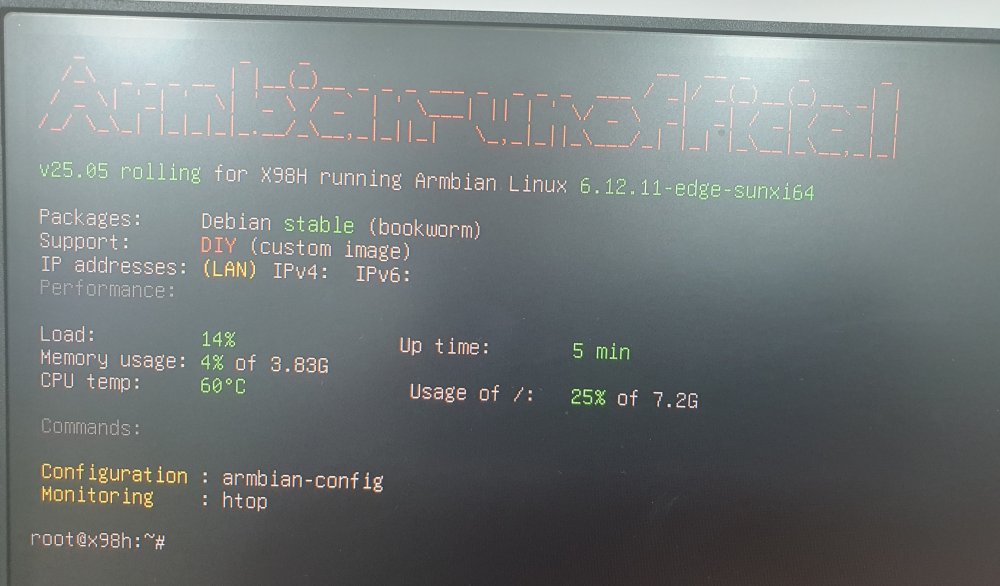
X98H is booted Armbian-unofficial_25.05.0-trunk_X98h_bookworm_edge_6.12.11_server.img.xz https://github.com/NickAlilovic/build
-
 Usual User, the information you linked about Linux 6.19 seems like there's progress for Rockchip. However, is there any indication that Allwinner H618 could get H265/HEVC decoding acceleration working too?
 -
Thank you for being specific about the RKxxx+6.19+Noble information As I asked in the other thread, please also specify which ffpmeg and mpv sources you used. I hope I can make it work in opiz3 (H618) in a more recent Debian (I only could make it work in Bookworm). Do you see any difference in 8bit vs 10bit HEVC(H265)?
-
hello i try image "Armbian-unofficial_26.05.0-trunk_Orangepi-4a_trixie_edge_7.0.0-rc5.img" not detected emmc and wifi. ethernet crushed periodically
-
@Mohammad Adel There are differences like Ethernet and maybe WiFi. Lets see if the X98H boots first.
-
Hardware video acceleration with recent armbian/mainline kernel (Kodi)
robertoj replied to XXXBold's topic in Orange Pi 5
For context, he is talking about: https://code.ffmpeg.org/FFmpeg/FFmpeg/pulls/20847 There are many ffpmpeg options. Which ffmpeg did you use? https://code.ffmpeg.org/Kwiboo/FFmpeg/src/branch/v4l2request-v3 https://code.ffmpeg.org/Kwiboo/FFmpeg/src/branch/v4l2-request-n8.1 And which debian/ubuntu version did you use? Which ffmpeg is included in that distribution? -
I need a Linux system that runs on an x98h device Anything that does not work is not booted by the device
-
 I maintain it and can take a look this week. Just need to find a spare nvme somewhere
 -
The x98h pro device is not the same as the x98h
-
I need a Linux system that runs on an x98h device
Werner replied to Mohammad Adel's topic in Allwinner CPU Boxes
duplicate -
 I need a Linux system that runs on an x98h device Anything that does not work is not booted by the device
-
@m1zfs I am willing to test as i have an m1 odroid with 4GB ram. What do i need to do ? I tried your dkms package installed it and rebooted but system never turned up after reboot.
-
It seems that the problem with the computer not booting on first boot returned with kernel 6.18.x. I have to restart the computer twice (power cycle) to get it to boot. The computer always started on first boot on Armbian 26.x with kernel 6.12.x, but after updating ArmBin when the 6.18.x kernels were released, the problem returned: OZPI v1 doesn't always start on the first try, and I have to turn it off and on again. Of course, when there's a kernel update, I run amrmbian-install, but that doesn't solve the recurring problem.