All Activity
- Past hour
-
Hi @ebin-dev, @SymbiosisSystems, and everyone in this thread, Following the recurring instability reports here and in the older topic ( https://forum.armbian.com/topic/30074-helios64-armbian-2308-bookworm-issues-solved/ ), I've packaged your opp-microvolt workaround as an opt-in DT overlay in the Armbian build framework. PR: https://github.com/armbian/build/pull/9822 — adds the overlay to both Armbian kernel trees: `rockchip64-current` (6.18) and `rockchip64-edge` (7.0). What you get once this lands: - `rockchip-rk3399-helios64-cpu-stability.dtbo` ships inside the regular `linux-dtb-{current,edge}-rockchip64` package. No hand-patching of DTBs, no separate downloads; `apt upgrade` keeps the overlay in sync with whatever DTB your kernel ships. - **Not enabled by default** — for the people whose Helios64 "just works", the mainline OPPs stay untouched. I don't want to push a tree-wide voltage bump onto every user when only some units exhibit the instability. - Activation is the standard Armbian way, either: armbian-config → System → Kernel → Manage device tree overlays → [*] rk3399-helios64-cpu-stability → save → reboot or manually, by adding the overlay name to the `overlays=` line in `/boot/armbianEnv.txt` (the `rockchip-` prefix is implicit, because `overlay_prefix=rockchip` is already set on this board): overlays=rk3399-helios64-cpu-stability Then reboot. Voltages are exactly the ones from your post in this thread — https://forum.armbian.com/topic/58597-helios64-armbian-trixie-with-linux-618-incl-opp-microvolt-patch/?do=findComment&comment=237456 (opp00..opp06 raised to 900 / 900 / 900 / 950 / 1025 / 1100 / 1175 mV; opp07 left at the mainline 1.20 V; `max` everywhere kept at 1.25 V). Frequencies are not touched. End-to-end verified on my Helios64 with both kernels: - current / 6.18.30, Trixie SD-card image - edge / 7.0.7, Trixie SD-card image (locally built) After enabling the overlay and a reboot: for n in 0 1 2 3 4 5 6 7; do od -An -tx4 --endian=big \ /sys/firmware/devicetree/base/opp-table-1/opp0$n/opp-microvolt done opp00 000dbba0 000dbba0 001312d0 opp01 000dbba0 000dbba0 001312d0 opp02 000dbba0 000dbba0 001312d0 opp03 000e7ef0 000e7ef0 001312d0 opp04 000fa3e8 000fa3e8 001312d0 opp05 0010c8e0 0010c8e0 001312d0 opp06 0011edd8 0011edd8 001312d0 opp07 00124f80 00124f80 001312d0 ...which matches your table 1:1. U-boot log line on boot: Applying kernel provided DT overlay rockchip-rk3399-helios64-cpu-stability.dtbo confirms that u-boot picks up the `.dtbo` from `/boot/dtb/.../rockchip/overlay/` and applies it via `fdt apply` before the kernel starts. Ready-to-flash **current/6.18** images, built from the PR branch by the official Armbian builder workflow: https://fi.mirror.armbian.de/incoming/iav/helios64/archive/ - Armbian_26.5.0_Helios64_resolute_current_6.18.30_minimal.img.xz - Armbian_26.5.0_Helios64_resolute_current_6.18.30_xfce_desktop.img.xz - Armbian_26.5.0_Helios64_trixie_current_6.18.30_minimal.img.xz If any of you can grab one of those (or wait for a nightly after the PR is merged) and confirm the workaround applies cleanly through the overlay path on your board, that would help the PR land. Bug reports are welcome too. Attribution lives in the overlay README block (look for the heading `### rk3399-helios64-cpu-stability`), pointing back to forum topics 30074 and 58597, prahal and ebin-dev: https://github.com/armbian/build/blob/feat/helios64-cpu-stability-overlay/patch/kernel/archive/rockchip64-6.18/overlay/README.rockchip-overlays https://github.com/armbian/build/blob/feat/helios64-cpu-stability-overlay/patch/kernel/archive/rockchip64-7.0/overlay/README.rockchip-overlays Thanks!
-
Hi @ebin-dev, @SymbiosisSystems, and everyone in this thread, Following the recurring instability reports here and in the older topic 30074, I've packaged your opp-microvolt workaround as an opt-in DT overlay in the Armbian build framework. PR: **armbian/build#9822** — adds the overlay to both Armbian kernel trees: `rockchip64-current` (6.18) and `rockchip64-edge` (7.0). What you get once this lands: - `rockchip-rk3399-helios64-cpu-stability.dtbo` ships inside the regular `linux-dtb-{current,edge}-rockchip64` package. No hand-patching of DTBs, no separate downloads; `apt upgrade` keeps the overlay in sync with whatever DTB your kernel ships. - **Not enabled by default** — for the people whose Helios64 "just works", the mainline OPPs stay untouched. I don't want to push a tree-wide voltage bump onto every user when only some units exhibit the instability. - Activation is the standard Armbian way, either: armbian-config → System → Kernel → Manage device tree overlays → [*] rk3399-helios64-cpu-stability → save → reboot or manually, by adding the overlay name to the `overlays=` line in `/boot/armbianEnv.txt` (the `rockchip-` prefix is implicit, because `overlay_prefix=rockchip` is already set on this board): overlays=rk3399-helios64-cpu-stability Then reboot. Voltages are exactly the ones from post #237456 (opp00..opp06 raised to 900 / 900 / 900 / 950 / 1025 / 1100 / 1175 mV; opp07 left at the mainline 1.20 V; `max` everywhere kept at 1.25 V). Frequencies are not touched. End-to-end verified on my Helios64 with both kernels: - current / 6.18.30, Trixie SD-card image - edge / 7.0.7, Trixie SD-card image (locally built) After enabling the overlay and a reboot: for n in 0 1 2 3 4 5 6 7; do od -An -tx4 --endian=big \ /sys/firmware/devicetree/base/opp-table-1/opp0$n/opp-microvolt done opp00 000dbba0 000dbba0 001312d0 opp01 000dbba0 000dbba0 001312d0 opp02 000dbba0 000dbba0 001312d0 opp03 000e7ef0 000e7ef0 001312d0 opp04 000fa3e8 000fa3e8 001312d0 opp05 0010c8e0 0010c8e0 001312d0 opp06 0011edd8 0011edd8 001312d0 opp07 00124f80 00124f80 001312d0 ...which matches your table 1:1. U-boot log line on boot: Applying kernel provided DT overlay rockchip-rk3399-helios64-cpu-stability.dtbo confirms that u-boot picks up the `.dtbo` from `/boot/dtb/.../rockchip/overlay/` and applies it via `fdt apply` before the kernel starts. Ready-to-flash **current/6.18** images, built from the PR branch by the official Armbian builder workflow: https://fi.mirror.armbian.de/incoming/iav/helios64/archive/ - Armbian_26.5.0_Helios64_resolute_current_6.18.30_minimal.img.xz - Armbian_26.5.0_Helios64_resolute_current_6.18.30_xfce_desktop.img.xz - Armbian_26.5.0_Helios64_trixie_current_6.18.30_minimal.img.xz If any of you can grab one of those (or wait for a nightly after the PR is merged) and confirm the workaround applies cleanly through the overlay path on your board, that would help the PR land. Bug reports are welcome too. Attribution lives in `patch/kernel/archive/rockchip64-{6.18,7.0}/overlay/README.rockchip-overlays` under `### rk3399-helios64-cpu-stability`, pointing back to topics 30074 and 58597, prahal and ebin-dev. Thanks!
- Yesterday
-
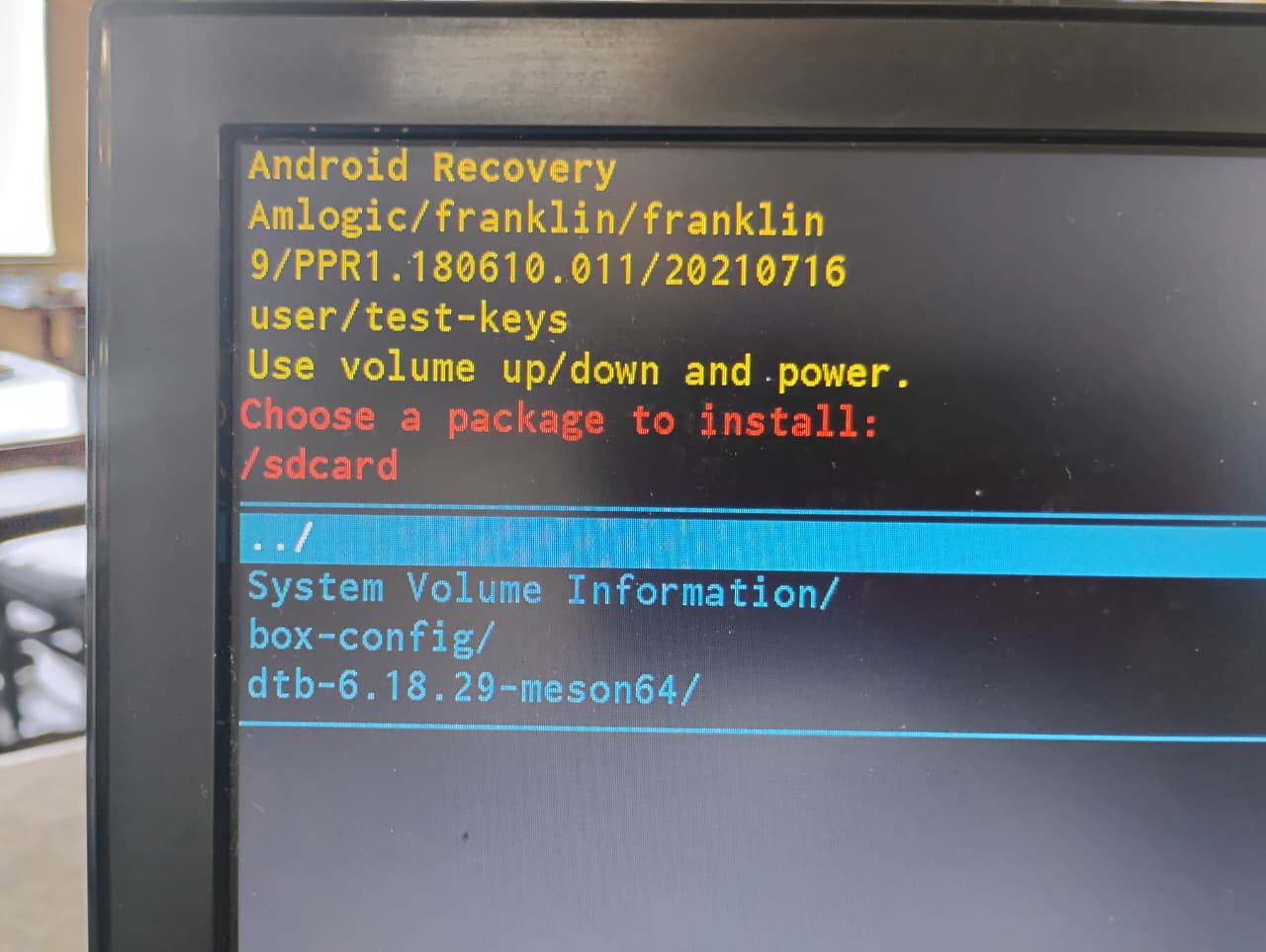
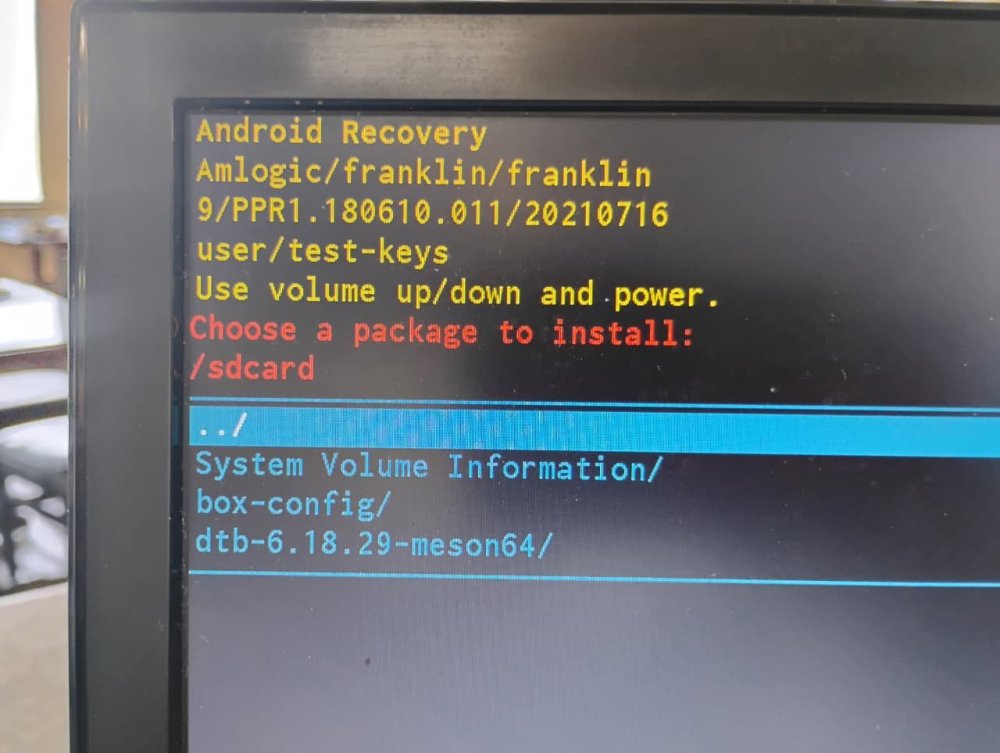
You shouldn't be getting into android recovery. How did you burn the image to the SD card? On what platform? The fact that I'm seeing things like "System Volume Information" and "box-config" which aren't directories that should exist on an Armbian image, it looks like something strange has happened to your SD card image.
-
It works. I am just showing you an easy way to connect to the board if you don't have UART or display output, even if temporarily.
-
 See how Tyr moves beyond MCU firmware boot to build the group, queue, VM, submission, and completion paths needed to run real Vulkan workloads on Mali CSF GPUs. View the full article
 -
I previously tested the USB-to-Ethernet adapter on version 6.6, and it worked perfectly. However, I haven't tested it on 6.18 yet.
-
well now i using a sd card and get this situation....
-

Rupa X88 Pro 13 - RK3528 board with images
sr4armbian replied to fedes_gl's topic in Rockchip CPU Boxes
@Joao Cordeiro Thanks for your reply. You are right, Amlogic S905X3 seems to be a good hardware without much issue for running Linux servers. -
Glad that you got it fixed and figured out a way to set this up. 🙌. I went with similar method, used USB Male to Male cable, Factory Flash Tool and maskrom pins to load the image that I have mentioned in above post, However I am still stuck with no HDMI and LED Display is not showing the clock, but a script which shows the IP address. This was part of the image created by the one who complied it. If you could share steps to get the one that is working (HDMI, Clock, Etc.,) for you would be helpful.
-

Rupa X88 Pro 13 - RK3528 board with images
Joao Cordeiro replied to fedes_gl's topic in Rockchip CPU Boxes
@sr4armbian I know of at least 3 main issues: no wifi LAN is 100mbps limited usb is 2.0 limited Also does not look like anyone is actively developing this. Since i use this as a server, i know that HDMI works to the point of showing the console, but i have no experience on a desktop environment. If you dont yet have one of this devices, dont buy one to get a linux box. Not worth it. -
You have the lspci verbose output so you can work back to get the non-verbose output as well. Should I have anything connected to the PCI lane or not? I know my USB devices work, at least with the internal controller, the question was about what exactly is the output/situation you need me to test.
-
 No risk of "starting a war," as I quite frankly don't give a damn about your opinion. The mitigations the devs have posted are easy to apply, so this is solved as far as I'm concerned. You must be really fun at parties, bedna
 -
I dont need details just lsusb and lspci without switches to see what my image 7.1 discovers on your board Of course you can pług on USB stick to see if it works also make steps like mentioned above to fix wifi aic driver
-
I'm not sure what "nothing to see with you project" means but above you I've included the most complete lspci there is. I'll send lsusb too, but there won't be much there as it works properly. Do you want me to have something connected to the USB or just print it without anything (it would be one line, unless you want verbose).
-
@sr4armbian Thanks for your response. I found a way to build the vendor release for my box with kernel 6.xxx. SD card and USB 2.0 flash drive are tested, and HDMI audio, HDMI video, Ethernet, and the front LED display are working so far. I am running it on my eMMC, but the built-in Wi-Fi and Bluetooth modules are not working. I have modified a bit of scripts to remove the HAOS part and create a firmware image that can be flashed directly via the factory flash tool using using usb cable in maskrom mode.
-
I see it is this board, quite new: http://www.orangepi.org/html/hardWare/computerAndMicrocontrollers/details/Orange-Pi-4A.html You can see at https://github.com/armbian/build/commits/main/config/boards/orangepi-4a.csc that no manintainer is defined, so up to yourself to figure out what is wrong. You need to start with attaching a serial debug cable (see 3 pins next to power key) Also I see this board has SPI-flash, there might be an old U-Boot variant in there that does not work together with mainline based 7.0.x kernel.
-

Have Armbian for Tanix TX1 QHZIW_H313_TX1_EMCP_V2.0?
Juan Esteban replied to Lesano's topic in Allwinner CPU Boxes
To my knowledge, there are two versions of this device: the "old" version and the new version, which has a 6031 Wi-Fi chip. Here are the two DTS files extracted from the original android tv firrmware for each hardware version. Hope it helps. Tanix_TX1_6031_DTS.txt Tanix_TX1_DTS.txt -
@Fit Girl The image available here works from emmc. I could not test this with SD card. Please be informed that there is no HDMI display post boot. You have to find out the IP address from your DHCP Server/Router once the box got booted. Post boot you are working on a blind box with command lines. It is working for me though without much issues so far.
-

Teclast T60 AI rooting + armbian possibility Allwinner A733
YODAI replied to Taz's topic in Allwinner CPU Boxes
Hi guys 1: First, I'm happy to register on your forum. 2: I needed to root my TECLAST T60 IA tablet to test it with some software, and I found this post on your forum. 3: My problem is: #: I followed the rooting steps up to step 5. #: Thinking it was better to install the new firmware first and then proceed with rooting. #: My big mistake was starting the firmware update with PhoenixSuit and the bootloader unlocked. After a while, I got a firmware error, and after restarting, I got this message. 4: I tried to enter fastboot mode by pressing the power button, volume down button, and volume up button, but I can't get into fastboot mode. I hope you can help me figure out how to enter fastboot mode, install the firmware, and then try to root the device.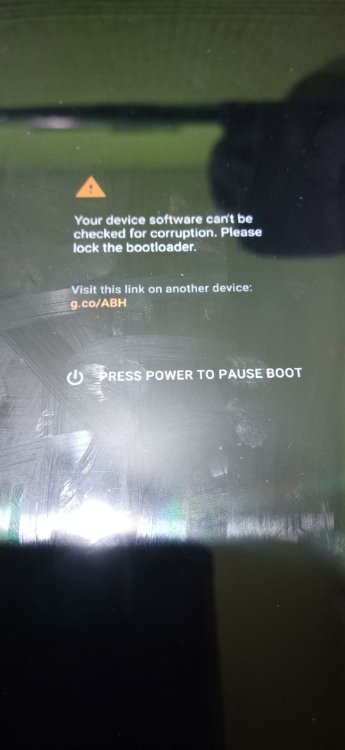
-
There is nothing to see with you project. I wish only to know the output from lsusb and lspci. For wifi you probably have to apply Fix 7.1 as above. Driver for aic8800 is not yet supported
-
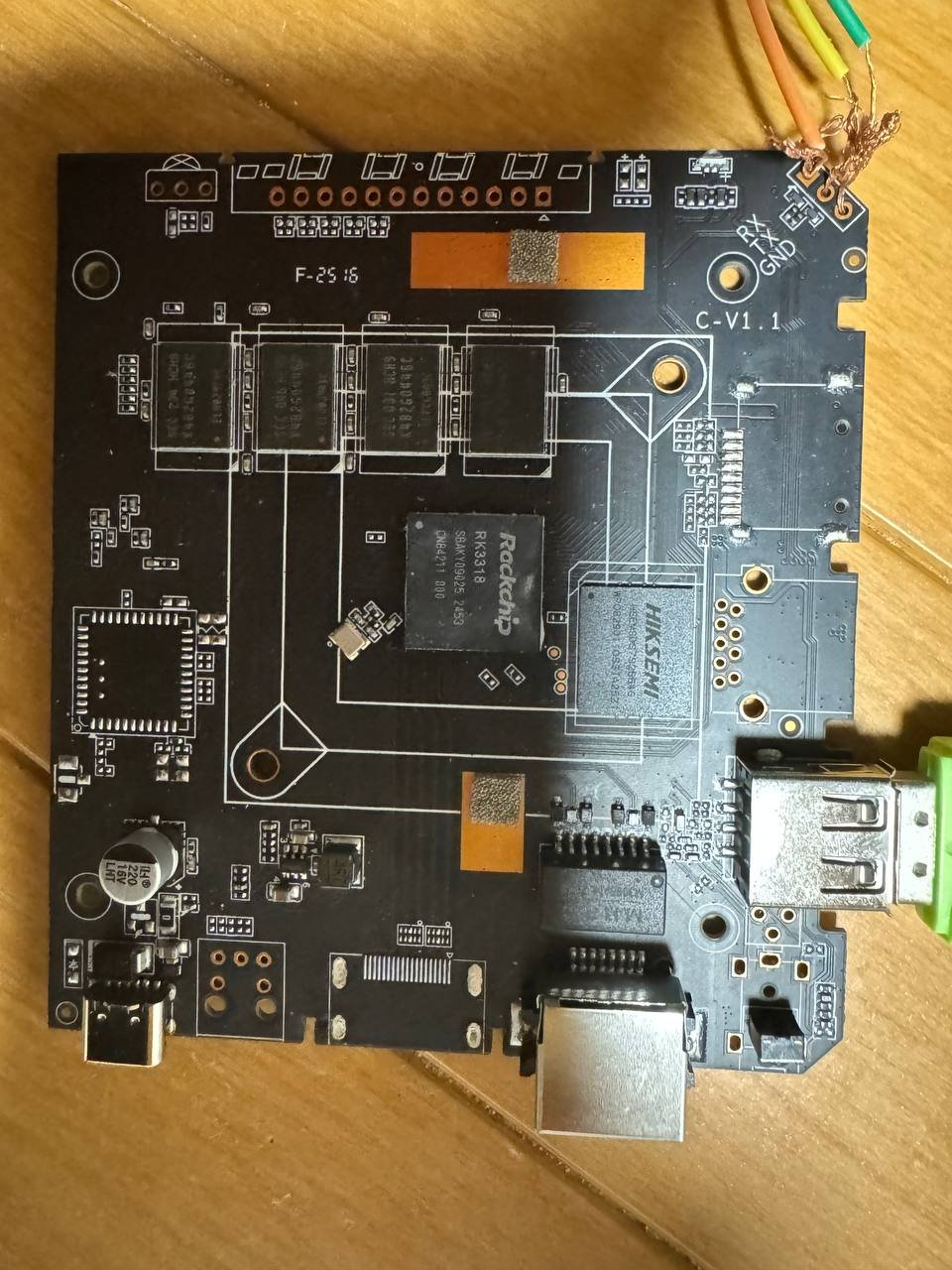
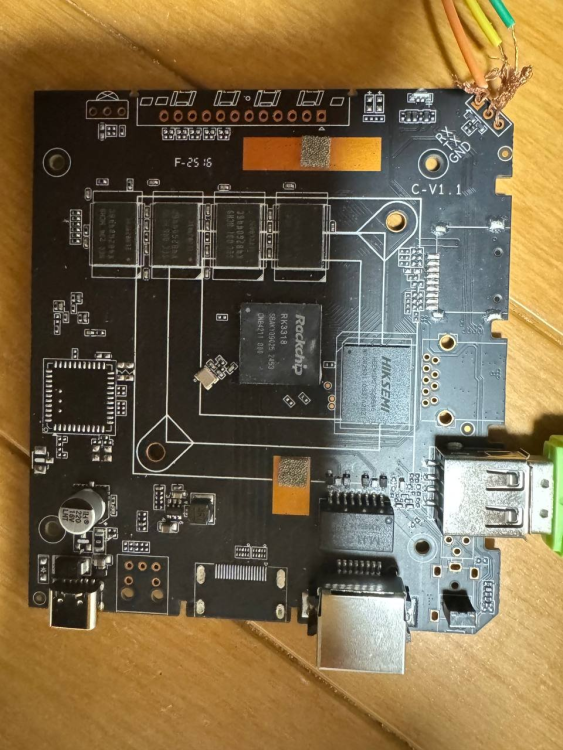
Hi everyone. I have this RK3318 chip box running Ubuntu, but I can't enable SSH to reinstall it. It doesn't have a display output port. Is there any way to reinstall the OS without desoldering the eMMC to reflash it? (I don't know how to put it back if I take it off). I've already tried flashing via USB and the RX/TX/GND lines, but neither worked. Model: AROP-01 CPU: Quad-core ARM processor Memory: 2GB System Storage: 64GB eMMC Network Interface: 1 × Ethernet USB Interface: 1 × USB Type-C Power: 5V/2A Dimensions: 103 × 103 × 20 mm Package Contents: 1 × Manual, 1 × Ethernet Cable, 1 × Power Cable Thank you.
-

What hardware will comfortably run Waydroid?
samlevy0515 replied to dreamlayers's topic in Software, Applications, Userspace
Great question — I’d really like to know too! Have you tried a lightweight Android image like LineageOS-microG inside Waydroid, or tweaked the GPU rendering settings? -
Today I noticed that last Sunday a community version of Armbian was released with Orange Pi 4A support. I tried to flash it in different ways just in case, but it just wouldn't boot. I used BalenaEtcher, Rufus and Armbian Imager and neither of them worked. Im new in this stuff, so I wanted to know if someone could tell me if it is something I'm doing wrong.
- Last week
-
Here's lspci -vvv with an older Radeon: https://paste.armbian.com/zisezuqoza.yaml and boot UART log (it boots but no display is visible) https://paste.armbian.com/asizofulux.sql Here's the same with Radeon RX 550: https://paste.armbian.com/ovinibafux.yaml The kernel complained about missing firmware (for polaris11), which actually was not missing. I had to regenerate initramfs using initramfsctl. After regenerating, the board stopped booting with the card connected: https://paste.armbian.com/qitiwiwoge.yaml Not sure how useful lsusb would be. So it's not super stable yet. I saw that you made these modules built-in. This is not necessary, selecting [M] is enough because then they can be loaded or unloaded (to try passing the card through to a VM I need to blacklist the module, which doesn't work for built-in modules). This is something I can try to do to get display output. Oh and WiFi isn't detected at all but that's probably not a surprise.
-
 Hi, I am assuming that you have a standard Q1 TV Box (Allwinner H313 based). 1) Download Armbian Imager here; 2) Install the version for your operating system; 3) After installing, choose "Manufacturer=ALLWINNER", Board="X96Q TV BOX", Operating system="minimal Trixie current" and Storage ( I suggest a good quality Class 10 SD card); 4) After writing the image, insert the SD card into the available SD slot; 5) Insert a wooden toothpick or a Q-tip into AV/Reset input; 6) Click (kindly) and hold the toothpick and connect the TV Box power supply to the power entry; 7) Release the toothpick after 8-10 seconds. if the HDMI connector is plugged you should see the Armbian initial boot process Note: some TV Boxes don't need items 5, 6 and 7. I hope it helps.