All Activity
- Past hour
-
I'll buy a new USB cable today and try connecting via ADB again. I can't even find the original firmware for this console. It seems like a trivial task to restore build.prop, but it's already driving me crazy. It won't connect via ADB, I can't find the firmware for this device, and it doesn't see the internal memory via Multitool. I'm at a dead end.
-
I once got the TVBOX to boot into recovery by flashing the raw mmc image directly to a sdcard and then powering on the tvbox with the sdcard
-
You can backup the mmc using multitool script and on a pc or phone extract the resulting gz file. Then from this raw disk image you need to get the offset and size of the system partition and then use dd to get the system partition out. After that you can make changes to files in the raw partition image and write the whole image back to the same offset. Never tried something like this but if it is possible to get into recovery mode and try if adb over usb is available then editing the system partition would be easier. The first method might worsen things so having the gz file saved at a safe place will be better
- Today
-
The problem is that I wanted to change the fingerprint and changed build.prop. After that, the console boots up, but the launcher does not start. I can only access the settings. And I can't connect to the console to restore the build.prop backup. As I understand it, it is impossible to connect to this console via adb, and multitool also cannot see the internal memory. Are there any options for editing build.prop?
-
Also, mmcblk2boot0 and mmcblk2boot1 should either have the bootloader or in my case were filled with null bytes. mmcblk2rpmb probably has something to do with TEE OS. Having a backup of mmcblk2 is what that matters
-
If the internal storage has android installed then it doesn't needs to have a partition table. Multiple partitions show up in android because the partition offset and size is passed with kernel commandline, you can just backup the mmc as a raw image and restore it as it is anytime later. Multitool or Armbian can't recognize the partitions of Android in this tvbox as they need a partition table to be present in the initial bytes else they treat the whole mmc as raw data.
-
 Feel free to reach out and become a partner: https://www.armbian.com/partners/
 -
Hello using an inovato quadra and would like it to start a specific program on boot how do I go about doing such a thing Pointer or instructions appreciated Thank you Jacques
-
i think i have a identical box out of my 3 other , this board is i thing NAND memory no eMMC , its only supportet by legacy Firmware kernel <4.x
-
Hello @Malay! No need to raise your voice. Anyhow - thanks for the feedback. The missing HDMI audio has a deeper reason: the communication with the Realtime-CPUs does not work. Background: HDMI audio needs a special DMA: adma, that in turn is supported by the rCPUs (the extra Cores running the real-time-OS from esos.elf) and that does not communicate correctly via rpmsg currently. Not sure why and also not sure if this is true with the other RiscV/Spacemit boards. The 2280 M.2 slot works, I am pretty sure. If you need a running Armbian *with* HDMI audio, grab the orangepi-rv2-ky branch from my repo. It's older and I use it to compare working vs. non-working currently. Also, there's a reason this has no pull request to Armbian/main: it's work-in-progress. LG // Sven-Ola
-
Hello. Thank you for your work on orangepirv2. I have a board with 2 Gb of RAM. I compiled it on your git https://github.com/sven-ola/armbian-build/tree/orangepi-rv2 Armbian-unofficial_26.02.0-trunk_Orangepirv2_noble_current_6.6.99_xfce_desktop.img and Armbian-unofficial_26.02.0-trunk_Orangepirv2_trixie_current_6.6.99_xfce_desktop.img Booting was done from the rear M.2 2280 1TB Armbian-unofficial_26.02.0-trunk_Orangepirv2_noble_current_6.6.99_xfce_desktop.img The download went fine. The network is working, HDMI video is working. is HDMI audio not working (I was upset by this fact) Armbian-unofficial_26.02.0-trunk_Orangepirv2_trixie_current_6.6.99_xfce_desktop.img It won't load, the network isn't working, and there's no HDMI output. I tried your image and the same behavior - It won't load, the network isn't working, and there's no HDMI output. Your image is not working with the rear M.2?
-
 Thanks a lot, I´m thinking about buying a board purely for your image, would you advise me to wait for the nanopi r3s release? I have an old rpi 3 collecting dust, do you think I may use that as well? thanks
 -
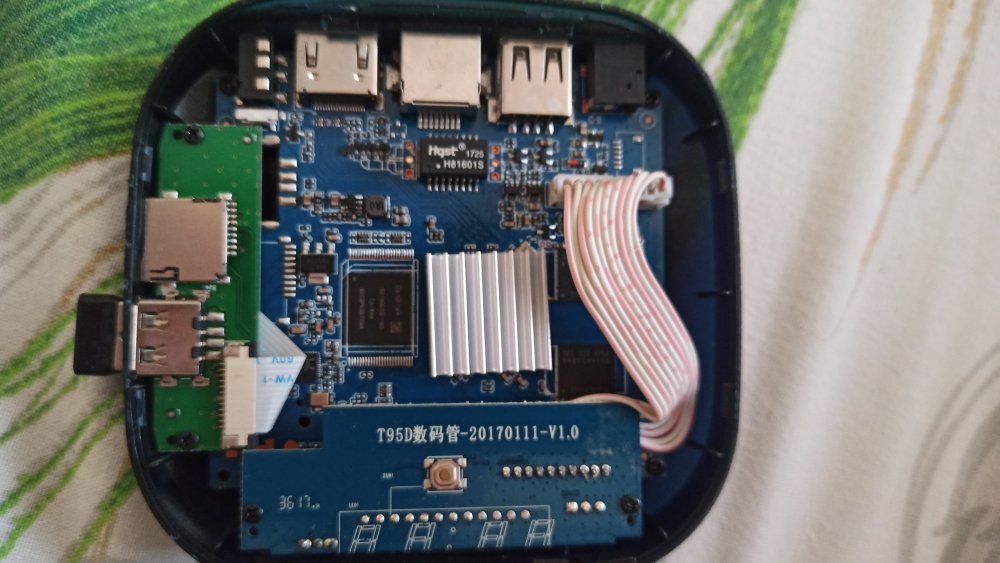
Hi, still stuck on my Iconbit XDS16 (T95D数码管-201701111-V1.0 blue board). Multitool menu loads, but mmcblk2 has no partitions at all (only mmcblk0p2). lsblk -f output: NAME FSTYPE LABEL UUID FSAVAIL FSUSE% MOUNTPOINT mmcblk0 |-mmcblk0p1 `-mmcblk0p2 0 100% / mmcblk2 mmcblk2boot0 mmcblk2boot1 mmcblk2rpmb Is there a specific DTB for this board that makes eMMC visible in Multitool? Thanks!
-
 I wonder how to sponsor or funding to this board?
 -
LMAO! So... What exactly is your question? Did you try "the mouse & keyboard" and they did not work? I would say you will get basic functionality on almost any usb mouse or keyboard on linux. wifi on the other hand can be a hit or miss. A quick search on "USB Logitech Unifier Nano dongle" gave me this: https://forums.linuxmint.com/viewtopic.php?t=373365 so it seems you might want to use solaar to configure the stuff. As for the Inovato Quadra4K, it looks like it is an allwinner H6 processor so I suspect it should work using armbian....
-
@Bones558 I think the LED is always on by default and doesn't blink. You can try kernel 5.15, I'm using Armbian-unofficial_25.11.0-trunk_Radxa-cubie-a7z_jammy_legacy_5.15.147.img Since I don't have any TTL modules or display adapters, I directly followed the instructions at https://docs.armbian.com/User-Guide_Autoconfig/ to set up the wireless network. After powering it on and waiting for a while, I could directly access SSH. Hope this helps.
-
Hi, I'm a long time Armbian user and overall extremely happy. It my default Linux distro everywhere! Thanks to everyone who is developing or contributing to it! Every time I pickup a new board and deploy Armbian I have to edit the `armbianEnv.txt` file and change verbosity to 7. The same question repeats in my head. Why is it not the default? Systemd and startup messages spam up like crazy and they have nothing interesting to offer. I do care what hardware did the kernel detect or was a protocol correctly negotiated etc. I personally would have it in reverse, verbose kernel, quiet systemd. But thats just me. Could we at least have parity, if systemd verbose then make kernel verbose too, if kernel quiet then systemd quiet too. I'm trying to understand what was the rationale for having quiet kernel and verbose systemd? Thanks!!
-
https://docs.armbian.com/Developer-Guide_Build-Switches/ Check for ARTIFACT_IGNORE_CACHE diy packages are locally cached. automated packages from the CI are stored online in ghcr. not only this, also the status of build framework internals (like stuff in https://github.com/armbian/build/tree/main/lib/functions) since they also can alter a package. "development" should be sufficient.
-
Build from branch v20250306. error! [ Failed to fetch SHA1 of 'https://git.kernel.org/pub/scm/linux/kernel/git/stable/linux.git' 'tag' 'v6.12.11' - make sure it's correct ] How to remove the error?
-
Does anyone here may have recommendations of standard sdcard or flashdrive that supports for installation on amlogic s905x devices? eg: sdcard only sdhc types or it will work with sdxc or any kind of limitations capacities for certain SBC ? . thank you in advance for your most kind replies. best regards
- Yesterday
-

Help wanted to test a new OpenVFD alternative
s100sic replied to Jean-Francois Lessard's topic in Amlogic meson
Hi Lessard can you please check this error (X88 PRO-B-RK3318-D4-V1.6)? root@GREEN:~/tm16xx-display# make module make EXTRA_CFLAGS="-DCONFIG_TM16XX -DCONFIG_TM16XX_KEYPAD -DCONFIG_TM16XX_I2C -DCONFIG_TM16XX_SPI -include /root/tm16xx-display/drivers/auxdisplay/tm16xx_compat.h -I/root/tm16xx-display/include/" -C /lib/modules/6.18.6-current-rockchip64/build M=/root/tm16xx-display/drivers/auxdisplay CONFIG_TM16XX=m CONFIG_TM16XX_KEYPAD=y CONFIG_TM16XX_I2C=m CONFIG_TM16XX_SPI=m CONFIG_LINEDISP=m modules make[1]: Entering directory '/usr/src/linux-headers-6.18.6-current-rockchip64' make[2]: Entering directory '/root/tm16xx-display/drivers/auxdisplay' CC [M] line-display.o CC [M] tm16xx_core.o CC [M] tm16xx_keypad.o tm16xx_keypad.c:81:6: error: redefinition of ‘tm16xx_set_key’ 81 | void tm16xx_set_key(const struct tm16xx_display *display, const int row, | ^~~~~~~~~~~~~~ In file included from tm16xx_keypad.c:18: tm16xx.h:189:20: note: previous definition of ‘tm16xx_set_key’ with type ‘void(const struct tm16xx_display *, const int, const int, const bool)’ {aka ‘void(const struct tm16xx_display *, const int, const int, const _Bool)’} 189 | static inline void tm16xx_set_key(const struct tm16xx_display *display, | ^~~~~~~~~~~~~~ tm16xx_keypad.c:135:5: error: redefinition of ‘tm16xx_keypad_probe’ 135 | int tm16xx_keypad_probe(struct tm16xx_display *display) | ^~~~~~~~~~~~~~~~~~~ tm16xx.h:184:19: note: previous definition of ‘tm16xx_keypad_probe’ with type ‘int(struct tm16xx_display *)’ 184 | static inline int tm16xx_keypad_probe(struct tm16xx_display *display) | ^~~~~~~~~~~~~~~~~~~ make[4]: *** [/usr/src/linux-headers-6.18.6-current-rockchip64/scripts/Makefile.build:290: tm16xx_keypad.o] Error 1 make[3]: *** [/usr/src/linux-headers-6.18.6-current-rockchip64/Makefile:2010: .] Error 2 make[2]: *** [/usr/src/linux-headers-6.18.6-current-rockchip64/Makefile:248: __sub-make] Error 2 make[2]: Leaving directory '/root/tm16xx-display/drivers/auxdisplay' make[1]: *** [Makefile:248: __sub-make] Error 2 make[1]: Leaving directory '/usr/src/linux-headers-6.18.6-current-rockchip64' make: *** [Makefile:50: module] Error 2 Thank you -
 Two Questions: How do I force Armbian/build to rebuild the kernel ? - Is there a `./compiler.sh` flag ? And where does the kernel get cached ? - Is it cached online ? - is it cached on kernel, kernel version, and kernel config hash ? I am trying to get a proper handle on Armbian/build. BTW: There really needs to be a `kernel` tag on Armbian Forum's - `Create New Topic`.
 -
Yes. Please wait. I was busy with other personal projects, so I haven't been doing armbian stuff for a few weeks.
-
@Робертс I've been following this pinout from the very beginning, but I'm having trouble setting it up. I think I should wait for instructions from you, which you might create. I would be incredibly happy and grateful if you could provide a step-by-step description of the steps for setting up the Chinese ili9488 display and the OrangePi Zero 3 board.Maybe then I will understand where I am making a mistake.Thank you very much for your patience.
-

Driving the ili9488 LCD (4.0 inch cheap chinese clone)
robertoj replied to robertoj's topic in Allwinner sunxi
I don't know what you could improve right now... But I know that LCD only receives data. My LCD works the same, with its MISO pin connected or disconnected.