All Activity
- Past hour
-
Wayland 1.25 refreshes its documentation with three new chapters covering Wayland XML specification, content model updates, and color management design. View the full article
- Today
-
Hi @sven-ola , I'm having an issue where my portrait-oriented monitor isn't displaying anything properly. I have a portrait-oriented monitor, and when I try to connect it via HDMI, it doesn't display anything—the screen remains blank. I found this in dmesg: [drm] spacemit_hdmi_connector_detect() hdmi status connected [drm] Initialized spacemit 1.0.0 for c0440000.display-subsystem-hdmi on minor 1 [drm] spacemit_hdmi_connector_detect() hdmi status connected [drm] spacemit_hdmi_get_edid_block() len 128 [drm] spacemit_hdmi_get_edid_block() len 128 spacemit-drm-drv c0440000.display-subsystem-hdmi: [drm] Cannot find any crtc or sizes I added `video=1080x1920@60` to the kernel parameters. Now it outputs: [ 4.162834] spacemit-drm-drv c0440000.display-subsystem-hdmi: [drm] User-defined mode not supported: "1080x1920": 60 137020 1080 1152 1160 1176 1920 1934 1936 1942 0x68 0x5 [ 4.162871] spacemit-drm-drv c0440000.display-subsystem-hdmi: [drm] Cannot find any crtc or sizes I think this is because the driver only supports a resolution of 1920x1080, but not 1080x1920. dmesg.txt
-
 @Jugo Slaven What version of Armbian are you running?
 -
I have seen some kernel errors w.r.t. trim on Silicon Power 16GB SD-card, was in ROCK3A. But no other errors. Kernel is unspecified, although I might be able to figure out which/what, you can even search this forum, then you know yourself. This errors do not occur on a RPi4 v1.1 (with RPL OS and kernel). So if you want to know, dig more into logs, doe specialistic blocklevel error checking. In general: welcome to SD-card magic!. See also this:
-
I flashed a home built nanpim4v2 image to two brand new Silicon Power 32GB sdcards and they wont boot whereas SanDisk 32GB boot OK can anyone explain why ?
-

Kernel not updating in image with armbian build
eselarm replied to KV1's topic in Armbian Project Administration
Why repair the filesystem first while you anyway overwrite the whole storage device then? /dev/sdb1 suggests an USB SD-card adaptor is used. Both the adaptor, which translates USB protocol into MMC commands, and the SD-card itself, which also does internal block managing, can mess up the filesystem. Not as long as this is plugged into the computer where the imager (or dd) is running, but once removed and put into the SBC, power is lost and re-applied. The USB + SD-card hardware (and also OS driver in the computer) might have flaws in its implementation. It could easily be that SD-card signals 'ready' to OS, so you then take out USB + SD-card, but that actually not all is committed to the actual flash and still some is in buffers or the SD-card is still doing wear-leveling and doesn't do that in a correct way. And worse, if fake sized counterfeit, the firmware might be busy doing its 'magic tricks' to fake hundreds of GB size while only 8 or 32 GB is actual flash chip. So unfortunately, even if using a verify step in writing an image, the actual content on the SD-card might be different from the image file once the SD-card is put in the SBC. I remember such a case on this forum where someone did manual block-level compare of storage device and image. I also have had such issue at least once. It is the situation where you just re-do / re-write again without knowing what is wrong. And/or use other SD-card, other USB-adaptor, other computer, etc. To prevent such issues, I tend to use (the) SBC itself to write SD-cards. My RPI4 runs from USB-SSD, so SD-card slot is free. I trust RPL HW more than various USB SD-card adaptors. Earlier test I mentioned using the the Armbian-imager was on NanoPi-R6C running from eMMC+NVME, so same story, free SD-card slot. It ran Armbian Trixie KDE6 and 7.0-rc rockchip64 kernel. I was also forced to more or less, because on my Tumbleweed N100 box the Armbian Imager only stayed white (some EGL error). That was with x86-64 AppImage. I thought it would be better to install from a .deb hence walked to my powered-on ARM64 running Debian. Anyway I do normally not use images. I would rather use ddrescue (enable mapfile option) to check and make sure image is same as on storage device. That helped also in the past for 4TB HDD's (when risk of bit-rot). It is CLI based and allows to re-do check after power-cycle. -

Booting armbian manually from u-boot shell over UART
Thành replied to user03's topic in Amlogic CPU Boxes
Could you please send me the DTB file that your motherboard displays and only receives internet signals? I have a motherboard that's similar to that one. - Yesterday
-
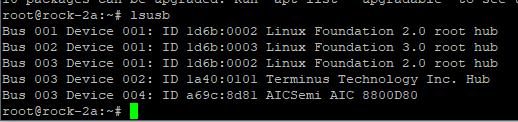
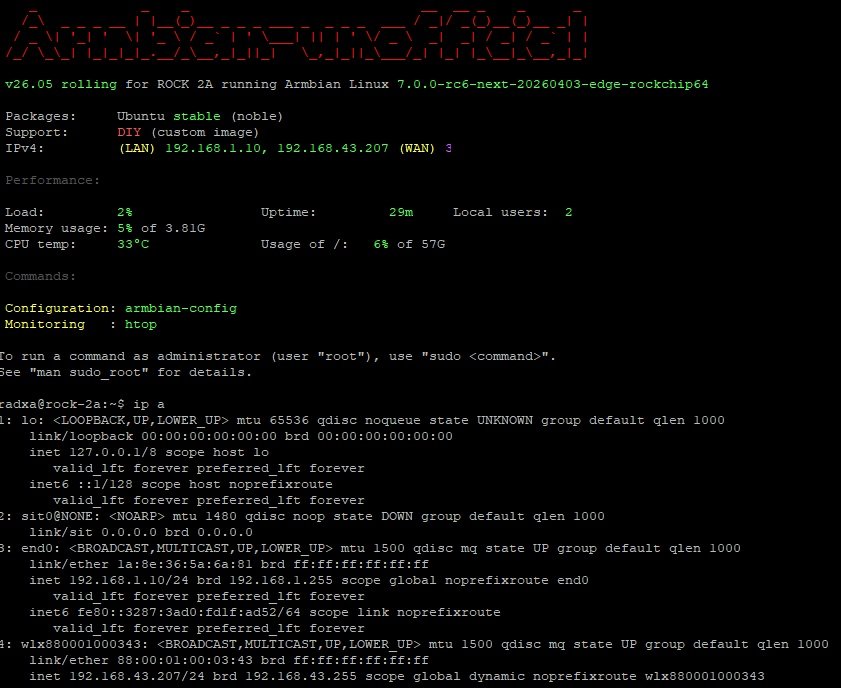
It is not working with this patch because offcially AIC8800 is not supported in kernel > 7.0-rc6 plus in my image Wifi was initially disabled With new image it is better: I made a small fix to make it running with some commands as root: ``` # unzip AIC_FIX.zip # mkdir -p /lib/modules/$(uname -r)/kernel/drivers/net/wireless/aic8800 # cp aic_btusb.ko aic_load_fw.ko aic8800_fdrv.ko /lib/modules/$(uname -r)/kernel/drivers/net/wireless/aic8800/ # depmod -a # cat /etc/modules-load.d/aic8800.conf aic_load_fw aic8800_fdrv aic_btusb # cp -r aic8800_fw /lib/firmware/ # cp -pr aic8800_fw/USB/aic8800D80/ /lib/firmware/ # modprobe aic_load_fw # modprobe aic8800_fdrv # modprobe aic_btusb # lsmod |grep -i aic aic_btusb 57344 0 aic8800_fdrv 626688 0 cfg80211 1200128 1 aic8800_fdrv aic_load_fw 86016 1 aic8800_fdrv ``` Please also remember as it is experimental and all you do it is on your own risk HDMI is not working and we need some code first, I guess for this part: CONFIG_PHY_ROCKCHIP_INNO_HDMI_QP
-
 Ok, maybe I am not able to boot because this image is not for the stock PocketCHIP but for one which requires a custom breakout board: https://github.com/armbian/build/pull/7647 Maybe I could have found that out sooner if there was a device page for this custom PocketCHIP in the community supported devices page at ttps://www.armbian.com/community/. Who/how is supposed to create it? The board maintainer? How is one supposed to do that? There is no mention in the Board Maintainers Procedures and Guidelines. I haven't anything on the armbian github repositories about the boards information on this page. It would be important to have the device page, especially when the image was created for custom developed PCBs. Only after some digging and finding the PR where the device was added, I was able to figure out why I may not be able to boot the pocketchip-sd armbian image.
 -
 @Sergioclr the H313, H616, H618, and IK316 are essentially the same SoC family. To successfully boot an image, you must match the correct AXP chip (the Power Management IC) and the specific DRAM version used on your board. Essentially, any thread discussing the H616/H618 (excluding older H3/H5/H6 chips) will contain relevant information for these SoCs. PMIC Information: http://linux-sunxi.org/AXP_PMICs DRAM Types: 3: DDR3 4: DDR4 7: LPDDR3 8: LPDDR4 You can try flashing various boot images until one successfully initializes your hardware. (If your box is secure-boot enabled, you will need to add the secure-boot modifications posted above.) https://github.com/NickAlilovic/build/releases/tag/20250306 Alternatively, for a more precise approach: Extract your Device Tree (DTS). Identify the specific AXP chip located on your board. Connect a USB-to-UART TTL device to the RX, TX, and GND pins on your board to monitor the boot sequence. https://forum.armbian.com/topic/29794-how-to-install-armbian-in-h618/#findComment-232411 https://forum.armbian.com/topic/29794-how-to-install-armbian-in-h618/page/4/#findComment-187672 https://forum.armbian.com/topic/29794-how-to-install-armbian-in-h618/page/23/#findComment-218660 https://linux-sunxi.org/UART Decompile your Device Tree Blob (DTB😞 dtc -I dtb -O dts -o source.dts source.dtb For a visual reference of a board using these specific chips, check out this hardware breakdown. http://nskhuman.ru/allwinner/krugh618.php?np=3
 -
 On a first analysis, I noticed that the git already has a very similar option that I need (H313): ~/build/patch/u-boot/u-boot-sunxi/board_x96q$ arm64-sun50i-h313-add-x96q-lpddr3-defconfig.patch sunsi-add-h616-internal-eth-phy-support.patch so I am stuck on how to proceed because the example has H616 parameters. Help will be appreciated.
 -

Kernel not updating in image with armbian build
KV1 replied to KV1's topic in Armbian Project Administration
TL;DR: fsck /dev/sdb1 Looks like something corrupted the drive filesystem. I was able fsck repair the drive, and re-apply the image via armbian-imager. The fact that armbian-imager 'validated' the flashed contents multiple times is where things went sideways. Once i tried to manually delete the contents of the drive, and that failed, it became apparent that the drive had been corrupted. I'm not sure what the 'validation' that armbian-imager does is, though. -
@Ducdanh Nguyen probably a real H313 SOC. You know this! You were on the other thread.
-
Kernel not updating in image with armbian build
SteeMan replied to KV1's topic in Armbian Project Administration
Have you mounted the image to verify that the problem isn't with the image? (You assume that the issue is with imager but you should first verify that the issue isn't with the image that imager is copying to the storage media. -
Kernel not updating in image with armbian build
KV1 replied to KV1's topic in Armbian Project Administration
Armbian-imager is just.. not doing anything useful... I manually deleted the 'kernel' on the device... which was really an apt packages list somehow... rebuilt & 'flashed'... 14:03:51 ● custom_image: Board detection completed successfully 14:03:51 ● frontend::app: Detected board from filename: Espressobin (espressobin) 14:03:52 ● board_queries: Device(s) added: ["/dev/sda", "/dev/sdb", "/dev/nvme0n1"] 14:03:55 ● operations: Requesting write authorization for device: /dev/sdb 14:03:55 ● flash::linux::privileges: Authorization will be requested via polkit when accessing: /dev/sdb 14:03:55 ● operations: Authorization granted for /dev/sdb 14:03:55 ● custom_image: Check decompression for /srv/development/espressobin-ultra/armbian-build/build/output/images/Armbian-unofficial_26.05.0-trunk_Espressobin_trixie_edge_6.18.21.img: false 14:03:55 ● operations: Starting flash: /srv/development/espressobin-ultra/armbian-build/build/output/images/Armbian-unofficial_26.05.0-trunk_Espressobin_trixie_edge_6.18.21.img -> /dev/sdb (verify: true) 14:03:55 ● flash::linux::writer: Starting flash: /srv/development/espressobin-ultra/armbian-build/build/output/images/Armbian-unofficial_26.05.0-trunk_Espressobin_trixie_edge_6.18.21.img -> /dev/sdb 14:03:55 ● flash::linux::writer: Image size: 2139095040 bytes (1.99 GB) 14:03:55 ● flash::linux::writer: Unmounting device partitions... 14:03:55 ● flash::linux::writer: Writing image... 14:04:01 ● flash::linux::writer: Write complete: 2040.0 MB in 5.5s (avg 373.2 MB/s) 14:04:01 ● flash::linux::writer: Starting verification... 14:04:01 ● flash::verify: Starting verification of 2139095040 bytes (1.99 GB) 14:04:05 ● flash::verify: Verify complete: 2040.0 MB in 4.6s (avg 441.9 MB/s) 14:04:05 ● flash::linux::writer: Flash complete! 14:04:05 ● operations: Flash completed successfully 14:04:05 ● custom_image: Deleting decompressed custom image: /srv/development/espressobin-ultra/armbian-build/build/output/images/Armbian-unofficial_26.05.0-trunk_Espressobin_trixie_edge_6.18.21.img 14:04:05 ● custom_image: Attempted to delete file outside custom-decompress cache: /srv/development/espressobin-ultra/armbian-build/build/output/images/Armbian-unofficial_26.05.0-trunk_Espressobin_trixie_edge_6.18.21.img > sudo mount /dev/sdb1 /mnt/ > ls /mnt bin boot/ dev/ etc/ home/ initrd.img initrd.img.old lib lost+found/ media/ mnt/ opt/ proc/ root/ run/ sbin selinux/ srv/ sys/ tmp/ usr/ var/ vmlinuz vmlinuz.old > ls -ltr /mnt/ total 80 drwxr-xr-x 2 root root 4096 Mar 2 16:50 sys/ lrwxrwxrwx 1 root root 8 Mar 2 16:50 sbin -> usr/sbin/ drwxr-xr-x 2 root root 4096 Mar 2 16:50 proc/ lrwxrwxrwx 1 root root 7 Mar 2 16:50 lib -> usr/lib/ drwxr-xr-x 2 root root 4096 Mar 2 16:50 home/ drwxr-xr-x 2 root root 4096 Mar 2 16:50 dev/ lrwxrwxrwx 1 root root 7 Mar 2 16:50 bin -> usr/bin/ drwxr-xr-x 2 root root 4096 Mar 31 22:57 mnt/ drwxr-xr-x 2 root root 4096 Mar 31 22:57 srv/ drwxr-xr-x 2 root root 4096 Mar 31 22:57 opt/ drwxr-xr-x 2 root root 4096 Mar 31 22:57 media/ drwxr-xr-x 11 root root 4096 Mar 31 22:57 usr/ drwxrwxrwt 2 root root 4096 Mar 31 22:57 tmp/ drwxr-xr-x 12 root root 4096 Apr 7 16:47 var/ drwxrwxr-x 2 root root 4096 Apr 7 16:47 selinux/ lrwxrwxrwx 1 root root 33 Apr 7 16:48 vmlinuz.old -> boot/vmlinux-6.18.21-edge-mvebu64 lrwxrwxrwx 1 root root 33 Apr 7 16:48 vmlinuz -> boot/vmlinux-6.18.21-edge-mvebu64 lrwxrwxrwx 1 root root 36 Apr 7 16:48 initrd.img.old -> boot/initrd.img-6.18.21-edge-mvebu64 lrwxrwxrwx 1 root root 36 Apr 7 16:48 initrd.img -> boot/initrd.img-6.18.21-edge-mvebu64 drwx------ 3 root root 4096 Apr 7 16:48 root/ drwx------ 2 root root 16384 Apr 7 16:49 lost+found/ drwxr-xr-x 91 root root 4096 Apr 7 16:49 etc/ drwxr-xr-x 3 root root 4096 Apr 7 16:49 run/ drwxr-xr-x 3 root root 4096 Apr 8 13:35 boot/ > ls -ltr /mnt/boot/ total 59328 -rw-rw-r-- 1 root root 1592 Apr 3 18:14 boot.cmd -rw-r--r-- 1 root root 5318624 Apr 3 18:36 System.map-6.18.21-edge-mvebu64 -rw-r--r-- 1 root root 224205 Apr 3 18:36 config-6.18.21-edge-mvebu64 lrwxrwxrwx 1 root root 28 Apr 7 16:48 Image -> vmlinux-6.18.21-edge-mvebu64 drwxr-xr-x 3 root root 4096 Apr 7 16:48 dtb-6.18.21-edge-mvebu64/ lrwxrwxrwx 1 root root 24 Apr 7 16:48 dtb -> dtb-6.18.21-edge-mvebu64/ -rw-rw-r-- 1 root root 38518 Apr 7 16:48 boot.bmp -rw-rw-r-- 1 root root 95 Apr 7 16:49 armbianEnv.txt -rw-rw-r-- 1 root root 1664 Apr 7 16:49 boot.scr -rw-r--r-- 1 root root 18372350 Apr 7 16:49 initrd.img-6.18.21-edge-mvebu64 -rw-r--r-- 1 root root 18372414 Apr 7 16:49 uInitrd-6.18.21-edge-mvebu64 lrwxrwxrwx 1 root root 28 Apr 7 16:49 uInitrd -> uInitrd-6.18.21-edge-mvebu64 -rw-r--r-- 1 root root 18398788 Apr 7 16:49 espressobin.itb > ls -ltr /srv/development/espressobin-ultra/armbian-build/build/output/images/Armbian-unofficial_26.05.0-trunk_Espressobin_trixie_edge_6.18.21.img -rw-rw-r-- 1 root root 2139095040 Apr 8 14:02 /srv/development/espressobin-ultra/armbian-build/build/output/images/Armbian-unofficial_26.05.0-trunk_Espressobin_trixie_edge_6.18.21.img > > ls -ltr /mnt/boot/Image lrwxrwxrwx 1 root root 28 Apr 7 16:48 /mnt/boot/Image -> vmlinux-6.18.21-edge-mvebu64 > ls -ltr /mnt/boot/vmlinux-6.18.21-edge-mvebu64 ls: cannot access '/mnt/boot/vmlinux-6.18.21-edge-mvebu64': No such file or directory > so... why is armbian-imager not pushing the kernel files from a custom image? -
 Hey everyone, I’ve cross-flashed a MXQ 4K 5G (Allwinner sun8iw7p1 / H3) firmware onto a different H3-based TV box. Everything works surprisingly well, except for the IR Power-On/Wakeup. Since the hardware is different, my box's IR receiver is sending a scancode that the MXQ firmware doesn't recognize as the "Wakeup" key. Because this is an Allwinner (sunxi) build and not Rockchip, I know I can't just edit a remote.conf file in the system partition to fix the cold-boot power button. My questions: Where exactly is the Hardcoded IR Wakeup/Power-on scancode stored in these Phoenix-style Allwinner images? Is it buried in the Device Tree Blob (DTB) under a specific IR controller node, or is it hardcoded in the U-Boot/SPL? If I unpack the boot.img or kernel, what hex patterns should I search for to find the Power-key scancode table? If anyone has experience patching the primary boot scancode for sun8i chips, I’d love some guidance on which partition/file to hex-edit. Thanks!
 -
I have a 512 MB RAM, 4GB Toshiba NAND PocketCHIP with a custome u-boot supporting USB Booting and decided to test the latest armbian community image for the PocketCHIP (https://github.com/armbian/community/releases/download/26.2.0-trunk.668/Armbian_community_26.2.0-trunk.668_Pocketchip-sd_trixie_current_6.18.20_minimal.img.xz) Boot seems to start fine with all kernel files load confirmed by u-boot output (vmlinuz, ramdisk dtb, etc) but then it goes mute while starting the kernel @TheSnowfield, you are listed as the pocketchip board maintainer (thanks a lot for your contribution! 🙏), any ideas of what am I missing? Do you have a suggestion for a working build? Thanks! Serial UART output: U-Boot SPL 2016.01-00115-g5f814bb (Dec 09 2016 - 23:00:24) Fuel Gauge: 77% Battery Voltage: 3776mV DRAM: 512 MiB CPU: 1008000000Hz, AXI/AHB/APB: 3/2/2 Trying to boot from NAND U-Boot 2021.10-rc5+ (Oct 21 2021 - 14:43:51 -0500) Allwinner Technology CPU: Allwinner A13 (SUN5I) Model: NextThing C.H.I.P. I2C: ready DRAM: sunxi SPL version mismatch: expected 3, got 1 512 MiB NAND: 4096 MiB Loading Environment from nowhere... OK Setting up a 480x272 lcd console (overscan 0x0) In: serial Out: vidconsole Err: vidconsole sunxi SPL version mismatch: expected 2, got 1 starting USB... Bus usb@1c14000: USB EHCI 1.00 Bus usb@1c14400: USB OHCI 1.0 scanning bus usb@1c14000 for devices... 5 USB Device(s) found scanning bus usb@1c14400 for devices... 1 USB Device(s) found scanning usb for storage devices... 1 Storage Device(s) found Hit any key to stop autoboot: 0 DIP: PocketCHIP (0x1) from Next Thing Co. (0x9d011a) Found 1 extension board(s). Device 0: Vendor: Mass Rev: 1.00 Prod: Storage Device Type: Removable Hard Disk Capacity: 14832.0 MB = 14.4 GB (30375936 x 512) ... is now current device Scanning usb 0:1... Found U-Boot script /boot/boot.scr 5475 bytes read in 4 ms (1.3 MiB/s) ## Executing script at 43100000 U-boot loaded from NAND 154 bytes read in 4 ms (37.1 KiB/s) sun5i-r8-chip.dtb: No match Load fdt: /boot/dtb/sun5i-r8-chip.dtb 14474151 bytes read in 780 ms (17.7 MiB/s) 10539688 bytes read in 557 ms (18 MiB/s) Found mainline kernel configuration 25215 bytes read in 9 ms (2.7 MiB/s) 2146 bytes read in 7 ms (298.8 KiB/s) Applying kernel provided DT fixup script (sun5i-a13-fixup.scr) ## Executing script at 45000000 Kernel image @ 0x42000000 [ 0x000000 - 0xa0d2a8 ] ## Loading init Ramdisk from Legacy Image at 43400000 ... Image Name: uInitrd Image Type: ARM Linux RAMDisk Image (gzip compressed) Data Size: 14474087 Bytes = 13.8 MiB Load Address: 00000000 Entry Point: 00000000 Verifying Checksum ... OK ## Flattened Device Tree blob at 43000000 Booting using the fdt blob at 0x43000000 Loading Ramdisk to 49232000, end 49fffb67 ... OK Loading Device Tree to 491c3000, end 49231fff ... OK Starting kernel ...
-
 Try sysctl vm.overcommit_memory=1 QEMU is probably trying to commit lots of virtual memory, but not using it. Don't know why it behaves like this.
 -
 Our multimedia engineering team delivered major improvements to GStreamer 1.28: hardware acceleration and zero-copy pipelines, HDR and color support for Wayland, AI inference integration, plus critical codec and RTP/WebRTC interoperability fixes. View the full article
 -
OK I see, now I remember, HAOS aarch64 has been there for download for a long time, I even recommended it to some one on another forum who also only saw the Intel VM, but as I indicated, is a bit hidden on github: https://github.com/home-assistant/operating-system/releases/ and direct latest link: https://github.com/home-assistant/operating-system/releases/download/17.2/haos_generic-aarch64-17.2.img.xz I personally don't want the Proxmox stuff indicated by Markus, I just use the standard packages available In Debian (or Opensuse) for years, on both Intel and Arm. Like indicated install virt-manager. It is manual install, but at least then more control. I used/use a mix of LVM based block devices and also just raw images (like unxz the one referenced). I see on RPi4 I have the HAOS VM configured with 2 vCPUs and 1GB RAM. On RK3588, so OPi5+, you will need CPU pinning if you use the vendor kernel (6.1) as it does not support mixing big and little (Cortex-A76 and Cortex-A55). Or use just 1 vCPU for the VM, then de-facto no mixing. Mixing is no problem with mainline based kernel, so then you can just use 8 vCPU's if you want. I currently have my NanoPi-R6C running with kernel 6.19.10+deb14-arm64-16k (from Debian sid) and works fine with VM's and all 8 cores.
-
Newbie on Armbian. I have an Allwinner H313 (confirmed) box that I want to to use as a basic Samba server. CPU:Allwinner H313Quad Core ARM Cortex A53 GPU:Mali-G31 OPenGL ES3.2 Memory:2GB Flash:16GB OS:Android 10.0 The actual firmware is a secure image and, no matter what procedure I do, I can't load any other image but the secure one. Debugging shows that 'fastbootd' has the "secure" flag set. My intention is to create a basic secure arm64 Debian image but I am having a hard time in doing so. Any ideas (specific Wiki, procedures) on how to create the secure image or "reset" the "secure" flag will be very appreciated. Thanks in advance.
-
Hello @greg396 What exactly are you trying to achieve? I assume you want to run Home Assistant in a virtual machine on ARM64. That's possible, but you need to install some prerequisites. According to your links, you're using an Orange Pi 5 Plus (RAM unknown). It's powerful enough, but I recommend at least 8GB. 🙂 First, install an ARM64 clone of Proxmox Virtual Environment (PXVirt). https://github.com/jiangcuo/pxvirt Then install HA: https://pimox-scripts.com/scripts?id=pimox-haos-vm `bash -c "$(curl -fsSL https://raw.githubusercontent.com/asylumexp/Proxmox/main/vm/pimox-haos-vm.sh)"` Done. If you run it on a home server it's OK! --- I personally use a Raspberry Pi 4 with 8GB of RAM running Armbian (trixie) since 1,5 year with PXVirt. It's running: Home Assistant (ARM64) Pi-hole OMV VM-Trixie Everything performs very well. 😃 Regards, Markus
-
networking in bpi-m5 with new 26.03.1 release.
SteeMan replied to gene1934's topic in Software, Applications, Userspace
As a moderator having watched this thread, I'm going to close it down, as I don't think anything else productive will be said at this point. However I do want to thank both @bedna and @eselarm for their time and effort to help. Armbian appreciates all the volunteers who make these forums possible.