All Activity
- Past hour
-
Hmm, after a lot of fiddling, I have concluded that the particular GPU I have needs a BAR size larger than the hardware platform can deliver... the stock DTB supplied with Armbian limits it to 1GB, and I managed to increase it to 2GB without issue... but the card requires 2GB+ 2MB, and so it fails every time. It seems that some other cards, both older and newer have more flexible VBIOS, so I'm going to try to obtain one of those, and lets see where we get to. I'd still like to ask that AMDGPU and XE graphics modules be enabled in the regular Armbian kernel, it doesn't seem like a big overhead!... Updates once I find another card.
-

nanopi-r4s, enp1s0 ethernet device not found after reboot
ArmUser replied to Junkman's topic in NanoPi R4S
First of all, thank you for the quick reply. I installed the new deb files over the old ones. Unfortunately, the enp1s0 interface is still missing. Here are the new log files after installing the new deb files: https://paste.armbian.com/ivofogiqeb - Today
-

nanopi-r4s, enp1s0 ethernet device not found after reboot
Werner replied to Junkman's topic in NanoPi R4S
https://testing.armbian.de/r4s/?C=M&O=D Check for the more recent files. This has a different attempt to fix it by reverting some stuff to be more like 6.12 -
what board did you replace it with?
-
nanopi-r4s, enp1s0 ethernet device not found after reboot
ArmUser replied to Junkman's topic in NanoPi R4S
Sorry for not providing the logs and thank you for the quick response. I performed a fresh installation of "Armbian_25.2.2_Nanopi-r4s_noble_current_6.12.15_minimal.img" and updated to kernel 6.18.10 using apt. Here are the logs with kernel 6.18.10: https://paste.armbian.com/rejaxeqagi I then downgraded to kernel 6.12.58 using armbian-config. Here are the logs with kernel 6.12.58: https://paste.armbian.com/ucusugalat Following this, I updated to kernel 6.18.10 again using apt and installed the .deb files you provided at https://testing.armbian.de/r4s/ using "dpkg -i *.deb". Unfortunately, that did not change anything. Here are the logs with the installed .deb files: https://paste.armbian.com/idikurafil Please let me know if there's anything else I can test or if you need further logs. -
I have a T9 2017 rk3328 box running Ubuntu xcfe many hours for downloading. There are not problems but xcfe displays lunchs himself many times and i have to close 20 or more instances of this application when checking the progress. Box is not crashed by this funny clonning. is it possible to avoid this? p.d. la test trunk
-
Hi there! I've got 2 of these industrial android boards (s2809-mb-v1.8c) and I've been trying to get armbian running on the. For a while but so far no success. These 2 boards were sold as being tinker boards but I believe that they are EVBs instead. Here are some photos: https://ibb.co/4wTm20s9 https://ibb.co/Z6PfvZCr https://ibb.co/HTFWLKTS I have also managed to find a link to the Chinese seller: https://m.globalsources.com/product/quad-core-board_1195354789f.htm Debug method: UART2 (because they don't have HDMI only LVDS and EDP ports) PMIC: RK808 So far trying to run them on the latest armbian 26 and 25 gets stuck at Starting Kernel. Ive managed to find a version 20 for the miqi board that loads kernel and boots into armbian bullseye but stops before login using a single core only and only 512mb of ram, anything beyond that just never starts the kernel using tinker and tinker-s DTBs. I have also managed to get a full dump of a current android image that is running correctly on one of the board and extracted: loader, kernel, dtb from the partitions. Extracting the images was painful cause none of the rk (linux rkdeveloptool, rkdev and rkandroidtool) methods worked.. only through uboot so that was painful to get 16mb parts from some of the images and join them all. Has anyone ever encountered any of these boards? Maybe anyone has an idea on how to get them up and running? Thanks for your help and sorry if this post is under the incorrect forum.
-
 My ROCK3A has a jumper option to disable SPI clock, so whole SPI will be bypassed and only SD-card works then. I power with fixed 12V (USB-C pigtail). I do not know now what version the board/PCB is. AFAIR from Radxa docs other versions have no such jumper. Maybe you already tried/know all this. Maybe wipe the SPI via rkdevelop. W.r.t. Rockchip SBC's (various brands) I am a bit confused what boot-device prefence/priority is. From schematics I saw it depends on a resistor value, but many boards in the world and endless resistor values possible.
 -
@guy cal Igor just fixed that: https://github.com/armbian/configng/pull/765
-
 @Werner thanks for the answers. It had a good 4 years run RIP I will try and check the capacitors on the weekend to check if something shorted there
 -
 Hi all, For whom who are looking for the image to be installed on this box: I have the same mxq box with H3 SoC and I flashed the Tritium H3 (libre) armbian image successfully and playing with it for year. Wifi not working, not sure about Bluetooth because I don't use them at all. Currently it works as my cups printer server for my brother usb printer.
 -
This device is not yet fully compatible with the mainline Linux kernel. Realtek USB 2.5GbE adapters, in particular, are known to have issues when used over USB 3 on these devices. The vendor-provided kernel reportedly offers better tuning for these adapters, though it is still not entirely flawless.
-
Making progress, but it seems there a number of problems to work through... Here's my current state, comments/suggestions welcome It does seem to eventually be happy(ish) with the BAR setup wth minor DTB changei, but it doesn't seem to even try to load the firmware.... :- [ 950.592779] amdgpu 0000:01:00.0: amdgpu: initializing kernel modesetting (POLARIS12 0x1002:0x699F 0x1458:0x22F2 0xC7). [ 950.592800] amdgpu 0000:01:00.0: amdgpu: register mmio base: 0xF0200000 [ 950.592802] amdgpu 0000:01:00.0: amdgpu: register mmio size: 262144 [ 950.592956] amdgpu 0000:01:00.0: amdgpu: detected ip block number 0 <common_v1_0_0> (vi_common) [ 950.592960] amdgpu 0000:01:00.0: amdgpu: detected ip block number 1 <gmc_v8_1_0> (gmc_v8_0) [ 950.592962] amdgpu 0000:01:00.0: amdgpu: detected ip block number 2 <ih_v3_0_0> (tonga_ih) [ 950.592965] amdgpu 0000:01:00.0: amdgpu: detected ip block number 3 <gfx_v8_0_0> (gfx_v8_0) [ 950.592967] amdgpu 0000:01:00.0: amdgpu: detected ip block number 4 <sdma_v3_1_0> (sdma_v3_0) [ 950.592970] amdgpu 0000:01:00.0: amdgpu: detected ip block number 5 <smu_v1_0_0> (powerplay) [ 950.592972] amdgpu 0000:01:00.0: amdgpu: detected ip block number 6 <dce_v1_0_0> (dm) [ 950.592975] amdgpu 0000:01:00.0: amdgpu: detected ip block number 7 <uvd_v6_3_0> (uvd_v6_0) [ 950.592977] amdgpu 0000:01:00.0: amdgpu: detected ip block number 8 <vce_v3_4_0> (vce_v3_0) [ 950.920388] amdgpu 0000:01:00.0: amdgpu: Fetched VBIOS from ROM BAR [ 950.920394] amdgpu: ATOM BIOS: xxx-xxx-xxx [ 950.920492] [drm] UVD is enabled in VM mode [ 950.920494] [drm] UVD ENC is enabled in VM mode [ 950.920497] [drm] VCE enabled in VM mode [ 950.920500] amdgpu 0000:01:00.0: amdgpu: Trusted Memory Zone (TMZ) feature not supported [ 950.920504] amdgpu 0000:01:00.0: amdgpu: PCIE atomic ops is not supported [ 950.920510] amdgpu 0000:01:00.0: amdgpu: PCI CONFIG reset [ 950.920627] amdgpu 0000:01:00.0: amdgpu: GPU posting now... [ 951.046148] amdgpu 0000:01:00.0: amdgpu: vm size is 128 GB, 2 levels, block size is 10-bit, fragment size is 9-bit [ 951.046277] amdgpu 0000:01:00.0: BAR 2 [mem 0x910000000-0x9101fffff 64bit pref]: releasing [ 951.046282] amdgpu 0000:01:00.0: BAR 0 [mem 0x900000000-0x90fffffff 64bit pref]: releasing [ 951.046315] pcieport 0000:00:00.0: bridge window [mem 0x900000000-0x9101fffff 64bit pref]: releasing [ 951.046323] pcieport 0000:00:00.0: bridge window [mem size 0x80200000 64bit pref]: can't assign; no space [ 951.046325] pcieport 0000:00:00.0: bridge window [mem size 0x80200000 64bit pref]: failed to assign [ 951.046330] pcieport 0000:00:00.0: bridge window [mem size 0x80200000 64bit pref]: can't assign; no space [ 951.046332] pcieport 0000:00:00.0: bridge window [mem size 0x80200000 64bit pref]: failed to assign [ 951.046335] amdgpu 0000:01:00.0: BAR 0 [mem size 0x80000000 64bit pref]: can't assign; no space [ 951.046337] amdgpu 0000:01:00.0: BAR 0 [mem size 0x80000000 64bit pref]: failed to assign [ 951.046339] amdgpu 0000:01:00.0: BAR 2 [mem size 0x00200000 64bit pref]: can't assign; no space [ 951.046341] amdgpu 0000:01:00.0: BAR 2 [mem size 0x00200000 64bit pref]: failed to assign [ 951.046344] amdgpu 0000:01:00.0: BAR 0 [mem size 0x80000000 64bit pref]: can't assign; no space [ 951.046345] amdgpu 0000:01:00.0: BAR 0 [mem size 0x80000000 64bit pref]: failed to assign [ 951.046347] amdgpu 0000:01:00.0: BAR 2 [mem size 0x00200000 64bit pref]: can't assign; no space [ 951.046349] amdgpu 0000:01:00.0: BAR 2 [mem size 0x00200000 64bit pref]: failed to assign [ 951.046352] pcieport 0000:00:00.0: PCI bridge to [bus 01-ff] [ 951.046354] pcieport 0000:00:00.0: bridge window [io 0x300000-0x300fff] [ 951.046357] pcieport 0000:00:00.0: bridge window [mem 0xf0200000-0xf02fffff] [ 951.046360] pcieport 0000:00:00.0: PCI bridge to [bus 01-ff] [ 951.046362] pcieport 0000:00:00.0: bridge window [io 0x300000-0x300fff] [ 951.046364] pcieport 0000:00:00.0: bridge window [mem 0xf0200000-0xf02fffff] [ 951.046367] pcieport 0000:00:00.0: bridge window [mem 0x900000000-0x9101fffff 64bit pref] [ 951.046380] amdgpu 0000:01:00.0: amdgpu: Not enough PCI address space for a large BAR. [ 951.046383] amdgpu 0000:01:00.0: BAR 0 [mem 0x900000000-0x90fffffff 64bit pref]: assigned [ 951.046405] amdgpu 0000:01:00.0: BAR 2 [mem 0x910000000-0x9101fffff 64bit pref]: assigned [ 951.046430] amdgpu 0000:01:00.0: amdgpu: VRAM: 2048M 0x000000F400000000 - 0x000000F47FFFFFFF (2048M used) [ 951.046433] amdgpu 0000:01:00.0: amdgpu: GART: 256M 0x000000FF00000000 - 0x000000FF0FFFFFFF [ 951.046438] [drm] Detected VRAM RAM=2048M, BAR=256M [ 951.046440] [drm] RAM width 128bits GDDR5 [ 951.046690] amdgpu 0000:01:00.0: amdgpu: amdgpu: 2048M of VRAM memory ready [ 951.046695] amdgpu 0000:01:00.0: amdgpu: amdgpu: 15812M of GTT memory ready. [ 951.046733] [drm] GART: num cpu pages 65536, num gpu pages 65536 [ 951.048243] [drm] PCIE GART of 256M enabled (table at 0x000000F400000000). [ 951.048855] [drm] Chained IB support enabled! [ 951.050102] amdgpu: hwmgr_sw_init smu backed is polaris10_smu [ 951.050568] [drm] Found UVD firmware Version: 1.130 Family ID: 16 [ 951.054854] [drm] Found VCE firmware Version: 53.26 Binary ID: 3 [ 951.264633] amdgpu 0000:01:00.0: [drm:amdgpu_ring_test_helper [amdgpu]] *ERROR* ring gfx test failed (-110) [ 951.266003] amdgpu 0000:01:00.0: amdgpu: hw_init of IP block <gfx_v8_0> failed -110 [ 951.266667] amdgpu 0000:01:00.0: amdgpu: amdgpu_device_ip_init failed [ 951.267227] amdgpu 0000:01:00.0: amdgpu: Fatal error during GPU init [ 951.267780] amdgpu 0000:01:00.0: amdgpu: amdgpu: finishing device.
-
As amazingfate (the Armbian dev for this device) clearly stated on the forum: cellular and camera are not working, only display, touch, wifi, and bluetooth are functional—so it won't replace your phone OS for calls and texts
- Yesterday
-
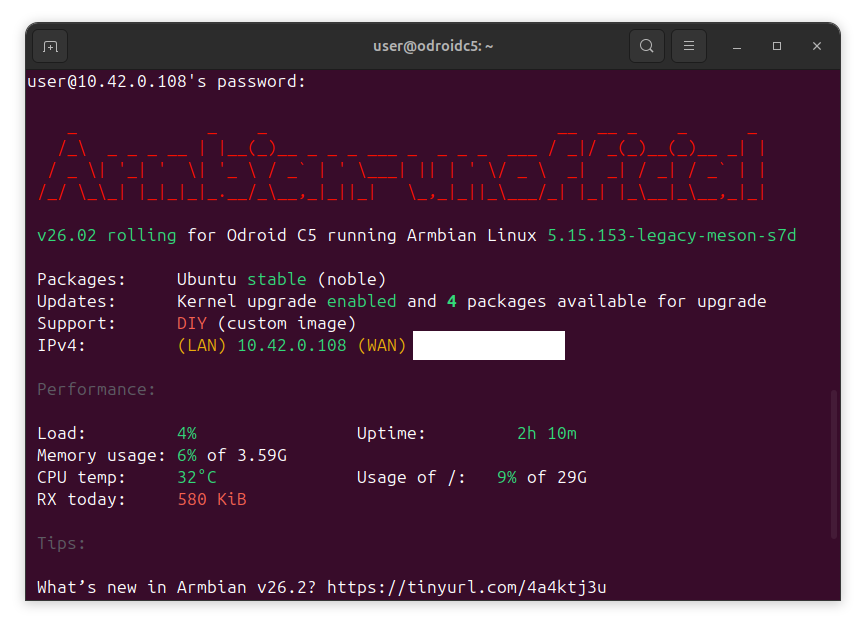
Can confirm. S905X5M is a different beast than the S905X. If there's interest, I can start another thread with an image and status, once this is somewhat more stable. Currently booting, but not without some debug console interaction on power up. In the meantime, code's up at https://github.com/tparys/build/tree/odroidc5 if anyone wants to go poking
-
 Hello, I hope you don't have any problem. Maybe me and my brother have defective or more unstable helios64 than you. Only thing I can say that Prahal share here the specifics files rk3399-kobol-helios64.dtb-6.XX.xx-L2-hs400-opp in this forum since two years ago my helios64 and my brother's helios64 work stable only with it. I back to 6.12.58 Kernel with rk3399-kobol-helios64.dtb-6.12.xx-L2-hs400-opp file and freeze firmware/kernel with armbian-config.
 -
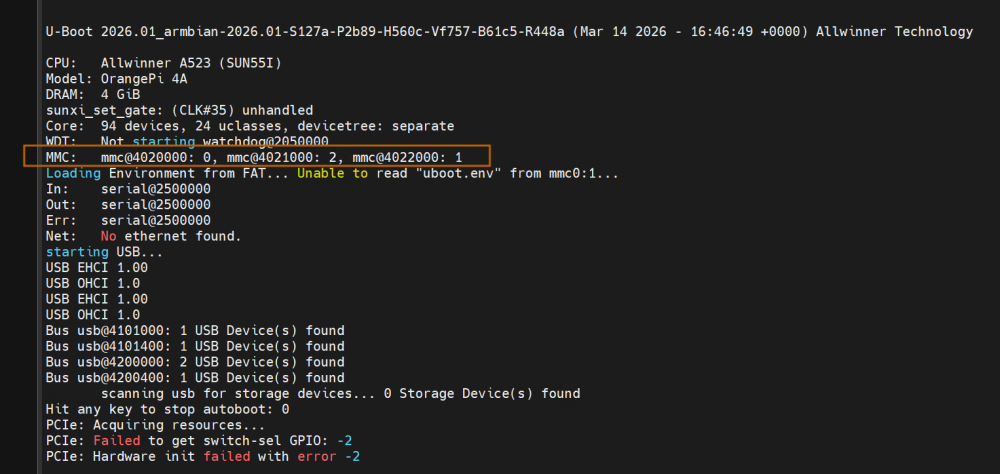
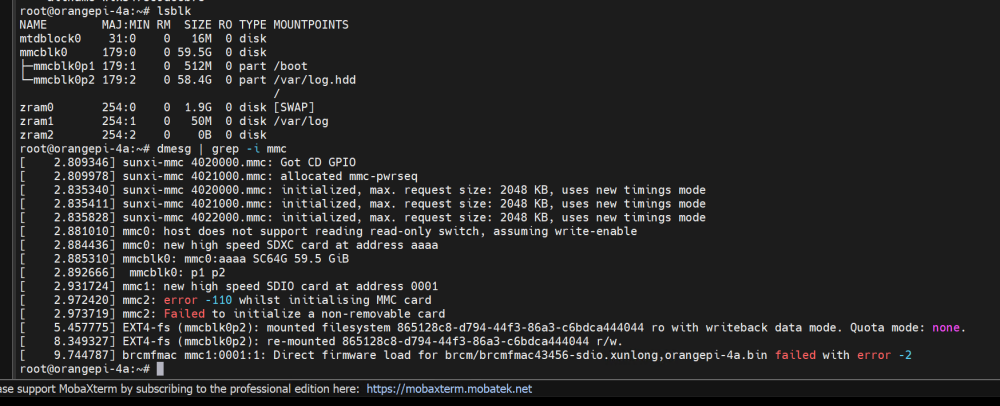
I am having issues with eMMC detection… The kernel does not detect the eMMC, but apparently U-Boot does. Attached are images.
-
I'm kinda new here, and lets first say thank you for Armbian, it has kinda saved me from having to do a lot more work than I have had to, to get my Orange Pi 5 Plus to a state where it's really a pretty cool little test/experimental system... BUT, I wondered... since many of these devices have accessible PCIe in one form or another, and the Mali GPU is a bit of a blocker... Perhaps it would be good to build the kernel with the modules for open source GPUs for Mesa... AMDGPU, XE, and i915.. Currently I'm in this position... I know I could clone the project from GIT, and build my own kernel, but this seems like an obvious next step and I wonder how many other people would try this if the modules were available. root@mouse:/home/james# lscpu | head -5 Architecture: aarch64 CPU op-mode(s): 32-bit, 64-bit Byte Order: Little Endian CPU(s): 8 On-line CPU(s) list: 0-7 root@mouse:/home/james# free -h total used free shared buff/cache available Mem: 30Gi 4.1Gi 18Gi 723Mi 9.2Gi 26Gi Swap: 15Gi 0B 15Gi root@mouse:/home/james# df -h . Filesystem Size Used Avail Use% Mounted on /dev/sda1 800G 322G 475G 41% /home root@mouse:/home/james# lspci 0000:00:00.0 PCI bridge: Rockchip Electronics Co., Ltd RK3588 (rev 01) 0000:01:00.0 VGA compatible controller: Advanced Micro Devices, Inc. [AMD/ATI] Lexa PRO [Radeon 540/540X/550/550X / RX 540X/550/550X] (rev c7) 0000:01:00.1 Audio device: Advanced Micro Devices, Inc. [AMD/ATI] Baffin HDMI/DP Audio [Radeon RX 550 640SP / RX 560/560X] 0002:20:00.0 PCI bridge: Rockchip Electronics Co., Ltd RK3588 (rev 01) 0002:21:00.0 Network controller: Intel Corporation Wi-Fi 6E(802.11ax) AX210/AX1675* 2x2 [Typhoon Peak] (rev 1a) 0003:30:00.0 PCI bridge: Rockchip Electronics Co., Ltd RK3588 (rev 01) 0003:31:00.0 Ethernet controller: Realtek Semiconductor Co., Ltd. RTL8125 2.5GbE Controller (rev 05) 0004:40:00.0 PCI bridge: Rockchip Electronics Co., Ltd RK3588 (rev 01) 0004:41:00.0 Ethernet controller: Realtek Semiconductor Co., Ltd. RTL8125 2.5GbE Controller (rev 05) root@mouse:/home/james# modprobe amdgpu modprobe: FATAL: Module amdgpu not found in directory /lib/modules/6.18.16-current-rockchip64 root@mouse:/home/james#
-
Hi, I am trying out Armbian 26.2.0-trunk.592 nightly (trixie) on a Radxa Rock PI 4b+ The community supported image boots fine and it is no problem to install Armbian on the on-board eMMC flash, but the installed NVMe SSD on PCIi is no recognised. It looks like the whole PCIe bus is not initialised properly during boot. in the kernel log I see: [ 0.062396] /pcie@f8000000: Fixed dependency cycle(s) with /pcie@f8000000/interrupt-controller [ 2.160749] rockchip-pcie f8000000.pcie: host bridge /pcie@f8000000 ranges: [ 2.160771] rockchip-pcie f8000000.pcie: MEM 0x00fa000000..0x00fbdfffff -> 0x00fa000000 [ 2.160779] rockchip-pcie f8000000.pcie: IO 0x00fbe00000..0x00fbefffff -> 0x00fbe00000 [ 2.869988] rockchip-pcie f8000000.pcie: PCIe link training gen1 timeout! [ 2.870032] rockchip-pcie f8000000.pcie: probe with driver rockchip-pcie failed with error -110 I have searched for quite a while now but could not really find a solution for this. It seems there have been similar problems reported regarding other SOCs using the same chip and I even see patches being proposed (not sure whether the PR has been merged) though at this moment I cannot really see any solution available to this yet. Did anyone else encounter this and is there any fix or workaround for this? I installed the Homeassistant OS image for this board (maintained here: https://github.com/citruz/haos-rockpi), which does not have this issue and allowed me to install and boot from the NVMe drive without any problem. Is anyone aware of the differences in the upstream linux kernel and the one that Armbian ships w.r.t. patches that could make a difference here? regards, Frederik
-
Hi @Edmilson Santos, what about Ethernet?
-
nanopi-r4s, enp1s0 ethernet device not found after reboot
Werner replied to Junkman's topic in NanoPi R4S
While waiting for new info, first poke in the dark. rk3399-fix-pci-phy.patch disabled https://testing.armbian.de/r4s/ feel free to test -
Perhaps a hardware defect? At least that would be my guess from what it sounds.
-
nanopi-r4s, enp1s0 ethernet device not found after reboot
Werner replied to Junkman's topic in NanoPi R4S
Please provide logs. armbianmonitor -u Otherwise its just poking around in the dark -
it only show 0xc8 if i have the wrong baudrate, otherwise nothing is shown on picocom's output. when i plug the poe hat, which has a fan (loaded by an overlay) it turns on, which would mean that it was loaded, right? but, i get no serial/hdmi output, no network uplink and only the green led is on. the same setup on another board works
-
nanopi-r4s, enp1s0 ethernet device not found after reboot
ArmUser replied to Junkman's topic in NanoPi R4S
I'm getting the exact same error after upgrading from kernel 6.12.58-current-rockchip64 to 6.18.10-current-rockchip64 on one of my NanoPi R4S. After a reboot, the network interface enp1s0 is missing. After shutting down and restarting, it reappears. If I revert to kernel 6.12.58-current-rockchip64 using armbian-config, the enp1s0 interface is also present after a reboot. Are there any suggestions on how I can resolve this issue without remaining on kernel 6.12.58-current-rockchip64?