


tparys
-
Posts
217 -
Joined
-
Last visited
Content Type
Forums
Store
Crowdfunding
Applications
Events
Raffles
Community Map
Everything posted by tparys
-
From your logs: Healthy: 6.12.32-current-meson64 Unhealthy: 6.18.15-current-meson64 Certainly sounds like something changed/broke in a major kernel update? For the near term, I would grab a copy of the 6.12 kernel and keep a copy. The apt tool should have saved a copy in /var/cache/apt/archives, so you should be able to pull a copy from the good system, and use "sudo dpkg -i" to downgrade the other two boards for the time being. If the working node has been upgraded, it's fan will probably stop working as intended after a power cycle. In parallel, the next thing to do is to take a look at the .dtb files for both kernels (amlogic/meson-sm1-odroid-hc4.dtb), and see what's changed. If I have a free evening, I'll take a peek. As @Igor as the board maintainer, you can also file a bug at https://github.com/armbian/build/issues, but could be a bit to get addressed.
-
Can you post logs of both working and not working boards? If they are exactly the same software, it sounds like a hardware issue. If the HardKernel images works as expected, perhaps you've updated all 3, but not rebooted the working one yet?
-
Nicely done. As some additional thoughts: 1. Fragment 0 and 2 of your .dts point to the same spot. They could be combined if you'd like. 2. The util-linux-extra package should be part of the core Ubuntu distribution. An apt install should have been enough, though you may need to enable the universe repository. 3. If you have a /dev/rtc1 device, that suggests that you have an rtc0 as well, and if you disable it, the kernel will natively load and store time to the one you provided. A quick glance at the .dts suggests one at /soc/bus@ff800000/rtc@a8. Adding one final fragment to your overlay like the below might allow you to skip need of hwclock, and both SystemD services for your RTC. See my note about CONFIG_RTC_HCTOSYS_DEVICE and CONFIG_RTC_SYSTOHC_DEVICE above. fragment@3 { target-path = "/soc/bus@ff800000/rtc@a8"; __overlay__ { status = "disabled"; }; }; 4. If you're up for it, submit a PR to create a dtbo for the I2C buses on the M5? Contributions to the project are always welcome.
-
It may be better to do this with an overlay, as a kernel update will wipe out any changes you make. If you're not seeing anything on any of the I2C buses, I'd first check your wiring. You should have 4 wires, SCL, SDA, GND, and either +3.3V or +5V (depending). Next, I'd check for similar boards to your M5. A quick search suggests it's an Amlogic S905X3, which is the same Meson SM1 CPU as the ODroid C4. And there's a pair of ODroid C4's overlays to enable I2C, and they're doing more than setting the status to "okay". May be worth a try? - meson-sm1-odroid-c4-i2c0.dtbo - meson-sm1-odroid-c4-i2c1.dtbo Failing that, I'd check to see if there's anything useful in the Banana Pi forums or documentation on how to enable those I2C buses. I'm afraid some of the Amlogic documentation may be somewhat limited.
-
So, I went through this recently on an NVidia device, and device tree overlays really aren't that hard. But there's a few things you'll need to get set up first, and not having an M5 to check, you'll probably have to do some reading / verification. I make no claim this will work out of the box for you. But I imagine this will save you a lot of reading. There's an example .dtbo at https://github.com/KF0ARE/i2c0-rtc.dtbo/blob/main/i2c0-rtc.dtbo you should look at, and you can decompile it with the following: dtc -O dts -o i2c0-rtc.dts i2c0-rtc.dtbo Which contains a fragment you'll be interested in, explicitly for the DS3231 ... /dts-v1/; / { compatible = "brcm,bcm2708"; ... snip ... fragment@3 { target = <0xffffffff>; __dormant__ { #address-cells = <0x01>; #size-cells = <0x00>; status = "okay"; ds3231@68 { compatible = "maxim,ds3231"; reg = <0x68>; status = "okay"; phandle = <0x04>; }; }; }; ... snip ... }; But you can't use this directly, because "compatible" doesn't include your M5, and "target" doesn't point anywhere useful in your DT. But it does call out the ds3231, and that it's at I2C address 0x68, so you can use that to find where the kernel thinks your RTC is. Take a look at where your I2C buses are (/dev/i2c-*) and just scan each of them like this to see if you can find it: tparys@pebble:~$ sudo i2cdetect -y -r 0 # NOTE: I2C bus #0 is /dev/i2c-0 0 1 2 3 4 5 6 7 8 9 a b c d e f 00: -- -- -- -- -- -- -- -- 10: UU -- -- -- -- -- -- -- -- -- -- -- -- -- -- -- 20: -- -- -- -- -- -- -- -- -- -- -- -- -- -- -- -- 30: -- -- -- -- -- -- -- -- -- -- -- -- -- -- -- -- 40: -- -- -- -- -- -- -- -- -- -- -- -- -- -- -- -- 50: -- -- -- -- -- -- -- -- -- -- -- -- -- -- -- -- 60: -- -- -- -- -- -- -- -- -- -- -- -- -- -- -- -- 70: -- -- -- -- -- -- -- -- In the above, address 0x10 is unusable as there's something else bound at that register. But check your buses to see if you can find 0x68. If you see something other than "--" or "UU" there, that's probably it. If you can't find it, double check that it's connected, powered on, and that your I2C bus has been enabled (might need to enable via DTB). Once you find it, you should be able to register it by doing something similar to the below as root (driver and I2C bus may be different): echo ds3231 0x68 > /sys/bus/i2c/devices/i2c-0/new_device If that works, and creates a /dev/rtc0 device, test that it's working with "hwclock". Once it's working, it's time to make your .dtbo. You'll probably want to dump your main .dtb with the same dtc command above, and look for i2c-0 (or whatever other bus you found), as well as a .dtbo or two for your M5 to find text to enter for "compatible". And you'll end up with something like this, saved as "m5-ds3231.dts" (or whatever): /dts-v1/; /plugin/; / { compatible = "brcm,bcm2708"; // <---- Change this fragment@0 { target = "i2c-0"; // <---- Change this __overlay__ { #address-cells = <0x01>; #size-cells = <0x00>; status = "okay"; ds3231@68 { compatible = "maxim,ds3231"; reg = <0x68>; status = "okay"; phandle = <0x04>; }; }; }; }; And you'll compile it like this: dtc -@ -O dtb -o m5-ds3231.dtbo m5-ds3231.dts And check it against your M5's DTB like below. Note that "target" or "target-path" has some odd syntax requirements. Quotes with a leading slash is a full path to your I2C device. Quotes without a leading slash is an alias. And angle brackets with an ampersand is a label (not everything has an explicit label). Worst case scenariou, call out the whole path in "target-path" with a leading slash, and call it a day. I beat my head against a wall for a while here before I realized I could test this without rebooting ... fdtoverlay -i /path/to/your/used.dtb -o modified.dtb m5-ds3231.dtbo And then add it to your overlay directory (/boot/dtb/CHIPNAME/overlays), enable it armbianEnv.txt, and give it a go? There's also two kernel build configs that may be of interest as well: CONFIG_RTC_HCTOSYS_DEVICE="rtc0" CONFIG_RTC_SYSTOHC_DEVICE="rtc0" The first triggers the kernel to load time from a given RTC when it first shows up. The second will tell the system to update RTC when locked against NTP. FYI, it seems that you can change these only with a new kernel build.
-
Industrial android board - RK3288 (possible EVB)
tparys replied to Mauricio Scotton's topic in Rockchip
At a glance, unless you see your board at https://armbian.com/download, chances are that no one else has gotten that board working. Might be better to post under "Other Families" for unsupported board stuff. @Werner may move later ... Might be crashing. Might be redirecting kernel to a different UART. May be worth checking earlycon and console settings in kernel args? You can try to pass break=premount or similar arguments to pause boot and allow you to poke around and see what's going on? -
You may want to check out this thread. There's someone else doing the same with an Orange Pi 5. Might be worth comparing notes with @KhanhDTP
-
I don't know if it's useful, but folks have been attaching external GPUs to low power boards for a while. My personal favorite was sacking and desoldering a USB3 controller to reuse it's PCIE lane: https://mloduchowski.com/raspberry-pi-4-b-pci-express/ Others have run into the same BAR limitation you noted: https://www.jeffgeerling.com/blog/2020/external-gpus-and-raspberry-pi-compute-module-4/ From a practical perspective, I'm not sure how many folks would be interested in discrete GPUs, as I'm not sure these sorts of boards would have the CPU or PCIE lanes to really make use of that extra horsepower. Most would get a dedicated embedded system, or a bespoke NVidia setup. For what it's worth, I ran into an issue where the kernel was too big for u-boot to boot it, and would just throw a synchronous abort and reset. The difference between working and not working was 7 MB.
-
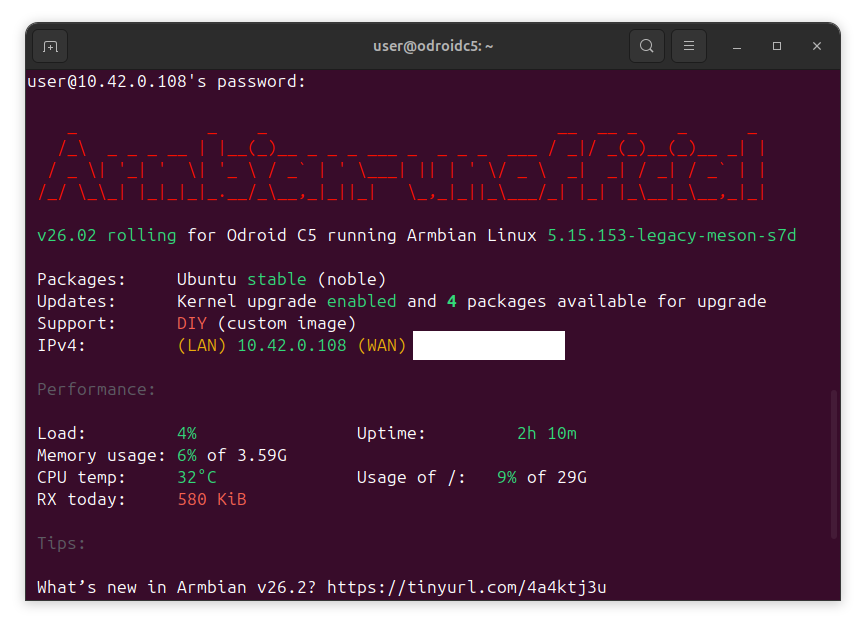
Can confirm. S905X5M is a different beast than the S905X. If there's interest, I can start another thread with an image and status, once this is somewhat more stable. Currently booting, but not without some debug console interaction on power up. In the meantime, code's up at https://github.com/tparys/build/tree/odroidc5 if anyone wants to go poking
-
Clarification on GPL 2.0 License Applicability
tparys replied to Clark McCauley's topic in Off-topic
GPL requires source code be offered for any software distributed. Changes to the build system probably aren't covered, but a modified DTB probably is. The final image also has the Linux kernel and other GPL components, so that definitely is. Bottom line is that GPL is supposed to be permissive. DTS is easily gotten from DTB. And you're probably good as long as you're not being a jerk about it. If that bothers you, you could also make a overlay (dtbo) and just patch the DTB on boot. You'd avoid the custom image and also make it more clear that your DTB is tweaked. -
Clarification on GPL 2.0 License Applicability
tparys replied to Clark McCauley's topic in Off-topic
This seems like an excellent question for a lawyer. That said, the Armbian Build system is GPL v2, which Wikipedia has an excellent Article on, and has the following to say: That said, even if you're not distributing modifications of the build system, the final image still has GPL components. -
to get 32768 clk from GPIO1 D4 on RK3328
tparys replied to emresensoy's topic in Advanced users - Development
PREEMPT_RT is fully merged in mainline Linux as of 2024 (https://en.wikipedia.org/wiki/PREEMPT_RT). -
to get 32768 clk from GPIO1 D4 on RK3328
tparys replied to emresensoy's topic in Advanced users - Development
The sysfs GPIO interface does not allow you to create clock outputs as-is. You'd do better seeing if that pin can be exposed through the sysfs PWM interface. I know the NanoPi M4V2's fan controller works this way (RK3399), and you can set the duty cycle. But you'd have to check if PWM is supported on that pin, and can be used in the way you're hoping. Failing that, it is possible to bit-bang the GPIO lines yourself if you're willing to write some C code. You can use Kernel Timers for fairly accurate timing, as long as you set High Scheduler Priority and Real Time Scheduler Class. Note that kernel timers only have a user specified resolution of 1ns, so you might not hit that frequency exactly. -
There's an Armbian provided SystemD service named armbian-led-state with the following description: # Armbian led state save and restore # Stores the current led state at shutdown and restores # it during bootstrap Maybe that's it? If so, you could disable it if it bothers you? Or adjust the script it calls at /usr/lib/armbian/armbian-led-state-save.sh?
-
All things are possible. The question is who's interested in doing (or funding) the work, and if technical data is available to do it. The build system is at https://github.com/armbian/build. If you know how to build a kernel, device tree, and bootloader, you can define how to do those steps there.
-
How you can help test upcoming Armbian 26.05 images?
tparys replied to Igor's topic in Advanced users - Development
Update on NanoPi M4v2 ... I pulled the most recent Armbian build, and manually ran the build for the M4v2, and it fails on kernel patch "general-gpio-driver-no-sleep". See pastebin at https://paste.armbian.com/puvorasuco for failed build. Checking upstream at https://git.kernel.org/pub/scm/linux/kernel/git/stable/linux.git, it looks like branch 6.18.y already has the subject patch, and was pushed today. Since both the rockchip and rockchip64 families use mainline kernel, I just submitted a PR that kills that patch for both. See https://github.com/armbian/build/pull/9368. -
Sorry in advance, but this is a bit of a dive. But, I haven't seen this fully captured and explained anywhere, and think this would be a useful thing to know for anyone who's doing arm64 development on a PC, which seems very relevant here ... I started pulling this thread when moving some software from Ubuntu Jammy to Noble, where the arm64 build process went from 20 mins to 50 mins. When I was done, it below to 15 min, and all I did was poke some flags for qemu's emulated CPU. The TL;DR version is that setting the environment variable QEMU_CPU to something like "cortex-a53" or "max,pauth-impdef=on" or even what I settled on, "max,pauth=off" saves massive amounts of time, and should be used anywhere you are running debootstrap, apt, or python in an emulated environment. However, you can't blindly set it everywhere because these flags are not defined for other architectures and will cause a hard stop when emulating PC or RISC-V. This has also shown up in the Armbian Build System. If you want to see this first hand, use the example here. Just save the following in test.sh: echo -n "testing... " for i in $(seq 2 10000); do is_prime=1 j=2 while ((j*j <= i)); do if (( i % j == 0)); then is_prime=0 break fi ((j++)) done if (( is_prime == 1 )); then echo $i > /dev/null fi done echo "done" And then run it in docker after ensuring a few things are installed ... ~ $ sudo apt install binfmt-support qemu-user-static ~ $ time docker run --rm -it --platform linux/arm64 -v .:/test ubuntu:noble /test/test.sh testing... done real 0m37.620s user 0m0.013s sys 0m0.022s ~ $ time docker run --rm -it --platform linux/arm64 -v .:/test ubuntu:jammy /test/test.sh testing... done real 0m4.700s user 0m0.011s sys 0m0.023s And we can wrestle that performance back by fiddling with QEMU flags ... ~ $ time docker run --rm -it --platform linux/arm64 -v .:/test --env QEMU_CPU=max,pauth=off ubuntu:noble /test/test.sh testing... done real 0m4.694s user 0m0.011s sys 0m0.024s So qemu bug? Not quite. The qemu emulator is a host application, and is the same both jammy and noble docker images, and I think the root cause was found here, and first appears in Ubuntu Lunar (23.10). The short version looks like gcc's stack protection logic wasn't operating as expected as the stack layout is a little different than it is on PC, a CVE was filed, and the "fix" is now stressing a slow code path in qemu. For the record, my heart goes out to "steev" and his slow, hours-per-bisect march to the answer. Pulling that thread a bit more, the QEMU Documentation has the following to say on the subject of arm64 pointer authentication: The qemu docs also suggest that the qemu impdef algorithm is the default, but I've not seen this on my version. It's possible this may be addressed in a much newer version of qemu, but that's not available in the Noble repos. It could be overridden via tonistiigi/binfmt (but I've not yet tested that). For what it's worth, it's not possible to just add a simple wrapper to qemu fix this either, as seen in this Github Example, and that's due to the Linux Kernel Binfmt Interface. The 'F' flag forces the kernel to store a handle to the specified emulator, and make it available in chroot and Docker contexts, and that doesn't help if it's only the wrapper it grabs and not the emulator binary. Similarly, it's not possible to pass additional flags via this interface, so without a change to the qemu binary, the QEMU_CPU environment variable may be the only way to work around this immediately. The other curious bit is what does QEMU_CPU=cortex-a53 enable to recover qemu speed? The answer is absolutely nothing. it just turns CPU features off. At a glance, I'm not sure if that something qemu is doing indirectly, or glibc conditionally enables at runtime. If anyone knows better than I here, please drop a comment. The curious can check can via: ~ $ docker run --rm -it --platform linux/arm64 ubuntu:noble cat /proc/cpuinfo processor : 0 model name : ARMv8 Processor rev 0 (v8l) BogoMIPS : 100.00 Features : fp asimd aes pmull sha1 sha2 crc32 atomics fphp asimdhp cpuid asimdrdm jscvt fcma lrcpc dcpop sha3 sm3 sm4 asimddp sha512 sve asimdfhm dit uscat ilrcpc flagm sb paca pacg dcpodp sve2 sveaes svepmull svebitperm svesha3 svesm4 flagm2 frint svei8mm svef32mm svef64mm svebf16 i8mm bf16 rng bti mte mte3 sme smei16i64 smef64f64 smei8i32 smef16f32 smeb16f32 smef32f32 smefa64 mops hbc CPU implementer : 0x00 CPU architecture: 8 CPU variant : 0x0 CPU part : 0x051 CPU revision : 0 ~ $ docker run --rm -it --platform linux/arm64 --env QEMU_CPU=cortex-a53 ubuntu:noble cat /proc/cpuinfo processor : 0 model name : ARMv8 Processor rev 4 (v8l) BogoMIPS : 100.00 Features : fp asimd aes pmull sha1 sha2 crc32 cpuid CPU implementer : 0x41 CPU architecture: 8 CPU variant : 0x0 CPU part : 0xd03 CPU revision : 4
-
How you can help test upcoming Armbian 26.05 images?
tparys replied to Igor's topic in Advanced users - Development
Board: ODroid C4 Image: Armbian_26.2.1_Odroidc4_noble_current_6.18.8_xfce_desktop.img.xz Tested OK: - Installation to SD card - Boot to desktop, login - OpenGL / Panfrost - USB 2.0 - Ethernet Not tested: - Audio via HDMI (Though alsamixer reports there's stuff there) If anything, the serial console seems rather quiet. But attached ... minicom.cap -
How you can help test upcoming Armbian 26.05 images?
tparys replied to Igor's topic in Advanced users - Development
I have two boards I can test. ODroid C4 and NanoPi M4v2. I'll pull down the C4 build and give it a go. I don't see a build for the M4v2? (EDIT - Doesn't look like the Github action failed)