Active threads
Showing topics posted in for the last 365 days.
- Past hour
-
 tried to boot this image Armbian_community_26.2.0-trunk.385_Aml-s9xx-box_trixie_current_6.18.8_minimal it gives this error scanning bus 0 for devices... 2 USB Device(s) found scanning usb for storage devices... init_part() 282: PART_TYPE_DOS 1 Storage Device(s) found reading zImage ** Unable to read file zImage ** reading dtb/amlogic/meson-gxl-s805x-p241.dtb 26728 bytes read in 57 ms (457 KiB/s) [rsvmem] get fdtaddr NULL! rsvmem - reserve memory Usage: rsvmem check - check reserved memory rsvmem dump - dump reserved memory rsvmem check failed Bad Linux ARM64 Image magic! gxl_p241_v1#
 -
Please use a build that isn't 7 years old. https://www.armbian.com/amlogic-s9xx-tv-box Read the FAQ and the install instructions linked there
- Today
-
Hi, welcome. Syncing forums and tags with supported boards is (still) a manual job and from time to time I either cannot keep up or miss things. Like in this case. I'll fix this later and then move appropriately. Until then feel free to state your question in "Beginners" using the "other" tag. Cheers
-
I tried Armbian_26.2.1_Nanopim4v2_trixie_current_6.18.8_minimal.img.xz, wrote it on TF card and it booted into Linux without any changes.
-
Hello, @Geoffrey F4FXLyou just saved me a lot of debugging time. I have multiple orange pi zero with h2+ and h3 and I had the same problem as you. With the reboot command, the sbc shutsdown but doesn't boot again, i need to reset the power for getting it booting again. On my side , this command extraargs=reboot=warm didn't worked but extraargs=reboot=watchdog worked perfectly. I just rebooted it 5 times in a row and it always rebooted well. My version : v25.11.2 for Orange Pi Zero running Armbian Linux 6.12.58-current-sunxi
-

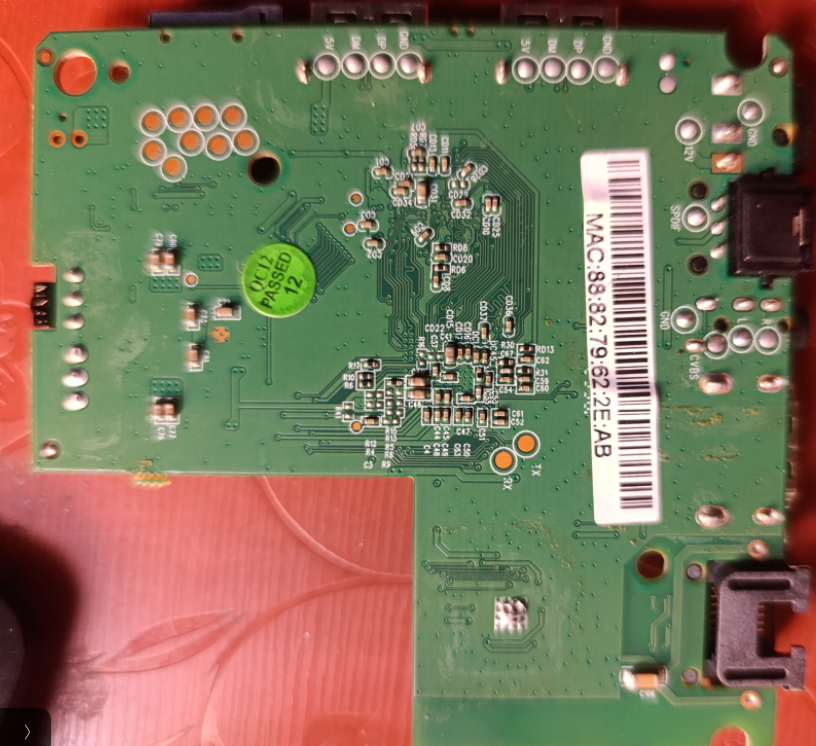
Where is the RAM present in this setup box?
abhishek timalsina posted a topic in Allwinner CPU Boxes
It is an h313 all winner box. But i can't point the RAM at all.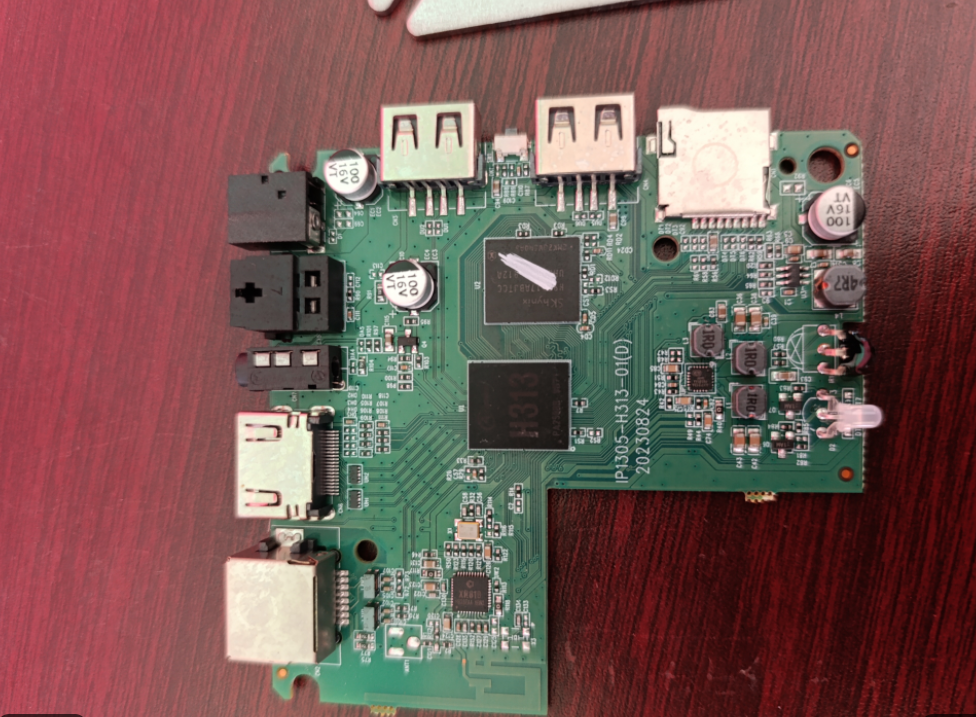
-
Excelent! That works. I didn't, notice that pinctrl-rk805 was externalized and can't be loaded automatically. For now I've just add pinctrl-rk805 to /etc/initramfs-tools/modules and update-initramfs. Werner: device tree has no changes for a long time. Thanks!
-
Hi Brent; YES! I did figure it out, finally. The issue is that almost all information on the web is for the older pipewire and wireplumber which works completely differently than the new versions. Bookworm used the "old way" and Trixie uses these new versions for which there isn't much info. Compounding the issue is that most information is regarding desktop versions of Linux, not headless like I run. So, when you use bluetooth on linux, wireplumber auto-creates profiles and pw nodes. Or at least it's supposed to. It wasn't creating these profiles because I was missing a conf file which is only needed when your NOT running on desktop, AFAICT. Add this file: /etc/wireplumber/wireplumber.conf.d/50-bluez-no-seat.conf wireplumber.profiles = { main = { monitor.bluez.seat-monitoring = disabled } } If you do that, all of sudden, bluetooth "just works". Took forever to find that stupid little piece of information.
-
@sicxnull I ran into the same issue when flashing "Armbian-unofficial_26.02.0-trunk_Mxqpro_bookworm_current_6.12.65_minimal" (worked only in SD Card). The issue was gone when I switched to "Armbian-unofficial_25.05.0-trunk_X96q-lpddr3-v1-3_bookworm_edge_6.12.11_server" built by @Nick A
-

The Rock Pi S completely freezes during OOMs
brentr replied to solaris3308's topic in Radxa Rock Pi S
Could you send me just the (short) list of packages you installed atop the base Armbian distro rather than a dump of every installed package? The goal is to provide me a simply procedure I can use to replicate the freeze you observe. You might also try running repeating the "free" command to monitor memory usage just after you start your tests. I expect you will see the swap usage steadily increasing. If you disable swap, the system will likely start killing processes. -
 Hello everyone, I have a Lemfo H96 Max V56 (8GB RAM / 64GB eMMC). Board PCB Version: HCY RK3566 - 1X32 - V13 - 2021-03-27 I am relatively new to the Linux world. So far, the only image I have managed to flash and boot successfully is an old Linaro Debian 10 (vendor image from 2019). However, this version lacks hardware acceleration (it runs on llvmpipe), which makes it unusable for my specific needs. My Goal: I want to run a modern Linux with a Desktop environment to use PortMaster and RetroArch. For this, I critically need a system with working Panfrost/Mali GPU drivers. The Problem: I have read through this thread, but I am finding it quite confusing to pinpoint exactly where to start given the various methods (Legacy vs Mainline/Chainloader). Also, it seems some file links are dead or pointing to empty repositories. Request: Could someone please guide me to the correct/updated files for my specific 8GB board? The correct MiniLoader/SPL (.bin) for RKDevTool. A working Desktop Image (.img) (Armbian Bookworm or Ubuntu) that supports GPU acceleration. I am already comfortable using RKDevTool and putting the device into Maskrom mode, so I just need the correct file set to avoid bricking the device. Thanks in advance for any help!
 - Yesterday
-
I'm back at it, but this time I can boot by setting netplan wifi up. On reboot wifi never comes up. Do the following: Since end0 is reporting as "busy," let's see if forcing it back to eth0 helps udev clear the conflict. Edit /boot/armbianEnv.txt. Add or modify the extraargs line to include: extraargs=net.ifnames=0 biosdevname=0 Fix hash errors: # Remove the cached package lists that are causing the mismatch sudo rm -rf /var/lib/apt/lists/* # Create the partial directory again just in case sudo mkdir -p /var/lib/apt/lists/partial # Clean out the local repository of retrieved package files sudo apt clean # Update the package index again sudo apt update This is latest build.
-
 BalenaEtcher has known issues and therefore not recommended. Use Armbian Imager or USBimager. Also verify that the downloaded image is good by utilizing the checksum. https://docs.armbian.com/User-Guide_Getting-Started/#download-and-verification https://github.com/armbian/imager https://bztsrc.gitlab.io/usbimager/
 -
moved
-
Will check it when i back to PC, will be away from pc for around a week
-
I do get multiple warnings while compiling the DTS file, about 50-100 warnings similar to this: ttt.dts:1752.3-32: Warning (gpios_property): /usb0-vbus:gpio: cell 0 is not a phandle reference ttt.dts:1764.3-32: Warning (gpios_property): /usb1-vbus:gpio: cell 0 is not a phandle reference ttt.dts:1776.3-32: Warning (gpios_property): /usb2-vbus:gpio: cell 0 is not a phandle reference ttt.dts:1823.4-34: Warning (gpios_property): /leds/led-3:gpios: cell 0 is not a phandle reference ttt.dts:1828.4-34: Warning (gpios_property): /leds/led-4:gpios: cell 0 is not a phandle reference The phandles are in this kind of format on the dts file: phandle = <0x20>; phandle = <0xc2>; phandle = <0x1c>; phandle = <0xc3>; phandle = <0xc4>; phandle = <0x16>; phandle = <0xc5>; example: Note: the usb0 vbus was originally disabled but I enabled it as the pcduino3 nano has a single regulator for all ports and it is attached to usb0 apparently. In the closing section of __symbols__, I have redirected all 3 regulators to usb0. I believe that the fact it is disabled is because they don't recommend powering the board through the OTG port as it can cause voltage drops when connecting devices as host. My setup will be a gadget with a wifi dongle in a USB A port, so voltage drops should not be a concern, this is just my assumption... usb0-vbus { compatible = "regulator-fixed"; regulator-name = "usb0-vbus"; regulator-min-microvolt = <0x4c4b40>; regulator-max-microvolt = <0x4c4b40>; enable-active-high; gpio = <0x17 0x01 0x09 0x00>; status = "okay"; phandle = <0xc2>;
-
-
 Ok, in case anyone's got any ideas about how to fix this, I'm happy to help if I can, but kernel repairs are a bit out of my league... It seems to reboot for different reasons - when it doesn't like something connected to the USB port, when doing a lot of disk I/O, etc. Here's a couple of the error logs from the terminal: INFO: task sgdisk:1567 blocked for more than 120 seconds. Tainted: G O 6.18.10-edge-sunxi64 #1 "echo 0 > /proc/sys/kernel/hung_task_timeout_secs" disables this message. task:sgdisk state:D stack:0 pid:1567 tgid:1567 ppid:1566 task_flags:0x400000 flags:0x00000018 Call trace: __switch_to+0xcc/0x180 (T) __schedule+0x348/0xaf8 schedule+0x38/0x110 io_schedule+0x40/0x60 folio_wait_bit_common+0x15c/0x390 folio_wait_bit+0x1c/0x30 folio_wait_writeback+0x4c/0xb8 __filemap_fdatawait_range+0x70/0xb0 filemap_fdatawait_keep_errors+0x24/0x58 sync_bdevs+0xb4/0x1a8 ksys_sync+0x64/0x98 __arm64_sys_sync+0x14/0x28 invoke_syscall.constprop.0+0x54/0xe8 do_el0_svc+0x44/0xc8 el0_svc+0x38/0x140 el0t_64_sync_handler+0x98/0xe0 el0t_64_sync+0x170/0x178 Kernel panic - not syncing: hung_task: blocked tasks CPU: 6 UID: 0 PID: 61 Comm: khungtaskd Tainted: G O 6.18.10-edge-sunxi64 #1 PREEMPT Tainted: [O]=OOT_MODULE Hardware name: Radxa Cubie A5E (DT) Call trace: show_stack+0x1c/0x30 (C) dump_stack_lvl+0x30/0x80 dump_stack+0x14/0x20 vpanic+0x2d4/0x308 panic+0x50/0x58 watchdog+0x278/0x718 kthread+0x134/0x1f8 ret_from_fork+0x10/0x20 SMP: stopping secondary CPUs Kernel Offset: disabled CPU features: 0x080000,00008000,48006281,0400701b Memory Limit: none ---[ end Kernel panic - not syncing: hung_task: blocked tasks ]--- INFO: task systemd-udevd:285 blocked for more than 120 seconds. Tainted: G O 6.18.10-edge-sunxi64 #1 "echo 0 > /proc/sys/kernel/hung_task_timeout_secs" disables this message. task:systemd-udevd state:D stack:0 pid:285 tgid:285 ppid:1 task_flags:0x400100 flags:0x00000809 Call trace: __switch_to+0xcc/0x180 (T) __schedule+0x348/0xaf8 schedule+0x38/0x110 io_schedule+0x40/0x60 folio_wait_bit_common+0x15c/0x390 folio_wait_bit+0x1c/0x30 folio_wait_writeback+0x4c/0xb8 __filemap_fdatawait_range+0x70/0xb0 filemap_write_and_wait_range+0x90/0xc0 sync_blockdev+0x24/0x40 bdev_disk_changed+0x64/0x5c8 blkdev_get_whole+0xa4/0xf8 bdev_open+0x278/0x3b0 bdev_file_open_by_dev+0xdc/0x148 disk_scan_partitions+0x6c/0x150 blkdev_ioctl+0x664/0xfc0 __arm64_sys_ioctl+0x470/0xaa0 invoke_syscall.constprop.0+0x54/0xe8 do_el0_svc+0xa4/0xc8 el0_svc+0x38/0x140 el0t_64_sync_handler+0x98/0xe0 el0t_64_sync+0x170/0x178 INFO: task sgdisk:1465 blocked for more than 120 seconds. Tainted: G O 6.18.10-edge-sunxi64 #1 "echo 0 > /proc/sys/kernel/hung_task_timeout_secs" disables this message. task:sgdisk state:D stack:0 pid:1465 tgid:1465 ppid:1464 task_flags:0x400000 flags:0x00000008 Call trace: __switch_to+0xcc/0x180 (T) __schedule+0x348/0xaf8 schedule+0x38/0x110 io_schedule+0x40/0x60 folio_wait_bit_common+0x15c/0x390 folio_wait_bit+0x1c/0x30 folio_wait_writeback+0x4c/0xb8 __filemap_fdatawait_range+0x70/0xb0 filemap_write_and_wait_range+0x90/0xc0 bdev_release+0x19c/0x1b0 blkdev_release+0x18/0x30 __fput+0xd0/0x2e8 fput_close_sync+0x44/0x108 __arm64_sys_close+0x3c/0x88 invoke_syscall.constprop.0+0x54/0xe8 do_el0_svc+0x44/0xc8 el0_svc+0x38/0x140 el0t_64_sync_handler+0x98/0xe0 el0t_64_sync+0x170/0x178 Kernel panic - not syncing: hung_task: blocked tasks CPU: 1 UID: 0 PID: 61 Comm: khungtaskd Tainted: G O 6.18.10-edge-sunxi64 #1 PREEMPT Tainted: [O]=OOT_MODULE Hardware name: Radxa Cubie A5E (DT) Call trace: show_stack+0x1c/0x30 (C) dump_stack_lvl+0x30/0x80 dump_stack+0x14/0x20 vpanic+0x2d4/0x308 panic+0x50/0x58 watchdog+0x278/0x718 kthread+0x134/0x1f8 ret_from_fork+0x10/0x20 SMP: stopping secondary CPUs Kernel Offset: disabled CPU features: 0x080000,00008000,48006281,0400701b Memory Limit: none ---[ end Kernel panic - not syncing: hung_task: blocked tasks ]---
 -

Have Armbian for Tanix TX1 QHZIW_H313_TX1_EMCP_V2.0?
Nick A replied to Lesano's topic in Allwinner CPU Boxes
@billymore The "Kernel panic - not syncing: VFS: Unable to mount root fs on unknown-block(0,0)" error indicates that the Linux kernel could not locate or mount the root file system during startup. . This is commonly caused by a missing or corrupted initial RAM filesystem (initramfs), an incorrect root= boot parameter write 0x4ff00000 rootfs.cpio.lzma.uboot -
@Jain Ziad I'm currently working on hardware acceleration, though I can't say yet if it will outperform the official Radxa builds since it uses the same drivers. I'll keep the community updated on the results.
- Last week
-
Hello Armbian-Community! TL;DR I've successfully enabled the Rockchip RK3568 NPU (0.8 TOPS INT8) on the ODROID-M1 with 8GB RAM running Armbian 6.18.9-current-rockchip64. The only thing needed to make this work for everyone is a 1-line kernel patch in Armbian build that I've already submitted: https://github.com/armbian/build/pull/9403 Once this patch is merged into Armbian, the DKMS modules will work out-of-the-box on all RK3568 boards. The Problem 1. Hardkernel and Rockchip provide NPU patches for quite old kernel versions: rockchip <= 6.6 hardkernel <= 5.10 2. IOMMU page table allocation bug — On systems with >4GB RAM, the kernel's IOMMU allocates page tables above 4GB, but the NPU can only access the first 4GB of physical memory, causing DMA mapping failures and inference timeouts The Solution 1. Kernel Patch (1 line!) - .gfp_flags = 0, + .gfp_flags = GFP_DMA32, This forces IOMMU page tables to be allocated below 4GB, fixing NPU operation on 8GB boards. 2. DKMS Driver Package I've created a complete DKMS package that: - Includes DT overlays for NPU, IOMMU, power-domain, and clock configuration - Supports dynamic frequency scaling (100 MHz - 1000 MHz) - Provides `/dev/dri/renderD129` (DRM/GEM interface) for RKNN Runtime - Would compile against Armbian's stock kernel headers with the above patch merged The Questions 1. What would be the best way to provide those modules for installation in the armbian system? 2. Has someone a 4 GB version of the M1 and could test the modules?
-
Hello, 4GB version. - Detecting meteors in GMN network (https://globalmeteornetwork.org/) - monitor other x64 machine and reset by power cycle (via gpio). rock64 is rock stable
-

to get 32768 clk from GPIO1 D4 on RK3328
tparys replied to emresensoy's topic in Advanced users - Development
The sysfs GPIO interface does not allow you to create clock outputs as-is. You'd do better seeing if that pin can be exposed through the sysfs PWM interface. I know the NanoPi M4V2's fan controller works this way (RK3399), and you can set the duty cycle. But you'd have to check if PWM is supported on that pin, and can be used in the way you're hoping. Failing that, it is possible to bit-bang the GPIO lines yourself if you're willing to write some C code. You can use Kernel Timers for fairly accurate timing, as long as you set High Scheduler Priority and Real Time Scheduler Class. Note that kernel timers only have a user specified resolution of 1ns, so you might not hit that frequency exactly. -
Is the NanoPC-T6 Plus compatible with the NanoPC T6 LTS image ?
Werner replied to magic_sam's topic in NanoPC T6 LTS
Probably a new product. Images are not compatible unless specifically marked as such. -

Efforts to develop firmware for H96 MAX M9 RK3576 TV Box 8G/128G
cmuki replied to Hqnicolas's topic in Rockchip CPU Boxes
Regarding the vendor kernel I also managed to get the GPU going with some AI help, but the HDMI hotplug issue persists. Will probably revisit it in the future. (the dtb should go in packages/blobs/h96-m9_original.dtb and the defconfig in patch/u-boot/legacy/u-boot-radxa-rk35xx/deconfig) h96-m9.csc h96-m9_original.dts h96-m9-rk3576_defconfig h96-m9_original.dtb