Active threads
Showing topics posted in for the last 365 days.
- Past hour
-
I recently did some trying to boot Armbian on this box and eventually got it not to recognize "Loader" mode using the reset button. It was working before I eventually flashed an not so compatible u-boot. I knew the risks, sh1t happens I was trying to boot Armbian from USB by the way, that is why I tried to do this. I discovered that the original firmware is the same as a H96_Max_M1PLUS as we can see from the official firmware file naming: rk3528_l001_H96_Max_M1PLUS_6621_64BIT_TAR-20251112.2200.img My question, as anyone had experience with this board? The idea is to ditch the original firmware and run HA on Armbian (I previously did this with another box using docker). I know the only option now is to "short" the eMMC in order to achieve "Maskrom" mode but there are no obvious pin points on the board.
-
Dear Armbian-Enthusiasts! I would like to install Armbian with Virtualbox, so that I can run Home Assistant (HA) in a VM environment (Intel chip .vdi) - yes, no container. Would chose this image "Armbian 25.11.1 Minimal / IOT 6.1 kernel" (rolling release) Installing Virtualbox with: sudo apt install virtualbox Is this possible? Best wishes, Greg Links: https://www.home-assistant.io/installation/linux/ https://wiki.debian.org/VirtualBox https://www.armbian.com/orange-pi-5-plus/
- Today
-

networking in bpi-m5 with new 26.03.1 release.
gene1934 replied to gene1934's topic in Software, Applications, Userspace
You mix up 2 things: - 'msdos filesystem' which usually means 'FAT' - 'msdos table' which usually means 'MBR partition table' agreed Both can be up to 2 TeraBytes when sector or cluster size is 512 bytes. So no reason to change to GPT. Changing to GPT (with standard 128 entries), will use the same space as where the U-Boot bootloader is located on SD-card for older Arm chips, like Allwinner A20 (original bananapi). So risk is un-bootable. which seems to be the case. but it sure as hell blocks mounting and working on the card b4 network is enabled. Why? the error reported is can't find ext4 filesystem. I'll rewrite it just to be sure its pristine. Because it did mount but only lost+found is there. next? -
Thanks for the info to try other options 🙂 Thanks for the tip, I'll try other options 🙂 It worked for: odroid-c4 ... basically, the settings are the same as for the OrangePI3LTS, I'm talking about connecting cables to a 40x2 / 20x2 LCD. The diagram for the BananapiM2pro is as follows: My Winstar 40x2 OLED LCD compatible with drivers: hd44780 / driver: WS0010 is detected in the system as: 3f .................................. sudo i2cdetect -y 0 [sudo] kris: 0 1 2 3 4 5 6 7 8 9 a b c d e f 00: -- -- -- -- -- -- -- -- 10: -- -- -- -- -- -- -- -- -- -- -- -- -- -- -- -- 20: -- -- -- -- -- -- -- -- -- -- -- -- -- -- -- -- 30: -- -- -- -- -- -- -- -- -- -- -- -- -- -- -- 3f 40: -- -- -- -- -- -- -- -- -- -- -- -- -- -- -- -- 50: -- -- -- -- -- -- -- -- -- -- -- -- -- -- -- -- 60: -- -- -- -- -- -- -- -- -- -- -- -- -- -- -- -- 70: -- -- -- -- -- -- -- -- .................................. You can also enter the appropriate values yourself in the file: sudo nano /boot/armbianEnv.txt verbosity=1 console=both overlay_prefix=meson fdtfile=amlogic/meson-sm1-bananapi-m2-pro.dtb rootdev=UUID=a4fb8074-c453-45da-ab31-4d61dca46cfa rootfstype=ext4 overlays=sm1-odroid-c4-i2c0 sm1-odroid-c4-i2c1 usbstoragequirks=0x2537:0x1066:u,0x2537:0x1068:u regards
-
@tparys Thanks for your precious advices I merged them in one dts. This suppress the dummy rtc0 rplace it by the real ds3231 rtc , and as it's rtc0 linux uses it at boot with out any service or script. the dts : /dts-v1/; /plugin/; / { compatible = "amlogic,meson-sm1"; fragment@0 { target-path = "/soc/bus@ffd00000/i2c@1d000"; __overlay__ { status = "okay"; clock-frequency = <100000>; pinctrl-names = "default"; pinctrl-0 = <&i2c2_pins>; #address-cells = <1>; #size-cells = <0>; rtc@68 { compatible = "maxim,ds3231"; reg = <0x68>; }; }; }; fragment@1 { target-path = "/soc/bus@ff600000/bus@34400/pinctrl@40"; __overlay__ { i2c2_pins: i2c2_pins { mux { groups = "i2c2_sda_x", "i2c2_sck_x"; function = "i2c2"; bias-disable; drive-strength-microamp = <3000>; }; }; }; }; fragment@2 { target-path = "/soc/bus@ff800000/rtc@a8"; __overlay__ { status = "disabled"; }; }; }; then I set up a basic service to keep ds3231 up to date either by internal system clock or NTP if chrony synchronize with internet extract of syslog : 2026-04-06T10:19:22.245210+02:00 bananapim5 systemd[1]: Started sync-rtc.timer - Run RTC sync every 6 hour. 2026-04-06T10:19:22.248077+02:00 bananapim5 kernel: rtc-ds1307 0-0068: SET TIME! 2026-04-06T10:19:22.248112+02:00 bananapim5 kernel: rtc-ds1307 0-0068: registered as rtc0 2026-04-06T10:19:22.248120+02:00 bananapim5 kernel: rtc-ds1307 0-0068: setting system clock to 2026-04-06T08:19:16 UTC (1775463556) 2026-04-06T10:24:18.665668+02:00 bananapim5 systemd[1]: Starting sync-rtc.service - Synchronize RTC0 avec l'horloge systeme si NTP actif... 2026-04-06T10:24:18.743806+02:00 bananapim5 sync-rtc: NTP actif : mise à jour RTC0 depuis l'heure système 2026-04-06T10:24:18.751001+02:00 bananapim5 sync-rtc: Mise à jour RTC0 depuis l'heure système NTP actif/inactif 2026-04-06T10:24:19.005750+02:00 bananapim5 systemd[1]: sync-rtc.service: Deactivated successfully. 2026-04-06T10:24:19.006443+02:00 bananapim5 systemd[1]: Finished sync-rtc.service - Synchronize RTC0 avec l'horloge systeme si NTP actif. root@bananapim5:/home/gerard# service : root@bananapim5:/home/gerard# cat /etc/systemd/system/sync-rtc.service [Unit] Description=Synchronize RTC0 avec l'horloge systeme si NTP actif After=chronyd.service [Service] Type=oneshot ExecStart=/usr/rtc/sync-rtc.sh root@bananapim5:/home/gerard# cat /etc/systemd/system/sync-rtc.timer [Unit] Description=Run RTC sync every 6 hour [Timer] OnBootSec=5min OnUnitActiveSec=6h Unit=sync-rtc.service Persistent=true [Install] WantedBy=timers.target root@bananapim5:/home/gerard# cat /usr/rtc/sync-rtc.sh #!/bin/bash # sync-rtc.sh # Synchronisation RTC <-> système avec logging # Vérifie si Chrony a des sources NTP actives NTP_OK=$(chronyc tracking | grep 'Reference ID' | grep -v '0.0.0.0') if [ -n "$NTP_OK" ]; then # Chrony OK, mettre RTC à jour depuis l’heure système logger -t sync-rtc "NTP actif : mise à jour RTC0 depuis l'heure système" else # NTP indisponible logger -t sync-rtc "NTP inactif" fi logger -t sync-rtc "Mise à jour RTC0 depuis l'heure système NTP actif/inactif" hwclock -w -f /dev/rtc0 root@bananapim5:/home/gerard# thanks again
-

[Latest] Armbian Build HDMI Audio support Fix
MarkAntony replied to just_facking_about's topic in Radxa Dragon Q6A
@rsbuffalo's Feb 18th post worked a treat for me on my Dragon Q6a (Armbian 26.2.1 trixie, xfce 4.20). Thanks so much for sharing your solution. - Yesterday
-
 @HenricoLegal can you find the wifi chip on your board?
 -
Holy Shit this is great! Finally can get use out of this doorstopper if you continue. Imagine getting MeshCore or Meshtastic installed.
-
 @Nick A Thank you, can you publish a server image for the Radxa A7Z with kernel 6.18?
 -
If an pre-made image is not there, just DIY. https://docs.armbian.com/Developer-Guide_Build-Preparation/
-
I see. Well I can confirm my bootloader is very stable. I have been running it on two devices for a couple years now without any issues. It cannot hurt to flash it again (to rule out random bitflips), but if you are getting sporadic crashing no matter the kernel/OS it does start to indicate a hardware issue. I have a laptop that crashes sporadically but it isn't so bad that I cannot use it. I've run memtest on it countless times without issue, tried replacing RAM, etc. some devices really are just cursed for whatever reason unfortunately. In case it is helpful, you can find the config for the kernel I run on my devices here: https://github.com/bschnei/linux-a3700
- Last week
-
Tried building a trixie image with this tee and still locks at the same spot
-
ok. I have 5 cubieboard 1. Not possible memory card for every one.
-
Great! I will start to tinker around with armbian.
-

Games Compatible With Armbian on Pinebook Pro
LivingLinux replied to Katsujinken's topic in Pinebook Pro
My PBP died, so I can no longer test it myself. You can start by testing the PPSSPP aarch64 AppImage. https://github.com/hrydgard/ppsspp/releases A couple of years ago I had performance issues with the PPSSPP Flatpak on my Phytium D2000, so I built it on Ubuntu 22.04. I'm not sure if I followed the instructions for Qt, or for Linux. So you need to install the prerequisites and I guess it doesn't hurt to install the additional packages mentioned for Ubuntu. https://github.com/hrydgard/ppsspp/wiki/build-instructions#building-with-cmake-other-platforms-eg-linux -

Teclast T60 AI rooting + armbian possibility Allwinner A733
Werner replied to Taz's topic in Allwinner CPU Boxes
moved to tvboxes -
Hi @BOFFBOY, have you managed to make it work? Having similar issue : tried with two different orange pi 5 , two different nvme SSDs, three different Power supplies up to 5V/5A and three armbian kernels: 5.10 | 6.1 and 6.18
-
Okay I think you are right they are shifting the RAM GB numbers so 8 GB is actually 4 GB as the price suggests. Now now, what I ended up doing is I bought a Teclast T60 AI tablet(for 100 euro shipped in EU) with Allwinner A772 which is supported by armbian and comes with 6GB RAM. I do not know if I will be trying to boot armbian on it soon but I was able to root it with Magisk. It did went on quite a journey to get it rooted as I kind of soft bricked it at first. Deepseek was giving me little wrong information but we got there. I think I might need a more competent AI agent like Gemini pro to get display, touch, wifi, bluetooth etc. working with armbian. Perhaps I post about the rooting process elsewhere at some point. Here is some of the gear I have if people are interested: https://www.aliexpress.com/item/1005009330391341.html DUX DUCIS Foldable Bluetooth 5.0 Keyboard with Touchpad & Phone Holder For Phones Tablets PC iOS Android Windows Mac https://www.aliexpress.com/item/1005011827691576.html https://www.aliexpress.com/item/1005009419399930.html HGFRTEE 3840*2160 13.3inch 4K Portable Monitor All in all pretty pleased with it so far, not exactly Surface pro 5/7 which I also have and they all weight about 1000 grams but then on the other hand this tablet did not cost me hundreds of $ so I can be little less nervous about someone stealing it.
-

CSC Armbian for RK3318/RK3328 TV box boards
andrey.lobov replied to jock's topic in Rockchip CPU Boxes
@jock Thank you, I will try. -
After more than six successful years with Helios4, I have to say goodbye to this platform and the highly valued, helpful, and knowledgeable Armbian forum. With 32-bit, it’s no longer feasible to continue using it in the future. I have installed the 4 8TB hard drives from the NAS into an Odroid H4+ (Intel, 64-bit), installed OMV8, and on top of that, Nextcloud-AIO Hub 26 Winter and AdGuardHome. Thank you very much for your support over the past few years. btw. The Helios4 hardware (excluding the hard drives) is still available.
-
 Hi.. I need de original firmware for android box Q17 Allwinner h313.. Someone can help me?
 -
I'd like to add my observations. The current version is 7.0.0-rc6-edge-sunxi64. The wireless interface is available, but if Ethernet is connected, it's impossible to connect to either interface via SSH. However, as soon as the Ethernet speed is set to 100, both interfaces become operational. Maybe this will help revive the hardware.
-
Hi Iuri, I had a similar issue for the rock3a, but I'm using a BigTreeTech 5" DSI display for use on a 3d printer. I've been dabbling in device drivers for 3 years with limited success, but I can say I recently got the 5" dsi display to work. All of my work is here: https://github.com/saltydog101/rock3a_dsi I had to load a new kernel module and then I was able to create a working dtbo for it. It was definitely more than I expected. That being said, when a vendor like Rockchip, Radxa or BigTreeTech decided to make a modification to the linux kernel and not have it committed to mainline, I don't think this is Armbian's issue at all. The engineers and community here do amazing work getting linux running on so many devices. You would normally have better luck looking at Radxa's discord and/or their documentation.
-
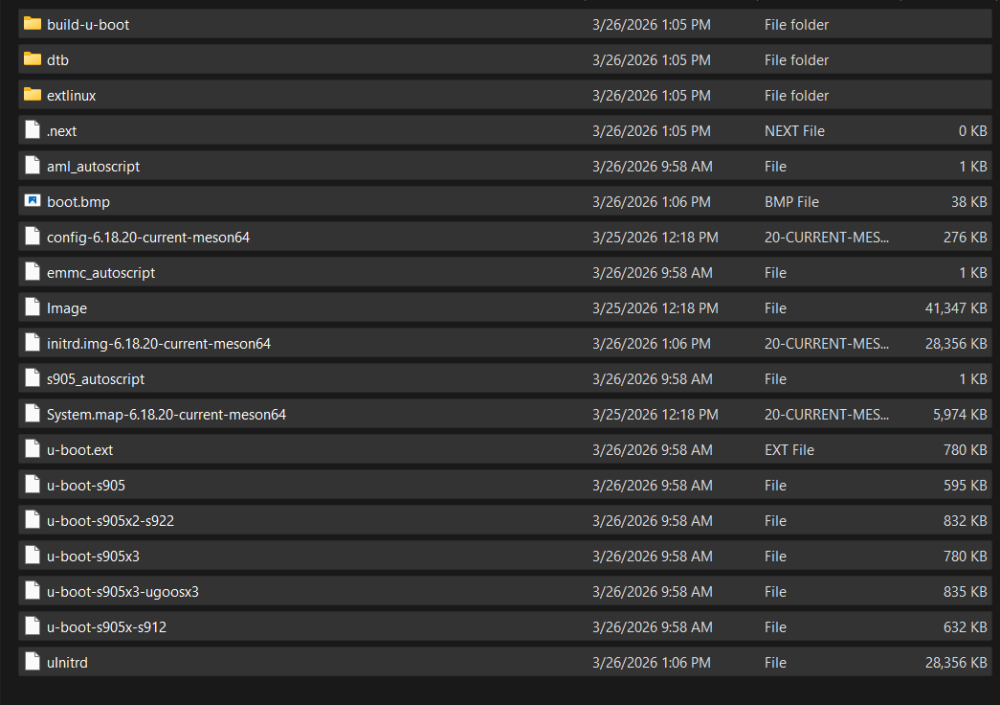
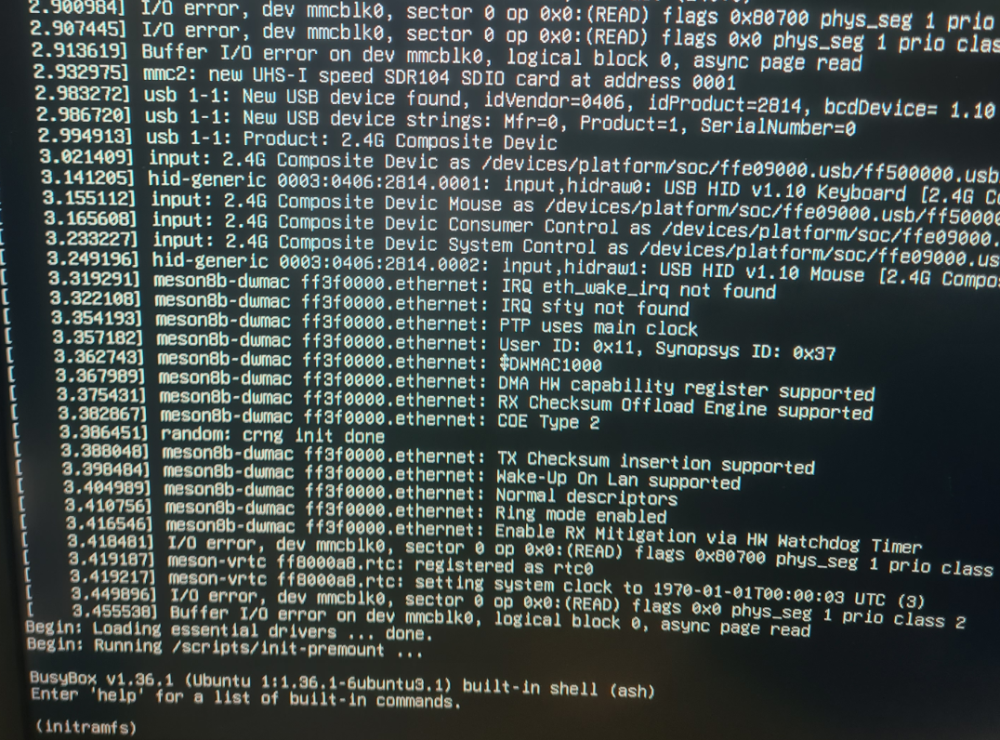
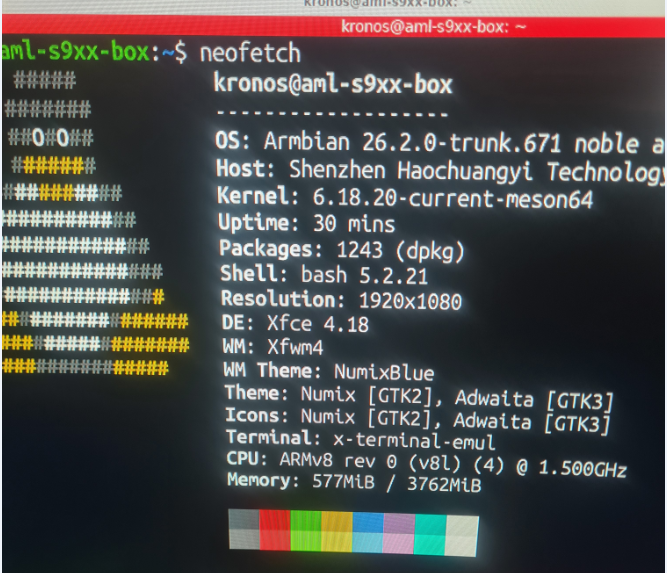
i will get that information for you.Sorry i did not give it sooner Box: H96 model x3 cpu-s905x3 rom 64gb the config file is kernel /Image initrd /uInitrd fdt /dtb/amlogic/meson-sm1-h96-max.dtb append root=UUID=54072e2a-0ddf-4b60-930c-f13cc5fc51b1 rootflags=data=writeback console=ttyAML0,115200n8 console=tty0 rw no_console_suspend consoleblank=0 fsck.fix=yes fsck.repair=yes net.ifnames=0 splash plymouth.ignore-serial-consoles I will post a neofetch of the usb flash that armibian works from on the same box strange enough when i take the sd card out the port on the box and place it in a usb card reader then boot armbian boots up ok and works(except the wifi) WHen i place the sd card back into the slot i get no errors but get stuck on initram
-
 Collabora presents "Bringing BitNet to ExecuTorch via Vulkan" at PyTorch Conference Europe in Paris (April 7-8) and attends ICLR in Rio de Janeiro (April 23-27). Connect with our team to discuss machine learning and open source innovation! View the full article