Active threads
Showing topics posted in for the last 365 days.
- Today
-
Hi Chris, when I tried to install the headers on my pcduino3nano, there were two options: linux-headers-armmp (or equivalent for your board) and kernel-headers. This secong package name was incomplete, but apt suggested a list of possible matches for my system. Give that a try. Cheers, Gaetano.
-
I would use systemd. Depending on what application you are talking about, a simple or oneshot service should do the trick. Read the first two examples in the manual: https://www.freedesktop.org/software/systemd/man/latest/systemd.service.html#Examples Assuming you mean an application started by the system and not your user, select the version that fits your situation, create/edit the file /etc/systemd/system/name_your_service.service with the contents needed, for example: [Unit] Description=Service to start "application" [Service] Type=simple ExecStart=/path/to/application [Install] WantedBy=multi-user.target Then enable the service and reboot. sudo systemctl enable name_your_service.service sudo reboot now You can use "systemctl status name_your_service.service" to see status, or "journalctl -u name_your_service.service" to see logs. You should obv change the name of the service from name_your_service to something fitting. If you want the application to run even earlier at boot, you can change multi-user.target to basic.target instead, but be mindful that if you do that and the application requires for example network to be available, you then also need to add "After=network-online.target". Instead, it's usually better to use "Before" and "After" variables and stay on multi-user.target. Please see manual in link above and https://www.freedesktop.org/software/systemd/man/latest/systemd.unit.html for more advanced usage.
-
Hello @JamesCL! I got the same error. You need to select at least one desktop package - error shows up with empty DESKTOP_APPGROUPS_SELECTED= Hello @Malay: That was on my todo list. I grabbed an eMMC from an old Odroid. It tried to boot if inserted. Thus boot sequence is: SD/TF, then eMMC, then MTD. So I booted with SD. eMMC showed up in /dev/mmcblk2. I started armbian-install, selected "Install on eMMC". Now it tries to boot that old Odroid image. So boot0, uboot, and SBI are there. Should work if you copy an image to /dev/mmcblk2. @All others: if that kernel thread for realtime-CPU (and HDMI audio) is active, the board always reports a load=2.0 or higher. This does not cause a very un-responsive Wayland-Gnome3-Desktop, this has other causes. Anyhow, this desires more investigation, since running a polling process to grab data from a realtime CPU does not sound right, there has to be an Interrupt or so, so I may again revert the reverted reversion (of the RPMSG kthread). Also I learned, that the Fedora project has an even larger esos.elf (rCPU firmware). I am curious what additional stuff may be in there 🤔 LG // Sven-Ola
-
Okay an update: Thank you @jock for the answer i've been looking for, I've managed to make use of the hardware acceleration (H.264) of my RK3229 on Android Auto (OpenAuto) but it's a complicated process i had to do. - I had to build my own aasdk and openauto from the git repository and test it as it is. running raw Open Auto showed the following issues: for openauto GUI it runs via linuxfb (trying to fix but still can't find a workaround) AndroidAuto stream decode was only running x264 (software decoding) [fixed tho] This has been fixed by doing a custom code for OpenAuto to utilize Kmssink (now works in 720p 30fps, going 60 adds a lot of latency but it's smooth!) Audio Not Working (i think can be fixed by pulse audio or just do direct hardware) Probably more since im only testing Audio Video as of right now. OpenAuto: RK3229 Armbian Github Repository if ever you want to try it!
-
Hello. I have easily managed to get armbian up and running of a usb stick, in fact everything worked perfect (hdmi, wifi, gbit ethernet, etc.). The tv box is h96-air-gbit (as the dtb is named), amlogic s905x3 soc, 32gb mmc, 4gb RAM, gigabit ethernet, 2xusb 2.0, 1xusb 3.0, sd card, hdmi, av port (reset button inside), spdif. The thing is, I wanted to benefit from the 32gb internal mmc storage, since I was running armbian from a 8gb usb stick (had a lot of those hanging around, and didn't want to buy a bigger one). I did notice the image I used had not armbian-install script, nor nand-sata-install. I did a manual install (snapshot copy) of my current system with the help of Claude.ai 1. step - create an setup another partition on the emmc (currently there were 2x 4M partitions - the bootloader I presume) sudo fdisk /dev/mmcblk1 sudo mkfs.ext4 -L ARMBIAN_ROOT /dev/mmcblk1p1 Note: Doing this seems enough reasonable to me (well, to my limited knowledge), no overwriting should have happened 2. step - snapshot copy the OS sudo mkdir -p /mnt/emmc sudo mount /dev/mmcblk1p1 /mnt/emmc sudo rsync -aAXv --exclude={"/dev/*","/proc/*","/sys/*","/tmp/*","/run/*","/mnt/*","/media/*","/lost+found"} / /mnt/emmc/ Note: This also seems alright, and the commands exited with no errors 3. step - update the extlinux.conf, the cmdline to point to the right UUID - the one from the emmc sudo blkid /dev/mmcblk1p1 sudo nano /mnt/emmc/boot/extlinux/extlinux.conf 4. step - just confirm everything is set, and shutdown, disconnect power and reconnect cat /mnt/emmc/boot/extlinux/extlinux.conf sync sudo umount /mnt/emmc Note: Everything seemed fine and correct. So after the whole process, I shut it down, removed the usb and booted. It didn't come online after a while, so I rebooted with hdmi connected (I did face some issues before, like unusally slow boot times in headless mode). It just never turned on. The logo was gone, so I figured something went quite wrong. Currently, the situation is the following: I reopened the board to connect uart for diagnostics. So The board without external storage (usb, sd card) doesn't boot, it does a certain sequence, but fails and just hangs (no reboot loop). If I have an external usb, the one which worked before (correct setup), it reboots in loop - it does try to boot from the usb, but fails. Chatgpt suggests that I probably overwrote some portions of the bootloader or firmware files on which armbian relied (some or most of the env vars are probably gone). Claude has a similar suggestion (FDT_BAD_MAGIC, get partition table from dts faild - the bootloader is messed up). I did try booting from usb and from sd - forcing multi boot (reset button), but that's definitely not the issue. The bootloader seems to be working up to a certain point - but booting from usb or sd produce the same error - last few lines of the log, right before the reboot (and it reboots indefinitely in loop): Device: SDIO Port B Manufacturer ID: fe OEM: 3456 Name: ASTCTran Speed: 50000000 Rd Block Len: 512 SD version 3.0 High Capacity: Yes Capacity: 7.3 GiB mmc clock: 40000000 Bus Width: 4-bit Device: SDIO Port B Manufacturer ID: fe OEM: 3456 Name: ASTCTran Speed: 50000000 Rd Block Len: 512 SD version 3.0 High Capacity: Yes Capacity: 7.3 GiB mmc clock: 40000000 Bus Width: 4-bit reading aml_autoscript 800 bytes read in 11 ms (70.3 KiB/s) ## Executing script at 01080000 ## Error: "bootfromsd" not defined get partition info failed !! reboot use default mode: normal bl31 reboot reason: 0xd bl31 reboot reason: 0x1 system cmd 1. Since, the aml_autoscript should definitely be working, the bootloader is the most probable issue. So, what Claude suggests is to flash s905x3 compatible u-boot. I managed to get the board in usb burn mode by mask rom (toothpick reset method didn't work). Currently I have the board plugged to pc (usb male to male) and uart connected (improvised RP2040 zero uart bridge). Please provide me with instructions and what to do. I soft bricked the board by following plausible instructions from ai, I don't want to hard brick it (I really liked it:) Also, I keep the board connected, since I don't know if I could reintroduce mask rom mode if turned off. Here is the complete log of one of the infinite reboots from the loop: SM1:BL:511f6b:81ca2f;FEAT:A0F83180:20282000;POC:F;RCY:0; EMMC:0; READ:0;0.0;CHK:0; bl2_stage_init 0x01 bl2_stage_init 0x81 hw id: 0x0001 - pwm id 0x00 bl2_stage_init 0xc0 bl2_stage_init 0x02 L0:00000000 L1:00000703 L2:00008067 L3:15000020 S1:00000000 B2:20282000 B1:a0f83180 TE: 146487 BL2 Built : 15:21:48, Aug 28 2019. g12a g1bf2b53 - luan.yuan@droid15-sz Board ID = 1 Set cpu clk to 24M Set clk81 to 24M Use GP1_pll as DSU clk. DSU clk: 1200 Mhz CPU clk: 1200 MHz Set clk81 to 166.6M fw parse done Load ddrfw from eMMC, src: 0x00060200, des: 0xf ffd0000, size: 0x0000c000, part: 0 Load ddrfw from eMMC, src: 0x00038200, des: 0xfffd0000, size: 0x00004000, part: 0 PIE I prepare done fastboot data load 00000000 emmc switch 1 ok ddr saved addr:00016000 Load ddr parameter from eMMC, src: 0x02c00000, des: 0xfffd0000, size: 0x00001000, part: 0 00000000 emmc switch 0 ok fastboot data verify verify result: 265 Cfg max: 5, cur: 1. Board id: 255. Force loop cfg DDR4 probe ddr clk to 912MHz Load ddrfw from eMMC, src: 0x00 014200, des: 0xfffd0000, size: 0x0000c000, part: 0 dmc_version 0001 Check phy result INFO : End of initialization INFO : End of read enable training INFO : End of fi ne write leveling INFO : ERROR : Training has failed! 1D training failed Cfg max: 5, cur: 2. Board id: 255. Force loop cfg DDR3 probe ddr clk to 792MHz Load ddrfw from eMMC, src: 0x0002c2 00, des: 0xfffd0000, size: 0x0000c000, part: 0 dmc_version 0001 Check phy result INFO : End of initialization INFO : End of read enable training INFO : End of fine wr ite leveling INFO : End of read dq deskew training INFO : End of MPR read delay center optimization INFO : End of Write leveling coarse delay INFO : End of write delay center optimization INFO : End of read delay center optimization INFO : End of max read latency training INFO : Td BL3X from eMMC, src: 0x00078200, des: 0x01768000, size: 0x000c8000, part: 0 BL33 CHK: 0xfffffff1 ADDR 01 7a1970 Load FIP HDR from eMMC, src: 0x00010200, des: 0x01700000, size: 0x00004000, part: 1 00000000 emmc switch 1 ok Load BL3X from eMMC, src: 0x00078200, des: 0x01768000, size: 0x000c8000, part: 1 bl2z: ptr: 05129330, size: 00001e40 0.0;M3 C HK:0;cm4_sp_mode 0 MVN_1=0x00000000 MVN_2=0x00000000 [Image: g12a_v1.1.3390-6ac5299 2019-09-26 14:09:46 luan.yuan@droid15-sz] OPS=0x10 ring efuse init 2b 0c 10 00 01 07 0e 00 00 0f 32 34 50 4d 50 50 [0.933 001 Inits done] secure task start! high task start! low task start! run into bl31 NOTICE: BL31: v1.3(release):4fc40b1 NOTICE: B L31: Built : 15:57:33, May 22 2019 NOTICE: BL31: G12A normal boot! NOTICE: BL31: BL33 decompress pass ERROR: Error initializing runtime service opteed_fast U-Boot 2015.01 (Jun 1 9 2020 - 20:04:27) DRAM: 3.8 GiBspi_post_bind(spifc): req_seq = 0 register usb cfg[0][1] = 00000000d7f3ec90 NAND: get_sys_clk_rate_mtd() 290, clock setting 200! NAND device id: 0 ff ff ff ff ff No NAND device found!!! nand init failed: -6 get_sys_clk_rate_mtd() 290, clock setting 200! NAND device id: 0 ff ff ff ff ff No NAND device found! !! nand init failed: -6 MMC: aml_privemmc/sd response timeout, cmd8, status=0x1ff2800 emmc/sd response timeout, cmd55, status=0x1ff2800 co-phase 0x3, tx-dly 0, clock 400000 co-phase 0x3, tx-dly 0, clock 40000000 aml_sd_retry_refix[983]:delay = 0x0,gadjust =0x162000 [mmc_startup] mmc refix success init_part() 282: PART_TYPE_DOS [mmc_init] mmc init success Amlogic multi-dtb tool Cannot find legal dtb! start dts,buffer=00000000d3e53620,dt_addr=00000000d3e53620 check_valid_dts: FDT_ERR_BADMAGIC get_partition_from_dts() 91: ret -9 get_partition_from_dts() 94: ret -9 get_ptbl_from_dtb()-272: get partition table from dts faild mmc_device_init()-1254: get partition table from dtb failed get_ptbl_rsv()-494: magic faild MPT, mmc_device_init()-1281: dtb&rsv are not exisIn: serial Out: s_verify_dtb_checksum()-3477: calc 0, store 0 update_dtb_info()-3585: cpy 1 is not val id _verify_dtb_checksum()-3477: calc 0, store 0 update_dtb_info()-3585: cpy 0 is not valid dtb_read()-3694: total valid _verify_dtb_checksum()-3477: calc 0, store 0 update_dtb _info()-3585: cpy 1 is not valid _verify_dtb_checksum()-3477: calc 0, store 0 update_dtb_info()-3585: cpy 0 is not valid dtb_read()-3694: total valid 0 emmc - EMMC sub system Usa ge: emmc dtb_read addr size emmc dtb_write addr size emmc erase dtb emmc erase key emmc fastboot_read addr size emmc fastboot_write addr size vpu: vpu_power_on vpu:[K M]Error:f[keymanage_dts_get_key_device]L100:/unify not parsed yet! [KM]Error:f[_get_km_ops_by_name]L248:key eth_exphy_para not know device 4 [KM]Error:f[key_unify_read]L312:key[eth_ exphy_para] no cfg in dts dwmac.f f3f0000 Waiting for PHY auto negotiation to complete. . . . done The Bes t Window is index 44 [KM]Error:f[keymanage_dts_get_key_device]L100:/unify not parsed yet! [KM]Error:f[_get_km_ops_by_name]L248:key eth_exphy_para not know device 4 [KM]E rror:f[key_unify_write]L279:key[eth_exphy_para] no cfg in dts libfdt fdt_check_header(): FDT_ERR_BADMAGIC No FDT memory address configured. Please configure the FDT address via "fdt addr <a ddress>" command. Aborting! dwmac.ff3f0000[KM]Error:f[keymanage_ta: erase the area which is uboot or data store erase partition <partition_name>: erase the area whi ch partition in u-boot store erase dtb store erase key store disprotect key store rom_protect on/off store scrub off|partition size scrub the area from offset and size store dtb i read/read/write addr <size> read/write dtb, size is optional store key read/write ad= 0 info->crc32 = 0 Magic is incorrect. boot-info is invalid. Resetting. save boo t-info info->magic = info->version_major = 1 info->version_minor = 0 info->slots[0].priority = 15 info->slots[0].tries_remaining = 7 info->slots[0].successful_boot = 0 info->slots[1].priority = 14 info->slots[1].tries_remaining = 7 info->slots[1].successful_boot = 0 info->crcion in u-boot store erase dtb store erase key store disprotect key st ore rom_protect on/off store scrub off|partition size scrub the area from offset and size store dtb iread/read/write addr <size> read /write dtb, size is optional store key read/write addr <size> read/write key, size is optional store ddr_parameter read/write addr <size> read/write ddr parameter[KM]Error:f[keymanage_dedid preferred_mode is <NULL>[0] hdr mode is 0 dv mode is ver:0 len: 0 hdr10+ mode is 0 [OSD]check dts: FDT_ERR_BADMAGIC, load default fb_addr parameters [OSD]set initrd_high: 0x3d800000 [OSD]fb_addr for logo: 0x3d800000 [OSD]check dts: FDT_ERR_BADMAGIC, load default fb_addr parameters [OSD]fb_addr for logo: 0x3d800000 [OSD]VPP_OFIFO_SIZE:0xfff01fff [CANVAS]canvas init [CANVAS]addr=0x3d800000 width=3840, height=2160 Cannot find dev. amot store erase dtb store erase key store disprotect key store rom_protect on/off store scrub off|partition size scrub the area from offset and size store dtb iread/read/write addr <size> read/write dtb, size is optional store key read/write addr <size> read/write key, size is optional store ddr_parameter read/write addr <size> read/write ddr parameter, size is o[KM]Error:f[keymanage_dnel error SARADC channel(2) is 0x3ff. saradc - saradc sub-system Usage: saradc saradc open <channel> - open a SARADC channel saradc close - close the SARADC saradc getval - get the value in current channel saradc test - test the SARADC by channel-7 saradc get_in_range <min> <max> - return 0 if current value in the range of current channel Command: bcb uboot-command Start ron_name>: erase the area which partition in u-boot store erase dtb store erase key store disprotect key store rom_protect on/off store scrub off|partition size scrub the area from offset and size store dtb iread/read/write addr <size> read/write dtb, size is optional store key read/write addr <size> read/write key, size is optional store ddr_parameter read/writeuboot-command Hit Enter or space or Ctrl+C key to stop autoboot -- : 0 Unknown command 'ddr_auto_fast_boot_check' - try 'help' pll tsensor avg: 0x1e95, u_efuse: 0x807a temp1: 25 ddr tsensor avg: 0x1eaf, u_efuse: 0x8076 temp2: 26 device cool done CONFIG_SYSTEM_AS_ROOT: systemroot system_mode: 1 Start read misc partition datas! Cannot find dev. amlmmc cmd <NULL> failed store - STORE sub-system Usage: store init flag store read name addr off|partition size read 'size' bytes starting at offset 'off' to/from memory address 'addr', skipping bad blocks. store write name addr off|partitiote addr <size> read/write key, size is optional store ddr_parameter read/write addr <size> read/write ddr parameter, size is optional store mbr addr update mbr/partition table by dtb [burnup]Err:store_read_ops,L84:cmd failed, ret=1, [store read misc 0xd3e4d090 0x0 0x820] failed to store read misc. info->magic = info->version_majosful_boot = 0 info->crc32 = -1075449479 Cannot find dev. amlmmc cmd <NULL> failed store - STORE sub-system Usage: store init flag store read name addr off|partition size read 'size' bytes starting at offset 'off' to/from memory address 'addr', skipping bad blocks. store write name addr off|partition size write 'size' bytes starting at offset 'off' to/frarameter read/write addr <size> read/write ddr parameter, size is optional store mbr addr update mbr/partition table by dtb [burnup]Err:store_write_ops,L148:cmd [store write misc 0xd3e4d090 0x0 0x820] failed active slot = 0 CONFIG_AVB2: null active_slot: normal Cannot find dev. amlmmc cmd <NULL> failed store - STORE sub-system Usage: store init flag store r on/off store scrub off|partition size scrub the area from offset and size store dtb iread/read/write addr <size> read/write dtb, size is optional store key read/write addr <size> read/write key, size is optional store ddr_parameter read/write addr <size> read/write ddr parameter, size is optional store mbr addr update mbr/partition table by dtb [burnup]Err:stornoSof sof timeout, reset usb phy tuning card in co-phase 0x2, tx-dly 0, clock 400000 co-phase 0x2, tx-dly 0, clock 400000 co-phase 0x2, tx-dly 0, clock 400000 co-phase 0x2, tx-dly 0, clock 400000 co-phase 0x2, tx-dly 0, clock 40000000 aml_sd_retry_refix[983]:delay = 0x0,gadjust =0x162000 [mmc_startup] mmc refix success init_part() 282: PART_TYPE_DOS [mmc_init] mmc init success Device: SDIO Port B Manufacturer ID: fe OEM: 3456 Name: ASTCTran Speed: 50000000 Rd Block Len: 512 SD version 3.0 High Capacity: Yes Capacity: 7.3 GiB mmc clock: 40000000 Bus Width: 4-bit Device: SDIO Port B Manufacturer ID: fe OEM: 3456 Name: ASTCTran Speed: 50000000 Rd Block Len: 512 SD version 3.0 High Capacity: Yes Capacity: 7.3 GiB mmc clock: 40000000 Bus Width: 4-bit reading aml_autoscript 800 bytes read in 11 ms (70.3 KiB/s) ## Executing script at 01080000 ## Error: "bootfromsd" not defined get partition info failed !! reboot use default mode: normal bl31 reboot reason: 0xd bl31 reboot reason: 0x1 system cmd 1.
-
Related answer: https://forum.armbian.com/topic/57601-missing-headers-for-618-kernel/#findComment-232075
-
Did you ever make progress on this project?
- Yesterday
-
I'm awaiting delivery of a new extruder heater/nozzle and it seems the wifi is reluctant to connect. Previously, the wifi would not connect until a calibration had been performed and it will not calibrate due to the extruder heater failing. I did upload the Sovol SV06 Ace mainboard schmatic to the O.P. but it is for board version 1.1. Hopefully I can connect, ssh in and get the *dtb file once the nozzel is replaced. Then cross check the *.dtb with the schematic. The new board,v1.2, likely uses the same Broadcom BCM43430 that Sovol Kipper Screen v1.2 uses. It may also have an additional fan socket. For future reader/search hits, you actually have to use radxa linux upgrade_tool. It will be a couple of days before I can follow up.
-
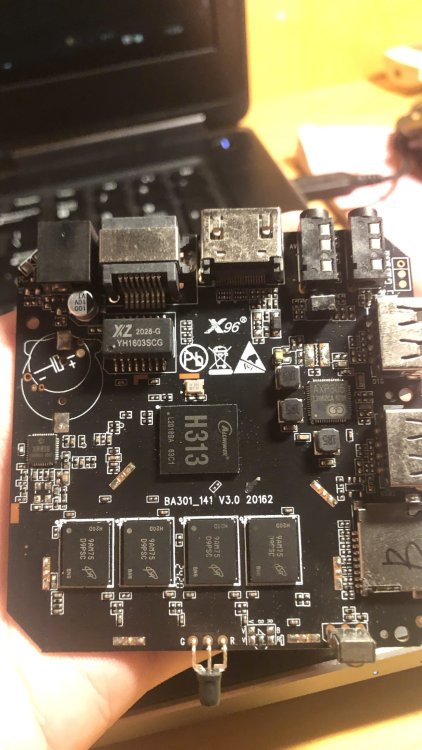
hello, i need some help with this box, i have tried a lot of image but only stayed red light or just blue light and shown nothing, my version using ddr3
-
I'll start on congratulating you for all you have accomplished. Now to your questions. I've never experienced a case where installing to emmc took away the ability to boot from the SD card, nor have I ever heard that reported by other users in the forums. So that one is a mystery. To debug that you would need to find your uart connection on the board and hook up a usb-uart adapter to monitor the uboot process. I would also recommend you try putting your image on a usb thumb drive and see if that works for a workaround. For autologin, you should just be able to follow any standard guidelines for doing that with a google search of 'xfce4 auto login' and you will likely need to edit some config file somewhere to enable this. Exactly what may depend on are you running Ubuntu or Debian userland with the Armbian kernel.
-
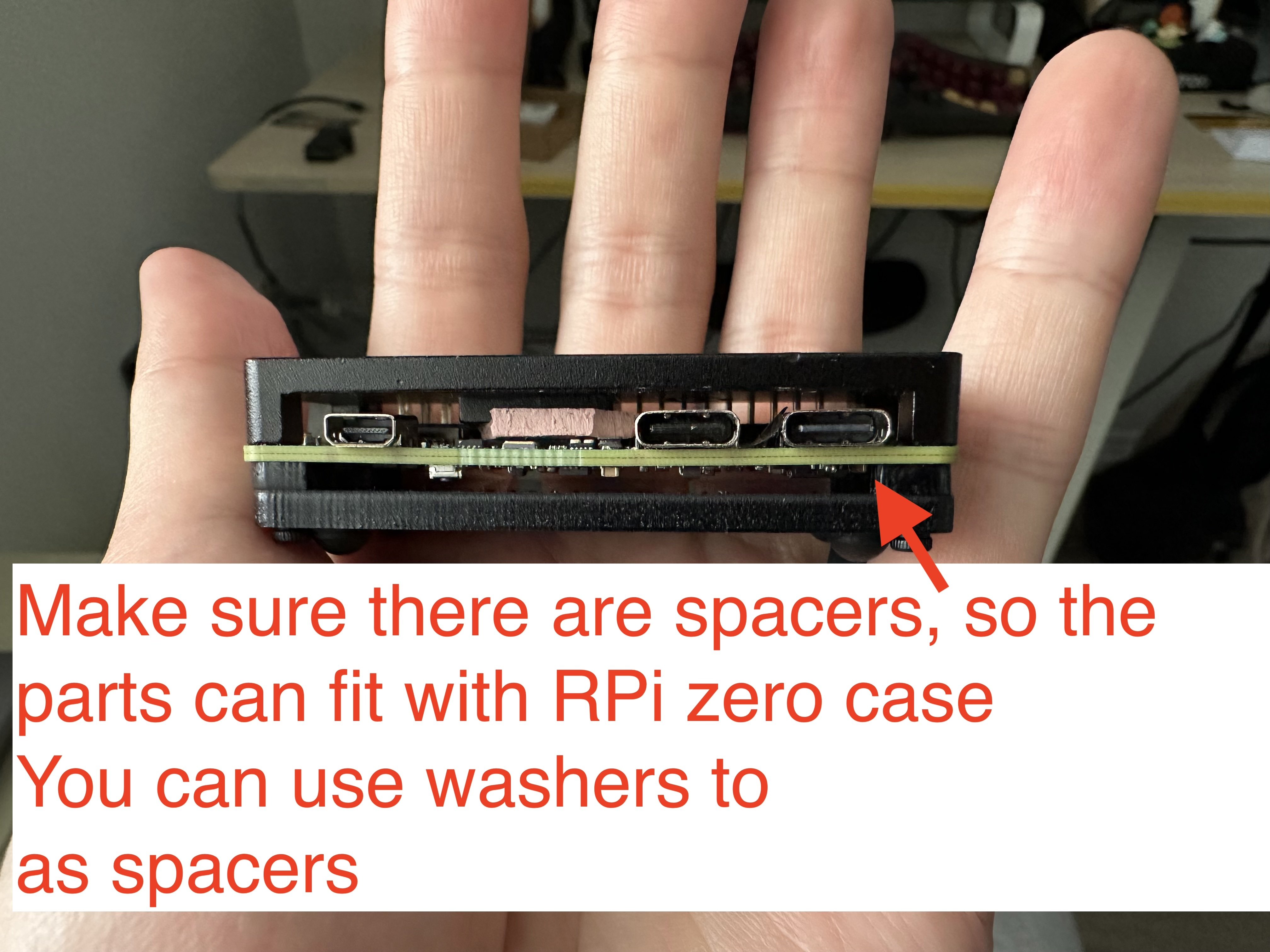
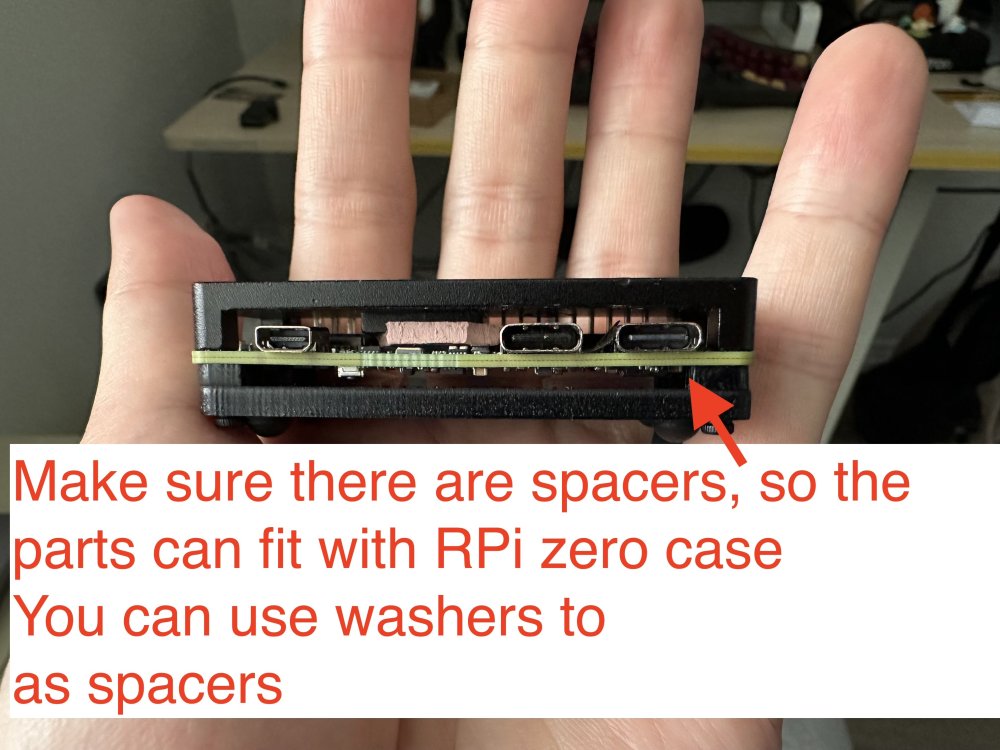
 Oh, I do not have a nanopi r3s, and I do not plan to buy it. The image is for the radxa zero 3w, but as I provided the source of building it, you can customize it to build with nanopi, too. The reason I mentioned nanopi r3s is because it has a dedicated case for it. I ended up using raspberry pi zero case for it, with some custom modifications, which is also nice. Raspberry Pi 1/2/3, zero/zero w/zero w2 won't work, because they only have 1 USB controller. The trick here is to have at least 2 USB controllers: 1 in host mode to connect to the UAC2.0 speakers, and 1 in gadget mode as a UAC1.0 USB device. Raspberry Pi 4/5 should work, but you need to make sure the power supply is strong enough, which is a big issue here, because with the official image, you can only connect the USB C port for power and as a USB gadget port, yet PS5 probably won't support that much power for RPi 4/5, so you ended up needing a USB power and data splitter for that, and connect the data port to PS5, then a separate power supply for the power port (simliar things happened in PiKVM).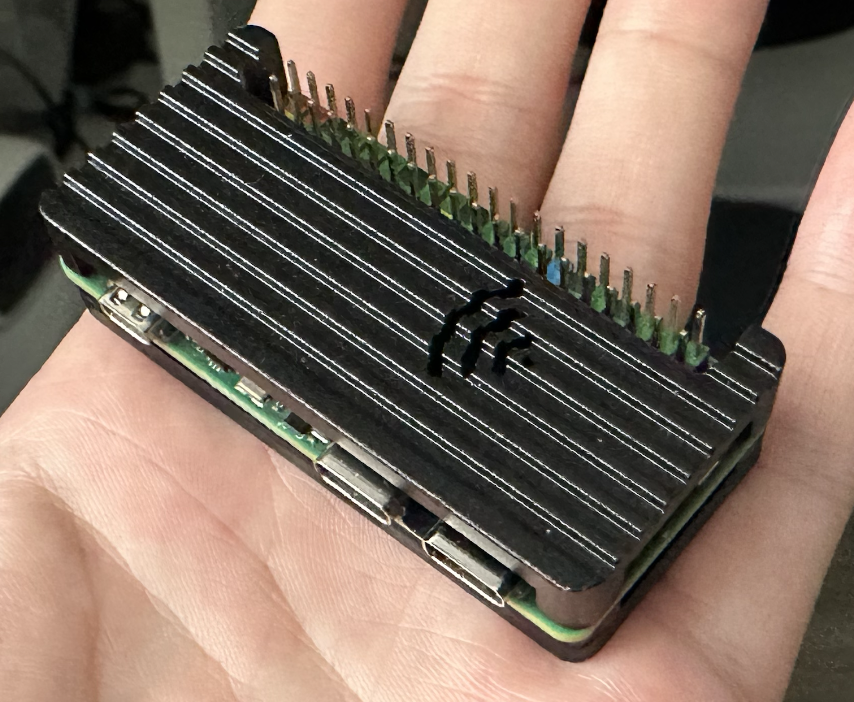
-
 I am working on a new version of the Luckfox Core3566 Board and Patches, as well as adding the Orange PI CM4 board to Armbian. Both rely on the Rockchip RK3566. Luckfox Core3566 Starting with the Core3566: The current board is just the vendor u-boot and kernel. It lacks PCIe support, but surely it is helpful to be as near to manufacturer configuration in their patches. My board config on the other side is not supporting the vendor specific patches, but based on a clean u-boot v2025.10 and runs nicely with current and edge kernels and also runs smoothly with nvme storage. The luckfox-core3566 config is currently maintainerless, but maybe users would like to have this vendor kernel version. My question: 1) Would the Armbian rather like to replace the vendor board config with a more future proof board config like mine or 2) Keep both board versions ( like rename config/boards/luckfox-core3566.csc to config/boards/luckfox-core3566_vendor.csc ) and let my variant replace the config/boards/luckfox-core3566.csc as default? 3)rd option would be combine both configs, but I had struggle to do so, as my version is using a different u-boot, using a simplified partition setup etc. Orange Pi cm4 I created a new board configuration to let Orange PI CM4 to work with Armbian as well. It is pretty similar to the bigtreetech cb2, but it's ethernet wiring and pcie powering device config differs from latter. Is it okay to create a MR directly in Github or does it need alignment with Moderators first? Cheers, Daniel PS: Nice to have time to work on embedded arm systems again. I did work on the sunxi based cubieboard and cubietruck back in the days, but job, family and basically life pulled me away from it for such a long time.
 -
 Feel free to reach out and become a partner: https://www.armbian.com/partners/
 -
LMAO! So... What exactly is your question? Did you try "the mouse & keyboard" and they did not work? I would say you will get basic functionality on almost any usb mouse or keyboard on linux. wifi on the other hand can be a hit or miss. A quick search on "USB Logitech Unifier Nano dongle" gave me this: https://forums.linuxmint.com/viewtopic.php?t=373365 so it seems you might want to use solaar to configure the stuff. As for the Inovato Quadra4K, it looks like it is an allwinner H6 processor so I suspect it should work using armbian....
-
@Bones558 I think the LED is always on by default and doesn't blink. You can try kernel 5.15, I'm using Armbian-unofficial_25.11.0-trunk_Radxa-cubie-a7z_jammy_legacy_5.15.147.img Since I don't have any TTL modules or display adapters, I directly followed the instructions at https://docs.armbian.com/User-Guide_Autoconfig/ to set up the wireless network. After powering it on and waiting for a while, I could directly access SSH. Hope this helps.
-
Hi, I'm a long time Armbian user and overall extremely happy. It my default Linux distro everywhere! Thanks to everyone who is developing or contributing to it! Every time I pickup a new board and deploy Armbian I have to edit the `armbianEnv.txt` file and change verbosity to 7. The same question repeats in my head. Why is it not the default? Systemd and startup messages spam up like crazy and they have nothing interesting to offer. I do care what hardware did the kernel detect or was a protocol correctly negotiated etc. I personally would have it in reverse, verbose kernel, quiet systemd. But thats just me. Could we at least have parity, if systemd verbose then make kernel verbose too, if kernel quiet then systemd quiet too. I'm trying to understand what was the rationale for having quiet kernel and verbose systemd? Thanks!!
-
https://docs.armbian.com/Developer-Guide_Build-Switches/ Check for ARTIFACT_IGNORE_CACHE diy packages are locally cached. automated packages from the CI are stored online in ghcr. not only this, also the status of build framework internals (like stuff in https://github.com/armbian/build/tree/main/lib/functions) since they also can alter a package. "development" should be sufficient.
-
Build from branch v20250306. error! [ Failed to fetch SHA1 of 'https://git.kernel.org/pub/scm/linux/kernel/git/stable/linux.git' 'tag' 'v6.12.11' - make sure it's correct ] How to remove the error?
-
Does anyone here may have recommendations of standard sdcard or flashdrive that supports for installation on amlogic s905x devices? eg: sdcard only sdhc types or it will work with sdxc or any kind of limitations capacities for certain SBC ? . thank you in advance for your most kind replies. best regards
- Last week
-

Help wanted to test a new OpenVFD alternative
s100sic replied to Jean-Francois Lessard's topic in Amlogic meson
Hi Lessard can you please check this error (X88 PRO-B-RK3318-D4-V1.6)? root@GREEN:~/tm16xx-display# make module make EXTRA_CFLAGS="-DCONFIG_TM16XX -DCONFIG_TM16XX_KEYPAD -DCONFIG_TM16XX_I2C -DCONFIG_TM16XX_SPI -include /root/tm16xx-display/drivers/auxdisplay/tm16xx_compat.h -I/root/tm16xx-display/include/" -C /lib/modules/6.18.6-current-rockchip64/build M=/root/tm16xx-display/drivers/auxdisplay CONFIG_TM16XX=m CONFIG_TM16XX_KEYPAD=y CONFIG_TM16XX_I2C=m CONFIG_TM16XX_SPI=m CONFIG_LINEDISP=m modules make[1]: Entering directory '/usr/src/linux-headers-6.18.6-current-rockchip64' make[2]: Entering directory '/root/tm16xx-display/drivers/auxdisplay' CC [M] line-display.o CC [M] tm16xx_core.o CC [M] tm16xx_keypad.o tm16xx_keypad.c:81:6: error: redefinition of ‘tm16xx_set_key’ 81 | void tm16xx_set_key(const struct tm16xx_display *display, const int row, | ^~~~~~~~~~~~~~ In file included from tm16xx_keypad.c:18: tm16xx.h:189:20: note: previous definition of ‘tm16xx_set_key’ with type ‘void(const struct tm16xx_display *, const int, const int, const bool)’ {aka ‘void(const struct tm16xx_display *, const int, const int, const _Bool)’} 189 | static inline void tm16xx_set_key(const struct tm16xx_display *display, | ^~~~~~~~~~~~~~ tm16xx_keypad.c:135:5: error: redefinition of ‘tm16xx_keypad_probe’ 135 | int tm16xx_keypad_probe(struct tm16xx_display *display) | ^~~~~~~~~~~~~~~~~~~ tm16xx.h:184:19: note: previous definition of ‘tm16xx_keypad_probe’ with type ‘int(struct tm16xx_display *)’ 184 | static inline int tm16xx_keypad_probe(struct tm16xx_display *display) | ^~~~~~~~~~~~~~~~~~~ make[4]: *** [/usr/src/linux-headers-6.18.6-current-rockchip64/scripts/Makefile.build:290: tm16xx_keypad.o] Error 1 make[3]: *** [/usr/src/linux-headers-6.18.6-current-rockchip64/Makefile:2010: .] Error 2 make[2]: *** [/usr/src/linux-headers-6.18.6-current-rockchip64/Makefile:248: __sub-make] Error 2 make[2]: Leaving directory '/root/tm16xx-display/drivers/auxdisplay' make[1]: *** [Makefile:248: __sub-make] Error 2 make[1]: Leaving directory '/usr/src/linux-headers-6.18.6-current-rockchip64' make: *** [Makefile:50: module] Error 2 Thank you -
Yes. Please wait. I was busy with other personal projects, so I haven't been doing armbian stuff for a few weeks.
-

Driving the ili9488 LCD (4.0 inch cheap chinese clone)
robertoj replied to robertoj's topic in Allwinner sunxi
I don't know what you could improve right now... But I know that LCD only receives data. My LCD works the same, with its MISO pin connected or disconnected. -

Efforts to develop firmware for H96 MAX V56 RK3566 8G/64G
王类 replied to Hqnicolas's topic in Rockchip CPU Boxes
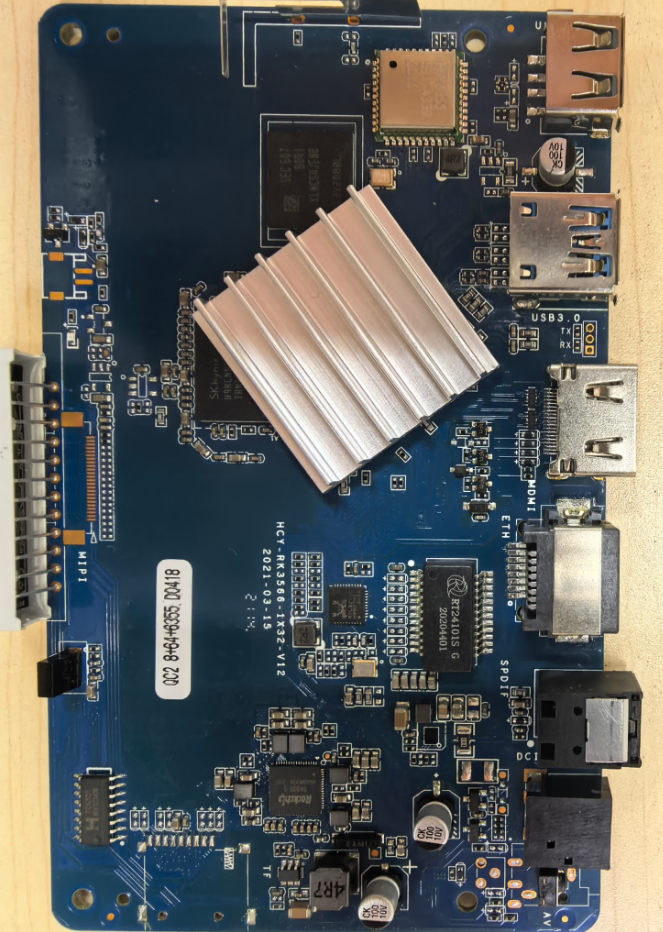
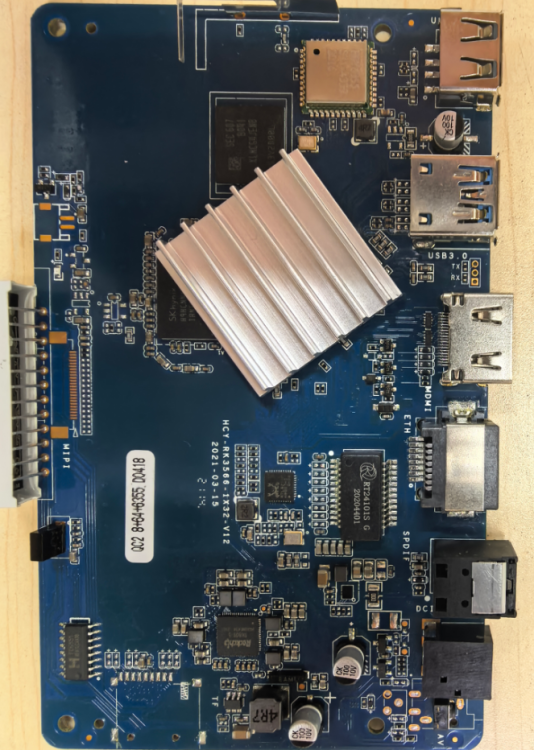
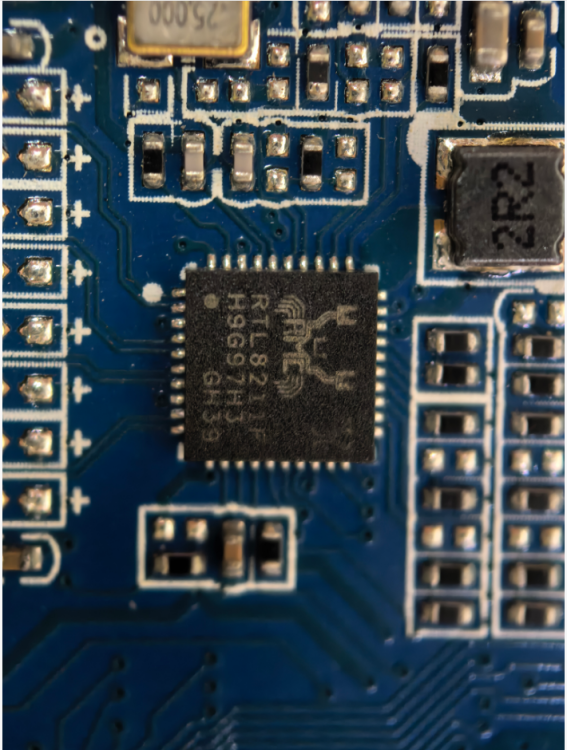
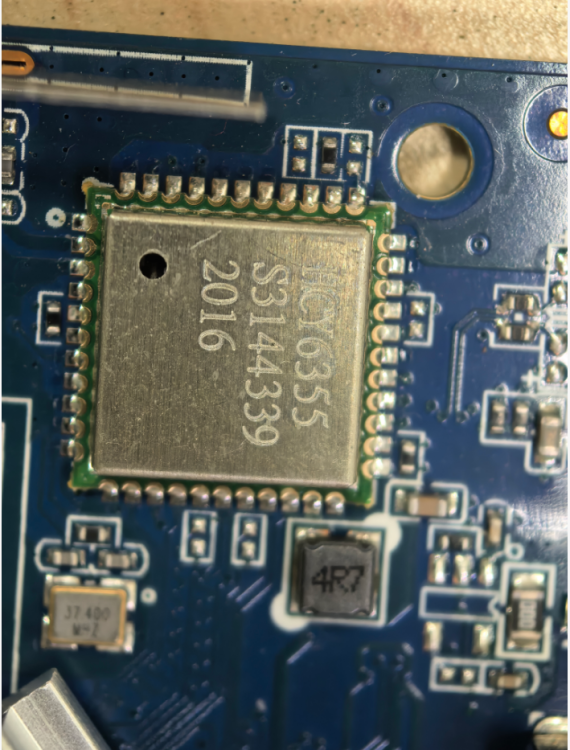
I bricked my original H96MAX TV box while tinkering with it, so I bought a new one. The new unit works fine with both wireless and wired networks on Android, but after flashing the firmware Armbian_26.2.0-trunk.302_H96-tvbox-3566_forky_current_6.18.6_minimal.img, the wired network stops working and only the wireless network is functional. Please help me fix this issue, thank you!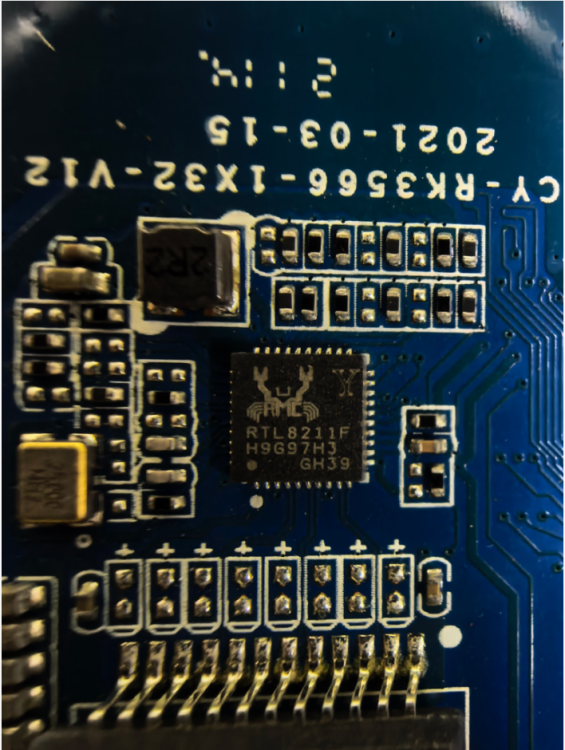
-
Try this. It worked on radxa-e54c with Cinnamon. rm -rf ~/.local/share/cinnamon && sudo reboot
-
Mhhh..... Image for OrangePi 3b works out of the box (and it's also possible to install to the eMMC), but it doesn't seem to support some features (i.e. there are no devices like "/dev/video*", "/dev/rknpu", etc.). Otherwise the images for BananaPI CM4 doesn't seem even to boot on OrangePI CM4: comparing both images, those are indeed different (i.e. "initrd.img", "vmlinuz", etc. are under "/boot" folder rather than in "/"). Dies anyone knows a simple way to burn BananaPI CM4 images (or another image) to OrangePI CM4 (to SD Card or better to eMMC)? Regards,