All Activity
- Past hour
-
Hi, thank, I forget this method. new result... same with 6.18.37: With 6.18.10-current-rockchip64 and rk3399-kobol-helios64.dtb-6.18.18-opp dtb file, Ok With 6.18.37-current-rockchip64 and overlay helios64 patch with armbian-config, Ko With 6.18.37-current-rockchip64 and k3399-kobol-helios64.dtb-6.18.18-opp dtb file, Ko more information: On "Cold Boot": System blink red After "Reset": Same crash like without DTB on previous Kernel like 6.18.10... Back to 6.18.10 and freeze with this kernel for this time, I don't have time to investigate more at this time. Have a nice day
- Today
-
Thank you very much. Thanks to your detailed guide—as well as the one by "Chiều Nhạt Nắng"—I successfully installed Armbian on my TV box. I had struggled for a long time previously, following outdated instructions without fully understanding them; I kept unplugging and replugging the power cable, which ended up damaging the power IC (so now I have to use the USB port for power). However, thanks to your specific guidance (user 0757), I followed the steps and finally succeeded. Thank you!
.thumb.JPG.05ddb51c0d29f118a52c779675eb8905.JPG)
-
Honestly, I've already forgotten what the problem was there. Most likely, I used the Armbian installer and specified where to install the distribution in the automatic image download mode. Before that, I had tried writing it manually. Besides that, I found an important nuance — if you install software through armbian-config, for example GNOME and Chromium, the Plymouth splash screen will be automatically configured at boot, and hardware video decoding will be enabled in the browser, which for some reason does not get enabled when installing manually.
-
Can I ask how did you fix it? I have the same problem but cannot get it to make it work.
-
 moved to off-topic neither a supported device nor about Armbian.
 -
 Hi all, I'm running DietPi on an Orange Pi Zero 3 (H618, sunxi64), which repackages the Armbian current-sunxi64 kernel. I use a USB DVB-T2 dongle (HanfTek Astrometa RTL2832P, VID/PID 15f4:0131) with tvheadend for over-the-air TV. After a routine update the dongle stopped working entirely, and I tracked the root cause down to missing kernel modules. ## Problem Starting from kernel 6.18.x (package linux-image-current-sunxi64 version 26.05.0-trunk-dietpi1 and all subsequent builds through dietpi5), the following modules are absent from the kernel package: - dvb_usb_v2 - dvb-usb-rtl28xxu - dvb_core The USB device is correctly detected at bus level (lsusb, dmesg) but no driver ever binds to it and /dev/dvb is never created. lsmod | grep dvb returns nothing, and find /lib/modules/$(uname -r) -iname "*dvb*" only shows RC keymap files (e.g. rc-dvbsky.ko.xz), not the actual DVB subsystem drivers. lsusb output: Bus 004 Device 003: ID 15f4:0131 HanfTek Astrometa DVB-T/T2/C FM & DAB receiver [RTL2832P] dmesg shows the device is enumerated but no driver binds: usb 4-1: New USB device found, idVendor=15f4, idProduct=0131, bcdDevice= 1.00 usb 4-1: Product: dvbt2 usb 4-1: Manufacturer: astrometadvbt2 (no further DVB-related messages) ## Verified affected range I downloaded and inspected each linux-image-current-sunxi64 .deb from the DietPi apt repo without installing them, extracted with dpkg-deb -x, and searched for dvb_usb_v2.ko / dvb-usb-rtl28xxu.ko inside lib/modules/*/kernel/drivers/media/usb/dvb-usb-v2/. Results: 26.05.0-trunk-dietpi1 through dietpi5 (kernel 6.18.x) → DVB modules ABSENT 26.02.0-trunk-dietpi8 (kernel 6.12.76) → DVB modules PRESENT 26.02.0-trunk-dietpi1 through dietpi7 (kernel 6.12.58–6.12.74) → PRESENT 25.11.0-trunk-dietpi1 through dietpi3 (kernel 6.12.43–6.12.57) → PRESENT The regression is introduced exactly at the 26.02→26.05 branch transition (kernel 6.12→6.18). ## Kernel config comparison (confirmed) In kernel 6.12.76 (/boot/config-6.12.76-current-sunxi64), the full DVB-USB subsystem is present and compiled as modules, including: CONFIG_DVB_CORE=m CONFIG_DVB_USB_V2=m CONFIG_DVB_USB_RTL28XXU=m CONFIG_DVB_USB=m (plus ~40 additional DVB USB driver modules) In kernel 6.18.29 (extracted from linux-image-current-sunxi64_26.05.0-trunk-dietpi5_arm64.deb), grep for DVB_USB and DVB_CORE returns NO output at all — the options are not present in the config file, not even as "# CONFIG_DVB_USB_V2 is not set". This confirms the entire DVB-USB subsystem was dropped from the sunxi64-current kernel config when the 6.18.x branch was opened, not selectively disabled. ## Hardware Board: Orange Pi Zero 3 (Allwinner H618, sun50i-h618) Dongle: HanfTek Astrometa DVB-T/T2/C FM & DAB receiver [RTL2832P] VID/PID 15f4:0131 Kernel broken: 6.18.29-current-sunxi64 GCC 13.3.0 (aarch64-linux-gnu), build date 2026-03-05 Kernel working: 6.12.76-current-sunxi64 USB device descriptor (from lsusb -v): idVendor 0x15f4 HanfTek idProduct 0x0131 Astrometa DVB-T/T2/C FM & DAB receiver [RTL2832P] bcdDevice 1.00 iManufacturer 1 astrometadvbt2 iProduct 2 dvbt2 bNumConfigurations 1 bNumInterfaces 2 MaxPower 500mA ## Workaround Downgrading to linux-image-current-sunxi64=26.02.0-trunk-dietpi8 restores DVB support. Package pinned with apt-mark hold to prevent auto-upgrade. Note: the downgrade via apt-get install --allow-downgrades correctly swapped the kernel image and initrd, but did NOT regenerate the /boot/dtb-<version>/ directory nor update the /boot/dtb symlink — it was left pointing to the now-removed newer kernel's dtb directory, causing a boot failure. The dtb files had to be manually copied from /usr/lib/linux-image-6.12.76-current-sunxi64/allwinner/ and the symlink fixed by hand. This may be worth a separate look at the postinst/postrm scripts for the kernel downgrade case on sunxi64. ## Requested fix Please re-enable CONFIG_DVB_USB_V2=m, CONFIG_DVB_USB_RTL28XXU=m, CONFIG_DVB_CORE=m and their dependencies in linux-sunxi64-current.config for the 6.18.x branch. These were present throughout the entire 6.12.x series and there is no apparent reason to drop them. Thanks for the great work on Armbian!
 -
Totally agree, too little or niche market! I 'm thinking about soldering simcard directly on these cheap minipci lte modem and use a regular usb2.0 cable, what a joke!
-
OK, I did not look into further details, I don't have any of this HW. I only have same experience 10 years ago, 4G module works in USB adapter, did not get it to work in mPCIE slot. I am not sure if a DeviceTree patch/change can fix it, don't know enough of that description principles. As indicated, SeeedStudio can read this, it is their HW, maybe they should fix it for you.
-
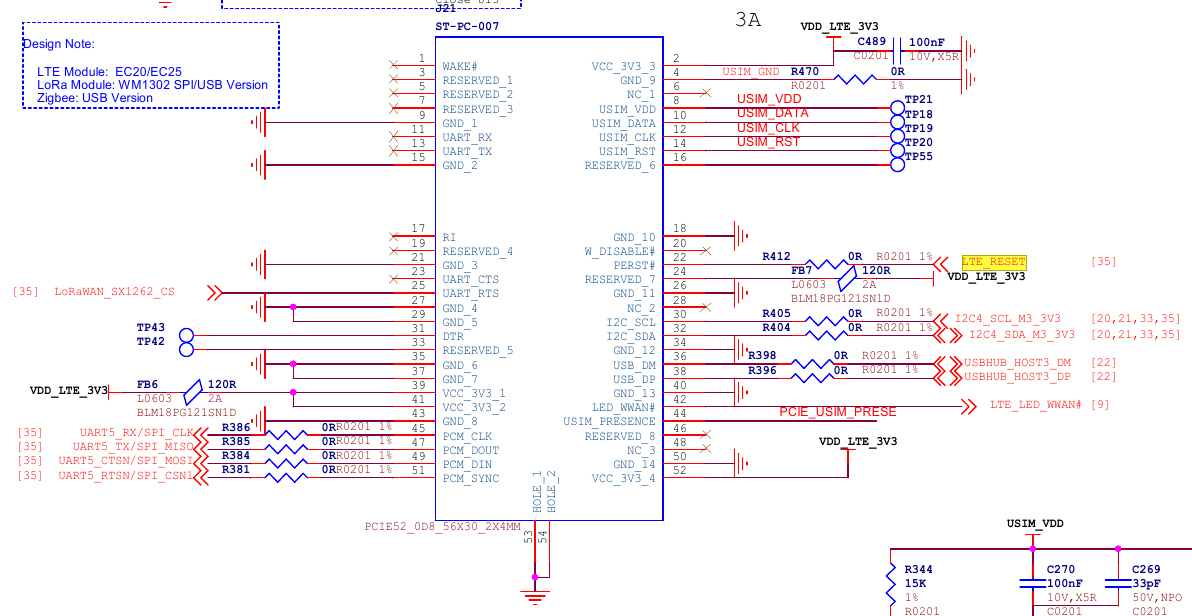
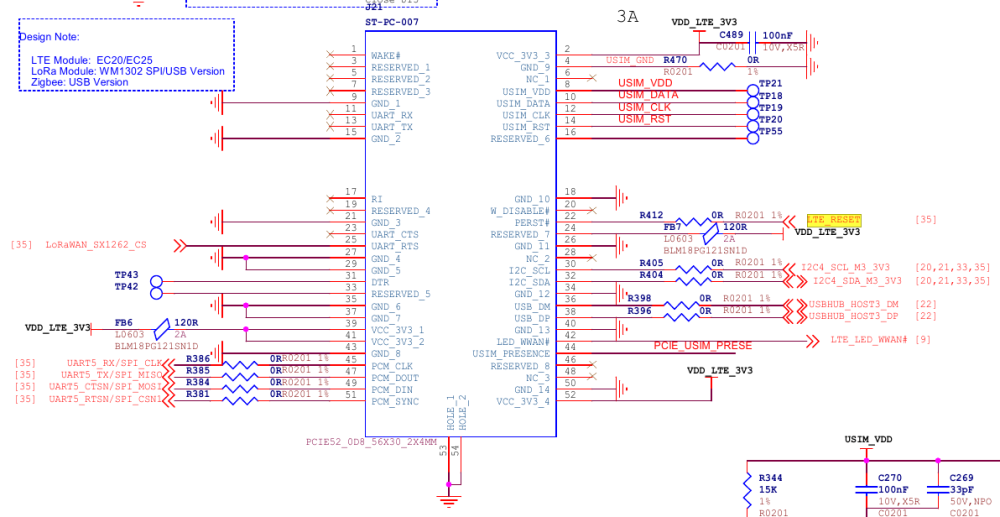
Thanks for your input, I never really use gpio lib and i don't know if gpio over i2c is userland playable or there are reserved to the kernel. The fact on the schematic is VSYS_3V3_EXP is the first rail powering up because it's supply I2Cs bus and the GPIO over I2C to switch ON or reseting thing. VCC5V0_DEVICE_S0 For FAN & HDMI & USB & TYPE-C, USB HUB (Total: 3A) switch on by RK806S over I2C (PMIC_PWR_CTRL2) VSYS_3V3_EXP For CSI & DSI & RPi 40Pin (Total: 4A) <======== I2Cs GPIO (LTE RESET), Minipcie is supplied here! , switch on by RK3576 gpio (VSYS_3V3_EXP_EN) VCC3V3_PCIE For PCIE-M.2 (nvme), switch on by RK3576 gpio (PCIE_PWREN_H_GPIO0B5) The design flaw is here : you need I2C up to put LTE modem (already on by the same I2C power supply) in reset state before switch on USB PHY, then release LTE_RESET. Why they didn't put LTE modem supply, triggering a 3.3vcc mosfet from USB 5V rail ready signal after usb init like normal usb device, too easy?
-

How to install correct linux-headers?
ErinBong replied to Stanislav Chizhik's topic in Software, Applications, Userspace
One thing that helped me in a similar situation was checking that the running kernel version matched the headers exactly with uname -r. A mismatch there can be really confusing. If you've recently upgraded the kernel, a reboot before installing the headers is worth trying too. -
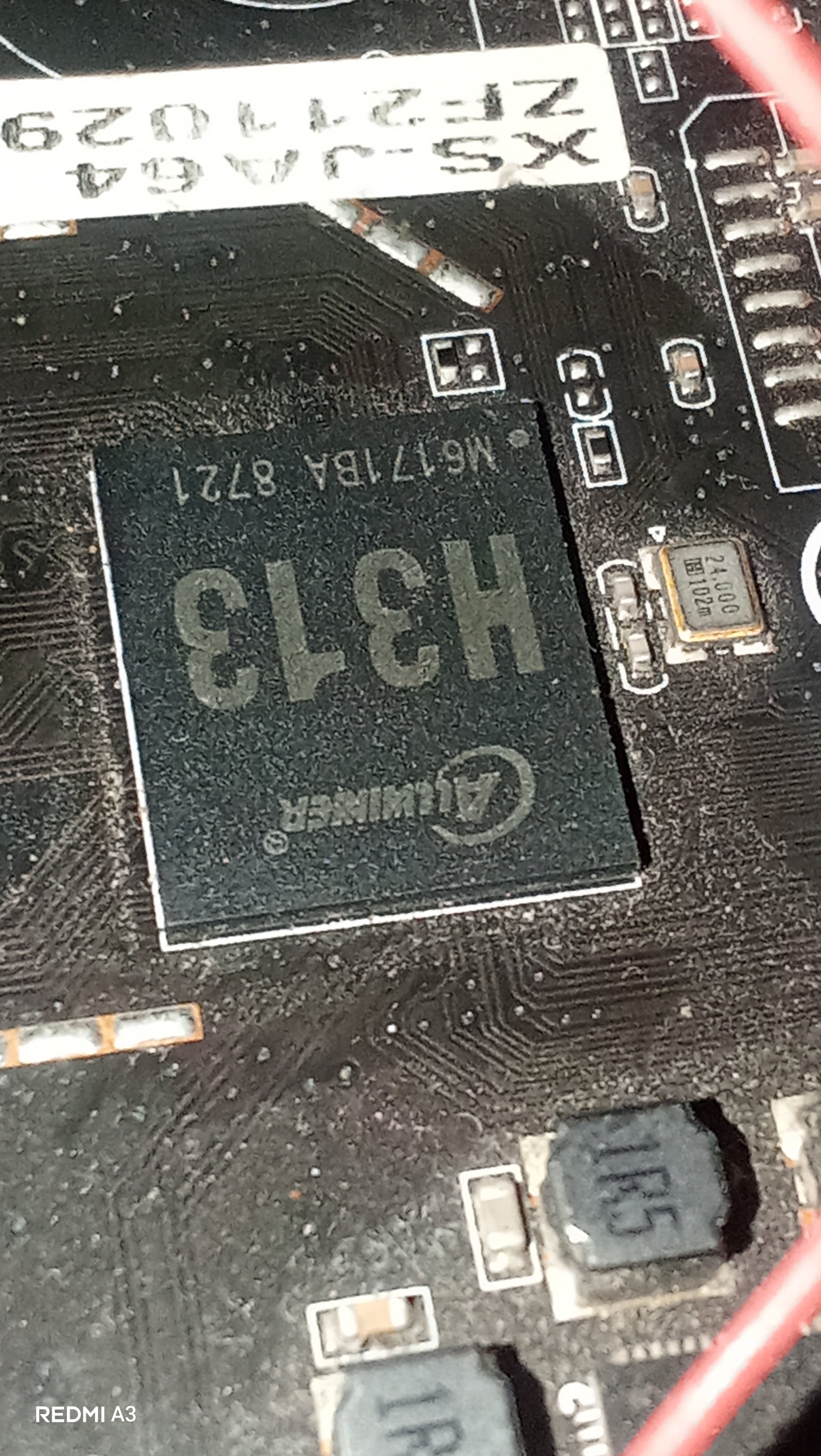
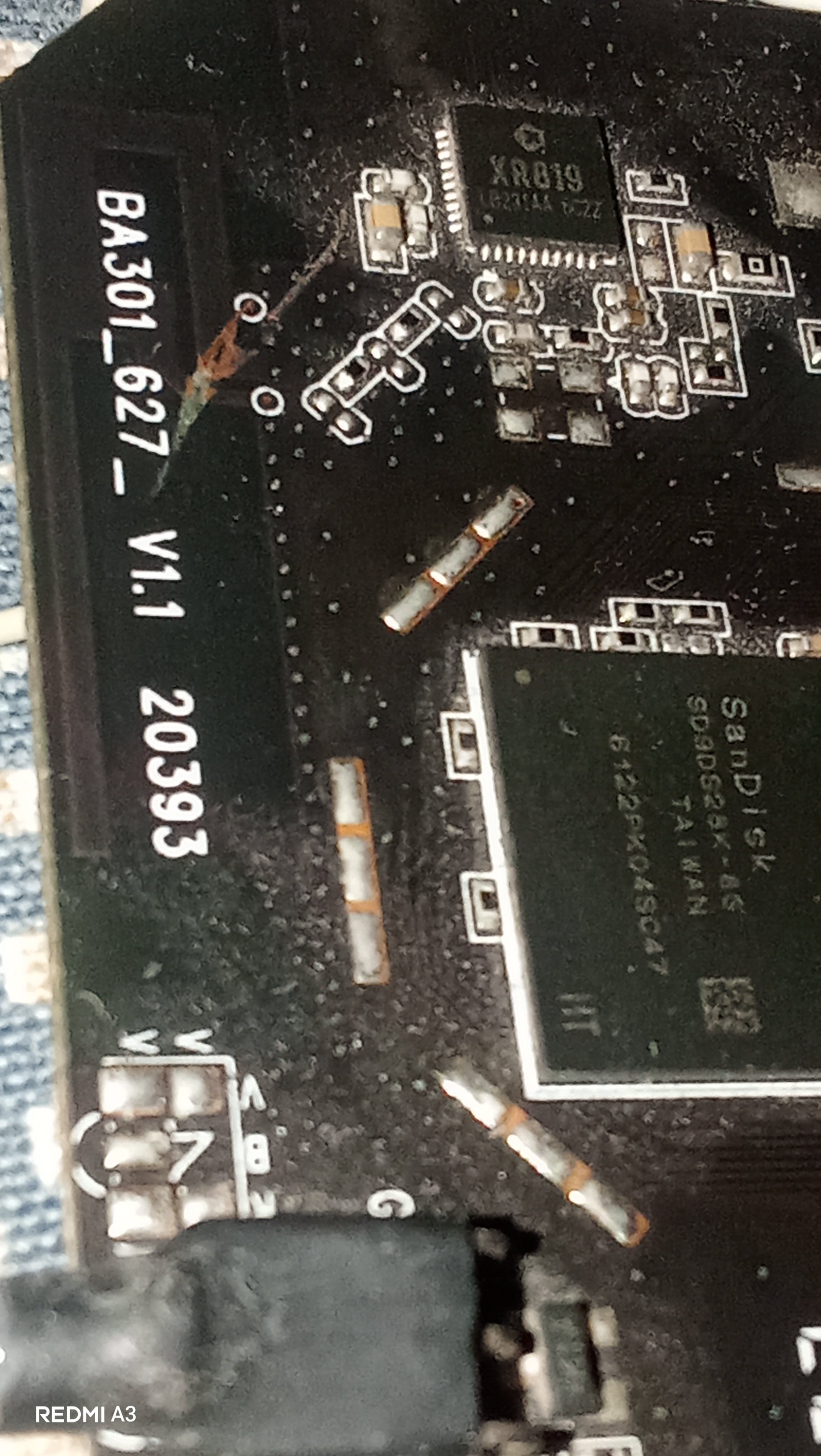
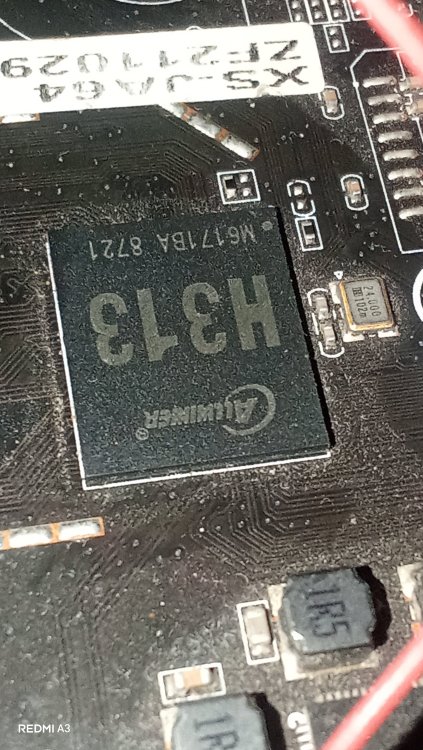
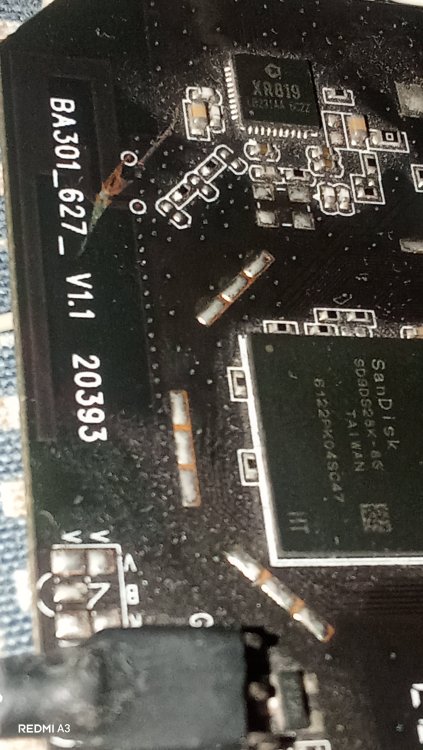
Hey guys, I just wanted some help from you regarding my X96Q. It is a 1+8GB Model with PCB Revision V1.1. It has a H313 processor but sunxi-fel reports H616. A few weeks ago I repaired the USB port of this box and I was successful in it and everything worked perfectly after that(the device booted up to android and worked perfectly) but Then I started to play with that Hidden button in AV port and I randomly clicked it and I thought it would be harmless but after that the device stuck in Red LED and didn't booted anything(possibly an EMMC Corruption). I tried Phoneix Suit first but it stuck on ram init. Then I brought a CP2102 Adapter to read the serial logs, and it turned out to be a Dram calibration errors where: Boot0 starts > Initializes The Emmc, the Board and the CPU -> Then the PMU(reported as AXP806 but physically AXP305) sets ram voltage to 1500mV -> Then it tries to Dram training -> fails and throws [...] "Read calibration error" multiple times —> keeps retrying until it gives up with "[...] Restraining final error." I investigated further and found that my emmc chip's critical sectors are corrupted. I used sunxi-fel to read the emmc and found that it fails to read after 16MB mark, means emmc got corrupted when I repeatedly pressed the AV port button. Now I tried a Armbian via sd card and it says: [...] Your Current DRAM Config isnt supported... Retrying... And keeps doing In a endless retry loop. Same for Miniarch, Armbian and many other builds... Any idea what's the problem with my box?
-
My thinking is that with a standard example tool from libgpiod (gpioset) it should be possible to toggle a GPIO line. I see 'P05' that seems a pad number of the RK3576. I remember I had to dig deep in internet fora for something similar for BananaPi M1 to see what to put in armbianEnv.txt. Or NanoPi-NEO. The later I use with those example gpioset to toggle a GPIO to switch some own electronics on/off. You could also use lgpio (rpigpio successor or any other that can toggle pin states). Note that formally, you need to threat a GPIO line like a file, claim, open, close etc. After that state is undefined, but most SBC kernels keep the state, but formally undefined. See many many discussions on wiringpi etc. W.r.t. this combPHY: the RK3576/RK3588: those can act as several SerDes, it is sort of multiplexed, so cannot be all at the same time. But you need to look in schematics. I use the SATA<> PCIE2x1 swap (on E-key slot on ROCK5B and ROCK3A) but it very much depends on what firmware/bootloader and DTB(O) and kernel. For the ROCK3A for example, I still don't have it working according to I wish with mainline based U-Boot+kernel. Only vendor 6.1 and legacy U-Boot. I see on the SeeedStudio page: preloaded with Armbian, so this topics is a sort of test-case IMO: is that claim with mainline based or vendor/legacy Rockchip; I guess the latter, so maybe list versions of various system software. 'Forky' is not released, so a moving target or rolling release, others don't know what versions you use so not possible to reproduce the issue(s).
-
lsusb? Aic8800 is on USB or PCI in radxa 2f?
-
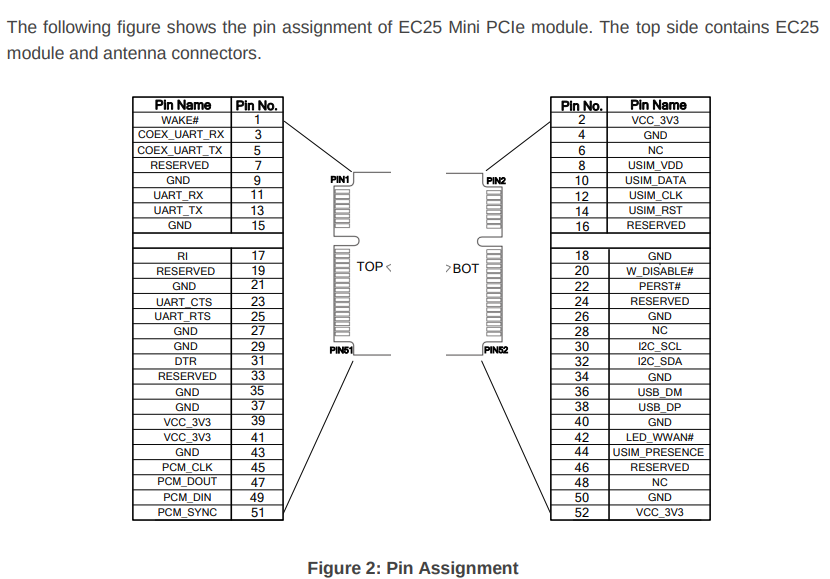
At the finnest, i cut the reset pin (22) on my minipcie module. Same all USB port lockdown. I put this modified lte modem in my external usb case, modem always working fine. So i take a spare new LTE modem and i connect it "hotplug" on the recomputer minipcie while already booted : lsusb see my Quectel LTE module!
-
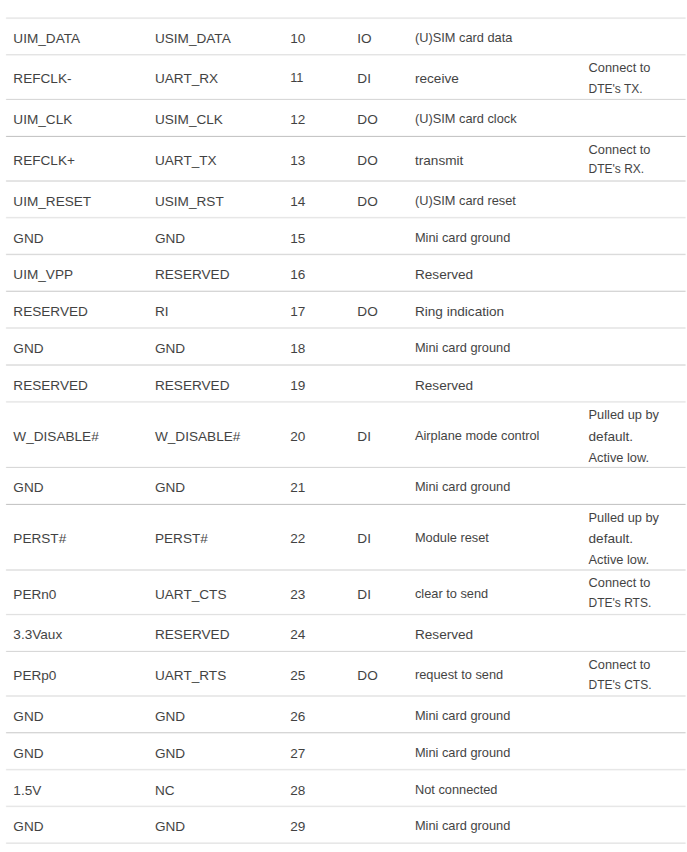
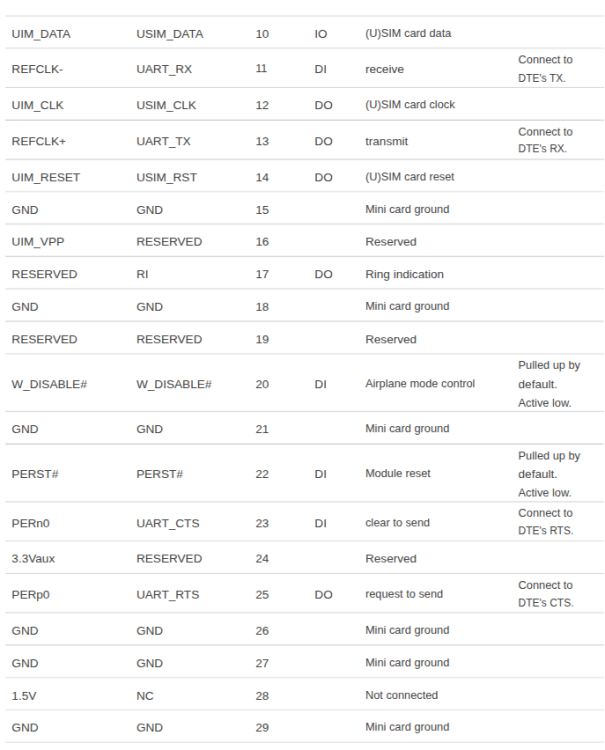
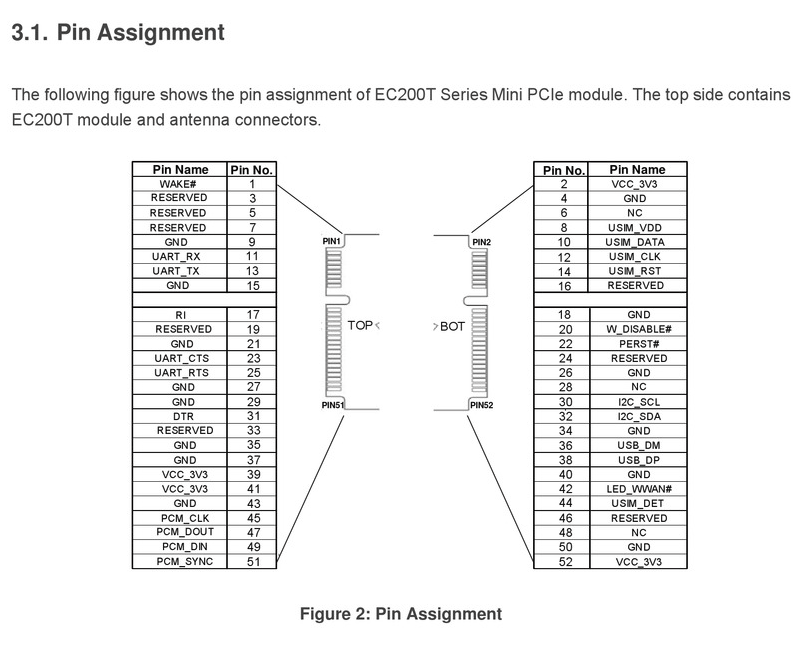
Maybe it's just relative to reset pin on the LTE modem, locking down all the shared USB BUS. On the dts, we can activate LTE_RESET : &i2c4 { status = "okay"; pinctrl-0 = <&i2c4m3_xfer>; gpio_xten: gpio_xten@21 { compatible = "nxp,pca9535"; reg = <0x21>; gpio-controller; #gpio-cells = <2>; interrupt-controller; gpio-line-names = "MIPI_DPHY_CSI0_IO1" ,"USB_USB30_PWREN_H", "USB_HOST_PWREN_H" ,"BRD_ID_WP", "LTE_RESET" ,"P05", "P06" ,"LoRaWan_sx1262_CS", "USER_LED_R" ,"USER_LED_B", "USER_LED_G" ,"P13", "P14" ,"P15", "P16" ,"P17"; gpio-line-offsets = <0>, <1>, <2>, <3>, <4>, <5>, <6>, <7>, <8>, <9>, <10>, <11>, <12>, <13>, <14>, <15>; }; On the LTE modem manual, reset is active when LTE_RESET is low, and pullup to vcc in normal operation. If LTE_RESET stay low with onboard modem connected, LTE modem may lock all USB ports. How can I define LTE_RESET to 1 at the boot?
-
how do i do that? i just apt-hold marked the packages for the time being.
-
Hello, I just received my SeedStudio Recomputer RK3576 and I have a well working machine thanks to the armbian team using the debian Forky image. I try to understand why i cannot connect a (usb) minipcie modem (already testing 1 year use with Radxa zero 3 W), all usb ports not working anymore! There is a strange note on schematic pdf : If the PCIe1 or SATA1 function of Combo PHY1 is selected, the USB3 OTG1 function cannot be used, and even the USB2 PHY1 function cannot be used But they also notice the support of usb link on this minipcie : LTE LoRa Module: Module:EC20/EC25 WM1302 SPI/USB Version Zigbee: USB Version The miniPCIe is connected on USBHUB_HOST3 <- USB HUB external chip -> USB2_HOST1 (RK3576 soc). All USB phy fail, even USB PHY not related to this usb hub. lsusb didn't show my usb modem, even if there no usb devices connected. I bought this nice machine as my home router with internal 4G modem quectel EC200A-EU but at this time ,my plan fail. The idle powerdraw with nvme onboard is under 2W and wifi sta active, Nice dietpi hardware! Thanks for your input (how to make this minipcie working, disable usb port is a possible tradeoff for me) Seb
- Yesterday
-

Gaming experience with Orange Pi 5 (RK3588) on Armbian
Alex Ling replied to KhanhDTP's topic in Orange Pi 5
@KhanhDTP, I used Mangohud and it showed the GPU did go up to 1GHz in most of the time (though not all the time) and the GPU usage is ~100%. Maybe I need to test more games I did see a ~7% boost for vkmark score to ~4400 -
The one from MR / my previous message
-
So I received my USB-PD trigger board, set it to 15V and it does nothing, the situation is still the same. I also ordered a USB tester to see the voltage and amperage, basically the board never draw more than 3 to 4W With Aarch64 UEFI image with EDK2 on the SPI flash, Linux starts to boot but then fails and I get a black screen
-
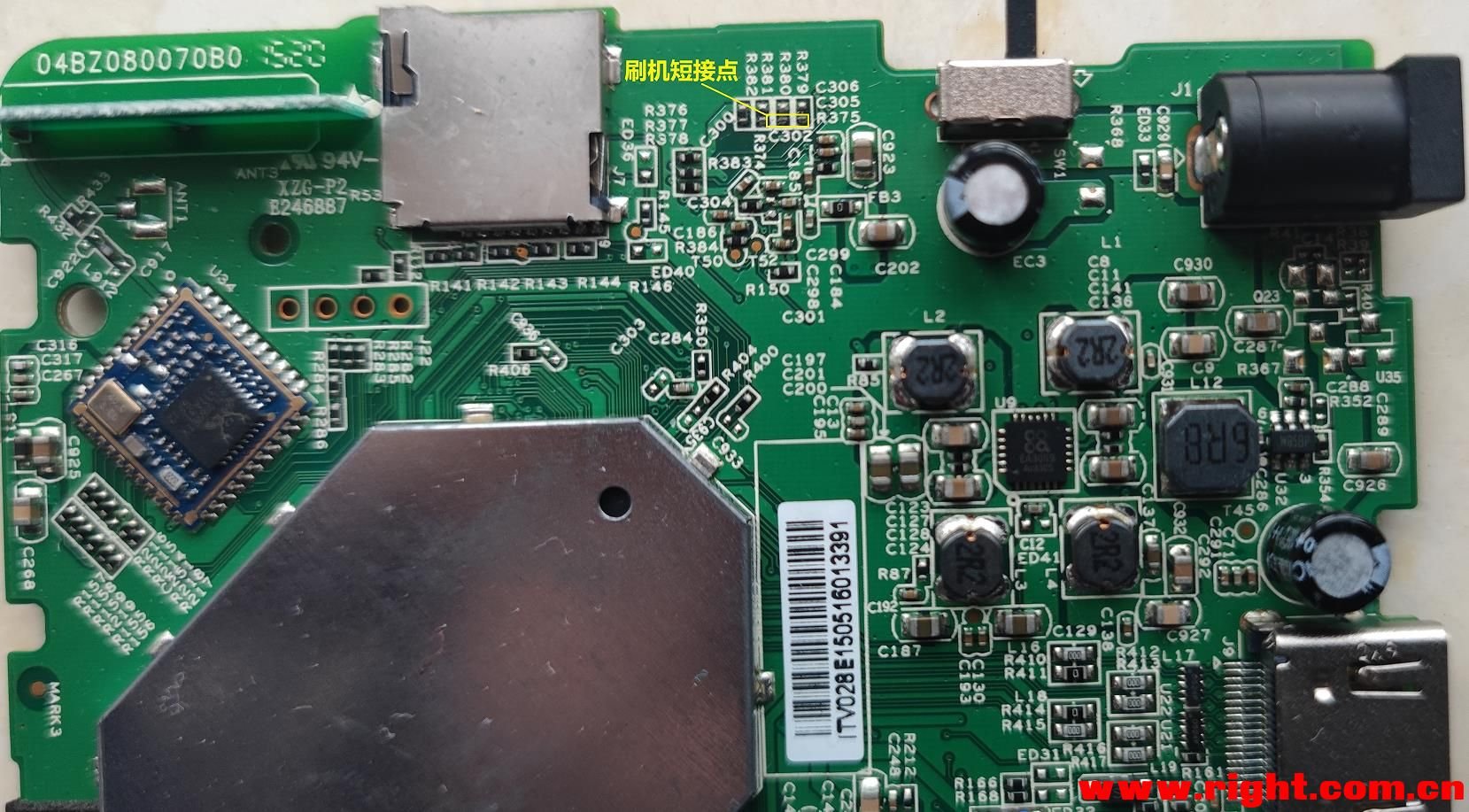
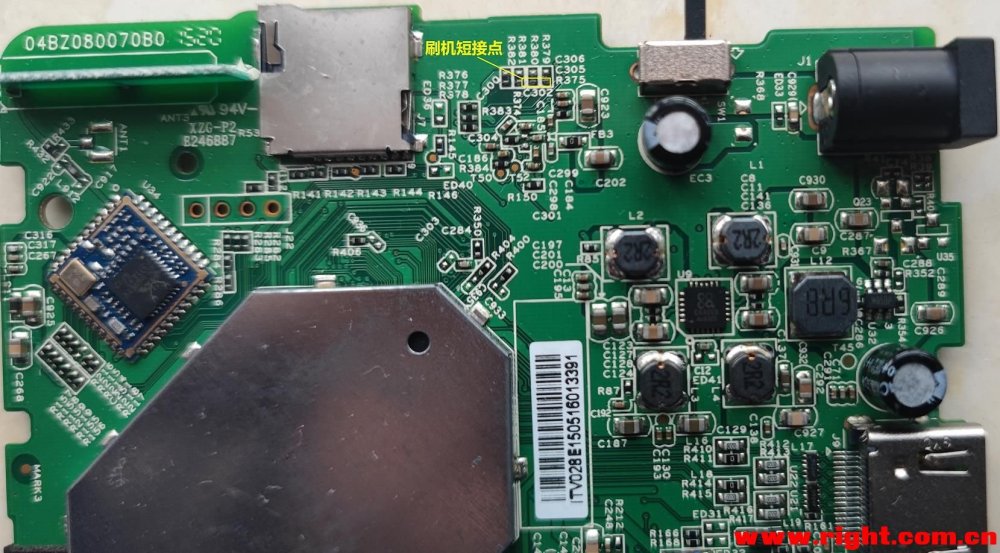
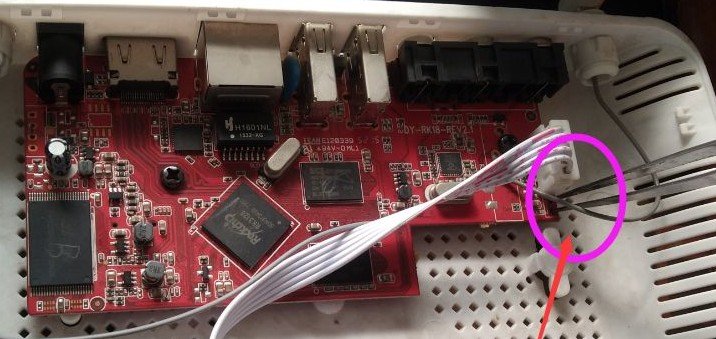
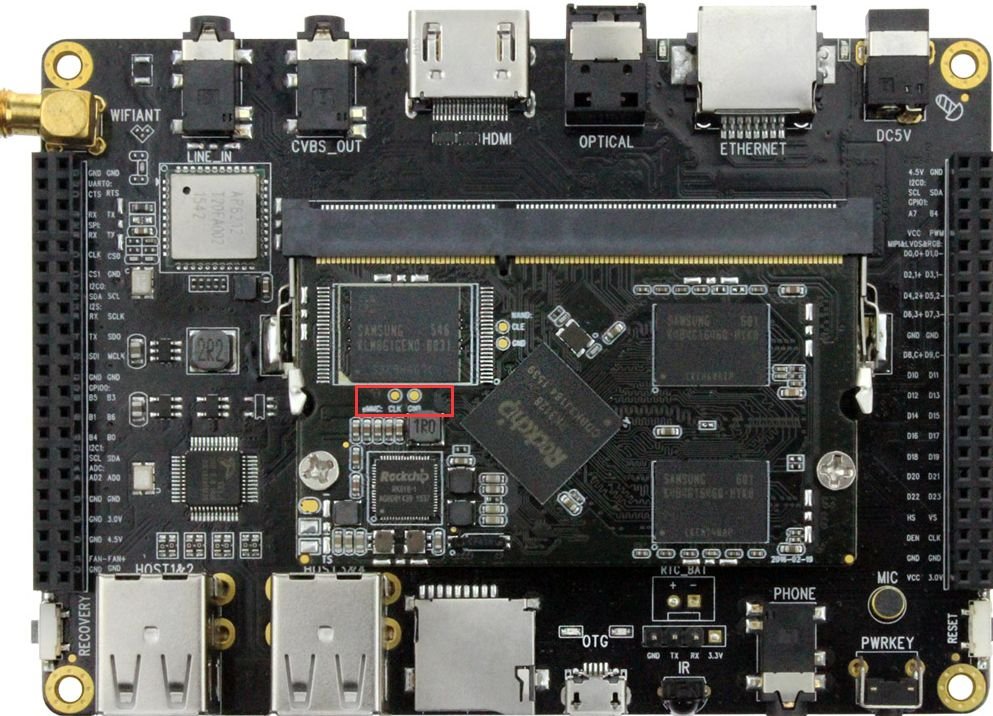
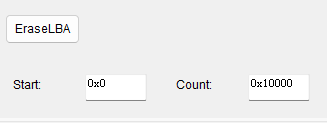
After finally getting my TV box to boot Armbian, I'd like to provide some beginner-friendly pointers in addition to @Chiều Nhạt Nắng's installation note 4.2, Full install to NAND / eMMC: As someone who's completely new to Android TV box modding, this step took me a while to get through. What it actually means is not to literally boot your TV box into its original firmware, but to enter either Loader Mode or Maskrom Mode. If you've built or tried to poke around your PC, they are sort of like the BIOS or UEFI (technically BIOS and UEFI live on the motherboard, not CPU... but I digress), or if you have done Nintendo Switch modding, it's like entering RCM. It's not the guide's fault because there are so many ways to get your chip to enter a "maintenance/recovery mode" on so many different boards even with the same chip, it's basically impossible to list all the ways to put it into a malleable state. The way to enter Loader or Maskrom mode typically requires you to do something to the TV box while it is actively booting up, which will interrupt the process and enter the respective mode. For my TV Box (2016 - 2020 ish, Huawei EC6108V9A, RK312X), to enter Loader Mode, I need to repeatedly tap the "Front Page" or "Home" button on my TV box remote as soon as I connect the OTG USB port to my PC (the OTG port is typically the USB port that's the closest to the Ethernet port), I didn't need to plug in the barrel power connector since the board draws power through the same USB connection. If you found yourself in an Android system recovery <3e> page, this is not what we want, you might be tapping the wrong button like "Standby" or "Sleep" button. For my board, once I successfully enter Loader Node, aside from the Windows notification and the Bold text saying "Found ____ Device" at the bottom of the RKDevTool/AndriodTool, it was also showing a static logo screen through HDMI. If you do not have the TV Box's remote, or if you have messed up the install and have to redo, you will almost definitely need to take apart the Box's outer shell and gain access to the PCB itself to enter Maskrom Mode instead. (Images found online) To enter Maskrom Mode, you will need to short two specific pins (or pin holes, or capacitor pads like the first image) as you plug the USB connector from the PC to the USB OTG port on your board (The official way is to short Clock (CLK) to Ground (GRD or any metal connector housing) but good luck finding those if they're not labeled). In my experience, tweezers are the best for this. Since everyone's board looks different, there are different ways to do it, but do not try to short anything on your board before you're absolutely certain that the image of the board matches the one on your hand exactly. Unfortunately these info are incredibly niche and hard to find, your best bet is to search your TV Box's model number along with your chip's name (RK3128 in our case) on google and bilibili, there's a good chance you'll end up on a Chinese forum and have to dig through it with google translate. (Do NOT take an AI's word for it!) In case the first step in the quote isn't clear enough, you have to click the EraseLBA button after typing in these addresses below it to erase sectors. It is also worth noting that you have to be in Loader Mode to EraseLBA or use any "Read____" buttons. If your device is in Maskrom Mode because you lost the remote or botched an install, you can't directly do all that aside from Download Image. The workaround is to hit the "..." button to the right of "Boot:", select rk3128_loader_v2.12.263.bin and hit Download. Now you can use most of the Advanced Functions while in Maskrom! In Chieu's attached image for this step, there is actually an error. If you are using the files from their 20260430 release (A26-release-20260430.zip), you will need to set Boot sector's address at 0x00006000, NOT 0x00010000. I strongly encourage you to open parameter.txt and verify the addresses yourself. My setup looks like this: 0x00000000 | Loader | rk3128_loader_v2.12.263.bin 0x00000000 | parameter | parameter.txt 0x00002000 | uboot | uboot.img 0x00004000 | trust | trust.img 0x00006000 | root | armbian_rootfs_26.2.img By the way, you can click on the empty box to the right of paths to find the files. Right click - Del item to delete any extra default entries you don't need. Now before you click Run, I strongly recommend you to connect the board to a monitor/TV via HDMI and your router via Ethernet with known good cables/connections! Your board's first boot into Armbian happens immediately after Download Image finishes, therefore it's incredibly difficult to monitor the progress without them. I'm honestly not sure if the setup can complete without Ethernet because I tried to flash my board without connecting Ethernet twice and failed twice. Miscellaneous Notes: If you're 100% positive that you have done the steps to enter Loader Mode or Maskrom Mode correctly but your PC is refusing to pick up the connection, try installing the driver "Rockchip_DriverAssitant_v4.2" (should be the first result on google). Some online sources might tell you to diagnose via UART with a USB-to-ttl adapter. It did not work on mine (was completely silent during boot). Conversely, not seeing anything from UART doesn't necessarily mean your board is bricked. The board should always be able to enter Maskrom if you have access to the PCB. After your board has gone through the first boot, you will see a prompt on the HDMI output asking you to set a password for the root user. You can connect to the board via SSH at this point with IP address shown during the boot sequence; you do not need to connect a physical keyboard to the board. A handy software to manage all your UART and SSH connections is MobaXterm. The settings are straightforward and there is a portable version if you don't like installing stuff. From OP's screenshots I think Chieu is using it too!
-
Hi, take a look at the build doc: https://docs.armbian.com/Developer-Guide_Build-Preparation/ You could try to build the kernel only, typically you get the latest version of the stable branch ./compile.sh kernel EXPERT="yes" BOARD=helios64 ARTIFACT_IGNORE_CACHE='yes' BRANCH=current
-
I am encountering similar issue in Allwinner-H618 based Kickpi-K2B board. Over the time, the video play stops with frozen frame display. The freeze is caused by the audio clock drifting from the video clock over time — and that drift happens during the video segments. have you (anyone) found the solution for this?
-

Gaming experience with Orange Pi 5 (RK3588) on Armbian
KhanhDTP replied to KhanhDTP's topic in Orange Pi 5
@Alex Ling That's weird. It's about 15% performance bump in theory. How GPU lock was show in...like Mangohud? -

SATA hard drives on Odroid-HC4 (OpenMediaVault works!)
BigHeadMode replied to BigHeadMode's topic in Odroid C4
I tried editing /boot/boot.cmd and recompiling. my changes did persist (I saw 'echo' worked) but it doesn't seem like my scsi scan trick worked. interrupting boot and just going straight into the above steps worked. so i think I need to edit boot.cmd to skip all the boot code for hc4 and just 'scan' then 'boot'. https://docs.armbian.com/User-Guide_Advanced-Configuration/


.JPG.fec77220f9a63c4cc0df11329be1a995.JPG)