All Activity
- Past hour
-
Does the box have an sd card slot and have you tried booting from that? (That is the common method). Also are you sure the box has an s905x3? Have you opened the box and inspected the chip? You might want to try all the uboot binaries just in case.
-
Thanks. URL is https://paste.armbian.com/liqeyelovi
- Today
-
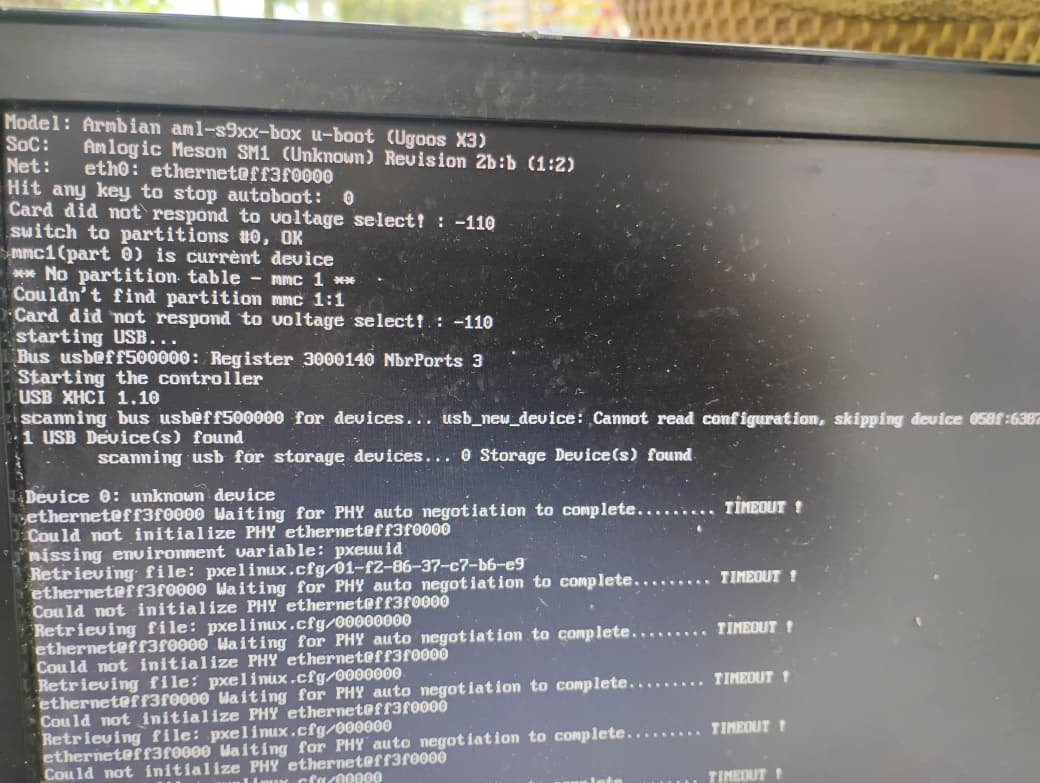
I am trying to boot from a USB stick, but it shows the error you can see in the screenshot. I am using the update button on the back of the TV box. It does start the boot process from the USB, but according to the error message it seems unable to actually read the drive. I have been stuck on this issue for several days now.
-
The s905x3 one. Also, how are you booting this? You say it doesn't recognize usb, so what are you using to boot Armbian?
-
Thank you very much for your responses, it totally make sense. I will try to build it myself, tho I have never done that, and my knowledge is very limited. I'd love to help one day, but this really is beyond what I can offer, for now.
-
Thanks for clarifying. And which would be the correct version of u‑boot for my BTV OTT BOX (model B11, Amlogic S905X3)? I admit I’m a bit lost at this point.
-
The screen shot you have shows you are using the Ugoos X3 version of uboot. That will not work as that is specific to that box.
-
moved post to correct forum
-
Friends, as shown in the image, I am trying to install a Linux system on this BTV: OTT BOX, model B11 with an Amlogic S905X3 CPU. However, I am not succeeding because it cannot read the USB drive. I have already tried changing the .ext, attempted to burn the image using Rufus, Balena, and nothing worked. I am using a Multilaser USB drive which I believe is 2.0. At the moment I don’t have another USB drive or memory card to test. Any suggestions?
-

Answered: Module bcache not found on 6.18.10-current-bcm2711
Werner replied to eduring's topic in Raspberry Pi
Well if you want to live on the edge, then use code { font-family: Consolas,"courier new"; color: crimson; background-color: rgba(0, 0, 0, 0.2); padding: 2px; font-size: 105%; } egde as branch instead of code { font-family: Consolas,"courier new"; color: crimson; background-color: rgba(0, 0, 0, 0.2); padding: 2px; font-size: 105%; } current -

Answered: Module bcache not found on 6.18.10-current-bcm2711
eduring replied to eduring's topic in Raspberry Pi
Ah, thank you so much! I love being "on the edge" 😉 The only way we learn in our profession / super hobby! Ps, for people who want to know, I'm building two of these: * https://makerworld.com/en/models/1605027-raspberry-pi-5-based-4-bay-nas#profileId-1692368 -
I have also encountered this using Orange pi 5 and latest Armbian updated as of today. That the "standing" USB port does not work also means that the USB-C port doesn't work -- they are electrically connected. So Mitu's question is also mine: Is this a limitation of the mainstream kernel (6.18.x) - i.e. does this work only with the vendor kernel (6.1.x)? EDIT: typo
-
For Ubuntu Resolute desktops you need to build from this branch: https://github.com/armbian/build/pull/9683 It is a matter of days when this will be merged. You can speed this process by reviewing the code. P.S. We lack 1-2 beefy arm64 servers or 30-40k $ and unknown $ for storage space as we would need to upgrade from free storage which is limited to 1000 artifacts in order to provide more build combinations. We are far away ...
-
Answered: Module bcache not found on 6.18.10-current-bcm2711
Werner replied to eduring's topic in Raspberry Pi
Newer kernel packages may not have hit apt repo yet. Use the build framework to generate a set of kernel packages to be installed via dpkg -i by yourself: https://docs.armbian.com/Developer-Guide_Overview/ code { font-family: Consolas,"courier new"; color: crimson; background-color: rgba(0, 0, 0, 0.2); padding: 2px; font-size: 105%; } ./compile.sh BOARD=rpi4b BRANCH=current kernel -
Providing logs with armbianmonitor -u helps with troubleshooting and significantly raises chances that issue gets addressed.
-
Our resources are limited so we cannot provide images for each board with each kernel and each desktop environment. Feel free to use the framework to build the combination you want by yourself. https://docs.armbian.com/Developer-Guide_Overview/
-
 Update: sicXnull/armbian-build (H96q) + "+CONFIG_SPL_IMAGE_TYPE_SUNXI_TOC0=y" and "secure-boot.patch" solved the problem. Now, the ethernet interface is fully functional. Thank you Nick & sicXnull.
 - Yesterday
-
I downloaded the image. And yes, of course, I needed to set up the wifi connection when armbian asked me to.
-
@Nick A I re-tested v0.6.4 on the A7S several times. It turns out that if you unplug and replug the DP cable before the GUI loads, you won't get a signal back. The only fix is to restart the device. Additionally, the restart button on the A7S is not functional with this image.
-
Hi there. I just got my hands on a brand new 5T with 24GB of RAM and installed Armbian 26.04 minimal on it (on an SD card - no eMMC on this board). I immediately put it to use running CI jobs, however started seeing segfaults and things almost straight away. Current power source is the Radxa 60W power supply. Currently passively cooled (with the Radxa heat sink). Hasn't gone over 70º in the last 24 hours, even when maxxed out compiling rust packages. Here's information about the board: james@kassandra:~$ cat /proc/device-tree/model Radxa ROCK 5Tjames@kassandra:~$ james@kassandra:~$ dpkg -l | grep '^ii linux-' ii linux-base 4.15ubuntu5 all Linux image base package ii linux-dtb-current-rockchip64 26.2.5 arm64 Armbian Linux current DTBs in /boot/dtb-6.18.24-current-rockchip64 ii linux-image-current-rockchip64 26.2.5 arm64 Armbian Linux current kernel image 6.18.24-current-rockchip64 ii linux-libc-dev:arm64 7.0.0-15.15 arm64 Linux Kernel Headers for development ii linux-u-boot-rock-5t-current 26.2.5 arm64 Das U-Boot for rock-5t james@kassandra:~$ sudo dd if=/dev/mmcblk1 bs=512 count=8192 2> /dev/null | strings | grep '^DDR' DDR 9fa84341ce typ 24/09/06-09:51:11,fwver: v1.18 I can reliably recreate the segfault by running `claude`: Bun v1.3.14 (0a466a11) Linux arm64 Linux Kernel v6.18.24 | glibc v2.43 CPU: neon fp aes crc32 atomics Args: "claude" Features: Bun.stderr(2) Bun.stdin(2) Bun.stdout(2) abort_signal(5) fetch(35) jsc spawn(8) standalone_executable yaml_parse claude_code Builtins: "bun:main" "node:assert" "node:async_hooks" "node:buffer" "node:child_process" "node:constants" "node:crypto" "node:dns" "node:events" "node:fs" "node:fs/promises" "node:http" "node:https" "node:module" "node:net" "node:os" "node:path" "node:path/posix" "node:path/win32" "node:perf_hooks" "node:process" "node:readline" "node:stream" "node:stream/consumers" "node:string_decoder" "node:timers/promises" "node:tls" "node:tty" "node:url" "node:util" "node:vm" "node:zlib" "ws" "node:http2" Elapsed: 9886ms | User: 3200ms | Sys: 775ms RSS: 72.61MB | Peak: 0.32GB | Commit: 72.61MB | Faults: 993 | Machine: 24.72GB panic(main thread): Segmentation fault at address 0x7300A749AD00 dmesg output: [54442.949901] 2.1.128: claude: potentially unexpected fatal signal 5. [54442.949933] CPU: 5 UID: 1000 PID: 540517 Comm: claude Not tainted 6.18.24-current-rockchip64 #2 PREEMPT [54442.949952] Hardware name: Radxa ROCK 5T (DT) [54442.949959] pstate: 00001000 (nzcv daif -PAN -UAO -TCO -DIT +SSBS BTYPE=--) [54442.949973] pc : 00000000031cb264 [54442.949980] lr : 00000000031cb264 [54442.949986] sp : 0000ffffece87fd0 [54442.949992] x29: 0000ffffece88070 x28: 000000000059aabe x27: 0000ffffb267f740 [54442.950016] x26: 0000000000000004 x25: 0000ffffece884c8 x24: 0000ffffece887b8 [54442.950035] x23: 0000ffffece88850 x22: 000000000691c000 x21: 0000ffffece88540 [54442.950055] x20: 000000000691c000 x19: 0000ffffece886d0 x18: 0000000000000000 [54442.950073] x17: 0000ffffb28386a0 x16: 0000000006a12ff0 x15: 0000000000000034 [54442.950092] x14: 0000000000000032 x13: 0000000000000003 x12: aaaaaaaaaaaaaaaa [54442.950111] x11: 0101010101010101 x10: 0000000000000000 x9 : 0000000000000000 [54442.950130] x8 : 0000000000000086 x7 : 0000000000000000 x6 : 0000000000000000 [54442.950148] x5 : 0000000000000000 x4 : 0000000000000000 x3 : 0000000000000000 [54442.950165] x2 : 0000000000000000 x1 : 0000ffffb2a3bc90 x0 : 0000000000000000 I tried running stress-ng and saw thousands of failures leading to a hard lockup: stress-ng: info: [542138] setting to a 10 mins run per stressor stress-ng: info: [542138] dispatching hogs: 8 vm stress-ng: info: [542139] vm: using 1.35GB per stressor instance (total 10.79GB of 13.48GB available memory) stress-ng: fail: [542153] checkerboard: detected 4 memory errors stress-ng: fail: [542149] galpat-one: detected 2437 memory errors stress-ng: fail: [542148] flip: detected 32 memory errors stress-ng: fail: [542147] flip: detected 96 memory errors stress-ng: fail: [542152] galpat-one: detected 5632 memory errors stress-ng: fail: [542148] galpat-one: detected 818 memory errors stress-ng: fail: [542147] fwdrev: detected 48 memory errors stress-ng: fail: [542149] gray code (flip): detected 96 memory errors stress-ng: fail: [542150] flip: detected 96 memory errors stress-ng: fail: [542147] galpat-one: detected 1980 memory errors stress-ng: fail: [542148] gray code: detected 160 memory errors stress-ng: fail: [542150] fwdrev: detected 112 memory errors stress-ng: fail: [542149] incdec code: detected 160 memory errors stress-ng: fail: [542150] galpat-one: detected 1740 memory errors stress-ng: fail: [542149] inc-nybble: detected 32 memory errors stress-ng: fail: [542148] incdec code: detected 16 memory errors stress-ng: fail: [542152] incdec code: detected 16 memory errors stress-ng: fail: [542151] flip: detected 288 memory errors stress-ng: fail: [542154] flip: detected 288 memory errors stress-ng: fail: [542153] flip: detected 144 memory errors stress-ng: fail: [542151] galpat-one: detected 256 memory errors stress-ng: fail: [542153] galpat-one: detected 871 memory errors stress-ng: fail: [542149] modulo X: detected 2 memory errors stress-ng: fail: [542149] info: 5 failures reached, aborting stress process stress-ng: fail: [542144] vm: detected 2727 bit errors while stressing memory stress-ng: error: [542138] vm: [542144] terminated with an error, exit status=2 (stressor failed) stress-ng: fail: [542148] modulo X: detected 4 memory errors stress-ng: fail: [542148] info: 5 failures reached, aborting stress process stress-ng: fail: [542142] vm: detected 1030 bit errors while stressing memory stress-ng: error: [542138] vm: [542142] terminated with an error, exit status=2 (stressor failed) stress-ng: fail: [542152] modulo X: detected 3 memory errors stress-ng: fail: [542150] modulo X: detected 8 memory errors stress-ng: fail: [542147] modulo X: detected 1 memory error stress-ng: fail: [542150] moving inversion: detected 12 memory errors stress-ng: fail: [542150] info: 5 failures reached, aborting stress process stress-ng: fail: [542139] vm: detected 1968 bit errors while stressing memory stress-ng: error: [542138] vm: [542139] terminated with an error, exit status=2 (stressor failed) stress-ng: fail: [542151] modulo X: detected 5 memory errors stress-ng: fail: [542152] one-zero: detected 7881 memory errors stress-ng: fail: [542151] moving inversion: detected 168 memory errors stress-ng: fail: [542153] modulo X: detected 37 memory errors stress-ng: fail: [542146] vm: detected 13532 bit errors while stressing memory stress-ng: error: [542138] vm: [542146] terminated with an error, exit status=2 (stressor failed) stress-ng: fail: [542147] mscan: detected 640 memory errors stress-ng: fail: [542147] info: 5 failures reached, aborting stress process stress-ng: fail: [542143] vm: detected 2765 bit errors while stressing memory stress-ng: error: [542138] vm: [542143] terminated with an error, exit status=2 (stressor failed) stress-ng: fail: [542153] moving inversion: detected 32 memory errors stress-ng: fail: [542153] info: 5 failures reached, aborting stress process stress-ng: fail: [542141] vm: detected 1088 bit errors while stressing memory stress-ng: error: [542138] vm: [542141] terminated with an error, exit status=2 (stressor failed) Anyone have any advice on how to fix this? Is it faulty DDR or a firmware issue?
-
Has anyone found a working gpiolib implementation for Armbian on Orange Pi 5? I'm aware of wiringPi and it sort of works. However, being able to use the "real stuff" so to speak would make my life easier.
-
@humanus Did you build it yourself, or did you just download Nick's version? Also, doesn't the WiFi connection need to be set up first? I downloaded Nick's A7S Mineline v0.1 directly, but I can't connect even with a wired NIC, so I can't get the WiFi working either.
-
Hi Armbian forum people! I'm trying to setup bcache for my openmediavault. But it seems the `bcache` module is not installed? Which means I cannot use `bcache` at the moment with openmediavault. I do know that the bcache has been added only recently: * https://github.com/armbian/build/pull/9550?ref=blog.armbian.com * "Enable BCACHE on Raspberry Pi build" But no go so far.. Is there anything I can do?
-
Are there no more update coming for the armsom-w3? I was planning to put the new ubuntu with KDE that showed up one month ago, and since a few days, it is not available anymore, there is only the trixie minimal. I was just wondering if it was normal or if the support was dropped for the armsom-w3 board.
-
 Hi @falbriard, I don't know where your image is from and to what RISC-V build of Chrome browser you are referring. Anyhow, you are free to test my latest image build from current main commit 3ce7dec74. Go to https://privat-in.de/ follow Downloads and flash Armbian-unofficial_26.05.0-trunk_Orangepirv2_trixie_current_6.18.26_minimal.img from there. You will find a script in /root which installs Gnome with GPU and Chromium. Any GPU stuff is from a mirror of the Bianbu Linux (Chinese Ubuntu variant from SpacemiT). Be warned: You may get a kernel downgrade if you install current Armbian upgrades. The image comes with 6.18.26-current-spacemit (from main) but Armbian repos may deliver 6.6 until that main-current-6.18 makes it to the update repos. HTH // Sven-Ola