All Activity
- Past hour
-
@Biasio95 Wait, I'm an idiot, the kernel parameter disables zSWAP, not zram. sry. Try "swapoff /dev/zram0" (or whatever the dev is named) and then remove the module with "modprobe -r zram" "echo 'blacklist zram' >> /etc/modprobe.d/blacklist.conf", add another swap and reboot. Or you could disable the zram-generator with the kernel parameter "systemd.zram=0", that way no zram should be able to be created. One of the methods should work, but I have not actually tried it on armbian, so there might be configs that can throw errors if you just remove the module, IDK. If not, read: https://docs.kernel.org/admin-guide/blockdev/zram.html#add-remove-zram-devices and remove the device in /sys/class/zram-control/hot_remove, I would assume that would stick. I assume you know how to setup a "normal" swap partition, because running without swap altogether is prob not a good idea.
- Today
-
Just managed to distract myself some more in this outrageous heat here in the UK and can confirm that the RELEASE=stable (6.18) build (from compile.sh) boots ok after some tweaking. It got stuck on "Starting Kernel" but when I added these lines to /boot/armbianEnv.txt to see why it failed, then it booted ok - dunno why. I think keep_bootcon was the important bit. extraargs=earlycon=uart8250,mmio32,0x02500000 keep_bootcon ignore_loglevel loglevel=8 The other problem then was getting the ethernet to work which I did by creating a device tree overlay file - much the same as other here is it only seems be working at 100M unlike the 1000M in the 5.15 kernel. The extra problem seemed to be that the wifi driver would periodically crash and cause a kernel-panic. The following DTS file pulls the ethernet down to 100M and disables the wifi to stop it crashing. You then compile this into a .dtbo file, copy it to /boot/overlay-user and reference it in armbianEnv.txt with this line user_overlays=opi4a-network-fix The opi4a-network-fix.dts syntax to create it is as follows ... apart from that I can't get it to do much more, so will go down the 5.15 bookworm route until things change /dts-v1/; /plugin/; / { compatible = "xunlong,orangepi-4a", "allwinner,sun55i-t527"; /* Maintain working Ethernet at 100M address 1 */ fragment@0 { target-path = "/soc/ethernet@4510000"; __overlay__ { phy-mode = "rgmii-id"; phy-handle = <&ext_rgmii_phy>; status = "okay"; mdio { #address-cells = <1>; #size-cells = <0>; ext_rgmii_phy: ethernet-phy@1 { compatible = "ethernet-phy-ieee802.3-c22"; reg = <1>; max-speed = <100>; }; }; }; }; /* Hard disable the unstable wireless MMC controller block */ fragment@1 { target-path = "/soc/mmc@4021000"; __overlay__ { status = "disabled"; }; }; };
-
@bedna I tried disabling zram, both with armbian-config (so disabling it in /etc/default/armbian-zram-config) and also adding extraargs=zswap.enabled=0 on /boot/armbianEnv.txt, but the swap still show up htop and mounted in the lsblk output. What am I missing?
-
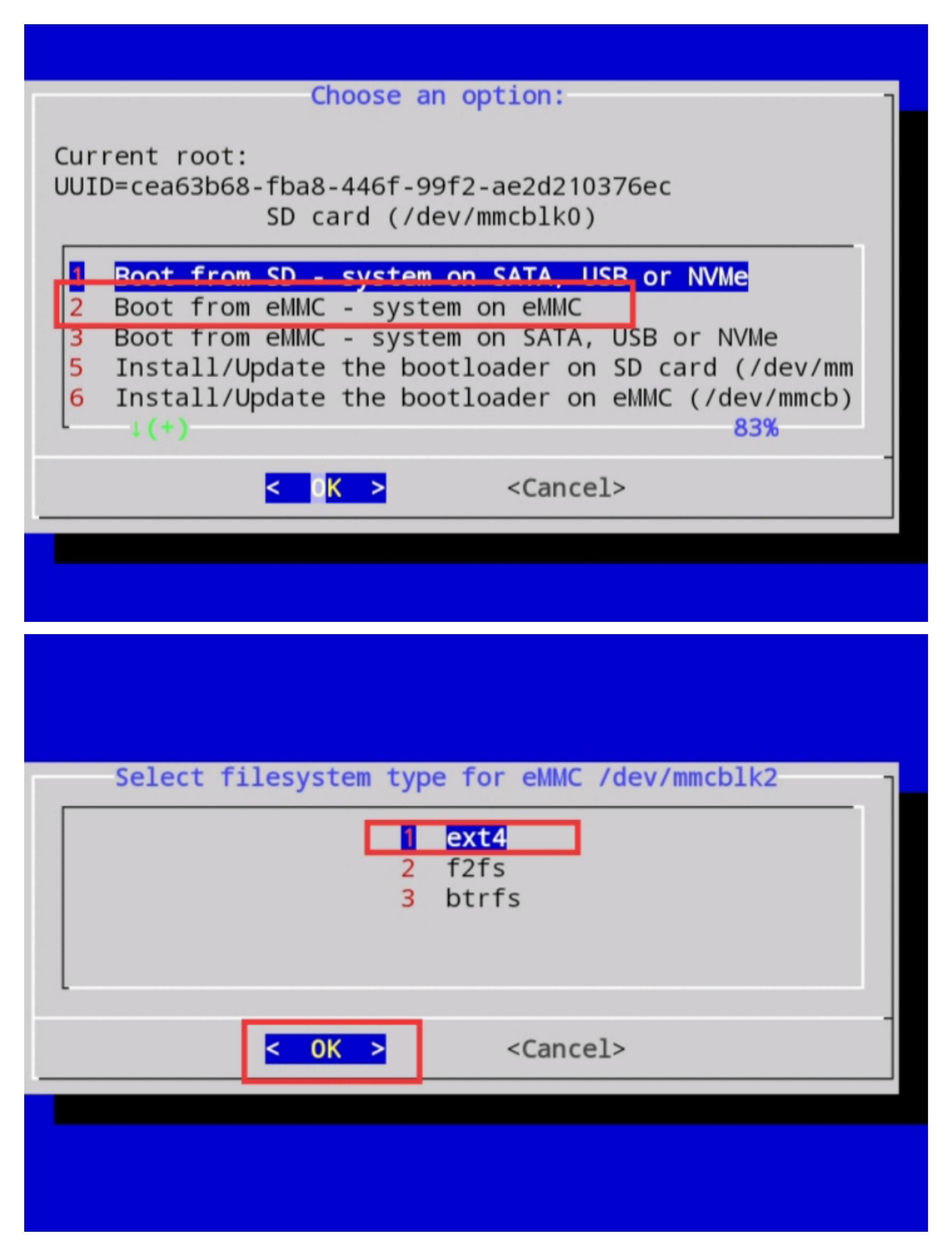
 Comprehensive Guide: Installing Armbian on the TX10 PRO (Allwinner H313) Introduction This technical guide documents the complete process for deploying Linux on the TX10 PRO Android TV Box (Allwinner H313). Due to hardware variations and kernel compatibility issues common on these devices, establishing a functional Armbian environment requires specific images, DTBs, and configuration steps. This documentation is designed to streamline the installation process and avoid common hardware compatibility problems. Technical Specifications & Environment The procedures in this guide were validated on a TX10 PRO with the following hardware: Component Specification ---------------- ----------------------------------- SoC Allwinner H313 (sun50iw9p1) CPU Quad-core Cortex-A53 (ARM64) Memory 1 GB LPDDR3 (Samsung eMCP) Storage 8 GB eMMC Board Revision WFTECH_V2.0 Device Codename titan-p1 Product walley Stock OS Android (Modified Build) Bootloader U-Boot Tested Kernel Linux 6.12.64 (bookworm) Tested working image: Armbian-unofficial_26.02.0-trunk_X96q-v1-3_bookworm_current_6.12.64_minimal.img.xz Kernel: Linux 6.12.64 bookworm Base OS: Debian Bookworm Server Target: X96Q DDR3 / Allwinner H313 Although this image is labeled for the X96Q DDR3, it successfully booted on my TX10 PRO with the WFTECH_V2.0 board and Allwinner H313 SoC. Hardware revisions vary, so compatibility with other TX10 PRO units is not guaranteed. ⚠ Crucial Hardware Warning TV box manufacturers frequently change internal components (RAM layout, Wi-Fi chipsets, and board revisions) without changing the product name. Always verify your board revision before proceeding. Using the wrong Device Tree Blob (DTB) can result in an unbootable system. Advantages & Disadvantages of Running Linux Advantages: Cost Efficiency Much cheaper than a Raspberry Pi or other SBC. Enclosure Included Comes with a case and power supply. Low Power Consumption Runs quietly with very low power usage, making it suitable for lightweight servers. Disadvantages: No Official Support Linux support depends entirely on community-maintained images. Thermal Throttling Cheap passive cooling causes overheating during heavy workloads. Weak eMMC Storage Internal storage may wear out under frequent writes. Slow I/O USB ports are usually USB 2.0 only. No SATA, NVMe, or native Gigabit Ethernet. Driver Problems Wi-Fi, Bluetooth, and hardware video acceleration usually require manual setup. Prerequisite Hardwares: MicroSD Card (8GB or larger) MicroSD Card Reader (Cost: 0.45 USD ) HDMI Monitor (Tv) USB Keyboard Ethernet Adapter Integrated Wi-Fi rarely works immediately on bookworm Linux. A wired Ethernet connection is strongly recommended for initial setup. Installation Process Step 1 — Download Armbian Official Armbian images generally do not include all hardware support for the H313. Download a trusted community image designed for Allwinner H313/H616 boards using the 6.12.64 kernel. USE THIS: Armbian-unofficial_26.02.0-trunk_X96q-v1-3_bookworm_current_6.12.64_minimal.img.xz Step 2 — Flash the SD Card ⚠ Warning Avoid using the Linux dd command if you are unfamiliar with it. Selecting the wrong drive can permanently erase your computer. Instead, use BalenaEtcher. Flashing Steps: Install and open BalenaEtcher. Insert your MicroSD card. Click Flash from File. Select the downloaded .img.xz image. Click Select Target. Choose your MicroSD card carefully. Click Flash! Wait until flashing and verification reach 100%. Safely eject the card. Step 3 — Hardware Setup Before powering on: Insert the MicroSD card. Connect HDMI. Connect USB keyboard. Connect USB Ethernet. Connect power. Step 4 — First Boot The first boot performs: Filesystem expansion Initial setup System configuration This may take several minutes. Expected boot sequence: U-Boot ↓ Linux Kernel ↓ Armbian Login Prompt Step 5 — Initial Login Default credentials: Username: root Password: 1234 After logging in you will be required to: Change the root password Create a normal user Configure timezone Configure locale Step 6 — Verify Network Built-in Wi-Fi will probably not work. The board uses the SSV6x5x / SV6256 chipset which requires extra drivers. Verify Ethernet: ip a ping -c 3 1.1.1.1 Step 7 — Update the System Enable network time: sudo timedatectl set-ntp true Then update: sudo apt update sudo apt upgrade -y Step 8 — Install to eMMC (Optional) Once everything works from the SD card: sudo armbian-config Navigate to: System ↓ Install ↓ Boot from eMMC Follow the installer. After completion: Shut down Remove the SD card Boot from internal storage Hardware Compatibility Working - perfectly HDMI Output USB Ports USB Ethernet Known Issues Wi-Fi - Not working Requires manual compilation of the SSV6256 driver. Graphics No hardware acceleration. Software rendering only. DTB Compatibility Boot success depends heavily on selecting the correct DTB. Different board revisions may require different DTBs. Best Practices Test from SD First Never install to eMMC before confirming that everything works. Backup Android Create a backup of the original Android firmware before modifying internal storage. DTB Troubleshooting If the device: Boot loops Shows a black screen Fails to boot Mount the SD card on another computer. Open: armbianEnv.txt Try different H313/H616 DTB files until the system boots successfully.
.thumb.jpg.0a12b49b2978b07f1a1dc2a50bf10693.jpg)
.thumb.jpg.80e71bf7111fe6835cd8a1480ff3ea43.jpg)
.jpg.a4b146753d94974e0a50b683b1975248.jpg)
-

NVMe not recognized on OrangePi 5 with Armbian
MAXIM ALEKSEEV replied to smurfx's topic in Beginners
I tried all the images including Armbian and the result is the same. The disk is a Silicon Power P34A60 256 GB NVME not SATA -
Ultra is not the standard OPi5 nor OPi5Pro, AFAIR it is also RK3588 v.s. RK3588S wich is a major difference w.r.t. PCIE Use a recent kernel/image, see https://armbian.com/boards/orangepi5-ultra And report brand and type of the M.2 NVME SSD. Some people have asked similar question and turned out to be a M.2 SATA SSD
-
NVMe not recognized on OrangePi 5 with Armbian
MAXIM ALEKSEEV replied to smurfx's topic in Beginners
orangepi@orangepi5ultra:~$ dmesg -T | grep -Ei 'pcie|nvme|ltssm|link fail|fe150000' lspci -nn lsblk [Thu Jul 9 14:07:43 2026] vcc3v3_pcie30: 3300 mV, disabled [Thu Jul 9 14:07:43 2026] reg-fixed-voltage vcc3v3-pcie30: Looking up vin-supply from device tree [Thu Jul 9 14:07:43 2026] vcc3v3_pcie30: supplied by vcc5v0_sys [Thu Jul 9 14:07:43 2026] reg-fixed-voltage vcc3v3-pcie30: vcc3v3_pcie30 supplying 3300000uV [Thu Jul 9 14:07:43 2026] vcc3v3_pcie2x1l0: 3300 mV, enabled [Thu Jul 9 14:07:43 2026] reg-fixed-voltage vcc3v3-pcie2x1l0: Looking up vin-supply from device tree [Thu Jul 9 14:07:43 2026] vcc3v3_pcie2x1l0: supplied by vcc12v_dcin [Thu Jul 9 14:07:43 2026] reg-fixed-voltage vcc3v3-pcie2x1l0: vcc3v3_pcie2x1l0 supplying 3300000uV [Thu Jul 9 14:07:43 2026] reg-fixed-voltage vcc3v3-pcie-eth: Looking up vin-supply from device tree [Thu Jul 9 14:07:43 2026] vcc3v3_pcie_eth: supplied by vcc12v_dcin [Thu Jul 9 14:07:43 2026] vcc3v3_pcie_eth: 3300 mV, enabled [Thu Jul 9 14:07:43 2026] reg-fixed-voltage vcc3v3-pcie-eth: vcc3v3_pcie_eth supplying 3300000uV [Thu Jul 9 14:07:44 2026] rk-pcie fe180000.pcie: invalid prsnt-gpios property in node [Thu Jul 9 14:07:44 2026] rk-pcie fe190000.pcie: invalid prsnt-gpios property in node [Thu Jul 9 14:07:44 2026] rk-pcie fe190000.pcie: Looking up vpcie3v3-supply from device tree [Thu Jul 9 14:07:44 2026] rk-pcie fe180000.pcie: Looking up vpcie3v3-supply from device tree [Thu Jul 9 14:07:44 2026] rk-pcie fe190000.pcie: Looking up vpcie3v3-supply property in node /pcie@fe190000 failed [Thu Jul 9 14:07:44 2026] rk-pcie fe180000.pcie: Looking up vpcie3v3-supply property in node /pcie@fe180000 failed [Thu Jul 9 14:07:44 2026] rk-pcie fe190000.pcie: no vpcie3v3 regulator found [Thu Jul 9 14:07:44 2026] rk-pcie fe180000.pcie: no vpcie3v3 regulator found [Thu Jul 9 14:07:44 2026] rk-pcie fe150000.pcie: invalid prsnt-gpios property in node [Thu Jul 9 14:07:44 2026] rk-pcie fe150000.pcie: Looking up vpcie3v3-supply from device tree [Thu Jul 9 14:07:44 2026] rk-pcie fe190000.pcie: IRQ msi not found [Thu Jul 9 14:07:44 2026] rk-pcie fe190000.pcie: use outband MSI support [Thu Jul 9 14:07:44 2026] rk-pcie fe190000.pcie: Missing *config* reg space [Thu Jul 9 14:07:44 2026] rk-pcie fe190000.pcie: host bridge /pcie@fe190000 ranges: [Thu Jul 9 14:07:44 2026] rk-pcie fe190000.pcie: err 0x00f4000000..0x00f40fffff -> 0x00f4000000 [Thu Jul 9 14:07:44 2026] rk-pcie fe190000.pcie: IO 0x00f4100000..0x00f41fffff -> 0x00f4100000 [Thu Jul 9 14:07:44 2026] rk-pcie fe190000.pcie: MEM 0x00f4200000..0x00f4ffffff -> 0x00f4200000 [Thu Jul 9 14:07:44 2026] rk-pcie fe190000.pcie: MEM 0x0a00000000..0x0a3fffffff -> 0x0a00000000 [Thu Jul 9 14:07:44 2026] rk-pcie fe190000.pcie: Missing *config* reg space [Thu Jul 9 14:07:44 2026] rk-pcie fe170000.pcie: invalid prsnt-gpios property in node [Thu Jul 9 14:07:44 2026] rk-pcie fe190000.pcie: invalid resource [Thu Jul 9 14:07:44 2026] rk-pcie fe170000.pcie: Looking up vpcie3v3-supply from device tree [Thu Jul 9 14:07:44 2026] rk-pcie fe180000.pcie: IRQ msi not found [Thu Jul 9 14:07:44 2026] rk-pcie fe180000.pcie: use outband MSI support [Thu Jul 9 14:07:44 2026] rk-pcie fe180000.pcie: Missing *config* reg space [Thu Jul 9 14:07:44 2026] rk-pcie fe180000.pcie: host bridge /pcie@fe180000 ranges: [Thu Jul 9 14:07:44 2026] rk-pcie fe180000.pcie: err 0x00f3000000..0x00f30fffff -> 0x00f3000000 [Thu Jul 9 14:07:44 2026] rk-pcie fe180000.pcie: IO 0x00f3100000..0x00f31fffff -> 0x00f3100000 [Thu Jul 9 14:07:44 2026] rk-pcie fe180000.pcie: MEM 0x00f3200000..0x00f3ffffff -> 0x00f3200000 [Thu Jul 9 14:07:44 2026] rk-pcie fe180000.pcie: MEM 0x09c0000000..0x09ffffffff -> 0x09c0000000 [Thu Jul 9 14:07:44 2026] rk-pcie fe180000.pcie: Missing *config* reg space [Thu Jul 9 14:07:44 2026] rk-pcie fe180000.pcie: invalid resource [Thu Jul 9 14:07:44 2026] rk-pcie fe170000.pcie: IRQ msi not found [Thu Jul 9 14:07:44 2026] rk-pcie fe170000.pcie: use outband MSI support [Thu Jul 9 14:07:44 2026] rk-pcie fe170000.pcie: Missing *config* reg space [Thu Jul 9 14:07:44 2026] rk-pcie fe170000.pcie: host bridge /pcie@fe170000 ranges: [Thu Jul 9 14:07:44 2026] rk-pcie fe170000.pcie: err 0x00f2000000..0x00f20fffff -> 0x00f2000000 [Thu Jul 9 14:07:44 2026] rk-pcie fe170000.pcie: IO 0x00f2100000..0x00f21fffff -> 0x00f2100000 [Thu Jul 9 14:07:44 2026] rk-pcie fe170000.pcie: MEM 0x00f2200000..0x00f2ffffff -> 0x00f2200000 [Thu Jul 9 14:07:44 2026] rk-pcie fe170000.pcie: MEM 0x0980000000..0x09bfffffff -> 0x0980000000 [Thu Jul 9 14:07:44 2026] rk-pcie fe170000.pcie: Missing *config* reg space [Thu Jul 9 14:07:44 2026] rk-pcie fe170000.pcie: invalid resource [Thu Jul 9 14:07:44 2026] rk-pcie fe150000.pcie: IRQ msi not found [Thu Jul 9 14:07:44 2026] rk-pcie fe150000.pcie: use outband MSI support [Thu Jul 9 14:07:44 2026] rk-pcie fe150000.pcie: Missing *config* reg space [Thu Jul 9 14:07:44 2026] rk-pcie fe150000.pcie: host bridge /pcie@fe150000 ranges: [Thu Jul 9 14:07:44 2026] rk-pcie fe150000.pcie: err 0x00f0000000..0x00f00fffff -> 0x00f0000000 [Thu Jul 9 14:07:44 2026] rk-pcie fe150000.pcie: IO 0x00f0100000..0x00f01fffff -> 0x00f0100000 [Thu Jul 9 14:07:44 2026] rk-pcie fe150000.pcie: MEM 0x00f0200000..0x00f0ffffff -> 0x00f0200000 [Thu Jul 9 14:07:44 2026] rk-pcie fe150000.pcie: MEM 0x0900000000..0x093fffffff -> 0x0900000000 [Thu Jul 9 14:07:44 2026] rk-pcie fe150000.pcie: Missing *config* reg space [Thu Jul 9 14:07:44 2026] rk-pcie fe150000.pcie: invalid resource [Thu Jul 9 14:07:44 2026] rk-pcie fe190000.pcie: PCIe Linking... LTSSM is 0x3 [Thu Jul 9 14:07:44 2026] rk-pcie fe180000.pcie: PCIe Linking... LTSSM is 0x3 [Thu Jul 9 14:07:44 2026] rk-pcie fe170000.pcie: PCIe Linking... LTSSM is 0x3 [Thu Jul 9 14:07:44 2026] rk-pcie fe150000.pcie: PCIe Linking... LTSSM is 0x0 [Thu Jul 9 14:07:44 2026] rk-pcie fe190000.pcie: PCIe Linking... LTSSM is 0x3 [Thu Jul 9 14:07:44 2026] rk-pcie fe170000.pcie: PCIe Linking... LTSSM is 0x3 [Thu Jul 9 14:07:44 2026] rk-pcie fe150000.pcie: PCIe Linking... LTSSM is 0x1 [Thu Jul 9 14:07:44 2026] rk-pcie fe190000.pcie: PCIe Linking... LTSSM is 0x3 [Thu Jul 9 14:07:44 2026] rk-pcie fe170000.pcie: PCIe Linking... LTSSM is 0x3 [Thu Jul 9 14:07:44 2026] rk-pcie fe150000.pcie: PCIe Linking... LTSSM is 0x1 [Thu Jul 9 14:07:44 2026] rk-pcie fe180000.pcie: PCIe Link up, LTSSM is 0x130011 [Thu Jul 9 14:07:44 2026] rk-pcie fe180000.pcie: PCI host bridge to bus 0003:30 [Thu Jul 9 14:07:44 2026] pcieport 0003:30:00.0: PME: Signaling with IRQ 154 [Thu Jul 9 14:07:47 2026] rk-pcie fe170000.pcie: PCIe Link Fail [Thu Jul 9 14:07:47 2026] rk-pcie fe170000.pcie: failed to initialize host [Thu Jul 9 14:07:47 2026] rk-pcie fe190000.pcie: PCIe Link Fail [Thu Jul 9 14:07:47 2026] rk-pcie fe190000.pcie: failed to initialize host [Thu Jul 9 14:07:47 2026] rk-pcie fe150000.pcie: PCIe Link Fail [Thu Jul 9 14:07:47 2026] rk-pcie fe150000.pcie: failed to initialize host [Thu Jul 9 14:07:47 2026] rockchip-pm-domain fd8d8000.power-management:power-controller: Looking up pcie-supply from device tree [Thu Jul 9 14:07:47 2026] rockchip-pm-domain fd8d8000.power-management:power-controller: Looking up pcie-supply property in node /power-management@fd8d8000/power-controller failed [Thu Jul 9 14:07:47 2026] reg-fixed-voltage pcie20-avdd0v85: Looking up vin-supply from device tree [Thu Jul 9 14:07:47 2026] pcie20_avdd0v85: supplied by vdd_0v85_s0 [Thu Jul 9 14:07:47 2026] pcie20_avdd0v85: 850 mV, enabled [Thu Jul 9 14:07:47 2026] reg-fixed-voltage pcie20-avdd0v85: pcie20_avdd0v85 supplying 850000uV [Thu Jul 9 14:07:47 2026] reg-fixed-voltage pcie20-avdd1v8: Looking up vin-supply from device tree [Thu Jul 9 14:07:47 2026] pcie20_avdd1v8: supplied by avcc_1v8_s0 [Thu Jul 9 14:07:47 2026] pcie20_avdd1v8: 1800 mV, enabled [Thu Jul 9 14:07:47 2026] reg-fixed-voltage pcie20-avdd1v8: pcie20_avdd1v8 supplying 1800000uV [Thu Jul 9 14:07:47 2026] reg-fixed-voltage pcie30-avdd0v75: Looking up vin-supply from device tree [Thu Jul 9 14:07:47 2026] pcie30_avdd0v75: supplied by avdd_0v75_s0 [Thu Jul 9 14:07:47 2026] pcie30_avdd0v75: 750 mV, enabled [Thu Jul 9 14:07:47 2026] reg-fixed-voltage pcie30-avdd0v75: pcie30_avdd0v75 supplying 750000uV [Thu Jul 9 14:07:47 2026] reg-fixed-voltage pcie30-avdd1v8: Looking up vin-supply from device tree [Thu Jul 9 14:07:47 2026] pcie30_avdd1v8: supplied by avcc_1v8_s0 [Thu Jul 9 14:07:47 2026] pcie30_avdd1v8: 1800 mV, enabled [Thu Jul 9 14:07:47 2026] reg-fixed-voltage pcie30-avdd1v8: pcie30_avdd1v8 supplying 1800000uV 0003:30:00.0 PCI bridge [0604]: Rockchip Electronics Co., Ltd Device [1d87:3588] (rev 01) 0003:31:00.0 Ethernet controller [0200]: Realtek Semiconductor Co., Ltd. RTL8125 2.5GbE Controller [10ec:8125] (rev 05) NAME MAJ:MIN RM SIZE RO TYPE MOUNTPOINTS mtdblock0 31:0 0 16M 0 disk mmcblk0 179:0 0 58.2G 0 disk ├─mmcblk0p1 179:1 0 1G 0 part /boot └─mmcblk0p2 179:2 0 56.6G 0 part /var/log.hdd / zram0 254:0 0 3.9G 0 disk [SWAP] zram1 254:1 0 200M 0 disk /var/log orangepi@orangepi5ultra:~$ -
NVMe not recognized on OrangePi 5 with Armbian
MAXIM ALEKSEEV replied to smurfx's topic in Beginners
orange pi 5 ultra Orange Pi 1.0.0 Jammy with Linux 5.10.160-rockchip-rk3588 NAME MAJ:MIN RM SIZE RO TYPE MOUNTPOINTS mtdblock0 31:0 0 16M 0 disk mmcblk0 179:0 0 58.2G 0 disk ├─mmcblk0p1 179:1 0 1G 0 part /boot └─mmcblk0p2 179:2 0 56.6G 0 part /var/log.hdd / zram0 254:0 0 3.9G 0 disk [SWAP] zram1 254:1 0 200M 0 disk /var/log [Thu Jul 9 13:41:39 2026] rk-pcie fe150000.pcie: PCIe Link Fail [Thu Jul 9 13:41:39 2026] rk-pcie fe150000.pcie: failed to initialize host -
just need to enable device drivers >graphics support> direct rendering manager> AMD GPU device drivers >graphics support> direct rendering manager> Noveau (nvidia) cards device drivers >graphics support> direct rendering manager> Intel Xe2 Graphics in the config
- Yesterday
-
Board Enabling PR: https://github.com/armbian/build/pull/10147
-
Here, I will document the efforts to get the Easy EAI RV1126 board into Armbian. Uboot: Link boot: Link MiniLoaderAll.bin: Link Docs available on: Link Build Command: ./compile.sh BOARD=easy-eai-nano BRANCH=vendor BUILD_DESKTOP=no BUILD_MINIMAL=yes KERNEL_CONFIGURE=no RELEASE=resolute
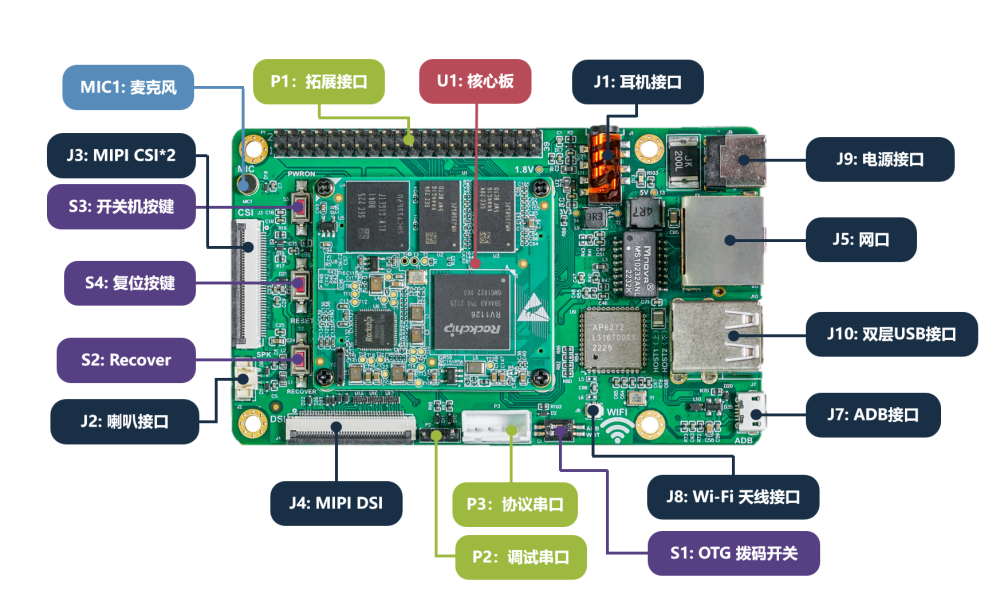
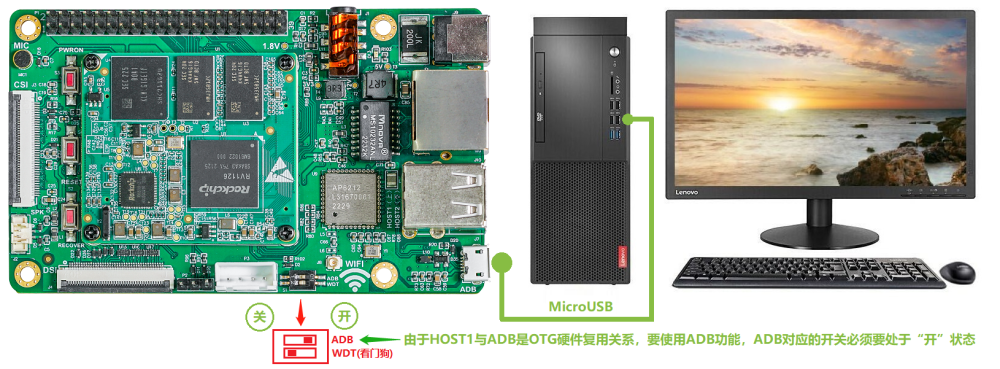
-
Hello, Same issue with debian trixie and my UPS connected by usb, not working but work on old kernel.
-
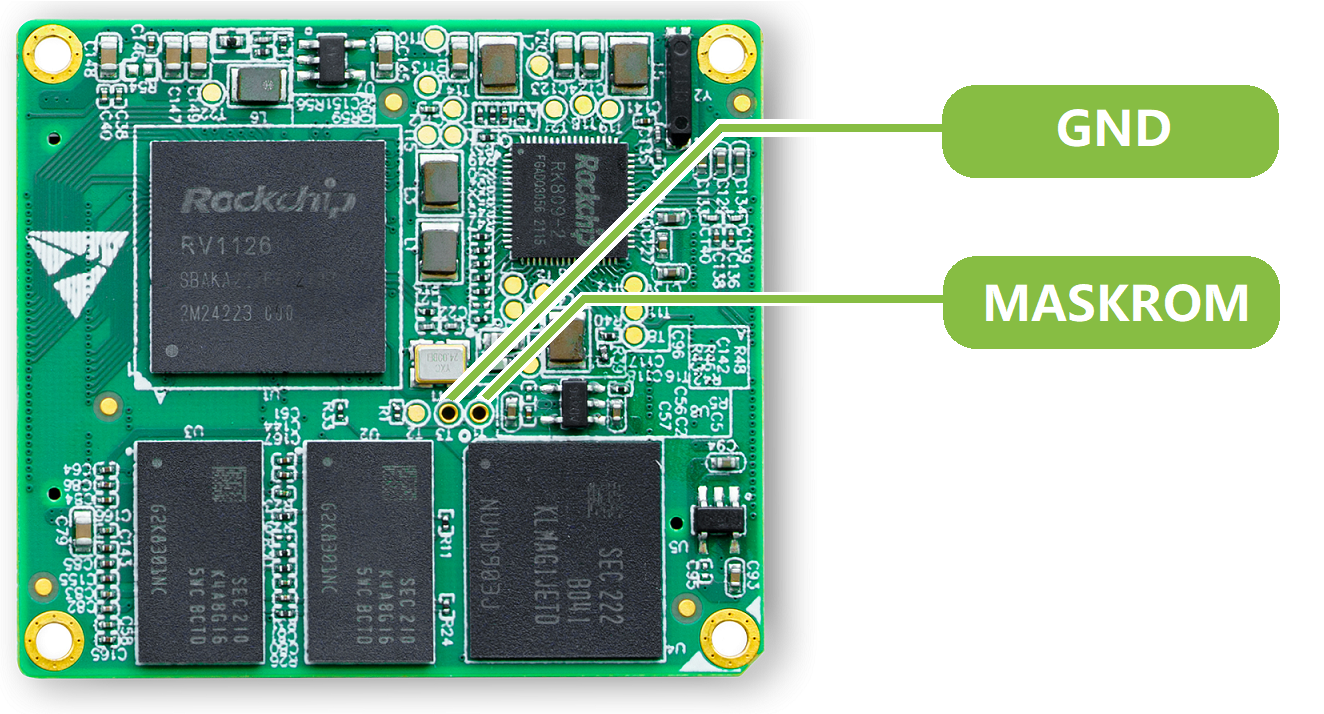
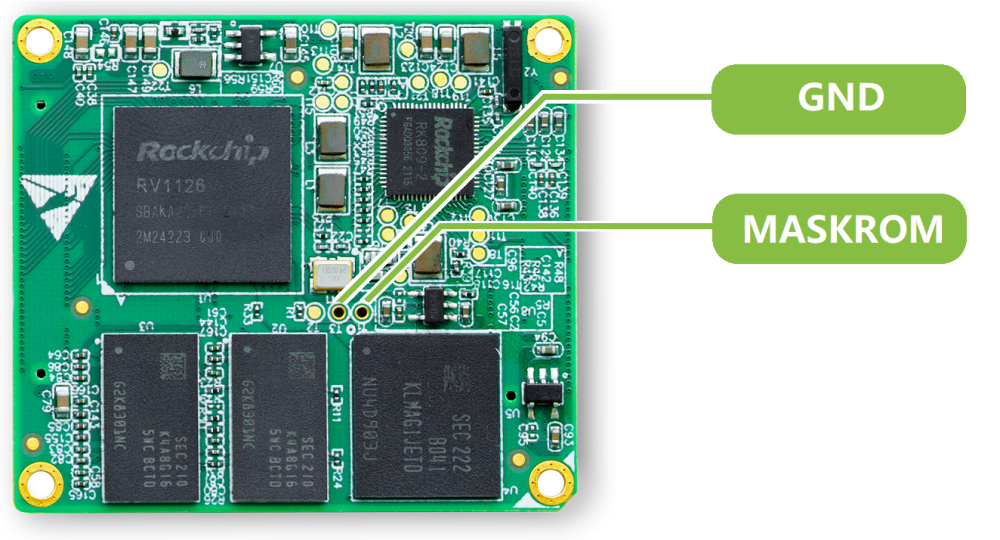
 You can try to short the EMMC that wasn't connected, to short the CLK and GND of the soldered EMMC also check this points to:
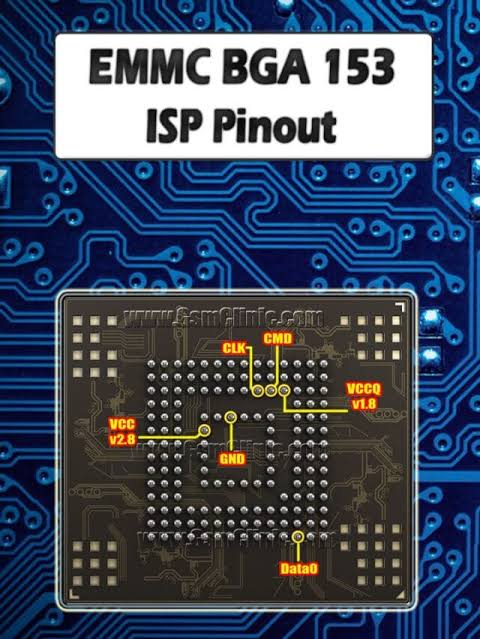
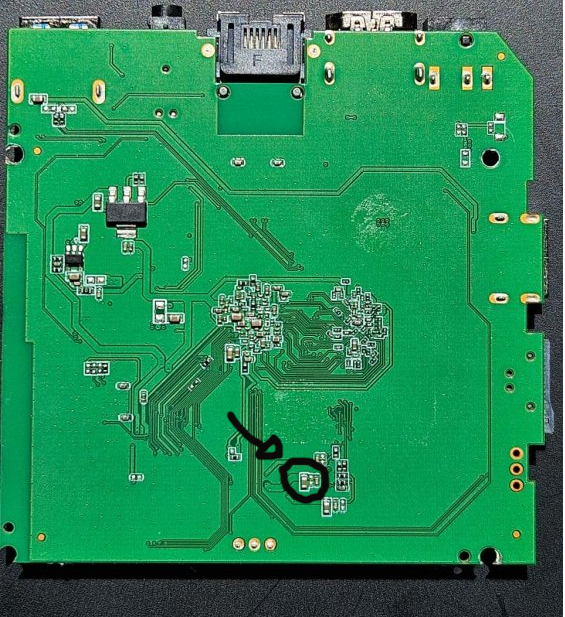
-
Is it possible to enable jumbo frame on any ethernet interface of Orange Pi RV2. My attempts to set mtu > 1500 are going to fail. The kernel is not support this. I use Ambian based Debian 13 ( current 6.18.35 ). By the way, network controller support Jumbo up to 18K.
-
Are there anyone who have tried flashing Armbian riscv uefi image to the nvme drive with armbianized u-boot in the SPI flash?
-
Hi I need assistance with my TV98 box. It is stuck on the android screen. I need firware
-

Freeze / kernel panic after upgrading to kernel 7.0.12
eselarm replied to Johannes's topic in Allwinner sunxi
Good that your bpi appears to be stable. My did hang again, no reaction on serial console, no reaction on IP networking. So I enabled the watchdog, uncommented the 'ping 192.168.1.1 line' and made it ping 192.168.1.100 and temporarily added that address to another computer: ip addr add dev br0 192.168.1.100/24 Then removing it: ip addr del dev br0 192.168.1.100/24 and after a minute or so: [ 263.929336] systemd-journald[236]: Received SIGTERM from PID 1071 (watchdog). [ 265.185973] systemd[1]: systemd 257.13-1~deb13u1 running in system mode (+PAM +AUDIT +SELINUX +APPARMOR +IMA +IPE +SMACK +SECCOMP +GCRYPT -GNUTLS +OPENSSL +ACL +BLKID +CURL +ELFUTILS +FIDO2 +IDN2 -IDN +IPTC +KMOD +LIBCRYPTSETUP +LIBCRYPTSETUP_PLUGINS +LIBFDISK +PCRE2 +PWQUALITY +P11KIT +QRENCODE +TPM2 +BZIP2 +LZ4 +XZ +ZLIB +ZSTD -BPF_FRAMEWORK -BTF -XKBCOMMON -UTMP +SYSVINIT +LIBARCHIVE) [ 265.221538] systemd[1]: Detected architecture arm. [ 269.100327] systemd[1]: Failed to fork off sandboxing environment for executing generators: Protocol error [!!!!!!] Failed to start up manager. [ 269.146571] systemd[1]: Freezing execution. This looks like HW watchdog does not work. Same trick on NanoPi-NEO, so also sunxi kernel although 7.0.12-edge-sunxi, it resets. So appears to work although no proof that it is HW reset. I have not checked live dmesg or so, just noticed it went offline and came back later when I also added that .100 IP address again. -
RK3576 - Support for full video hardware acceleration on Armbian
eselarm replied to Marus Gradinaru's topic in Nanopi M5
If you use and Armbian image with kernel '6.1.115-vendor-rk35xx' (note there are many builds over time, all same name, but you need to look in config-6.1.115-vendor-rk35xx and maybe also consider the gcc compiler version to have RKMPP based method working. I mean the API is there, you need a special ffmpeg (from jellyfin for example to use it) in order to use RKMPP based decoding and encoding in HW. That is just CLI, server use-case, works on RK3568 and RK3588. RK3576 should have the same speed/ASIC blocks as RK3588 AFAIK, but check yourself. It can do 5x realtime speed 1080p50 HEVC to H264. mpv 'uses open and agreed standards' and RKMPP is not. Also Android is completely different. Same is Windows or Apple iOS. Those are implemented by commercial/paid developers. In fact it is worse, ffmpeg open-source developers have concluded already long time ago the Rockchip downstream kernel code was copied and violates licenses. (Rockchip copied code and put their names in it.). So since a few months, ffmpeg developers requested github to remove access and that happened. So following GPL licensing, that 6.1.115 kernel is essentially illegal. How you want to deal with that is up to you. It is like it is. Anyway, 6.1.x downstream is getting old and might contain several unpatched security holes. So over time the 'problem' will solve itself as people won't trust it anymore despite being able to use every HW block in RK35xx. As already said, decoding generally is implemented as part on mainline kernel, you just need matching latest userspace. Encoding is much more complex. If you want that, only Intel/AMD is more or less viable option. Like N100, so in cheap miniPCs, certainly considering high RAM prices, is just a way better option. Plays all HW accelerated in FireFox (and mpv as well). Does also VP9 encoding for example, is a royalty free codec, so you won't see this 2 decades old patents issues for H264 and HEVC. Also note AV1 HW decoding was the first to be available in mainline kernel for RK3588. There is just not much content I think. And HW AV1 encoding is another level of new silicon, is not really an option to do in software. -

RK3576 - Support for full video hardware acceleration on Armbian
JFL replied to Marus Gradinaru's topic in Nanopi M5
Hi @Marus Gradinaru, May be this might interest you. -
# cat /etc/NetworkManager/system-connections/br0.nmconnection [connection] id=br0 uuid=75d54cd2-cdfe-4621-ab45-0bddf3ab4e6c type=bridge interface-name=br0 zone=trusted [ethernet] cloned-mac-address=my eth0 mac address [ipv4] method=auto [ipv6] addr-gen-mode=default method=ignore # cat /etc/NetworkManager/system-connections/eth0-br0_slave.nmconnection [connection] id=eth0-br0_slave uuid=31645756-5c39-4184-a0c2-337ae09422ec type=ethernet interface-name=eth0 master=75d54cd2-cdfe-4621-ab45-0bddf3ab4e6c slave-type=bridge # cat /etc/NetworkManager/system-connections/wlan0-br0_slave.nmconnection [connection] id=wlan0-br0_slave uuid=4ff7f9f2-056e-4836-9bc7-0e77d98a989c type=wifi interface-name=wlan0 master=75d54cd2-cdfe-4621-ab45-0bddf3ab4e6c slave-type=bridge [wifi] band=bg channel=1 mode=ap ssid=mywifissid [wifi-security] key-mgmt=wpa-psk proto=rsn; psk=mypassword template, stripped, optimized, cleaned, untested
-
I would not give up on the BPiPro just because this networking stack/tool issues. As I indicated, a bridged WiFi AP works fine with NetworkManager. Armbian images are there to get you started very easily, even without Linux know-how. But it still is Linux, open-source, all DIY and no company you can manage to blame (try to find the engineer(s) who designed the SBC ... ). I know the majority of SBC users throws away working older installations and then get stuck with some new pre-installed image. You can instead just dist-upgrade in-place Netplan is from Canonical and there to uniform Ubuntu so NM and systemd-networkd can be used. Debian does not need netplan, there is no dependency on NM nor systemd-networkd. Now look at this: A script from Armbian does netplan yaml that does .netdev/.network files or .nmconnection files. As long as it works, fine. But 3 layers, from math permutation you can know that means many more potential error cases. So you want to discard HW because networking config tooling has become too complex? I forgot to power off the RPi3b+ before night and now in the morning the internet on the smartphone still works (via that AP). A simple reboot via serial console and short flip to 4G but then back to connected to the AP. BUT, the wlan0 again shows as 'failed'. So it seems a timing issue or so or just the status reporting is the issue. Also Android normally simply disconnects on PHY/MAC layer if no public routing ('internet'). That might happen easily after reboots or so or just without various timeouts. Note I have disabled systemd-networkd-wait-online.service else always 3 minutes waiting at reboot. You can also specify how and what to wait for, but needs reading docs. Also note that OS is not vanilla Debian aarch64, but from RPL, there is many changed packages, especially also in the network domain. And RPi3 has USB connected networking, not on the SoC like most other SBC's, this is also an issue I discovered. I see for another RPi3: @/raspi4/latest/etc/NetworkManager/system-connections -rw------- 1 root root 259 Jan 21 16:16 br0.nmconnection -rw------- 1 root root 217 Jan 21 16:16 eth0-br0_slave.nmconnection -rw------- 1 root root 312 Jan 22 10:44 wlan0-br0_slave.nmconnection Is still RPiOS arm64 bookworm, but with some hacks to prevent netplan and cloud-init disturbing things and wasting time, it also works with RPiOS Trixie. Certainly without tricks on standard Debian Trixie as I simply copy those 3 files to and from old AMD fanless computer etc that also has WiFi onboard. You need to make sure you stop and start NM at the proper moments and also make sure no UUID doubles or orphans. Should be fine when new, not yet booted image.
-
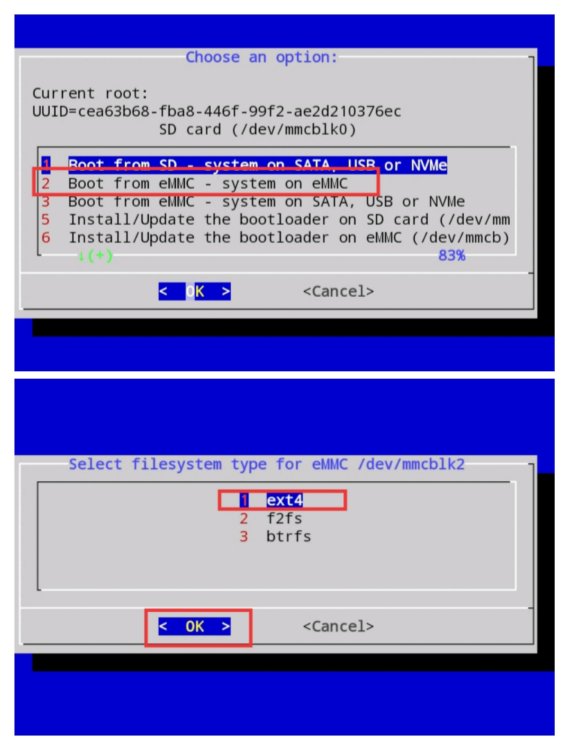
The nand-sata-install script is indeed quite old and not very actively maintained anymore. A common modern replacement on Odroid XU4 (and similar boards) is to use the Armbian installer built into armbian-config. You can run: Bash sudo armbian-config Then go to System → Install (or Install to SATA/USB/NVMe depending on your setup). Many people find it more reliable than the old nand-sata-install. Alternatively, you can do it manually with dd for U-Boot + rsync for the rootfs, but armbian-config is usually the easiest route these days. If you run into any issues with it, feel free to share the output and I can help walk you through it.
-
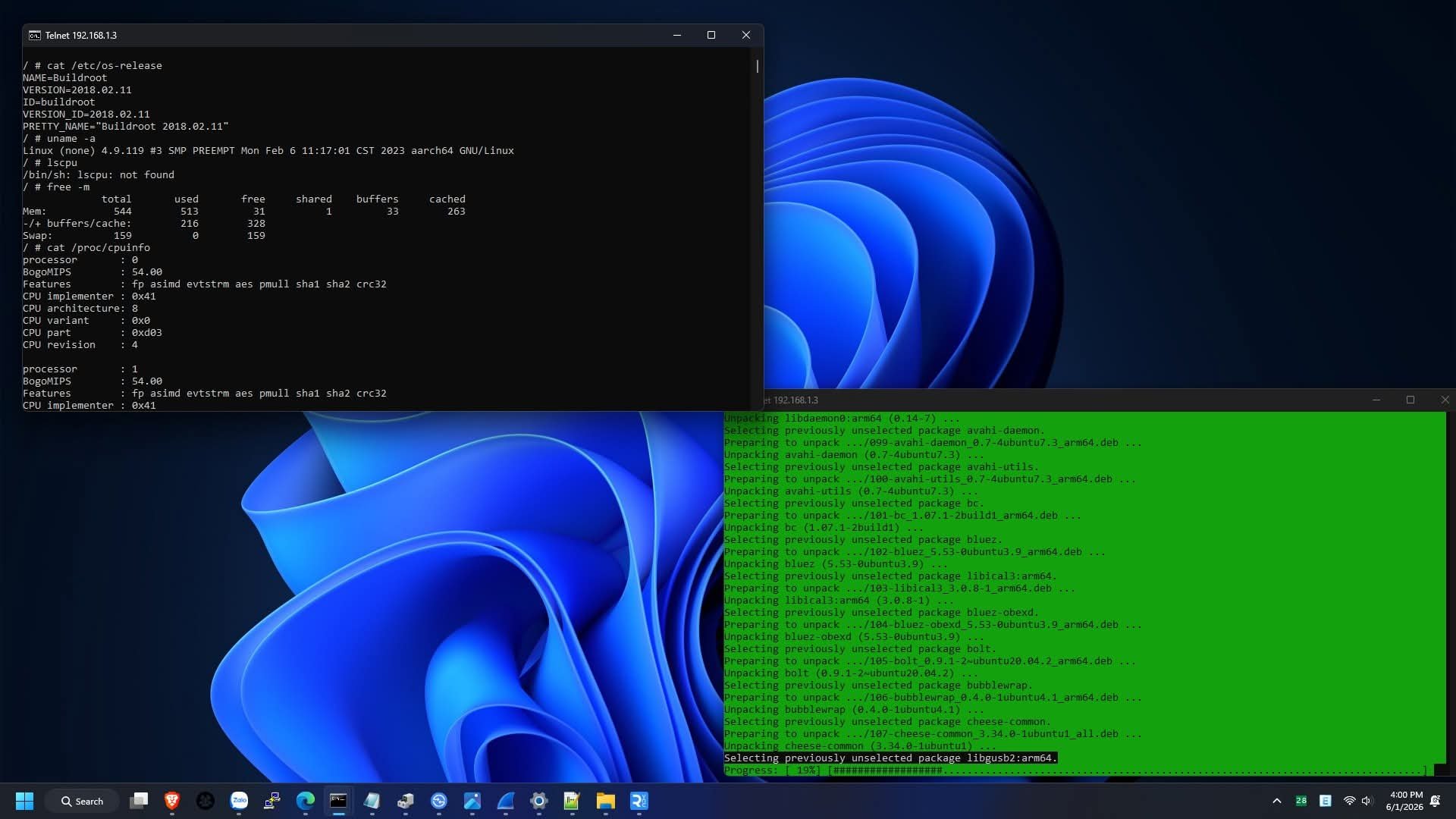
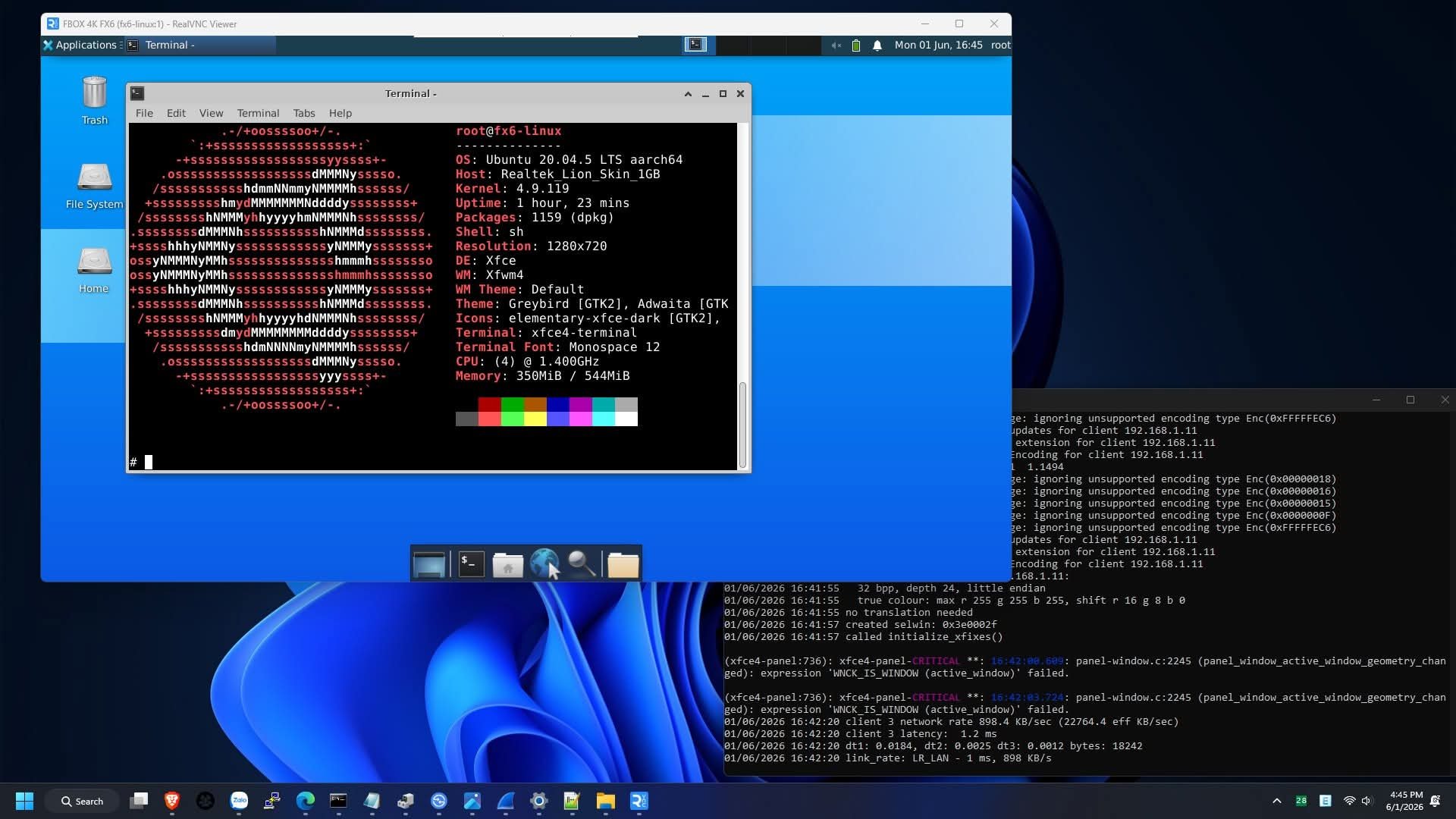
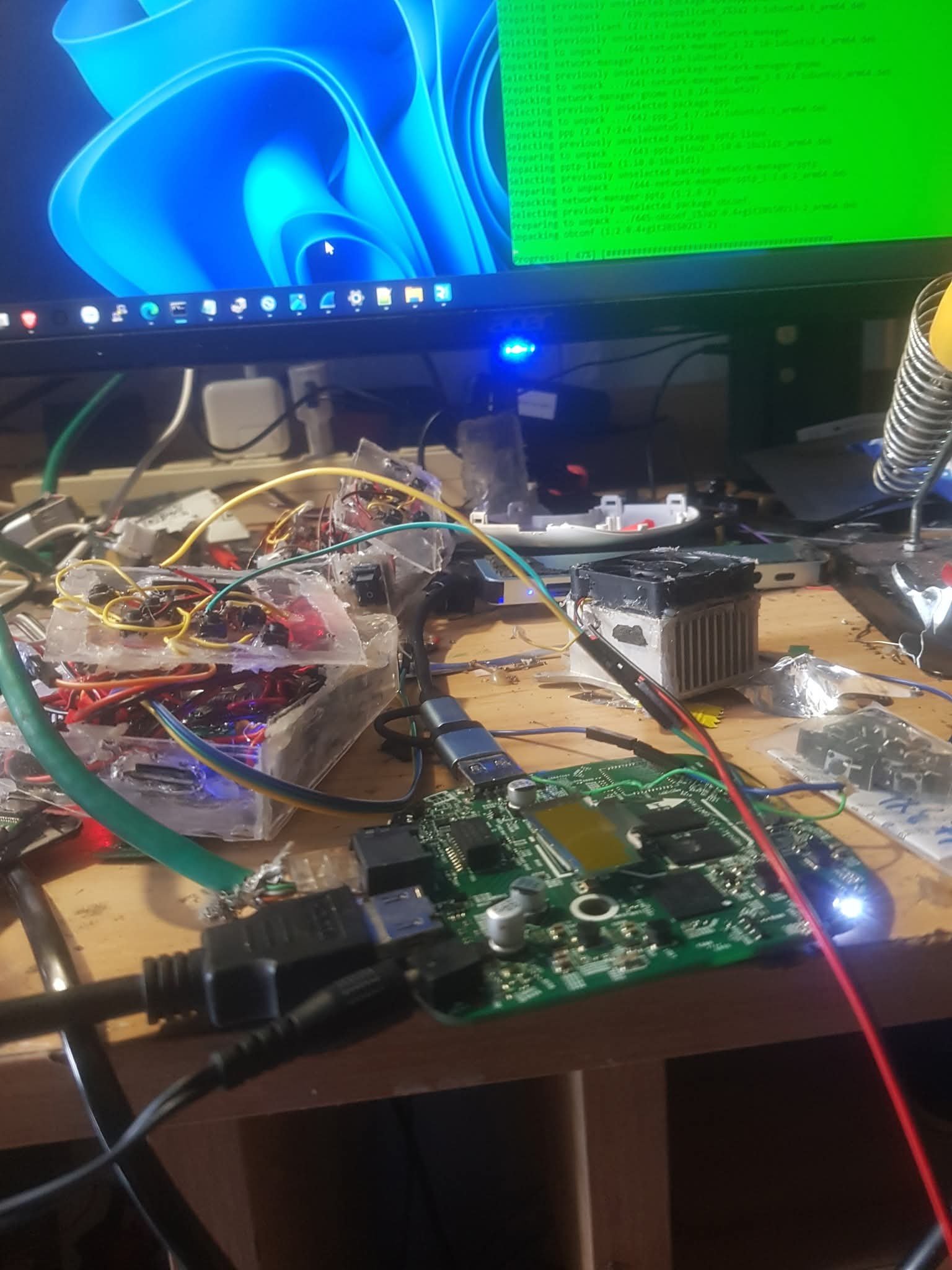
So i had figured out how to get the root shell access on this specific type of box(fx6), and unfortunately, nope. You cant run any other os than the official firmware linux(buildroot) because of secure boot and locked bootloader(nope, you can't unlock it with fastboot). But, you can use chroot to run ubuntu or another os. Heres some images for proof. So, you cant run armbian, have to stick with buildroot, you can modify it the way you like with root permission, just dont modify the root parttion, if you do, it wont boot and it will be bricked
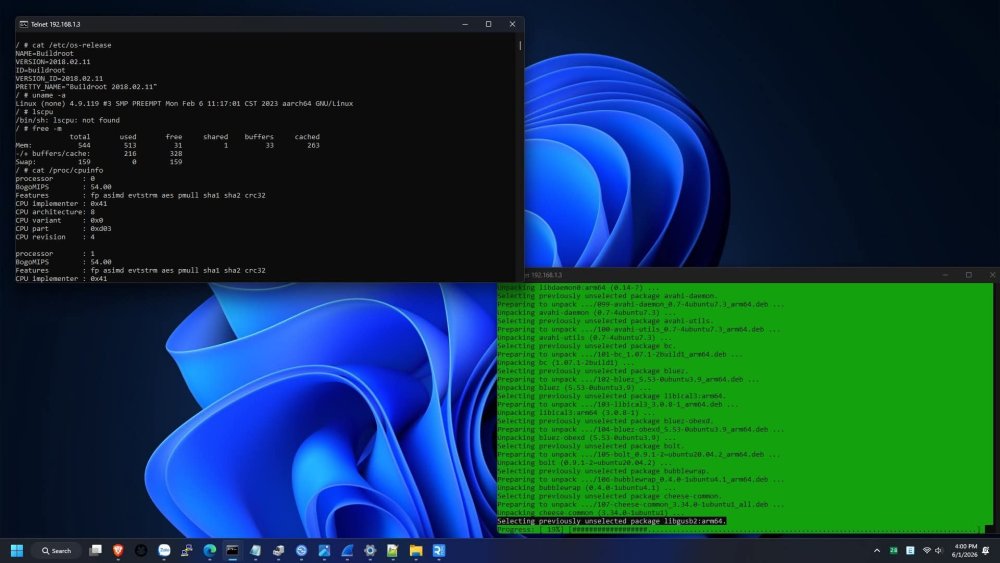
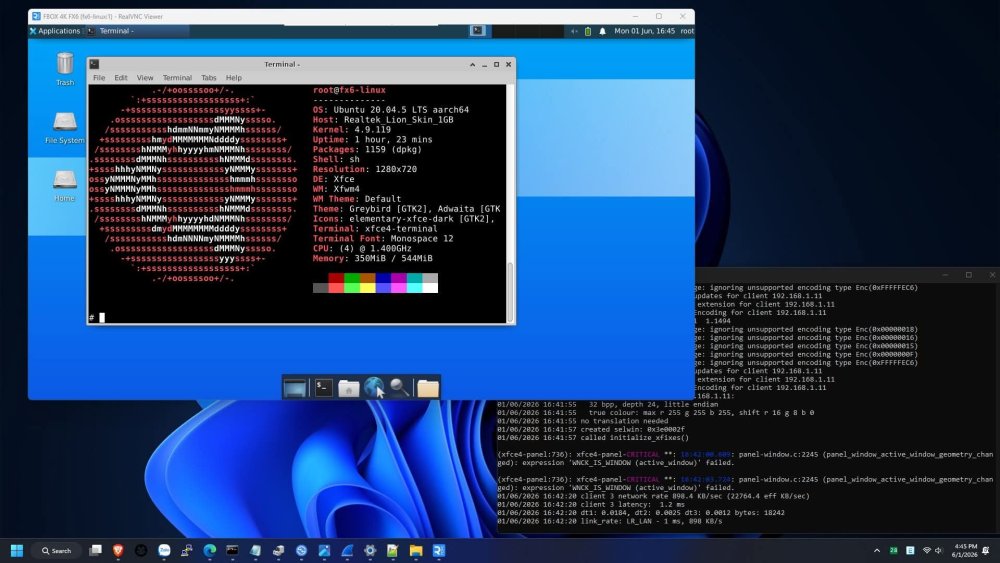
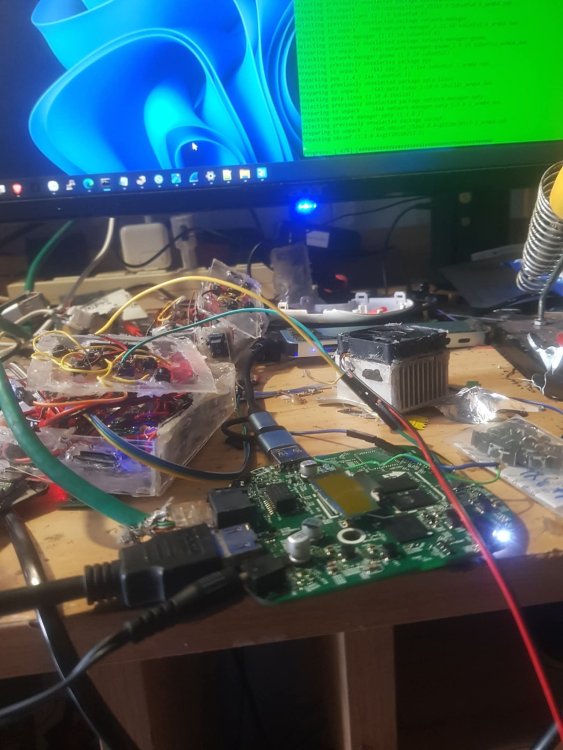
-
 Ok, then. But at least remove that "It works out of the box" statement (which is not true), so that other people don't waste their time, like I did. This Armbian OS, at this time, does not support the NanoPi M5 board.
 -
Theoretically no, because the game won't occupy all the ram, so when you start to fill it up, the kernel should start compressing and move other stuff to zram, but theory is not always how it works in practicality. As for how to disable zram, add zswap.enabled=0 to your kernel parameters and it won't be available after a reboot. To stop zram during operation, IIRC, stop (not disable) systemd-zram-setup@zram0.service. If it's not you should be able to figure out what to stop by listing relevant unit files with systemctl --type swap



.jpg.eb1a6abbd84e7184c010c4dd1ba427aa.jpg)
.jpg.c4f1ecc42a80fcf48526d4eac0c0f3a7.jpg)