Active threads
Showing topics posted in for the last 365 days.
- Today
-
 I had encountered the same problem.Official images' driver were too old and customized.That means you can't change the DE easily.Have a try on Armbian Edge(mainline panthor instead) or build an Orange Pi OS by yourself.Github link.
 -
@qq20739111 I have this patch included in my latest build. I wonder if this will change the cooling and performance. I'll release a test image so you can perform a benchmark on it. I only have a heat sink and fan for the A7A right now. https://github.com/radxa/allwinner-device/commit/7716c3aacfe0ca4432ad3973ec7ea864d2b91195
- Yesterday
-

SV6256P WiFi Now Working on Linux 6.x (Armbian Tested)
Kauã Fonseca replied to Kevin su's topic in Allwinner CPU Boxes
Excuse me for asking, I'm a total noob when it comes to TV boxes. But how do I install this on a ROM? I have an Android TV ROM that works fine but without Wi-Fi. -
 No, just plain 100MBps eth.
 -

H96 Max RK3528 - Cannot boot Armbian from TF/SD card
kalama yzd replied to Alexander Polko's topic in Rockchip CPU Boxes
@jock hi, I have the same box same prb, I used your multitool , same prb black screen like images from ophub, or I created IMG multitool in wrong way, I'm newby in this, plz I want a step by step. Or tutorial I will thankfull Have a good day -

Cheapest box with 1000M/1Gbit ethernet + USB 3.0?
ant_thomas replied to ant_thomas's topic in General Chat
Any suggestions? -

Trying to boot Armbian on LinknLink iSG Box SE
rosic replied to Sancho's topic in Rockchip CPU Boxes
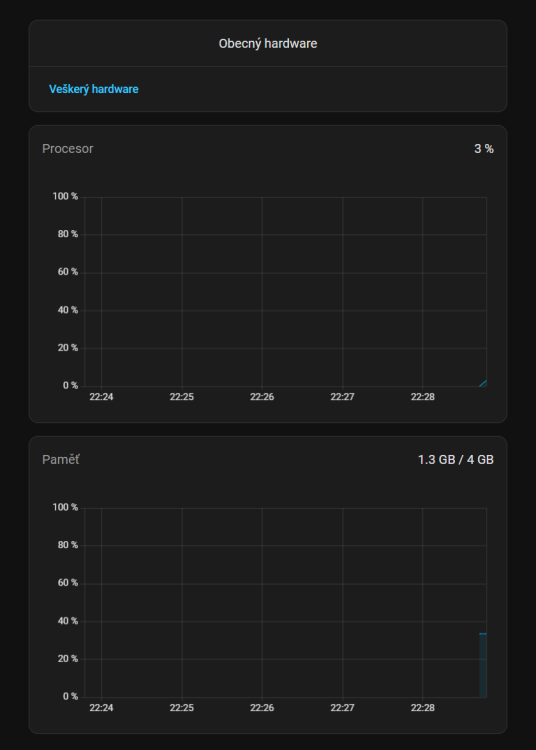
I used the one from github link shared before - dq08_ha_supervised_3.0.0_r2.img But wifi, bt and remote controler are not working afterwards. USBs seem to work fine - screenshots from HomeAssistant. I have 3 of those LinknLink iSG boxes. First one went perfect, second one was flashing there and back, eventually got it working. 3rd one is still giving me troubles 🤷♂️😅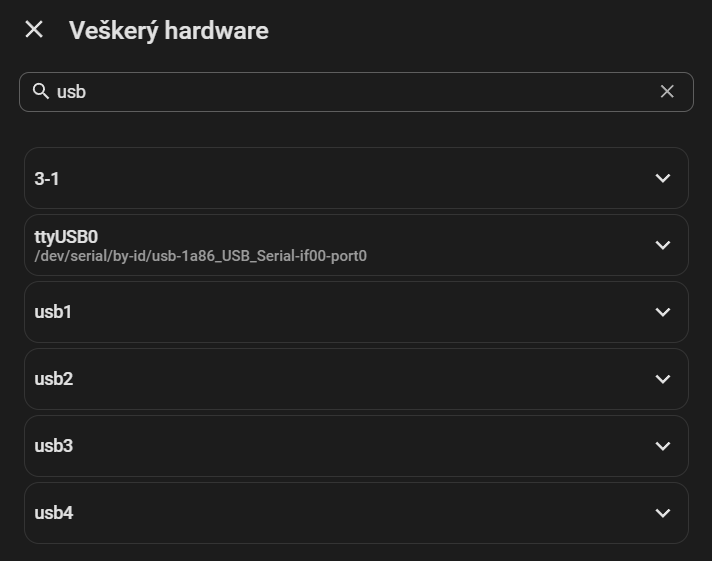
-

CSC Armbian for RK3318/RK3328 TV box boards
usual user replied to jock's topic in Rockchip CPU Boxes
I usually use Falkon in a Plasma environment with Wayland backend. -
Thx 2, but how do we go there from the boards page, these days!? After not been around for a while I'm happy to find out that Igor still (re)-supports the Espressobin board. Though the homepage had been redesigned heavily I was missing e.g. the links to the adapted u-boot files, rescue stuff, etc. - thx
-
I've found these firmware.Maybe they are helpful? nvram_ap6611s.txt clm_syn43711a0.blob SYN43711A0.hcd fw_syn43711a0_sdio.bin
-
 I am not sure if it is a configuration error on my side or intended behaviour, but I am getting apticron emails about armbian-config almost daily due to releases being made by CI/CD. Is there a "release" branch I could switch to to make it stop? Or do I need to blacklist armbian-config from apticron reports? Thanks!
 -
You are not using Armbian. This is a fork of Armbian which uses our name without permission and they do not contribute to the core development process. They trick you into thinking that you will get some sort of support at this place which isn't the case. We do not support 3rd party forks.
- Last week
-
Hi all, I finally could get 4GB in my Transpeed M98 Plus. For everyone that have this same problem, the solution is just use a patch to change 2 archives, the "configs/transpeed-8k618-t_defconfig" and the include/configs/sunxi-common.h to define the maximum dram to 4GB instead 2GB. Just put the patch in build/patch/u-boot/u-boot-aw before the compilation process. To be honest I don't know how Nick could put his box to work with 4GB, because the sunxi-common.h fix in 2GB the maximum amount of dram, #define PHYS_SDRAM_0_SIZE 0x80000000 /* 2 GiB */ instead of #define PHYS_SDRAM_0_SIZE 0x100000000ULL /* 4 GiB */. 174-define-DRAM_MAX_SIZE-to-4GB.patch
-
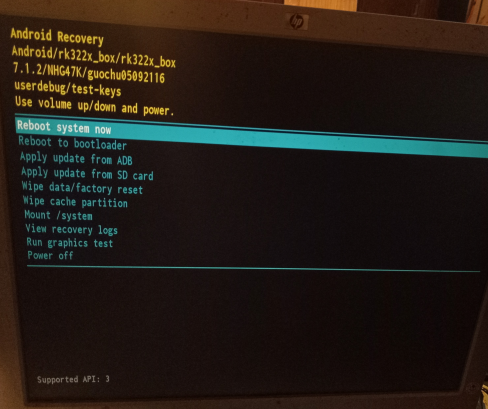
What do I do here? My box has no keys period save the reset button. I searched for the issue in this thread and didn't find anything, or in the internet at large. I have no remote for it (And it doesn't have bluetooth to start with) and usb devices didn't work, so that's not it either.
-
The Orange Pi CM4 isn’t as widely supported in Armbian as some other boards yet, so support can be a bit limited depending on what you’re trying to do. Your best bet is to check the Armbian download page or forums for any community builds, as some users have shared working images or tweaks. Otherwise, you may need to use the official Orange Pi OS or adapt an existing Armbian image with some manual configuration.
-
For some reason, the CPU frequency in Ubuntu is set to 1416000 while the hardware can reach 1512000, which is an improvement of about 6 and a half in CPU performance. I would appreciate a change or explanation. Thank you very much for everything.
-
Hi Tparys Sorry for the last reply, it has been a couple of busy days. > If they are exactly the same software, it sounds like a hardware issue. Yes that was my initial thought, and therefore I validated with the HardKernel images on one of broken nodes and since the PWM fan was a normal. It seems to be a software problem instead. > If the HardKernel images works as expected, perhaps you've updated all 3, but not rebooted the working one yet? After the second node broke have a turn all devices off each night and the healthy node has worked every day. > Can you post logs of both working and not working boards? Node 1 (Healthy): https://paste.armbian.com/ibofokalis Node 2 (Unhealthy): https://paste.armbian.com/ifihodukoj I am reinstalled armbian 26.2.1 Noble and here is the PWM not working. I am capable of setting a PWM but it doesn't respond to it. It was on this node I have tested the HardKernel Image Node 3 (Unhealthy): https://paste.armbian.com/kemesojuva I have done some additional debug on this node. The hwmon2/pwm1_enable is set to 1 for manual mode and pwm1 is zero even if the fan is speeding at full speed. If I disable the fancontrol service and manually control the pwm1, it is possible to set the pwm to a different speed and the fan will respond but after a split sensor would the value of pwm1 be reset to 0 instead of the assigned value.
-
My bad I didn't specify. On Windows. I lost 4h on it. I needed to use dd on a Mac to create a bootable SD card. Arbian Imager didn't help, it killed my Window stuck on storage finding and couldn't be killed. on Mac made a bad job of flashing, didn't even started boot. Btw on Windows, all methods I used (Raspberry Imager, Etcher, Rufus) all made like 50ish small 0 bite partitions and one big unallocated. Somehow it started booting, Armbian logo on, but then it failed.
-

HDMI audio and analog audio do not work on Opi5Plus
JFL replied to ずっと一人's topic in Orange Pi 5 Plus
Hi, Just an update on this issue. Upgraded to kernel-7.0.0-edge-rockchip64-26.2.0-trunk.733, still no audio output on Analog Headphone/Audio Jack. -
Hey there, I try to install Armbian on my Arduino UNO Q (2 GB), but it fails with all three images Armbian_community_26.2.0-trunk.703_Arduino-uno-q_trixie_edge_6.19.0_minimal.tar.xz Armbian_community_26.2.0-trunk.703_Arduino-uno-q_noble_edge_6.19.0_gnome_desktop.tar.xz Armbian_community_26.2.0-trunk.703_Arduino-uno-q_noble_edge_6.19.0_kde-neon_desktop.tar.xz The error message: .\arduino-flasher-cli.exe flash .\Armbian_community_26.2.0-trunk.703_Arduino-uno-q_trixie_edge_6.19.0_minimal.tar.xz WARNING: flashing a new Linux image will erase any existing data that you have on the board. Do you want to proceed and flash .\Armbian_community_26.2.0-trunk.703_Arduino-uno-q_trixie_edge_6.19.0_minimal.tar.xz on the board? (yes/no) yes Unzipping Debian image arduino-images/ arduino-images/disk-sdcard.img.esp arduino-images/disk-sdcard.img.root arduino-images/flash/ arduino-images/flash/imagefv.elf arduino-images/flash/zeros_1sector.bin arduino-images/flash/multi_image.mbn arduino-images/flash/gpt_main0.bin arduino-images/flash/gpt_backup2.bin arduino-images/flash/featenabler.mbn arduino-images/flash/boot.img arduino-images/flash/prog_firehose_ddr.elf arduino-images/flash/tz.mbn arduino-images/flash/xbl.elf arduino-images/flash/rawprogram0.xml arduino-images/flash/gpt_both0.bin arduino-images/flash/gpt_empty0.bin arduino-images/flash/gpt_backup1.bin arduino-images/flash/xbl_feature_config.elf arduino-images/flash/rawprogram0.nouser.xml arduino-images/flash/gpt_main2.bin arduino-images/flash/km4.mbn arduino-images/flash/gpt_backup0.bin arduino-images/flash/zeros_33sectors.bin arduino-images/flash/gpt_main1.bin arduino-images/flash/abl.elf arduino-images/flash/rpm.mbn arduino-images/flash/storsec.mbn arduino-images/flash/devcfg.mbn arduino-images/flash/cdt.bin arduino-images/flash/hyp.mbn arduino-images/flash/qupv3fw.elf arduino-images/flash/patch0.xml arduino-images/flash/uefi_sec.mbn panic: runtime error: index out of range [0] with length 0 goroutine 1 [running]: github.com/arduino/arduino-flasher-cli/internal/updater.Flash({0x7ff7f72e8c08, 0xc0000e9e50}, 0xc000288130, {0xc0000a8060, 0x54}, 0x1?, 0x0, {0x0, 0x0}, 0x0) D:/a/arduino-flasher-cli/arduino-flasher-cli/internal/updater/flasher.go:95 +0x757 github.com/arduino/arduino-flasher-cli/cmd/arduino-flasher-cli/flash.runFlashCommand({0x7ff7f72e8c08, 0xc0000e9e50}, {0xc000288110, 0x1?, 0x1?}, 0x0, 0x0, {0x0, 0x0}) D:/a/arduino-flasher-cli/arduino-flasher-cli/cmd/arduino-flasher-cli/flash/flash.go:117 +0x349 github.com/arduino/arduino-flasher-cli/cmd/arduino-flasher-cli/flash.NewFlashCmd.func1(0xc00002c908, {0xc000288110, 0x1, 0x1}) D:/a/arduino-flasher-cli/arduino-flasher-cli/cmd/arduino-flasher-cli/flash/flash.go:74 +0x94 github.com/spf13/cobra.(*Command).execute(0xc00002c908, {0xc0002880e0, 0x1, 0x1}) C:/Users/runneradmin/go/pkg/mod/github.com/spf13/cobra@v1.9.1/command.go:1019 +0xae7 github.com/spf13/cobra.(*Command).ExecuteC(0xc00002c608) C:/Users/runneradmin/go/pkg/mod/github.com/spf13/cobra@v1.9.1/command.go:1148 +0x465 github.com/spf13/cobra.(*Command).Execute(...) C:/Users/runneradmin/go/pkg/mod/github.com/spf13/cobra@v1.9.1/command.go:1071 github.com/spf13/cobra.(*Command).ExecuteContext(...) C:/Users/runneradmin/go/pkg/mod/github.com/spf13/cobra@v1.9.1/command.go:1064 main.main() D:/a/arduino-flasher-cli/arduino-flasher-cli/cmd/arduino-flasher-cli/main.go:71 +0x3f0 .\arduino-flasher-cli.exe flash latest works as expected, so it seems to be an issue with these images. Or do I use the wrong installation method? The problem is reproducible under Windows 11 and Linux. Installation over Armbian Imager also fails https://paste.armbian.com/fowidugipo https://paste.armbian.com/ogekaqalaq
-

Request for archived RK3318 image (legacy 4.4.213 kernel)
Sharkam replied to stive ali's topic in Rockchip CPU Boxes
Hi, did you find any legacy rk3318 image? -

Amlogic S905X -- Cannot install Armbian to internal eMMC
chairman replied to pochopsp's topic in Amlogic CPU Boxes
Yeah, I’ve looked into the patch file. It doesn’t work with latest u-boot at all. It looks for dtb file, whereas latest u-boot includes mostly dtbi files. I think I’ll have to look into slightly newer than 2020.07 u-boot. I’m guessing it would be easier to port that patch. -
Thank you very much for your reply, Werner - and indeed for all the tremendous work you do! The drive is listed as an /dev/nvme0n1p1, so I think I did choose the right overlay. Rootfs UUID is correct. I tested SPI/MTD boot with Armbian 26.2.1, rootfs on NVMe. I erased and reflashed the SPI flash manually: ``` shell sudo flash_eraseall /dev/mtd0 sudo dd if=/usr/lib/linux-u-boot-vendor-orangepi5/u-boot-rockchip-spi.bin \ of=/dev/mtdblock0 bs=1M conv=fsync status=progress sync ``` I then verified that the running system was still using /boot from the SD card: ``` shell findmnt /boot ``` which returned: ``` shell /boot /dev/mmcblk1p1[/boot] ``` I mounted the NVMe rootfs and compared /boot on SD vs NVMe: ``` shell sudo mkdir -p /mnt/nvme sudo mount /dev/nvme0n1p1 /mnt/nvme ls -la /boot ls -la /mnt/nvme/boot ``` The NVMe /boot contents were older/stale compared with the SD /boot, so I synchronized them: ``` shell sudo rsync -aHAX --delete /boot/ /mnt/nvme/boot/ sync ``` I then powered the board off completely, removed the SD card, and tested booting from SPI + NVMe again but it still won't boot without the SD card. I watched your video on UART debugging, but unfortunately, my serial cable is too slow, so I'll get one of those you recommend and try again. Thanks again!
-
BitNet-style ternary brings LLM inference to ExecuTorch via its Vulkan backend, enabling much smaller, bandwidth-efficient models with portable GPU execution on edge devices. Presented at PyTorch Conference Europe 2026. View the full article
-
 @MMGen First, thanks for a great tutorial! I have a question about gpt. I maintain shrink-backup and I use dd to copy "boot sector" and rsync the rest (VERY easily described) But I do not distinguish any difference between if it's mbr or gpt when using dd, I just copy everything before root partition with dd (and a few MiB extra) then format root, rsync, yadayadayada... (not important) So I got curious why you skip the first 64 512b blocks in the dd for gpt? (for others reading, the 512 is because fdisk ALWAYS returns 512b blocks, even though gpt is actually 4k blocks) dd if=$(echo *.img) of=/dev/sda bs=512 skip=64 seek=64 count=32704 Can you explain why? I tried to find something online referencing the first 64 512b blocks of a gpt partition table, but could not find anything. I would really appreciate you educating me, or some links where I can read up on the reason. Thank you!