Active threads
Showing topics posted in for the last 365 days.
- Past hour
-

iptables module missing from 6.18.10-current-meson64 kernel
eselarm replied to Jeedom Cassivet's topic in Beginners
Why you do this (on a normal modern Trixie kernel, actually even 1 year newer)? This is what I have (runs rockchip64 7.0-rc3 kernel): root@ranc:~# ls -al /sbin/iptables /etc/alternatives/iptables lrwxrwxrwx 1 root root 22 Nov 1 2023 /etc/alternatives/iptables -> /usr/sbin/iptables-nft lrwxrwxrwx 1 root root 26 Jan 16 2023 /sbin/iptables -> /etc/alternatives/iptables On other Aarch64 computer, it dates back to 2019 already, that is a standard Debian installation, always in-place upgraded since Buster or so. The Linux kernel does things natively as NetFilter, the iptables commands are mapped. Legacy is even older and I guess the old kernel API has been removed. But do research yourself if you want to know, at least 'man iptables-legacy' - Today
-
After the update/upgrade, all CPUs are now installed nproc 4 This didn't fix my Bluetooth (maybe it's some individual bug in my system?) but since Bluetooth works correctly in the new images for OrangePi 3 LTS, I'm marking this thread as resolved... I'll probably install the latest image soon, although it will be time-consuming. ........................... orangepi3-lts:~# dmesg | grep "CPU" [ 0.000000] Booting Linux on physical CPU 0x0000000000 [0x410fd034] [ 0.000000] Detected VIPT I-cache on CPU0 [ 0.000000] CPU features: kernel page table isolation forced ON by KASLR [ 0.000000] CPU features: detected: Kernel page table isolation (KPTI) [ 0.000000] SLUB: HWalign=64, Order=0-3, MinObjects=0, CPUs=4, Nodes=1 [ 0.000000] rcu: RCU restricting CPUs from NR_CPUS=8 to nr_cpu_ids=4. [ 0.005157] smp: Bringing up secondary CPUs ... [ 0.007070] Detected VIPT I-cache on CPU1 [ 0.007260] CPU1: Booted secondary processor 0x0000000001 [0x410fd034] [ 0.009368] Detected VIPT I-cache on CPU2 [ 0.009541] CPU2: Booted secondary processor 0x0000000002 [0x410fd034] [ 0.011117] Detected VIPT I-cache on CPU3 [ 0.011261] CPU3: Booted secondary processor 0x0000000003 [0x410fd034] [ 0.011373] smp: Brought up 1 node, 4 CPUs [ 0.011398] CPU: All CPU(s) started at EL2 [ 0.011443] CPU features: detected: 32-bit EL0 Support [ 0.011449] CPU features: detected: 32-bit EL1 Support [ 0.011458] CPU features: detected: CRC32 instructions [ 0.011470] CPU features: detected: PMUv3 [ 0.260754] ledtrig-cpu: registered to indicate activity on CPUs [ 0.414642] sun50i_cpufreq_nvmem: Using CPU speed bin speed0 [ 0.457342] WARNING: CPU: 3 PID: 71 at drivers/iommu/iommu.c:612 __iommu_probe_device+0x1a8/0x4a0 [ 0.457375] CPU: 3 UID: 0 PID: 71 Comm: kworker/u16:4 Not tainted 6.18.19-current-sunxi64 #2 PREEMPT Ps. I don't know if I announced the CPU solution too early? Maybe there's a problem with the processor clock speed? .............. cat /etc/default/cpufrequtils ENABLE=false MIN_SPEED=480000 MAX_SPEED=1810000 GOVERNOR=performance root@orangepi3-lts:~# cpu Temperature: 40 °C CPU-0 Frequency: 1608 Mhz CPU-1 Frequency: 1608 Mhz CPU-2 Frequency: 1608 Mhz CPU-3 Frequency: 1608 Mhz root@orangepi3-lts:~# cat /etc/default/cpufrequtils ENABLE=false MIN_SPEED=480000 MAX_SPEED=1810000 GOVERNOR=performance root@orangepi3-lts:~# cat /etc/default/cpufrequtils ENABLE=false MIN_SPEED=480000 MAX_SPEED=1810000 GOVERNOR=performance root@orangepi3-lts:~# root@orangepi3-lts:~# cat /sys/devices/system/cpu/cpu0/cpufreq/cpuinfo_cur_freq 1608000 root@orangepi3-lts:~# cat /sys/devices/system/cpu/cpu*/cpufreq/scaling_governor performance performance performance performance ............... shouldn't it be : 1810000 ... ?
-
Anyone got the dedicated Fan header working correctly? It won't spin at all. Enabled the fanctrl overlay. changed pwm rate,the fan won't budge.. Tried stress the CPU but this only cause shutdown
-
Hi, i have amlogic s805 tv box from mxq, how do i run armbian onecloud? bc none of this helped me.
-

nanopi-r4s, enp1s0 ethernet device not found after reboot
ArmUser replied to Junkman's topic in NanoPi R4S
I installed the patch files with "Pb143" in the name on Friday, but unfortunately there was no improvement. Here are the logs: https://paste.armbian.com/dovedafali Can you tell me if I can test something with this? If so, what exactly do I need to do? -
 logs are incomplete. dmesg is missing completely which would be the most relevant. moved to staging
 -
Why would you use an image for the Zero 3 for the 5B? You cannot simply shove an image for a random board into yours and assume it works...
-
 This is latest edge version 6.18. Should be easily reproducible on your end, effects all rock 5B+ boards and this board is a platinum supported board.
 -
Hi all, Over the past few months working on the A7Z, I’ve successfully ported a number of BSP drivers to Linux 6.18. The code is available here: https://github.com/alexcaoys/allwinner-bsp/tree/linux-6.18.y It’s currently tested on 6.18.19 and should, in theory, work with newer 6.18.y releases. I’ve tried to reuse as much upstream (mainline) drivers as possible, and have also upstreamed support for PCK600 and ET7304 used on the A7Z. Hopefully this helps accelerate ongoing mainline efforts. Feedback, issues, and PRs are very welcome. I may also look into creating branches for Linux 7.x in the future.
- Yesterday
-

Driving the ili9488 LCD (4.0 inch cheap chinese clone)
forumtrekker replied to robertoj's topic in Allwinner sunxi
Pami, I have not personally found any LLM capable of generating working DTS files no matter what. It seems to be too niche for the LLM to understand. This DTS could potentially be a good starting ground for the pi, replacing "bcm2835" which refers to the pi zero 1, with "bcm2710" which refers to the pi zero 2. The github repository I linked is a good guide to getting the red displays working for a voron printer using panel-mipi driver, and I referenced it to create the DTS I use for the rock pi 4b. Also, try lowering the SPI speed to 20, 16, or 10 MHz, then raise it when you verify it works. I was frustrating myself for weeks thinking my DTS was broken, when it was fine the entire time, just my SPI speed was too high. robertoj: I appreciate your help, but I believe the issue I have with the red display (I have the same one as pami sent) is a combination of SPI commands being sent at the wrong interval (at the end of the clock cycle instead of in line), as well as insufficient SPI speed - where the display freezes above 24 MHz, and shows extreme visual tearing below it. At RGB666, its too much data for a measly 20MHz SPI rate, and the board does not support any other RGB modes in SPI. Since the TE pin is not exposed on the board, I cannot sync the SPI writes to the display. At least, that is my theory. I've given up on using an SPI display, and instead transitioned to an RGB Parallel display, which uses one gpio pin per color bit. Note that, at least in the display datasheet I received, the display actually does have the pins needed to drive it over DPI RGB Parallel. You can drive the board in 16, 18, or 24 bit mode over DPI RGB Parallel. These pins are not exposed on the board, but you could use an FPC breakout board to interface with these pins, and drive the display in DPI RGB parallel instead (accounting for the backlight voltage needed). The advantage of using RGB Parallel is it natively uses the GPU (RGB Parallel is the same technology as VGA) and has very fast refresh rate. For anyone here in future, any DPI hats that exist, like the adafruit kippah or othermod dpi topper, do not have the correct pinout to interface with this specific ili9486/8, but if you were to rearrange the pins on either the HATS or with an intermediary FPC PCB, then they would work plug and play. -
 Hello, i tried "Armbian_community_26.2.0-trunk.606_Radxa-cubie-a5e_trixie_edge_6.19.8_minimal.img" and wlan didn't work, i think the device tree is broken Radxa-cubie-a5e kernel 6.19.x as a quick fix, I copy the kernel 6.18.x "sun55i-a527-cubie-a5e.dtb" file to the /boot/dtb/allwinner directory to get wlan working.
 -
@sven-ola there are 3 ways to boot the R2S: 1. Press the boot button before applying power. White USB port connected to a PC. Apply power. It goes into fastboot mode like an android. Theoretically this should let you flash the on-board eMMC. I can successfully put it in fastboot mode but the flashing has not worked. 2. Boot from eMMC 3. Boot from USB. The eMMC has two boot partitions that are fixed size and one large main partition. My project uses the u-boot environment but also does a few minor things. It prioritizes USB if it finds a bootable medium there. It also safely flashes the boot blocks on the eMMC and then the main blocks. It adds some safety checks before flashing. Nothing else.
-
hi, I installed in usb the last version and boot. something wrong happen here, only left these two upgrades, I tried again with backup-img and falied to boot again

-
moved to off-topic since not directly related to armbian.
-
Ok after trying a speeker switcher, switching from cinnimon to the kde version, finnally I tried flashing with the offical armbian flasher, and I tried a bunch of old online solutions that looked similar. Still my headphone doesn't work. I think it is due to armbian thinking the built in sound card is the headphones. But on a positive note the weird unmounting of armbian when my chromebook sleeps or when the lid is closed does not occur on armbian kde. So far kde is more stable than cinnimon.
- Last week
-
@José Manuel Márquez Luque try these images https://github.com/NickAlilovic/build/releases/tag/20250306
-
@Bob-the-great try these images https://github.com/NickAlilovic/build/releases/tag/20250306
-

Helios64 - Armbian Trixie with linux 6.18 (incl. opp-microvolt patch)
BipBip1981 replied to ebin-dev's topic in Rockchip
Thank a lot ! -

Industrial android board - RK3288 (possible EVB)
tparys replied to Mauricio Scotton's topic in Rockchip
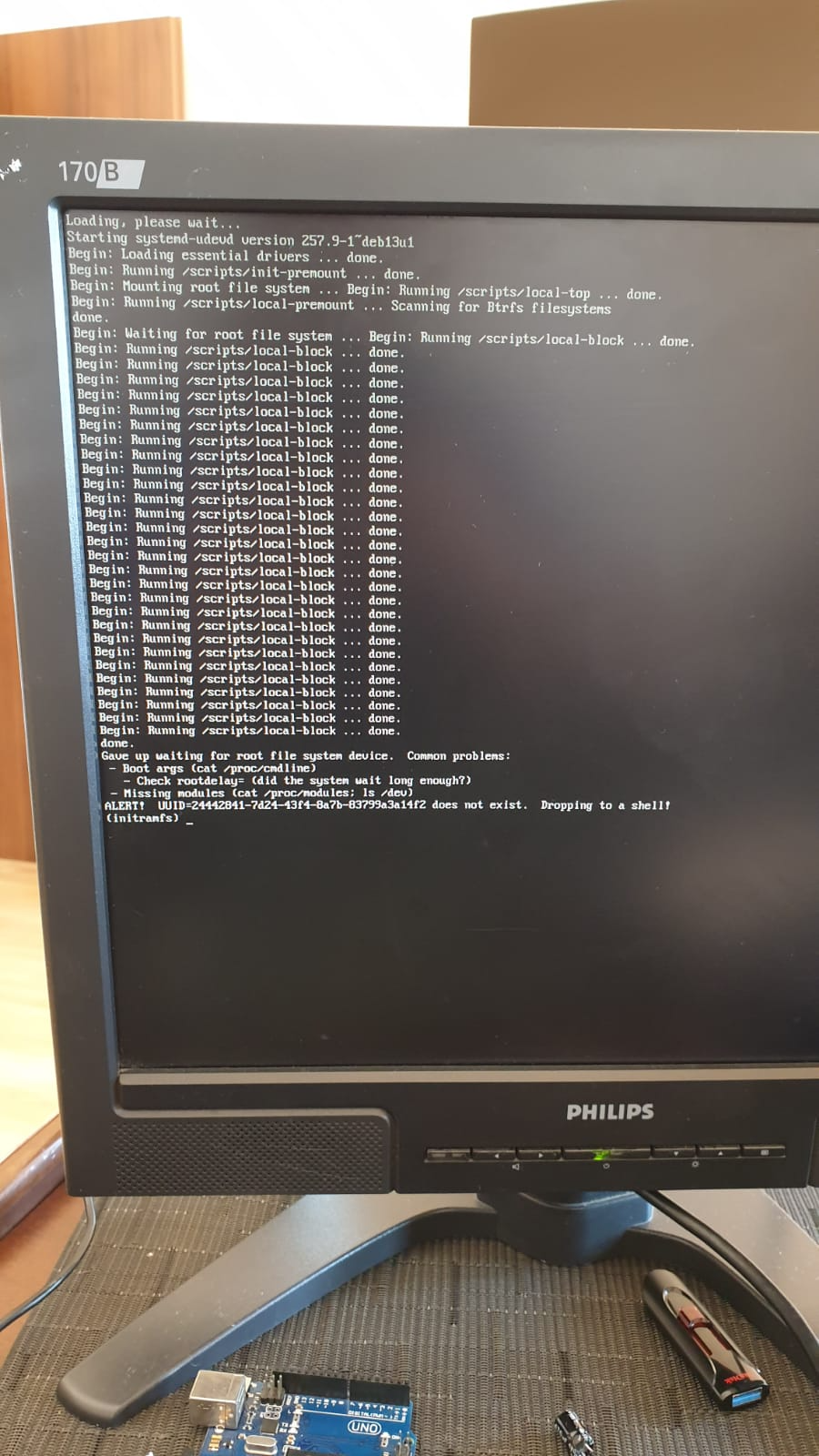
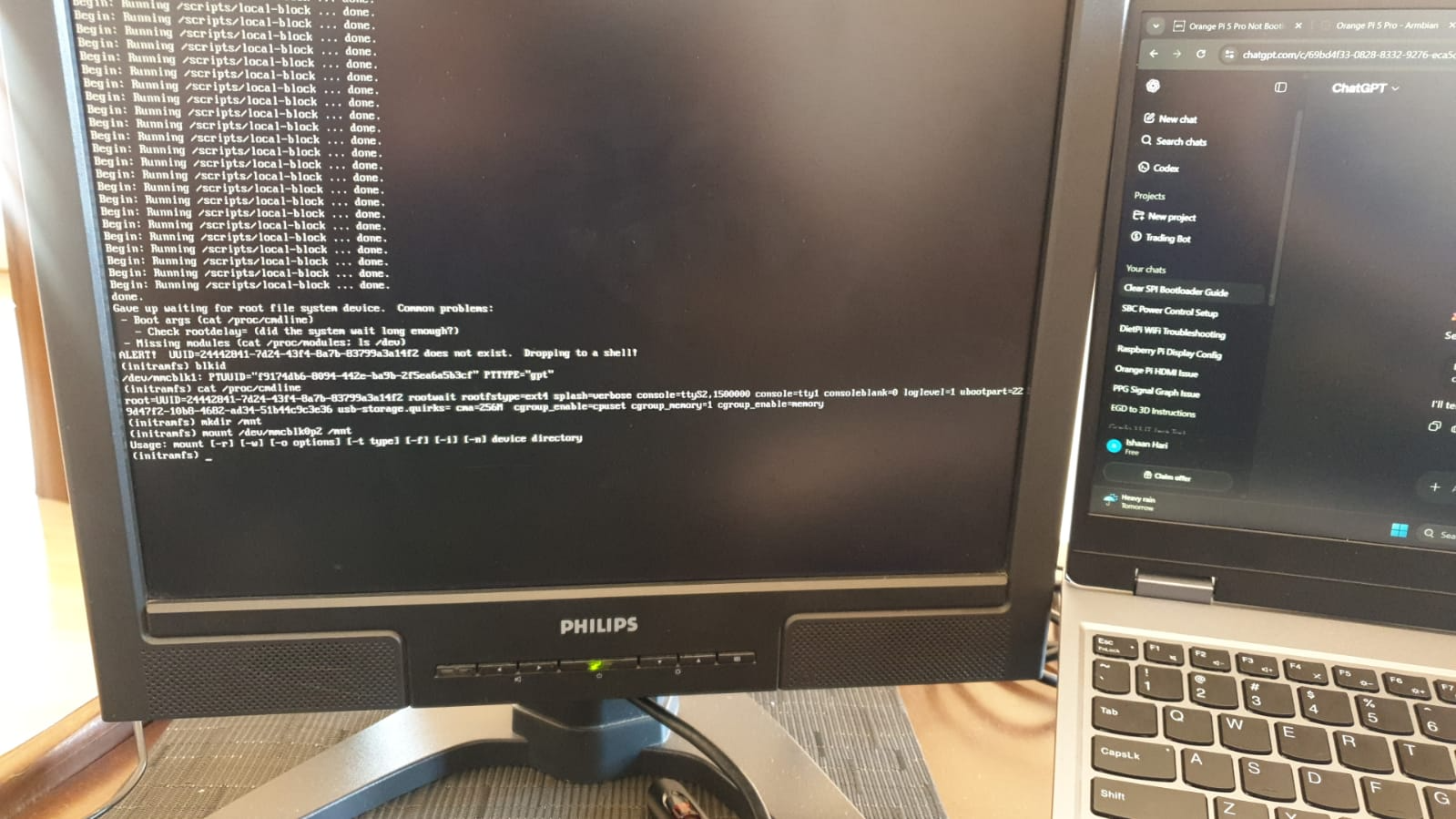
At a glance, unless you see your board at https://armbian.com/download, chances are that no one else has gotten that board working. Might be better to post under "Other Families" for unsupported board stuff. @Werner may move later ... Might be crashing. Might be redirecting kernel to a different UART. May be worth checking earlycon and console settings in kernel args? You can try to pass break=premount or similar arguments to pause boot and allow you to poke around and see what's going on? -
HI, It looks like you have an RK3518 chip from your photo, and not the 3528? Or was that a typo? In any case I also bought a box from AliExpress. It looks similar to mine with the 3518 chip. If there is a way to extract the ROM Image from my box I can maybe upload it for you somewhere?
-
You may want to check out this thread. There's someone else doing the same with an Orange Pi 5. Might be worth comparing notes with @KhanhDTP
-
 Hi @Werner, I bought an UART USB device and followed your video here https://www.youtube.com/watch?v=UpVMO7gbnYM to read boot logs. I'm not a huge expert but looks like there is a problem finding /boot when two nvme are connected. Please find attached the following logs: uart-bootcorrectnvme.log -> one nvme plugged (the one with os installed in slot 1) - works! uart-bootdualnvme.log -> two nvme plugged (the one with os installed in slot 1) - fails! uart-bootmicrosd.log -> two nvme plugged + microsd plugged - works! Tests have been executed with official 30W Radxa Power adapter ( same result with POE+ 25W hat) Please, let me know if there is anything else I can provide. Thanks uart-bootcorrectnvme.log uart-bootdualnvme.log uart-bootmicrosd.log
 -
Enable ethernet port on expansion board for OrangePi zero 2w
Werner replied to Golecom's topic in Allwinner sunxi
moved -
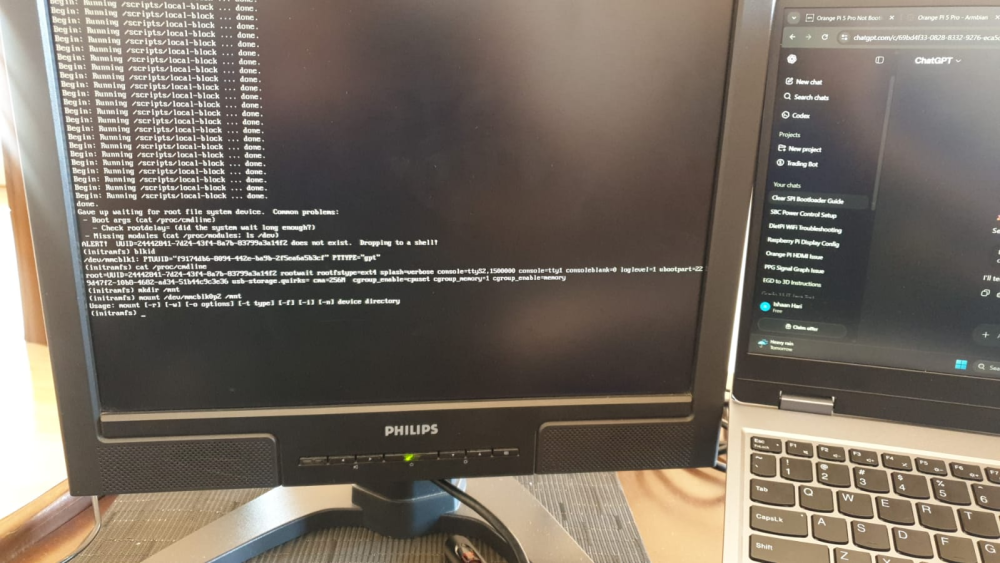
@Werner I have tried your command but no success. Here is what a clean boot of Armbian shows. I also ran some commands with the outputs below.
-
https://docs.armbian.com/Process_Contribute/#adding-a-new-board