Active threads
Showing topics posted in for the last 365 days.
- Past hour
-
@Harleyyyu, I tried swapping uboot and trust offsets as you suggested. I performed a full erase, injected the parameter, and flashed them at 0x2000 (Trust) and 0x4000 (U-Boot). Here is the log of the process: ./rkdeveloptool ld DevNo=1 Vid=0x2207,Pid=0x320b,LocationID=101 Maskrom ./rkdeveloptool db rk322x_loader_v1.10.238_256.bin Downloading bootloader succeeded. ./rkdeveloptool ef Erasing flash complete. ./rkdeveloptool rfi Flash Info: Manufacturer: SAMSUNG, value=00 Flash Size: 7216 MB Flash Size: 14778368 Sectors Block Size: 512 KB Page Size: 2 KB ECC Bits: 0 Access Time: 40 Flash CS: Flash<0> ./rkdeveloptool ul rk322x_loader_v1.10.238_256.bin Upgrading loader succeeded. ./rkdeveloptool prm parameter.txt Writing parameter succeeded. ./rkdeveloptool ppt **********Partition Info(parameter)********** NO LBA Name 00 00002000 uboot 01 00004000 trust 02 0000A800 resource 03 00012000 kernel 04 00018000 boot 05 00028000 system ./rkdeveloptool wl 0x2000 BBtrust_with_ta_ga4fd2d1.img Write LBA from file (100%) ./rkdeveloptool wl 0x4000 AAuboot_extraido.img Write LBA from file (100%) ./rkdeveloptool wl 0xA800 CCresources-linux.img Write LBA from file (100%) ./rkdeveloptool wl 0x12000 DDkernel.img Write LBA from file (100%) ./rkdeveloptool wl 0x18000 EEboot.img Write LBA from file (100%) ./rkdeveloptool wl 0x28000 FFparticao_linux.ext4 Write LBA from file (100%) ./rkdeveloptool rd Reset Device OK. Resulting Boot Log (Swapped Offsets): Still fails with the signature error. Interestingly, at addr:0x2000, the header now reads 0x4d524150 (ASCII for "PARM"), meaning the Bootrom is seeing the parameter/GPT signature where it expected a loader component. DDR Version V1.10 20190926 In ID:0xFFF 300MHz LPDDR3 Bus Width=32 Col=11 Bank=8 Row=14 CS=1 Die Bus-Width=32 Size=1024MB mach:4 OUT Boot1 Release Time: May 13 2019 17:02:59, version: 2.56 ChipType = 0xc, 421 mmc2:cmd19,100 SdmmcInit=2 0 BootCapSize=2000 UserCapSize=7216MB FwPartOffset=2000 , 2000 SdmmcInit=0 NOT PRESENT StorageInit ok = 163350 SecureMode = 0 SecureInit ret = 0, SecureMode = 0 atags_set_bootdev: ret:(0) GPT 0x63337df8 signature is wrong recovery gpt... GPT 0x63337df8 signature is wrong recovery gpt fail! tag:LOADER error,addr:0x2000 hdr 633377e0 + 0x0:0x4d524150,0x000002f8,0x4d524946,0x45524157, tag:LOADER error,addr:0x4000 hdr 633377e0 + 0x0:0x00,0x00,0x00,0x00,0x00,0x00,0x00,0x00,0x00,57, tag:LOADER error,addr:0x4800 hdr 633377e0 + 0x0:0x00,0x00,0x00,0x00,0x00,0x00,0x00,0x00,0x00,0x00,0x00,0x00,0x00,0x00,0x00x00000000,0x00000000,0x00000000,0x00000000, tag:LOADER error,addr:0x6000 hdr 633377e0 + 0x0:0x00,0x00,0x00,0x00,0x00,ag:LOADER error,addr:0x5800 hdr 633377e0 + 0x0:0x00000000,0x00000000,0x00000000,0x00000000, tag:LOADER error,addr:0x780000000,0x00000000,0x00000000,0x00000000, tag:TOS error,addr:0x6800 hdr 633377e0 + 0x0:0x00,0x00,0x00,0x00,0x00,0x0TOS error,addr:0x6000 hdr 633377e0 + 0x0:0x00000000,0x00000000,0x00000000,0x00000000, tag:TOS error,addr:0x8000 0000,0x00000000,0x00000000,0x00000000, tag:TOS error,addr:0x9000 hdr 633377e0 + 0x0:0x00,0x00,0x00,0x00,0x00,0x00,0x00,0x00,0x00,0x00, UsbHook ...251116 powerOn 772192 @jock, the flash chip is definitely healthy as it was working perfectly with the stock Android firmware yesterday. I am following the guides strictly and initializing with the db command every time. To give you a clear reference, here is what happens when I follow your "Installation without SD card" (flashing the raw image to eMMC) after a full ef (erase flash): ./rkdeveloptool ld DevNo=1 Vid=0x2207,Pid=0x320b,LocationID=101 Maskrom ./rkdeveloptool rd 3 Reset Device failed! ./rkdeveloptool db rk322x_loader_v1.10.238_256.bin Downloading bootloader succeeded. ./rkdeveloptool ef Erasing flash complete. ./rkdeveloptool wl 0x0 Armbian_community_26.2.0-trunk.357_Rk322x-box_forky_current_6.18.7_minimal.img Write LBA from file (100%) Result: Absolute silence. No LED, no UART output. Finally, if I try to boot Multitool from the SD Card after zeroing the internal flash, I get the specific Trust OS freeze I mentioned before. The serial output confirms that TEE-CORE starts but hangs right after: Internal flash zeroing process: ./rkdeveloptool ld DevNo=1 Vid=0x2207,Pid=0x320b,LocationID=101 Maskrom ./rkdeveloptool db rk322x_loader_v1.10.238_256.bin Downloading bootloader succeeded. ./rkdeveloptool ppt Not found any partition table! ./rkdeveloptool ppt Not found any partition table! ./rkdeveloptool ef Erasing flash complete. Result: □□DDR Version V1.11 20200910_dbg In ID:0xFFF 300MHz LPDDR3 Bus Width=32 Col=11 Bank=8 Row=14 CS=1 Die Bus-Width=32 Size=1024MB mach:4 OUT Boot1 Release Time: May 13 2019 17:02:59, version: 2.56 ChipType = 0xc, 423 mmc2:cmd19,100 SdmmcInit=2 0 BootCapSize=2000 UserCapSize=7216MB FwPartOffset=2000 , 2000 mmc0:cmd5,20 SdmmcInit=0 0 BootCapSize=0 UserCapSize=7604MB FwPartOffset=2000 , 0 StorageInit ok = 179763 SecureMode = 0 SecureInit ret = 0, SecureMode = 0 atags_set_bootdev: ret:(0) GPT 0x63337df8 signature is wrong recovery gpt... GPT 0x63337df8 signature is wrong recovery gpt fail! LOADER Check OK! 0x61000000, 290821 TOS Check OK! 0x68400000, 359530 Enter Trust OS INF [0x0] TEE-CORE:init_primary_helper:377: Initializing (1.1.0-333-gc9d95d1 #2 2018年 08月 17日 星期五 03:32:22 UTC arm) INF [0x0] TEE-CORE:init_primary_helper:378: Release version: 2.0 INF [0x0] TEE-CORE:init_primary_helper:379: Next entry point address: 0x61000000 [2accGZ3G��غ��ؾeػؼ The device is identified as SAMSUNG by the loader, but it's physically a Kingston eMCP (O8EMCP08). Could this manufacturer ID mismatch be causing the Trust OS to misconfigure the RAM timings and freeze? Is there a patched loader or a specific trust.img for these Kingston eMCP variants?
- Today
-
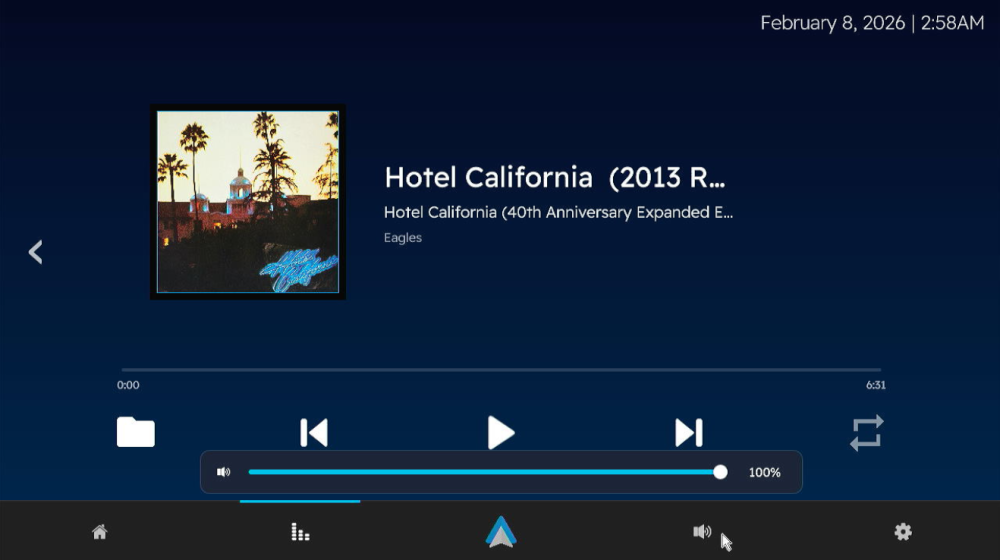
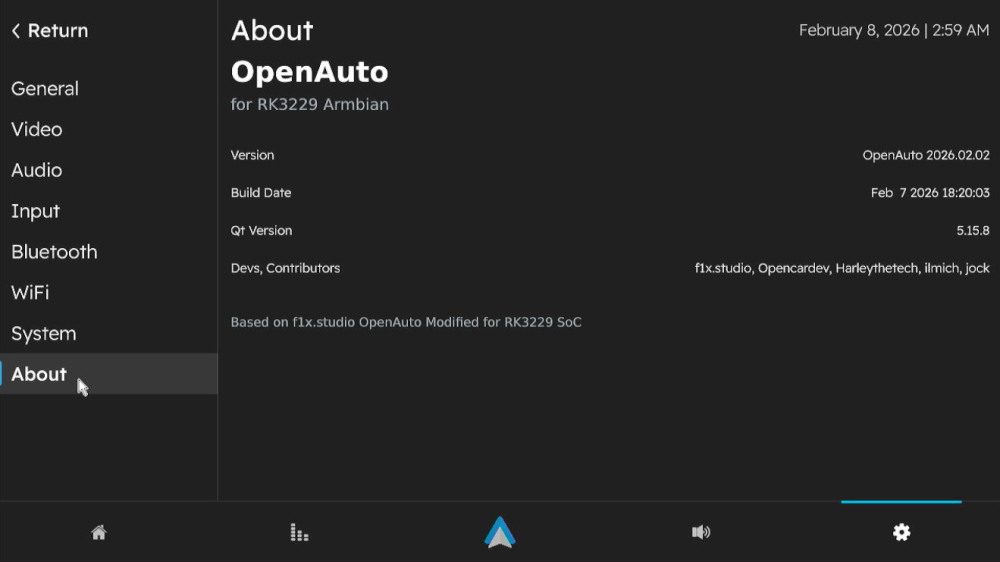
 Version 3.1.0 Has been released! I won't be going into details like last time, this build also includes the fixes for "known issues" from version 3 Alpha build. Bugs Found? Open a ticket in https://github.com/Harleythetech/openauto-rk3229-armbian/issues Download: Github: OpenAuto RK322x - oark322x-3.1.0-beta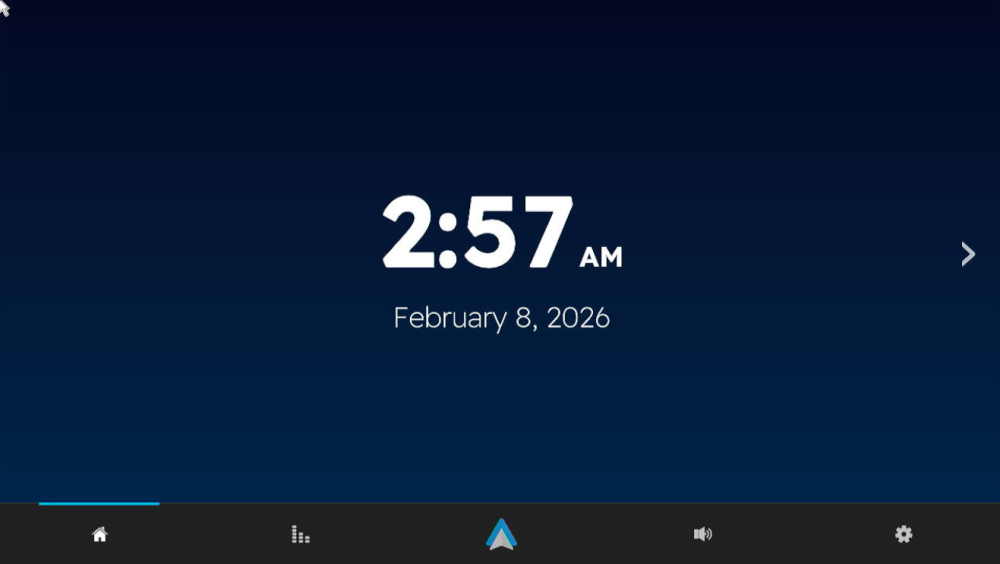
-
@Bones558 I made custom u-boot to fix the boot splash on a7z. I'll upload some new images.
-
Two addons: I compiled on another notebook and stumbled over a RAM error message from Armbian compile.sh. Notebook has 8GB, so I added the recommended KERNEL_BTF=no to the ./compile.sh args. A dkms status says, the bcmdhd is built and active. Also, I started an experient to port the Spacemit PVR code drop (GPU) mentioned earlier. This is really untested, but at least builds on my board: https://codeberg.org/sven-ola/mesa-spacemit-k1/releases. Now trying to spice up some cinnamon, but may need a cooking recipe for the binary shared libs...
-
@marcosdsdba Can you take a picture or just tell us the Wi-Fi chip you have on your board?
-
@Rodrigo Campos The 20251226 build uses a newer kernel, but audio through the A/V out port is currently broken. I haven't had time to fix it yet, so if you don't need that port, feel free to use this version.
-

Super console cube X3 seems can't boot.
gnutux landia replied to gnutux landia's topic in Amlogic CPU Boxes
I buy a different USB uart Usbuart Maybe I can do what you suggest. I need to wait to the item arrives at my home. When It arrives I post here to the device read uart method. -
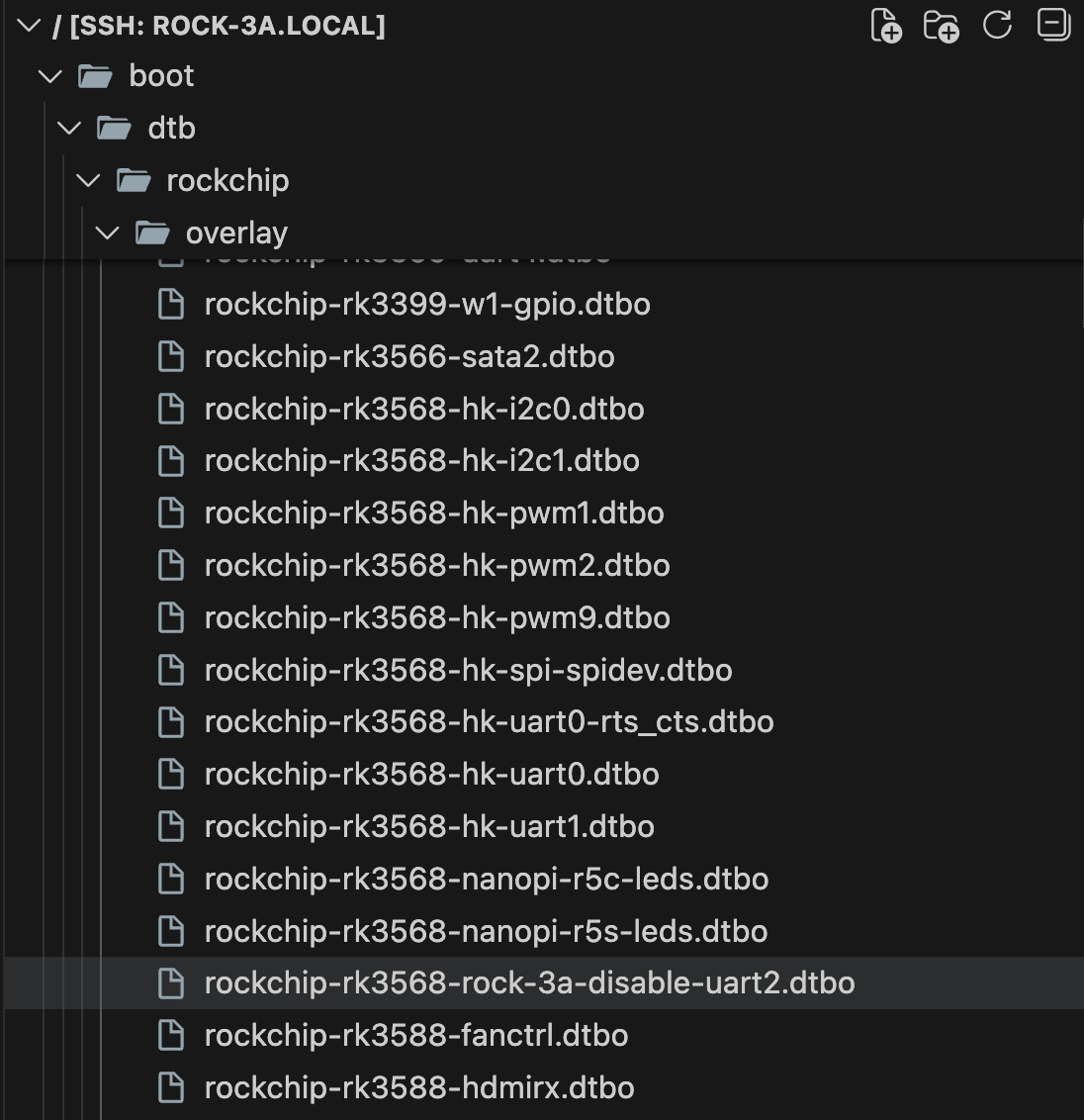
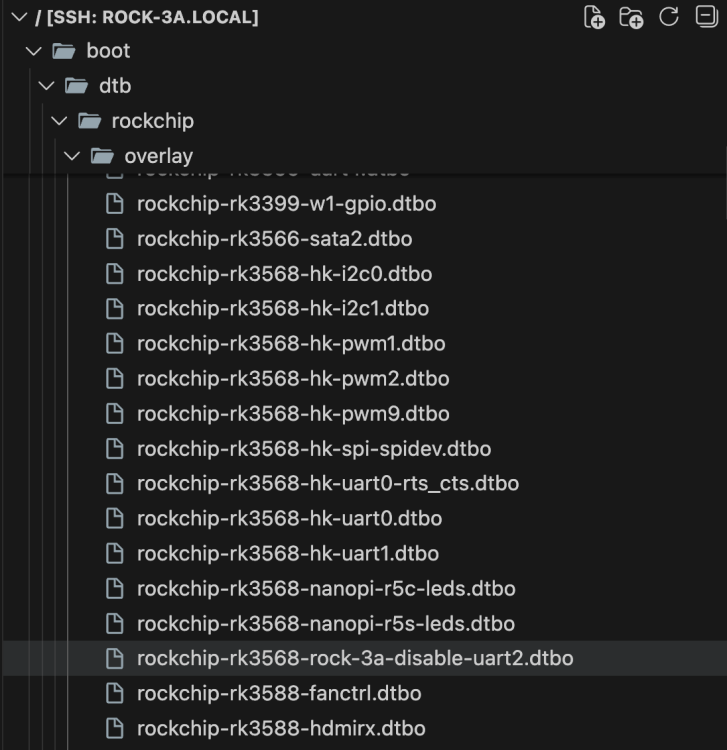
I am trying to setup Raxda Display 8 HD with Radxa ROCK 3A. On official Radxa OS, I used Rsetup tool to setup overlay for `Radxa Display 8 HD' using official guide. How can I do same on Dedicated applications images with Armbian Linux v6.12 ( Home Assistant ) ? I have read Device Tree overlays guide on armbian docs but I can't find overlay for lcd display in files:
-
Thank you! That worked like a charm
-

CSC Armbian for RK3318/RK3328 TV box boards
SuzSinclair replied to jock's topic in Rockchip CPU Boxes
Thanks for the feedback , i have finally downloaded this version and burn into sd card , put in sd card then reconnect power, the system normal boot i cant see armbian screen, the blue light is on, and nothing on screen or dark screen can someone point me please what is happening.
-
 The drm_prime error is somehow "normal": AFAIR mpv was trying each hardware decoder in turn and, if it does not support the codec, prints the error and tries the next hardware decoder in line. If you try to decode h.265, perhaps it first picks an hardware decoder which does not support such codec with such parameters and prints the error, then tries another decoder which is capable and everything works. Usually rockchip devices have two hardware decoders, Hantro and rkvdec; Hantro does not support h.265 at all on older chips, but rkvdec does.
 -
I now found a workaround, basically adding the following to the top of /boot/boot.cmd setenv usbstoragequirks "0x2537:0x1066:u,0x2537:0x1068:u" and running mkimage -C none -A arm -T script -d /boot/boot.cmd /boot/boot.scr (as shown at the bottom of /boot/boot.cmd However this is not sustainable, and it would still be preferable if the inclusion of armbianEnv.txt could be fixed, ESPECIALLY considering that the download page https://www.armbian.com/odroid-n2/ gives the following (useless due to this issue) advise: On modern kernels adding “video=HDMI-A-1:1920x1080M@60D” to boot /boot/armbianEnv.txt (extraargs=) should force HDMI to 1080p instead of the 4K native resolution.
-
Probably because nobody had use for those until today. Feel free to send a PR adding whats missing.
-
 https://www.armbian.com/download/ https://github.com/armbian/os/releases https://github.com/armbian/community/releases
 -
Thanks @Sanjay, are you running Trixie? I was trying new driver (r8152) the other days as well, I tried your approach on a fresh install and still having the same issue (I can write to an OMV share with around 220MB, but reading back crashes the 2.5 interface); as far as I read some additional network & power management settings are needed, just didn’t find the right combination so far. Out of curiosity I dusted off the old SD card that still had my initial setup on buster, booted from it and on the same tests I get around 180MB write and 220MB read without any crash. Will spend some more time on it and if not I’ll just leave it as is, I can use the 1g network with no issue, the nas will not be running 24x7 anyway, it’s just for some backups every now and then. Just that my OCD wants the 2.5 interface to be there as well.
- Yesterday
-

How you can help test upcoming Armbian 26.02 images?
tparys replied to Igor's topic in Advanced users - Development
Update on NanoPi M4v2 ... I pulled the most recent Armbian build, and manually ran the build for the M4v2, and it fails on kernel patch "general-gpio-driver-no-sleep". See pastebin at https://paste.armbian.com/puvorasuco for failed build. Checking upstream at https://git.kernel.org/pub/scm/linux/kernel/git/stable/linux.git, it looks like branch 6.18.y already has the subject patch, and was pushed today. Since both the rockchip and rockchip64 families use mainline kernel, I just submitted a PR that kills that patch for both. See https://github.com/armbian/build/pull/9368. -
 some things are happening at the bleeding edge https://lore.kernel.org/u-boot/?q=a733 pay attention to u-boot, the most important thing are dram controller, pmic, mmc/sd etc then of course kernel as well https://lore.kernel.org/linux-sunxi/?q=a733
 -
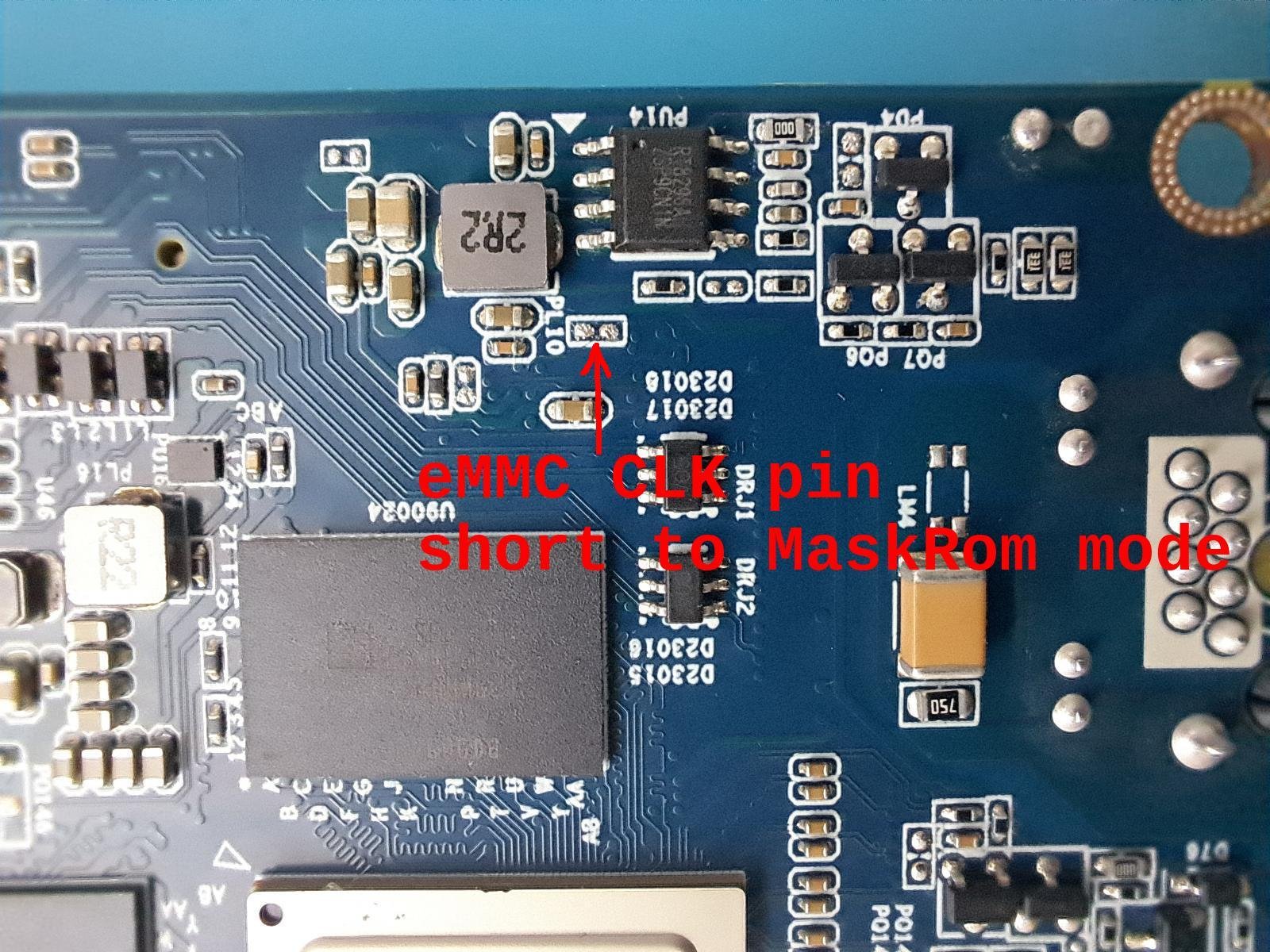
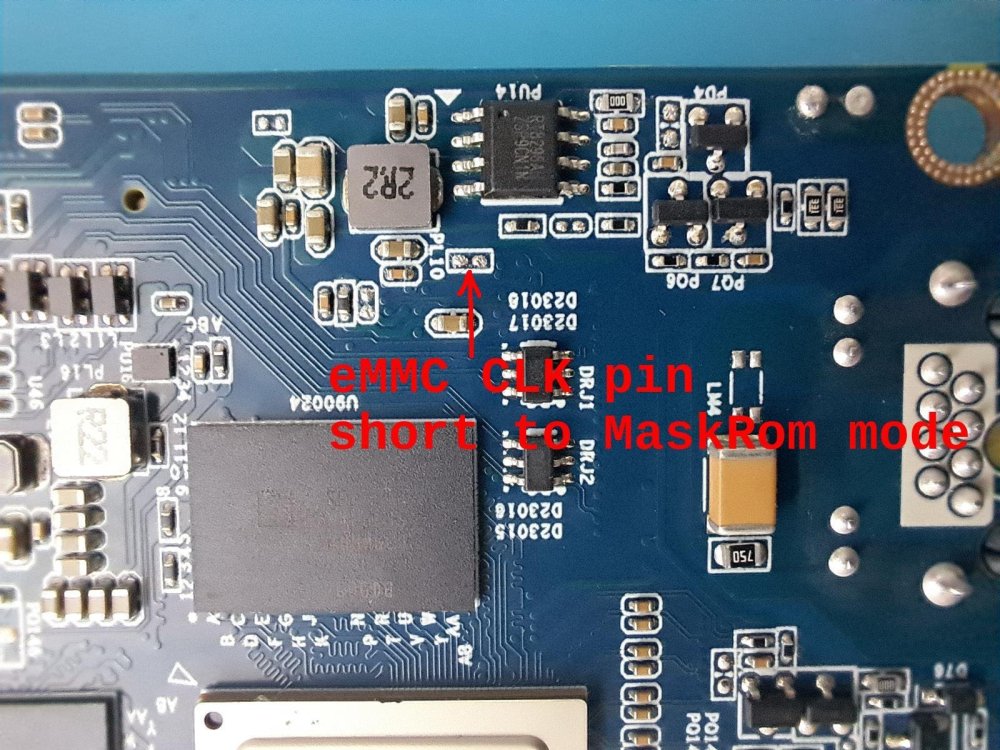
Take some time but I was able to identify the CLK pin. Shorting the marked pins (CLK and GND in this case) was able to switch MaskRom mode. Note: in early boot stages the eMMC CLK only working in legacy mode (24Mhz).
-
Sorry in advance, but this is a bit of a dive. But, I haven't seen this fully captured and explained anywhere, and think this would be a useful thing to know for anyone who's doing arm64 development on a PC, which seems very relevant here ... I started pulling this thread when moving some software from Ubuntu Jammy to Noble, where the arm64 build process went from 20 mins to 50 mins. When I was done, it below to 15 min, and all I did was poke some flags for qemu's emulated CPU. The TL;DR version is that setting the environment variable QEMU_CPU to something like "cortex-a53" or "max,pauth-impdef=on" or even what I settled on, "max,pauth=off" saves massive amounts of time, and should be used anywhere you are running debootstrap, apt, or python in an emulated environment. However, you can't blindly set it everywhere because these flags are not defined for other architectures and will cause a hard stop when emulating PC or RISC-V. This has also shown up in the Armbian Build System. If you want to see this first hand, use the example here. Just save the following in test.sh: echo -n "testing... " for i in $(seq 2 10000); do is_prime=1 j=2 while ((j*j <= i)); do if (( i % j == 0)); then is_prime=0 break fi ((j++)) done if (( is_prime == 1 )); then echo $i > /dev/null fi done echo "done" And then run it in docker after ensuring a few things are installed ... ~ $ sudo apt install binfmt-support qemu-user-static ~ $ time docker run --rm -it --platform linux/arm64 -v .:/test ubuntu:noble /test/test.sh testing... done real 0m37.620s user 0m0.013s sys 0m0.022s ~ $ time docker run --rm -it --platform linux/arm64 -v .:/test ubuntu:jammy /test/test.sh testing... done real 0m4.700s user 0m0.011s sys 0m0.023s And we can wrestle that performance back by fiddling with QEMU flags ... ~ $ time docker run --rm -it --platform linux/arm64 -v .:/test --env QEMU_CPU=max,pauth=off ubuntu:noble /test/test.sh testing... done real 0m4.694s user 0m0.011s sys 0m0.024s So qemu bug? Not quite. The qemu emulator is a host application, and is the same both jammy and noble docker images, and I think the root cause was found here, and first appears in Ubuntu Lunar (23.10). The short version looks like gcc's stack protection logic wasn't operating as expected as the stack layout is a little different than it is on PC, a CVE was filed, and the "fix" is now stressing a slow code path in qemu. For the record, my heart goes out to "steev" and his slow, hours-per-bisect march to the answer. Pulling that thread a bit more, the QEMU Documentation has the following to say on the subject of arm64 pointer authentication: The qemu docs also suggest that the qemu impdef algorithm is the default, but I've not seen this on my version. It's possible this may be addressed in a much newer version of qemu, but that's not available in the Noble repos. It could be overridden via tonistiigi/binfmt (but I've not yet tested that). For what it's worth, it's not possible to just add a simple wrapper to qemu fix this either, as seen in this Github Example, and that's due to the Linux Kernel Binfmt Interface. The 'F' flag forces the kernel to store a handle to the specified emulator, and make it available in chroot and Docker contexts, and that doesn't help if it's only the wrapper it grabs and not the emulator binary. Similarly, it's not possible to pass additional flags via this interface, so without a change to the qemu binary, the QEMU_CPU environment variable may be the only way to work around this immediately. The other curious bit is what does QEMU_CPU=cortex-a53 enable to recover qemu speed? The answer is absolutely nothing. it just turns CPU features off. At a glance, I'm not sure if that something qemu is doing indirectly, or glibc conditionally enables at runtime. If anyone knows better than I here, please drop a comment. The curious can check can via: ~ $ docker run --rm -it --platform linux/arm64 ubuntu:noble cat /proc/cpuinfo processor : 0 model name : ARMv8 Processor rev 0 (v8l) BogoMIPS : 100.00 Features : fp asimd aes pmull sha1 sha2 crc32 atomics fphp asimdhp cpuid asimdrdm jscvt fcma lrcpc dcpop sha3 sm3 sm4 asimddp sha512 sve asimdfhm dit uscat ilrcpc flagm sb paca pacg dcpodp sve2 sveaes svepmull svebitperm svesha3 svesm4 flagm2 frint svei8mm svef32mm svef64mm svebf16 i8mm bf16 rng bti mte mte3 sme smei16i64 smef64f64 smei8i32 smef16f32 smeb16f32 smef32f32 smefa64 mops hbc CPU implementer : 0x00 CPU architecture: 8 CPU variant : 0x0 CPU part : 0x051 CPU revision : 0 ~ $ docker run --rm -it --platform linux/arm64 --env QEMU_CPU=cortex-a53 ubuntu:noble cat /proc/cpuinfo processor : 0 model name : ARMv8 Processor rev 4 (v8l) BogoMIPS : 100.00 Features : fp asimd aes pmull sha1 sha2 crc32 cpuid CPU implementer : 0x41 CPU architecture: 8 CPU variant : 0x0 CPU part : 0xd03 CPU revision : 4
-

Have Armbian for Tanix TX1 QHZIW_H313_TX1_EMCP_V2.0?
Nick A replied to Lesano's topic in Allwinner CPU Boxes
@billymore I was able to detect my transpeed box using the toothpick trick. Here are some links that might help figure it out. Maybe even going on irc and asking the sunxi guys. https://oftc.catirclogs.org/linux-sunxi/search?q=tx1 https://groups.google.com/g/linux-sunxi/c/OrktE3duFDA -

how install armbian or miniarch in tv box Tanix tx1 mini
billymore replied to Info Zap's topic in Allwinner CPU Boxes
Hello, I'm stuck as well. I tried to boot on different version of Armbian made for H313 (X96Q) but without success (burning image on USB drive, booting with AV FEL button pressed during boot). LED remains RED and no booting. I tried miniarch. I tried to enter fel mode via USB and Debian virtual Machine witout succcess (the TX1 does not appear as USB peripheral during my USB FEL attempts). - Last week
-
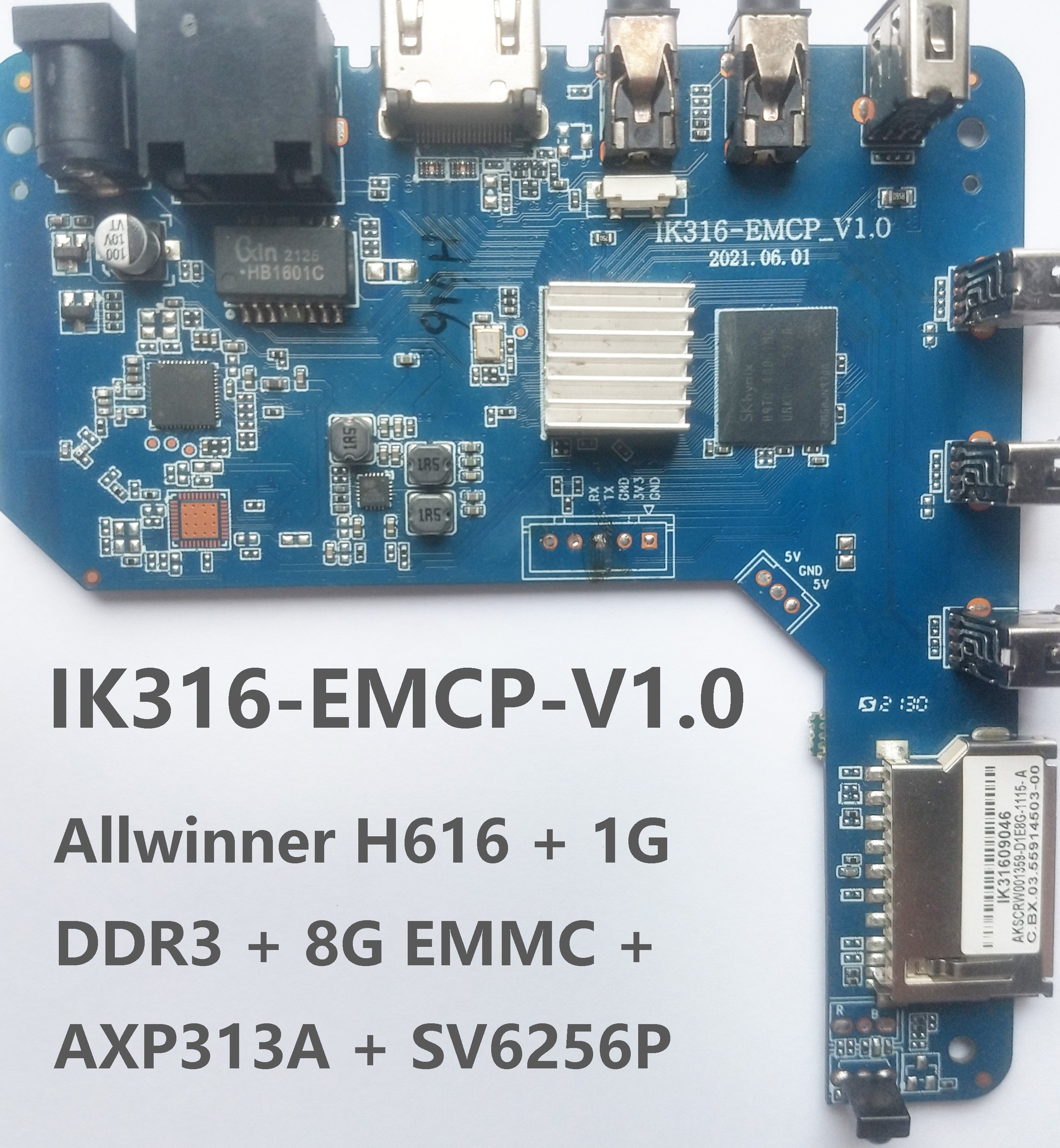
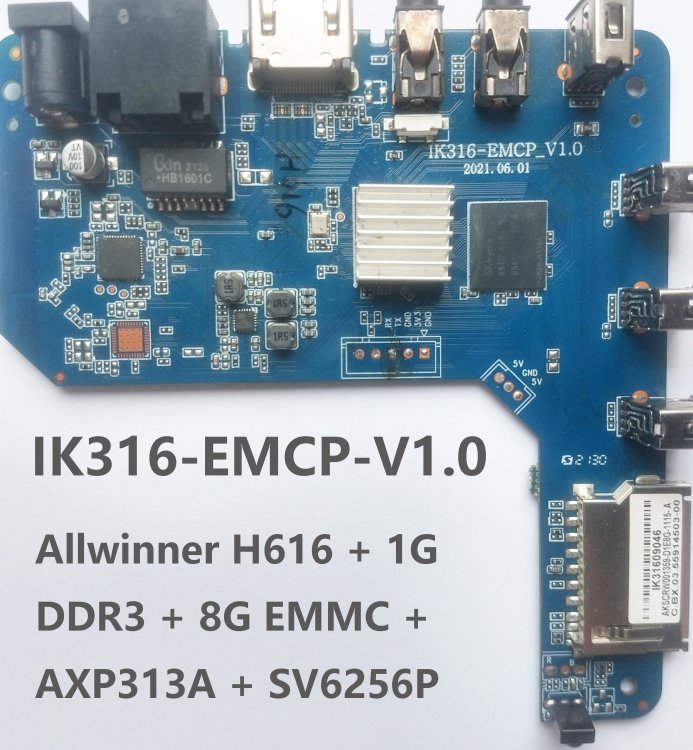
@Nick A Thank you for your excellent work! I managed to compile it myself and shared it with someone who has the same board (IK316-EMCP_V1.0). 1. Changed kernel preemption mode from full preemption to voluntary preemption. 2. Added MediaTek Wi-Fi drivers (MT7601U etc). 3. Embedded kernel headers. https://github.com/cdhigh/armbian_build/releases/tag/v20250306
-
Hello Orima, Thank you for asking. I am doing well. I've been mainly distracted by an online drawing class. I will try to make a complete written guide in the weekend. It will be a new project in my github, and I will make a new thread here.
-

Armbian Linux v6.1 - Bluetooth not working - no BT controller found
SM2027 replied to SM2027's topic in Banana Pi M7
i had to do it on my own, no worries but it surprised me about it. -

[Latest] Armbian Build HDMI Audio support Fix
Hackerman replied to just_facking_about's topic in Radxa Dragon Q6A
This recipe does not work for me. Could you please explain in more detail which exact Armbian image you are using and what exactly needs to be done to get the sound working?