Active threads
Showing topics posted in for the last 365 days.
- Past hour
-
The boot partition presence doesn't depend directly on the Armbian version—it's determined by the board configuration. Some configs enable an extra boot partition, especially for boards using older U-Boot versions that can't boot directly from ext4. As a result, even for the same board and Armbian version, different branches (e.g., legacy, vendor, current, edge) may behave differently. Vendor branch might use an old BSP U-Boot requiring the extra partition while mainline branch uses newer U-Boot that boots straight from ext4.
-

Orange pi 5 plus issue with 3.5mm headset microphome
Werner replied to Perechesov Vladimir's topic in Orange Pi 5 Plus
would you mind sending a pr or even upstream this change? - Today
-

Gaming experience with Orange Pi 5 (RK3588) on Armbian
KhanhDTP replied to KhanhDTP's topic in Orange Pi 5
Armbian 25.11.2 Noble XFCE (BSP Kernel: 6.1.115) + PanVk - mesa 26.0 (https://launchpad.net/~ernstp/+archive/ubuntu/mesaaco) + Box64 arm64 v0.4.1 2eb2fd9cd (https://ryanfortner.github.io/box64-debs/) + proton-10.0-3-amd64-wow64 (https://github.com/Kron4ek/Wine-Builds/releases/download/proton-10.0-3/wine-proton-10.0-3-amd64-wow64.tar.xz) + dgVoodoo2 (https://github.com/dege-diosg/dgVoodoo2/releases) + DXVK-stripped v2.4.1 30~60fps@720p (medium settings) box64 environment variables: Batman Arkham Asylum GOTY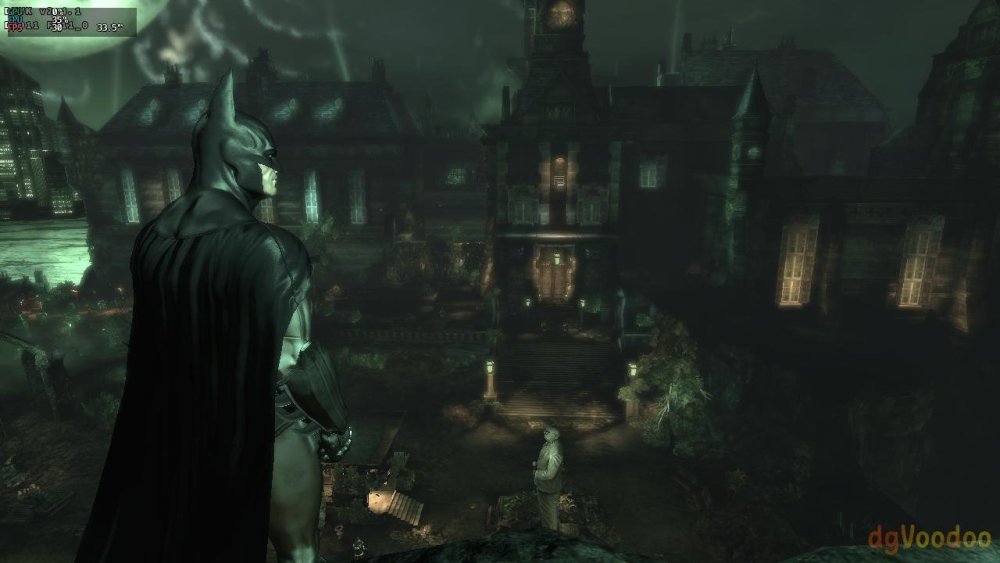
-

ssh missfire on bpi-m5 noble
gene1934 replied to gene1934's topic in Software, Applications, Userspace
Now I have restarted the install with a 64G u-card, and it is totally different. it only took 1 pass at networkmanager to make all the local network work in that I can ssh gene@any-local-machine and bavk again. But now I cannot get thru the router for its dnsmasq server. All addresses in the network setup are checked and correct. The hostname has been reset to its normal, e5p, has been used for 3 or 4 years but the Network is unreachable because the router isn't functioning as a dns lookup. Its even been rebooted a couple times. New faster router about 4 months back with dd-wrt in it. ip a: end0: <BROADCAST,MULTICAST,UP,LOWER_UP> mtu 1500 qdisc mq state UP group default qlen 1000 link/ether 2a:b6:6c:1a:3a:1f brd ff:ff:ff:ff:ff:ff inet 192.168.71.122/24 brd 192.168.71.255 scope global noprefixroute end0 valid_lft forever preferred_lft forever inet6 fe80::28b6:6cff:fe1a:3a1f/64 scope link valid_lft forever preferred_lft forever ip r: 192.168.71.0/24 dev end0 proto kernel scope link src 192.168.71.122 metric 100 192.168.71.0/24 via 192.168.71.1 dev end0 proto static metric 200 /etc/netplan/armbian.yaml: root@e5p:/etc/netplan# cat armbian.yaml network: version: 2 renderer: NetworkManager ethernets: end0: addresses: - "192.168.71.122/24" nameservers: addresses: - 192.168.71.1 dhcp4: false dhcp6: false macaddress: "2a:b6:6c:1a:3a:1f" routes: - metric: 200 to: "192.168.71.1/24" via: "192.168.71.1" Can anyone see what is wrong with that? Thanks. -

CSC Armbian for RK3318/RK3328 TV box boards
OmegaCyclops replied to jock's topic in Rockchip CPU Boxes
Hello everyone, I hope I'm in the right place. So I got an H50 tv box (T98) that I found lying around, and installed via the multitool everything including armbian itself, which works properly. The issue that I have is that I had to do all via ssh and haven't been able to get any HDMI output, tried updating lightdm, switching it to sleek, and at this point idk what else to do. Thank you in advance! -
I've never used any other method. I'd suggest using a search engine to search for other methods to "enable multi boot on amlogic TV box"
-
Hi @ff255, Can you try with the following changes/additions to armbianEnv.txt: # previous load addresses # fdt_addr_r=0x01f00000 # kernel_addr_r=0x02000000 # ramdisk_addr_r=0x04000000 # new load addresses fdt_addr_r=0x01f00000 kernel_addr_r=0x02200000 ramdisk_addr_r=0x04600000 # new kernel_addr_r is aligned to 2MiB boundary # new ramdisk_addr_r is aligned to 2MiB boundary - not really neccessary afaik but "why not both?" Quick calculation below: The "next loadaddr" for kernel and ramdisk are the <previous loadaddr>+<previous filesize> 'aligned' upwards to 2MiB, Groetjes,
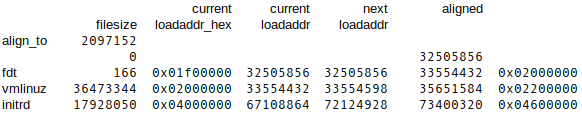
- Yesterday
-
-

Efforts to develop firmware for H96 MAX V56 RK3566 8G/64G
GBEM replied to Hqnicolas's topic in Rockchip CPU Boxes
Heya, Of interest to anyone encountering the 2025 AIC8800 WiFi and Bluetooth hardware, and who is using Buildroot; this is the package that builds and installs everything into a Home Assistant image. Of academic interest in the present discussion also, offering minor suggestions in dts and service file. 👽 aic8800.zip -
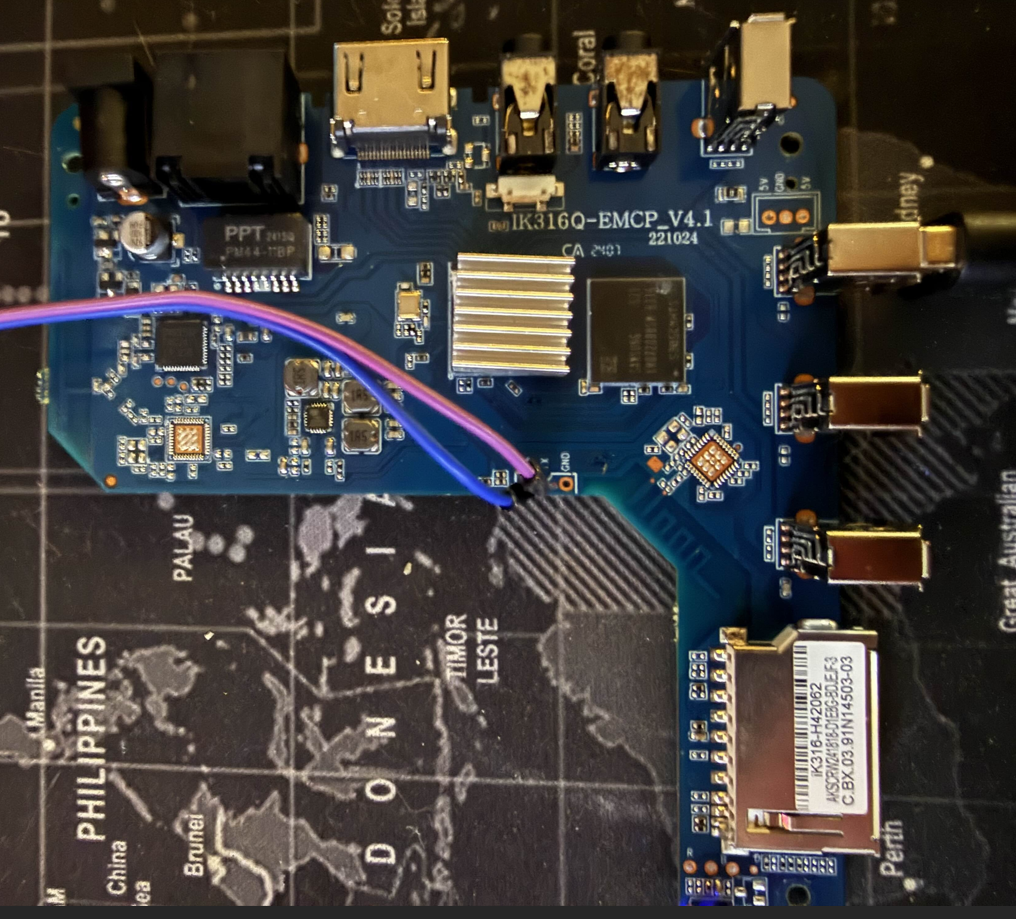
Hello Everyone, I've seen a few threads on these boards but wanted to create a centralized source for information. It's my understanding there are multiple variants of these boards, the one I have and used is IK316Q-EMCP_V4.1 I know there are other versions without UART ports, mine was lucky enough to have them. To build this image (adjust the compile command to your liking) git clone https://github.com/sicXnull/armbian-build cd armbian-build git checkout MXQ-PRO ./compile.sh build BOARD=mxqpro-h313 BRANCH=current BUILD_DESKTOP=yes BUILD_MINIMAL=no DESKTOP_APPGROUPS_SELECTED= DESKTOP_ENVIRONMENT=cinnamon DESKTOP_ENVIRONMENT_CONFIG_NAME=config_base EXPERT=yes KERNEL_BTF=no KERNEL_CONFIGURE=no KERNEL_GIT=shallow RELEASE=bookworm Prebuilt Images Armbian-unofficial_26.02.0-trunk_Mxqpro_bookworm_current_6.12.65_cinnamon_desktop.img Armbian-unofficial_26.02.0-trunk_Mxqpro_bookworm_current_6.12.65_minimal.img Unfortunately this board was already flashed with MiniArch by the time i got it, so i was unable to get the original DTB. Therefore, wifi does not work Is someone able to get the DTB from this board so we can get wifi working?
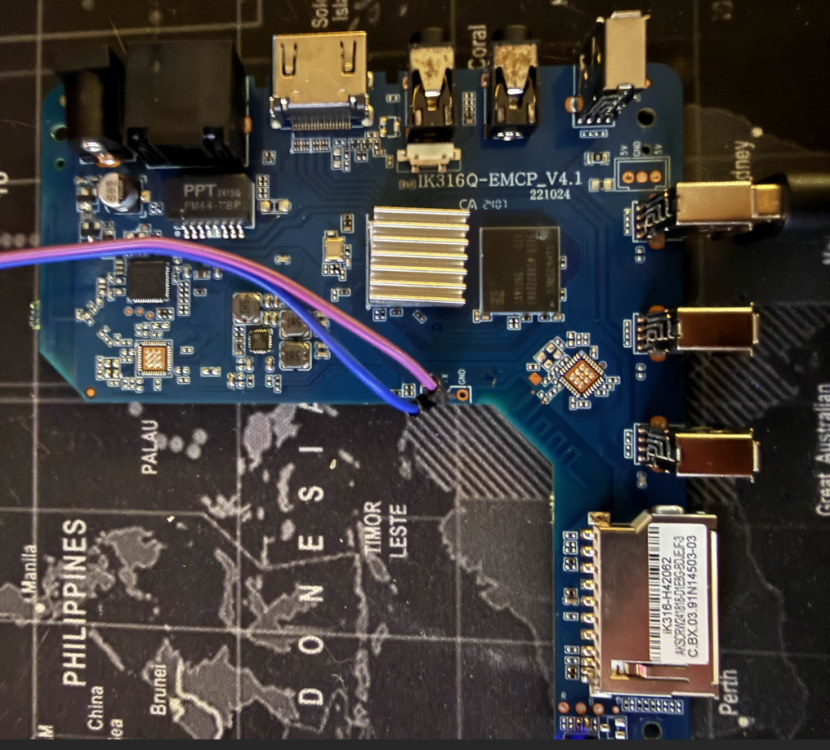
-
Bit late to the thread, but just a heads up. Been reading this thread and saw the DTS with the connector numbering. So I went to the manual to check the pinout and the pin number is listed as GPIO S/N. Just thought I would add to the thread.
-
Have uploaded a new "edge" image for RV2 for testing. This time, wifi works. "current" image is the same. If you want to test, go to https://privat-in.de and grab Downloads. If you want to compile, clone https://github.com/sven-ola/armbian-build/tree/orangepi-rv2 and run Edit: forget to activate Mediatek wifi drivers as well. Also merged current Armbian/main. Uploaded again. LG // Sven-Ola
-
ah yes, you're right. Well homassistant seems to depend on docker, so if the docker issue is resolved, hass will probably work too. Though no clue what the issue with docker is. Since it is an issue with configng, I suggest to report directly here: https://github.com/armbian/configng/issues Don't forgot to be as verbose as possible when reporting. Will raise chances getting it addressed sooner
-
 How to get this working on your Raspberry Pi (5) Hello all. Thanks again, @MMGen, for offering this fantastic tutorial. As mentioned before, it was the foundation for me to encrypt my Raspi 5, although the tutorial wasn't intended for that. I hat to make the some adjustments to get it working. But first some reasoning. What's the difference? The Armbian image for Raspi comes with two partitions: FAT32 for booting ext4 as a root Out of the box it already resembles the result that we try to achieve. I assume that this is due to the different booting process of a Raspi compared to other sige-board computers. Download the desired image from: https://www.armbian.com/rpi4b/ https://mirrors.dotsrc.org/armbian-dl/rpi4b/archive/ → more images (I only tested my approach with the minimal Trixie image, kernel version 6.12.41 to .58, and would be delighted to know if somebody also got it working with other derrivates.) Changes to the original tutorial: Basically I followed the tutorial (versions Oct 25 to Jan 26) except for the steps below where I had to make some adjustments. If the original tutorial receives major updates (e.g. in its structure) please consider that, as I might not keep this post up to date. Step 6: As the type of the boot partition needs to be FAT32 instead of ext4, in fdisk change the partition type (hit t) to FAT32 (0b or just b in the partition list l). I also adjusted the size of this partition to +1G, just in case, but that shouldn't make a difference. Here's final partition table: Device Boot Start End Sectors Size Id Type /dev/<your-drive>p1 8192 2105343 2097152 1G b W95 FAT32 /dev/<your-drive>p2 2105344 3907029167 3904923824 1.8T 83 Linux I'm using an NVME drive instead of a SD card. I guess that won't make a difference. I always repaced sda with nvme0n1 when I followed the tutorial. I also increased p1's size to a whole GB, just to be sure. Step 7: mkfs -t vfat /dev/<your-drive>p1 # NOT: mkfs.ext4 /dev/<your-drive>p1 # e2label /dev/sda1 CRYPTO_BOOT won't work on FAT32 partitions Step 8: Because there is no label on the FAT32 partition, just link it manually: BOOT_PART=/dev/<your-device>p1 In my image, the resolv.conf was already present and symlinked to /run/systemd/resolve/stub-resolv.conf. I had to rename it to etc/resolv.conf.old and only then did: cat /etc/resolv.conf > etc/resolv.conf Step 9: Now it gets a bit hairy. As already explained, the Armbian Raspi image works a bit differently. It holds the following partitions: P1: is the boot partition. During (or after?) the boot process it will be mounted to P2:/boot/firmware. P2 contains a cmdline.txt (content covered below) which is the config file to make the adjustments from Step 9.1 for the boot partition. P2: is our root partition. P1:/boot does contain an armbianEnv.txt but that is not the config file used during the initial boot process for the unlocking system . Step 9.1: At this point in the tutorial P2 is mounted to root/boot, so you can nano boot/cmdline.txt and change its content to: console=serial0,115200 console=tty1 loglevel=1 root=/dev/mapper/<custom-name-or-rootfs> rootdev=/dev/mapper/<custom-name-or-rootfs> rootfstype=ext4 fsck.repair=yes rootwait logo.nologo cgroup_enable=cpuset cgroup_memory=1 cgroup_enable=memory I was hesitant to make further changes besides the root and rootdev entries or break the line but probably that's also feasible. Step 9.2: Skipped. Step 9.7: As the boot partition is FAT32, etc/fstab has to know about it too. Also notice that commit=600 results in a failure to mount it to /boot/firmware after unlocking and rebooting (took me days before I could plug a display to my Raspi, read the boot log and figure out that line as the source of failure). Therefore I deleted the commit declaration. /dev/mapper/<custom-name-or-rootfs> / ext4 defaults,noatime,nodiratime,commit=600,errors=remount-ro 0 1 UUID=<BOOT_UUID> /boot/firmware vfat defaults,noatime,nodiratime,errors=remount-ro 0 2 tmpfs /tmp tmpfs defaults,nosuid 0 0 Step 10: Add systemd-cryptsetup (when using Trixie or higher) to the install list in the chroot (thanks to @The Tall Man for mentioning; automatic install worked for me btw). apt --yes install systemd cryptsetup cryptsetup-initramfs dropbear-initramfs In principle that should be it and i just followed the rest of the tutorial. But after the initrd.img got generated I always had to make adjustments, after which I had to recreate it. update-initramfs is always suspiciously fast so I just used the approach from this tutorial: KERNEL_VERSION=ls /lib/modules/ echo "CONFIG_RD_ZSTD=y" > /boot/config-$KERNEL_VERSION # to use the right decompression method mkinitramfs -o /boot/initrd.img $KERNEL_VERSION rm /boot/config-$KERNEL_VERSION # remove the config If you want to keep the original initrd.img as a backup you can just copy it before running the above commands but of course it won't be work with our encrypted boot. You can give the .img output file a different name. Don't forget to change the line initramfs initrd.img followkernel in boot/config.txt accordingly. Don't forget ssh-keygen -A. That's it Please let me know how if it worked for your Raspi. Good luck. @MMGen: If you find this sub-tutorial helpful enough, please consider to link it in your original post or feel free to incorporate it. It took me quite some days to figure out all the necessary changes and borow from other sources. Would be nice to spare others and this thread is a top rank in search engines. As you can see I used a name other than rootfs as my device name – the ability to change that could be a nice feature for the next version of your script Cheers!
 -
 http://blog.armbian.com/content/images/2026/01/T6-Plus-01.pngThe NanoPC T6 Plus, powered by the performance-optimized Armbian OS, is your ticket to a truly professional, high-speed edge computing experience. This industrial-grade device is built around the flagship Octa-core Rockchip RK3588 SoC and now features a massive upgrade to LPDDR5 RAM (up to 32GB), giving it the muscle to handle heavy virtualization, 8K media, and AI workloads effortlessly. Its core hardware is ideal for power users and enterprise integration. The dual 2.5GbE Ethernet ports ensure you can maximize the speed of high-bandwidth wired connections, while multiple M.2 slots (M-Key for NVMe and E-Key for Wi-Fi/BT) allow for blazing-fast storage arrays and wireless expansion. More importantly, the switch to LPDDR5 memory significantly boosts bandwidth, unleashing the full potential of the 8-core CPU and NPU. With Armbian, managing this SBC is simple and utilizes the device's full potential. To configure your system or install complex software stacks, just launch the terminal and run: sudo armbian-config. Navigate to Software and select from pre-packaged installers like Docker, Home Assistant or JellyFin. This single step leverages the RK3588’s processing power for seamless containerization and service hosting, combating supply chain bottlenecks with older LPDDR4X boards. Finally, the PCIe 3.0 x4 interface is perfect for attaching high-speed NVMe SSDs, instantly turning the T6 Plus into a high-performance NAS or media server capable of real-time transcoding. This is just one example of usage. It can serve as a compact 8K workstation, an advanced NVR surveillance hub, a powerful emulation gaming box, or a local LLM host utilizing the 6 TOPS NPU and RKLLM. Thanks to its rich interface options—including HDMI 2.1 output and 2.0 HDMI input—the T6 Plus excels in scenarios where multimedia performance and raw compute power are essential. From segmented home labs to industrial control systems. Combined with the efficiency of the new memory architecture and solid software support, it offers an unrivaled balance between performance, expandability, and reliability. Hardware specifications Feature Specification SoC Rockchip RK3588 CPU Octa-core ARM (4× Cortex-A76 @ 2.4GHz + 4× Cortex-A55 @ 1.8GHz) GPU ARM Mali-G610 MP4 Compatible with OpenGL ES 1.1/2.0/3.2, OpenCL 2.2, Vulkan 1.2 NPU 6 TOPS (INT8) Supports INT4, INT8, INT16, FP16 VPU 8K@60fps H.265 / VP9 / AVS2 decoder 8K@30fps H.264 decoder 8K@30fps encoder (H.265 / H.264) Memory 16 GB / 32 GB LPDDR5 (Upgraded from LPDDR4X) Storage 32GB / 64GB / 256GB eMMC 5.1 1 × M.2 M-Key (PCIe 3.0 x4) for NVMe SSD microSD (UHS-I) Ethernet 2 × 2.5 GbE ports (RTL8125BG) Wireless Optional via M.2 E-Key (PCIe 2.1 x1 + USB 2.0) Video Output 2 × HDMI 2.1 (Up to 8K@60fps) 1 × USB-C (DisplayPort 1.4) Video Input 1 × HDMI 2.0 Input (Up to 4K@60fps) USB 1 × USB 3.0 Type-A 1 × USB-C (Data/DP) Misc USB 2.0 headers Expansion 40-pin GPIO header Mini-PCIe connector Power Input DC 12V/2A (5.5 x 2.1mm jack) PCB 8-layer PCB, 110 × 80 mm Operating Temp 0 °C to 70 °C View the full article
 -
Hi, you need to provide a boot log, maybe something will be noticed. If you boot without wifi and can access a previous boot log when the machine is freezing, put it here.
-

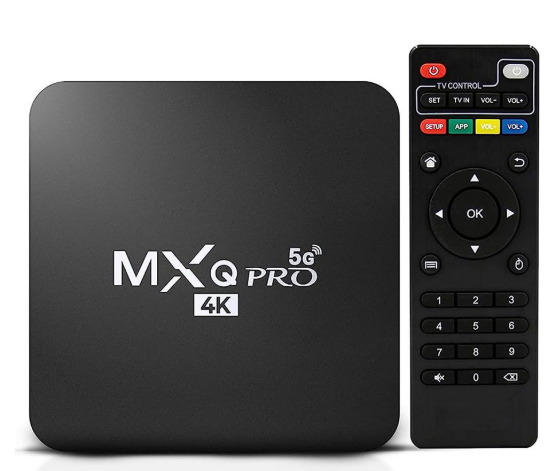
Image for MXQ PRO 4K 5G (Q44_V4.1_20210120 - Allwinner H3)
Mjondolo Fam replied to Wel7on's topic in Allwinner CPU Boxes
find armbian 20 with 5.4.33 kernel most stable for that box -
did you even research what all these switches do? NEWPKG does not even exist, SKIP_EXTERNAL_TOOLCHAINS was removed recently and KERNELBRANCH is ususally a specific tag and EXPERT....well...are you?
-
Hey there! @arizonan so.. if your H96 is stock you wont need any of my instructions.. My box got bricked somehow and this was pretty much the "troubleshoot" to get it working again. What you need to do is follow this instructions: HERE
-
 "While it didn't give an solution, " Well actually it gave many solutions, none of which worked! I've learned from this experience never follow an AI bot blindly, without second-guessing it's suggestions; it will lead you down the Garden path till Christmas. Many of its instructions in other aspects of armbian worked first time like a charm whereas this did not. I'll take a break for a week or two and think about it. Thanks for your suggestions......
 -

Efforts to develop firmware for X96 X6 RK3566 (8G/64G)
Dũng Trần replied to loi xin's topic in Rockchip CPU Boxes
Do you still have the download link for the ISO file Station M2 Armbian_community_24.11.0-trunk.167_Station-m2_bookworm_current_6.6.52_minimal.img.xz? -
You will need to provide a lot more information. What image are you trying to use? What CPU does your box have? There are different generations of this box and from what I can see they all have different cpus.
- Last week
-
 Ubuntu I see. That I do not have running, so cannot speak from experience.
 -

T9 TvBox Sunwell - Pcb Label T9-RK3328-8x4-V1.8
Константин Кривбасс replied to GmP's topic in TV Boxes running Armbian
Hello! I see you installed the 3318 image on the T9 and everything works fine. Congratulations! I'm not a big Linux expert, but I'd like to make a server out of it. I have the same console, but I'm afraid I can't handle it. I couldn't even find the best image for it...could you share your image for it? -
 I am thinking about getting a Nanopi R3S, which could be a better option, for it has a dedicated designed case for it. The CPU on it is the same one, so computation wise should be feasible.