Active threads
Showing topics posted in for the last 365 days.
- Past hour
-

[Bug]: Ethernet rarely connecting successfully in Orange Pi 3 LTS
c0rnelius replied to iMagz's topic in Allwinner sunxi
This unit on Armbian has bigger problems than the Ethernet not coming up. such as: I believe that stems from the current U-Boot being used. If I flash mine and use my DTS that comes up correctly and the ethernet. Sorry but bringing this unit up to snuff would take more time than I'm currently willing to put in right now. If a window opens up in the future, I'll look into it. -

Booting armbian manually from u-boot shell over UART
user03 replied to user03's topic in Amlogic CPU Boxes
So far I only have working ethernet, which is good enough probably. So, hdmi, wifi, audio, gpu are not working. Is there anything I can do to fix any of these? Install some firmware, edit the dtb or something? - Today
-
Hello @brunorro, I have uploaded two images to https://privat-in.de/ (navigate to downloads, grab Armbian*.img). Simply post findings here. The "edge" image is rather unstable, e.g. my NVME gives a read-error while working fine with "current", while a Mediatek Wifi card seems to work. Probably no easy task, could be anywhere in the IOMMU - DMA - PCIe triangle. The images are compiled from https://github.com/sven-ola/armbian-build/tree/orangepi-rv2 kernel with defaults plus switched on every Mediatek Wifi driver module. Here's my Todo for ref (+ marks ok): To be merged + Boot from SSD (upper+lower) + SPI NOR flash boot / install + SD/TF speed too slow (15mb/s) - Check SD UHS in uboot speed limit + Brcm SDIO wifi not working - Armbian edge: Brcm SDIO Wifi - Armbian edge: PCIe NVME IOErr + Bluetooth not working - RTL ethernet (2.5gbit R2V board?) - Ky overlay dtbo's missing - Focaltech touch driver from Ky? - Ky MIPI/CSI cam modules - What is that realtime r_uart? - GPU? USB2-OTG? USB3? Sound? Personal wishlist: - Device-mapper / dm_era missing + Mediatek PCIe wifi modules - PCIe adapter: Radeon GPU test Ah, yes. OpenWrt is on the Ky list of supported systems. I have a personal history on that too. While getting rid of systemd may be not that difficult (see Devuan) exchanging libc is another beast probably. LG // Sven-Ola
-

Support for TV Boxes with Amlogic S905X4
Ngọc Hải Lê replied to calusbr's topic in Amlogic CPU Boxes
I have a Magicsee N5 Max X4 TV box (Amlogic S905X4). Has anyone tried this with this model? I tried removing the # S905X4_Generic symbol, but it still gives an error when booting. Could you please help me? Thank you! -
On https://www.armbian.com/radxa-rock-5-itx/ there are several things wrong. 1 is a desktop image has stated size of 260.1 MB, that is certainly wrong. Then below there are several filenames Armbian_24.11.1_Rock-5-itx* in a sort of test report list. Note sure if that makes sense, more than 1 year old images. Also 6.1.75 vendor kernel had a few issues for me, although other RK3588 SBC. 1 year old versions of images might rely on older non-KMS HDMI init of a HDMI-monitor (done by older U-Boot), while newer U-Boot fails to init HDMI-monitor and also newer kernel and the current KMS might do things in a different way. I have that for my NanoPi-R6C and a certain older Medion HDMI monitor. Sometimes the KDE login screen just pops-up in 640x480. When login, the normal desktop goes correctly to 1080p60 (fullHD). A soft reboot also keeps it then in 1080p60, but the 2026.x versioned U-Boot does not manage to init the HDMI (maybe on-purpose, I have not looked in build config etc). I have not tried restarting displaymanager via ssh as the 640x480 came eventually, but did it several times in the past (from 2019 till 2024 or so until not using it with HDMI anymore) for 2 RPI4, also different monitor and also with or without a HDMI switch in between. A method is to put a video= statement on the kernel commandline with the desired mode. Earlier via RPi firmware in config.txt. I also looked into journal for the NanoPi-R6C issues of course and various failures w.r.t. HDMI after kernel 6.16.x or so, but all not fatal. So in the end it works and now properly working with kernel 6.18.2 edge kernel (Armbian Trixie KDE6). I went back to other bootloader (EDK2-UEFI v1.1) as that manages to init the HDMI monitor before kernel load and that is what I need, else always other computer needed (serial console) to select a different kernel or kernel config. I have never used video= statement with Armbian (yet), maybe I'll try just to know if and how it could work. So @Bobbox, can you post what image it is (exact filename and sha256sum) ? Even better is also kernel version and U-Boot version (exact UUID build strings), but a better human readable version will also give some hints already. And maybe upload armbianmonitor log, but that is maybe for later.
-
It is not recommended to match ZFS with vendor kernel(s). In general. Use mainline based current / edge kernels. Here v6.18.y we also might not have suitable ZFS yet as the kernel is too fresh. But if not today, it will be avail within days / weeks.
-
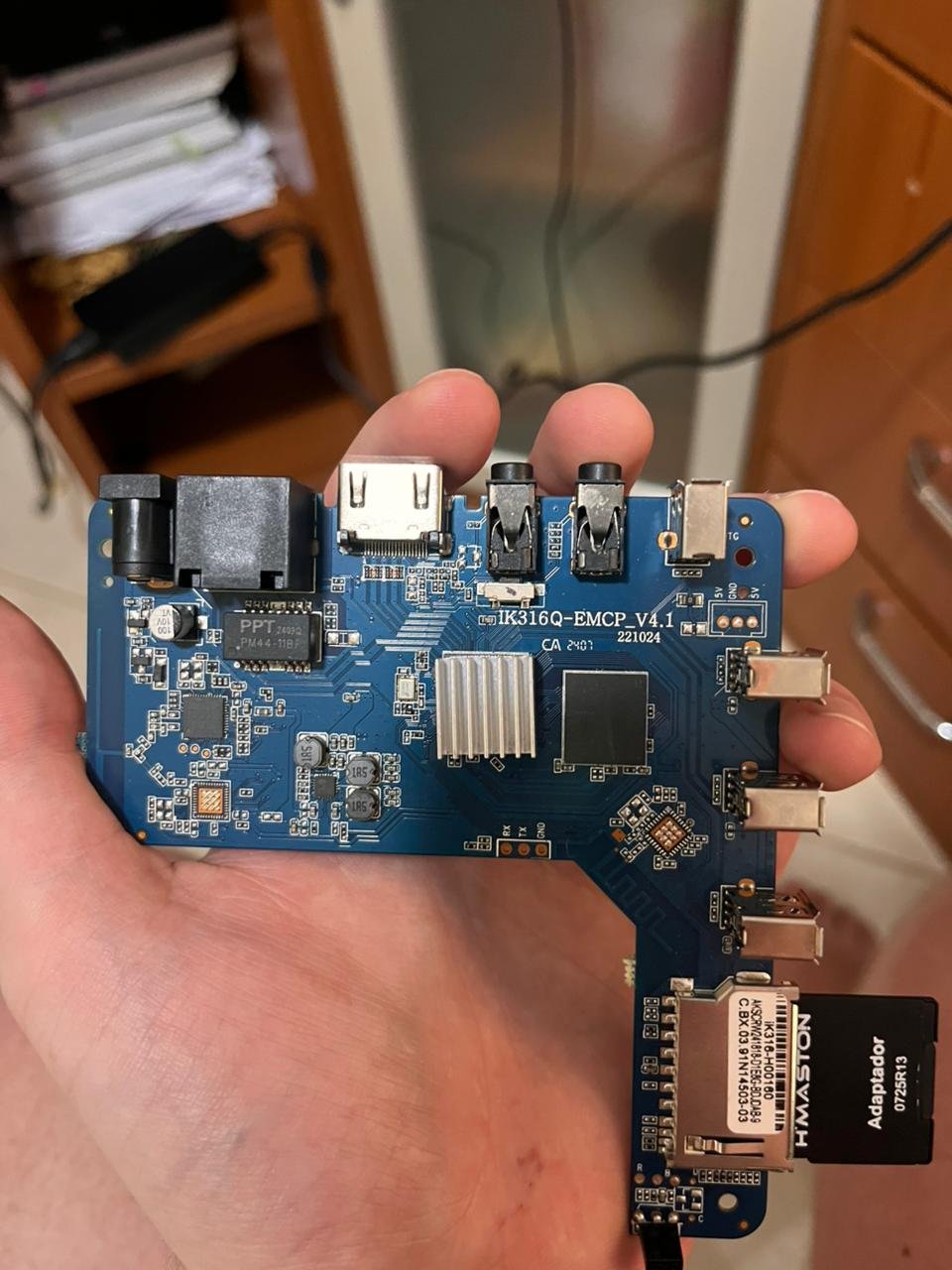
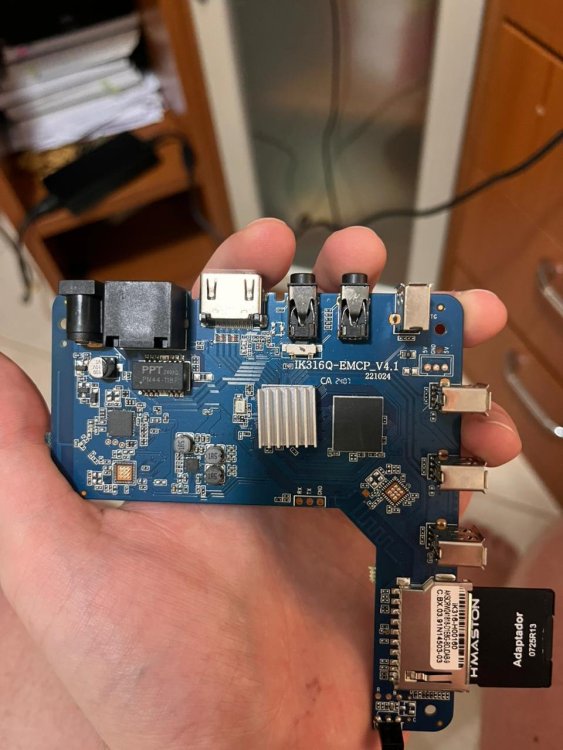
 Managed to find how to solve the issue! For anyone with the same board revision (IK316Q-EMCP_V4.1) and LPDDR3 memory who is struggling to boot standard images: I tried multiple generic builds (Ophub, etc.) and DTB edits without success. The solution was using this specific pre-configured image version from the sicXnull repository. The working image is: Armbian-unofficial_24.11.0-trunk_X96q_bookworm_current_6.6.44_mate_desktop.img.xz Download Link: https://github.com/sicXnull/armbian-build/releases/download/v24.8.0-trunk.425/Armbian-unofficial_24.11.0-trunk_X96q_bookworm_current_6.6.44_mate_desktop.img.xz It booted immediately. Hope this helps others with this specific hardware.
 -
Hello!! I am looking for help to boot Armbian on a generic TV Box sold as "MXQ Pro 4K 5G". I have tried multiple images (including official and community builds from sicXnull), but I only get a black screen or signal loss immediately after the boot attempt. Device Specifications: Model on case: MXQ Pro 4K 5G Board ID: IK316Q-EMCP_V4.1 SoC: Allwinner H313 (identified as sun50iw9p1 in Android) RAM: 1GB (Single chip configuration) Storage: 8GB eMMC Current Status: I am able to boot into the stock Android. To attempt the Armbian boot, I've tryed the Power up method, the power up pressing the hidden AV switch, using the reboot update command from a terminal emulator within Android. The issue: Upon executing the reboot command, the Android system shuts down, the display signal cuts off (or stays black), and the device never initializes Armbian (no HDMI output, no LEDs blinking differently). What I have tried:
-
So I tried running Armbian Minimal/IoT version with kernel 6.1 and the fan is operating normally (tested it with the stress command). I didn't realize i was working with two different kernel versions. Sometimes you just need another set of eyes to look at a problem. Thanks for the help, cheers!
- Yesterday
-

OrangePi Zero LTS ili9341 TFT LCD (and later OrangePi Zero 3)
robertoj replied to robertoj's topic in Allwinner sunxi
If you don't have X11 or Wayland, try using the linux command "fbi" (frame buffer image). I think I put an example in this trhead or in the Banana Pi ili9341 thread (in this allwinner forum section). -
Gaming experience with Orange Pi 5 (RK3588) on Armbian
robertoj replied to KhanhDTP's topic in Orange Pi 5
Does anybody know if this will work with Allwinner H618? -
Driving the ili9488 LCD (4.0 inch cheap chinese clone)
robertoj replied to robertoj's topic in Allwinner sunxi
Forumtrekker: I am 99% sure that if you see the LCD working OK once, with kungfupancake or any other a txt/bin file, for just console text, it will work for any graphics. There's an issue with plymouth: it modifies the initrd in a way that it loses track of the bin file, and the kernel driver fails to load. See: https://forum.armbian.com/topic/53568-how-to-add-a-specific-single-file-in-the-initrdimg-ideally-automatically-with-update-initramfs/#comment-221767 I am running my SPI at 40MHz fine with 20cm wires. I don't have time to see your DTS file, but are you using the same CS pin as I do? I have noticed there's a default "chip select" pin, which makes everything work better. If you are using panel-mipi-dbi driver, don't use any additional DTS for the LCD, not even additional SPI DTS, and armbianEnv.txt that refer to the LCD. According to the notro wiki, the ili9486 and ili9488 will only work with RGB888 mode (because we use SPI). There's the "format" parameter line just for that, in my DTS. Can you send a good photo of your LCD front and back? My method is for a Red PCB LCD. I don't know the brand, but it is not Waveshare, Creality or any known company. Sorry, saying "Chinese LCD" is like saying "wet water": redundant and not specific. pami: the english in your post is fine, but you can separate ideas and separate processes in paragraphs, to let me focus in one problem at a time Many LCD guides, due to being so old, use the fbcopy driver, or another "classic framebuffer" driver. I could make my ili9341 work with it, but since I learned to use the panel-mipi-dbi I only started using that. It get's you more fluid animations and probably Linux will prefer it in the future. If one dtbo file and a python script makes your LCD work fine, share that script and DTBO (best if you can decompile the DTBO into DTS), in this thread, as attached files. Send more photos of your LCD. AI suggestions will only work if the solution is well documented somewhere in the internet, and the AI has found it. AI will re-word the answer and take credit for it. -
Has this thread been updated yet, bro? I'm trying out Ubuntu.
-
Unfortunately, I have exactly the same problem.

-
http://blog.armbian.com/content/images/2026/01/githubhighlights-2-1.webpThis week in Armbian development saw a significant round of kernel updates, board support enhancements, and workflow improvements. Notable changes include refactoring of the sunxi patchset, multiple kernel bumps for Rockchip and sunxi platforms, and the introduction of parallel repository management. Several device-specific fixes were implemented, such as improved fan control and USB support for the Station M3, and initial support for the OrangePi 4A. Deprecated and problematic drivers were removed to streamline builds, while eBPF options and bootloader updates further enhance system capabilities. The team also addressed various patching, locale, and build issues, ensuring smoother operations across supported hardware. sunxi: refactor full patchset. by @EvilOlaf in armbian/build#9219Apply rtl8723cs bluetooth only with kernels above 6.1. by @paolosabatino in armbian/build#9184armbian-kernel: more eBPF-oriented options for userspace tooling. by @rpardini in armbian/build#9193atf: once again no-warn-rwx-segment woes. by @rpardini in armbian/build#9162Drop USB wireless driver that doesn't want to compile. by @igorpecovnik in armbian/build#9202Enable OrangePi 4A CSC Initial Support. by @juanesf in armbian/build#9185evict device trees from patches into bare dt. by @EvilOlaf in armbian/build#9215extensions/mtkflash: mtk-flash --no-erase-mmc1 landed upstream as --preserve-boot1. by @rpardini in armbian/build#9198extensions/ufs: don't check sfdisk version also when BUILDING_IMAGE!=yes. by @rpardini in armbian/build#9161feat: implement parallel repository management workflow. by @igorpecovnik in armbian/build#9224Fix broken patch due to upstream changes, drop edge kernel as its not used. by @igorpecovnik in armbian/build#9200Fix locale warnings during chroot operations. by @iav in armbian/build#9160Fix rootfs compilation (dropping deprecated gtk2 engines), drop broken patch on meson64. by @igorpecovnik in armbian/build#9199framework & kernel config - rework the optionality of kernel builtins vs modules. by @tabrisnet in armbian/build#9165framework - extension_hook_opt_out. by @tabrisnet in armbian/build#9178genio/radxa-nio-12l: OPTEE/u-boot/TF-A/FIP bootloader + EXT=mtkflash + fixes. by @rpardini in armbian/build#9159genio: kernel quality-of-life enhancements. by @rpardini in armbian/build#9167grub: remove invalid hack for hvc0. by @rpardini in armbian/build#9189Helios64: update uboot to v26-01. by @iav in armbian/build#9125host-release: allow to build on resolute. by @rpardini in armbian/build#9190mixtile-blade3: board: disable 'edge' kernel, as it's not ready for end-users yet. by @rpardini in armbian/build#9181mvebu64: re-revitalize espressobin - can build (under noble) again. by @rpardini in armbian/build#9182NanoPi R3S LTS: Update to u-boot-v2026.01. by @pyavitz in armbian/build#9207opt-out of driver_rtl8723cs in some legacy kernels so they build again. by @rpardini in armbian/build#9176patching: introduce add-only mode for DT Makefile AutoPatcher. by @rpardini in armbian/build#9204PR actions scripts: fix workflow execution name. by @igorpecovnik in armbian/build#9186rock-3a: unset BOOTFS_TYPE for non-vendor builds. by @EvilOlaf in armbian/build#9068Rockchip bump current to 6.18 and edge to 6.19. by @paolosabatino in armbian/build#9169Rockchip maint: drop upstreamed patch. by @igorpecovnik in armbian/build#9196rockchip/uefi-loong64 6.19: rewrite patches against 6.19-rc4. by @rpardini in armbian/build#9172rockchip64-6.18: Enable audio for HDMI0 on station-m3. by @kasimling in armbian/build#9170rockchip64: bump edge to 6.19; current 6.12 -> 6.18. by @EvilOlaf in armbian/build#9067rockchip64: patch ATF 2.13 to build on gcc-14+ (ref rk3399's m0). by @rpardini in armbian/build#9208rtl8723cs: stop including proprietary driver for kernel 6.19 onwards. by @paolosabatino in armbian/build#9171station-m3: Fix fan speed and enable USB 3.0 Type-A port. by @kasimling in armbian/build#9177sun55iw3.conf bump u-boot to v2026.01 (final). by @juanesf in armbian/build#9197sunxi-6.18: rename patch that does fixups for clarity. by @rpardini in armbian/build#9213sunxi: Add CONFIG_TTY_OVERY_SDIO to edge kernel config. by @EvilOlaf in armbian/build#9226sunxi: bump edge to 6.18.4. by @EvilOlaf in armbian/build#9188sunxi: bump current and edge to latest minor. by @EvilOlaf in armbian/build#9229sunxi: bump current to 6.12.64. by @EvilOlaf in armbian/build#9195sunxi: cleanup old patchsets. by @EvilOlaf in armbian/build#9212sunxi: move overlays from various patches into auto-patcher. by @EvilOlaf in armbian/build#9211thinkpad-x13s: bump arm64-sc8280xp to steev's 6.18.y. by @rpardini in armbian/build#9173tools/repository/extract-repo.sh: simplify extraction by copying directly from pool. by @igorpecovnik in armbian/build#9174u-boot: allow custom LOGLEVEL with UBOOT_LOGLEVEL (default to 6). by @rpardini in armbian/build#9191u-boot: bump u-boot to v2026.01 (final) for boards that had -rcX. by @rpardini in armbian/build#9179kernel-make: clang: Remove -Wno-error=unknown-warning-option from clang KCFLAGS.. by @iav in armbian/build#9183View the full article
-
I noticed the same thing. It looks like the server images might have been temporarily removed, possibly during a site update or reorganization. I’d suggest keeping an eye on the official download page or checking the Armbian GitHub mirror, they usually restore missing builds pretty quickly.
-
Latest nightly I found seems to work, built from source and installed klipper, etc using normal instructions online. Klipperscreen is not working but I believe I will need to build the full graphical version to get this working with my Waveshare 7" hdmi screen. Wifi and general usage of this build seems very stable. Note: I did that the lagtest ngihtly code PR for CB2 was months old, but again, it seems to work.
- Last week
-

Helios64 - Armbian 23.08 Bookworm issues (solved)
tommitytom replied to ebin-dev's topic in Rockchip
Been looking at getting my Helios64 back up and running after experiencing a lot of instability a few years ago. Stumbled across this thread and things look somewhat promising, but after reading through I'm unsure what I should actually do to get things running! Lots of different posts with lots of different .dtb files, seemingly PR's in to the armbian repo etc. As of today, what is the best approach to get things up and running? Do the PR's mean I should be able to just use Armbian direct from the site and have a stable NAS? EDIT: I installed the latest version listed on the Helios64 armbian page (v25.11.2 - 6.12.58-current-rockchip64) and it seems to be working fine so far. -
Hello, sorry for late answer, but I had no time to experiment with my rock64 board. Maybe this issue is already resolved, if so please let me know. I'm still using kernel 6.6.63 and holding kernel packages in order not to break a working home server. So I managed to temporary switch kernel to 6.12.9 again for testing (copied old /boot and corrected symlinks) and enter UART console: Here is output of U-Boot commands you asked: Hit any key to stop autoboot: 0 => setenv b => setenv c => setenv a "a/b" => setexpr b sub "a/" "" a Unknown command 'setexpr' - try 'help' => echo ${b} => setexpr c 1 + 1 Unknown command 'setexpr' - try 'help' => echo ${c} => fdt fdt - flattened device tree utility commands Usage: fdt addr [-c] <addr> [<length>] - Set the [control] fdt location to <addr> fdt move <fdt> <newaddr> <length> - Copy the fdt to <addr> and make it active fdt resize [<extrasize>] - Resize fdt to size + padding to 4k addr + some optional <extrd fdt print <path> [<prop>] - Recursive print starting at <path> fdt list <path> [<prop>] - Print one level starting at <path> fdt get value <var> <path> <prop> - Get <property> and store in <var> fdt get name <var> <path> <index> - Get name of node <index> and store in <var> fdt get addr <var> <path> <prop> - Get start address of <property> and store in <var> fdt get size <var> <path> [<prop>] - Get size of [<property>] or num nodes and store in <var> fdt set <path> <prop> [<val>] - Set <property> [to <val>] fdt mknode <path> <node> - Create a new node after <path> fdt rm <path> [<prop>] - Delete the node or <property> fdt header - Display header info fdt bootcpu <id> - Set boot cpuid fdt memory <addr> <size> - Add/Update memory node fdt rsvmem print - Show current mem reserves fdt rsvmem add <addr> <size> - Add a mem reserve fdt rsvmem delete <index> - Delete a mem reserves fdt chosen [<start> <end>] - Add/update the /chosen branch in the tree <start>/<end> - initrd start/end addr NOTE: Dereference aliases by omitting the leading '/', e.g. fdt print ethernet0. => echo ${fdtfile} rockchip/rk3328-rock64.dtb => echo ${fdt_addr_r} 0x01f00000 => echo ${kernel_addr_r} 0x02000000 => echo ${ramdisk_addr_r} 0x04000000 => ver U-Boot 2017.09-rockchip-ayufan-1065-g95f6152134 (Apr 06 2020 - 08:10:39 +0000) aarch64-linux-gnu-gcc (Ubuntu/Linaro 7.5.0-3ubuntu1~18.04) 7.5.0 GNU ld (GNU Binutils for Ubuntu) 2.30 => CTRL-A Z for help | 1500000 8N1 | NOR | Minicom 2.10 | VT102 | Offline | ttyUSB0 I have set up rock64 to boot from SSD connected over USB3-SATA adapter (bought from pine64 store) without SD-card. To make it work I flashed latest U-Boot from ayufan to SPI by this tutorial. Maybe this error because of old U-Boot, and you're right, looks like it doesn't support setexpr command djurny, thank you for looking into this. And one question I don't understand, if I should upgrade U-Boot in SPI or I should erase SPI and wirte U-boot somewhere else? And will I be able to boot directly from USB-SSD without SD-card after that?
-
I don’t know about Odroid n2 but all the 2025.11 builds with graphical ui get stuck when the initial setup is completed and message appears “now booting to graphical session” and never boots 2024 builds do boot and stay normal I am using mainline uboot via spi boot.
-

Rupa X88 Pro 13 - RK3528 board with images
shexplorer replied to fedes_gl's topic in Rockchip CPU Boxes
Hi there, I also bought one (V1.5) and tried to use armbian. Unfortunately, I managed to brick it. I booted your image @johlnx from sd, that worked. Then I overwrote the internal EMMC with your image and the box won't boot anymore. Any idea how I can fix it? I made an backup of the original image, but I also read that it may be incomplete because of read protection in uboot of the emmc? I also tried to get into MaskMode by pressing the button and connecting the USB 2.0 to my Windows-PC but no device is discovered. I attached the serial uboot log. Hope somebody has a suggestion how i can boot something again. Thanks boot_with_armbian_sd_insert.log boot_without_sd_insert.log -
Hello everyone! I am running Armbian in a BTV11 box (Amlogic S905X3) alongside the "meson-sm1-sei610.dtb". My cabled ethernet connection is working fine but not WIFI. No networks are found. I have already tried alternatives like meson-sm1-sei610-ethfix.dtb, that leads to my ethernet to also stop working. At first the Kernel was looking for `brcmfmac4330-sdio.seirobotics,sei610.bin` firmware, that doesnt exist in Armbian. So I made a symlink pointing to a generic `brcmfmac4330-sdio.bin`. Saw that similar fixes worked for other people. This is what I see from logs: `sudo dmesg`: [ 8.451121] brcmfmac: F1 signature read @0x18000000=0x16044330 [ 8.456690] brcmfmac: brcmf_fw_alloc_request: using brcm/brcmfmac4330-sdio for chip BCM4330/4 [ 8.488102] usbcore: registered new interface driver brcmfmac [ 8.495653] brcmfmac mmc2:0001:1: Direct firmware load for brcm/brcmfmac4330-sdio.clm_blob failed with error -2 [ 8.858975] brcmfmac: brcmf_c_process_clm_blob: no clm_blob available (err=-2), device may have limited channels available [ 8.871034] brcmfmac: brcmf_c_preinit_dcmds: Firmware: BCM4330/4 wl0: Oct 25 2011 19:34:12 version 5.90.125.104 [ 13.975072] brcmfmac: brcmf_sdio_readframes: read 97 bytes from channel 1 failed: -84 [ 13.979176] brcmfmac: brcmf_sdio_rxfail: abort command, terminate frame, send NAK [ 14.014920] brcmfmac: brcmf_sdio_readframes: RXHEADER FAILED: -84 [ 14.017205] brcmfmac: brcmf_sdio_rxfail: abort command, terminate frame, send NAK [ 16.618796] brcmfmac: brcmf_sdio_bus_rxctl: resumed on timeout [ 16.639467] ieee80211 phy0: brcmf_netdev_open: failed to bring up cfg80211 [ 18.506857] ieee80211 phy0: brcmf_p2p_create_p2pdev: timeout occurred [ 18.507694] ieee80211 phy0: brcmf_cfg80211_add_iface: add iface p2p-dev-wlan0 type 10 failed: err=-5 [ 22.171208] brcmfmac: brcmf_sdio_readframes: RXHEADER FAILED: -84 [ 22.171730] brcmfmac: brcmf_sdio_rxfail: abort command, terminate frame, send NAK [ 24.554983] brcmfmac: brcmf_sdio_bus_rxctl: resumed on timeout [ 24.575580] ieee80211 phy0: brcmf_run_escan: error (-110) More info available from Armbian monitor: https://paste.armbian.com/zuwididupe Does anyone have any insight that might help me figure out whats wrong with my box's WIFI?
-
Armbian for H313 X96-Q LPDDR3 TV-Box
Maurizio Finesso replied to sicxnull's topic in Allwinner CPU Boxes
Hi @sicxnull, @Nick A thank you very much for your support. Probably last night I was very confused when I wrote my post. Of course the v5.1 updated will be nice to have but looking better I can say to you and to @ventara that the armbian image suggested from Nick to Trauma (https://github.com/NickAlilovic/build/releases/download/20250306/Armbian-unofficial_25.05.0-trunk_X98h_bookworm_edge_6.12.11_xfce_desktop.img.xz) works fine on X96Q vs 5.1 only things the led in front remain always red and that why I was thinking it doesn't boot. Ethernet port works but wifi doesn't work. Never mind ethernet is enough. On the other side when I compare the two release (sicxnull and Nick) I didn't realize that I copy two times the same image on two different sd (I was really too tired) so don't consider the indication that I give you apart the wifi chip. That is right! -

OZPI v1 new image with Armbian v26.2 Debian stable (trixie)
TRay replied to TRay's topic in Allwinner sunxi
Today all works, thank you for all who fixed this problem 🙂 apt update Get:1 http://security.debian.org trixie-security InRelease [43,4 kB] Get:2 http://deb.debian.org/debian trixie InRelease [140 kB] Get:3 http://deb.debian.org/debian trixie-updates InRelease [47,3 kB] Get:5 https://github.armbian.com/configng stable InRelease [5 467 B] Get:4 http://armbian.lv.auroradev.org/beta trixie InRelease [39,4 kB] Get:6 http://deb.debian.org/debian trixie-backports InRelease [54,0 kB] Get:7 http://security.debian.org trixie-security/main armhf Packages [88,8 kB] Get:8 http://deb.debian.org/debian trixie/non-free armhf Packages [69,9 kB] Get:9 http://deb.debian.org/debian trixie/non-free-firmware armhf Packages [6 685 B] Get:10 https://github.armbian.com/configng stable/main armhf Packages [434 B] Get:11 http://deb.debian.org/debian trixie/main armhf Packages [12,7 MB] Get:12 http://deb.debian.org/debian trixie/contrib armhf Packages [50,6 kB] Get:13 http://deb.debian.org/debian trixie-updates/main armhf Packages [5 144 B] Get:14 http://deb.debian.org/debian trixie-backports/main armhf Packages [133 kB] Get:15 http://deb.debian.org/debian trixie-backports/contrib armhf Packages [4 368 B] Get:16 http://deb.debian.org/debian trixie-backports/non-free-firmware armhf Packages [3 856 B] Get:17 http://deb.debian.org/debian trixie-backports/non-free armhf Packages [1 520 B] Fetched 13,4 MB in 12s (1 073 kB/s) 32 packages can be upgraded. Run 'apt list --upgradable' to see them. -
 Thanks @Werner this is fixed, it works. In my case auto selected mirror is fi.mirror.armbian.de .