All Activity
- Past hour
-

Gaming experience with Orange Pi 5 (RK3588) on Armbian
maul7456 replied to KhanhDTP's topic in Orange Pi 5
I hear that now we have proton 11 with arm64 support. Does anyone try to test games with that new version?? -

Fsck system fs read-only, but don't boot
Johan Nilsson replied to Johan Nilsson's topic in Allwinner sunxi
Sorry I don't understand. -
 Background - I have a Helios64 NAS with 4 x HDDs running Armbian 25.11.2 with kernel 6.12.58. The HDDs each have a ZFS partition but the partitions aren't imported. The OS is running from an sd card and logging is to ram. Power management and spin-down on the HDDs is disabled. Despite all this *something* is causing the heads to move every second or two. iotop shows no disk activity . lsof +d /mnt/sda etc. shows no open files and fatrace shows files in /usr and /var but nothing on /dev/sda etc. So, whilst it doesn't look as if any files are being accessed the HDDs are still doing something. The question is WHAT and how do I stop it ? Any ideas ?
 - Today
-

How to disable HDIMI and Codec audio divices on kernel 6.18.25
TRay replied to TRay's topic in Allwinner sunxi
Another interesting thing is that snd_usb_audio is not loaded as a module and seems to be compiled. I tried in /boot/armbianEnv.tx in extrargs= put snd_usb_audio.index=0 but that didn't work either, unless a different name should be provided instead of snd_usb_audio. -
How to disable HDIMI and Codec audio divices on kernel 6.18.25
TRay replied to TRay's topic in Allwinner sunxi
By the way, it's a shame the old method of forcing the bit card number via /etc/modprobe.d/alsa.conf didn't work on Armbian. options snd_usb_audio index=0 options sun4i_codec index=1 options snd_hdmi_audio index=2 alias snd-card-0 snd_usb_audio alias snd-card-1 sun4i_codec alias snd-card-2 snd_hdmi_audio That's why I was looking for a way to disable these additional audio codecs and HDMI, but maybe it's because snd_usb_audio, etc., aren't loaded as modules in the new kerne -
How to disable HDIMI and Codec audio divices on kernel 6.18.25
TRay replied to TRay's topic in Allwinner sunxi
Ok I check via ls /proc/device-tree/__symbols__/ addr_mgt hdmi_con_in name r_i2c_pins tcon_tv0 ahub1_codec hdmi_in nmi_intc rmii_pins tcon_tv0_in ahub1_cpu hdmi_in_tcon_top ohci0 r_pio tcon_tv0_in_tcon_top_mixer0 ahub1_mach hdmi_out ohci1 r_rsb tcon_tv0_in_tcon_top_mixer1 ahub1_plat hdmi_out_con ohci2 r_rsb_pins tcon_tv0_out ahub_dam_mach hdmi_phy ohci3 rtc tcon_tv0_out_tcon_top ahub_dam_plat i2c0 osc24M sid ths axp313 i2c0_pins pio spdif ths_calibration ccu i2c1 planes spdif_tx_pin uart0 codec i2c1_pi_pins prcm_ppu spi0 uart0_ph_pins cpu0 i2c2 pwm spi0_cs0_pin uart1 cpu1 i2c2_ph_pins pwm0 spi0_pins uart1_pins cpu2 i2c2_pi_pins pwm0_pin spi1 uart1_rts_cts_pins cpu3 i2c3 pwm1 spi1_cs0_pin uart2 cpu_critical i2c3_pa_pins pwm1_pg_pin spi1_cs1_pin uart2_pg_pins cpu_opp_table i2c3_pg_pins pwm1_ph_pin spi1_pins uart2_pg_rts_cts_pins cpu_speed_grade i2c3_ph_pins pwm1_pi_pin sram_c uart2_ph_pins cpu_target i2c4 pwm2 sram_c1 uart2_ph_rts_cts_pins cpu_threshold i2c4_pg_pins pwm2_ph_pin syscon uart2_pi_pins crypto i2c4_ph_pins pwm2_pi_pin tcon_lcd0 uart2_pi_rts_cts_pins ddr_temp_critical iommu pwm3 tcon_lcd0_in uart3 de ir pwm3_ph_pin tcon_lcd0_in_tcon_top_mixer0 uart3_pi_pins de3_sram ir_rx_pin pwm3_pi_pin tcon_lcd0_in_tcon_top_mixer1 uart3_pi_rts_cts_pins display_clocks l2_cache pwm4 tcon_lcd0_out uart4 dma lradc pwm4_ph_pin tcon_top uart4_pi_pins dump_reg mdio0 pwm4_pi_pin tcon_top_hdmi_in uart4_pi_rts_cts_pins ehci0 mdio1 pwm5 tcon_top_hdmi_in_tcon_tv0 uart5 ehci1 mixer0 pwm5_pin tcon_top_hdmi_out uart5_pins ehci2 mixer0_out r_ccu tcon_top_hdmi_out_hdmi usbotg ehci3 mixer0_out_tcon_top_mixer0 reg_aldo1 tcon_top_mixer0_in usbphy emac0 mixer1 reg_dcdc1 tcon_top_mixer0_in_mixer0 ve_sram emac1 mixer1_out reg_dcdc2 tcon_top_mixer0_out ve_temp_critical ext_rgmii_phy mixer1_out_tcon_top_mixer1 reg_dcdc3 tcon_top_mixer0_out_tcon_lcd0 watchdog ext_rgmii_pins mmc0 reg_dldo1 tcon_top_mixer0_out_tcon_tv0 wifi_pwrseq gic mmc0_pins reg_usb1_vbus tcon_top_mixer1_in x32clk_fanout_pin gpadc mmc1 reg_vcc33_wifi tcon_top_mixer1_in_mixer1 gpu mmc1_pins reg_vcc5v tcon_top_mixer1_out gpu_temp_critical mmc2 reg_vcc_wifi_io tcon_top_mixer1_out_tcon_lcd0 hdmi mmc2_pins r_i2c tcon_top_mixer1_out_tcon_tv0 After decompiling the DTS image (H618): grep -A 15 "codec {" /tmp/extracted_tree.dts soundcard-mach,codec { }; }; ahub1_plat { #sound-dai-cells = <0x00>; compatible = "allwinner,sunxi-snd-plat-ahub"; apb_num = <0x01>; dmas = <0x25 0x04 0x25 0x04>; dma-names = "tx\0rx"; playback_cma = <0x80>; capture_cma = <0x80>; tx_fifo_size = <0x80>; rx_fifo_size = <0x80>; tdm_num = <0x01>; tx_pin = <0x00>; -- soundcard-mach,codec { sound-dai = <0x33>; phandle = <0x98>; }; }; usb@5100000 { compatible = "allwinner,sun50i-h616-musb\0allwinner,sun8i-h3-musb"; reg = <0x5100000 0x400>; clocks = <0x02 0x70>; resets = <0x02 0x32>; interrupts = <0x00 0x19 0x04>; interrupt-names = "mc"; phys = <0x34 0x00>; phy-names = "usb"; extcon = <0x34 0x00>; root@host:/tmp# grep -A 15 "hdmi_sound {" /tmp/extracted_tree.dts root@host:/tmp# grep -A 10 "ahub1_mach {" /tmp/extracted_tree.dts ahub1_mach { compatible = "allwinner,sunxi-snd-mach"; soundcard-mach,name = "HDMI"; soundcard-mach,format = "i2s"; soundcard-mach,frame-master = <0x31>; soundcard-mach,bitclock-master = <0x31>; soundcard-mach,slot-num = <0x02>; soundcard-mach,slot-width = <0x20>; status = "okay"; phandle = <0x97>; HDMI Audio is located under the label: ahub1_mach Analog Codec is associated with: ahub1_plat and codec These nodes have a default status of "okay," which causes them to occupy slots 0 and 1. and use /dts-v1/; /plugin/; / { compatible = "allwinner,sun50i-h616"; fragment@0 { target = <&codec>; __overlay__ { status = "disabled"; }; }; fragment@1 { target = <&ahub1_codec>; __overlay__ { status = "disabled"; }; }; fragment@2 { target = <&hdmi>; __overlay__ { status = "disabled"; }; }; fragment@3 { target = <&spdif>; __overlay__ { status = "disabled"; }; }; fragment@4 { target = <&ahub1_mach>; __overlay__ { status = "disabled"; }; }; }; and after reboot not show HDMI and Codec audio and USB sound card has 0 number -
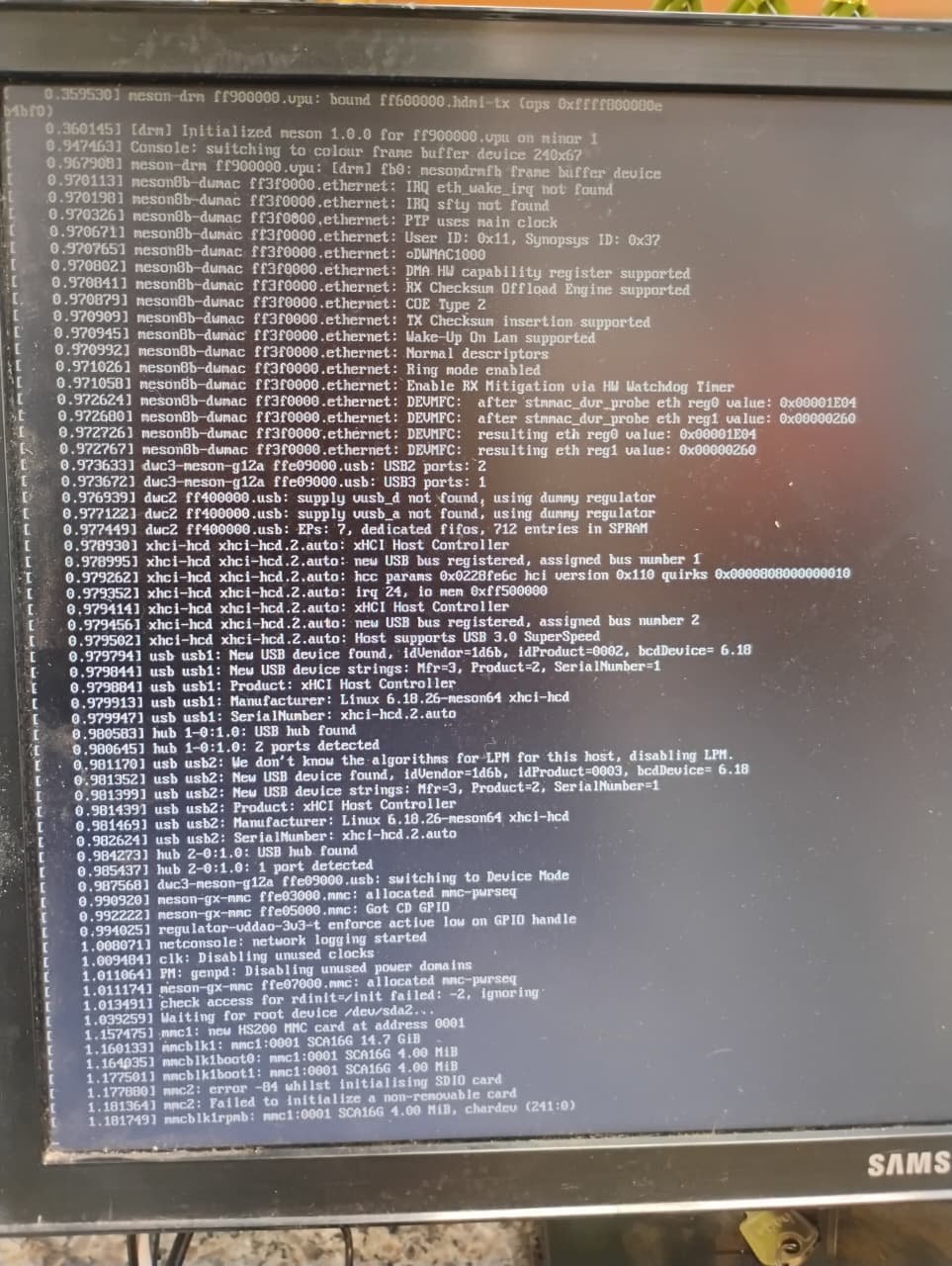
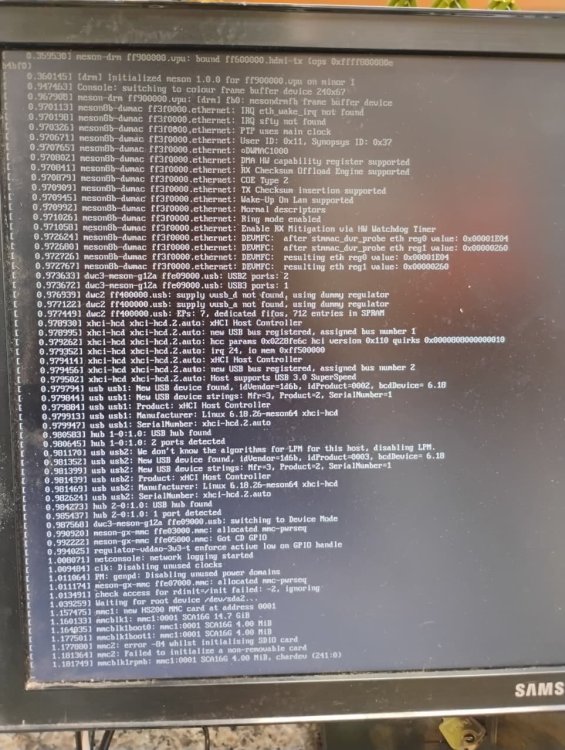
Well, with the new image there was some progress, but I will give up for now. I will look for an SD card and try again using it. I’m confident that I will finally succeed in this operation.
-

How to disable HDIMI and Codec audio divices on kernel 6.18.25
Werner replied to TRay's topic in Allwinner sunxi
I don't know the names either. I suggest to look at the original device tree by decompiling it: dtc -I dtb -O dts /boot/dtb/allwinner/whateverthenameofthezero3devicetreewas.dtb -
@Maberikku Great! @humanus Nick said you hit a kernel error on 6.6. Can you paste the details here.
-

Helios64 - Armbian Trixie with linux 6.18 (incl. opp-microvolt patch)
BipBip1981 replied to ebin-dev's topic in Rockchip
Boot on a from scratch helios64 sdcard image, cross fingers and copy / rename / replace original dtb file with ebin-dev file or mount sdcard with scratch helios64 on another computer, do the change, then boot with you ready sdcard on the helios64 -
How to disable HDIMI and Codec audio divices on kernel 6.18.25
TRay replied to TRay's topic in Allwinner sunxi
Unfortunately, there's no technical way to connect to the UART to see. I'm not sure if I got the names right. Maybe the HDMI and audio codecs have different names in the tree devices ? Is there any way to find them? -
How to disable HDIMI and Codec audio divices on kernel 6.18.25
Werner replied to TRay's topic in Allwinner sunxi
Check uboot logs if the overlay has been loaded correctly. You may need an usb uart adapter for this. -
How to disable HDIMI and Codec audio divices on kernel 6.18.25
TRay replied to TRay's topic in Allwinner sunxi
Ok tried: /dts-v1/; /plugin/; / { compatible = "allwinner,sun50i-h616"; fragment@0 { target = <&codec>; __overlay__ { status = "disabled"; }; }; fragment@1 { target = <&hdmi_sound>; __overlay__ { status = "disabled"; }; }; }; and run armbian-add-overlay disable-internal-audio.dts But after reboot, still Codec and HDMI exist in the list of cards Maybe I wrote the overlay file? -
Helios64 hangs with 26.2.1 / 6.18.10 kernel on cpu5
BipBip1981 replied to SymbiosisSystems's topic in Rockchip
-
Hi SymbiosisSystems, here: But I think you find it 😉
-
How to disable HDIMI and Codec audio divices on kernel 6.18.25
Werner replied to TRay's topic in Allwinner sunxi
I suggest to create a device tree overlay to disable both. -
How to disable HDIMI and Codec audio divices on kernel 6.18.25
TRay replied to TRay's topic in Allwinner sunxi
After updating the system, when the 6.12.x kernel was updated to 6.18.25, the audio codec and HDMI codecs appeared in the list, which caused the USB sound card to be renumbered from 0 to 2. I know I can change the number from 0 to 2, but there's a system image that users use with their configuration, which previously had the card number set to 0. As a result of the system update, everyone lost communication with the sound card in the application. I'm looking for a solution to restore the system so that the USB sound card remains number 0. If anyone has any good advice on how to make the USB sound card permanently have number 0 in the list or how to block Codec and HDMI audio in the system so that they are not present? -
Get an SD card. That is what 95% of people use on these boxes. Also if you want help, you need to be a lot more detailed than 'but reported it couldn't find the installation package'. Logs/Screenshots are needed to even begin to help.
-
How to disable HDMI and CODEC in system where is ne kernel 6.18.25 cat /proc/asound/cards 0 [Codec ]: sun4i-codec - H616 Audio Codec h616-audio-codec 1 [HDMI ]: HDMI - HDMI HDMI 2 [Device ]: USB-Audio - USB PnP Sound Device C-Media Electronics Inc. USB PnP Sound Device at usb-5200400.usb-1, full speed I need an always USB sound card with the number of 0
-
@BipBip1981 where can I download rk3399-kobol-helios64.dtb-6.XX.xx-L2-hs400-opp ? Thanks
-
I don’t have an SD card for testing, only a USB stick. The idea is to turn this TV box into a KDS for a restaurant, it will only run this program. However, it needs to be done in Linux. I downloaded a new image, it booted through Android, it detected the USB stick but reported that it couldn’t find the installation package.
-
Have you tried all of the uboot binaries as I suggested above? Also, you didn't answer my question about SD card. Does the box have an SD card slot and have you tried that?
-
Yes, I opened it and it really does have the Amlogic chipset. However, it is still not booting from the USB stick. Do you have any recommendations? I’ve been stuck on this for a week and I’m quite new to this area.
-
moved to staging
-

Teclast T60 AI rooting + armbian possibility Allwinner A733
Taz replied to Taz's topic in Allwinner CPU Boxes
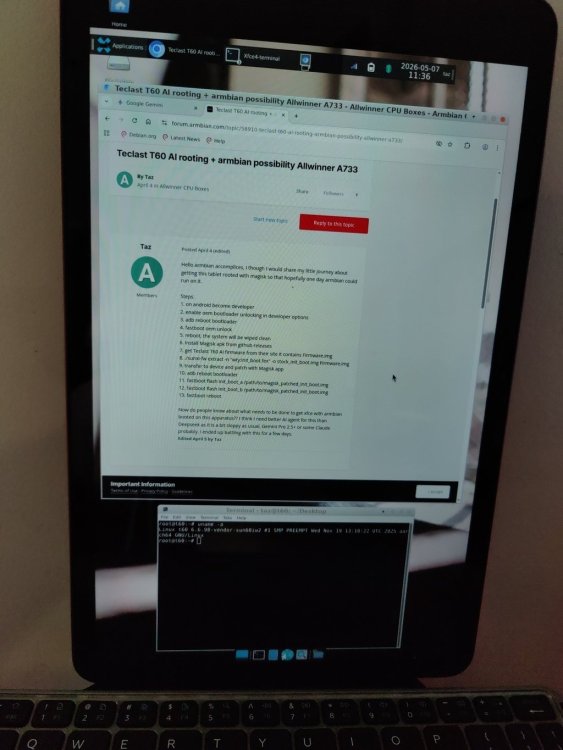
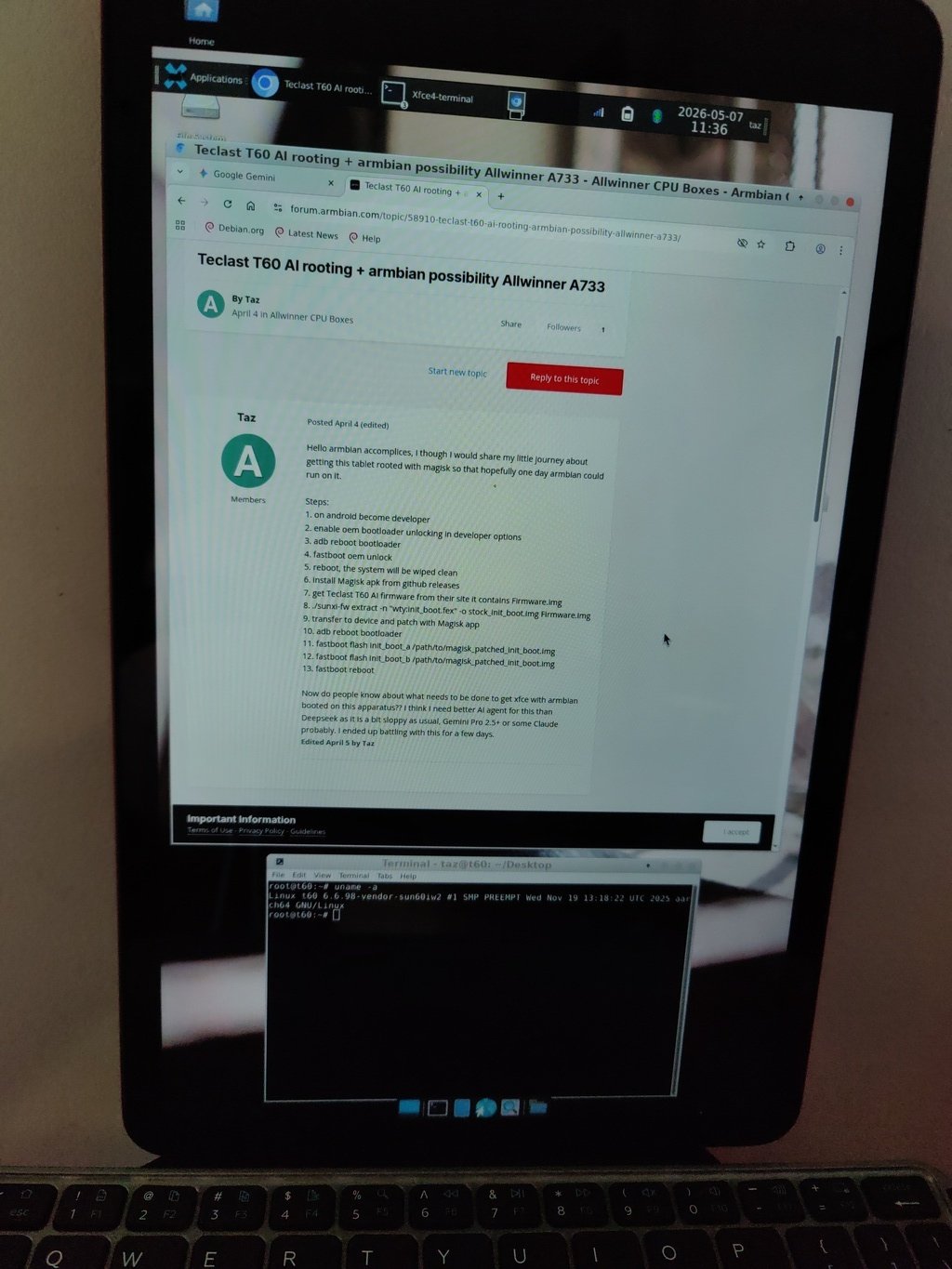
Had to debootstrap trixie because depmod version mismatch. Wifi 2.4 + 5 GHz + BT headphones, keyboards all work. USB is still stuck in plain charge, no micro SD. According to Gemini 3.1 Pro which I have been using, Imagination Technologies (PowerVR) BXM-4-64 MC1 would need 6.12.x kernel or newer which I have not been able to boot yet. This actually feels a bit faster than the Teclast Android even though without accel youtubes playback is quite slow. Battery life probably 5+ hours. aliexpress.com/item/1005009649297050.html keyboard + touchpad I have is a bit shady miss-clicks a bit once in a while. Might have to AI haxor some software filter to get it behave a bit better but that should not be that big of a deal. I have kind of already made up my mind, this ain't going to boot Android anymore, have to see if I grab another one at some point.