All Activity
- Today
-
Thank you, @Mangix. We bumped u-boot to v2025.10 for Helios, so I would assume those commits are already incorporated, aren't they? I have only looked at commit dates, not actual code.
-
I never mentioned any solution. Moving your post to an appropriate location is a forum moderation task and the post was FYI only. I don't have this board nor do I know how to fix it.
-
 I am strugling withthe AXP223 gpio LDO configuration to initialise properly, otherwise the i2C lines to the touchscreen controller are unpowered. Therefore I will add traces in the axP223 rsb (reduced signal bus) driver code. And I try to not be annoying here, but I am a bit lost. What is the common method for driver debugging/development in armbian? I mean how to recompile the kernel without rebuilding all the image? For now I changed the kernel configuration for the rsb driver to module. And I will compile it on the target to add my traces. In case someone has the solution to my problem, my dts looks like this: &axp_gpio { gpio1_ldo_pin: gpio1-ldo-pin { pins = "GPIO1"; function = "ldo"; }; }; ®_ldo_io1 { pinctrl-names = "default"; pinctrl-0 = <&gpio1_ldo_pin>; regulator-always-on; regulator-min-microvolt = <3000000>; regulator-max-microvolt = <3000000>; regulator-name = "i2C0-iovcc"; status = "okay"; }; And while the regulator initialises for the AXP223 GPIO1/LDO, I have nothing but GND on the pin. [ 1.223696] i2C0-iovcc: Bringing 3800000uV into 3000000-3000000uV Because the driver configures the pin in the regulators, it seems like the axp_gpio and pinctrl definitions are useless.
 -

Gaming experience with Orange Pi 5 (RK3588) on Armbian
KhanhDTP replied to KhanhDTP's topic in Orange Pi 5
Armbian 25.8.2 Noble XFCE (BSD Kernel: 6.1.115) + PanVk - mesa 26.0 (https://launchpad.net/~ernstp/+archive/ubuntu/mesaaco) + box64 3.9 (https://ryanfortner.github.io/box64-debs/) + proton-10.0-3-amd64-wow64 (https://github.com/Kron4ek/Wine-Builds/releases/download/proton-10.0-3/wine-proton-10.0-3-amd64-wow64.tar.xz) + DXVK-stripped v1.8.1 >=60fps@720p Portal 2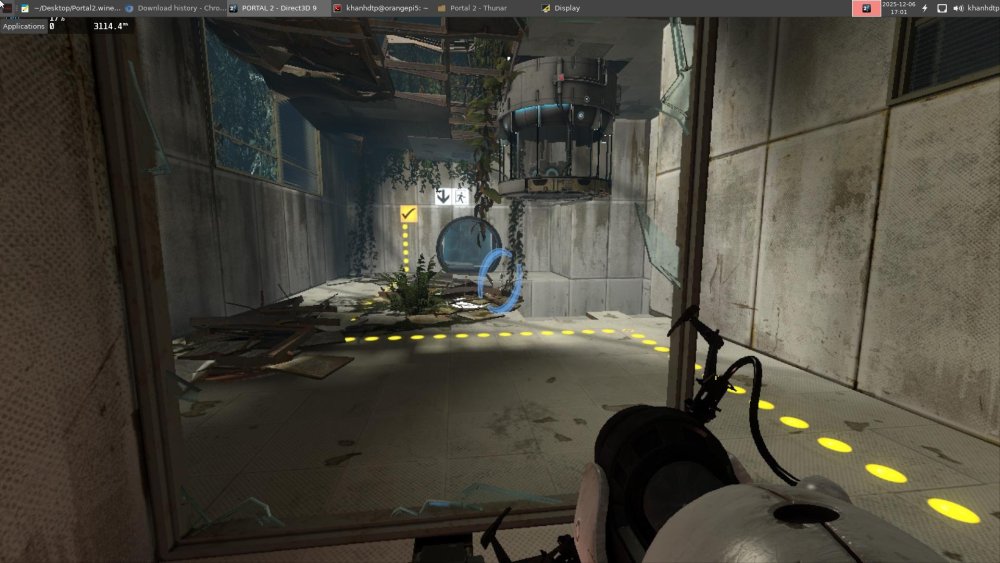
-
Hi, Thank you for responding, but honestly I didn’t understand the solution you mentioned. My R58X is still completely dead after flashing, with no power, no LEDs, and no way to enter Loader or MaskROM mode. Could you please provide a clear step-by-step method to bring the device back to life? Right now I only need a solution to power on the device and make it work again. The reply was “moved to the appropriate place”, but I still didn’t get the actual fix. Please guide me on how to recover the board. Thank you.
-
@robertoj OK. I managed to build Armbian, selecting mipi-panel-dbi support and booting to 16-bit. After setting it up and running the dts you provided, my screen still doesn't work. I'm probably doing something wrong, because although the screen glows white, it still shows barely noticeable backlight flickering. I also tried to do it according to Pancake's instructions, but I also didn't have any success. This log with Pancake's cat log.txt [ 1.623324] gpio gpiochip0: Static allocation of GPIO base is deprecated, use dynamic allocation. [ 2.173154] gpio gpiochip1: Static allocation of GPIO base is deprecated, use dynamic allocation. [ 2.242555] sdiohal:sdiohal_parse_dt adma_tx:1, adma_rx:1, pwrseq:0, irq type:data, gpio_num:0, blksize:840 [ 7.591150] systemd[1]: Starting systemd-backlight@backlight:backlight_gpio.service - Load/Save Screen Backlight Brightness of backlight:backlight_gpio... [ 7.652908] systemd[1]: Finished systemd-backlight@backlight:backlight_gpio.service - Load/Save Screen Backlight Brightness of backlight:backlight_gpio. user@orangepizero3:~$ hostnamectl Static hostname: orangepizero3 Icon name: computer Machine ID: a5f7b63422b54dc5a365def0a7294555 Boot ID: 4445f89ef8cb4b999e3fa684f292ca2a Operating System: Armbian-unofficial 26.02.0-trunk bookworm Kernel: Linux 6.16.8-edge-sunxi64 Architecture: arm64 And this log with DTS from you cat log.txt [ 1.623908] gpio gpiochip0: Static allocation of GPIO base is deprecated, use dynamic allocation. [ 2.172898] gpio gpiochip1: Static allocation of GPIO base is deprecated, use dynamic allocation. [ 2.242212] sdiohal:sdiohal_parse_dt adma_tx:1, adma_rx:1, pwrseq:0, irq type:data, gpio_num:0, blksize:840 But I'm very happy that I managed to build my first Linux, albeit in such a simple way. My pinout Displ OpiZ3 Vcc - out 3.3v Gnd - gnd Cs - ph9 Reset - pc14 Dc/rc - pc7 Sdi(mosi) - ph7 Sck - ph4 Led - 5v Sdo(miso) - ph8
-
Hi, I’ve installed Armbian to my Vero4k+ and all works fine except wired ethernet, the thing is it kind of works, but when I use different dtb files: meson-gxl-s905d-vero4k-plus.dtb wifi works, bluetooth works eth doesn’t, eth0 interface is UP but can’t get IP or set one, meson-gxl-s905d-p230.dtb wifi works, bluetooth doesn’t, eth generally works but when testing with iperf3 in server mode it’s great cca 930mbps 0 errors, but in client mode it depends of OS (ubuntu or debian) and kernel (5 or 6) used from 1-350mbps but with looooot of errors (cca. 67000 for 10 sec test) and if I limit link speed to 100mbps it doesn’t change much, also lot of errors, if I boot it to osmc it works fine (920mbps symetrical, also some errors on client side but fine). Is there anything I can do to troubleshoot - fix this? Thank you
-
moved to the appropriate place
-
moved meaning???
-
@laibschcoud you take a look at https://github.com/u-boot/u-boot/commit/cae6e8993c8eaed7c520b1046766b658e0f97b90 https://github.com/u-boot/u-boot/commit/aec83261b98eec3a2ca2e9a5a2debea31fcd9d65 https://github.com/u-boot/u-boot/commit/529d24002b6cefb88cd00cef307b8752dbeebfc4 Maybe relevant for the first patch.
-

Driving the ili9488 LCD (4.0 inch cheap chinese clone)
forumtrekker replied to robertoj's topic in Allwinner sunxi
Did a fresh install of community Armbian desktop this time, running current 6.12.60 from here. It seems there is no need to compile from scratch if you are using the panel-mipi driver from kungfupanda, I copied my DTS, panel-mipi.bin, etc. from my edge custom compiled installation to the community one and it worked fine after repeating the initramfs process, but I still get a stuck display after a bit, this time on the Armbian loading screen. SSH and Serial console work fine, its just the system stops knowing how to use the display after the initial boot sequence is done, and the kernel hands off the display to X11 / Wayland? This is consistent with how I believe tinydrm works, which is storing the image in memory and displaying new ones from memory if given (which in this case, none are given after a certain stage in the boot process and this hand off to the window manager never happens.) Need to figure out how to tell the system to keep using the drm display. I already tried putting /dev/dri/card0 instead of /dev/fb0 in 99-fbdev.conf, and I've been trying the following extraarg in /boot/armbianEnv.txt to try and get it to work. Screen still pauses halfway through boot messages / loading screen. extraargs=video=SPI-1:480x320@30 -
go armbian-config - Wait warning message "The current OS (bookworm) is not a officially supported distro!" - Kernel - KER001 Use alternative kernels - Would you like to continue? <Yes> - Show only mainstream kernels on the list? <No> And there the list: then choose "linux-image-edge-sunxi64=25.8.1 v6.15.4 " mainstream kernels: linux-image-current-sunxi64/bookworm 25.8.2 arm64 Armbian Linux current kernel image 6.12.47-current-sunxi64 linux-image-edge-sunxi64/now 26.02.0-trunk arm64 [installed,local] Armbian Linux edge kernel image 6.16.8-edge-sunxi64 linux-image-legacy-sunxi64/bookworm 25.8.2 arm64 Armbian Linux legacy kernel image 6.6.75-legacy-sunxi64 6.16.8: 6.15.4: In the working kernel 6.15.4, the following audio-related modules are loaded: snd_soc_sunxi_machine, snd_soc_sunxi_ahub, snd_soc_sunxi_ahub_dam In the broken kernel 6.16.8, these three modules are completely missing. Only the generic snd_soc_hdmi_codec is present, but it doesn't seem to bind to the hardware correctly without the sunxi-specific modules. I don't know how, but there the list in 6.16.8: tried to activate all dtbs in armbian-config - DTO001 - Manage device tree overlays noghing happend
- Yesterday
-
Well, that makes me wonder how you were able to verify successful flashing with the broken adapters as you were upset we even dared to ask if you did... Maybe reconsider your tone for next time? As it seems the initial request to make sure you had no issues with your storage - one way or the other - were in fact helpful and spot on...
-
I don't even think this has anything to do with Armbian / Debian / Ubuntu. It's simply someone mucking around too much for their own good and frankly being arrogant about it. Until I see the problem reproduced in a stock setup this is simply PEBKAC as far as I can tell. I mean, for anyone actually willing to read, it's right there: Nov 24 13:06:57 lab systemd-timesyncd[1185]: Network configuration changed, trying to establish connection. systemd is essentially a monolith, you don't really get to pick and choose for all intends and practical purposes. The choice @Quantum needs to make is whether he wants to have something that works or whether he prefers to be high-and-mighty and run around being condescending to those whose work he uses without paying a dime all the while making outlandish claims. This is a non-issue.
-
Hi Installed Armbian_25.11.1_Rock-5c_trixie_current_6.12.58_minimal.img and one of the USB-3 port, the top one, doesn't work. No reaction when inserting something, nothing in /var/log/syslog. The same with Armbian_25.11.1_Rock-5c_noble_current_6.12.58_minimal.img The Armbian_25.11.1_Rock-5c_trixie_vendor_6.1.115_minimal.img however is OK. What could be the cause of this problem? Thanks and regards, Chris
-
Hi I have a Rock5c with a Penta SATA hat and it works OK. It is the only (?) way of having several disk connected to Rock5c. Note, it cannot boot of the disks on the hat. Have two SSDs and mirrored ZFS pool. No problems at all. Setting it up to act as Frigate server. The fifth SATA, in fact e-SATA connector comes very handy to connect a large disc for constant recording. You may also consider Odroid HC4. I think it's the cheapest solution and it's fan is negligible 🙂 Have three of them, acting as mail/backup/HomeAssistant servers. Had in the past some problems with USB but recent kernels are OK. Hope it helps.
-

Orange Pi Zero 3 Sound Problem(Lineout-Analog Codec)
Taha YILDIRIM replied to Taha YILDIRIM's topic in Allwinner sunxi
With the H618 kernel, the system is very stable but there is no audio output at all. With the H616 kernel, audio works perfectly, but the system starts showing screen distortions, artifacts, and UI crashes. When I said “image became distorted” and “kernel artifacts”, I meant things like the screen going black, color blocks appearing, and the desktop environment crashing. I already tried enabling analog-codec, installing alsa-utils, using alsamixer, and testing with mpg123, but the result didn’t change. I haven’t built my own Armbian image yet, but I’m considering trying an edge kernel with the Armbian build system. -
@Learnincurve It is very easy to build only the kernel with the Armbian Build Framework. The result will then appear as output/debs/linux-image*.deb
-
This is custom hardware world and Armbian is a build framework 1st. It is not Debian vs. Armbian vs. Ubuntu. Debian, Ubuntu and other labels means something in mainstream x86 world while here they mean nothing, they are abused to generate sales. If you go for regular Debian, you will do 1-2-3 steps back and if you are lucky, one step forward - to accidentally load kernel where feature you need, works. If i2c stack wasn't properly ported to mainline kernel or if there is some other trouble that prevents this working in standard world, you can only run firmware that is provided by vendor. This is quite common and there you will have other problems. Problems you have are not simple to resolve or at least not in the "by the way" fashion. In order to help you - there are two ways and both are difficult - you are lucky and meet a person on this forum that knows rare technical specifics for this particular board from head or you meet someone that will invest few days to get down to this level ... People who are maintaining this place, don't have time to breathe and some are old too. It is impossible to focus into every problem that shows up as there is no capacity. And bugs are being re-introducted all the time. By everyone. In that case you would need to go for Intel mini PC. Custom hardware needs hard push sometimes to get something in order. I can assure you that Armbian works perfectly on Intel PC I use it for my desktop. Many of boards we present here would be paperweight long time ago.
-
 ping @amazingfate and @prahal
 -
maybe @schmiedelm has an idea?
-

Efforts to develop firmware for H96 MAX M9 RK3576 TV Box 8G/128G
cmuki replied to Hqnicolas's topic in Rockchip CPU Boxes
@xiaobao80I did manage to get 3.5mm working with the help of ChatGPT. The box is using HT5010. ChatGPT told me to disable the es8388 nodes, but it still works with them enabled. My sai@2a61000 looks like this: My ht5010-sound node looks like this: I got bluetooth working with a hack from the Radxa forums here (creating a shell script and adding it to the root's crontab): I tried to send audio from a TV to the rk3576 box - it did work, but the latency is too much for me. The brown box has beefier cooling than the purple one. I haven't recompiled, used my "stable" image from before to fix the 3.5mm issue, might need to recompile to try the GPU driver. Tried the rkr7.1 dts, but couldn't get it to work (might need additional time to look at it); armbian / linux-rockchip is still at rkr5.1. -
Driving the ili9488 LCD (4.0 inch cheap chinese clone)
forumtrekker replied to robertoj's topic in Allwinner sunxi
I got the display to work! I left out a phandle = <0x01> line in my ili9486@0 section, adding it made it work. DTS was fine otherwise. It's a little glitchy and laggy so I need to tinker with it more, but I see plymouth displaying properly! I can't seem to get into tty or XFCE, but I believe I'm not running wayland and it sounds like thats a requirement for tinydrm? I'll figure it out, but the hard part is over. Once I get everything polished I'll write a summary of my steps so its easy for others to follow. Working DTS for the red ili9488 display using tinydrm driver: Edit: Removing XFCE & plymouth seems to break things, display is pure white again. It also rearranges /sys/class/drm to be card1-SPI-1 instead of card0-SPI-1. Adding this line to /boot/armbianEnv.txt results in the blue and black stripes again, instead of a white screen, but prevents the screen from working with plymouth or XFCE. extras="fbcon=map:0" Reinstalling plymouth and XFCE reverts this white screen and shows boot messages again but no tty console, only if there is no fbcon line at all. Installing just plymouth and not XFCE shows boot messages only if fbcon=map:1 is set, note the 1 instead of 0. Still no tty. The last boot message is and the one after (which I see on serial console) is this, so maybe plymouth finishes writing boot messages to display and the system just never accesses it again? Maybe I need xorg to access /dev/dri/card0 instead of /dev/fb0, since it is not a fbtft device but a DRM one? [ OK ] Finished plymout… Write Out Runtime Data. -
There are none. https://docs.armbian.com/User-Guide_Networking/#networking
-
Driving the ili9488 LCD (4.0 inch cheap chinese clone)
forumtrekker replied to robertoj's topic in Allwinner sunxi
My latest post on page two shows the waveshare clone LCD DTS, working under FBTFT not DRM. The gpio formatting is strange, but it is what I lifted from Radxa provided DTS for a different waveshare LCD that I'm adapting for the displays here. This DTS I have is functional, and I'm certain the pins are correct as the Red ili9488 display shows purple / blue lines using FBTFT (probably incorrect init sequence, since it shows purple and red using your FBTFT init sequence under ili9341 driver instead of ili9486. fb_ili9486 does not work as you also experienced), and the Blue waveshare clone display works perfectly. Current working red DTS: Current working waveshare fbtft, laggy (waveshare LCD is a parallel display with shift register hacks and kind of bad, so lag is expected.) Haven't tried DMA or fbcp since fbtft is outdated anyway. I've commented what each line / hexadecimal represents, to make it easy to follow. I spent several weeks trying variations of the DTS you provided, and I was never able to get it to work properly. I only got positive results when I started using the formatting I am now. The formatting is semi-understandable, every gpio and spi is just referenced at the end of the file by line name and position in increases of 4 (0 refers to the first item in a line, 4 to the second, 8 to the third etc), instead of being directly called in their location. For example, the target of fragment0 is 0xfffffff, which at the bottom of the DTS in the fixups section, is referred to as spi1. The cs-gpios are referred to in fixups in both gpio4 and gpio1. I am using latest armbian compiled per your instructions / forum posts, running edge compiled armbian with kernel 6.18.0-rc6, with panel-mipi selected at kernel build time according to the KungfuPancake github, firmware placed in lib/firmware, and drm verified to be loaded and semi functioning. I've essentially followed all your forum posts but have not had the success you have had. I'm now wondering if I have to tell armbian how to use the display with DRM, because I read somewhere that fbtft will draw constantly to your screen, but DRM will only draw when called and by default stays a white screen until called by the system. I tried adding a line in /boot/armbian.conf which should use the /dev/fb0 device as a display when /sys/class/drm/card1-spi is present (which it is), but it doesn't change anything. Edit: it seems adding this is not necessary if plymouth is installed. extras="fbcon=map:1" I appreciate your help! EDIT: I went through the first page of this thread again to check I haven't missed anything. since I've done multiple reinstall's etc... and realized after installing xfce this time, I didn't go through the updating of initramfs to ensure panel-mipi loads properly with plymouth installed. Panel-mipi seemed to still load fine and be present, but I went through the steps in your thread here and it fixed the following error I was having since installing XFCE, AND the screen is showing blue and black bars. The evidence seems to be pointing to the drm driver being initialized and used properly, so i'm going to make sure my gpio pin polarity is correct in my DTS since DRM expects flipped values in some cases compared to FBTFT, then I will check my wiring and shorten them in case it is physics / interference problem, and finally I'll try other init sequences from lcdwiki. [ 4.601941] panel-mipi-dbi-spi spi1.0: No config file found for compatible 'panel-mipi-dbi-spi' (error=-2)