All Activity
- Past hour
-
Is this specific patch that reverts the busy looping thread? https://github.com/armbian/build/commit/99ad08839eed42d647e716a3ed090ea318d01d2e
-

How you can help test upcoming Armbian 26.02 images?
Igor replied to Igor's topic in Advanced users - Development
What I have already tested: UEFI x86 KDE Neon, Gnome, Ubuntu minimal MusePI Pro Xfce Odroid M1 KDE Neon -
I managed to get some USB-C functionality back by adding a device tree overlay. cat odroid-usbc-fix.dts /dts-v1/; /plugin/; /* 1. Force the USB controller into Host mode */ &{/usb@fc000000} { dr_mode = "host"; status = "okay"; /delete-property/ usb-role-switch; /delete-node/ port; }; /* 2. Target the specific USB3 Type-C regulator by its absolute path */ &{/regulator-5v0-vcc-usb3-typec} { regulator-always-on; regulator-boot-on; status = "okay"; }; /* 3. Target the USB3 Host regulator by its absolute path */ &{/regulator-5v0-vcc-usb3-host} { regulator-always-on; regulator-boot-on; status = "okay"; }; However this disables OTG and devices with strict udev switching timing requirements fail to switch. So my QHY CCD camera is correctly detected as a westbridge device and udev / fxload commences loading the firmware but the power to the device is toggled and the firmware load fails as a result. If I plug the QHY CCD in to the USB-C port via a powered USB-C hub then everything works fine. This works because the HUB is providing constant power. So there appears to be a lot of difference between the Radxa USB-C and Odroid USB-C implementation that will need someone better at kernel stuff than me.
-
As a followup: we have some help from @c0rnelius who digged out a solution to that kthread=high load issue (see latest commit / patches in my branch on https://github.com/sven-ola/armbian-build/tree/orangepi-rv2). Maybe this helps for the R2S too?
- Today
-
 Just a feedback. Device: Orange Pi 5 Plus OS Image: Armbian_26.2.0-trunk.370_Orangepi5-plus_noble_current_6.18.8_gnome_desktop.img.xz media-player: mpv-.37.0-1ubuntu4 Following the gudide on the first page and added "profile=fast" (in order to have smooth 4K/60 playback) in /etc/mpv/mpv.conf. mpv-.37.0-1ubuntu4 playback 8bit 4K/60 h264 and h265 (hevc) video with vpu hardware accceleration. 10bit h265 or any vp9 and av1 video NO vpu hardware acceleration as far as I can tell. 10bit 4k/60 hevc video -- No vpu hw acceleration 4K/60 hevc -- with vpu hw acceleration. Error messages. Full HD av1 -- No vpu hw acceleration Full HD vp9 -- No vpu hw acceleration Edit: Chromium_v144 can play 8bit 4K/60 h264, h265 and av1 videos with vpu hw acceleration. No vpu hw acceleration with vp9 videos. If not mistaken the current kernel-6.18.8-current-rockchip64 or 6.19-rc8-edge-rockchip64 do not support vpu hw acceleration with vp9 codec.
 -
@Kevin suIf the build error was due to a base files installation error, rerun the build with the same options. It should complete the image compilation. I haven't found a proper fix yet, but rerunning the build should resolve it. I'll update the server image soon.
-
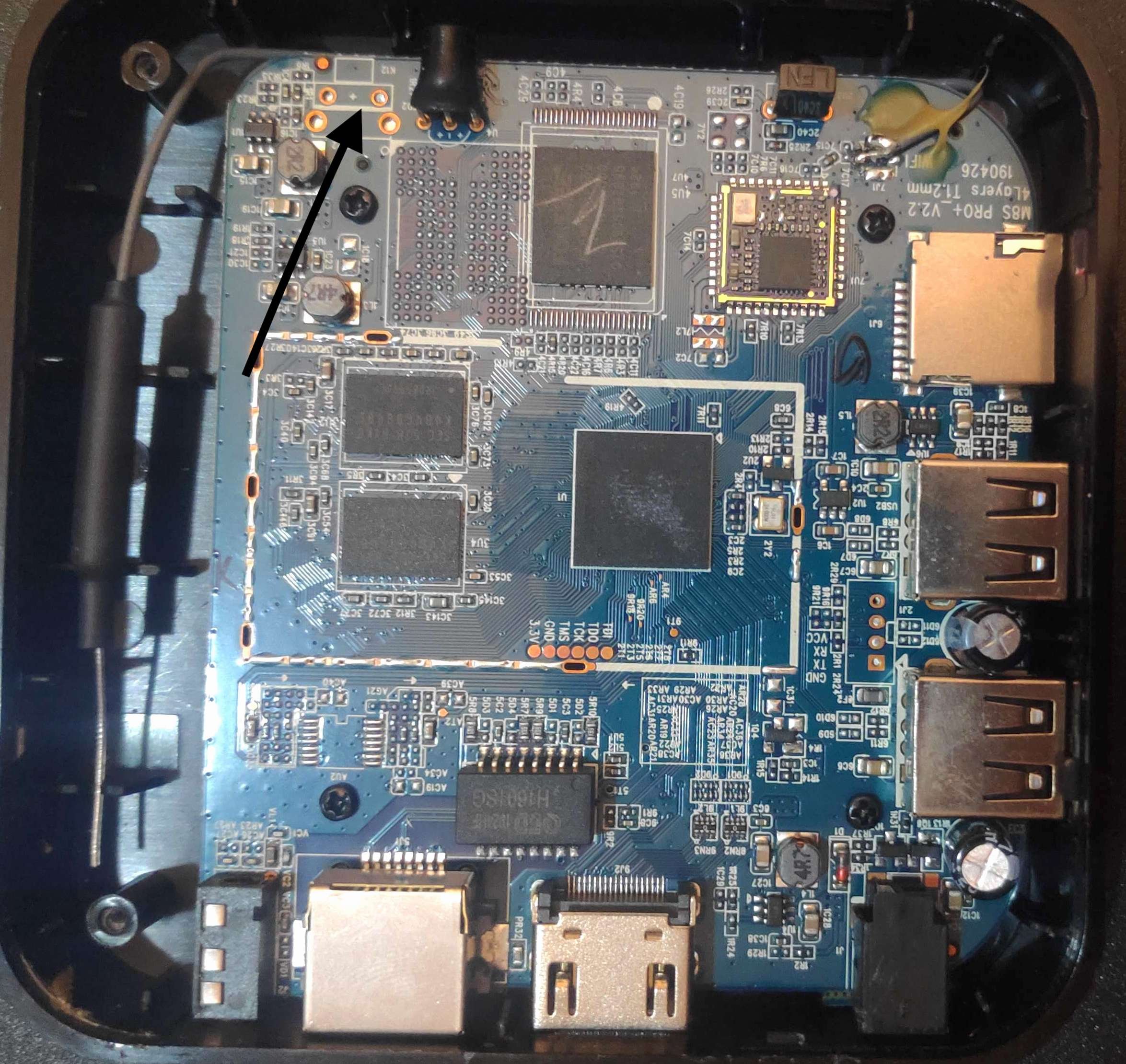
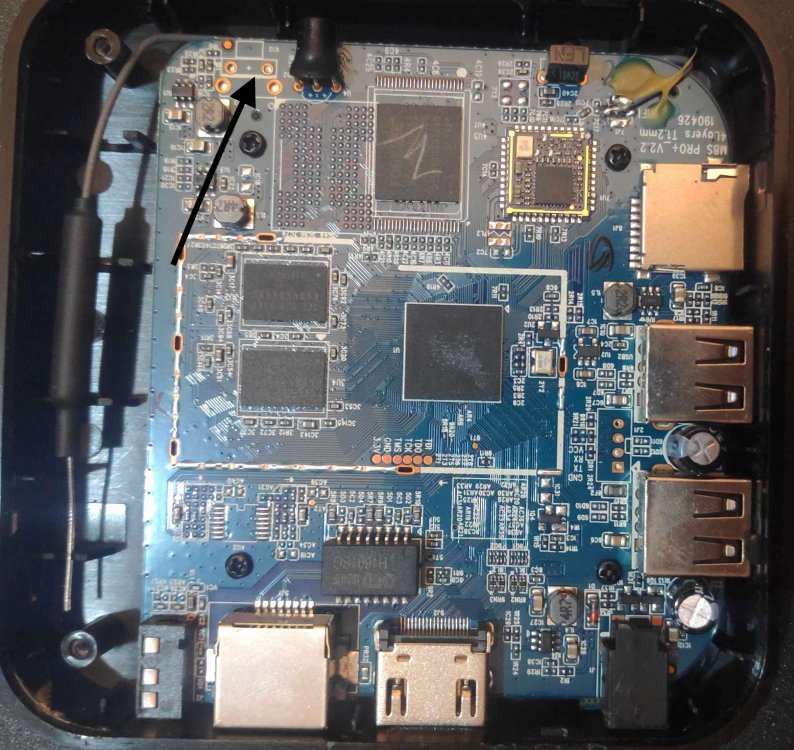
Hello - if someone get this type of TV Box from ebay (10€ ) - and dont have an GoogleAccount or do not want use the ADB way. The switch is located in one corner but not soldered. Use a small cable to put GND from end of arrow where the pointing of arrow in picture - to do the reset - (during restart just hold some seconds and device did start from SD-Card -) This device also features a RX/TX -Console and Jtag Interface - you find it if you take closer look.
-
Hi @maxsub we see a high load (== 2.00 on idle) on RV2 and probably other SpacemiT devices. Both on 6.6.99 and 6.18.8 kernels. Caused by an active kthread() that is needed for the communication to the rCPU. Note: rCPU means the extra realtime RISCV-CPU that is powered by the realtime OS we load on boot with CONFIG_EXTRA_FIRMWARE="esos.elf". On the RV2 the high load display has no temperature side effects, but maybe this is not true for R2S. We have a photo of the R2S on the PullRQ (see https://github.com/armbian/build/pull/9299#issuecomment-3811665824 ) so the large cooling cap obviously is necessary? Can you retry with a 6.18.8 kernel with disabled kthread on the R2S? Just rename the last 3 patches in build/patch/kernel/archive/spacemit-6.18 from {016,017,018}*.patch to *.disabled and rebuild. TIA // Sven-Ola
-
Build dropped today with NVME and WiFi support for a5e: https://www.armbian.com/radxa-cubie-a5e/
-
@Nick A Could you create a current version image? I’ve tested all the images I could find, and only yours runs perfectly. Armbian-unofficial_25.05.0-trunk_X96q-lpddr3-v1-3_bookworm_edge_6.12.11_server.img.xz However, since this is an "edge" build, it doesn’t include MT7601U wifi card support, while the current version does. I tried compiling it myself, but ran into many errors and couldn’t complete the build. If you could create a "current" branch image, that would be ideal. Thanks in advance!
-
I compiled two different versions on the 8GB RV2: edge and current, and targeted two boards: R2S and RV2. Both compiles worked. Now I am testing the R2S as an access point with a USB wifi. The wifi adapter is working fine. The RV2 reports a stable temperature of 35C peaking at 47C when building. The R2S runs hot: 58C with a heatsink when doing nothing, peaking at 70C when doing .deb updates.
- Yesterday
-
We are opening public testing for upcoming Armbian images. The goal is to verify that the right images are built and that basic functionality works before boards are moved to the main download pages. You don’t need to be a developer. Simple testing and short reports are enough. 1. Download testing images Testing images are available here: https://fi.mirror.armbian.de/incoming/igorpecovnik/ Pick the image matching your board and choose desktop if applicable. Once image is confirmed working, the board will be: Moved to the main download pages Added to Armbian Imager 2. Check that expected images exist Before testing, please verify that: Your board is listed The expected image variants exist If an image (variant) seems to be missing: Check the release target definitions: https://github.com/armbian/armbian.github.io/tree/main/release-targets If the image should exist, check build logs to see if it failed: https://github.com/armbian/os/actions/runs/21642728389 If you are unsure, report it anyway. 3. Flash and boot Flash the image using Armbian Imager: https://imager.armbian.com Boot the board and check whether it reaches: Login prompt (CLI images) Desktop (Desktop images) If the board does not boot, serial output or photos help. 4. What to test Please focus on basic functionality: Boot reliability and reboot Networking (Ethernet, Wi-Fi, Bluetooth) Display and GPU, if applicable Installer and first-boot experience Advanced features can wait. Stability comes first. 5. UEFI ARM64 images If your board might support UEFI on ARM64, please test those images on them. Working UEFI images allow us to reuse targets and reduce the number of generated images. Reference: https://github.com/armbian/armbian.github.io/blob/main/release-targets/reusable.yml 6. Community-supported boards Some boards are currently released as community-supported: https://github.com/armbian/community/releases We want to promote suitable boards to standard support which brings more image variants and much faster download. This requires: Confirmation that basic functionality works Send a PR to change status from .csc to .conf A community member willing to step up as maintainer If you rely on such a board and want it promoted, this is the time to help. 7. Reporting When reporting test results, please include: Board model Image name and variant What works and what does not Logs or serial output if available Even short reports like “Board X, image Y, boots and networking works” are useful. Thanks to everyone helping with testing. Early feedback directly improves the release quality!
-

PocketBeagle 2 - boot issue in currently available images
PStinno replied to PStinno's topic in BeagleY-AI
Hi Andrei, That's perfect, thank you for getting to this so promptly. Kind Regards, Paul -
So, a little update from my side for whoever is interested in this (and again, thanks for reading). Been playing with the box 2-3 evenings every week since my last post and still impressed by it (considering what I plan to use it for), yet not there where it should be yet. Bookworm (some various archive images I found online) works fine, and I can install OMV via armbian config, although performance is bad and I’m talking here about applying changes using the UI - like it takes whole minutes, plus some expected issues for the 2.5g interface. Trixie, all good installing, OMV fails from armbian config but works fine via the OMV installation guide from their site, it’s snappy in applying changes, like not instant but just a few seconds. The 2.5g interface is still an issue and while I can get good results on writing to the box after trying various fixes found online (like a 4gb file write is just fine, the interface crashes and I lose connection while copying from it back to my pc). This doesn’t crash the device completely, still works fine on the 1g interface, and accessible, so from my point of view is more of a perf issue than a stability one. Overall, still happy having this box, but man you do spend a lot of time getting things right, an obviously I’m a newbie. Thanks for watching! (Just for clarity, my 1g interface is connected to my 1g router, and the 2.5 one directly to my desktop to a 2.5 usb network card, and this set up was working fine on buster)
-

Efforts to develop firmware for H96 MAX M9 RK3576 TV Box 8G/128G
a.ni replied to Hqnicolas's topic in Rockchip CPU Boxes
Hi all, I was able to make my H96 MAX M9S running on armbian (beta) Linux 6.19.0-rc8-edge-rockchip64. Using: - armbian u-boot, installed by armbian-config - root fs on emmc Working: - both USB ports - HDMI (audio+video) - Ethernet port - Wifi using aic8800 DKMS drivers provided by https://github.com/radxa-pkg/aic8800/releases - Leds Not working: - GPU/NPU - Bluetooth - any HW acceleration - many other things as in attached dmesg Known issues: - no USB port is working in usb3 mode (5000M) - missing hci port for Bluetooth - driver aic8800_btlpm_sdio hast to be loaded manually - other as in attached dmesg Attached you can find: - my working dts for armbian Linux 6.19.0-rc8-edge-rockchip64 - my original dts extracted from the box - dmesg Hope some will be able to help with other things rk3576-evb1-v10-main-h96-v3.dts rk3576-evb1-v10_org.dts dmesg.txt -

PocketBeagle 2 - boot issue in currently available images
Andrei Aldea replied to PStinno's topic in BeagleY-AI
Hey Paul - Once this gets merged it's going to be fixed, thanks for the report! https://github.com/armbian/build/pull/9349/ Best, Andrei -
If anyone is still interested, I have one that I assembled, looked at but never got around to using. No idea what to ask for it but it certainly isn't doing me any good. Have the manual, SATA drive bay adapters for 2.5" drives and the like. Make me an offer and pay shipping from Oregon. Let's talk!
-
I think I've completed all tasks. Thus the OpiRV2 PR now waits for a team member to press the [merge] button probably. @maxsub I compiled 6.6.99 kernel on my board with 2Gb RAM once. Needed 3 hours and a decent swap file. HTH // Sven-Ola
-
I have managed to compile this on two different platforms (Ubuntu and MacOS) for both boards: RV2 and R2S. My RV2 has 8GB and has a 64GB eMMC. I am hoping to be able to build it on the R2S natively. Will let you know how that goes. Looking forward to seeing this PR merged into armbian:main. I think the GPU will remain orphaned. OrangePi decided to use a unsupported GPU and it seems mostly a check box for them v/s them truly intending to support it.
-
@maxsub: if you still have compile probs, I just uploaded new images to my site on https://privat-in.de (navigate to downloads). LG // Sven-Ola
-
Oh so I stand corrected... I was going from information on the website: I don't see a Linux client, and in other sites: emby was open source but now it's not
-

Help wanted to test a new OpenVFD alternative
arl_spb replied to Jean-Francois Lessard's topic in Amlogic meson
Edit the makefile: # keypad support CONFIG += CONFIG_TM16XX_KEYPAD=n #CCFLAGS += -DCONFIG_TM16XX_KEYPAD -
I am so thrilled to be able to get this working. Donation to Armbian on the way.
-
Hi there! I got a QNAP TS-228A with RTD1295 and 1GB of memory. I was playing around with the mainline kernel and trying to figure out the correct DTS for this NAS. I managed to boot up my with one working USB from the back, everything looks fine but I feel like the CPU is running with low frequency. The logs clearly shows that the boot is very slow, it takes long minutes for SystemD to start up it's services. The setup is one USB drive with Arch Linux rootfs tarball with custom compiled kernel with options like CONFIG_ARCH_REALTEK or CONFIG_F2FS_FS_ZSTD. Unfortunately Arch's kernel misses this target. Is it worth to spend more time with this device? Were any of us able to setup the Gbit ethernet and SATA interfaces? I can see there are many related repo's with usable dts or drivers. I think most of the driver are available we just need to adjust the device tree according to that. I saw the SMP implementation is also somewhat problematic with the spin table, psci solution. [ 19.016897] VFS: Mounted root (f2fs filesystem) readonly on device 8:2. [ 19.027405] devtmpfs: mounted [ 19.032713] Freeing unused kernel memory: 3264K [ 19.037576] Run /sbin/init as init process [ 19.528716] systemd[1]: System time advanced to built-in epoch: Wed 2026-01-07 19:31:44 UTC [ 80.887403] systemd[1]: systemd 259-2-arch running in system mode (+PAM +AUDIT -SELINUX +APPARMOR -IMA +IPE +SMACK +SECCOMP +GCRYPT +GNUTLS +OPENSSL +ACL +BLKID +CURL +E) [ 80.921626] systemd[1]: Detected architecture arm64. [ 111.625814] systemd[1]: Initializing machine ID from random generator. [ 111.632867] systemd[1]: Installed transient '/etc/machine-id' file. [ 111.641073] systemd[1]: Hostname set to <alarm>. [ 142.877742] systemd[1]: bpf-restrict-fs: BPF LSM hook not enabled in the kernel, BPF LSM not supported. [ 176.038563] systemd[1]: Queued start job for default target Graphical Interface. [ 177.884307] systemd[1]: Created slice Slice /system/dirmngr. [ 209.925527] systemd[1]: Created slice Slice /system/getty. [ 240.645593] systemd[1]: Created slice Slice /system/gpg-agent. [ 271.365518] systemd[1]: Created slice Slice /system/gpg-agent-browser. [ 302.085600] systemd[1]: Created slice Slice /system/gpg-agent-extra. [ 332.805493] systemd[1]: Created slice Slice /system/gpg-agent-ssh. [ 363.525552] systemd[1]: Created slice Slice /system/keyboxd. [ 394.245551] systemd[1]: Created slice Slice /system/modprobe. [ 424.965578] systemd[1]: Created slice Slice /system/serial-getty. [ 455.684357] systemd[1]: Created slice User and Session Slice. [ 486.391860] systemd[1]: Started Dispatch Password Requests to Console Directory Watch. [ 517.111666] systemd[1]: Started Forward Password Requests to Wall Directory Watch. [ 547.831552] systemd[1]: Arbitrary Executable File Formats File System Automount Point was skipped because of an unmet condition check (ConditionPathExists=/proc/sys/fs/b. [ 547.848314] systemd[1]: Expecting device /dev/ttyS0... [ 578.551439] systemd[1]: Reached target Local Encrypted Volumes. [ 609.271487] systemd[1]: Reached target Image Downloads. [ 639.991487] systemd[1]: Reached target Local Integrity Protected Volumes. [ 670.711612] systemd[1]: Reached target Path Units. [ 701.431485] systemd[1]: Reached target Remote File Systems. [ 732.151447] systemd[1]: Reached target Slice Units. [ 762.871556] systemd[1]: Reached target Swaps. [ 793.591527] systemd[1]: Reached target Local Verity Protected Volumes. [ 824.311963] systemd[1]: Listening on Device-mapper event daemon FIFOs. [ 855.041446] systemd[1]: Listening on Query the User Interactively for a Password. [ 885.761590] systemd[1]: Listening on Process Core Dump Socket. [ 916.477769] systemd[1]: Listening on Credential Encryption/Decryption. [ 947.201487] systemd[1]: Listening on Factory Reset Management. [ 977.912008] systemd[1]: Listening on Journal Socket (/dev/log). [ 1008.631975] systemd[1]: Listening on Journal Sockets. [ 1039.361885] systemd[1]: Listening on Console Output Muting Service Socket.
-
Hi, @Harleyyyu, thanks for the copy of multitool. Sadly it behaves just like before. When turning on with the SD card inserted I only get a red LED. I saw some people saying they had luck booting from LibreELEC, but I get the exact same behavior. I do want to keep a backup of my current OS. Any next steps for debugging it? Maybe it needs a shittier SD Card?