All Activity
- Past hour
-

Compiling an LCD driver for armbian on Allwinner A33.
robertoj replied to Patrick 42's topic in Advanced users - Development
You dont need to cross-compile. You need to select the in-kernel-source option: https://www.kernelconfig.io/config_drm_panel_himax_hx8394 within the armbian build process. Then you need to create a DTS like: https://forum.armbian.com/topic/47971-driving-the-ili9488-lcd-40-inch-cheap-chinese-clone/ And also dig through the experience in this thread: https://forum.armbian.com/topic/50963-dsi-display-does-not-work-on-raspberry-pi-5/#comment-216030 Send photo of the a33 and LCD -
Previously we provided Cinnamon. Which we find out, few days before release, that is broken (beyond quick repair). I just delete already prepared images, nothing else could be done. General problem is that we don't have anyone keeping an eye on desktops. It is vanilla Debian - we only add branding. I personally use Ubuntu LTS Gnome and that's I fix in case something shows up.
- Today
-
Why so few Debian (Trixie) images with this batch of newly released images? Not one full desktop image for Debian?
-
 Hi, I'am Patrick from France, it is my first post on the forum. I am porting the Zortrax m200 plus 3D printer to Armbian and my last important step would be to have the LCD screen working. I cross compiled my module but I have this message when installing it: # insmod panel-himax-hx8394.ko [ 1760.189919] BPF: [120533] Invalid name_offset:2238391 [ 1760.195183] failed to validate module [panel_himax_hx8394] BTF: -22 insmod: ERROR: could not insert module panel-himax-hx8394.ko: Invalid parameters Then I added the module source code to the sources, but calling ./compile.sh seems to update the repo and revert my changes such as I do not see my module in there. The next possibility would be to create an image with the kernel headers included. I will try to compile the driver on the system. And is there another way?
 -
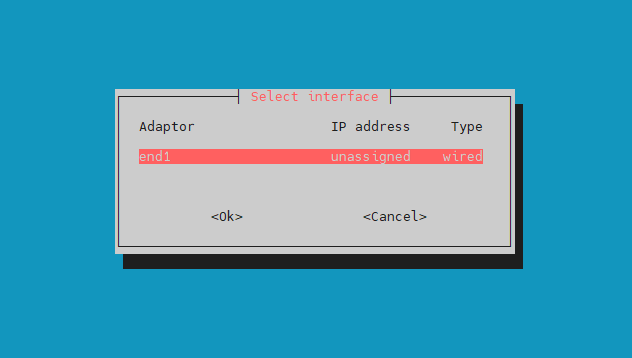
So, I bought a good TTL adapter and managed to capture the boot log after flashing the device. I hope I can get some help now! don't know if this is correct or not. For some reason, the device isn't receiving an IP address on the local network. Is there a DHCP client issue? Another device, a Luckfox Pico Pro Max, receives an IP address without any problems after a firmware update with the same firmware installed. root@luckfox-lyra-ultra-w:~# ip a 1: lo: <LOOPBACK,UP,LOWER_UP> mtu 65536 qdisc noqueue state UNKNOWN group default qlen 1000 link/loopback 00:00:00:00:00:00 brd 00:00:00:00:00:00 inet 127.0.0.1/8 scope host lo valid_lft forever preferred_lft forever inet6 ::1/128 scope host noprefixroute valid_lft forever preferred_lft forever 2: end1: <BROADCAST,MULTICAST> mtu 1500 qdisc noop state DOWN group default qlen 1000 link/ether 02:95:55:d5:00:1c brd ff:ff:ff:ff:ff:ff altname enx029555d5001c root@luckfox-lyra-ultra-w:~# root@luckfox-lyra-ultra-w:~# ip route root@luckfox-lyra-ultra-w:~# sudo ip address add 192.168.1.111/24 dev end1 root@luckfox-lyra-ultra-w:~# sudo ip link set end1 up RTNETLINK answers: Cannot allocate memory root@luckfox-lyra-ultra-w:~# root@luckfox-lyra-ultra-w:~# free total used free shared buff/cache available Mem: 502048 61416 312852 1120 140100 440632 Swap: 251020 0 251020 root@luckfox-lyra-ultra-w:~# sudo ip route add default via 192.168.1.1 Error: Nexthop has invalid gateway. root@luckfox-lyra-ultra-w:~# root@luckfox-lyra-ultra-w:~# dhclient -bash: dhclient: command not found root@luckfox-lyra-ultra-w:~# dhcpcd -bash: dhcpcd: command not found root@luckfox-lyra-ultra-w:~# nmcli device status -bash: nmcli: command not found root@luckfox-lyra-ultra-w:~# rfkill ID TYPE DEVICE SOFT HARD 0 bluetooth bt_default blocked unblocked LOG dmesg root@luckfox-lyra-ultra-w:~# dmesg [ 12.347098] systemd[1]: netplan-ovs-cleanup.service - OpenVSwitch configuration for cleanup was skipped because of an unmet condition check (ConditionFileIsExecutable=/usr/bin/ovs-vsctl). [ 12.348163] systemd[1]: systemd-hibernate-clear.service - Clear Stale Hibernate Storage Info was skipped because of an unmet condition check (ConditionPathExists=/sys/firmware/efi/efivars/HibernateLocation-8cf2644b-4b0b-428f-9387-6d876050dc67). [ 12.378655] systemd[1]: Starting systemd-modules-load.service - Load Kernel Modules... [ 12.405293] systemd[1]: Starting systemd-network-generator.service - Generate network units from Kernel command line... [ 12.406603] systemd[1]: systemd-pcrmachine.service - TPM PCR Machine ID Measurement was skipped because of an unmet condition check (ConditionSecurity=measured-uki). [ 12.407623] systemd[1]: systemd-tpm2-setup-early.service - Early TPM SRK Setup was skipped because of an unmet condition check (ConditionSecurity=measured-uki). [ 12.440229] cpu cpu0: bin=0 [ 12.440299] cpu cpu0: leakage=4 [ 12.440367] cpu cpu0: Failed to get reg [ 12.440386] cpu cpu0: soc version=0, speed=0 [ 12.440498] cpu cpu0: failed to set opp config [ 12.440514] cpu cpu0: failed to init opp info [ 12.446781] systemd[1]: Starting systemd-udev-load-credentials.service - Load udev Rules from Credentials... [ 12.478445] systemd[1]: Starting systemd-udev-trigger.service - Coldplug All udev Devices... [ 12.543552] cpu cpu0: bin=0 [ 12.543616] cpu cpu0: leakage=4 [ 12.543688] cpu cpu0: Failed to get reg [ 12.543707] cpu cpu0: soc version=0, speed=0 [ 12.543811] cpu cpu0: failed to set opp config [ 12.543825] cpu cpu0: failed to init opp info [ 12.546917] systemd[1]: Mounted dev-mqueue.mount - POSIX Message Queue File System. [ 12.548819] systemd[1]: Mounted run-lock.mount - Legacy Locks Directory /run/lock. [ 12.557284] systemd[1]: Mounted sys-kernel-debug.mount - Kernel Debug File System. [ 12.561114] systemd[1]: fake-hwclock-load.service: Deactivated successfully. [ 12.565736] systemd[1]: Finished fake-hwclock-load.service - Restore the current clock. [ 12.626730] systemd[1]: Finished kmod-static-nodes.service - Create List of Static Device Nodes. [ 12.646891] cpu cpu0: bin=0 [ 12.646961] cpu cpu0: leakage=4 [ 12.647033] cpu cpu0: Failed to get reg [ 12.647052] cpu cpu0: soc version=0, speed=0 [ 12.647166] cpu cpu0: failed to set opp config [ 12.647182] cpu cpu0: failed to init opp info [ 12.647807] systemd[1]: modprobe@configfs.service: Deactivated successfully. [ 12.650302] systemd[1]: Finished modprobe@configfs.service - Load Kernel Module configfs. [ 12.655510] systemd[1]: modprobe@drm.service: Deactivated successfully. [ 12.658127] systemd[1]: Finished modprobe@drm.service - Load Kernel Module drm. [ 12.665290] systemd[1]: modprobe@efi_pstore.service: Deactivated successfully. [ 12.668129] systemd[1]: Finished modprobe@efi_pstore.service - Load Kernel Module efi_pstore. [ 12.672568] systemd[1]: modprobe@fuse.service: Deactivated successfully. [ 12.675374] systemd[1]: Finished modprobe@fuse.service - Load Kernel Module fuse. [ 12.682766] systemd[1]: Finished systemd-modules-load.service - Load Kernel Modules. [ 12.687615] systemd[1]: Finished systemd-network-generator.service - Generate network units from Kernel command line. [ 12.694297] systemd[1]: Finished keyboard-setup.service - Set the console keyboard layout. [ 12.697519] systemd[1]: Finished systemd-udev-load-credentials.service - Load udev Rules from Credentials. [ 12.704996] systemd[1]: Reached target network-pre.target - Preparation for Network. [ 12.706087] systemd[1]: sys-fs-fuse-connections.mount - FUSE Control File System was skipped because of an unmet condition check (ConditionPathExists=/sys/fs/fuse/connections). [ 12.712801] systemd[1]: Mounting sys-kernel-config.mount - Kernel Configuration File System... [ 12.713450] systemd[1]: systemd-fsck-root.service - File System Check on Root Device was skipped because of an unmet condition check (ConditionPathExists=!/run/initramfs/fsck-root). [ 12.737667] systemd[1]: Starting systemd-remount-fs.service - Remount Root and Kernel File Systems... [ 12.750229] cpu cpu0: bin=0 [ 12.750306] cpu cpu0: leakage=4 [ 12.750383] cpu cpu0: Failed to get reg [ 12.750404] cpu cpu0: soc version=0, speed=0 [ 12.750519] cpu cpu0: failed to set opp config [ 12.750537] cpu cpu0: failed to init opp info [ 12.758268] systemd[1]: Starting systemd-sysctl.service - Apply Kernel Variables... [ 12.781710] systemd[1]: Starting systemd-tmpfiles-setup-dev-early.service - Create Static Device Nodes in /dev gracefully... [ 12.840144] systemd[1]: Mounted sys-kernel-config.mount - Kernel Configuration File System. [ 12.853542] cpu cpu0: bin=0 [ 12.853637] cpu cpu0: leakage=4 [ 12.853712] cpu cpu0: Failed to get reg [ 12.853733] cpu cpu0: soc version=0, speed=0 [ 12.853846] cpu cpu0: failed to set opp config [ 12.853863] cpu cpu0: failed to init opp info [ 12.892411] EXT4-fs (mmcblk0p1): re-mounted. Quota mode: disabled. [ 12.900244] systemd[1]: Finished systemd-remount-fs.service - Remount Root and Kernel File Systems. [ 12.912688] systemd[1]: systemd-hwdb-update.service - Rebuild Hardware Database was skipped because of an unmet condition check (ConditionNeedsUpdate=/etc). [ 12.913688] systemd[1]: systemd-pstore.service - Platform Persistent Storage Archival was skipped because of an unmet condition check (ConditionDirectoryNotEmpty=/sys/fs/pstore). [ 12.922292] systemd[1]: Starting systemd-random-seed.service - Load/Save OS Random Seed... [ 12.922949] systemd[1]: systemd-tpm2-setup.service - TPM SRK Setup was skipped because of an unmet condition check (ConditionSecurity=measured-uki). [ 12.938881] systemd[1]: Finished systemd-sysctl.service - Apply Kernel Variables. [ 12.956894] cpu cpu0: bin=0 [ 12.956960] cpu cpu0: leakage=4 [ 12.957030] cpu cpu0: Failed to get reg [ 12.957050] cpu cpu0: soc version=0, speed=0 [ 12.957152] cpu cpu0: failed to set opp config [ 12.957167] cpu cpu0: failed to init opp info [ 13.018349] systemd[1]: Finished systemd-tmpfiles-setup-dev-early.service - Create Static Device Nodes in /dev gracefully. [ 13.020159] systemd[1]: systemd-sysusers.service - Create System Users was skipped because no trigger condition checks were met. [ 13.033094] systemd[1]: Starting systemd-resolved.service - Network Name Resolution... [ 13.054629] systemd[1]: Starting systemd-timesyncd.service - Network Time Synchronization... [ 13.060388] cpu cpu0: bin=0 [ 13.060461] cpu cpu0: leakage=4 [ 13.060544] cpu cpu0: Failed to get reg [ 13.060569] cpu cpu0: soc version=0, speed=0 [ 13.060693] cpu cpu0: failed to set opp config [ 13.060713] cpu cpu0: failed to init opp info [ 13.088211] systemd[1]: Starting systemd-tmpfiles-setup-dev.service - Create Static Device Nodes in /dev... [ 13.163561] cpu cpu0: bin=0 [ 13.163630] cpu cpu0: leakage=4 [ 13.163703] cpu cpu0: Failed to get reg [ 13.163724] cpu cpu0: soc version=0, speed=0 [ 13.163836] cpu cpu0: failed to set opp config [ 13.163854] cpu cpu0: failed to init opp info [ 13.266907] cpu cpu0: bin=0 [ 13.266976] cpu cpu0: leakage=4 [ 13.267049] cpu cpu0: Failed to get reg [ 13.267070] cpu cpu0: soc version=0, speed=0 [ 13.267184] cpu cpu0: failed to set opp config [ 13.267200] cpu cpu0: failed to init opp info [ 13.274715] systemd[1]: Finished systemd-udev-trigger.service - Coldplug All udev Devices. [ 13.289922] systemd[1]: Finished systemd-tmpfiles-bin=0 [ 13.473591] cpu cpu0: leakage=4 in=0 [ 13.473591] cpu cpu0: leakage=4 in=0 [ 13.473591] cpu cpu0: leakage=4 in=0 [ 13.473591] cpu cpu0: leakage=4 [ 13.473658] cpu cpu0: Failed to get re[32m[ 13.473658] cpu cpu0: Failed to get re[32m[ 13.473658] cpu cpu0: Failed to get re[32m[ 13.473658] cpu cpu0: Failed to get re[32m[ 13.473658] cpu cpu0: Failed to get re[32m[ 13.473658] cpu cpu0: Failed to get re[32m[ 13.m[ 13.473677] cpu cpu0: soc version=g [ 13.473677] cpu cpu0: soc version=g [ 13.473677] cpu cpu0: soc version=g [ 13.473677] cpu cpu0: soc version=g [ 13.473677] cpu cpu0: soc version=g [ 13.473677] cpu cpu0: soc version=g [ 13.473677] cpu cpu0: soc version=0, speed=0 [ 13.473789] cpu cpu0: fa] systemd[1]: systemd-binfmt.service - S13.735411] systemd[1k_gmac-dwmac ff4d0000.ethernet: Idded device: zram1ndystemd-binfmt.service - S13.735411rk_gmac-dwmac ff4d0000.ethernet: Can not read property: tx_delay.stemd-binfmt.service -[ 14.659770] rk_gmac-dwmac ff4d0000.ethernet: set tx_delay to 0xffffffffmac ff4d0000.eth9783] rk_gmac-dwmac ff4d0000.ethernet 14.659829] rk_gmac-dwmac ff4d0000.ethernet: rk_gmac-dwmac ff4d0000.ethernet: rk_gmac-dwmac ff4d000014.659842] cannot get clock mac_clk_rxbecause of an unmeet Up Additional Binary Formats was skipped because of an unme[ 14.659842] cannot get clock mac_clk_rxd because of an unmeet Up Additional Binary F[ 14.659842] cannot get clock mac_clk_rx Additional Binary Formats was skipped becaus[ 14.659842] cannot get clock mac_clk_rxthIsMountPoint=/proc/sys/fs/binft condition c[ 14.659842] cannot get clock mac_clk_rxfs/binft condition check (ConditionPathIsMoun[ 14.659842] cannot get clock mac_clk_rx(ConditionPathIsMountPoint=/proc/sys/fs/binft[ 14.659842] cannot -dwmac ff4d0000.ethernet: cannot get clock m3mrk_gmac-dwmac ff4d0000.ethernet: cannot get clock m3mrk_gmac-dwmac ff4d0000.ethernet: cannot get clock m3mrk_gmac-dwmac ff4d0000.ethernet: cannot get clock m3mrk_gmac-dwmac ff4d0000.ethernet: cannot get clock m3mrk_gmac-dwmac ff4d0000.ethernet: cannot get clock m3mrk_gmac-dwmac ff4d0000.etherneition check (ConditionFirstBoot=yhine-id-commit.service - Savservice - Journal Service.[WLAN_RFKILL]: Enter rfkill_wlan_init [ 18.132686] systeservice - Journal Service._parse_dt: uart_rts_gpios is no-in-use. [ 18.132686] systeservice - Journal Service. [ 18.132686] systeservice - Journal Service. [ 18.132686] systeservice - Journal Service. [ 18.132686] systeservice - Journal Service. [ 18.132686] systemd-journald[441]: Received client request to flush runtimemd-journald[441]: Received client request to flush runtimemd-journald[441]: Received client request to flush runtimemd-journald[441]: Received client request to flush runtimemd-journald[441]: Received client request to flush runtimemd-journald[441]: Received client request to flush runtimemd-journald[441]: 19.662697] systemd-journald[441]: journal. [ 19.662697] systemd-journald[441]: journal.ut/input0 [ 19.662697] systemd-journald[441]: journal.ut/input0 [ 19.662697] systemd-journald[441]: journal.ut/input0 [ 19.662697] systemd-journald[441]: journal.ut/input0 [ 19.662697] systemd-journald[441]: journal. bound 14.996070] rockchip-drm display-su[ 19.662697] systemd-journald[441]: Received client request to relinquish /var/log/journal/c2gsubsystem: bound 14.996070] rockchip-drm display-subsystem: bound 14.996070] r[ 25.083239] platform ff4a8000.sai: defg6070] rockchip-drm display-subsystem: bound f[ 25.083239] platform ff4a8000.sai: defg [ 25.083239] platform ff4a8000.sai: defg: first-boot-complete.target - First Boot Com[ 25.083239] platform ff4a8000.sai: deferred probe pendingomplete was skipped becauseroot@luckfox-lyra-ultra-w:~# erred probe pending=yes). root@luckfox-lyra-ultra-w:~# erred probe pending root@luckfox-lyra-ultra-w:~# erred probe pending root@luckfox-lyra-ultra-w:~# erred probe pending root@luckfox-lyra-ultra-w:~# erred probe pending root@luckfox-lyra-ultra-w:~# erred probe pending root@luckfox-lyra-ultra-w:~# erred probe pending root@luckfox-lyra-ultra-w:~# erred probe pending root@luckfox-lyra-ultra-w:~# erred probe pending root@luckfox-lyra-ultra-w:~# erred probe pending root@luckfox-lyra-ultra-w:~# erred probe pending root@luckfox-lyra-ultra-w:~# erred probe pending root@luckfox-lyra-ultra-w:~# erred probe pending root@luckfox-lyra-ultra-w:~# erred probe pending root@luckfox-lyra-ultra-w:~# erred probe pending root@luckfox-lyra-ultra-w:~# erred probe pending root@luckfox-lyra-ultra-w:~# erred probe pending root@luckfox-lyra-ultra-w:~# erred probe pending root@luckfox-lyra-ultra-w:~# erred probe pending root@luckfox-lyra-ultra-w:~# erred probe pending root@luckfox-lyra-ultra-w:~# erred probe pending root@luckfox-lyra-ultra-w:~# erred probe pending root@luckfox-lyra-ultra-w:~# erred probe pending root@luckfox-lyra-ultra-w:~# erred probe pending root@luckfox-lyra-ultra-w:~# erred probe pending root@luckfox-lyra-ultra-w:~# erred probe pending root@luckfox-lyra-ultra-w:~# erred probe pending root@luckfox-lyra-ultra-w:~# erred probe pending root@luckfox-lyra-ultra-w:~# erred probe pending root@luckfox-lyra-ultra-w:~# erred probe pending root@luckfox-lyra-ultra-w:~# erred probe pending root@luckfox-lyra-ultra-w:~# erred probe pending root@luckfox-lyra-ultra-w:~# erred probe pending root@luckfox-lyra-ultra-w:~# erred probe pending root@luckfox-lyra-ultra-w:~# erred probe pending root@luckfox-lyra-ultra-w:~# erred probe pending root@luckfox-lyra-ultra-w:~# erred probe pending root@luckfox-lyra-ultra-w:~# erred probe pending root@luckfox-lyra-ultra-w:~# erred probe pending root@luckfox-lyra-ultra-w:~# erred probe pending root@luckfox-lyra-ultra-w:~# erred probe pending root@luckfox-lyra-ultra-w:~# erred probe pending root@luckfox-lyra-ultra-w:~# erred probe pending root@luckfox-lyra-ultra-w:~# erred probe pending root@luckfox-lyra-ultra-w:~# erred probe pending root@luckfox-lyra-ultra-w:~# erred probe pending root@luckfox-lyra-ultra-w:~# erred probe pending root@luckfox-lyra-ultra-w:~# erred probe pending root@luckfox-lyra-ultra-w:~# erred probe pending root@luckfox-lyra-ultra-w:~# erred probe pending root@luckfox-lyra-ultra-w:~# erred probe pending root@luckfox-lyra-ultra-w:~# erred probe pending root@luckfox-lyra-ultra-w:~# erred probe pending root@luckfox-lyra-ultra-w:~# erred probe pending root@luckfox-lyra-ultra-w:~# erred probe pending root@luckfox-lyra-ultra-w:~# erred probe pending root@luckfox-lyra-ultra-w:~# erred probe pending
-
I've already benchmarked a computer-interactivbe task (like image processing) on the Orangepi 5 plus's processor——and it wrapped up in just 40 minutes, which is impressively fast. Therefore, I' like to try the NPU. Anyone know how to tap into its NPU for AI workloads?
-
I am a newbie making first steps with Armbian on my random MXQ PRO4 tv-box, huge thanks for everyone who made it possible, I find it to be a great way to improve my Linux skills. I wanted to ask for the help with it's wifi/bt chip marked as MSN8830A. I am currently running Armbian-unofficial_24.11.0-trunk_Rk322x-box_noble_current_6.6.56_xfce_desktop.img.xz from eMMC and apart from wifi/bt everything else works perfect. Will greatly appreciate any advise on prober driver/armbian image that may help with wifi. Attaching the picture showing the chip and board name. 74ea9647-b0c9-44d7-9233-0bdea959de5a.jfif
-
It works for me without the DT fix as well, but PCIe doesn't work for me at all, even with the referenced patch. But I suppose it's because the device discussed in this thread doesn't have any PCIe hardware support at all.
-
 @wolf7250 > Is it possible this has been resolved now and I won't need to do anything? I think so, because I was just able to perform a package update without any problems. > Or will I likely need to run the commands that Igor listed in the post that you linked? The background of my post was to encourage you to upgrade your OMV6 to OMV7 (after a full backup) and if the same (minor) problems arise, the solution is well-known.
 -
IIRC stuff for rock2a/f was sent to upstream uboot too. Try adding a condition to use mainline uboot as well. You can check various rockchip based boards which also have this in their board config file.
-
I tried various parameters when mounting and unmounting, such as: sudo umount -f /media/..., but the system still hangs. You can't connect to the device via SSH in a new session. If you force a reboot (or sudo systemctl poweroff ) without unmounting it, it won't happen, and you won't be able to connect via SSH. Physically disconnecting the cable also doesn't help.
-
@djoness Can you share your MiniArch-20231112-6.6.2-board-h313.x96_q-SD-Image.img on Cloud,or Send me email(lq007lq@gmail.com). Because The owner's github update, The old version has been overwritten.
-
After upgrading to Armbian 26.2, I noticed that if I mounted a network drive (samba, cifs) and even accessed it, and then tried to unmount it (sudo umount -t cifs ...), the system would freeze. Upgrading from Debian 12 (bookworm) to Debian 13 (trixie) didn't help. I did a rollback to Armbian 25.x via backup, and this problem doesn't exist there.
-
@iav nice. Yeap. One fixes topology and the other pcie performance. Tested on the BananaPi BPI-CM4
-
I add a patch from https://git.kernel.org/pub/scm/linux/kernel/git/amlogic/linux.git/patch/?id=79482f3791c4760b9b0d8d9bfde9f1053ea3dd5e into my build (`userpatches/kernel/archive/meson64-6.18`) And success! 7-Zip 23.01 (arm64) : Copyright (c) 1999-2023 Igor Pavlov : 2023-06-20 64-bit arm_v:8 locale=en_GB.UTF-8 Threads:6 OPEN_MAX:1024 Compiler: 13.2.0 GCC 13.2.0 Linux : 6.18.0-edge-meson64 : #1 SMP PREEMPT Sun Nov 30 22:42:10 UTC 2025 : aarch64 PageSize:4KB THP:always hwcap:8FF:CRC32:SHA1:SHA2:AES:ASIMD LE 1T CPU Freq (MHz): 1887 1899 1901 1901 1903 1903 1903 3T CPU Freq (MHz): 299% 1904 300% 1903 RAM size: 3773 MB, # CPU hardware threads: 6 RAM usage: 1334 MB, # Benchmark threads: 6 Compressing | Decompressing Dict Speed Usage R/U Rating | Speed Usage R/U Rating KiB/s % MIPS MIPS | KiB/s % MIPS MIPS 22: 7750 530 1423 7540 | 135098 544 2118 11518 23: 7635 541 1438 7780 | 134250 551 2106 11614 24: 7469 535 1502 8032 | 131036 551 2089 11498 25: 7334 545 1537 8374 | 129234 552 2085 11501 ---------------------------------- | ------------------------------ Avr: 7547 538 1475 7931 | 132404 549 2099 11533 Tot: 544 1787 9732 @c0rnelius, you hit them! Thank you!!!
-
https://lore.kernel.org/linux-amlogic/20251127170908.14850-1-18255117159@163.com/T/#t https://lore.kernel.org/linux-amlogic/176397825606.3590190.10935817124468233062.b4-ty@linaro.org/T/#t
- Yesterday
-
As a reminder: earlier this year, WDR_s had success with the waveshare 9486 LCD, with the ili9341 driver, but that was the fbtft old style driver. https://forum.armbian.com/topic/46824-orange-pi-zero-3-ili9486-tft-lcd/#findComment-213110 I can't remember whether someone used the adafruit ili9341 driver (DRM) for the Waveshare ili9486/9488 LCD... anyone remembers? And a success case in the reddit community (warning Raspberry): https://www.reddit.com/r/raspberry_pi/comments/1lk18a7/comment/mzql8v4/
-
Hello: To compare all available use of this so great card, we could share our uses. For me i se it with : -OpenMediaVault for the NAS function; as file copy save and Torrent -Transmission for the torrent sharing -2 HDDs to save files on USB 3 and 2. And you ? I have a Rock64 1Gb with external power station 5A power
-
 Thanks for responding @FredK! Is it possible this has been resolved now and I won't need to do anything? Or will I likely need to run the commands that @Igor listed in the post that you linked?
 -
 The HDMI0(Port next to Headphone Jack) is driven by DP1 on rk3588 via RA620(a dp2hdmi converter). https://git.kernel.org/pub/scm/linux/kernel/git/torvalds/linux.git/commit/arch/arm64/boot/dts/rockchip?h=v6.18&id=07c53a9e970712b1a479dd0ec4adfe184482c22f ROCKCHIP_DW_DP is needed in order to have working 2nd HDMI port. In menuconfig : Device Drivers ---> Direct Rendering Manager (XFree86 4.Graphics support ---> 1.0 and higher DRI support) ---> Rockchip specific extensions for Synopsys DW DP <pre> │ CONFIG_ROCKCHIP_DW_DP: │ │ │ │ This selects support for Rockchip SoC specific extensions │ │ to enable Synopsys DesignWare Cores based DisplayPort transmit │ │ controller support on Rockchip SoC, If you want to enable DP on │ │ rk3588 based SoC, you should select this option. │ │ │ │ Symbol: ROCKCHIP_DW_DP [=n] │ </pre> https://git.kernel.org/pub/scm/linux/kernel/git/torvalds/linux.git/commit/arch/arm64/boot/dts/rockchip/rk3588-extra.dtsi?h=v6.18&id=64566e35757faded57a65d65e84b5ca95974ee19
 -
Upgrade to Armbian 25.11.2 successful.
-
Yes, it is a custom Armbian image (no coding needed) Download the Armbian build system from github Select panel-mipi-dbi to be a kernel module (M) Choose Trixie, minimal (the greeter+desktops available in Armbian need to be pure wayland, but the greeter is not) Try the DTS and firmware file again I will try to explain better tonight Are you sure you meant Linux 6.1.31? My opiz3 is running 6.13.x or newer
-
@wolf7250fyi: I upgraded my Helios4 from OMV6 to OMV7 RC1 in February 2024 already. Upgrade went smoothly. But after that further OMV updates were not possible, solution found at https://forum.armbian.com/topic/23465-apt-get-update-fails-with-public-key-errors/?do=findComment&comment=178626
-
By helping cleaning gigantic Allwinner patchset so we can upgrade it to 6.18.y and merge already prepared Cubie a5e https://github.com/armbian/build/pull/8831 Then it become easier.
-

how to install armbian on mx10 f3 (tv stick)?
Nick A replied to Maxim Shell's topic in Allwinner CPU Boxes
@Maxim Shell it’s possible to boot using USB OTG. You’ll need the latest u-boot. You can use my mainline build. Not sure if your stick has secure boot enabled. You can remove the secure boot patches if you don't need it. https://github.com/NickAlilovic/build/tree/mainline/patch/u-boot/u-boot-mainline git clone https://github.com/NickAlilovic/build.git --branch mainline cd build ./compile.sh build BOARD=transpeed-8k618-t BRANCH=edge BUILD_DESKTOP=yes BUILD_MINIMAL=no DESKTOP_APPGROUPS_SELECTED=browsers DESKTOP_ENVIRONMENT=xfce DESKTOP_ENVIRONMENT_CONFIG_NAME=config_base EXTRAWIFI=no KERNEL_BTF=no KERNEL_CONFIGURE=no RELEASE=bookworm https://linux-sunxi.org/FEL/USBBoot#Mainline_U-Boot_.28v2015.04_and_newer_versions.29 build/cache/sources/u-boot-worktree/u-boot/v2025.10/spl/u-boot-spl.bin You can mount the compiled image to get the other files. sun50i-h618-transpeed-8k618-t.dtb uImage boot.scr I haven't done this before. Let us know how it works out for you.