All Activity
- Today
-

H96 Max RK3528 - Cannot boot Armbian from TF/SD card
Alexander Polko replied to Alexander Polko's topic in Rockchip CPU Boxes
I've been working on getting Armbian running on an H96 Max RK3528 TV-box (board marking RK3528_DDR3_8X4_V12) with 4GB DDR3 and 64GB eMMC running stock Android 13. I'm building on Ilya Kurdyukov's work (github.com/ilyakurdyukov/rk3528-tvbox) and have made significant progress, but I've hit a wall and need guidance. WHAT WORKS 1. Flashed custom U-Boot (2017.09 Rockchip with Ilya's patches + my custom patches for USB host activation and USB-first boot) via rkdeveloptool. 2. Added patches to enable USB host in U-Boot DTS: &u2phy_host, &usb_host0_ehci, &usb_host0_ohci all set to status = "okay"; &usbdrd_dwc3 set to dr_mode = "host", status = "okay". 3. Modified distro_bootcmd so boot_targets = "usb0 mmc1 mtd2 mtd1 mtd0 pxe dhcp" — network boot is attempted before Android fallback. 4. Built Armbian image with BOARD=rk3528-tvbox, BRANCH=legacy, RELEASE=jammy, xfce desktop. 5. TF-slot does not work (box hangs when microSD inserted in TF slot, likely BootROM SD-boot disabled via OTP as @jock mentioned in other RK3528 threads). 6. USB card reader with microSD works in U-Boot — I see "U-Boot.armv8" DHCP client on my Mikrotik router at IP 192.168.55.114. 7. Set up PXE boot infrastructure: dnsmasq TFTP server on 192.168.55.228, NFS rootfs export on same server (/srv/nfs/armbian-rootfs), Mikrotik DHCP configured with next-server and boot-filename options. 8. U-Boot successfully downloads via TFTP: pxelinux.cfg/01-c6-33-00-3f-cb-3c (PXE config by MAC), Image (kernel, 34 MB), and dtb/rockchip/rk3528-android.dtb (extracted from stock Android boot.img, compatible: "rockchip,rk3528-evb2-ddr3-v10", "rockchip,rk3528"). WHAT DOES NOT WORK After TFTP downloads complete, the kernel appears to never start: — HDMI shows only grey screen (U-Boot logo from Ilya's gray_square_logo patch). — No kernel DHCP request on network (would indicate IP_PNP starting). — No NFS activity (nfsstat -s shows calls = 0). — No ARP responses from the box — only Mikrotik ARP requests to .114 appear in tcpdump. — Eventually Android fallback loads (boot_android runs after distro_bootcmd fails). EVIDENCE — NETWORK TRACES dnsmasq log confirms successful TFTP downloads: Apr 24 01:33:38 dnsmasq-tftp: sent /srv/tftp/pxelinux.cfg/01-c6-33-00-3f-cb-3c to 192.168.55.114 Apr 24 01:33:45 dnsmasq-tftp: sent /srv/tftp/Image to 192.168.55.114 Apr 24 01:33:45 dnsmasq-tftp: sent /srv/tftp/dtb/rockchip/rk3528-android.dtb to 192.168.55.114 Then complete silence from the box. tcpdump — U-Boot DHCP + TFTP sequence (this part works): 00:45:24.375253 IP 0.0.0.0.68 > 255.255.255.255.67: BOOTP/DHCP, Request from c6:33:00:3f:cb:3c, length 300 DHCP-Message: Discover, ARCH=22, Vendor-Class: "U-Boot.armv8" 00:45:24.878890 IP 0.0.0.0.68 > 255.255.255.255.67: BOOTP/DHCP, Request from c6:33:00:3f:cb:3c DHCP-Message: Request, Server-ID: 192.168.55.1, Requested-IP: 192.168.55.114, Vendor-Class: "U-Boot.armv8" 00:45:24.942243 IP 192.168.55.114.1583 > 192.168.55.228.69: TFTP, RRQ "pxelinux.cfg/01-c6-33-00-3f-cb-3c" octet timeout 5 blksize 1468 00:45:25.005127 IP 192.168.55.114.1646 > 192.168.55.228.69: TFTP, RRQ "uInitrd" octet timeout 5 blksize 1468 00:45:28.349357 IP 192.168.55.114.1918 > 192.168.55.228.69: TFTP, RRQ "Image" octet timeout 5 blksize 1468 00:45:35.412847 IP 192.168.55.114.2837 > 192.168.55.228.69: TFTP, RRQ "dtb/rockchip/rk3528-evb2-ddr3-v10.dtb" octet timeout 5 blksize 1468 All files transfer successfully (observed via TFTP ACK packets). tcpdump — after booti, everything goes silent. The only traffic about the box is Mikrotik's ARP probes: 00:55:19.283404 ARP, Request who-has 192.168.55.114 tell 192.168.55.1 00:55:20.296683 ARP, Request who-has 192.168.55.114 tell 192.168.55.1 00:55:21.346711 ARP, Request who-has 192.168.55.114 tell 192.168.55.1 00:55:23.441524 ARP, Request who-has 192.168.55.114 tell 192.168.55.1 ... continues for minutes with no response from the box ... The box does not respond to any ARP, does not send new DHCP, does not contact NFS (port 2049 or 111). It is as if the kernel never actually starts — or it starts but hangs so early that no network driver comes up. NFS server stats — zero kernel activity: $ sudo nfsstat -s Server rpc stats: calls badcalls badfmt badauth badclnt 0 0 0 0 0 Confirms the kernel never reached NFS root mounting. WHAT I HAVE TRIED Tested multiple combinations, all fail the same way: — 3 different DTBs: rk3528-evb1-ddr4-v10.dtb, rk3528-evb2-ddr3-v10.dtb, and the extracted Android DTB (which matches exactly: "Rockchip RK3528 EVB2 DDR3 V10 Board"). — 4 console configs: console=tty0, console=tty1, console=ttyFIQ0,1500000, and combinations. — With and without initrd (both uInitrd and no initrd). — USB card reader with microSD for rootfs (UUID-based mount). — NFS rootfs (CONFIG_ROOT_NFS=y confirmed in kernel config). — Various bootargs: earlycon=uart8250,mmio32,0xff9f0000, ignore_loglevel, panic=10, rootdelay=5. Current PXE config (last attempt): default linux timeout 10 label linux kernel Image fdt dtb/rockchip/rk3528-android.dtb append root=/dev/nfs nfsroot=192.168.55.228:/srv/nfs/armbian-rootfs,vers=3,tcp,nolock,rsize=32768,wsize=32768 rw ip=dhcp console=ttyFIQ0,1500000 console=tty1 earlycon=uart8250,mmio32,0xff9f0000 loglevel=8 ignore_loglevel panic=10 rootdelay=5 FILE VALIDATION All files check out: Image: Linux kernel ARM64 boot executable Image, little-endian, 4K pages ARM64 magic "ARMd" at offset 0x38 confirmed. DTB: Device Tree Blob version 17, correct compatible string. Kernel: CONFIG_NFS_FS=y, CONFIG_NFS_V3=y, CONFIG_ROOT_NFS=y, CONFIG_IP_PNP=y, CONFIG_IP_PNP_DHCP=y — all built-in. THE DIAGNOSTIC ROADBLOCK — UART I cannot use UART for debugging. My board has DEBUG pins marked (TX/RX/GND/VCC near the WiFi module) but UART output is pure garbage at every standard rate (115200, 460800, 921600, 1500000). I suspect either: the DEBUG pins are poorly soldered on this unit, the UART configuration is different from what Ilya documented, or the pins are actually for a different UART or purpose entirely. Without readable UART, I am completely blind to what happens after U-Boot's booti command — whether the kernel panics, hangs on early init, or starts silently. MY QUESTIONS 1. Is PXE/TFTP network boot actually expected to work on this U-Boot 2017.09 from Rockchip? The bootcmd_pxe in this U-Boot is: run boot_net_usb_start; dhcp; if pxe get; then pxe boot; fi Has anyone successfully booted Armbian this way on RK3528? 2. Is there a known issue where Ilya's U-Boot + Armbian kernel don't hand off properly? Is there a specific bootm/booti command format required that PXE might not follow? 3. Could the issue be that the Armbian kernel expects specific arguments (like androidboot.* or bootloader-specific init params) that my PXE append line does not provide? 4. Are there any known-working examples of Armbian RK3528 TV-box boot that do NOT rely on on-device storage (microSD/USB flash)? 5. Given that U-Boot runs and gets DHCP fine, all files transfer via TFTP fine, file formats are correct, but the kernel is silent after booti — is this a known class of problem with a known solution besides UART? BOARD DETAILS Model: H96 Max RK3528 (board RK3528_DDR3_8X4_V12) SoC: Rockchip RK3528 RAM: 4GB DDR3 (8x Samsung K4B4G0446B) eMMC: Samsung KLMCG2KETM-B041 64GB WiFi: SKYWB8800 (AIC8800) Stock: Android 13 (RZX.V01.20240924) MAC: C6:33:00:3F:CB:3C I'm happy to run any diagnostic commands or provide additional info. Thank you for any guidance. -
Thanks, I compiled one myself too, and it works fine. I actually thought Nick A said A7S support was only added in 6.18. I also built a desktop version for A7S, but the GUI doesn't seem to start or work properly.
-
Aiee! Installed my old "Noble" image. Updating will remove kernel 6.18.18 and install 6.6.99 and also has the error in the firmware package as decribed above by @VBB. Also, that funny "cli.github.com/packages" repo does not work. While that kernel downgrade is probably caused by linux-image-current-spacemit moved from 6.6.99 to 6.18.x recently (and the Armbian repos are out of date somehow) that firmware package should update without any errors. Will need time to sort this out. Anyhow, the "Noble" image works with GPU-activated Gnome desktop as long as you do not update (downgrade)...
-
Ah - sorry for the confusion. Those Armbian*.img files are pre-installed. Means: the GPU stuff is already there. I am not sure what happens, if you run that GPU install again (I need to investigate, give me an hour).
-
I published my Vontar H618 bring-up patch set here: https://github.com/aco-art/vontar-h618-armbian-patche It includes the Armbian userpatches, U-Boot/kernel changes, and diagnostics tools I used for this box. Tested on my 4 GiB DDR3 Vontar H618 unit and shared in case it helps with similar H618/H616-class TV boxes. On my tested unit, Wi-Fi, Bluetooth, LAN, HDMI output, and the basic GPU/display path are working with this baseline.
-
I'm having the same issue after upgrading. I do backups on an HDD via USB for the two drives on my HC4 I was on Bullseye this year and was planning on moving up to Bookworm for a bit, but was hit with the issue. I decided to jump then into Trixie in the hopes that a more recent kernel would fix it, but I'm still facing it. kernel: Linux odroidhc4 6.18.10-current-meson64 dmesg error msg: usb usb1-port2: connect-debounce failed
-

How to install correct linux-headers?
Werner replied to Stanislav Chizhik's topic in Software, Applications, Userspace
We don't ship headers for each and every trunk image. Way too much data. Simplest solution is to use the framework to create a complete set of kernel deb packages. Those will include matching headers. -
The orange pi zero 2w is configured to only start u-boot from the microSD in the built-in microSD. You would have to: * recompile that uboot to load the initramfs and the kernel from your alternative storage (did you really mean HDD? which connector would you use?) or * load initramfs and kernel from the typical microsd /boot partition, but configure the kernel argument line to accept the HDD as the rootfs (make sure that the initramfs contains the kernel modules, and the hdd name is in the /etc/fstab file) or https://jamesachambers.com/orange-pi-zero-2-usb-ssd-boot-guide/
-
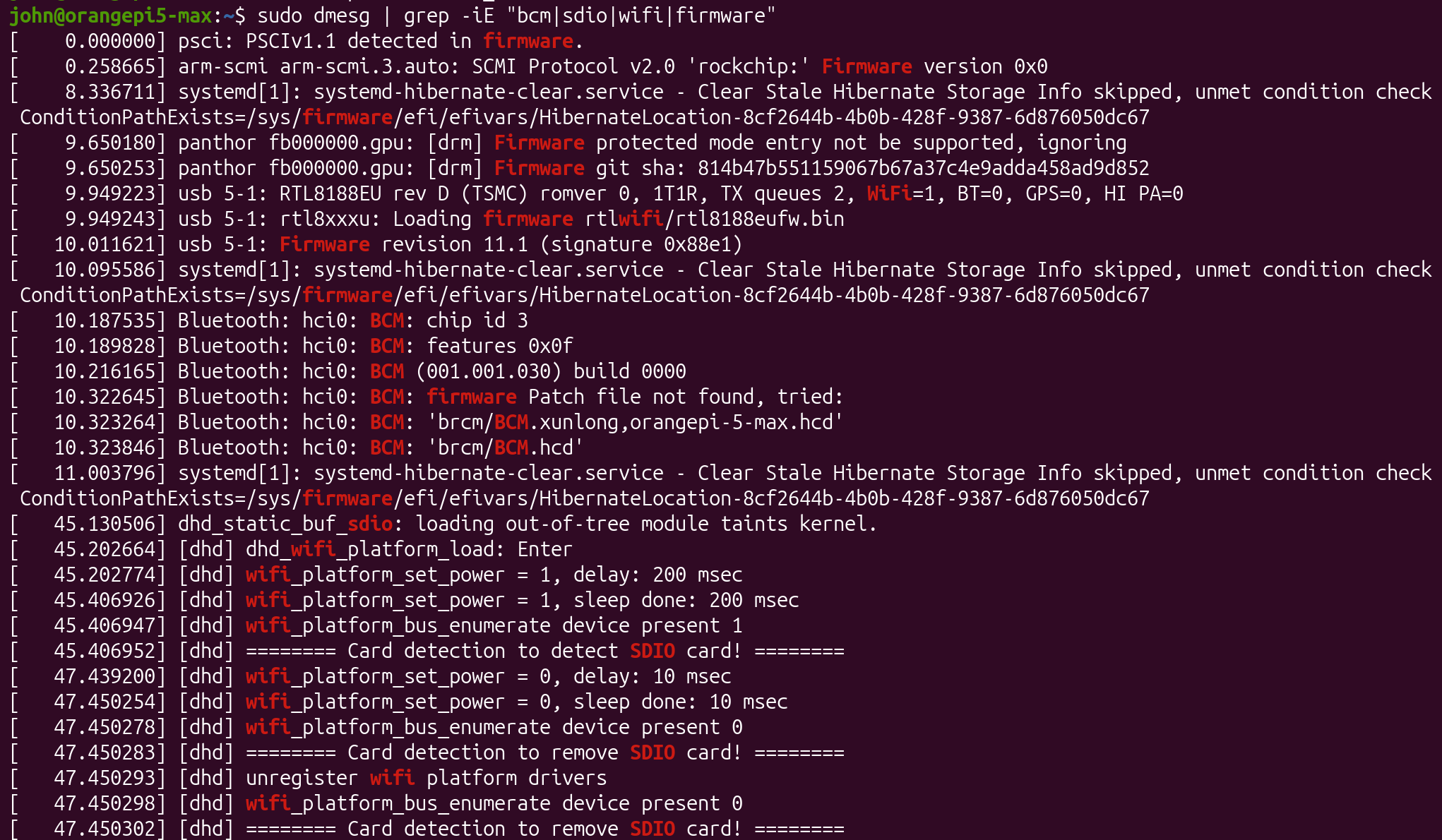
To fix that error I removed `/lib/firmware/qcom/sm8550/ayn/odin2mini` and other 2 symlinks. run `ls -la /lib/firmware/qcom/sm8550/ayn/` to show them. I ran the script and did a reboot. Now I'm in the uboot command line and I see this error: ``` no nvme partition table available [ 10.473] Couldn't find partition nvme 0:1 [ 10.477] Couldn't find partition nvme 0:1 [ 10.481] Couldn't find partition nvme 0:1 [ 10.485] Couldn't find partition nvme 0:1 [ 10.489] Couldn't find partition nvme 0:1 ``` I only have sd card plugged in. Also this: ``` [ 4.478] Retrieving file: /boot/extlinux/extlinux.conf [ 4.510] 1: Armbian-unofficial [ 4.510] Retrieving file: /boot/uInitrd [ 5.712] Retrieving file: /boot/Image [ 8.067] append: root=UUID=818a9fb1-4820-445e-9c18-e94a975ca969 earlycon=sbi console=tty1 console=ttyS0,115200 loglevel=1 rw no_console_suspend consoleblank=0 fsck.fix=yes fsck.repair=yes net.ifnames=0 splash plymouth.ignore-serial-consoles [ 8.086] Retrieving file: /boot/dtb/spacemit/k1-orangepi-rv2.dtb [ 8.133] ** File not found /boot/dtb/spacemit/k1-orangepi-rv2.dtb ** [ 8.136] Skipping Armbian-unofficial for failure retrieving FDT [ 8.150] pcie_dw_k1x pcie@ca400000: has no power-on-status flag, use default. [ 8.155] Now init Rterm... [ 8.157] pcie prot id = 1, porta_init_done = 0 [ 8.161] Now waiting portA resister tuning done... ``` I renamed `k1-orangepi-rv2.dtb` to `k1-x-orangepi-rv2.dtb` and it did let me to boot into DE. Kernel has probably updated incorrectly. `uname -r` and boot log shows 6.6.99-current-spacemit. Wifi module doesn't work either. ``` # inxi -G Graphics: Device-1: saturn-le driver: spacemit_drm_drv v: N/A Device-2: hdmi driver: spacemit_hdmi_drv v: N/A Device-3: saturn-hdmi driver: spacemit_drm_drv v: N/A Display: server: X.Org v: 23.2.6 with: Xwayland v: 23.2.6 driver: N/A resolution: 1920x1080~75Hz API: EGL v: 1.4,1.5 drivers: pvr,swrast,zink platforms: gbm,x11,surfaceless,device API: OpenGL v: 3.3 compat-v: 2.1 vendor: mesa v: 24.0.1 renderer: softpipe API: Vulkan v: 1.3.275 drivers: N/A surfaces: N/A ``` I was able to update the kernel by installing `linux-kernel-edge-spacemit` and `linux-headers-edge-spacemit`, but wifi module still doesn't work. `bcmdhd-spacemit-sdio-dkms` is intalled though
-
I flashed gnome desktop from your website. GPU script yields this error: ``` Preparing to unpack .../armbian-firmware_26.2.1_all.deb ... Unpacking armbian-firmware (26.2.1) over (26.02.0-trunk) ... dpkg: error processing archive /var/cache/apt/archives/armbian-firmware_26.2.1_all.deb (--unpack): unable to open '/lib/firmware/qcom/sm8550/ayn/odin2mini/a740_zap.mbn.dpkg-new': No such file or directory Errors were encountered while processing: /var/cache/apt/archives/armbian-firmware_26.2.1_all.deb E: Sub-process /usr/bin/dpkg returned an error code (1) ```
-
@lsdlsd88 hello! Thanks for sharing the photos and the serial logs; it looks like the stock firmware did not pick up the sdcard at all. The sdcard seems to be detected, but for some reason the rockchip miniloader of the stock firmware does not it as first source. Are you able to retrieve the first 100-200 megabytes of the original firmware via serial? You should be able to use dd even within Android. edit: ah-ha ok, I understand! there is misconfiguration in the webserver and the link changes; thanks, I updated it!
-
ok found the issue, I got the wrong multitool image. the link on 1st post was broken returning 404 so I had to search elsewhere ended up choosing 322x folder instead of 3318. correct link to update 1st post https://users.armbian.com/users.armbian.com/jock/web/rk3318/
-
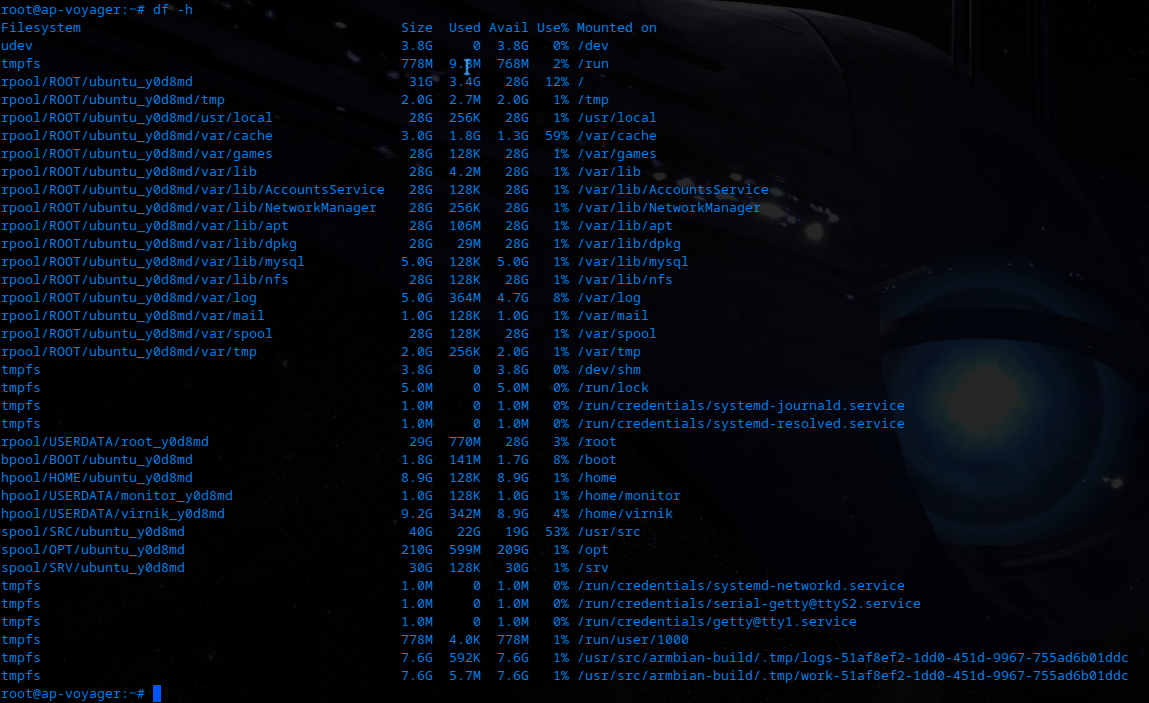
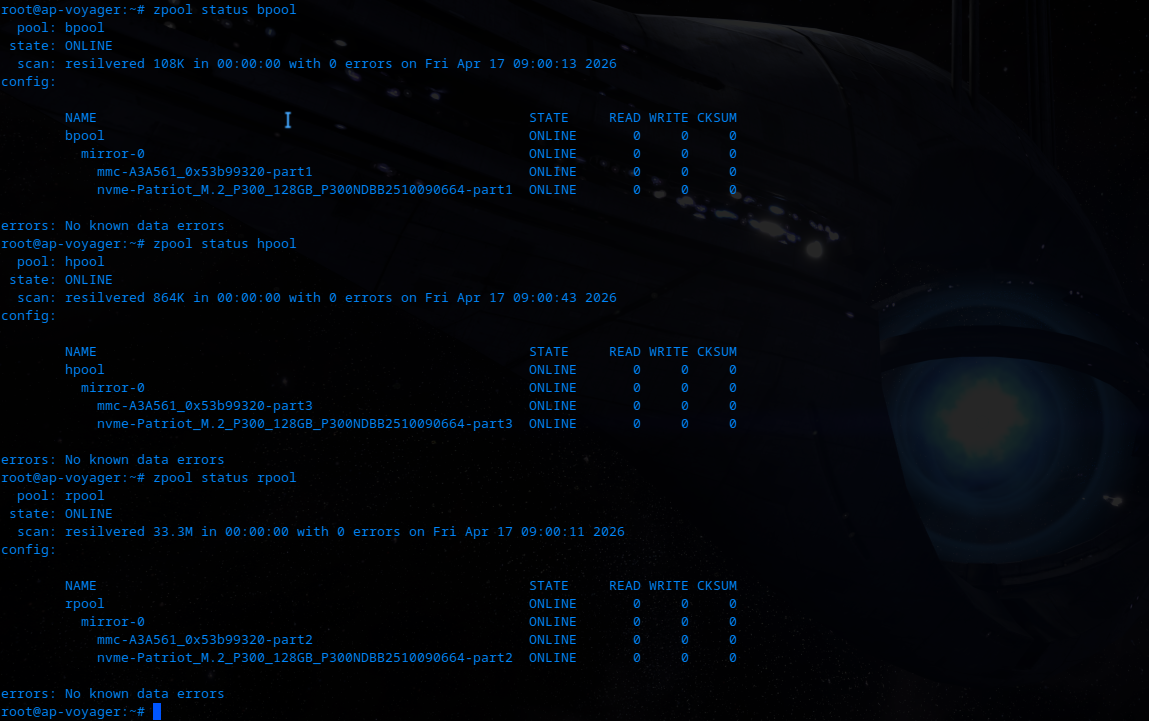
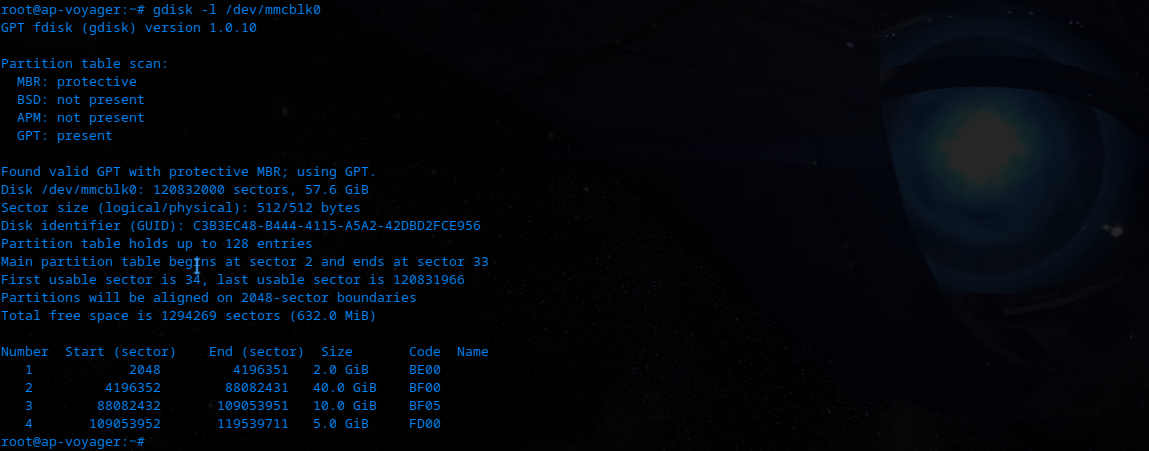
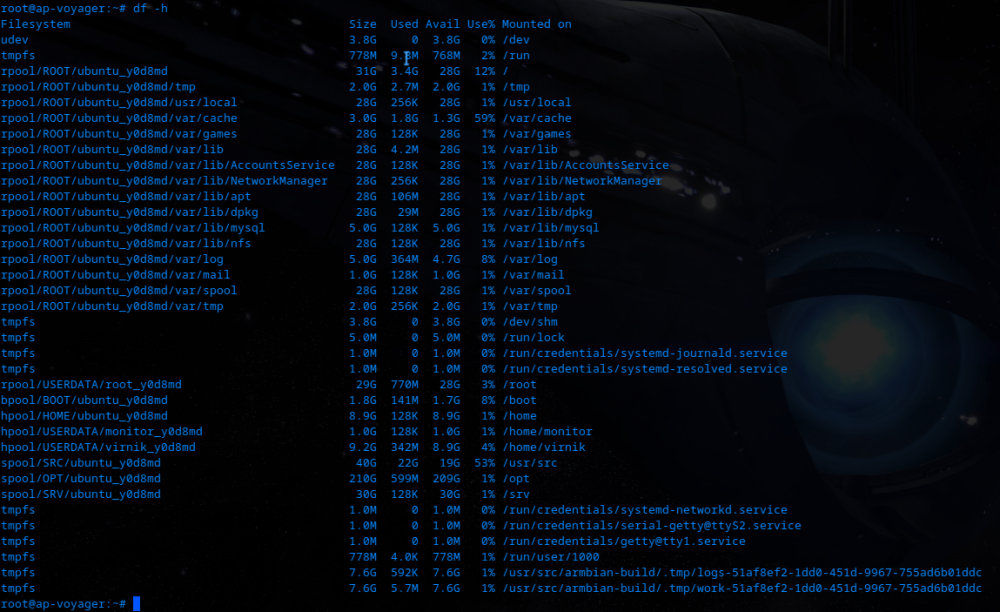
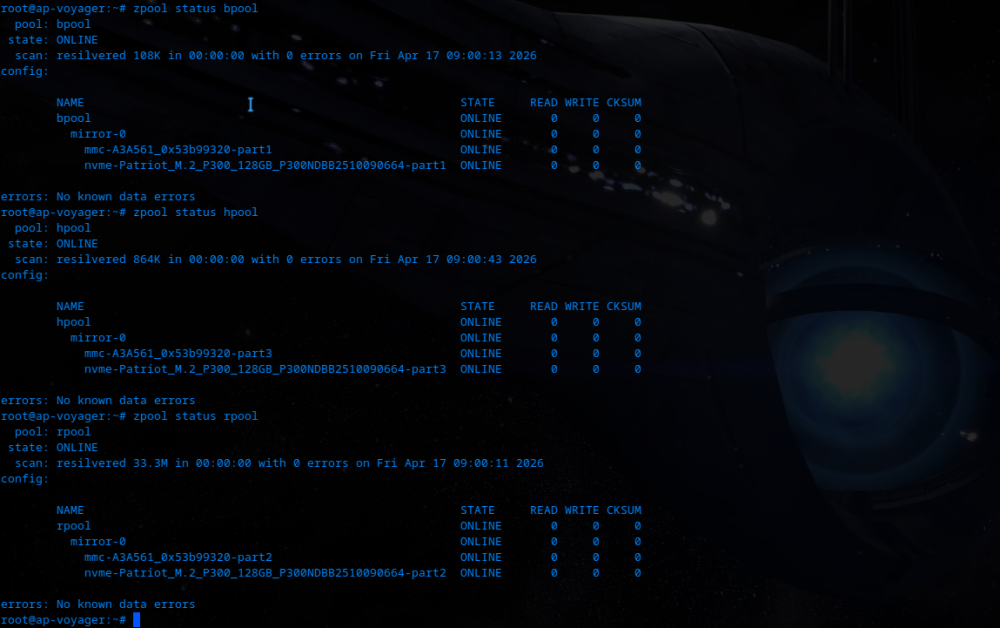
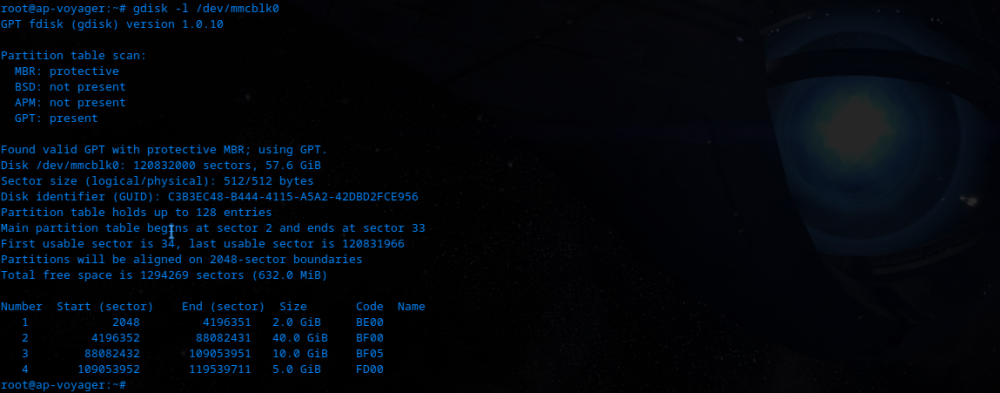
Yes, you can completely resize it. You can also turn it to ZFS volume, and boot off of it. Just rebuild u-boot with ZFS support. Or ask, and I will provide patches required to have it.
-
It is. Before I managed to rebuild u-boot with ZFS support, I had to boot off of EMMC. I shrunk first partition with kernel, initrd etc, and then made another one with actual FS. Temporary solution for me back then. But gave me time to rebuild everything and enable native ZFS boot. Since then, I use EMMC only as a ZFS volume (another one in the mirror is NVME drive). never used armbian-config though - I am old-schooler, so I had to build whole stack myself to get what I wanted.
-

USB 3.0 port does not show connected device.
Vojtěch Weiss replied to jarda9 jarda9's topic in Rockchip
I am using the same board, and I also experienced this. Sometimes USB is not re-enumerated. Also, if you're using USB-C, sometimes some wires requires you to flip the connector. Basically some makers are cheaping out on cables, and they work only when you flip it. Also, if you'll leave the drive connected and reboot, does it find it? Have you checked u-boot, does it see it? Be aware, that USB-C connector is finicky. I had to replace it (resolder with new, sturdier variant), and then make it concrete-hard to break by solidifying epoxy over and under it (keep connector connected in it, and put some oil on it before plugging it in, so that epoxy won't leak inside it. -
.thumb.jpg.20ed26dd68aaee94a94b227bf670a8eb.jpg)
[SOLVED] Unable to install Armbian on Arduino Uno Q (2 GB)
SuperKali replied to lyevod79's topic in New boards
Use armbian imager for flashing it, arduino flasher cli is not compatible -
Hi @Logan thats probably the reason why your board does not boot from NVME.
-
@sven-ola there is no nvme device in the /dev
-

[Feature Request] Include snd-usb-audio module in Banana Pi F3 builds
jac replied to jac's topic in Banana Pi F3
current_6.6.99_minimal (desktop build has the snd-usb-audio module) -
 I just installed Armbian_community_26.2.0-trunk.732_Rockpi-4bplus_trixie_current_6.18.22_minimal on a Rockpi-4bplus. How do I install the correct Linux headers? The standard apt install linux-headers-$(uname -r) method doesn't work for armbian. OK, there's a corresponding option in armbian-config, and it seems to run successfully, but for some reason, I only see linux-headers-6.12.74+deb13+1-arm64 and linux-headers-6.12.74+deb13+1-common in /usr/src.
 -

SV6256P WiFi Now Working on Linux 6.x (Armbian Tested)
Kevin su replied to Kevin su's topic in Allwinner CPU Boxes
@Vinicius Guastala Thank you for your feedback. Your patches have already been merged into my repository. -

Gaming experience with Orange Pi 5 (RK3588) on Armbian
Alex Ling replied to KhanhDTP's topic in Orange Pi 5
@KhanhDTP are you using esync of wine? NTsync is available on 6.18+ rk3588 kernels. I think that may give a performance improvement. - Yesterday
-
Of course, you can build an A7S image now as well. There's no display output yet.
-
There is a Readme.txt stating: opirv2.img is for Nextcloud install, while Armbian is none of that. You probably want the latter.