All Activity
- Past hour
-
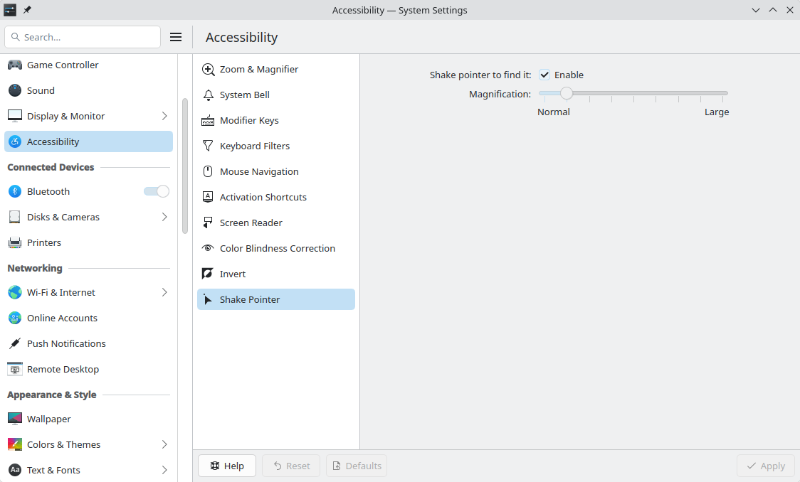
Dear eselarm, thank you for clarification! Really sad that there's no proper arm support yet. VM is really handy using snapshots.
-
 I am asking because I can't find a toggle or anything in the settings and find it a tad anoying especally when it is a game I am playing a fast paced game.
 - Today
-

Hardware video acceleration with recent armbian/mainline kernel (Kodi)
Joe K replied to XXXBold's topic in Orange Pi 5
Hello, I made a buld with the vendor kernel for mekotronics R58SV2, and build ubutu desktop Gnome. I definately have no HW decoding since with fhd .mp4 h264 videos the beast runs on 100% cpu all cores what did I wrong? Help appreciated -
After installing the latest update, my 3D printer warns about outdated instructions in the MCU and asks to recompile and flash it. What should I do?
-

networking in bpi-m5 with new 26.03.1 release.
bedna replied to gene1934's topic in Software, Applications, Userspace
It's most likely a local ipv6 op is talking about, not a public. ipv6 in range fe80::/10 is local only. To remove ipv6 in that regard, ipv6 has to be disabled on the device or it will get an address like that. And according to what is provided: 2: end0: <BROADCAST,MULTICAST,UP,LOWER_UP> mtu 1500 qdisc mq state UP group default qlen 1000 link/ether be:63:9c:35:dd:4f brd ff:ff:ff:ff:ff:ff inet 192.168.71.2/24 brd 192.168.71.255 scope global noprefixroute end0 valid_lft forever preferred_lft forever inet6 fe80::bc63:9cff:fe35:dd4f/64 scope link valid_lft forever preferred_lft forever Today I learned a bit more about systemd-resolved, seems 127.0.0.53 IS the correct config for systemd-resolved: https://unix.stackexchange.com/questions/612416/why-does-etc-resolv-conf-point-at-127-0-0-53 And: If dhcp server is configured correctly, nothing has to be done on the devices (except resolving domains to local ip unless that is done on the LAN by dnsmasq) -
This does not support f2fs I guess; standard in U-Boot is only FAT and Ext4 Some never U-Boot builds also include Btrfs. f2fs I have not seens working, but you will need to build a custom u-boot yourself then. Other option is at add Armbian argument to use an extra bootfs, tha will then be FAT or Ext4, so you can still use f2fs for rootfs. I would make U-Boot understand Btrfs and then use Btrfs for rootfs, as for several boards/platforms that is already default (likely only when you use newer/edge/mainline U-Boot).
-
Providing logs with armbianmonitor -u helps with troubleshooting and significantly raises chances that issue gets addressed.
-

networking in bpi-m5 with new 26.03.1 release.
eselarm replied to gene1934's topic in Software, Applications, Userspace
My ISP offers no IPv6, so I usually set IPv6 configuration on disable or ignore. You still might see a link-local IPv6 address (starting with fe80), but that should not matter. I don't know why you can't simply type an IPv4 address in the various fields of nmtui. I have no issues with that. The risks is that you have various other random issues; If you try to do an fsck of /dev/sdc1 and it fails, that is a sign on the wall. It usually is something with SD-card, it might be counterfeit or your SD-card adapter has issues. -
@Werner I imagine there are plenty of people here who could help solve similar problems. In theory, I could provide a pair of an old RPI (master) and a 4A (slave), with the slave serial connected to the master and power controlled via the GPIO, and they are also on the same VLAN. However, if something goes wrong it needs control to the slave's SD card, all I've found is an SD card extender, and it needs something like an emulator that connects to the master via the same USB/SPI.
-

Error at the end of image generation.
Werner replied to Guilherme's topic in UEFI x86 / qemu x86 / arm64
First: https://forum.armbian.com/terms Second: Provide full logs -

Industrial android board - RK3288 (possible EVB)
Mauricio Scotton replied to Mauricio Scotton's topic in Rockchip
Hey tparys! Thank you very much for your reply and apologies for my delay getting back to you. I haven't had much time to play with this board, but lately I've managed to do some very good progress. Basically I've got Armbian 20 Bullseye working with kernel 6.19. that was a victory! Versions that work/don't: [WORKS] Armbian_20.07_Arm-32_bullseye_current_5.7.7_desktop.img (From a MiQi board) [NOPE] Armbian_25.11.1_Tinkerboard_bookworm_current_6.12.58-homeassistant.img [NOPE] Armbian_25.11.1_Tinkerboard_noble_current_6.12.58_minimal.img [NOPE] Armbian_25.11.1_Tinkerboard_trixie_current_6.12.58_minimal.img [NOPE] Armbian_26.2.0-trunk.370_Tinkerboard_noble_current_6.18.8_xfce_desktop.img [NOPE] Armbian_26.2.1_Tinkerboard_trixie_current_6.18.8_minimal.img Armbians 25 up, some times hangs at Starting Kernel, and majority of the times stops at Loading Ramdisk, all of them tested with most of the DTBs provided The android that runs on the other working board has a kernel with version 4.4 Havent test that because I believe it stops earlier than that I have extracted the DTB from the working Android and got a frankenstein EVB DTS working with some of the features. So far I've got working: *4Cores *2GB Ram *Wifi (using rtw8723d_fw.bin ) *Status LED What doesn't work for sure: -Ethernet -FE2.1 USB Hub 2.0 Untested: ? LVDS 1/2 Panel ? EDP 1/2 Panel ? Speaker ? MIC ? SIM Card Module (Attached to the FE2.1 Hub, so defo not working) And maybe some other peripherals that I was not able to test. I'm still to make the FE2.1 USB Hub work as the 4 only USB physical ports are not working. Also ETH has an issue on stmmac that returns the reset value. and this was merged recently to the kernel. (I'm trying to build v6.19 from source with my patch, but thats being painful too ) Here is my stmmac patch: diff --git a/drivers/net/ethernet/stmicro/stmmac/stmmac_main.c b/drivers/net/ethernet/stmicro/stmmac/stmmac_main.c index 01ede5148163..9f0ee9ea96fa --- a/drivers/net/ethernet/stmicro/stmmac/stmmac_main.c +++ b/drivers/net/ethernet/stmicro/stmmac/stmmac_main.c @@ -3208,8 +3208,7 @@ static int stmmac_init_dma_engine(struct stmmac_priv *priv) ret = stmmac_reset(priv); if (ret) { - netdev_err(priv->dev, "Failed to reset the dma\n"); - return ret; + netdev_warn(priv->dev, "Failed to reset the dma, device will work with reduced throughput\n"); } I have also attached my current DTS built on top of the EVB version based on the Android with logs from both. Once again, thank you very much for your help! Best Regards, Mauricio. Armbian 20 Bullseye booting log.txt Android Boot Full log.txt android_check.dts rk3288-evb-rk808-armbian-fixed36.dts - Yesterday
-

Trying to boot Armbian on LinknLink iSG Box SE
Sancho replied to Sancho's topic in Rockchip CPU Boxes
Finally managed to restore the box to stock official Android firmware, everything works as expected. I also tested a firmware for the H96 Max M1, with this one the WiFi is not working, they seem to use a different wifi chip. Any recommendations on where to start with flashing Armbian on this device? -
OMV 8+ doesn't support 32bit architectures anymore (including Helios4). https://forum.openmediavault.org/index.php?thread/58798-helios4-omv-8/ Given it seems to be stuck on kernel 6.6, it does feel like it's on life support unfortunately.
-

networking in bpi-m5 with new 26.03.1 release.
gene1934 replied to gene1934's topic in Software, Applications, Userspace
which of course fails as nmtui it will not accept the dot separators in an ipv4 address needed to be entered in an ipv4 only situation. I'll repeat as I have said quite a few times already, that I, in weston wv, am at least 100 miles from ANY ipv6 enabled net access. There surely are some ipv6 in pittsburg pa., 150 miles north, maybe in Charleston, 100 miles south. I have battled this using armbian-config and in using that microscopecly tiny moving radiation symbol at the top right of the xfce4 screen. If that is a defense to prevent ipv4 addresses where ipv6 is expected, change the box color so we know it can be skipped in real estate not yet blessed with ipv6 addresses. We are NOT mind readers any more than you are, but this particular group off us is about a 3/4 million in the whole state where flat ground to build a house on is measured in the gallons of diesel fuel to make it flat enough to build on. Fix nmtui so its actually usable and do a respin. while at it, fix whatever prevents our mounting it to edit such stuff before 1st boot. That restriction is a huge pain in the ass too. fdisk tells us its dos partition for sdc with an ext4 sdc1, but when we attempt to mount it, the ext4 cannot be found. That restriction is also present in the 25-5 release. Yet it boots & almost runs. next try? -
just go threre: https://forum.friendlyelec.com/viewtopic.php?f=93&t=4691
-
Estou tentando gerar uma imagem Qemu-uefi-x86 usando a seguinte linha: ./compile.sh BOARD=qemu-uefi-x86 BRANCH=current KERNEL_CONFIGURE=no ARCH=x86_64 BUILD_MINIMAL=yes BUILD_DESKTOP=no KERNEL_BTF=no RELEASE=jammy Ao final do processo, recebo o seguinte erro. Alguém pode me ajudar? Estava gerando corretamente e, de repente, parou. Ign:6 http://archive.ubuntu.com/ubuntu jammy-backports InRelease [🔨] Erro:1 https://github.armbian.com/configng estável InRelease [🔨Erro do sistema ao resolver 'github.armbian.com:https' - getaddrinfo (16: Dispositivo ou recurso ocupado) [🔨] Erro:2 https://apt.armbian.com jammy InRelease [🔨Erro do sistema ao resolver 'apt.armbian.com:https' - getaddrinfo (16: Dispositivo ou recurso ocupado) [🔨] Err:3 http://archive.ubuntu.com/ubuntu jammy InRelease [🔨Erro de sistema ao resolver 'archive.ubuntu.com:http' - getaddrinfo (16: Dispositivo ou recurso ocupado) [🔨] Erro:4 http://archive.ubuntu.com/ubuntu jammy-security InRelease [🔨Erro de sistema ao resolver 'archive.ubuntu.com:http' - getaddrinfo (16: Dispositivo ou recurso ocupado) [🔨] Erro:5 http://archive.ubuntu.com/ubuntu jammy-updates InRelease [🔨Erro de sistema ao resolver 'archive.ubuntu.com:http' - getaddrinfo (16: Dispositivo ou recurso ocupado) [🔨] Erro:6 http://archive.ubuntu.com/ubuntu jammy-backports InRelease [🔨Erro de sistema ao resolver 'archive.ubuntu.com:http' - getaddrinfo (16: Dispositivo ou recurso ocupado) [🔨Lendo listas de pacotes... [🔨] W: Falha ao buscar https://github.armbian.com/configng/dists/stable/InRelease Erro de sistema ao resolver 'github.armbian.com:https' - getaddrinfo (16: Dispositivo ou recurso ocupado) [🔨] W: Falha ao buscar https://apt.armbian.com/dists/jammy/InRelease Erro de sistema ao resolver 'apt.armbian.com:https' - getaddrinfo (16: Dispositivo ou recurso ocupado) [🔨] W: Falha ao buscar http://archive.ubuntu.com/ubuntu/dists/jammy/InRelease Erro de sistema ao resolver 'archive.ubuntu.com:http' - getaddrinfo (16: Dispositivo ou recurso ocupado) [🔨] W: Falha ao buscar http://archive.ubuntu.com/ubuntu/dists/jammy-security/InRelease Erro de sistema ao resolver 'archive.ubuntu.com:http' - getaddrinfo (16: Dispositivo ou recurso ocupado) [🔨] W: Falha ao buscar http://archive.ubuntu.com/ubuntu/dists/jammy-updates/InRelease Erro de sistema ao resolver 'archive.ubuntu.com:http' - getaddrinfo (16: Dispositivo ou recurso ocupado) [🔨] W: Failed to fetch http://archive.ubuntu.com/ubuntu/dists/jammy-backports/InRelease System error resolving 'archive.ubuntu.com:http' - getaddrinfo (16: Device or resource busy) [🔨] W: Some index files failed to download. They have been ignored, or old ones used instead. [🚸] WARNING: SDCARD /var/lib/apt/lists dir is not empty [ before 'apt-get --no-install-recommends install armbian-config' :: /home/adm64/buldx86-64/.tmp/rootfs-ad6535a3-5649-47eb-bfe2-25cd24623192/var/lib/apt/lists (21 files) ] [🔨] /home/adm64/buldx86-64/.tmp/rootfs-ad6535a3-5649-47eb-bfe2-25cd24623192/var/lib/apt/lists: [🔨] total 182M [🔨] drwxr-xr-x 5 root root 120 Apr 6 15:49 .. [🔨] drwxrwxr-x 4 root root 500 Apr 6 15:25 . [🔨] drwx------ 2 systemd-network root 40 Apr 6 15:25 partial [🔨] -rw-r----- 1 root root 0 Apr 6 15:24 lock [🔨] drwxr-xr-x 2 systemd-network root 40 Apr 6 15:24 auxfiles [🔨] -rw-r--r-- 1 root root 125K Apr 6 12:23 archive.ubuntu.com_ubuntu_dists_jammy-backports_InRelease [🔨] -rw-r--r-- 1 root root 126K Apr 6 12:22 archive.ubuntu.com_ubuntu_dists_jammy-updates_InRelease [🔨] -rw-r--r-- 1 root root 126K Apr 6 12:19 archive.ubuntu.com_ubuntu_dists_jammy-security_InRelease [🔨] -rw-r--r-- 1 root root 19M Apr 3 18:09 archive.ubuntu.com_ubuntu_dists_jammy-updates_main_binary-amd64_Packages [🔨] -rw-r--r-- 1 root root 6.9M Apr 3 18:09 archive.ubuntu.com_ubuntu_dists_jammy-updates_universe_binary-amd64_Packages [🔨] -rw-r--r-- 1 root root 17M Apr 2 19:01 archive.ubuntu.com_ubuntu_dists_jammy-security_main_binary-amd64_Packages [🔨] -rw-r--r-- 1 root root 5.9M Apr 2 19:01 archive.ubuntu.com_ubuntu_dists_jammy-security_universe_binary-amd64_Packages [🔨] -rw-r--r-- 1 root root 33M Apr 1 00:36 archive.ubuntu.com_ubuntu_dists_jammy-updates_restricted_binary-amd64_Packages [🔨] -rw-r--r-- 1 root root 5.4K Mar 30 03:55 github.armbian.com_configng_dists_stable_InRelease [🔨] -rw-r--r-- 1 root root 623 Mar 30 03:55 github.armbian.com_configng_dists_stable_main_binary-amd64_Packages [🔨] -rw-r--r-- 1 root root 31M Mar 25 09:42 archive.ubuntu.com_ubuntu_dists_jammy-security_restricted_binary-amd64_Packages [🔨] -rw-r--r-- 1 root root 440K Mar 15 04:56 archive.ubuntu.com_ubuntu_dists_jammy-backports_main_binary-amd64_Packages [🔨] -rw-r--r-- 1 root root 143K Mar 15 04:56 archive.ubuntu.com_ubuntu_dists_jammy-backports_universe_binary-amd64_Packages [🔨] -rw-r--r-- 1 root root 277K Jan 28 17:31 archive.ubuntu.com_ubuntu_dists_jammy-security_multiverse_binary-amd64_Packages [🔨] -rw-r--r-- 1 root root 308K Jan 26 14:47 archive.ubuntu.com_ubuntu_dists_jammy-updates_multiverse_binary-amd64_Packages [🔨] -rw-r--r-- 1 root root 264K Apr 21 2022 archive.ubuntu.com_ubuntu_dists_jammy_InRelease [🔨] -rw-r--r-- 1 root root 62M Apr 21 2022 archive.ubuntu.com_ubuntu_dists_jammy_universe_binary-amd64_Packages [🔨] -rw-r--r-- 1 root root 897K Apr 20 2022 archive.ubuntu.com_ubuntu_dists_jammy_multiverse_binary-amd64_Packages [🔨] -rw-r--r-- 1 root root 6.5M Apr 18 2022 archive.ubuntu.com_ubuntu_dists_jammy_main_binary-amd64_Packages [🔨] -rw-r--r-- 1 root root 895K Apr 13 2022 archive.ubuntu.com_ubuntu_dists_jammy_restricted_binary-amd64_Packages [🔨] [🔨] /home/adm64/buldx86-64/.tmp/rootfs-ad6535a3-5649-47eb-bfe2-25cd24623192/var/lib/apt/lists/partial: [🔨] total 0 [🔨] drwx------ 2 systemd-network root 40 Apr 6 15:25 . [🔨] drwxrwxr-x 4 root root 500 Apr 6 15:25 .. [🔨] [🔨] /home/adm64/buldx86-64/.tmp/rootfs-ad6535a3-5649-47eb-bfe2-25cd24623192/var/lib/apt/lists/auxfiles: [🔨] total 0 [🔨] drwxrwxr-x 4 root root 500 Apr 6 15:25 .. [🔨] drwxr-xr-x 2 systemd-network root 40 Apr 6 15:24 . [🔨] E: Failed to fetch http://archive.ubuntu.com/ubuntu/pool/main/n/newt/libnewt0.52_0.52.21-5ubuntu2_amd64.deb System error resolving 'archive.ubuntu.com:http' - getaddrinfo (16: Device or resource busy) [🔨] E: Failed to fetch http://archive.ubuntu.com/ubuntu/pool/main/n/newt/whiptail_0.52.21-5ubuntu2_amd64.deb System error resolving 'archive.ubuntu.com:http' - getaddrinfo (16: Device or resource busy) [🔨] E: Failed to fetch http://archive.ubuntu.com/ubuntu/pool/main/p/pv/pv_1.6.6-1build2_amd64.deb System error resolving 'archive.ubuntu.com:http' - getaddrinfo (16: Device or resource busy) [🔨] E: Failed to fetch https://github.armbian.com/configng/pool/main/a/armbian-config/armbian-config_26.2.0-trunk.655.0330.065342_all.deb System error resolving 'github.armbian.com:https' - getaddrinfo (16: Device or resource busy) [🔨] E: Unable to fetch some archives, maybe run apt-get update or try with --fix-missing? [💥] Error 1 occurred in main shell [ at /home/adm64/buldx86-64/lib/functions/logging/runners.sh:15 chroot_sdcard_apt_get_install() --> lib/functions/logging/runners.sh:15 post_armbian_repo_customize_image__install_armbian-config() --> extensions/armbian-config.sh:17 post_armbian_repo_customize_image() --> <extension_magic>:167 call_extension_method() --> lib/functions/general/extensions.sh:57 run_hooks_post_armbian_repo_customize_image() --> lib/functions/rootfs/customize.sh:60 do_with_logging() --> lib/functions/logging/section-logging.sh:81 build_rootfs_and_image() --> lib/functions/main/rootfs-image.sh:59 full_build_packages_rootfs_and_image() --> lib/functions/main/default-build.sh:36 do_with_default_build() --> lib/functions/main/default-build.sh:42 cli_standard_build_run() --> lib/functions/cli/cli-build.sh:25 armbian_cli_run_command() --> lib/functions/cli/utils-cli.sh:136 cli_entrypoint() --> lib/functions/cli/entrypoint.sh:176 main() --> compile.sh:50 ] [💥] Limpeza [aguarde a conclusão da limpeza] [🌿] Desmontando recursivamente [ SDCARD - aguarde ] [🌿] Desmontando recursivamente [ MOUNT - aguarde ] [🌿] Arquivo de log ANSI criado; inspecione-o executando: [ less -RS output/logs/log-build-ad6535a3-5649-47eb-bfe2-25cd24623192.log.ans ] [🌱Compartilhar o log manualmente: [use um dos comandos abaixo (ou adicione SHARE_LOG=yes na próxima vez!)] [🌿] Compartilhe o log manualmente: [ curl --data-binary @output/logs/log-build-ad6535a3-5649-47eb-bfe2-25cd24623192.log.ans https://paste.armbian.com/log ] [🌿] Compartilhe o log manualmente: [ curl --data-binary @output/logs/log-build-ad6535a3-5649-47eb-bfe2-25cd24623192.log.ans https://paste.armbian.de/log ] [🌿] Compartilhe o log manualmente: [ curl --data-binary @output/logs/log-build-ad6535a3-5649-47eb-bfe2-25cd24623192.log.ans https://paste.next.armbian.com/log ] [🌿] Compartilhe o log manualmente: [ curl --data-binary @output/logs/log-build-ad6535a3-5649-47eb-bfe2-25cd24623192.log.ans https://pa
-
Built image with such flags: Etched img to sdcard and SBC has no response on power up. U-boot log: OS boots normally if I use ext4, but would like to stick to f2fs. Btrfs or f2fs used to work if I used 7 months old armbian-build git checkpoint but not any more. Anyone else had similar problems?
-
The initrd might be missing needed drivers for you to continue getting console output. Kind of a pain to troubleshoot that. The kernel I linked above is configured so that it should actually boot with no initramfs at all (though that isn't recommended). It obviously can't hurt to try a different PSU if you have one. The device also will do PoE (on the WAN port I believe) which is a nice little feature so you could try that too. The device tree I use comes directly from the linux tree. It is built into U-Boot and then U-Boot provides it to the kernel via standard location as specified in UEFI. It is entirely possible that older kernels might be unhappy with a newer device tree but you really shouldn't be having any issues with 6.18 and newer but they do need to be configured to load the device tree from UEFI. I think that kernel config option is CONFIG_OF.
-
I tried using the 'bootflow scan -b` after getting the armbian efi build installed on the SATA, Grub came up fine, but it never made it past initrd loading... nothing further ever. Using mox-imager and pushing your release image gave me a lot of stability for the standard eMMC install... Re-flashed that image, but didn't help... still panicing all the time -- different places -- with the 6.x kernels (6.12, 6.18, 6.19) on the Armbian install. I've seen some comments about power draw / PSU issues in other threads, but i'm just using the stock PSU provided. You're not doing anything special with Device Tree / Overlays are you?
-
No; an Intel (virtual machine) image does not run natively on ARM (OPi5+). You need an ARM (virtual machine) image, but those are not available (at least not click-to-download). If you look in raw downlaod folders and/or github, maybe there are nowadays. Or ask on the forum there. You need a general Aarch64 UEFI HAOS image, qcow2 or raw/flat/img format and that will be able to run at full speed on a hypervisor. Not sure about VirtualBox, but for sure the Linux built-in QEMU/libvirtd/KVM. Main user-inteface program is installed via sudo apt install virt-manager.
-
These are for helios64. I think the OP was looking for helios4. The omv link gives a 404 when removing the 6. There's a helios4 image for 26.2.1 (Trixie?) but I'm not sure it supports OMV. The omv-release-upgrade script says "The system architecture armv7l is not supported.", and the Armbian page says "OMV (OpenMediaVault) can be installed on Armbian Bookworm minimal with armbian-config -> software." Bookworm will be supported for another couple of years (2028-06-30) at least. Sadly, it might be time to consider a replacement.
-
I just created a new image and am reporting the following: - On the first boot, I don't have Ethernet (I don't use wireless) and - The eMMC is not detected. Thanks
-
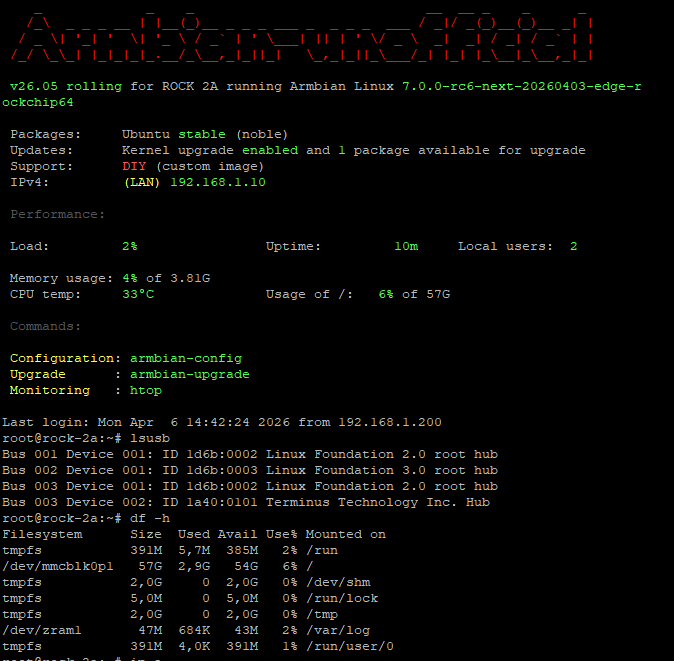
Armbian image placed on internal soldered eMMC 64GB - only one issue now aic8800 not supported yet by kernel 7.0-rc6 so no wifi 😕 No PCI as no PCI slots... also no HDMI... Experimental image based on Kwiboo repo dispo here.
-
This week’s Armbian development saw significant enhancements across hardware support and system functionality. The Arduino UNO Q was officially added, along with new firmware and flash binaries for the QRB2210 and QCM2290 variants. HDMI CEC support was introduced for Rockchip RK3588/RK3576 SoCs, while panel compatibility expanded with updates for Raspberry Pi and Hardkernel ODROID-Vu8S. Key kernel improvements included a bump to version 7.0-rc6 and rewritten patches for Rockchip64-6.18. The release also featured workflow hardening, exclusion of unsupported boards, and fixes for USB-C OTG mode on Odroid-M2. These updates collectively strengthen Armbian’s platform stability and broaden its device coverage. ChangesAdd Arduino UNO Q. by @igorpecovnik in armbian/armbian.github.io#268Add firmware for Arduino UNO Q (QRB2210/QCM2290). by @SuperKali in armbian/firmware#123Add HDMI CEC support to Rockchip RK3588/RK3576 SoCs. by @chaitan3 in armbian/build#9622Agatti: add flash binaries for Arduino UNO Q (QRB2210). by @SuperKali in armbian/qcombin#1Arduino logo. by @igorpecovnik in armbian/armbian.github.io#269ch13726a: Added missing MIPI_DSI_MODE_VIDEO. by @kay-lambdadelta in armbian/build#9621config: rockchip64: build Motorcomm YT6801 drivers built-in for OOB Ethernet. by @c127dev in armbian/build#9625drm: add support for rpi panel v2. by @ackPeng in armbian/linux-rockchip#465Exclude end-of-support boards from armbian-images.json. by @igorpecovnik in armbian/armbian.github.io#271Harden data-update-partners workflow. by @igorpecovnik in armbian/armbian.github.io#270mainline: bump edge to 7.0-rc6. by @EvilOlaf in armbian/build#9618Odroid-M2: Add support for Hardkernel ODROID-Vu8S panel. by @mlegenovic in armbian/build#9627Odroid-M2: Fix USB-C port in OTG mode. by @mlegenovic in armbian/build#9633Remove radxa-dragon-q6a from targets-release-nightly blacklist. by @igorpecovnik in armbian/armbian.github.io#267rockchip-vendor: CONFIG_BT_HCIBTUSB=m. by @vidplace7 in armbian/build#9628rockchip64-6.18: rewrite kernel patches against 6.18.21. by @EvilOlaf in armbian/build#9629SpacemiT: Disable k1-usb: add disconnect function support. by @pyavitz in armbian/build#9620View the full article