All Activity
- Today
-
@PH Ph Ask Goole AI mode... I haven't played with 4G CPE routers.
-
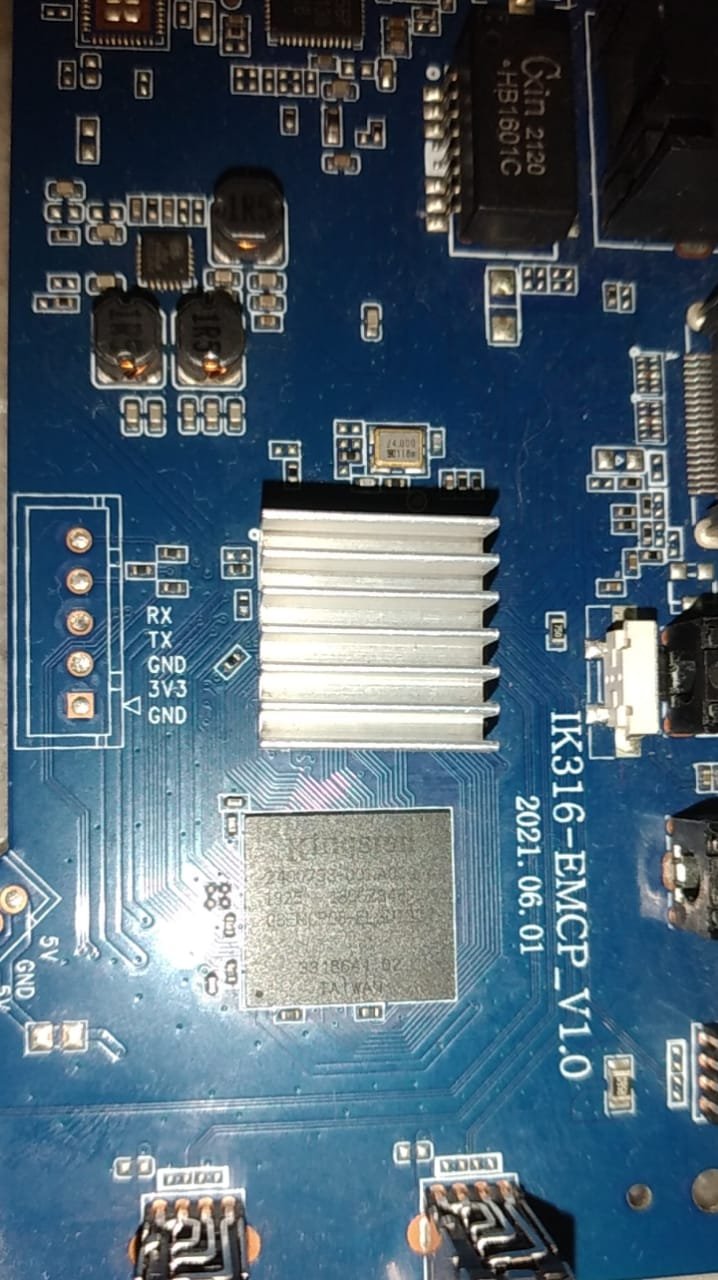
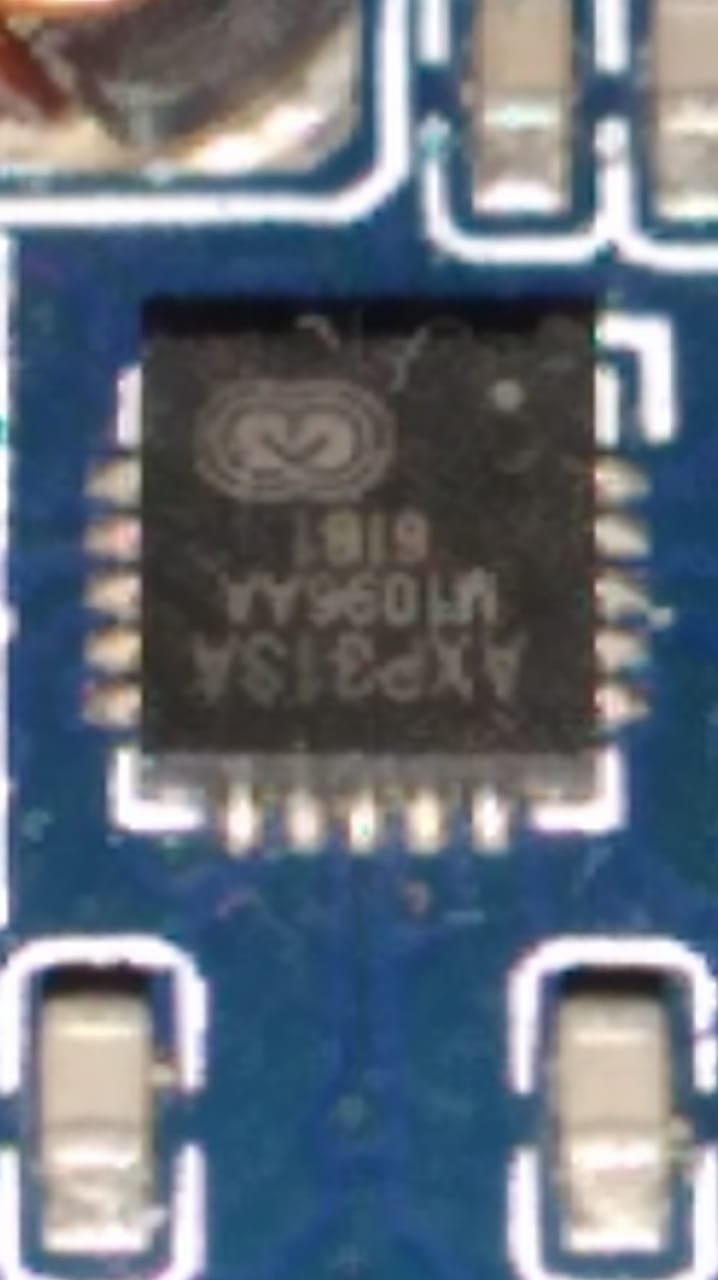
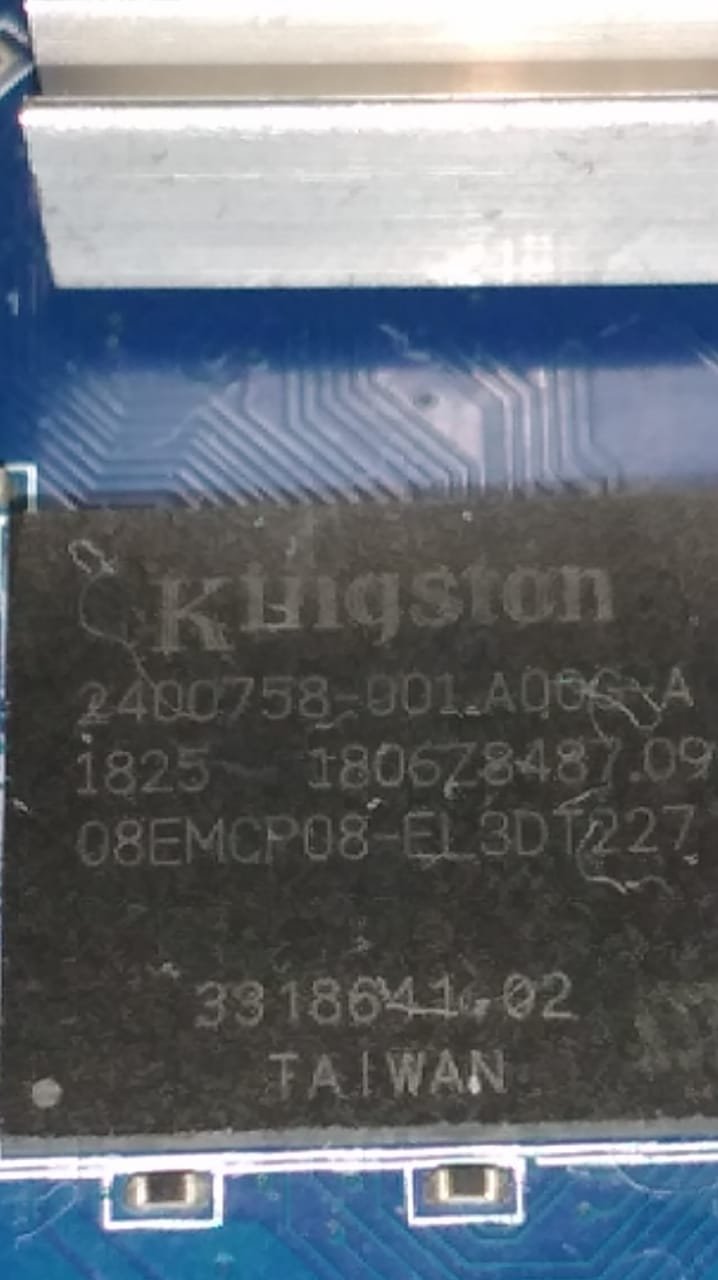
@Nick A hi brow, I'm using the image shown on page 2. The one you showed to another user with the same motherboard ik316-emcp_v1.0. https://github.com/NickAlilovic/build/releases/download/20250306/Armbian-unofficial_25.05.0-trunk_X96q-lpddr3-v1-3_bookworm_edge_6.12.11_xfce_desktop.img.xz The only difference I noticed is the emcp IC; in my version it's a Kingston. Here are some new photos. I really believe the eMMC block is damaged, but the RAM is still working. Or it has a cold solder joint. That's why it's not detected in Armbian, and it's not possible to install the stock firmware directly. If you have/or want or would like to run any tests, I am available. Thank you in advance for your support. I'll use it from the SD card. I'll just try to fix the acceleration issue. But for my purpose, it already works well as it is. Purpose: Remote access behind a dual CGNAT, to control a 4G CPE, a router, and an NVR in a rural area. The NVR has normal access if connected to the cloud service, but I prefer not to use it. The router and CPE are not accessible, and the IPv6 address changes constantly. Thank you again.

-
So far, the best working images I have found for the LonganPi 3H are those developed for the BananaPi M4 Zero. Only issues I have encountered are wifi-related. Hopefully this helps someone.
-

Need help with video decode acceleration on NanoPi R6S
Blind55 replied to Blind55's topic in NanoPi R6S/R6C
Thank you, everyone, for the suggestions. After having been absent here for a while, I am going to try Dante's suggestion first. Thanks again! -
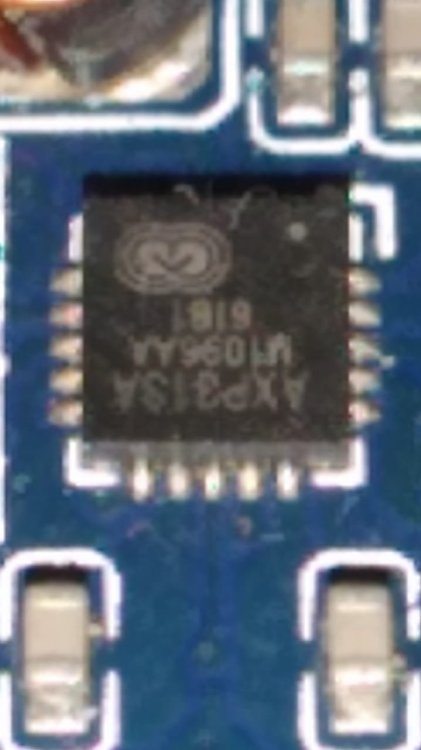
@PH Ph You didn't tell us which image you used? Your dts shows axp1530. Which is also known as axp313a. https://linux-sunxi.org/AXP_PMICs pmu { compatible = "x-powers,axp1530";
-
@PH Ph Recovery is your boot.bin nick@nick:~/Documents$ file recovery recovery: Android bootimg, kernel (0x40080000), ramdisk (0x43000000), page size: 2048, cmdline (selinux=1 androidboot.selinux=permissive androidboot.dtbo_idx=0,1,2 buildvariant=userdebug) nick@nick:~/Documents$ cp ~/Documents/recovery ~/Documents/Android_boot_image_editor/boot.img nick@nick:~/Documents$ cd ~/Documents/Android_boot_image_editor/ nick@nick:~/Documents/Android_boot_image_editor$ ./gradlew unpack Starting a Gradle Daemon (subsequent builds will be faster) > Task :unpack 18:58:16.027 [main] INFO cfig.packable.PackableLauncher - [^boot(-debug)?\.img$, ^recovery\.img$, ^recovery-two-step\.img$, ^init_boot\.img$, ^ramdisk\.img$]/class cfig.packable.BootImgParser 18:58:16.030 [main] INFO cfig.packable.PackableLauncher - [^.*\.dtb$]/class packable.DeviceTreeParser 18:58:16.030 [main] INFO cfig.packable.PackableLauncher - [^dtbo\.img$]/class cfig.packable.DtboParser 18:58:16.030 [main] INFO cfig.packable.PackableLauncher - [^misc\.img$]/class cfig.packable.MiscImgParser 18:58:16.030 [main] INFO cfig.packable.PackableLauncher - [^ota\.zip$]/class cfig.packable.OTAzipParser 18:58:16.030 [main] INFO cfig.packable.PackableLauncher - [^payload\.bin$]/class cfig.packable.PayloadBinParser 18:58:16.030 [main] INFO cfig.packable.PackableLauncher - [^(system|system_ext|system_other|system_dlkm)\.img$, ^(vendor|vendor_dlkm|product|cache|userdata|super|oem|odm|odm_dlkm)\.img$]/class rom.sparse.SparseImgParser 18:58:16.030 [main] INFO cfig.packable.PackableLauncher - [^vbmeta\.img$, ^vbmeta\_[a-z]+.img$]/class cfig.packable.VBMetaParser 18:58:16.030 [main] INFO cfig.packable.PackableLauncher - [^vendor_boot(-debug)?\.img$, ^vendor_kernel_boot\.img$]/class cfig.packable.VendorBootParser 18:58:16.030 [main] INFO XXXX - args: [unpack] 18:58:16.033 [main] INFO XXXX - arg: #0 - unpack 18:58:16.035 [main] INFO XXXX - loop #0 18:58:16.035 [main] INFO XXXX - lazy mode (in current dir) 18:58:16.205 [main] INFO cfig.packable.PackableLauncher - Found: boot.img, ^boot(-debug)?\.img$ 18:58:16.206 [main] WARN cfig.packable.PackableLauncher - args: 1, targetHandler: class cfig.packable.BootImgParser 18:58:16.206 [main] INFO cfig.packable.PackableLauncher - continue ... 18:58:16.206 [main] WARN cfig.packable.PackableLauncher - [/home/nick/Documents/Android_boot_image_editor/boot.img] will be handled by [BootImgParser] 18:58:16.274 [main] WARN cfig.packable.PackableLauncher - 'unpack' sequence initialized 18:58:16.274 [main] WARN cfig.packable.PackableLauncher - XXXX: args.size: 1 clazz = BootImgParser func = fun cfig.packable.BootImgParser.unpack(kotlin.String): kotlin.Unit orig args: 0: unpack Converted args: 0: /home/nick/Documents/Android_boot_image_editor/boot.img 18:58:16.281 [main] INFO cfig.packable.BootImgParser - unpackInternal(fileName: /home/nick/Documents/Android_boot_image_editor/boot.img, unpackDir: build/unzip_boot/) 18:58:16.282 [main] INFO cfig.packable.BootImgParser - workspace set to build/unzip_boot/ 18:58:16.282 [main] INFO cfig.packable.IPackable - deleting /home/nick/Documents/Android_boot_image_editor/build/unzip_boot ... 18:58:16.298 [main] INFO cfig.bootimg.Common - workspace file overridden: /home/nick/Documents/Android_boot_image_editor/build/unzip_boot/workspace.ini 18:58:16.299 [main] INFO cfig.packable.BootImgParser - header version 2 18:58:16.408 [main] WARN cfig.bootimg.v2.BootHeaderV2 - BootImgHeader constructor 18:58:16.414 [main] INFO cfig.Avb - python aosp/avb/avbtool.v1.2.py verify_image --image /home/nick/Documents/Android_boot_image_editor/boot.img Verifying image /home/nick/Documents/Android_boot_image_editor/boot.img using embedded public key vbmeta: Successfully verified footer and NONE vbmeta struct in /home/nick/Documents/Android_boot_image_editor/boot.img Traceback (most recent call last): File "/home/nick/Documents/Android_boot_image_editor/aosp/avb/avbtool.v1.2.py", line 4935, in <module> tool.run(sys.argv) File "/home/nick/Documents/Android_boot_image_editor/aosp/avb/avbtool.v1.2.py", line 4739, in run args.func(args) File "/home/nick/Documents/Android_boot_image_editor/aosp/avb/avbtool.v1.2.py", line 4874, in verify_image self.avb.verify_image(args.image.name, args.key, File "/home/nick/Documents/Android_boot_image_editor/aosp/avb/avbtool.v1.2.py", line 2582, in verify_image elif not desc.verify(image_dir, image_ext, expected_chain_partitions_map, ^^^^^^^^^^^^^^^^^^^^^^^^^^^^^^^^^^^^^^^^^^^^^^^^^^^^^^^^^^^^^^^^ File "/home/nick/Documents/Android_boot_image_editor/aosp/avb/avbtool.v1.2.py", line 1687, in verify image = ImageHandler(image_filename, read_only=True) ^^^^^^^^^^^^^^^^^^^^^^^^^^^^^^^^^^^^^^^^^^^^ File "/home/nick/Documents/Android_boot_image_editor/aosp/avb/avbtool.v1.2.py", line 760, in __init__ self._read_header() File "/home/nick/Documents/Android_boot_image_editor/aosp/avb/avbtool.v1.2.py", line 775, in _read_header self._image = open(self.filename, 'rb') ^^^^^^^^^^^^^^^^^^^^^^^^^ FileNotFoundError: [Errno 2] No such file or directory: '/home/nick/Documents/Android_boot_image_editor/recovery.img' 18:58:16.563 [main] ERROR cfig.Avb - /home/nick/Documents/Android_boot_image_editor/boot.img failed integrity check by "python aosp/avb/avbtool.v1.2.py verify_image --image /home/nick/Documents/Android_boot_image_editor/boot.img" 18:58:16.633 [main] WARN cfig.bootimg.Common - s.srcFile: boot.img, s.dumpFile: /home/nick/Documents/Android_boot_image_editor/build/unzip_boot/kernel, s.offset: 2048, s.length: 18651144 18:58:16.701 [main] INFO KernelExtractor - [aosp/make/tools/extract_kernel.py, --input, /home/nick/Documents/Android_boot_image_editor/build/unzip_boot/kernel, --output-configs, /home/nick/Documents/Android_boot_image_editor/build/unzip_boot/kernel_configs.txt, --output-version, /home/nick/Documents/Android_boot_image_editor/build/unzip_boot/kernel_version.txt] 18:58:16.703 [main] INFO KernelExtractor - kernel version: [4.9.170] 18:58:16.703 [main] INFO KernelExtractor - kernel config dumped to : /home/nick/Documents/Android_boot_image_editor/build/unzip_boot/kernel_configs.txt 18:58:16.799 [main] INFO ZipHelper - decompress(gz) done: /home/nick/Documents/Android_boot_image_editor/build/unzip_boot/ramdisk.img.gz -> /home/nick/Documents/Android_boot_image_editor/build/unzip_boot/ramdisk.img 18:58:16.801 [main] INFO cfig.bootimg.cpio.AndroidCpio - Cleaning /home/nick/Documents/Android_boot_image_editor/build/unzip_boot/root ... 18:58:16.829 [main] WARN cfig.bootimg.cpio.AndroidCpio - root/config has improper file mode 555, fix it 18:58:17.154 [main] INFO cfig.bootimg.cpio.AndroidCpio - cpio trailer found, mode=000001ed 18:58:17.155 [main] INFO cfig.bootimg.Common - ramdisk extracted : /home/nick/Documents/Android_boot_image_editor/build/unzip_boot/ramdisk.img -> /home/nick/Documents/Android_boot_image_editor/build/unzip_boot/root 18:58:17.173 [main] INFO rom.fdt.DTC - Found FDT header: #0 FdtHeader(magic=3490578157, totalsize=119955, offDtStruct=72, offDtStrings=106948, offMemRsvmap=40, version=17, lastCompVersion=16, bootCpuidPhys=0, sizeDtStrings=13007, sizeDtStruct=106876) 18:58:17.174 [main] INFO rom.fdt.DTC - no more FDT header 18:58:17.175 [main] INFO rom.fdt.DTC - Successfully parsed 1 FDT headers from /home/nick/Documents/Android_boot_image_editor/build/unzip_boot/dtb 18:58:17.175 [main] INFO cfig.bootimg.v2.BootV2 - dtb sz = 1 18:58:17.178 [main] INFO rom.fdt.DTC - parsing DTB: /home/nick/Documents/Android_boot_image_editor/build/unzip_boot/dtb.0 18:58:17.185 [main] INFO rom.fdt.DTC - [dtc, -q, -I, dtb, -O, dts, /home/nick/Documents/Android_boot_image_editor/build/unzip_boot/dtb.0, -o, /home/nick/Documents/Android_boot_image_editor/build/unzip_boot/dtb.0.dts] 18:58:17.198 [main] INFO rom.fdt.DTC - [dtc, -q, -I, dts, -O, yaml, /home/nick/Documents/Android_boot_image_editor/build/unzip_boot/dtb.0.dts, -o, /home/nick/Documents/Android_boot_image_editor/build/unzip_boot/dtb.0.dts.yaml] 18:58:17.200 [main] INFO avb.AVBInfo - parseFrom(FILE:boot.img) ... 18:58:17.207 [main] INFO avb.AVBInfo - FILE:boot.img: Glance(footer=Footer(versionMajor=1, versionMinor=0, originalImageSize=25913344, vbMetaOffset=25915392, vbMetaSize=512), vbMetaOffset=25915392).footer 18:58:17.239 [main] INFO avb.AVBInfo - VBMeta: boot.img -> /home/nick/Documents/Android_boot_image_editor/build/unzip_boot/boot.avb.json 18:58:17.289 [main] INFO cfig.Avb - vbmeta blob is unsigned 18:58:17.329 [main] INFO cfig.bootimg.v2.BootV2 - Unpack Summary of boot.img ┌───────────────────────────────────────┬──────────────────────────────────────┐ │What │Where │ └───────────────────────────────────────┴──────────────────────────────────────┘ ┌───────────────────────────────────────┬──────────────────────────────────────┐ │image info │build/unzip_boot/boot.json │ ├───────────────────────────────────────┼──────────────────────────────────────┤ │AVB info [verify fail] │build/unzip_boot/boot.avb.json │ ├───────────────────────────────────────┼──────────────────────────────────────┤ │kernel │build/unzip_boot/kernel │ │\-- version [4.9.170] │build/unzip_boot/kernel_version.txt │ │\-- config │build/unzip_boot/kernel_configs.txt │ ├───────────────────────────────────────┼──────────────────────────────────────┤ │ramdisk │build/unzip_boot/ramdisk.img.gz │ │\-- extracted ramdisk rootfs │build/unzip_boot/root │ ├───────────────────────────────────────┼──────────────────────────────────────┤ │dtb │build/unzip_boot/dtb │ │\-- decompiled dts [1] │build/unzip_boot/dtb.*.dts │ └───────────────────────────────────────┴──────────────────────────────────────┘ 18:58:17.349 [main] WARN cfig.packable.PackableLauncher - 'unpack' sequence completed BUILD SUCCESSFUL in 8s 8 actionable tasks: 1 executed, 7 up-to-date dtb.0.dts
- Yesterday
-

Efforts to develop firmware for H96 MAX V56 RK3566 4G/32G
GBEM replied to Hqnicolas's topic in Rockchip CPU Boxes
Thanks, @WINEDS, for the extra WiFi links and info. The sources for these will have everything I'll need. @WINEDS, you have made a series of changes to the DTS in my_rk3566-h96-tvbox3.dts, that adapt the build for the Maxio MAE0621A Ethernet and AIC AIC8800D80 WiFi and Bluetooth modules. I'll need to adapt these changes, to a quite different Home Assistant OS DTS file that worked with the earlier hardware. The my_rk3566-h96-tvbox3.dts file is large. I'm concerned that I'll miss something that's been added, conceivably with catastrophic result. There isn't a diff of your DTS file, that lists changes to support the 2025 Ethernet, WiFi and Bluetooth integration, is there? If not, are there any gotchas I should be looking for? GBEM 👽 -
Hi all, I found where the problem was... My SD-card was not working correctly. My apologies. The system could not read/find ext4 partition on SD-card (because of "unknown" type and mounting point). I guess this happened when I erased my previous ext4 partitions by Windows disk manager and re-wrote Armbian image later. Problem was resolved as soon as I reformatted/recorded new image by Ubuntu. Thank you all.
-
 Hello! I'm new to this forum but i follow the SBC comunity for a long time. I have a Pine 64, a bunch of raspberryies, 2 nanopies and some "japanese" arm64 tablet. Now i have bought a Radxa 5 Mini-ITX and i'm very happy with it. I was capable to compile ffmpeg with the rockchip extensions and exploit the RK3588 VPU and the NPU with face recognition. Now i was testing the HDMI Input of the board and unfortunaly discovered that the video is capturing just fine but i'm out of luck with the audio side. On the kernel 6.1.115 (last BSP at the moment i think) the recording device of the audio input is not visible in arecode -l This is what i see: **** List of CAPTURE Hardware Devices **** card 4: rockchipes8316 [rockchip-es8316], device 0: dailink-multicodecs ES8316 HiFi-0 [dailink-multicodecs ES8316 HiFi-0] Subdevices: 1/1 Subdevice #0: subdevice #0 But the hdmi input audio card is still found under /proc/asound/cards: root@rock-5-itx:~# cat /proc/asound/cards 0 [rockchiphdmi1 ]: rockchip-hdmi1 - rockchip-hdmi1 rockchip-hdmi1 1 [rockchiphdmi0 ]: rockchip-hdmi0 - rockchip-hdmi0 rockchip-hdmi0 2 [rockchiphdmi2 ]: rockchip-hdmi2 - rockchip-hdmi2 rockchip-hdmi2 3 [rockchiphdmiin ]: rockchip-hdmiin - rockchip-hdmiin rockchip-hdmiin 4 [rockchipes8316 ]: rockchip-es8316 - rockchip-es8316 rockchip-es8316 5 [rockchipspdiftx]: simple-card - rockchip,spdif-tx1 rockchip,spdif-tx1 Furthermore if i go under /proc/asound/pcm: root@rock-5-itx:~# cat /proc/asound/pcm 00-00: rockchip-hdmi1 i2s-hifi-0 : rockchip-hdmi1 i2s-hifi-0 : playback 1 01-00: rockchip-hdmi0 spdif-hifi-0 : rockchip-hdmi0 spdif-hifi-0 : playback 1 02-00: rockchip-hdmi2 spdif-hifi-0 : rockchip-hdmi2 spdif-hifi-0 : playback 1 03-00: rockchip-hdmiin i2s-hifi-0 : 04-00: dailink-multicodecs ES8316 HiFi-0 : dailink-multicodecs ES8316 HiFi-0 : playback 1 : capture 1 05-00: fe4f0000.spdif-tx-dit-hifi dit-hifi-0 : fe4f0000.spdif-tx-dit-hifi dit-hifi-0 : playback 1 So the HDMI Input is still found (rockchip-hdmiin) but is not exposing any playback or capture jack So i tried to investigate and found that rockchip as changed the sound driver at some point as i found out here: https://zhuanlan.zhihu.com/p/664345417 (Link in Chinese) (I don't know if i can post link so let me know) Now i found that if i manualy install the 6.1.75 Kernel i found the device and i am able to record the audio: root@rock-5-itx:~# arecord -l **** List of CAPTURE Hardware Devices **** card 0: rockchiphdmiin [rockchip-hdmiin], device 0: rockchip-hdmiin i2s-hifi-0 [rockchip-hdmiin i2s-hifi-0] Subdevices: 1/1 Subdevice #0: subdevice #0 card 1: rockchipes8316 [rockchip-es8316], device 0: dailink-multicodecs ES8316 HiFi-0 [dailink-multicodecs ES8316 HiFi-0] Subdevices: 1/1 Subdevice #0: subdevice #0 Anyone can't test this? Maybe is for all the RK3588 or only the Radxa 5 ITX.
 -
Hi @Nick A, Only if it's right now, brother.😁 Whatever you need and is within my reach, I will provide it immediately.😉😆 Recovery.gz Super.gz (its 2Gb decompressed)
-
Latest armbian firmwares fail to boot on vim3 and graphical desktop do not start. As a workaround I installed old armbian image from August 2024 which booted and worked fine but sudo apt upgrade installed new firmware and it fails to boot to desktop again. Fails on all images Xfce and gnome available on website.
-

Help wanted to test a new OpenVFD alternative
Jean-Francois Lessard replied to Jean-Francois Lessard's topic in Amlogic meson
@blackc fwnode_for_each_available_child_node_scoped has been mainstreamed in 6.18 (see Commit 448097b). When compiling out-of-tree from jefflessard/tm16xx-display, tm16xx_compat.h should provide backward compatibility (see Line 102). It looks like the Makefile is not picking up the include. You can try to manually add #include "tm16xx_compat.h" to tm16xx_core.c. -
I have only recently been able to get my LaFrite 512, no EMMC to boot armbian. My errors were legion. Might I suggest: 1. write the spi update image with the dd command, I had used etcher to no avail 2. make sure you use the USB port nearer the gpio pins 3. connect the hdmi output on the board to a monitor or use the serial header pins so that you'll have visual confirmations of what is going on 4. if the spi update image is newer than the board's image the update should be applied. My board was out of date and the image was applied. I've no idea what happens if the board has the same or newer image. I wasn't patient or thorough enough to check. 5. Use etcher to write any of the currently posted minimal images to a usb drive of 8, 16, or 32 GB - don't use a larger usb drive. Do not use the Ubuntu server image - the apt sources are bad on that one. 6. put the usb drive with the linux image in the usb port further from the gpio pins -- the opposite of what is needed for the spi update. Again make user you can see what is going on when you boot - hdmi to monitor is fine. Plug a usb keyboard in the other usb port to make things easy. 7. Power on the board. I used an el-cheapo power supply and it worked just fine. If you have a good usb drive the board should boot fairly quickly. There shouldn't be any or many failures on the way up. Again let me reiterate -- a small usb drive. Every 64GB and larger drive I tried failed during the boot process. You may have better luck, but start small to see it things work. I had decided some months ago that my board was defective, it wasn't, my brain was (or is). Hopefully some of my experiences will help. BTW make sure you use the forky rolling release for your Radxa-2F, because unless Armbian has fixed the older releases, your wireless card's drivers will be deleted on an apt upgrade or an Armbian-upgrade. Hope this helps.
-
I've noticed that since yesterday the `server` Armbian images disappeared from the product pages. Example: https://www.armbian.com/radxa-rock-5-itx/ I can no longer see them. Is it a bug, or something expected from now on. I also noticed the https://armbian.chi.auroradev.org/dl/rock-5-itx/ folder is empty.
-

Gaming experience with Orange Pi 5 (RK3588) on Armbian
晓飞丁 replied to KhanhDTP's topic in Orange Pi 5
I try FEX today and it is the same. I will try hangover tomorrow -
I've been using the Helios64 since launch, still going strong 👍 A couple of years back I had to limit the CPU frequency to avoid crashes until the last clean install of bulleyes. Since then stock clock and no custom dtb. Looking forward to my next holidays, planning on a clean install of Trixie. I'm planning on keeping using it as long as this thing wants to stay alive. An really nice piece of hardware, and I'm too cheap to move to something else 😄
-

DM_CRYPT module unavailable in initramfs after update to 6.1.115
IBV replied to David Zarebski's topic in Beginners
Nothing to read on input. Maybe this is the real error, the keyboard input or console has issues. The console param on boot remained unchanged after update ? -
 use system resolver instead of default:https://github.com/armbian/build/blob/60e869c42c03af0428d9983750eb766a7a846d43/config/templates/config-example.conf.template#L25
 -
If this is something with languages: I remember Armbian has a preferences option in apt config somewhere 'no languages'. Is old memory, maybe changed nowadays. Maybe a hint where to look and what to try. It would actually be a Cinnamon issue then.
-
@PH Ph Can I have your recovery and super?
-
 Old Thread, but I was stuck with a similar Issue related to Temporary failure resolving 'security.ubuntu.com' Turns out in my Case I had to specify a custom NAMESERVER Build Switch. Looking at the Reference Guide, the NAMESERVER Environment Variable defaults to 1.0.0.1. https://docs.armbian.com/Developer-Guide_Build-Switches/#hidden-options-for-advanced-users-default-values-are-marked-bold In my Case however, a DNS Block is enforced on my Main Router for all direct DNS Requests to any Nameserver (except the approved local DNS Servers, which are the only ones that can forward DNS Requests to Upstream DNS Servers). The Solution was quite easy once that was figured out. Just pass a local DNS Server as part as the Build Command 😃: compile.sh \ build \ NAMESERVER=192.168.1.3 \ ... I only came across the Reference Guide by Chance. It was tricky because the Docker Container used for the build Process could resolve any host successfully (e.g. curl -4 ifconfig.me or even curl -6 ifconfig.me), but I guess that either another Container (Docker inside Docker) or systemd-nspawn does something weird of its own.
 -

Efforts to develop firmware for H96 MAX V56 RK3566 4G/32G
WINEDS replied to Hqnicolas's topic in Rockchip CPU Boxes
The WiFi is easy. Just : wget https://github.com/radxa-pkg/aic8800/releases/download/4.0%2Bgit20250410.b99ca8b6-3/aic8800-firmware_4.0+git20250410.b99ca8b6-3_all.deb wget https://github.com/radxa-pkg/aic8800/releases/download/4.0%2Bgit20250410.b99ca8b6-3/aic8800-sdio-dkms_4.0+git20250410.b99ca8b6-3_all.deb dpkg -i aic8800-firmware_4.0+git20250410.b99ca8b6-3_all.deb dpkg -i aic8800-sdio-dkms_4.0+git20250410.b99ca8b6-3_all.deb You will need the Linux kernel headers installed though. -
@Nick A hi bro, I followed the instructions in the topic you indicated, but I couldn't extract it. I tried here and was unsuccessful. If you have some time and availability, here's the image.If you can't make it, I'll have to redo the steps over the weekend, I'll post it as soon as I can. Bootloader.img
-
I'm seeing this exact Cinnamon problem on the Pinebook Pro (Rockchip rk3399). I get the same error message flagging Util.latinise. I see no Start menu button. If I press the hardware start button on my keyboard I see a blank menu box appear with no icons or functionality. Under Armbian/bookworm, which I currently run on the Pinebook Pro, there is no problem; Cinnamon seems to work fine under Armbian/bookworm. The problem appears only with Armbian/trixie.
-
There we go https://github.com/armbian/build/pull/9106