All Activity
- Past hour
-
If you can experiment with the board, then try few other kernels: https://docs.armbian.com/User-Guide_Armbian-Config/System/#alternative-kernels and report where wifi will be up.
-
Wow... OK, this is far beyond what I understand. I see a mediatek wifi dongle in USB 2-1 I think the plugged in dongle. But have no idea were the internal WiFi adapter is and how to activate it. It worked in a previous version of armbian ubuntu but not the latest I just found out... Ernst-Jan
- Today
-
https://paste.armbian.com/emoyipejug
-
 There is a previous topic on this from 2020, but it's closed and not much action was taken except discussing workarounds. I'd like to continue this. Looking at the kernel configs in this repo, many of them have CONFIG_RT_GROUP_SCHED=y. This does not play nicely with modern systemd (cgroups v2), breaking things like rtkit-daemon. See https://bugs.gentoo.org/569546 and https://bugzilla.redhat.com/show_bug.cgi?id=655321. rtkit is an important part of making pulseaudio and pipewire work smoothly, as well as for many other low-latency applications. There are a few currently available workarounds, but none are ideal: 1. Linux 6.16 or later has boot time param rt_group_sched=0 to override it, but there is still some runtime overhead. No exact alternative for earlier kernels. 2. kernel.sched_rt_runtime_us=-1 in sysctl.conf -- potentially dangerous as it removes the 95% CPU time safeguard for RT processes, leading to lockups when badly behaving processes exist. 3. disable cpu and cpuset cgroup controllers in systemd configs -- has a lot of other side effects, like preventing systemd's CPU limits for services Since the last post on this (linked above), forcefully assigning an rt time time slice won't even work anymore, since cgroup v2 doesn't even have that ability anymore. So this kernel config option is somewhat useless now.
 -
thanks. The image has been launched. I will try to test gpio and mipi camera.
-

Helios64 - Armbian Trixie with linux 6.18 (incl. opp-microvolt patch)
BipBip1981 replied to ebin-dev's topic in Rockchip
Hello, I use with 6.18.15 the two way below. - new way with armbian-config and choses the overlay stabilty file for helios64 - the old way with my old dtb file for 6.18.xx kernel that i downloaded in this forum and work good with all 6.18.xx kernel until 6.18.10 kernel (rk3399-kobol-helios64.dtb-6.18.18-opp.zip) Have a good day -
I already did the apt update & upgrade, it actually seems like the 6.18.35 did solve that issue - or at least, that's how I'd read the newer "armbianmonitor -u" as posted here: https://paste.armbian.com/orawuzawun PS: I didn't test again if it works now without the script for reasons of lack of access to the bananapi + local screen + local keyboard in case it still came up without end0 - bot the output of armbianmonitor at least doesnt show up that failure you pointed at.
-
Added https://github.com/armbian/build/pull/10213
-

does rockpro64 armbian cli come with non free software?
eselarm replied to renky's topic in Pine RockPro64
You should check with: grep non-free /etc/apt/sources.list.d/*.sources And remove the non-free components and also remove/purge all packages that belong to non-free. You probably need some 'man apt-get' to figure out how to select those. -
I see in your log: [ 15.439789] sun7i-dwmac 1c50000.ethernet end0: Register MEM_TYPE_PAGE_POOL RxQ-0 [ 15.466497] sun7i-dwmac 1c50000.ethernet end0: PHY [stmmac-0:01] driver [RTL8211E Gigabit Ethernet] (irq=POLL) [ 15.677165] sun7i-dwmac 1c50000.ethernet end0: Failed to reset the dma [ 15.758481] sun7i-dwmac 1c50000.ethernet end0: stmmac_hw_setup: DMA engine initialization failed [ 15.772254] sun7i-dwmac 1c50000.ethernet end0: __stmmac_open: Hw setup failed If I look at my bpi: root@banlipi:~# dmesg | grep ethernet [ 3.767952] sun7i-dwmac 1c50000.ethernet: IRQ eth_wake_irq not found [ 3.774414] sun7i-dwmac 1c50000.ethernet: IRQ sfty not found [ 3.780287] sun7i-dwmac 1c50000.ethernet: PTP uses main clock [ 3.894850] sun7i-dwmac 1c50000.ethernet: Version ID not available [ 3.902941] sun7i-dwmac 1c50000.ethernet: DWMAC1000 [ 3.907950] sun7i-dwmac 1c50000.ethernet: No HW DMA feature register supported [ 3.915196] sun7i-dwmac 1c50000.ethernet: TX Checksum insertion supported [ 3.922008] sun7i-dwmac 1c50000.ethernet: Normal descriptors [ 3.927689] sun7i-dwmac 1c50000.ethernet: Ring mode enabled [ 5.766296] sun7i-dwmac 1c50000.ethernet end0: renamed from eth0 [ 19.418540] sun7i-dwmac 1c50000.ethernet end0: Register MEM_TYPE_PAGE_POOL RxQ-0 [ 19.465510] sun7i-dwmac 1c50000.ethernet end0: PHY [stmmac-0:01] driver [RTL8211E Gigabit Ethernet] (irq=POLL) [ 19.476982] sun7i-dwmac 1c50000.ethernet end0: No Safety Features support found [ 19.484490] sun7i-dwmac 1c50000.ethernet end0: RX IPC Checksum Offload disabled [ 19.491897] sun7i-dwmac 1c50000.ethernet end0: No MAC Management Counters available [ 19.508289] sun7i-dwmac 1c50000.ethernet end0: PTP not supported by HW [ 19.514967] sun7i-dwmac 1c50000.ethernet end0: configuring for phy/rgmii-id link mode [ 23.717977] sun7i-dwmac 1c50000.ethernet end0: Link is Up - 1Gbps/Full - flow control rx/tx root@banlipi:~# uname -a Linux banlipi 6.18.35-current-sunxi #1 SMP Tue Jun 9 10:28:53 UTC 2026 armv7l GNU/Linux So no DMA related problem. The AI advise is nonsense IMO; There might some (longterm) hidden bug/issue in the sunxi kernel when running on bananapi as mine usually hangs after a few days with a kernel paging issue, root cause I don't now. BUT, now tha I am challenging this with 24/7 kernellogging via serial console, 'it does not wanna crash': root@banlipi:~# uptime 14:32:05 up 7 days, 18:13, 1 user, load average: 0.07, 0.14, 0.12 I must say only thing it does is read out the AXP PMU values every 10s and pushes that into influxDb. Maybe I should hook up a SATA SSD or HDD and see if I can repeat. Maybe doe upgrade, so you get newer kernel (6.18.35): sudo apt update && sudo apt full-upgrade -y
-
Armbian_community_26.8.0-trunk.359_Rockpro64_trixie_current_6.18.38_minimal.img.xz If the image installs non free software on the computer can you tell which packages they are and how to remove them from the computer, such that no piece of non free software stays on the computer? In this post free software should be understood as coined by the fsf.org. Thank you.
-
Providing logs with armbianmonitor -u helps with troubleshooting and significantly raises chances that issue gets addressed.
-
I Installed this image and it works fine. Sadly the build in WiFi module is not working. I now use an external wifi dongle. What could be the problem here? Ernst-Jan
-
Hi, FYI, there might be an issue with old, slow hardware. Yesterday I installed the minimal Ubuntu 26.04 current 6.18.24 downloaded from https://armbian.com/boards/bananapi on my old Banana Pi on an similar old 8GB SD by sandisk. It runs normaly, but cannot set up the end0 during booting. Doing an "ip link set end0 up" manually on cli afterwards immediately activated end0, so my solution was using an script to do this command after booting. The AI aiding me thinks it's just the slow hardware causing a timeout when it should set up the interface during booting. Just wanted to let you know.
-
Using the KDE image on eMMC storage, this is how far the boot process get. The results or from the serial port. [217]HELLO! BOOT0 is starting! [220]BOOT0 commit : 595900dccf [224]periph0 has been enabled [227]set pll end [229]PL gpio voltage : 3.3V [233][pmu]: bus read error [236]PMU: AXP2202 [241]PMU: AXP1530 [245]power mode:33, sys_vol:920 [249]vaild para:1 select dram para0 [253]dram_para[0]:0x4b0 [255]dram_para[1]:0x8 [258]dram_para[2]:0x7070707 [261]dram_para[3]:0xd0d0d0d [264]dram_para[4]:0xe0e [266]dram_para[5]:0x84848484 [269]dram_para[6]:0x310a [272]dram_para[7]:0x8000000 [275]dram_para[8]:0x0 [277]dram_para[9]:0x34 [280]dram_para[10]:0x1b [282]dram_para[11]:0x33 [285]dram_para[12]:0x3 [287]dram_para[13]:0x0 [290]dram_para[14]:0x0 [292]dram_para[15]:0x4 [295]dram_para[16]:0x72 [297]dram_para[17]:0x0 [300]dram_para[18]:0x8 [302]dram_para[19]:0x0 [305]dram_para[20]:0x0 [307]dram_para[21]:0x26 [310]dram_para[22]:0x80808080 [313]dram_para[23]:0x6060606 [316]dram_para[24]:0x0 [318]dram_para[25]:0x74000000 [322]dram_para[26]:0x38000000 [325]dram_para[27]:0x802f3333 [328]dram_para[28]:0xc7c5c4c2 [331]dram_para[29]:0x3533302f [335]dram_para[30]:0xc60 [337]dram_para[31]:0x48484848 [340]board init ok [363]enable_jtag [365]card no is 0 [367]sdcard 0 line count 4 [370][mmc]: mmc driver ver 2023-03-24 16:23 [380][mmc]: Wrong media type 0x0 [383][mmc]: ***Try SD card 0*** [405][mmc]: HSSDR52/SDR25 4 bit [408][mmc]: 50000000 Hz [411][mmc]: 30436 MB [413][mmc]: ***SD/MMC 0 init OK!!!*** [425]boot param - magic error [428]DRAM BOOT DRIVE INFO: V0.67 [432]DRAM_VCC set to 1160 mv [559]DRAM retraining ten [577][AUTO DEBUG]32bit,2 ranks training success! [606]Soft Training Version: T2.0 [7410][SOFT TRAINING] CLK=1200M Stable memtest pass [7415]DRAM CLK =1200 MHZ [7418]DRAM Type =8 (3:DDR3,4:DDR4,7:LPDDR3,8:LPDDR4) [7428]DRAM SIZE =4096 MBytes, para1 = 310a, para2 = 10001000, tpr13 = 6461 [7459]DRAM simple test OK. [7462]dram size =4096 [7469]nsi init 2023-2-23 [7605]Loading boot-pkg Succeed(index=0). [7609]Entry_name = u-boot [7619]Entry_name = monitor [7623]Entry_name = scp [7626]Entry_name = dtb [7631]mmc not para [7632]Jump to second Boot. NOTICE: BL31: v2.5(debug):20a8ac62a NOTICE: BL31: Built : 17:17:28, Jan 22 2024 NOTICE: BL31: No DTB found. nsi init ok 2022-11-08 ERROR: Error initializing runtime service opteed_fast
- Yesterday
-
@AurealNixThank you, excellent work... boot from eMMC All that's missing is adding support for NVMe
-
@AurealNix download the KDE v0.2 again and I was able to write it to SD card . No issues. I am impressed, KDE loads just fine. Took a bit to load the first time. Wifi works just fine, loaded Chromium and launched Youtube. Playback is good, at the moment full screen drops frames. Audio through HDMI just worked, no issue. I also loaded the KDE image on eMMC, it did not boot. I will check what is going on use serial and report back if I see anything.
-
Of course. Kernel upgrade is handled via standard apt get update and upgrade. If you need to change to specific kernel, use https://docs.armbian.com/User-Guide_Armbian-Config/System/#alternative-kernels Make sure to update all packages before going that route, IIRC this problem is related to u-boot. Which is updated after all packages are up2date with armbian-install utility,
-

Hardware video acceleration with recent armbian/mainline kernel (Kodi)
robertoj replied to XXXBold's topic in Orange Pi 5
If you are using the friendlyelec image, can you really say "mpv is vanilla from Debian"? I am really asking, because I haven't used friendlyelec in a long time, and I don't remember if they have their own DEB repository. Can you identify the ffmpeg version and compilation options? Same with mpv. Run $ ffmpeg with no options, and it will print out the version and the libraries that were activated. $ apt list ffmpeg $ apt list mpv $ mpv --version $ cat /etc/issue $ uname -a I do remember that friendlyelec has some extra video abilities, because they maintain their own patches with bleeding edge code, while the official ffmpeg and mpv maintainers are still checking whether to accept the pull requests. Is it even possible to run "armbianmonitor -u" in friendlyelec? Do you see "v4l2-request" or "va-api" (or "vaapi") anywhere in the mpv log? is your gnome desktop running under X11 or Wayland? (last time I used friendlyelec with Kodi, the graphic server was gbm, and there was no desktop, only Kodi). If you run $ mpv --vo=gpu -v my.mp4 , mpv will print a more verbose log, with more details of how its running. -
@Nick_Sl @bickns — the headless build is up (146 MB, pure Debian 13, mainline 6.18.38, SSH from first boot): https://github.com/ut-slayer/orangepi-4a-mainline/releases/tag/v0.2 If either of you gives it a spin, I'd love a short report — what works, what doesn't. No rush and no obligation; even "booted, nothing broke" is useful. @Nick_Sl — you offered to test, so I'm taking you up on it 🙂. Most useful gaps right now: NVMe / M.2 SSD, suspend, and the GPIO header (eMMC and the 4 GB variant were just confirmed by another tester). @bickns — if the board ever leaves the drawer: the analog codec driver works, but mic capture is the one bit I couldn't bench-test (no onboard mic here). With your outdoor-audio project, you'd be the only one who could close that gap. Zero pressure either way. And if you don't mind, I'll add you to the thanks in the repo — testers get named there (JamesCL is already in for confirming the eMMC and the 4 GB variant). Also, early days and no promises: the VPU (hardware video decode) is something I've now started digging into. Thanks both.
-
That sounds good. I'm not using the jack for mic or output but should be able to check the DSP when things are more tied down with this outdoor-audio project. Will let you know and thanks again on a great job with this board!!
-
Software complexity is extreme ... And only x86 I would assume, so there is very little of interests for us. It is enough that packages are assembled at different time, so they will have different (bugs &) fixes. Either Ubuntu will get this bug or xtradebs will be fixed. Soon both wil be fixed or both broken .... unless bug is down to the OS level. Where snap will win with its, presumbly, stabilized OS container.
-
Hardware video acceleration with recent armbian/mainline kernel (Kodi)
Igor replied to XXXBold's topic in Orange Pi 5
On prebuild images we test video acceeleration within Chromium and it works. Both kernels, Ubuntu Noble / Resolute Gnome, same good or bad on all boards. Others userspace combo might not work and other/all video players we don't even try to cover. Our job is done, when at least one method works OOB. It was integrated. This is not needed anymore. For overlay, I don't know. I think its still needed and it that case, its certanly present. On kernel, where this is needed. -

Hardware video acceleration with recent armbian/mainline kernel (Kodi)
MMGen replied to XXXBold's topic in Orange Pi 5
With the official friendlyelec image for Nano Pi M6 (trixie, gnome, 6.1 kernel), I'm getting hardware acceleration with the plain vanilla mpv from Debian: mpv --vo=gpu my.mp4 mpp[2968]: mpp_platform: client 18 driver is not ready! ● Video --vid=1 (h264 1080x1920 59.9998 fps) [default] ● Audio --aid=1 (aac 2ch 44100 Hz 128 kbps) [default] arm_release_ver: g24p0-00eac0, rk_so_ver: 10-616430-r0 mpp[2968]: mpp_info: mpp version: 958803d7 author: Herman Chen 2026-02-26 fix[h265d_rkv]: Fix rkv ref and poc setup overflow Using hardware decoding (rkmpp). AO: [pipewire] 44100Hz stereo 2ch floatp VO: [gpu] 1080x1920 drm_prime[nv12] Everything works wonderfully, and CPU usage is about 25%, compared to 500% for Armbian. Why can't rkmpp be enabled on Armbian to give us harware accel out of the box? @Igor: The overlay link you provided above (mesa-vpu) is broken. And no such overlay exists in the prebuilt images for the Nano Pi M6. Result: still no hardware acceleration for my M6 with Armbian. -
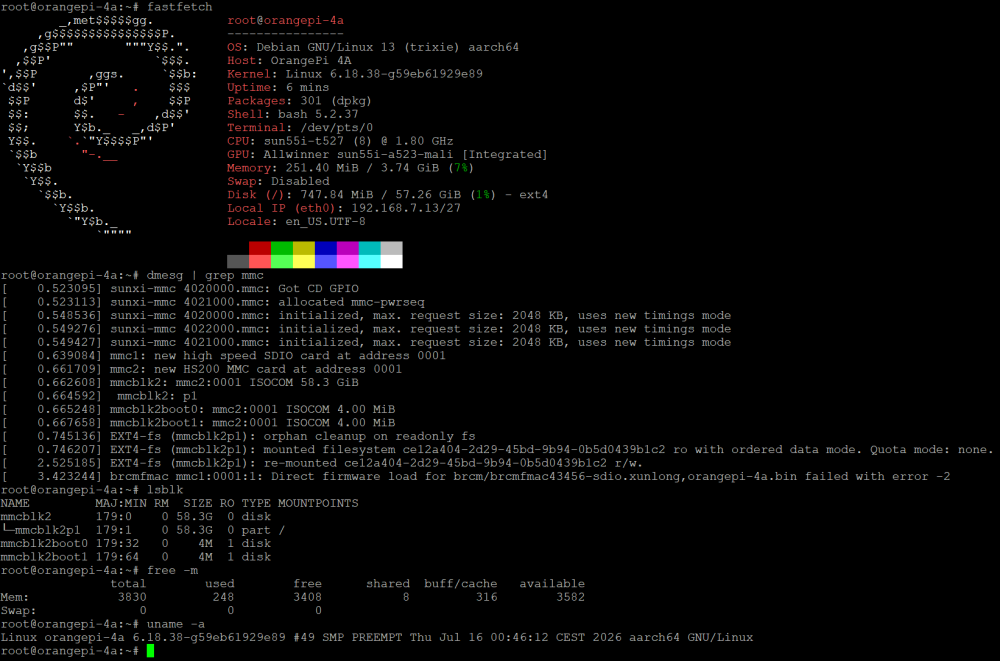
@JamesCL This is a fantastic report — thank you, James. 🙏 You've actually confirmed two things I couldn't test on my own hardware… 1) eMMC works (detection + HS200 + read/write)… booting from eMMC is a separate step I haven't wired up yet. 2) 4GB variant confirmed (free -m shows 3830 MB)… The two warnings — you read it right, secure SRAM for OP-TEE/BL31, harmless, cosmetic DTS cleanup I'll tidy up. …that's the most useful kind of report there is. Thanks again! 🙌