All Activity
- Past hour
-

Help wanted to test a new OpenVFD alternative
Jean-Francois Lessard replied to Jean-Francois Lessard's topic in Amlogic meson
@blackc fwnode_for_each_available_child_node_scoped has been mainstreamed in 6.18 (see Commit 448097b). When compiling out-of-tree from jefflessard/tm16xx-display, tm16xx_compat.h should provide backward compatibility (see Line 102). It looks like the Makefile is not picking up the include. You can try to manually add #include "tm16xx_compat.h" to tm16xx_core.c. -
I have only recently been able to get my LaFrite 512, no EMMC to boot armbian. My errors were legion. Might I suggest: 1. write the spi update image with the dd command, I had used etcher to no avail 2. make sure you use the USB port nearer the gpio pins 3. connect the hdmi output on the board to a monitor or use the serial header pins so that you'll have visual confirmations of what is going on 4. if the spi update image is newer than the board's image the update should be applied. My board was out of date and the image was applied. I've no idea what happens if the board has the same or newer image. I wasn't patient or thorough enough to check. 5. Use etcher to write any of the currently posted minimal images to a usb drive of 8, 16, or 32 GB - don't use a larger usb drive. Do not use the Ubuntu server image - the apt sources are bad on that one. 6. put the usb drive with the linux image in the usb port further from the gpio pins -- the opposite of what is needed for the spi update. Again make user you can see what is going on when you boot - hdmi to monitor is fine. Plug a usb keyboard in the other usb port to make things easy. 7. Power on the board. I used an el-cheapo power supply and it worked just fine. If you have a good usb drive the board should boot fairly quickly. There shouldn't be any or many failures on the way up. Again let me reiterate -- a small usb drive. Every 64GB and larger drive I tried failed during the boot process. You may have better luck, but start small to see it things work. I had decided some months ago that my board was defective, it wasn't, my brain was (or is). Hopefully some of my experiences will help. BTW make sure you use the forky rolling release for your Radxa-2F, because unless Armbian has fixed the older releases, your wireless card's drivers will be deleted on an apt upgrade or an Armbian-upgrade. Hope this helps.
- Today
-

Gaming experience with Orange Pi 5 (RK3588) on Armbian
晓飞丁 replied to KhanhDTP's topic in Orange Pi 5
I try FEX today and it is the same. I will try hangover tomorrow -
I've been using the Helios64 since launch, still going strong 👍 A couple of years back I had to limit the CPU frequency to avoid crashes until the last clean install of bulleyes. Since then stock clock and no custom dtb. Looking forward to my next holidays, planning on a clean install of Trixie. I'm planning on keeping using it as long as this thing wants to stay alive. An really nice piece of hardware, and I'm too cheap to move to something else 😄
-

DM_CRYPT module unavailable in initramfs after update to 6.1.115
IBV replied to David Zarebski's topic in Beginners
Nothing to read on input. Maybe this is the real error, the keyboard input or console has issues. The console param on boot remained unchanged after update ? -
 use system resolver instead of default:https://github.com/armbian/build/blob/60e869c42c03af0428d9983750eb766a7a846d43/config/templates/config-example.conf.template#L25
 -
If this is something with languages: I remember Armbian has a preferences option in apt config somewhere 'no languages'. Is old memory, maybe changed nowadays. Maybe a hint where to look and what to try. It would actually be a Cinnamon issue then.
-
@PH Ph Can I have your recovery and super?
-
 Old Thread, but I was stuck with a similar Issue related to Temporary failure resolving 'security.ubuntu.com' Turns out in my Case I had to specify a custom NAMESERVER Build Switch. Looking at the Reference Guide, the NAMESERVER Environment Variable defaults to 1.0.0.1. https://docs.armbian.com/Developer-Guide_Build-Switches/#hidden-options-for-advanced-users-default-values-are-marked-bold In my Case however, a DNS Block is enforced on my Main Router for all direct DNS Requests to any Nameserver (except the approved local DNS Servers, which are the only ones that can forward DNS Requests to Upstream DNS Servers). The Solution was quite easy once that was figured out. Just pass a local DNS Server as part as the Build Command 😃: compile.sh \ build \ NAMESERVER=192.168.1.3 \ ... I only came across the Reference Guide by Chance. It was tricky because the Docker Container used for the build Process could resolve any host successfully (e.g. curl -4 ifconfig.me or even curl -6 ifconfig.me), but I guess that either another Container (Docker inside Docker) or systemd-nspawn does something weird of its own.
 -

Efforts to develop firmware for H96 MAX V56 RK3566 4G/32G
WINEDS replied to Hqnicolas's topic in Rockchip CPU Boxes
The WiFi is easy. Just : wget https://github.com/radxa-pkg/aic8800/releases/download/4.0%2Bgit20250410.b99ca8b6-3/aic8800-firmware_4.0+git20250410.b99ca8b6-3_all.deb wget https://github.com/radxa-pkg/aic8800/releases/download/4.0%2Bgit20250410.b99ca8b6-3/aic8800-sdio-dkms_4.0+git20250410.b99ca8b6-3_all.deb dpkg -i aic8800-firmware_4.0+git20250410.b99ca8b6-3_all.deb dpkg -i aic8800-sdio-dkms_4.0+git20250410.b99ca8b6-3_all.deb You will need the Linux kernel headers installed though. -
@Nick A hi bro, I followed the instructions in the topic you indicated, but I couldn't extract it. I tried here and was unsuccessful. If you have some time and availability, here's the image.If you can't make it, I'll have to redo the steps over the weekend, I'll post it as soon as I can. Bootloader.img
-
I'm seeing this exact Cinnamon problem on the Pinebook Pro (Rockchip rk3399). I get the same error message flagging Util.latinise. I see no Start menu button. If I press the hardware start button on my keyboard I see a blank menu box appear with no icons or functionality. Under Armbian/bookworm, which I currently run on the Pinebook Pro, there is no problem; Cinnamon seems to work fine under Armbian/bookworm. The problem appears only with Armbian/trixie.
-
There we go https://github.com/armbian/build/pull/9106
-
Gaming experience with Orange Pi 5 (RK3588) on Armbian
晓飞丁 replied to KhanhDTP's topic in Orange Pi 5
Thank you so much! -
Thank you @Nick A
-

Gaming experience with Orange Pi 5 (RK3588) on Armbian
KhanhDTP replied to KhanhDTP's topic in Orange Pi 5
Yeah, mb box64 issue or something. I can't boot this game with box64 + wine/proton, only hangover (FEX) is working for me. Any Dxvk will work, I think! - Yesterday
-

Efforts to develop firmware for H96 MAX V56 RK3566 4G/32G
GBEM replied to Hqnicolas's topic in Rockchip CPU Boxes
Thanks, @WINEDS. I see you guy's are all over it, have at least the Ethernet sorted, and hints on the path to WiFi. I found an AllWinner CPU board from Radxa, that uses the same network peripherals as the newer H96 Max V56. The Radxa Cubie A5E is reported to feature WiFi6 and Bluetooth 5.4 using it's BLink BL-M8800DS2, which would be a step-up for me. https://docs.radxa.com/en/cubie/a5e/other-system/tina-os/build-system <- bsp, etc. Wish me luck. GBEM 👽 -
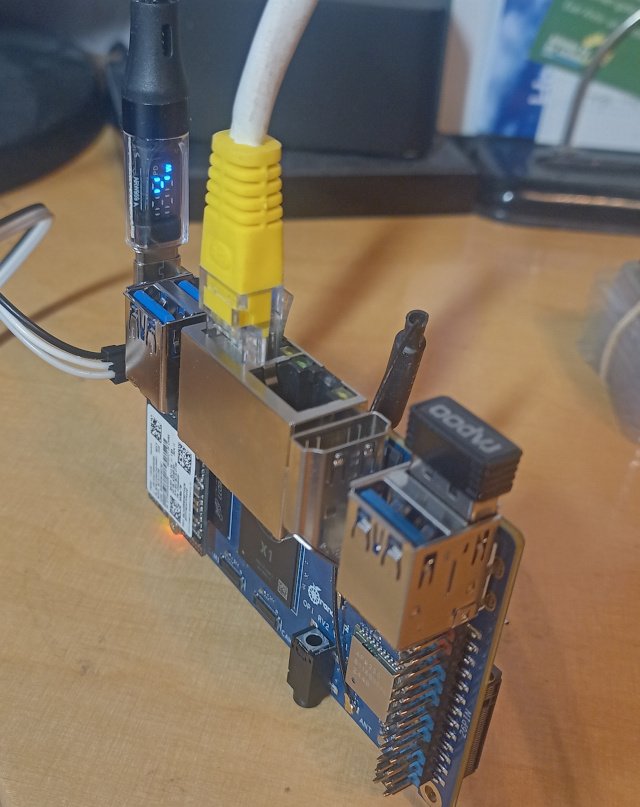
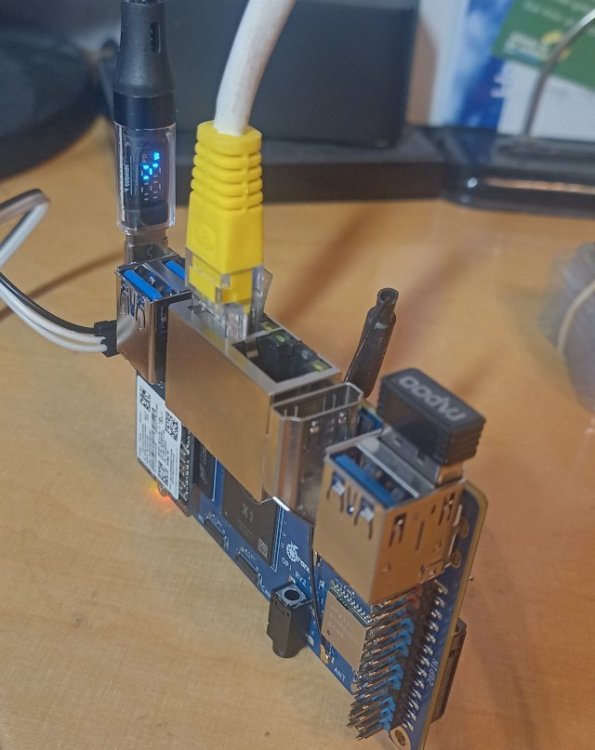
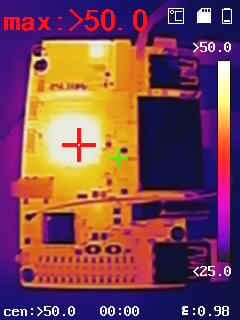
In the meantime, I spotted the pending MR from https://github.com/tmshlvck for this in the Pull Request Backlog. There are a number of issues with that, besides that it's very similar. Adding *.deb from xunlong without review is (mmm), better stay away from this. I'm not sure if the camera *.json is required. Not anything from the xunlong tree needs to be copied probably. I cleaned out my version (see https://github.com/sven-ola/armbian-build/tree/orangepi-rv2), but while this is open since October, I postpone to trigger another MR on that issue. My goal is: boot from upper 2230 SSD and use lower M.2 for Wifi (there are cheap Mediatek 3-band Wifi cards with 2280 adapter). If anyone wants similar setup, just checkout my branch from the link above and: ./compile.sh BOARD=orangepirv2 BRANCH=current RELEASE=trixie KERNEL_CONFIGURE=no BUILD_MINIMAL=yes KERNEL_GIT=shallow Write output/images/*.img to SD and boot with that. Use armbian-install to copy boot cfg on MTD. Again copy that *.img to /dev/nvme0n1. Remove SD card, reboot board. While investigating, there are a number of hints that the Ky X1 is in fact a SpacemiT K1 variant. Maybe stripped down, since the RCPU firmware (esos.elf) is much smaller. I have noticed, that Xunlong is not exactly welcome here. Chinese difficulties with the words upstream and donation probably. I think the hard work is to maintain / port the kernel and u-boot code drops with future versions. On the other hand: this board is cheap, offers a way to practice with a new CPU arch, and has the expected minimum number of M.2 slots. I'm currently compiling a kernel on that board. ETA 3 hours or so, board is not very fast. Anyhow, temp stays below 80°C if operated upright (above foto). No unusual hotspots, board and RAM seems stable, wifi and ethernet works. HTH and LG // Sven-Ola
-
What is booted also depends on boot scripts (and what is in armbianEnv.txt). This might have changed. And also the U-Boot code on the SD-card (sits invisible between partition table and 1st partition, usually sector 34-32767) might be newer and assume other defaults, I don't know. You need serial console cable and loglevel set to 7 so you can see what is happening after power-on. But maybe something else is wrong, at least make sure you post relevant info here on the forum. You can look in /usr/lib/u-boot/platform_install.sh to see where U-Boot is written. Also if you look there you can find some version string, likely in your mtd0/SPI is older than on the SD-card.
-
Hm... I never had such problems before. As far as I know, U-boot always overrides SPI as soon as bootable SD-card is inserted. How can I reach U-boot on SD-card if Armbian installation has been interrupted and not finished? When I insert such raw SD-card I do not see there any partitions applicable for mounting... My apologies for silly questions)))
-
Gaming experience with Orange Pi 5 (RK3588) on Armbian
晓飞丁 replied to KhanhDTP's topic in Orange Pi 5
I failed to run DaveTheDiver using these settings: PanVk-mesa 26.0 + wine-Proton-10.0.3 + Dxvk 2.7.1(stripped) the log shows: Unsupported ioctl 74080 Faking StorageDeviceProperty data Is FEX or DXVK 1.7.1 is a must ? -
 lsinitramfs -l boot/initrd.img-6.1.115-vendor-rk35xx | grep dm-mod -rw-r--r-- 1 root root 249464 Nov 25 15:18 usr/lib/modules/6.1.115-vendor-rk35xx/kernel/drivers/md/dm-mod.ko Looks like it is. Interestingly, when I update-initramfs -u, I do get warning about mdadm (failing to scan array) but I thought that the two issues were unrelated. Could it have an effect on the mapper availability? update-initramfs -u update-initramfs: Generating /boot/initrd.img-6.1.115-vendor-rk35xx W: mkconf: MD subsystem is not loaded, thus I cannot scan for arrays. W: mdadm: failed to auto-generate temporary mdadm.conf file.
 -
But that means you have 2 bootloaders and also 2 bootscripts. That will cause confusion, is it no surprise you end up in initramfs. I do not know which one has priority for the OPI5, maybe it is variable, depending on something in hardware on the board. On my ROCK3A, I can place an optional jumper that disables mtd0/SPI, so only option is U-Boot from SD-card. You can interrupt U-Boot if you connect serial console cable and then manually load the OS from SD-card or NVME, but it is a lot of commands and you need to know or study what those do. If you want to run a new OS from SD-card, you need to change (all) boot.* + armbianEnv.txt files, such that there is only 1 set (from SD-card or from NVME). Also only 1 U-Boot is best, else it will stay confusing. So wipe the U-Boot on SD-card. Then place the correct UUID in armbianEnv.txt (the UUID from rootfs on SD-card). Alternatively, you can use extlinux.conf boot method, you need to create that yourself, I use it on some SBC's so I can test new kernels etc (select at power-on in U-Boot via serial console cable). Or you flash EDK2-UEFI in mtd0/SPI and radically change all to EFI en grub bootmanager. Needs all manual own actions, not an Armbian thing.
-
picture seems broken/corrupted
-
DM_CRYPT module unavailable in initramfs after update to 6.1.115
IBV replied to David Zarebski's topic in Beginners
The error talks about dm-mod kernel module and not dm-crypt. Can you confirm that dm-mod exists in your initramfs? Just to eliminate this being the issue.