Active threads
Showing topics posted in for the last 365 days.
- Today
-

Installing Armbian in emmc on MXQ Pro 4k S905W
SteeMan replied to m4teush's topic in Amlogic CPU Boxes
If you mean the built-in script as described in the instructions linked to from the download page (https://www.armbian.com/amlogic-s9xx-tv-box) Then yes that should do everything you need. -

Install on amlogic tv box without working emmc
hexdump replied to Игорь Шаповалов's topic in Amlogic CPU Boxes
@SteeMan - there is no pressure to do it quickly or at all ... if you should look at it and have questions, just ask me here (i'm reading here regularly, but sometimes with a few days delay) or create an issue in my github repo. i'm always happy to see that you are keeping the amlogic boxes stuff alive pretty well in armbian. -
Can't you run on sdcard? It is heavily suggested to run on sdcard before installing on emmc. However the overlay is emmc-pins
-
@Робертс My screen is constantly white. Here's my wiring diagram. Display-Orangepi zero 3 VCC-5v GND-GND CS-PH9(spi1) RST-PC14 D/C-PC7 SDI-PH7(mosi) SCK-PH4 BL-3.3v SDO-PH8(miso) Also, there might be a typo. The specified dc-gpio in your dts is described as PHC7. I don't quite understand, is it PC7 or PH7?
-

Driving the ili9488 LCD (4.0 inch cheap chinese clone)
pami replied to robertoj's topic in Allwinner sunxi
Unfortunately, nothing's working for me yet(. It didn't work with dts, and my Python tests have only resulted in a gray screen and nothing else. I'm still using deepseek, as I don't understand it myself. Maybe I should connect the display's MISO? Although the display only seems to receive data, not transmit it. -

OrangePi Zero LTS ili9341 TFT LCD (and later OrangePi Zero 3)
robertoj replied to robertoj's topic in Allwinner sunxi
Yes. Probably this week. -
You can switch to beta to get faster updates, though they're untested autobuilds, so if something breaks, you have to unbrick yourself.
-
The Evolution of SBCs: From Hobby Boards to Edge ComputingOver the past two decades, single-board computers (SBCs) have transformed from experimental maker tools into the backbone of modern embedded and edge systems. What started as a handful of affordable hobby boards has grown into a diverse ecosystem powering automation, AI, and connected infrastructure around the world. From Prototypes to PossibilityEarly SBCs were humble experiments — small circuit boards combining processor, memory, and I/O on one platform. For years they lived quietly inside industrial machines and educational kits. The real turning point came in the early 2010s with boards like the Raspberry Pi, BeagleBone, and Cubieboard, which brought Linux to the maker community at a scale and price that anyone could access. These boards opened the floodgates for innovation. Suddenly, home labs, classrooms, and startups could prototype full Linux systems for the cost of a dinner. The appeal wasn’t just price — it was openness, GPIO access, and a thriving community that treated hardware as something to explore, not just consume. The Rise of a Global EcosystemAs demand grew, more vendors entered the field: Orange Pi, FriendlyElec, Radxa, and dozens of others expanded on the idea, each offering faster SoCs, more memory, and better I/O. Modern SBCs can now host NVMe storage, multiple displays, gigabit networking, and dedicated NPUs for AI workloads — features once reserved for full desktops or servers. They power digital signage, smart gateways, home servers, and even small AI clusters. Developers began caring not just about hardware specs, but also kernel stability, upstream drivers, and long-term support — exactly where Armbian excels. What’s NextLooking ahead, the direction is clear: AI acceleration everywhere – NPUs and neural engines are becoming standard on SBCs.Unified software stacks – Containers, orchestration tools, and reproducible builds are reaching the edge.Energy-aware computing – Solar and battery-powered deployments highlight the need for lean, resilient systems.Armbian’s role in this landscape is to provide the stable software foundation that ties it all together — open, optimized, and reliable across dozens of architectures. In SummarySBCs have grown up. They are no longer just learning tools or proof-of-concept boards — they are the quiet engines running modern infrastructure at the edge. Armbian sits at the heart of that transformation, helping these devices boot faster, run cleaner, and stay useful long after their first flash. The evolution of the SBC mirrors the story of open computing itself: innovation born from community effort, refined through shared knowledge, and extended by software that stays light enough to go anywhere. View the full article
-
 @quaSimba: Fantastic work! Will put a link at the top of the tutorial for visibility.
 -
Armbian recently merged and will be releasing (and backporting) a patched devicetree file for the Odroid C4 and HC4 that eliminates the second power-cycle "glitch" during boot. Hopefully this will fix at least one issue people have been reporting, where some HDDs (or other devices) do not react well to rapid power double-tap during boot. https://github.com/armbian/build/blob/main/patch/kernel/archive/meson64-6.19/board-odroid-sm1-regulators-boot-on.patch It will also be released (and likely backported) upstream in next Linux kernel release and/or fixes. Also, something else people have been reporting is the HC4 struggling to spin up two large HDDs at the same time. If you have an HDD with a "Power Up In Standby" (PUIS) setting, such as the Seagate IronWolf, then you can configure all non-system (non-boot) drives in this manner, and then mount and access them sequentially after the system has booted. Depending on how much power the HDDs use in regular operation, this might work to get both spun up and running. Theoretically, you could also access just one drive at a time and then place it back in standby before using the other drive. YMMV.
- Yesterday
-
@kil I also own a T95H and playing around with that now. Would it be possible getting your final dts, dtb and .config for u-boot? Thanks in advance & best regards
-
Hi, I could try to help, my board is exactly the same as yours. Can you provide me a source with instructions of how to do that?
-
Hello, I come across this topic as I got a couple of cheap OrangePI CM4 boards. As per I can see, the board is not yet supported by Armbian, so I would like to ask what is the current best option. I have seen BananaPI CM4 was an option, but is this still valid? Also, I have tried using the Ubuntu version (i.e. Ubuntu 22.04 with kernel 5.10.160) provided by OrangePI on mine and I have recompiled the kernel as below: This works well, but it doesn't seem supporting the NPU (i.e. there is no device "/dev/rknpu"). So I was wondering if the BananaPI CM4 above is better from that point of view. Regards,
-
Hello, I am facing an issue with my Youyeetoo YY3568 board. After that, I attempted to flash my own Yocto (Radxa manifest–based) wic image for the YY3568 using RKDevTool on Windows, but the flashing did not complete successfully. Since then, the board is always detected in Maskrom mode and never switches back to Loader mode. What I have tried so far: 1- Flashed prebuilt Ubuntu image (YY3568_Ubuntu_EDP.img) from the official link: https://drive.google.com/drive/folders/1D90vztL9fRfWV7laV9mdcnZ5kNpxx_tl → Board still shows Maskrom mode after flashing. 2- Flashed SDK-based image and loader built using the official documentation: https://wiki.youyeetoo.com/en/YY3568/ubuntu → Board remains in Maskrom mode. I have tried flashing from both Windows (RKDevTool) and Linux (rkdeveloptool), but the board is consistently detected in Maskrom mode. Question: How can I recover the board from Maskrom mode and bring it back into Loader mode, so that I can flash images and make the board operational again? Any guidance would be appreciated. Thank you.
-
 psst, I ordered a board, hopefully I've time and may get it going it takes a lot of *work* to even get it working and with more often than not , no (scant) documentation (e.g. missing dram controller docs ) / codes to even get it working. btw it is good for those who wish to have board support to donate in support of armbian in support of it, it is probably the only sustainable way to do so.
 -
Should be there. https://github.com/armbian/build/blob/00b6e17abfd859893a39f6445715a3327fed150a/config/kernel/linux-meson64-edge.config#L355 https://cateee.net/lkddb/web-lkddb/IP_NF_IPTABLES.html
-

ssh missfire on bpi-m5 noble
gene1934 replied to gene1934's topic in Software, Applications, Userspace
thank you. I'l give that a try when I wake again. -
http://blog.armbian.com/content/images/2026/01/githubhighlights-2.png This week’s Armbian development saw a major cleanup of legacy toolchain code, alongside numerous board-specific improvements and kernel updates. Support was added for the Nuvoton MA35D1 NuMaker IoT board, while the BananaPi CM4/M2S and Khadas VIM3L boards received updated U-Boot bootloaders. Several fixes addressed hardware compatibility, including Bluetooth on Orange Pi Zero2, Type-C issues on Helios64, and build stability for the Raspberry Pi 4B. The release also introduced enhanced audio support for Genio devices and new AV1 patches for Rockchip64. Continuous integration workflows were reorganized, and the Ubuntu Resolute image build was enabled, reflecting ongoing efforts to streamline and modernize the Armbian build system. "get completely rid of dead code toolchain stuff", pt2. by @rpardini in armbian/build#9218"get completely rid of dead code toolchain stuff", pt3. by @rpardini in armbian/build#9252"get completely rid of dead code toolchain stuff", pt4 - fixes. by @rpardini in armbian/build#9256Add post-build Armbian extension for burnable JetHub boards. by @QwaSeeK in armbian/build#8844BananaPi CM4/M2S: Update u-boot to v2026.01. by @pyavitz in armbian/build#9250board: add Nuvoton MA35D1 NuMaker IoT board support. by @TuAFBogey in armbian/build#9205bunch o' fixes: 6.18/current .configs (uefi-all/meson64) + boards KERNEL_TARGET + meson64 6.18 pcie debork again-again. by @rpardini in armbian/build#9247ci: organize GitHub Actions into meaningful categories. by @igorpecovnik in armbian/build#9260Enable Ubuntu Resolute image build. by @iav in armbian/build#9164Fix OP-TEE build on Ubuntu Jammy (older binutils). by @TuAFBogey in armbian/build#9249Fix Panther-X2. by @sicXnull in armbian/build#9243Fix typec on pinebook pro. by @amazingfate in armbian/build#9245genio: add alsa-ucm-conf + ucm2 config for working audio in userspace. by @rpardini in armbian/build#9235genio: collabora: bump to collabora's 6.19-rc5. by @rpardini in armbian/build#9251Helios64: fix Type-C PHY registration. by @iav in armbian/build#9158khadas-vim3l: u-boot: update v2026.01 u-boot fanciness. by @rpardini in armbian/build#9257mainline: bump edge to rc5. by @EvilOlaf in armbian/build#9244Meson64: Delete patches that are not required. by @pyavitz in armbian/build#9239meson64: remove upstreamed patch for 6.18.6 and rewrite the rest. by @EvilOlaf in armbian/build#9266mixtile-core3588e: alias ethernet0 to gmac0 for stable MAC address. by @rpardini in armbian/build#9237orangepizero2: fix bluetooth in edge kernel. by @EvilOlaf in armbian/build#9242radxa-zero2: fancy u-boot v2026.01 // minimal+full fusb302 enablement. by @rpardini in armbian/build#9253rockchip64-6.19: arm64: dts: rockchip: describe pcie ethernets on FriendlyElec NanoPC-T6. by @rpardini in armbian/build#9238Rockchip64: Add verisilion av1 patches. by @amazingfate in armbian/build#9240rockchip64: Helios64: fix Type-C PD negotiation. by @iav in armbian/build#9255rpi4b: fix build and boot issues. by @EvilOlaf in armbian/build#9267sunxi-current: recover lost Makefile entries. by @EvilOlaf in armbian/build#9236sunxi: bump current and edge to latest minor. by @EvilOlaf in armbian/build#9229sunxi: resolve some cross patch dependencies. by @EvilOlaf in armbian/build#9232sunxi: switch current and edge back to auto bumping. by @EvilOlaf in armbian/build#9234u-boot: run binwalk on all the produced u-boot bins (always). by @rpardini in armbian/build#9192Update jethome j200 kernel patchset, uboot to 2025.04. by @adeepn in armbian/build#9231View the full article
-
Hi @ff255, There is an effort to add this calculation in the U-Boot bootscript. I'll have a look at doing this during updates to initramfs or kernel, good suggestion! Groetjes,
-
Thank you very much! Regards, Chris
-
update on this. I did try to install Helium/Helium Miner and it does not work. ill work on the devicetree to get that functionality present but for now be warned.
- Last week
-
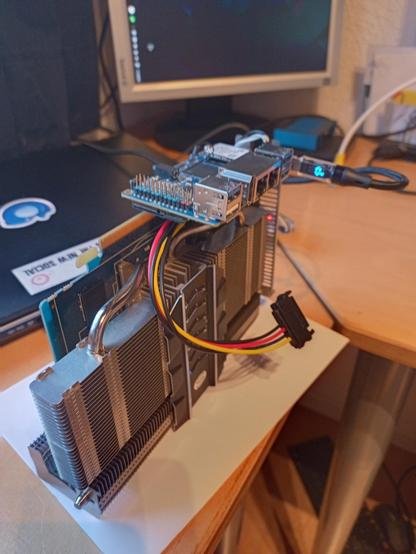
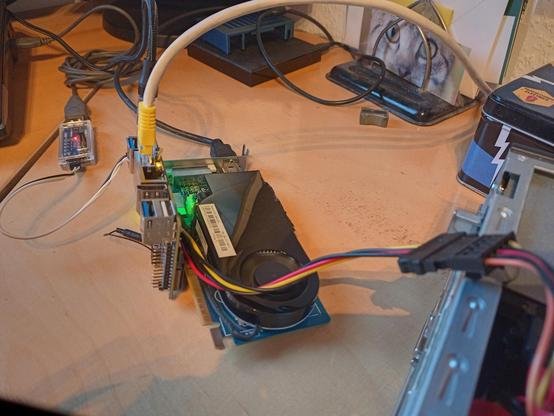
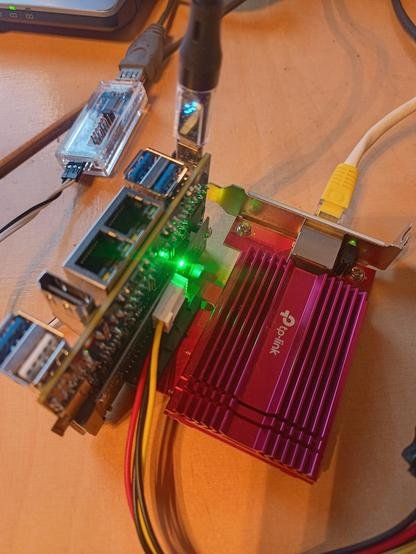
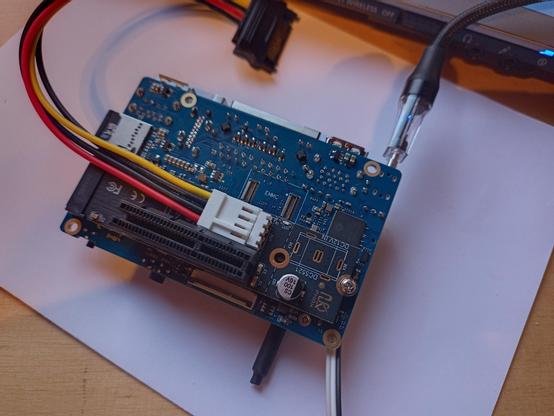
Have solved another todo: grab overlay *.dtbo from Ky/Xunlong. There is still some quirks with SD/TF read/write speed (UHS / 1.8v mode). Also applied for Armbian maintainership on orangepirv2 in advance. Had some experiments with that M.2 to PCIe adapter I recently got. That oversized thing is an older Radeon with an Opi RV2 mounted on top. That does not work (no, card is so old it does not require extra 12V). Second image is a even older Nividia Geforce, That one shows up with "lspci" but does not work b/c no RiscV drivers (that's expected). Next ist an TP-Link / Aquantic 10 GbE Ethernet card. That one works, even without that extra power supply from the PC next to it. Not sure, if the Spacemit CPU can handle the ten gigs... Last image: the 2280-to-PCIe adapter with the eternal SATA power feed cable. LG // Sven-Ola
-
Hi everyone, and sorry for my poor English. I'd like to enable PWM on my CM3588 nanoPC with the latest Armbian Trixie version. Can anyone who's managed to get the PWM working properly tell me which pin to connect the PWM signal to and what exactly to do to enable it? Thanks to anyone who replies.
-
Thank you Pearo, What does "S/N" mean? I just ended up using my orange pi zero 3 gpio without the additional DTS, which made connector numbering available in the gpioinfo command... There were comments that made it sound not really necessary, and it was more work than I wanted to take on. The solution for me was: https://forum.armbian.com/topic/33800-orange-pi-zero-3-gpio/#findComment-181191 This was 2 years ago, and I haven't even thought about it, all this time.
-
Hallo, in want to start with odroid n2+ to organize a PV System with smart-power-meter(s) ... To reduce th amount of components I want to use min. 2x UART's from the odroid (without using the console port) + RS485 Transceiver(s) ... I understand that your dtbo file add support for the Uart's of the 40 pin Socket ! ? After upgrading to linux kernel-6.18.5 i need such a dtbs / dtb0 file... Where can I download these files atually ? Bye