Active threads
Showing topics posted in for the last 365 days.
- Past hour
-
This week's work centers on board portfolio expansion, kernel and U-Boot version bumps, and CI and infrastructure hardening across the build and documentation pipelines. Board support saw notable growth with the introduction of the SpacemiT K3 Pico-ITX and Luckfox Nova (RK3308B), alongside a new generic uefi-arm64-dt family and board intended to standardize UEFI device-tree targets. Qualcomm enablement advanced through Radxa Dragon Q6A and Q8B work, including UFS provisioning for Kodiak, EDL-based UFS flashing in the imager, and audioreach topology firmware for sc8280xp. Catalog assets were extended for the MaaXBoard 8ULP, Mellow Fly C5, Xiaomi Sheng, and the new Radxa and SpacemiT boards. On the kernel and bootloader front, rockchip64, meson64, and rpi4b edge branches were promoted to the stable 7.1 series, with the rtl8192eu driver rebuilt and re-enabled against the new tree. U-Boot was refreshed on cm3588-nas, nanopik2-s905, and the Luckfox Nova, while updated DDR, BL31, and BL32 blobs landed for RK3528 and new SPL loaders were published for RV1103, RV1106, and RK3506. Targeted kernel-config work restored md/RAID modules on sunxi, enabled MIPI DBI panels on sunxi64, and added CPUFreq support for the SpacemiT K1. Infrastructure changes focused on resilience and resource control. The git-trees workflow gained bounded retries, escalating timeouts, and Google mirror fallbacks; Docker base-image pulls now retry transient GHCR failures and split host dependencies into per-group apt layers. Image compression caps xz memory and thread usage, the info-gatherer no longer exhausts file descriptors, and a new CI policy enforces transparent backgrounds and object-size limits for board and vendor logos, with offending assets re-cropped. #Armbian #EmbeddedLinux #UBoot #Qualcomm #Rockchip ChangesActions: Disable debugsym builds. by @vidplace7 in armbian/MorseMicro-DKMS#7Add Board & Vendor logo for the Mellow Fly C5. by @deece in armbian/armbian.github.io#324Add board SpacemiT K3 Pico-ITX. by @pyavitz in armbian/build#10001Add board: Luckfox Nova (RK3308B). by @crackerjacques in armbian/build#9985Add K3 Pico ITX. by @igorpecovnik in armbian/armbian.github.io#341Add Luckfox Nova board image. by @crackerjacques in armbian/armbian.github.io#332Add MaaXBoard 8ULP board image and Avnet vendor logo. by @govindsi in armbian/armbian.github.io#340Add Radxa Dragon Q8B board image. by @SuperKali in armbian/armbian.github.io#342Add spl_loader bins for RV1103, RV1106, RK3506. by @vidplace7 in armbian/rkbin#46Add Xiaomi Sheng board image. by @code002-2 in armbian/armbian.github.io#337armbian-install: fix boot on UEFI systems. by @EvilOlaf in armbian/build#9945armbian-upgrade: use apt-get to silence apt CLI-warning noise. by @igorpecovnik in armbian/build#9998artifact-uboot: opt-in cache-bust via UBOOT_HASH_EXTRA for prebuilt blobs. by @igorpecovnik in armbian/build#9995board assets: fix 10 board-image dimensions + square the Huawei logo. by @igorpecovnik in armbian/armbian.github.io#334ci: board-asset validation — transparent background + object-size + full monthly scan. by @igorpecovnik in armbian/armbian.github.io#333ci: bound each retry attempt with a 10-minute timeout. by @rpardini in armbian/shallow#8ci: double retry timeout each attempt; fetch from Google mirrors. by @rpardini in armbian/shallow#9ci: enforce MAX_OBJECT_PCT=50 + re-crop the two over-limit board images. by @igorpecovnik in armbian/armbian.github.io#335ci: make git-trees workflow resilient to network failures. by @rpardini in armbian/shallow#7ci: push image-info data branch direct to github (bypass git cache proxy). by @igorpecovnik in armbian/armbian.github.io#338ci: vendor logos must be transparent + ≤80% object fill (+ fix the 6 opaque ones). by @igorpecovnik in armbian/armbian.github.io#336cm3588-nas: u-boot: bump to v2026.07-rc3. by @rpardini in armbian/build#9975docker: retry transient ghcr base-image pulls; guard the auto-pull cronjob. by @igorpecovnik in armbian/build#10006docker: split host deps into per-group apt layers in generated Dockerfile. by @rpardini in armbian/build#9999Feature/sunxi mainline stmmac ac300. by @deece in armbian/build#9952fix(images): hide UFS images from the catalog. by @SuperKali in armbian/imager#157fix(profiles): keep the flash profile picker in sync with Settings. by @SuperKali in armbian/imager#156Flash UFS images to Qualcomm boards over EDL. by @SuperKali in armbian/imager#158image: cap xz compression memory and lower the thread cap. by @igorpecovnik in armbian/build#10005info-gatherer: fix 'Too many open files' from cpu*4 parallel workers. by @igorpecovnik in armbian/build#10014introduce new family uefidt and new board uefi-arm64-dt. by @amazingfate in armbian/build#9923Kodiak: add Radxa Dragon Q6A UFS provisioning XML. by @SuperKali in armbian/qcombin#2luckfox-rk3308b-nova: bump U-Boot to v2026.07-rc4. by @crackerjacques in armbian/build#10010meson64: bleedingedge: enable CONFIG_GPIO_CDEV_V1. by @adeepn in armbian/build#9979nanopik2-s905: bump u-boot to v2026.04. by @igorpecovnik in armbian/build#9989PocketBeagle 2 - Fix NCM Networking w/ACM for Serial. by @Grippy98 in armbian/build#10007qcom/qcs6490: replace Radxa Dragon Q6A adsp/cdsp with linux-firmware. by @SuperKali in armbian/firmware#129qcom/sc8280xp: add Radxa Dragon Q8B audioreach topology. by @SuperKali in armbian/firmware#128radxa-cubie-a5e: tidy BOARD_NAME to "Cubie A5E". by @igorpecovnik in armbian/build#9990remove bleedingedge from all boards. by @EvilOlaf in armbian/build#10016rk3528: updated rkbins ddr/bl31/bl32 for rk3528. by @rpardini in armbian/rkbin#47rockchip64 & meson64: bump edge to stable 7.1. by @EvilOlaf in armbian/build#9980rpi4b: bump edge to 7.1.y. by @EvilOlaf in armbian/build#9982rtl8192eu: fix build against 7.1 and re-enable. by @EvilOlaf in armbian/build#10009SpacemiT K1: Update CPUFreq support EDGE. by @pyavitz in armbian/build#9981sunxi64: Enable CONFIG_DRM_PANEL_MIPI_DBI=m for current and edge configs. by @d93921012 in armbian/build#9984sunxi: restore md modules (software raid modules). by @k-popov in armbian/build#9992Update MorseMicro suite to 1.17.9. by @vidplace7 in armbian/MorseMicro-DKMS#8Update odroidxu4-current to 6.6.143. by @belegdol in armbian/build#10018View the full article
- Today
-

NVMe not recognized on OrangePi 5 Pro with Armbian
eselarm replied to Folaht Pjehrsohmehj's topic in Beginners
This is not NVME, but SATA. No surprise it does not work. It might be that the M.2 slot of the OPi5pro is such that with an overlay, you could map SATA signals to that slot and then it should work. Look in rockchip overlays folder for any .dtbo file with name like *rk3588*sata* But you should check HW circuit diagram maybe first, might also be that this is only for the normal OPi5 Maybe search a bit, I found Is old topic, but the principles are still the same. -

SATA hard drives on Odroid-HC4 (OpenMediaVault works!)
BigHeadMode replied to BigHeadMode's topic in Odroid C4
I am 95% sure this happens even on a plain Armbian install. I'll double check. Some news: - it does not happen on all SATA devices (booted fine with 1 SSD) - power supply seems fine; marked 4.0 A There is a workaround! press any key to interrupt boot (be fast, 2 second timer) scsi scan # wait under 2 minutes boot # similar output to "failed" boots # but after under 2 minutes, it will continue into the boot process Does anyone know how I could put these steps into the boot process automatically? -
Hello everybody, With 6.18.10-current-rockchip64 and rk3399-kobol-helios64.dtb-6.18.18-opp dtb file, Ok With 6.18.35-current-rockchip64 and overlay helios64 patch with armbian-config, Ko With 6.18.35-current-rockchip64 and k3399-kobol-helios64.dtb-6.18.18-opp dtb file, Ko The crash is random... sometime crash: - At the boot with red system light blinking - At the opening of my LUKS ciffers drives - At a high cpu load - With nothing special, all led are blue, system blinking but network and ssh is Ko Is it possible to explain me how to see the problem or how to have log because I am in blind to have more details ? Is it possible to explain me how to pass to the last 6.18.36 kernel to seen if it is better than 6.18.35 ? Thanks a lot.
-
Thank you, bro. I'll try it this evening after work. I'll post the results.
-

Installation Instructions for TV Boxes with Amlogic CPUs
William Bulchi replied to SteeMan's topic in FAQ
I want to install an image from the sd card to the internal memory in x96q tv box, it boots perfectly from sd card, without having to press anything, and everything works ok, even bluetooth adapter and video reproduction, my question is "do i still need to modify boot files to install in emmc or is not necessary? thanks in advance.... -

armbian not booting TV BOX TX9Pro sun50iw9 H616
Nick A replied to Роман Логинов's topic in Allwinner CPU Boxes
You can find everything you need here. H616 is similar to H618. https://forum.armbian.com/topic/29794-how-to-install-armbian-in-h618/ you can use this tool to extract your dram settings. https://github.com/apritzel/sunxi-fw - Yesterday
-
Update on 0.7: Led Display works perfectly Wifi works perfectly after reboot (i would suggest it on screen after the driver is built) Unable to test USB3 at the moment Installed Kodi, unable to get video acceleration (it says llvmpipe with CPU at almost 100%, clearly is running software rendering) @serovan did you reboot after first boot? But yes, probably your revision has different pinout for the peripherals (wifi and PHY)
-
IMX708/ Pi Cam 3 not initializing on Pi Zero 2W
eselarm replied to Stuart Watt's topic in Raspberry Pi
What is your plan with that camera? My latest try with raspbian (armv6) trixie based failed w.r.t. V4L2. So that is with start.elf, not start_x.elf. The latter works fine on bookworm based raspbian for camara v1. Camera v3 never worked with legacy firmware mode (start_x=1), so needs libcamera. For easy handling, the latest RPL variant of libcamera named rpicam should work, but then you'll be essentially back to RaspberryPiOS. If you have standard Debian Trixie based, all that modified libcamera is not there and more important, you will have other firmware files (bootcode.bin start.elf fixup.dat). Armbian takes the version from Ubuntu AFAIK, Debian is yet another version as is the latest from RaspberryPiOS (64-bit patched Debian or 32-bit patched and re-compiled Raspbian). The package name is raspi-frmware, check which versions there are with sudo apt list -a raspi-frmware and in addition, the 3 files themselves, I did timestamp or suffix them with sha256sum in the past on order to keep track of the various ones delivered for various OSses and images. I assume the Armbian kernel is compiled from same RPi kernel tree as RaspberryPiOS, so overlays for the v3 camera should be there and functionally the same. I currently have 1 camera v1 base RPI3B+ running, still bookworm, but I might boot it with Debian Trixie/Sid and see what mainline libcamera does. Probably then Armbian bcm2711 edge kernel, at least something that provides overlays as Debian kernels have almost none, at least not for camera sensors. -
There is supposed to be a package that automatically handles building a (presumably patched) version of the kernel module for this wifi/bt chip, called `aic8800-usb-dkms`, but for some reason, a kernel upgrade doesn't auto-trigger it. During the last kernel upgrade, I was able to get it working by manually doing `sudo dpkg-reconfigure aic8800-usb-dkms`, but that also does not work since 26.5.1, as it gives Deleting module aic8800-usb-4.0+git20250410.b99ca8b6-3 completely from the DKMS tree. Loading new aic8800-usb-4.0+git20250410.b99ca8b6-3 DKMS files... Building for 6.18.2-current-qcs6490 Building initial module for 6.18.2-current-qcs6490 Error! Bad return status for module build on kernel: 6.18.2-current-qcs6490 (aarch64) Consult /var/lib/dkms/aic8800-usb/4.0+git20250410.b99ca8b6-3/build/make.log for more information. And that file basically says (a bunch is redacted for brevity): DKMS make.log for aic8800-usb-4.0+git20250410.b99ca8b6-3 for kernel 6.18.2-current-qcs6490 (aarch64) Sat Jun 20 06:36:14 PM PDT 2026 make: Entering directory '/usr/src/linux-headers-6.18.2-current-qcs6490' make[1]: Entering directory '/var/lib/dkms/aic8800-usb/4.0+git20250410.b99ca8b6-3/build/USB/driver_fw/drivers/aic8800' warning: the compiler differs from the one used to build the kernel The kernel was built by: aarch64-linux-gnu-gcc (Debian 14.2.0-19) 14.2.0 You are using: gcc (Ubuntu 13.3.0-6ubuntu2~24.04.1) 13.3.0 ... gcc: error: unrecognized command-line option ‘-fmin-function-alignment=8’; did you mean ‘-flimit-function-alignment’? gcc: error: unrecognized command-line option ‘-fmin-function-alignment=8’; did you mean ‘-flimit-function-alignment’? make[4]: *** [/usr/src/linux-headers-6.18.2-current-qcs6490/scripts/Makefile.build:287: aic_load_fw/aic_txrxif.o] Error 1 ... Apparently, the kernel is now built with gcc 14 (which matches the default in Debian Trixie images but not Ubuntu Noble images which have gcc 13). Not sure how to resolve that inconsistency. 1. Install & replace gcc 13 with gcc 14 (just installing won't work as this dkms module build doesn't respect CC env vars); not sure if this will break other things in Ubuntu 24.04 2. Rebuild the kernel with gcc 13; same issue will re-occur on the next kernel upgrade 3. Or something else Just out of curiosity, did you have to mess around with gcc versions to get it to compile (or are you using Debian Trixie images)?
- Last week
-
I have checked .... true.... my fix 7.1 was creted for 7.1-rc1 here we have got 7.1-rc4 so not working... Problably it needs to fix dirver aic8800 as still not supported plus compilation... usb2/usb3/ethernet are working?
-
just as a statistics/stability report: the DTB with the NPU works very well. Uptime of the device is already a week, it's running armbian and immich on it. While immich lags sometimes because the board can be weak for video processing, but in general it already processed ~20k images with OCR and face detection based on RKNN. I consider it pretty good results.
-
I have wifi and it worked without building or installing anything. During the first boot I was asked if I would like to use wifi, I saw the list of SSIDs, but I was unable to connect. I used nmcli and I'm connected now. dkms status outputs: bcmdhd-spacemit-sdio/101.10.591.84.37-4, 6.18.36-current-spacemit, riscv64: installed Update: It boots from eMMC
-

Armbian in IK316-EMCP_v4.1
Aldiansyah Permana replied to Matheus Gomes's topic in Allwinner CPU Boxes
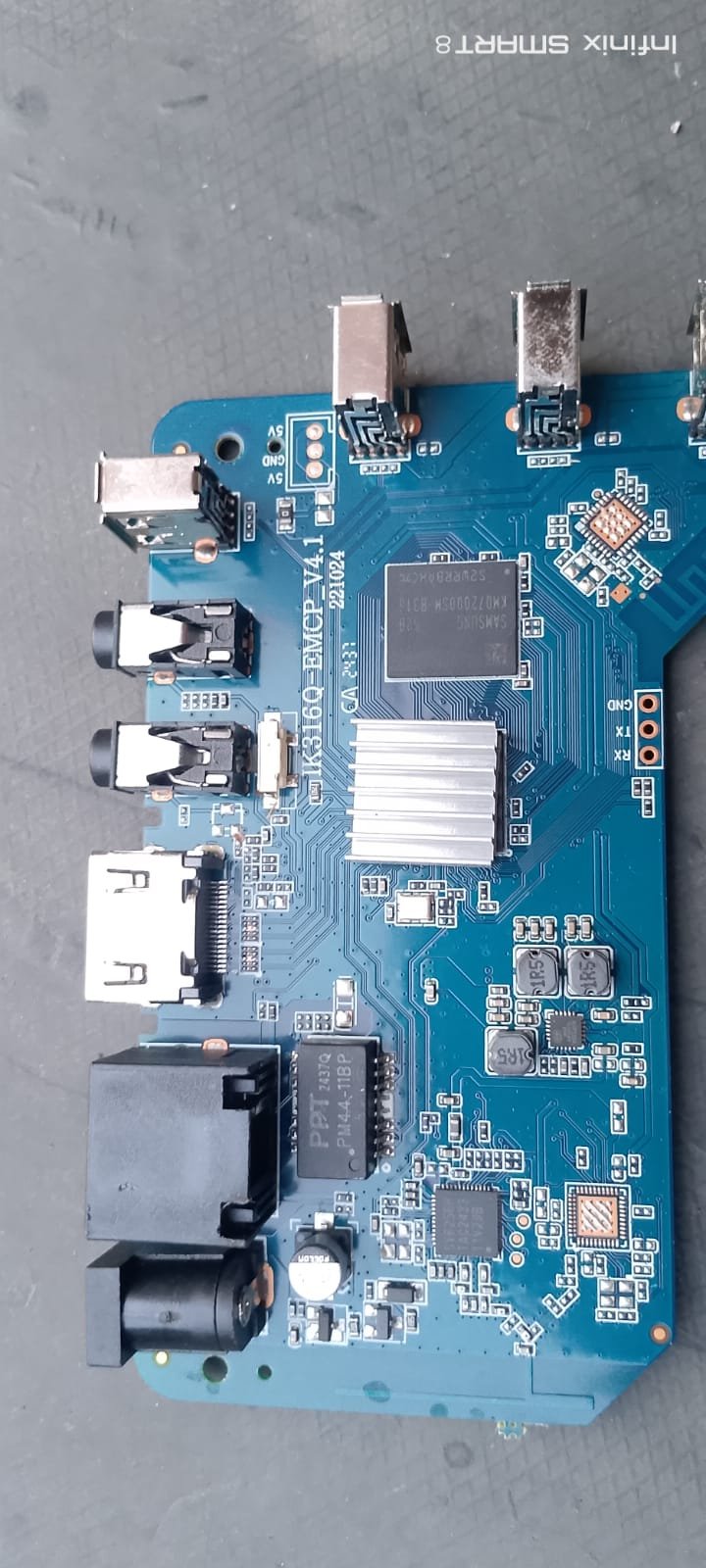
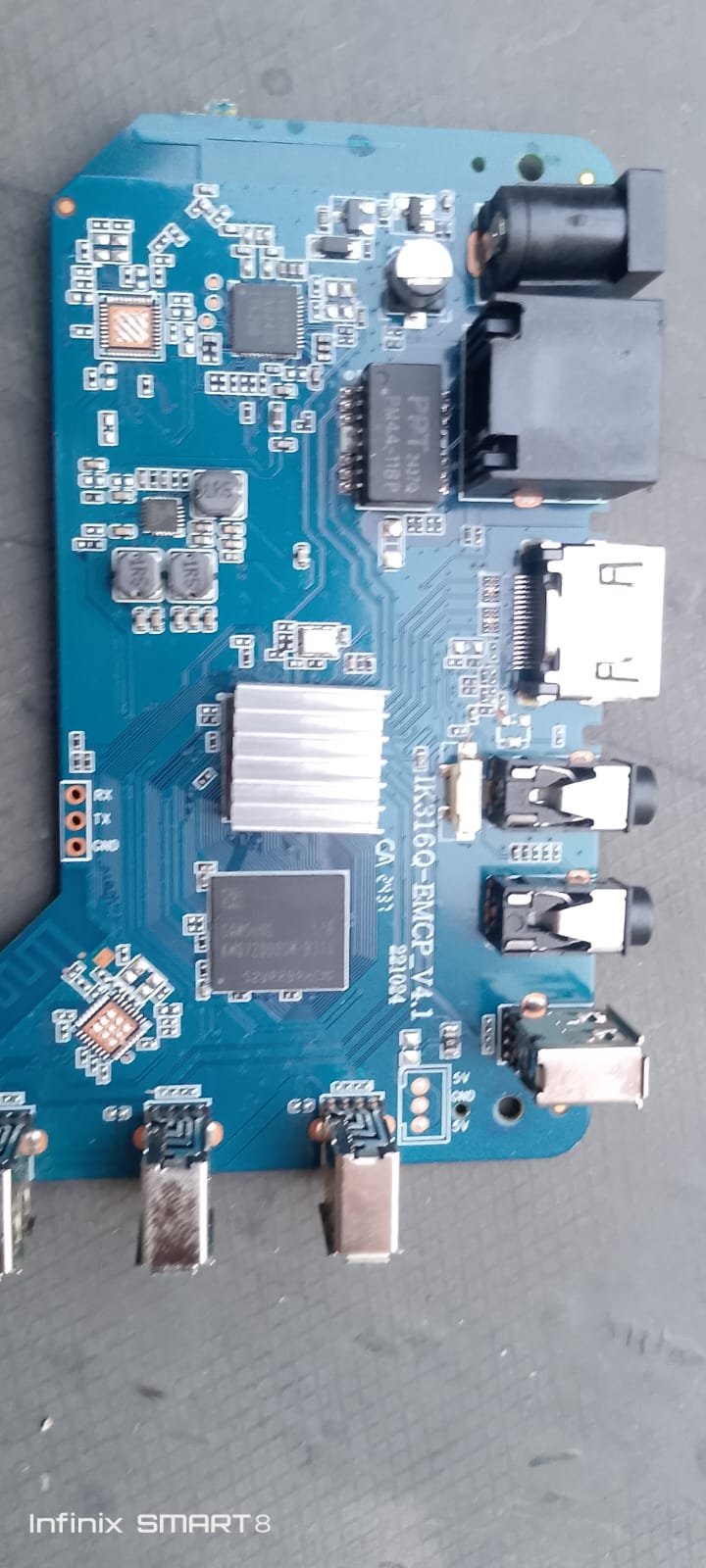
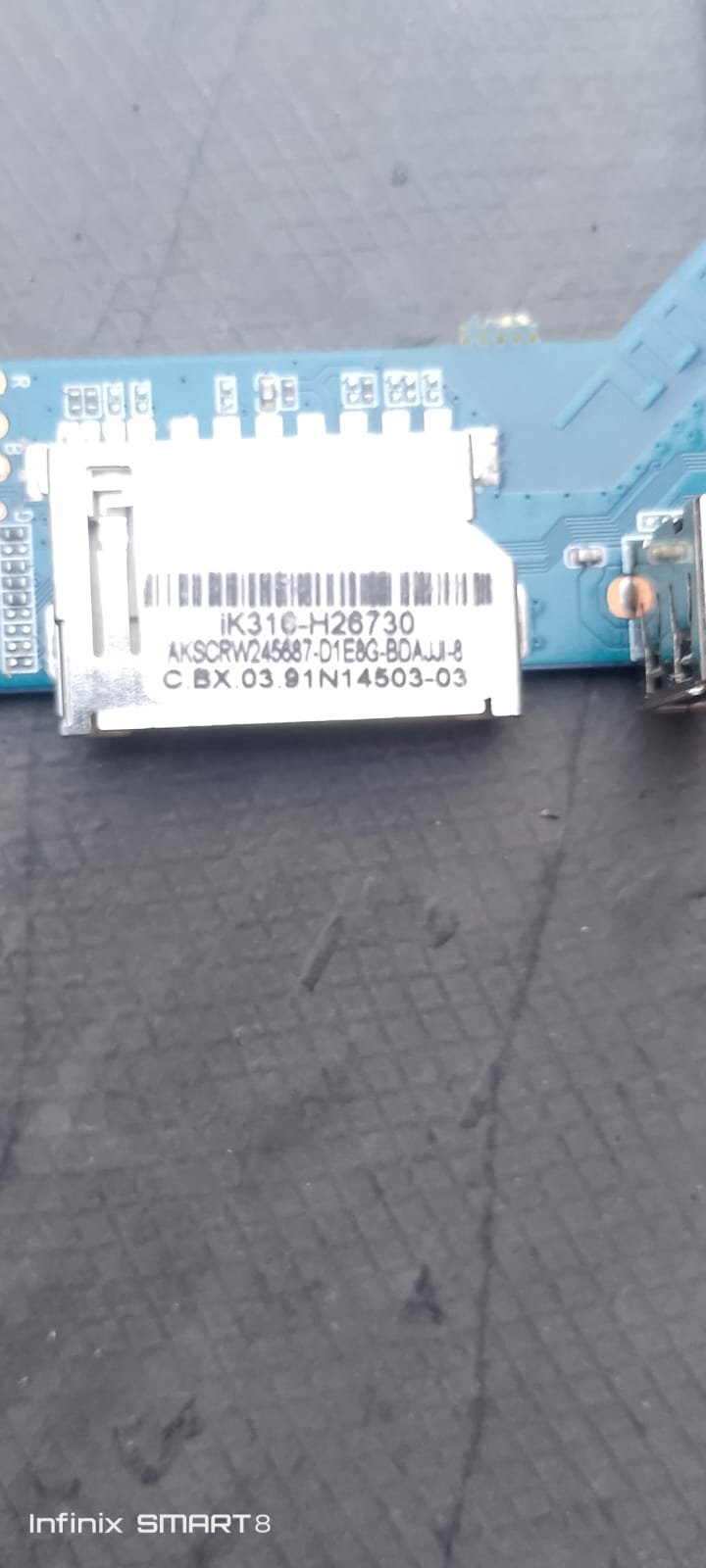
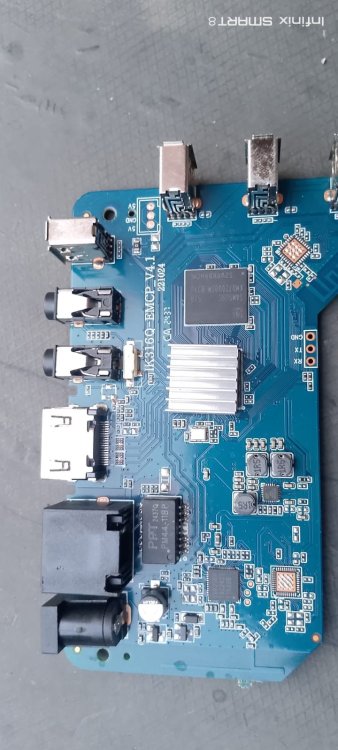
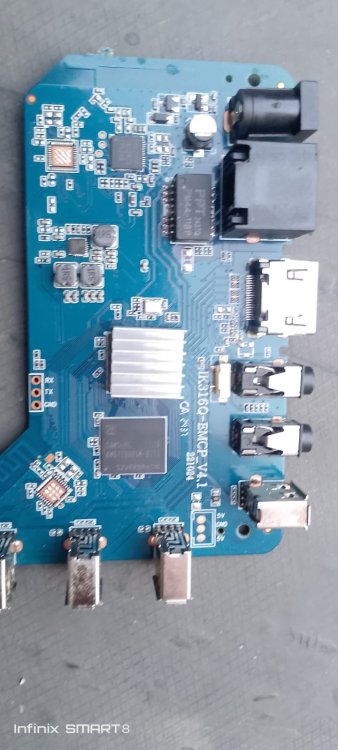
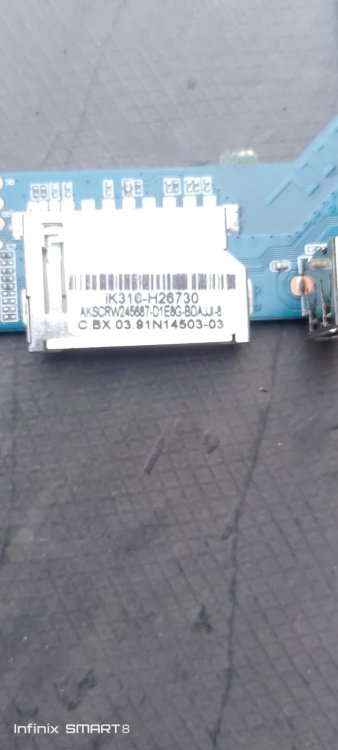
please help me I need firmware STB MXQPRO 4K 5G ADVANCE mainbord type IK316Q-EMCP_V4.1 221024.send me FW as the same board please,i need install for android tv.and tool I'have as I flash for 8 firmware while I install program full after reboot or shutdown then start again my stb did'nt start to menu.Thank's Best Regard brothers,.jpeg.40b0d79a49f98e9c83a5e45df94ee1ca.jpeg)
-

Gaming experience with Orange Pi 5 (RK3588) on Armbian
KhanhDTP replied to KhanhDTP's topic in Orange Pi 5
@Alex Ling Yeah, I hope it will boost the performance or compatibility even more. -
I don't have this device so I can only give generic advice. Set verbosity to 7 in /boot/armbianEnv.txt to get more details besides this unhandled SMC message. From what I've read over the years is that this device seems quite fragile and has lots of quirks in to get it halfway decently running. It would be not uncommon that (on first glance unrelated) upstream changes break something.
-
I see no clear error, only something with hdmi-audio-codec, but that is somehow expected AFAIK with mainline based rockchip64 kernel. I think Xfce is X11 and others default to wayland. You can try KDE in X11. 4K is not fully mainlined AFAIK, but you need to check yourself. You can try an edge kernel, is 7.1.x based, maybe it fixes things. I have seen many such issues (RK3588 SoC) in the past, but thing are remarkably fine with 'latest Linux' (KDE6 1080p60, don't have a 4K monitor/TV).
-
 Moved to off-topic.
 -
It would be super handy whilst also preconfiguring network / users / timezone ... that hostanem was in there also
-
Hi there, I followed the instructions in section 4.1 to install it onto the memory card, but when I plug it into the TV box, it won't boot from the card. Could you please provide instructions again?
-
Providing logs with armbianmonitor -u helps with troubleshooting and significantly raises chances that issue gets addressed. and/or lspci output it might also be a power issue or just that you specific nvme does not work with non-vndor kernel also kernel is already at 6.18.35 for current rockchip, maybe see if that fixes something w,r,t, yiour nvme
-
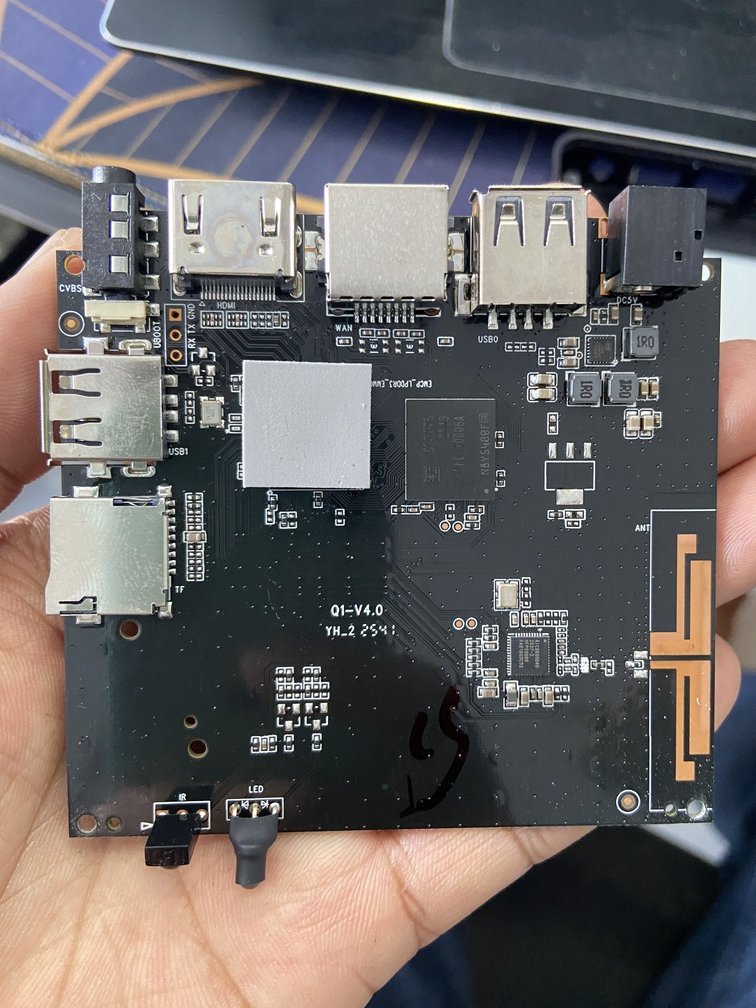
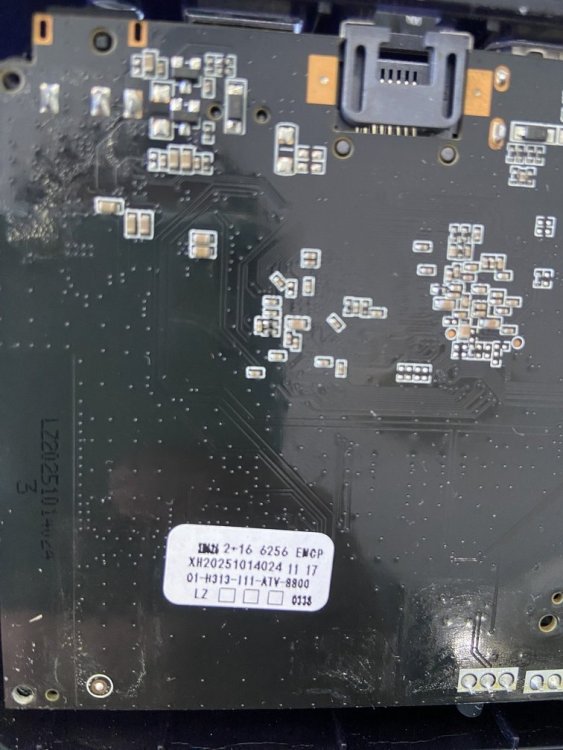
 Hello everyone, I am looking for the original firmware for my Q1 TV Box. Board information: Board: Q1-V4.0 CPU: Allwinner H313 RAM/Storage: 2GB + 16GB eMCP (Foresee) WiFi: SV6256P Sticker on PCB: Q1-H313-111-ATV-8800 XH20251014024 I have already tried searching on Needrom, but the available firmware is for Q1-V3.0 / A32 / A33 boards, and I am not sure it is compatible with my Q1-V4.0 board. Does anyone have the original firmware (.img) or know where I can download it? Thank you very much.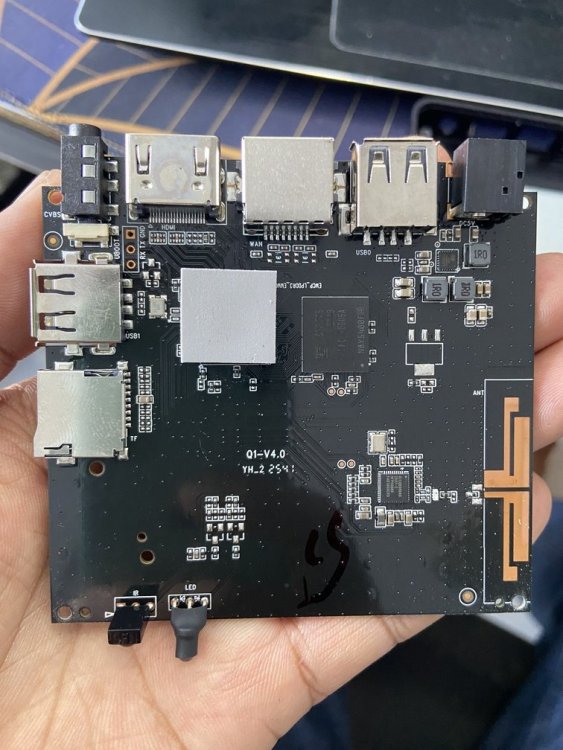
-
With the most recent minimal Debian image, Armbian_26.2.1_Bananapim2s_trixie_current_6.18.15_minimal.img on my A311D, I hit a problem with Xorg. Instead of starting up into dwm via lightdm's autologin, all I got was the blank blinking cursor screen. Working through it with an LLM, the resolution worked out to be adding a stanza to Xorg.conf. Section "ServerFlags" Option "AutoAddGPU" "false" EndSection Is this the correct solution? Is this known or understood? I know nothing about any of this. I presume it's related to how the devices look to Xorg via the kernel, but I have no understanding beyond that level, if that's even correct.
-
 @MMGen yeah, that's where mbr keeps its stuff. I guess my question is why skip copying the first 32KiB even if it's empty? In form of time saving, we are talking microseconds. Even if it were to be mbr that you convert into gpt, the conversion would remove the first 32KiB turning it into zeroes and put the gpt partition table on the last 34 x 512k blocks... Is there any other reason to skip it? Is it due to the encryption? Would this process not work if I don't skip the first 64x512 blocks?
 -
 Well I don't know what is that firmware and I'm not going to touch it even with a 6 meters stick, sorry. Random software from the internet is not a wise idea, even more if it is a software you are going to install onto a computer laying in your private network. About the serial adapter, I don't know, you should post logs or something useful to give you sensible guidance; giving you blind instructions won't help. If you're a newbie, probably it is better to wait for someone telling you a way to get maskrom mode on your board. I just want to ask you if you tried to put the multitool on a sdcard and boot the board with it.